
Docs · guide
Out of office message, and everybody who receives it
By Alberto Gulotta · Updated · 9 min read
Searching for an out of office message starts as a search for wording — something that sounds professional and does not take twenty minutes to write. The wording matters less than one fact about the audience, and Microsoft states that fact plainly inside its own instructions.
“Sending automatic replies to anyone outside my organization will send your automatic reply to every email, including newsletters, advertisements, and potentially, junk email.”
Microsoft, in its own instructions. An out-of-office reply is not a note to your colleagues. It is a message published to everybody who writes to you, for as long as it is switched on, including people and machines you have never heard of.
The same paragraph gives the control: “If you want to send automatic replies to those outside your organization, we recommend choosing My contacts only.” On the web version the same setting is called Send replies only to contacts.
That single sentence reorganises the task. The question is not what sounds right but what am I comfortable telling an unknown number of strangers, repeatedly, for two weeks.
Outlook is built around exactly that distinction, and it is the feature people use least.
What the outside version should and should not carry
Worth including
- That you are away and the date you return.
- One name and address for anything urgent.
- Whether messages will be read on your return, or not at all.
Worth leaving out
- Where you are going.
- That the office, or the house, is empty.
- A personal mobile number.
- The reason, if it is medical or personal.
None of that is caution for its own sake; it follows from the sentence above. If the reply goes to every sender including junk, then everything in it is being told to strangers — and the two most useful facts (that you are away, and until when) are exactly the two a stranger has least business knowing.
The first is already handled for you, and it is worth knowing so you do not try to solve it: “this feature automatically sends a customized message once to each person who emails you during your absence.” A colleague who writes to you five times in a week gets one reply, not five. The out-of-office is not a bot answering every message; it is a notice delivered once per sender.
The second is the one that leaves replies running into November. Microsoft: “optionally, set a date range for your automatic replies. This will turn off automatic replies at the date and time you enter for the end time. Otherwise, you’ll need to turn off automatic replies manually.” Without an end time nothing stops it — not returning to the office, not reading the mail, not sending from the same account.
The third narrows the audience, and Microsoft states its own preference rather than leaving it open: “Send replies only to contacts if you want automatic reply messages to only be sent to those external senders who are in your Contacts list”, and, for anyone replying outside the organisation at all, “we recommend choosing My contacts only”. That is the setting that keeps the notice away from newsletters and from whoever bought your address.
The same three questions have different answers on the other big mail system, and one of them is a genuine difference rather than a different menu. Google’s vacation responder also answers each sender once — “in most cases, your reply is only sent to people the first time they message you” — but it does not then stay quiet indefinitely: someone “can get your reply more than once if” “the same person contacts you again after four days and your automatic reply is still on”. A colleague who writes in week one and again in week two gets two replies, which is a decision rather than a fault. Two other rules go with it. The end is built in — “your automatic reply starts at 12:00 AM on the start date and ends at 11:59 PM on the end date, unless you end it earlier” — where Outlook leaves it running until you stop it. And part of the audience is excluded by a rule rather than by a setting: “Emails sent to your spam folder or addressed to a mailing list you subscribe to don’t get your reply.” Those are Google’s rules for Gmail; Microsoft’s, quoted above, are Outlook’s, and neither describes the other.
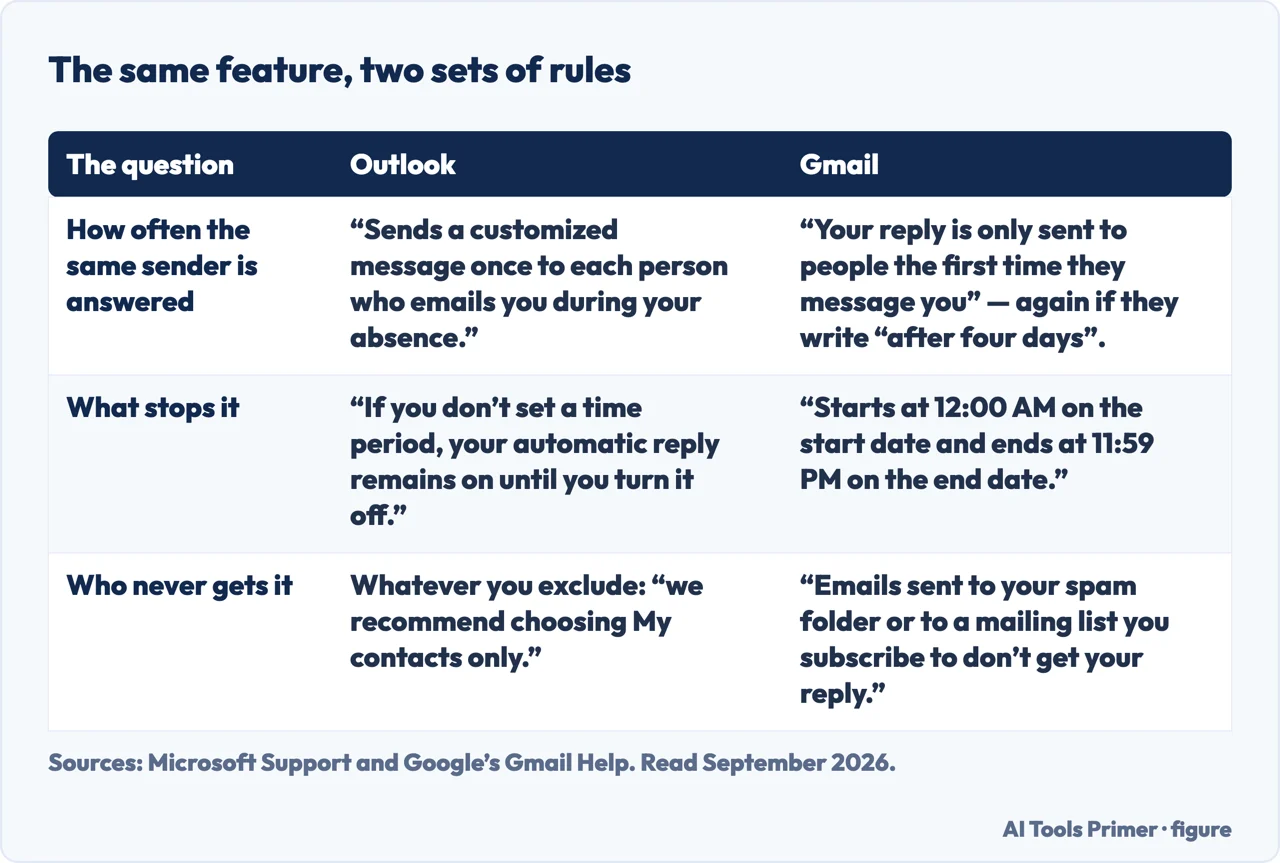
Now the mechanics, which are short. In Outlook on the web and Outlook.com: Settings › Account › Automatic replies, turn the toggle on, and — this is the part to do — tick Send replies only during a time period and enter a start and an end.
Microsoft is explicit about what happens if you skip it: “If you don’t set a time period, your automatic reply remains on until you turn it off.” That is the auto-reply still running in March, telling everybody you are back on the fourth of January. Setting the end date takes ten seconds and removes the only genuinely embarrassing failure mode of this feature.
In classic Outlook the route is File › Automatic Replies › Send automatic replies, with the same optional date range and the two tabs described above.
And if the button is not there at all, that is not a fault. Microsoft: “If you don’t have Automatic Replies after selecting File, you might be using a Gmail, Yahoo, or other POP or IMAP account that doesn’t support the Outlook Automatic Replies feature.” Automatic replies are a server-side feature; an account that Outlook is only reading from cannot answer mail while your computer is shut. The alternative Microsoft offers is a rule — which does work, and only “if you leave Outlook running while you’re away”, which is a meaningfully worse arrangement.
A note on the phrasing, because the second commonest search names the program: an out of office message outlook is the same document as any other, with one difference that matters — Outlook is where the inside-and-outside split actually exists as two separate boxes. In mail systems without that split there is one message, and it is the outside one whether you wrote it that way or not.
One last thing worth deciding rather than defaulting: whether to say that mail will be deleted or ignored. If nobody is covering and you genuinely will not read a fortnight of backlog, saying so is kinder than the silence that follows a promise to reply. If somebody is covering, name them and their address rather than “my colleague” — the point of the message is to save the sender a second email.
The guides below take it four ways: setting it up, what to write, the versions and accounts where it works differently, and the rest of what a message carries when it leaves you.
Where to start
Four ways in.
- “There is no Automatic Replies button.”
- That is when it is not there
When it is not there
The Automatic Replies button is missing for a documented reason, and the workaround has a real limitation.
What a message carries
The rest of this wing. Everything attached to an email behaves differently from how it looks in your own window.
Not covered here. It will not give you fifty templates. Three lines cover it, and the hard part is deciding what not to say.
It will not treat the reply as internal. Microsoft says the external version goes to every sender including junk, and everything in it is therefore public.
And it will not skip the end date. Without one, Microsoft says the reply runs until you turn it off — and that is the one failure people actually remember. What holds instead is simple: who receives an external automatic reply, and the date-range behaviour, are quoted from Microsoft’s own documentation.
Arranging time with other people in Outlook
The four things Outlook does with your calendar and other people's.
- The same job, in the other places it comes up
- How to send a calendar invite in Outlook, and when it becomes one
- How to share Outlook calendar, and why their address decides it
- How to schedule an email in outlook, and where it waits
Sources
- Microsoft Support — How to set up out of office automatic replies in Outlook (the routes in classic Outlook and on the web, the Inside and Outside My Organization tabs, the warning that external replies go to every email including junk, the My contacts only recommendation, the date-range behaviour, and the note that Gmail, Yahoo and other POP or IMAP accounts do not support the feature) — support.microsoft.com, read 6 September 2026.
- Google, Gmail Help — Send an automatic reply when you’re out of office (that the automatic reply starts at 12:00 AM on the start date and ends at 11:59 PM on the end date unless ended earlier; that in most cases the reply is only sent to people the first time they message you; that someone can get the reply more than once if the same person contacts you again after four days while it is still on, or if you edit the reply; that adding a subject line prevents an automatic reply inside a conversation thread; and that emails sent to the spam folder or addressed to a mailing list you subscribe to do not get the reply) — support.google.com, read 5 September 2026.
Written by Alberto Gulotta
Founder and editor of AI Tools Primer, writing from Palermo, Italy. Thirty-five years of taking computers apart, starting with a Commodore 64 — the long version is on the about page.
Something wrong on this page? Write to aitoolsprimer@gmail.com and it gets fixed.
Written on 22 August 2026 · last checked 23 September 2026.
Independence and limits
No affiliate links and no paid placements anywhere on this site. Nobody pays to appear here, and no company has seen this page before you did.
This is general information, not professional advice. Where a page touches money, health, safety or the law, it names its source and the date it was read — and your situation may still differ. See the privacy page and the cookie policy.