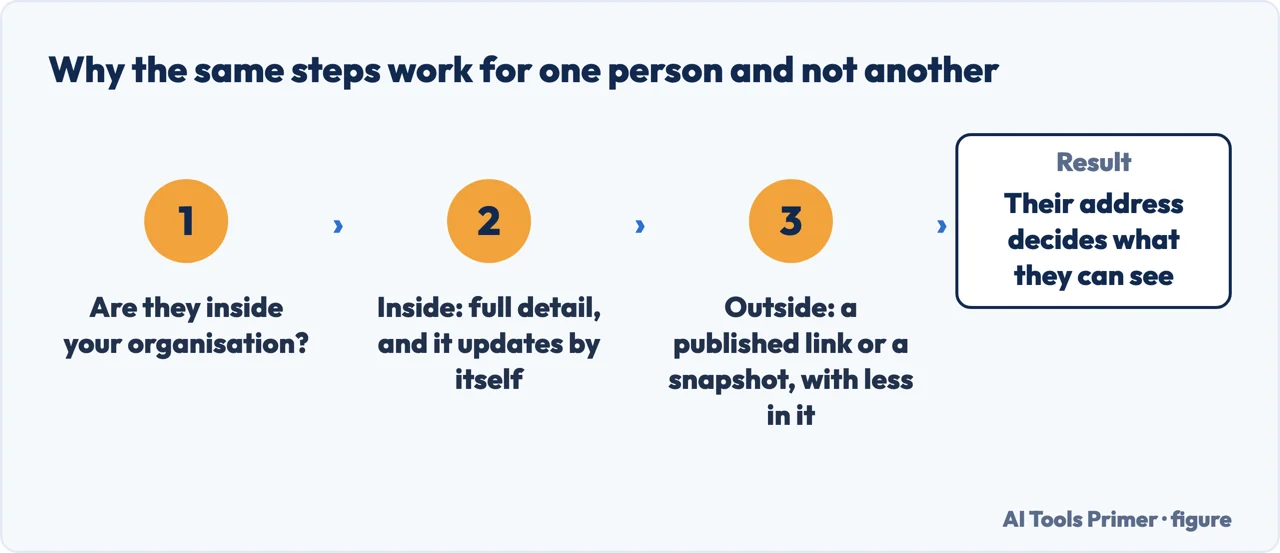
The button is easy to find. What is not obvious about how to share outlook calendar entries with somebody is that the same button produces two completely different things — and which one you get is settled by their email address rather than by anything you choose on the way through.
The same steps, two different results. Figure drawn by AI Tools Primer.
Somebody in your organisationA live calendar
Changes appear immediately. Microsoft: instant syncing is on “only if both users are in the
same Microsoft 365 tenant, or if the calendar is shared by an Outlook.com user.”
You can hand over more than looking. Can edit lets them change things; Delegate
goes further and lets them “schedule and respond to meetings on your behalf.”
Somebody outside itA subscription
Microsoft: that arrangement “currently generates an Internet Calendar Subscription (ICS)
URL”, and “the sync timing is determined by the recipient’s calendar service.” Not by you.
And the ladder stops early: “You can’t give editor or delegate access to people outside
your organization.” Outside, the three viewing levels are the whole menu.
The route itself is short, and identical in every recent version. From the navigation pane choose Calendar; on the Home tab choose Share calendar, picking which calendar if you keep more than one; type the person into the address box; then — and this is the step people skip — open the drop-down list beside their name and choose the level of access before pressing Share. One limit is worth knowing before you start: you can share with more than one person, but Microsoft notes “you can only add one person at a time.”
Three levels of looking, then two levels of doing. The drop-down beside somebody’s name
offers Can view when I’m busy, Can view titles and locations and
Can view all details — free/busy, then headlines, then everything. Above those sit
Can edit and Delegate.
Two rules inside that ladder are not guessable. Microsoft: “Editors can
be assigned to your primary calendar (named ‘Calendar’) or to any additional calendars
that you created. Delegates can only be assigned to your primary calendar.” And delegate
access “is only available if you’re using a work or school account in Microsoft 365 or with
Exchange Online.”
That second paragraph is worth reading twice if you have ever set up a stand-in for a holiday. A delegate can act for you — Microsoft says they “can schedule and respond to meetings on your behalf” — but only on your main calendar. If your team’s work actually lives on a project calendar you created, a delegate cannot be pointed at it. An editor can. People spend an afternoon looking for a Delegate option that a secondary calendar does not offer, and the rule that says so lives in a support article rather than beside the menu.
How long the other person waits, in Microsoft’s own numbers
Same organisationInstant. Changes “appear right away”, on every device including
their phone.
A different Microsoft 365 tenant“Syncing happens approximately
every three hours.”
An Outlook.com address“The calendar will update approximately
every three hours.”
A Gmail address“The calendar might be updated every 24-48 hours.”
Those four lines explain nearly every complaint about a shared calendar. Somebody moves a meeting, tells the other person, and the other person still sees the old slot — so one of them assumes the sharing is broken. Nothing is broken. Inside one organisation the change is there before the sentence finishes; across two, it is on a roughly three-hourly cycle; into Gmail it may not surface until the following day, because at that point your calendar is a subscription and, in Microsoft’s words, the timing belongs to the recipient’s service.
This is also the practical answer to a question that gets asked backwards. If the exact minute matters — a shift rota, an on-call handover, a room booking people act on — then a link into a personal Gmail account is the wrong instrument, and no setting on your side will make it faster. The fast version exists only where both ends are inside the same organisation. It is the same question that decides whether a scheduled message leaves on time: is a server doing this, or is it happening on somebody’s own machine when they happen to be looking?
“The easiest way for a user to check … is to check if the shared calendar appears on
their mobile phone. If it does, the shared calendar is already upgraded to the new model.”
Microsoft’s own diagnostic, and it costs nothing to run. Ask the person you shared with to
open Outlook on their phone. If your calendar is there, they are on the arrangement that syncs
instantly. If it is only on their desktop, they are on the older one, and the delay they are
complaining about is the delay that arrangement has always had.
There is one more thing worth knowing about what the other person actually receives, because it is not what the word “sharing” suggests. In the current arrangement Microsoft does not simply give them a window onto your calendar: “A new calendar is created in the recipient’s mailbox, and this calendar contains a copy of the owner’s calendar (starting one year prior to date of acceptance).” They read from their own copy and write back to yours. The one-year figure is the part to remember — a colleague who accepts today does not get an archive of everything you have ever done, and if somebody needs a meeting from three years ago, sharing the calendar is not how they will find it.
Which brings up the obvious objection: not wanting a colleague to see the dentist, the interview, the difficult afternoon. The setting that solves it is not a setting. Microsoft: “Calendar sharing isn’t limited to the default Calendar folder that’s created in all Outlook profiles. You can create additional calendar folders and choose which of those folders to share.” That is also, in practice, the answer to how to create a shared calendar in outlook: you make a second calendar and share that one instead of your own. A calendar called Project, shared with the three people on the project, gives them everything they need and nothing they do not — and it sidesteps the blunter alternative of granting free/busy only and leaving everyone guessing what the busy block is.
Finally, the step that is not yours. Sharing sends an invitation, and it does nothing until it is taken up: “The person you’re sharing a calendar with will receive an email invitation to share their calendar. Once they accept, they can add your calendar to their own view.” If your calendar has not appeared for them, the first thing to check is not your permissions — it is whether that invitation is still sitting unopened in their mailbox.
The other calendar puts the same limit in the same place: the administrator. Google’s instruction opens with it — “if you use Calendar through your work or school, your administrator decides if you can share it” — and adds the condition people meet when the calendar is not theirs: “if you want to share a calendar that someone else owns, that person must give you the ‘Make changes and manage sharing’ permission.” Both systems are built the same way. Sharing is a permission granted by whoever owns the calendar, inside limits set by whoever owns the organisation, and neither of those is usually you.
The guides below take it four ways: what happens inside your organisation, what happens outside it, what to do when a shared calendar will not update, and how to share less than all of it.
Almost never a permissions problem. These guides cover the delays that are documented, the test that tells you which arrangement you are on, and the older model.
Not covered here. It will not tell you a setting exists that makes an external calendar update instantly. Microsoft publishes the timings, they belong to the receiving service, and pretending otherwise wastes an afternoon.
It will not treat a shared calendar as harmless by default. What leaves your account is a copy of a year of your life, and the guide above says how to share a smaller one instead.
And it will not send you to a third-party sync tool first. Where Microsoft documents a route that works, that is the route the guide gives. What holds instead is simple: the permission levels and the sync timings are Microsoft’s own figures, with the date each page was read.
Arranging time with other people in Outlook
The four things Outlook does with your calendar and other people's.
Microsoft Support — Calendar sharing in Microsoft 365 (the instant-syncing rule, the table of sync timings including the three-hour and 24-48 hour figures, the ICS arrangement, the mobile-phone test and the one-year copy in the recipient’s mailbox) — support.microsoft.com, read 22 August 2026.
Microsoft Support — Share an Outlook calendar as view-only with others (the Share calendar route, the three viewing levels, the invitation the recipient must accept, and additional calendar folders) — support.microsoft.com, read 22 August 2026.
Microsoft Support — Share and access a calendar with edit or delegate permissions in Outlook (edit versus delegate, the limit on people outside your organisation, and delegates on the primary calendar only) — support.microsoft.com, read 22 August 2026.
Google Calendar Help — Share your calendar: the administrator’s veto, and the permission somebody else has to grant before you can share their calendar — support.google.com, read 4 September 2026.
AG
Written by Alberto Gulotta
Founder and editor of AI Tools Primer, writing from Palermo, Italy. Thirty-five years of
taking computers apart, starting with a Commodore 64 — the long version is on the
about page.
Written on 22 August 2026 · last checked 23 September 2026.
§
Independence and limits
No affiliate links and no paid placements anywhere on this site. Nobody pays to appear here,
and no company has seen this page before you did.
This is general information, not professional advice. Where a page touches money, health,
safety or the law, it names its source and the date it was read — and your situation may
still differ. See the privacy page and the
cookie policy.