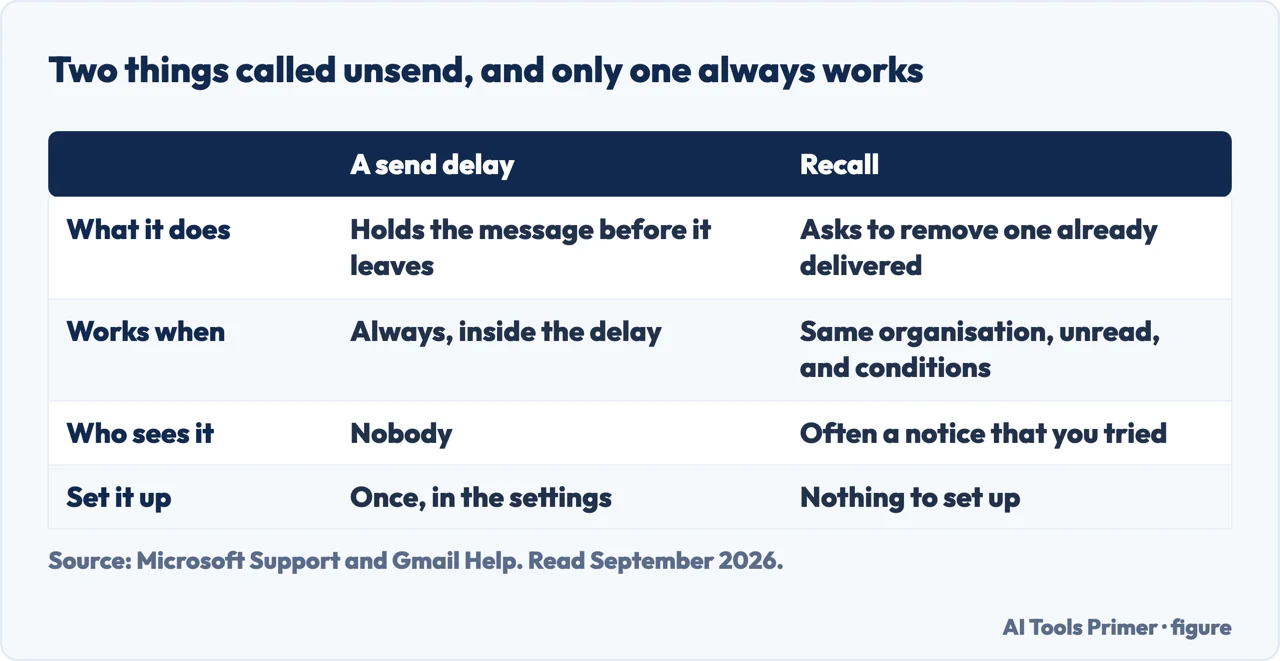
Two programs answer how to unsend an email in outlook and in Gmail with features that share a name and do fundamentally different things. The iPhone has a third with the same name again: unsending an iMessage, and the two minutes you have to do it. Knowing which one you have decides whether you can relax or need to start writing an apology.
A delayGmail, and Outlook.com
The message has not gone anywhere yet. Google: “If you decide you don’t want to send an email,
you have a short time after to cancel it.” You click Undo next to “Message sent”.
The length is yours to set: Settings, then “Undo Send”, then a cancellation period of
5, 10, 20, or 30 seconds. Outlook.com has the same arrangement — an Undo prompt “for
the length of time you set in Compose”.
Works every time, within the window
A recall requestclassic Outlook, on Exchange
The message has gone. What you are asking for is that it be taken back out of somebody else’s
mailbox, and the option is named after what it can actually do:
“Delete unread copies of this message.”
Message tab › More Move Actions › Recall This Message. On the Simplified Ribbon:
More commands (…) › Actions › Recall This Message.
Works only under conditions
One always works. The other asks. Figure drawn by AI Tools Primer.
The distinction is the whole subject. Gmail’s Undo Send is a delay dressed up as a recall. The message sits on your own side for the seconds you chose and is then released; pressing Undo stops a departure rather than chasing a delivery. Nothing has to be retrieved from anywhere, so nothing can go wrong — and equally, once the window closes there is no second chance at all.
Outlook’s recall is the harder thing: a request that the message be removed from somewhere it has already arrived. Microsoft is precise about when that request can even be made.
When recall simply is not available
“If you don’t see the Recall This Message command, you probably don’t have an Exchange
account or the feature isn’t available within your organization.”
“You can’t recall a message in Outlook on the web.”
“You can’t recall a message that’s protected by Azure Information Protection.”
And the condition hiding in the option itself: it deletes unread copies. If the person has
already opened it, there is nothing for the recall to remove — which is why the feature works best
in the first sixty seconds and almost never after an hour.
The web restriction catches a lot of people, because it is invisible until the moment you need it. Somebody who normally uses Outlook in a browser and reaches for the recall command will not find it, and the message they are trying to retrieve is already sitting in an inbox.
Outlook then tells you whether it worked, which many mail systems do not do at all. “After submitting
a recall request, usually less than 30 seconds later, you will get an email notification
with the subject ‘Message Recall Report for message [original message subject]’.”
If it cannot be carried out immediately — Microsoft’s example is a mailbox that is temporarily
unavailable — “we’ll continue to retry for up to 24 hours before marking the recall as
failed.” So a recall that has not reported back is not necessarily finished.
That report is worth waiting for rather than assuming. A recall that succeeded and a recall that quietly failed look identical from your side until the notification arrives, and Microsoft says the retrying can go on for up to 24 hours.
Which leads to the honest conclusion about both features, and the reason this guide exists. The delay is the reliable one and it is the one you can set up in advance. If you send email that you occasionally regret, the useful action is not learning the recall procedure. It is going into settings today and giving yourself thirty seconds.
On the phrasing, since people search both: how to unsend an email in gmail is the delay described above and is entirely within your control. How to recall an email in outlook is the request, and whether it works depends on your organisation, the recipient’s reading habits, and how fast you noticed.
One last thing that neither feature does. Recall removes copies from mailboxes it can reach; it does not remove anything already forwarded, quoted in a reply, printed, screenshotted, or read on a phone in a notification banner. A recall report saying the message was deleted is a statement about a mailbox, not about what somebody knows.
The guides below take it four ways: the two mechanisms, setting up the one that works, what to do when neither is available, and the habits that make this whole page unnecessary.
Not covered here. It will not promise that recall works. Microsoft names three situations where the command is not even available, and the option itself only removes unread copies.
It will not treat Undo Send as a recall. It is a delay, which is why it is reliable — and why it has to be set up before you need it.
And it will not pretend a successful recall means nobody saw it. It is a statement about a mailbox and nothing else. What holds instead is simple: the cancellation periods and the three unavailability conditions are quoted from Google and Microsoft documentation.
Sources
Microsoft Support — How to recall an email in Outlook: Requirements, Limitations and Steps (the Recall This Message route on both ribbons, the Exchange requirement, that recall is unavailable in Outlook on the web and for messages protected by Azure Information Protection, the delete-unread-copies option, the recall report and the twenty-four hours of retrying) — support.microsoft.com, read 6 September 2026.
Google — Gmail Help, Send or unsend Gmail messages (the Undo prompt after sending, and the cancellation period options of 5, 10, 20 or 30 seconds) — support.google.com, read 22 August 2026.
AG
Written by Alberto Gulotta
Founder and editor of AI Tools Primer, writing from Palermo, Italy. Thirty-five years of
taking computers apart, starting with a Commodore 64 — the long version is on the
about page.
Written on 22 August 2026 · last checked 23 September 2026.
§
Independence and limits
No affiliate links and no paid placements anywhere on this site. Nobody pays to appear here,
and no company has seen this page before you did.
This is general information, not professional advice. Where a page touches money, health,
safety or the law, it names its source and the date it was read — and your situation may
still differ. See the privacy page and the
cookie policy.