
Docs · guide
How to track changes in Word, and how to get rid of them
By Alberto Gulotta · Updated · 10 min read
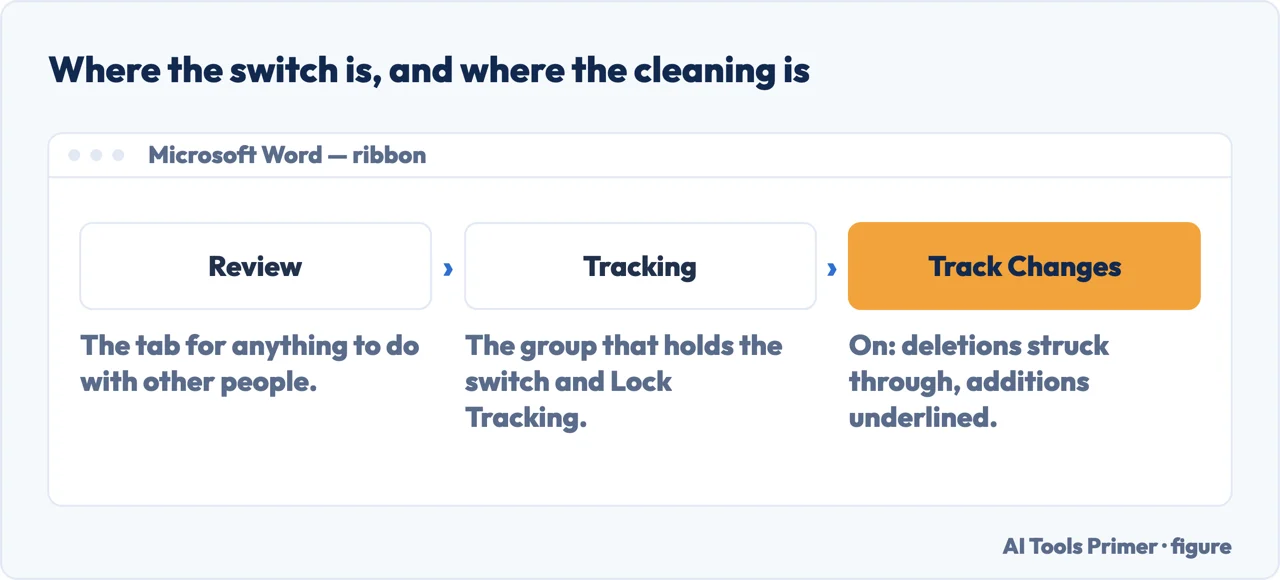
Track changes in Word is one switch — Review › Tracking › Track Changes — and three different operations that people take for one. Turning it on marks every edit. Turning it off stops new marks and leaves the old ones. Only Accept or Reject takes them out of the file.
| What you want | Where it is | What happens to the existing marks | Source |
|---|---|---|---|
| Start tracking | Review › Tracking › Track Changes | Deletions get a strikethrough, additions an underline, each author a colour | Microsoft |
| Stop tracking | The same switch again | Nothing. “Word stops marking changes, but the colored underlines and strikethroughs are still in the document” | Microsoft |
| Hide the marks | Review › Markup › No Markup | Nothing. They come back the next time the file is opened | Microsoft |
| Remove the marks | Review › Accept, or Reject | This is the only one that takes them out | Microsoft |
| Stop other people turning it off | Review › Tracking › Track Changes › Lock Tracking | A password holds the switch on | Microsoft |
Turning it off does not remove anything
That single sentence explains why “turn off track changes” and “remove track changes” are searched almost as often as how to switch it on. Turning it off stops new marks appearing. Everything already marked stays exactly where it is. And Microsoft is explicit about the other near-miss too: “Hiding changes doesn’t remove them from the document. You must use the Accept and Reject commands in the Changes group to remove markup from your document.”
The three different things people mean
All in the same place — Review, in the ribbon — and each doing something the others do not.
- On the Review tab, select Tracking, then Track Changes. That is Microsoft’s own route. From here on, “deletions are marked with a strikethrough, and additions are marked with an underline”, and each author gets a colour of their own.
- Edit normally. Nothing else changes: the marks are made for you as you type.
- When the document comes back, set the view to All Markup. In the Markup group, choose it from the drop-down. Simple Markup shows only “a red line in the margin”, not the strikethroughs and underlines themselves.
- Accept or reject every change. One at a time, or all at once. Microsoft is explicit about why this step cannot be skipped: “To remove tracked changes, you must accept or reject them.”
- Only then send it. Turning tracking off does not clean the file, and neither does hiding the markup — both leave everything in place for whoever opens it next.
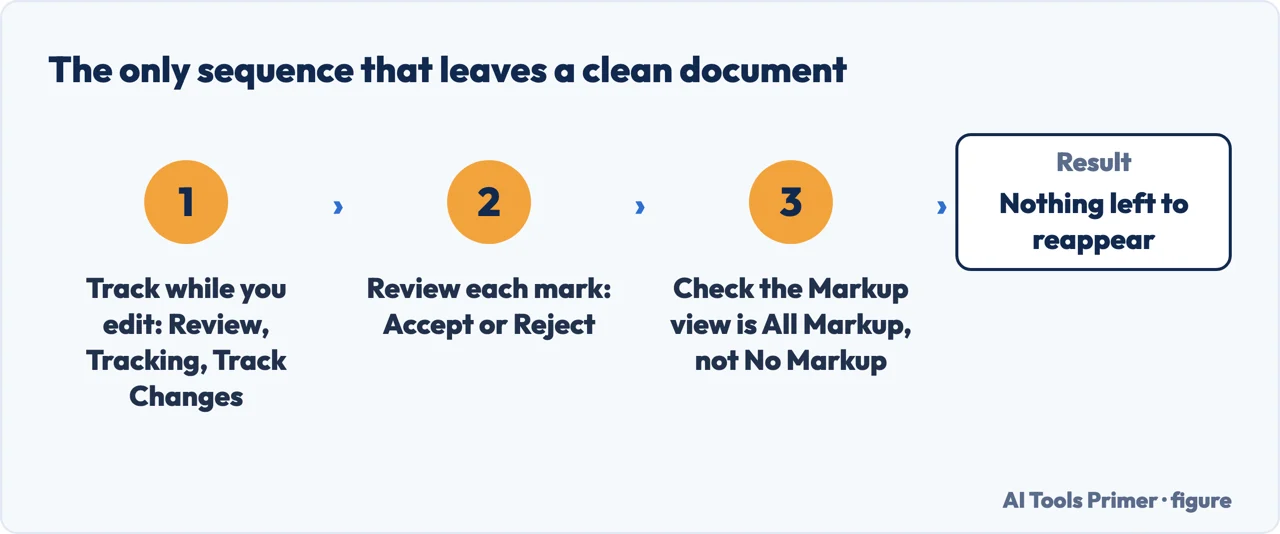
The order that avoids the whole problem is short. Track while you edit. Accept or reject before you send. Everything else in this cluster is somebody discovering, usually late, that those are two separate actions.
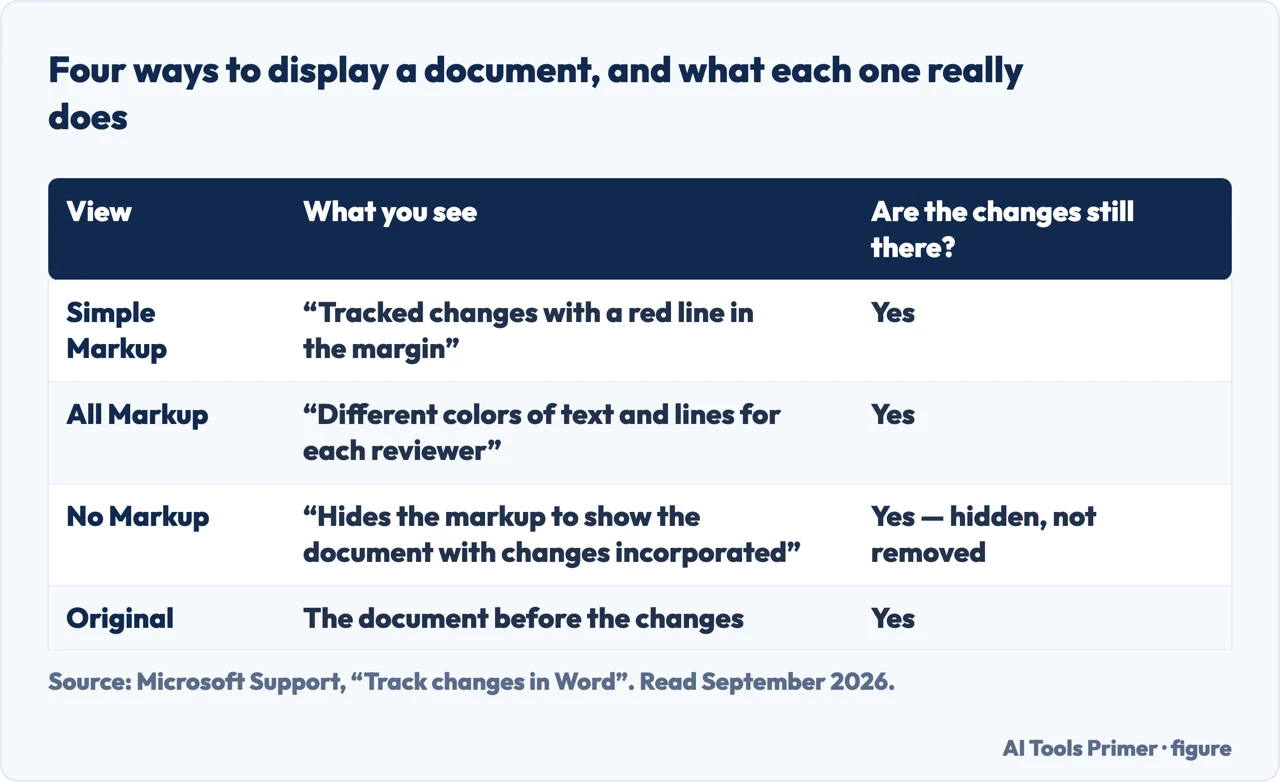
Word offers a dropdown that looks like it decides what the document contains. It decides what you see. Microsoft lists the four in one place: “Simple Markup displays tracked changes with a red line in the margin.” “All Markup displays tracked changes with different colors of text and lines for each reviewer.” “No Markup hides the markup to show the document with changes incorporated.” “Original displays the original document without tracked changes and comments showing.”
Then the sentence that the whole page turns on, written by Microsoft immediately after that list: “However, any tracked changes or comments in the document that have not been accepted, rejected, or deleted remain in the document.” No Markup is a pair of sunglasses, not an eraser. The document you are about to send is unchanged; you have simply stopped looking at the part you wanted gone. Microsoft names the only thing that does remove it: “you must use the Accept and Reject commands in the Changes group to remove markup from your document.”
Two smaller published details follow from the same distinction. Markup prints unless you stop it — the route is File > Print > Settings > Print All Pages, then “under Document Info, select Print Markup to clear the check mark” — so a document that looks clean on screen in No Markup can still come out of the printer covered in revisions. And tracking can be nailed shut from the other side: Word offers “a password to keep others from turning off Track Changes”, under Review > Track Changes > Lock Tracking.
Why this is a privacy question and not only a tidiness one
Tracked changes are a record of what a document used to say. A contract where a clause was softened, a report where a number was revised, an application where a sentence about a previous employer was removed — all of that travels inside the file, and it is visible to anyone who opens it and turns the markup back on.
Hiding the marks makes them invisible on your screen. It does not take them out. A reviewer, a counterpart or an opposing solicitor sees the same file you do, and one click shows them the version history you thought you had removed.
So the habit worth forming is a final step rather than a setting: before a document leaves you, accept or reject everything, then look at it once more with markup showing. If it is clean with the markup on, it is clean.
None of which is an argument against the feature. Track changes is the best thing in Word for work that passes between people: it shows exactly what one person did to another person’s text, it can be undone selectively, and it makes a conversation about a document possible without anybody losing their version. The feature is not the trap. The gap between hiding and removing is.
The same job exists in Google Docs under another name. There it is called Suggesting: Google describes it as being able to “suggest changes to a document without changing the original text”, and the switch is the Editing button at the top right. The difference that matters is at the end — a suggestion that nobody accepts simply stays a suggestion, while a tracked change that nobody accepts travels inside the file.
A line through a word is not the same thing. Formatting text with a strikethrough changes how it looks and nothing else: the words stay in the file, in the word count and in anything copied out of it. A tracked change records who proposed what; a struck-through line records nothing.
And the name lawyers and editors use is redlining, which is the same feature and the same risk: a contract sent with the markup hidden rather than resolved carries every earlier position of both sides inside it.
Where to start
Four ways in.
- “What else is hidden in the file?”
- Go to what travels inside
What travels inside
Tracked changes are one of several things a file carries that you did not mean to send. This wing covers the rest.
Questions people also ask
How do I use track changes in Word?
On the Review tab, select Tracking, then Track Changes. From that moment Word marks deletions with a strikethrough and additions with an underline, and gives each author a different colour. The switch is the same one you use to turn it off again.
Why can’t I see the tracked changes in a document?
Because of the view, not the file. Simple Markup shows only a red line in the margin, and No Markup “hides the markup to show the document with changes incorporated”. Switch the Markup drop-down to All Markup and they are all there.
How do I remove tracked changes for good?
Accept or reject them. Microsoft states it as a rule: “To remove tracked changes, you must accept or reject them. Choosing the No Markup view only temporarily hides changes. They will be visible again the next time someone opens the document.”
Does Google Docs have track changes?
It has the same job under another name: Suggesting mode. Google’s wording is “you can suggest changes to a document without changing the original text. If the owner approves your suggestions, they replace the original text.” The switch is the Editing button at the top right, changed to Suggesting.
Not covered here. It will not tell you that switching tracking off cleans a document. Microsoft says the opposite, and this guide quotes it.
It will not treat this as a formatting nuisance. What a document used to say is information, and it leaves the building inside the file.
It will not cover Excel, where in Microsoft 365 the Track Changes button came off the Review tab along with Shared Workbooks.
And it will not recommend a tool for it. Everything here is three buttons on the Review tab, in software the document is already open in. What holds instead is simple: the behaviour described here is quoted from Microsoft’s own documentation.
Editing a document other people will read
Marks that are meant to be seen by whoever opens the file next.
- The same job, in the other places it comes up
- How to strikethrough on Google Docs, and take it off
- How to combine Word documents, without uploading them
- How to add a watermark in Word, and what it will not do
Sources
- Microsoft Support — Track changes in Word, including the statement that turning tracking off leaves existing marks in the document — support.microsoft.com, read 3 September 2026.
- Microsoft Support — Accept or reject tracked changes in Word, and the rule that No Markup only hides them until the file is opened again — support.microsoft.com, read 3 September 2026.
- Google Docs Editors Help — Suggest edits in Google Docs: the same job under another name, and what happens when the owner approves — support.google.com, read 3 September 2026.
Written by Alberto Gulotta
Founder and editor of AI Tools Primer, writing from Palermo, Italy. Thirty-five years of taking computers apart, starting with a Commodore 64 — the long version is on the about page.
Something wrong on this page? Write to aitoolsprimer@gmail.com and it gets fixed.
Written on 21 August 2026 · last checked 24 September 2026.
Independence and limits
No affiliate links and no paid placements anywhere on this site. Nobody pays to appear here, and no company has seen this page before you did.
This is general information, not professional advice. Where a page touches money, health, safety or the law, it names its source and the date it was read — and your situation may still differ. See the privacy page and the cookie policy.