
Docs · guide
How to do a mail merge in Word, and prepare the list
By Alberto Gulotta · Updated · 8 min read
A mail merge is one document that prints or sends itself once per person, with the names swapped in. Microsoft’s description is precise: “Placeholders — called merge fields — tell Word where in the document to include information from the data source.” Which means how to do a mail merge in word is mostly a question about the spreadsheet, not about Word.
Five things Microsoft asks of the spreadsheet, before you start
Quoted from the Excel data source page. Every failed mail merge we have seen breaks one of these, and the last two are the ones nobody expects.
- Column names match the fields you want. Microsoft’s example is exact: “to address readers by their first name in your document, you’ll need separate columns for first and last names.” One “Name” column cannot produce “Dear Sarah”.
- “All data to be merged is present in the first sheet of your spreadsheet.”
- “Data entries with percentages, currencies, and postal codes are correctly formatted in the spreadsheet so that Word can properly read their values.” This is where a postcode arrives with its leading zero missing.
- “The Excel spreadsheet to be used in the mail merge is stored on your local machine.” Not in a cloud folder that syncs — on the machine.
- “Changes or additions to your spreadsheet are completed before it’s connected to your mail merge document in Word.” Finish the list first. Editing it afterwards is how merges go strange.
And the safety valve, on the Word side. Choose Edit Recipient List, then “clear the check box next to the name of any person who you don’t want to receive your mailing.” It is the last place to remove the colleague who left, the duplicate, and the test entry with your own name on it.
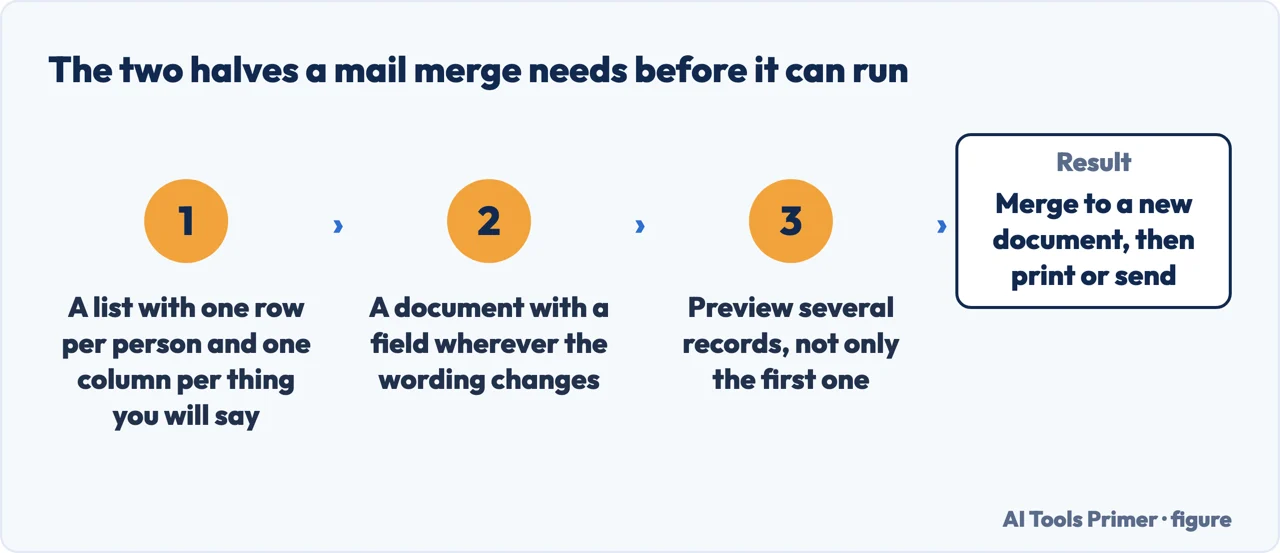
With those five satisfied, the Word side is short. Start a document, pick the type, connect the spreadsheet, insert the merge fields where the personal details go, preview, and finish. If something comes out wrong at the preview stage, it is almost always one of the five above rather than a mistake in Word — and the preview exists precisely so you find out before you have printed three hundred sheets.
What Word can merge into
- Letters
- “that include a personalized greeting. Each letter prints on a separate sheet of paper.”
- Sent from Word, one address per message. See above.
- Envelopes and labels
- “where names and addresses come from your data source” — the reason this feature gets found at all.
- Directory
- “lists a batch of information for each item in your data source. Use it to print out your contact list, or to list groups of information, like all of the students in each class.” Microsoft notes this is “also called a catalog merge”, which is why searching for it under that name finds nothing.
“Email where each recipient’s address is the only address on the To line. You’ll be sending the email directly from Word.”
Microsoft, read 22 August 2026. That single sentence is the reason to use a mail merge rather than a normal email for anything going to more than a handful of people. Each person receives a message addressed only to them — nobody sees the rest of the list. The alternative that people reach for instead, a long line of addresses in Cc, publishes every recipient’s email address to every other recipient, and it cannot be taken back once sent.
The part that has nothing to do with Word. A mail merge means you are holding a list of named people and contacting them individually. In most of Europe and the United Kingdom that is personal data, and how you obtained it, what you told those people it was for, and how they can ask to be removed are questions with legal answers. None of that is difficult for a small mailing, and none of it appears in any guide to the feature. The guide on customer data below sets out what actually applies.
A practical habit before the real send. Merge to a new document rather than straight to the printer or to email, and read the first three and the last three. Merges fail at the edges — the first record because of a header row read as data, the last because of a stray blank row below the table. Both are invisible in Word and obvious in the merged output.
And keep the merged document. The letter Word generates is a record of exactly what each person was sent, which the template and the spreadsheet together are not, because either can change afterwards. If anybody ever asks what was in their copy, that file answers it in one search.
The shape of the job is not Microsoft’s invention. LibreOffice describes the same two halves in one sentence: “to create a form letter, you need a text document that contains fields for address data, and an address database. Then you combine or merge the address data and the text document.” Its wizard sits under Tools rather than Mailings, and it adds a warning Word does not: if the document is in HTML format, “any embedded or linked images will not be sent with the email”. Worth knowing before a merge goes out with holes where the logo was.
The requirements for the spreadsheet, the document types, the note about the To line and the Edit Recipient List step are quoted from Microsoft’s own Word documentation, read on 22 August 2026 and listed below. The advice about merging to a document first, and about keeping it, are ours.
Where to start
Four ways in.
- “It is not picking up my names.”
- Almost certainly the spreadsheet — preparing the list
- “I need to email a lot of people.”
- This is the right tool — sending to people
- “I need labels or envelopes.”
- Same feature — what it can produce
- “Whose data is this?”
- A real question — the list itself
Preparing the list
Microsoft states five requirements for the spreadsheet. A merge that misbehaves is nearly always breaking one of them.
Sending to people
One address per message, sent from Word. The alternative — one email with everyone in the To field — publishes every address to everyone else.
What it can produce
Letters, email, envelopes, labels and a directory. The last one is the least known and often the one people actually wanted.
The list itself
A mailing list is a record of named people. That is a fact about your obligations as well as about your spreadsheet.
Not covered here. It will not give you the Word steps and skip the spreadsheet. Microsoft publishes five requirements for the data source, and that is where merges fail.
It will not pretend a mailing list is only a technical object. It is a list of named people, and that carries obligations this section does not gloss over.
And it will not recommend a mail merge add-in for something Word has done since before most of them existed. What holds instead is simple: the spreadsheet requirements and the note about the To line are quoted from Microsoft’s own Word documentation, with the date each page was read.
Sources
- Microsoft Support — Use mail merge for bulk email, letters, labels, and envelopes, including the definition of merge fields, the available data sources and the four document types — support.microsoft.com, read 22 August 2026.
- Microsoft Support — Mail merge using an Excel spreadsheet, including the five requirements for the data source and the Edit Recipient List step — support.microsoft.com, read 6 September 2026.
- LibreOffice Help — Creating a form letter: the same two halves of a mail merge in another word processor, and the warning about images in an HTML merge — help.libreoffice.org, read 4 September 2026.
Written by Alberto Gulotta
Founder and editor of AI Tools Primer, writing from Palermo, Italy. Thirty-five years of taking computers apart, starting with a Commodore 64 — the long version is on the about page.
Something wrong on this page? Write to aitoolsprimer@gmail.com and it gets fixed.
Written on 22 August 2026 · last checked 23 September 2026.
Independence and limits
No affiliate links and no paid placements anywhere on this site. Nobody pays to appear here, and no company has seen this page before you did.
This is general information, not professional advice. Where a page touches money, health, safety or the law, it names its source and the date it was read — and your situation may still differ. See the privacy page and the cookie policy.