
Docs · guide
How to merge cells in Excel, and why you may not want to
By Alberto Gulotta · Updated · 12 min read
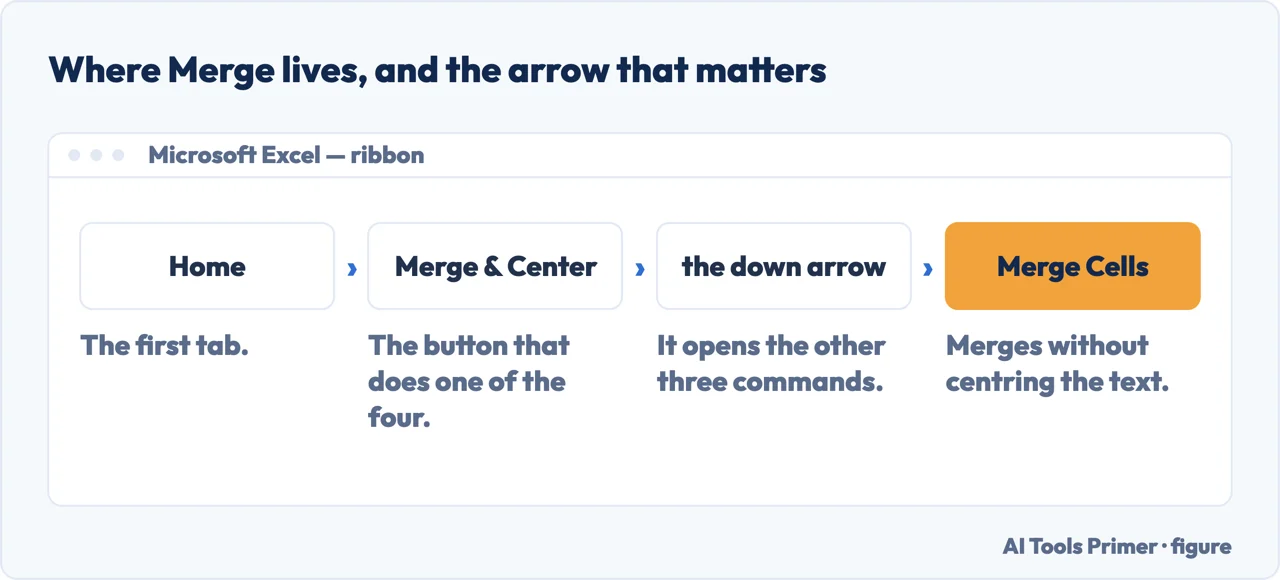
To merge cells in Excel: select them, then Home › Merge & Center › Merge Cells. That is the whole instruction, and it is not the reason this page exists — because the command deletes everything except the upper-left cell, and says so only in a note.
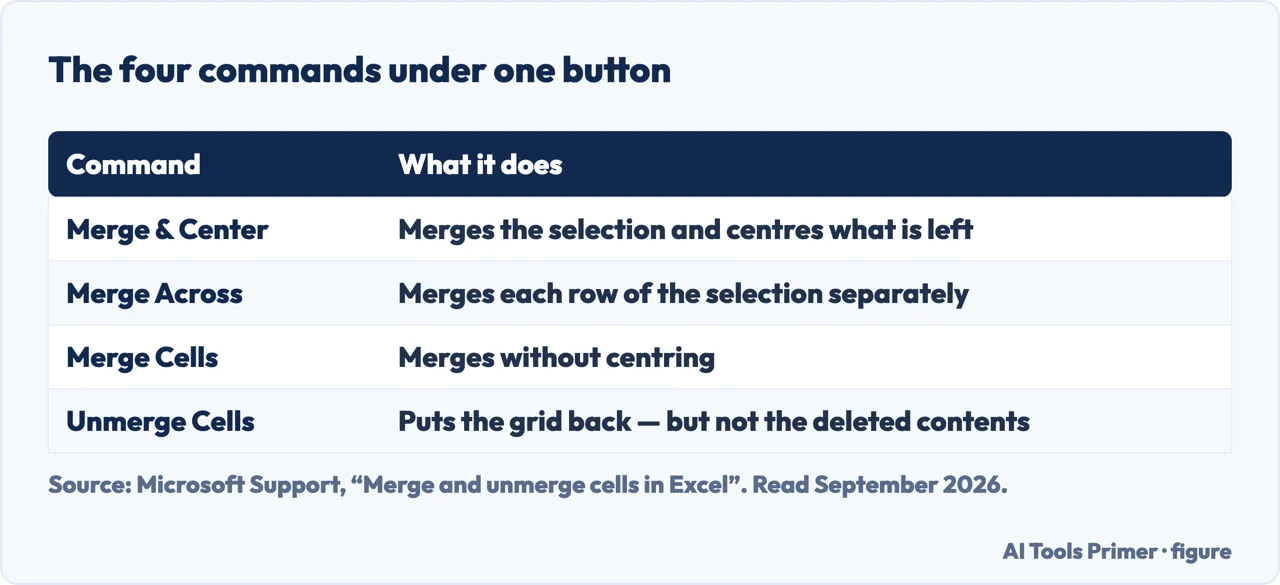
| Command | What it does | What happens to the contents | Source |
|---|---|---|---|
| Merge & Center | Merges the selection and centres the text | Only the upper-left cell survives | Microsoft |
| Merge Across | Merges each row of the selection separately | The same, row by row | Microsoft |
| Merge Cells | Merges without centring | The same | Microsoft |
| Unmerge Cells | Puts the grid back | Nothing returns: “you cannot split an unmerged cell” | Microsoft |
| The same job in Google Sheets | Format › Merge cells | Also keeps only the top-left value |
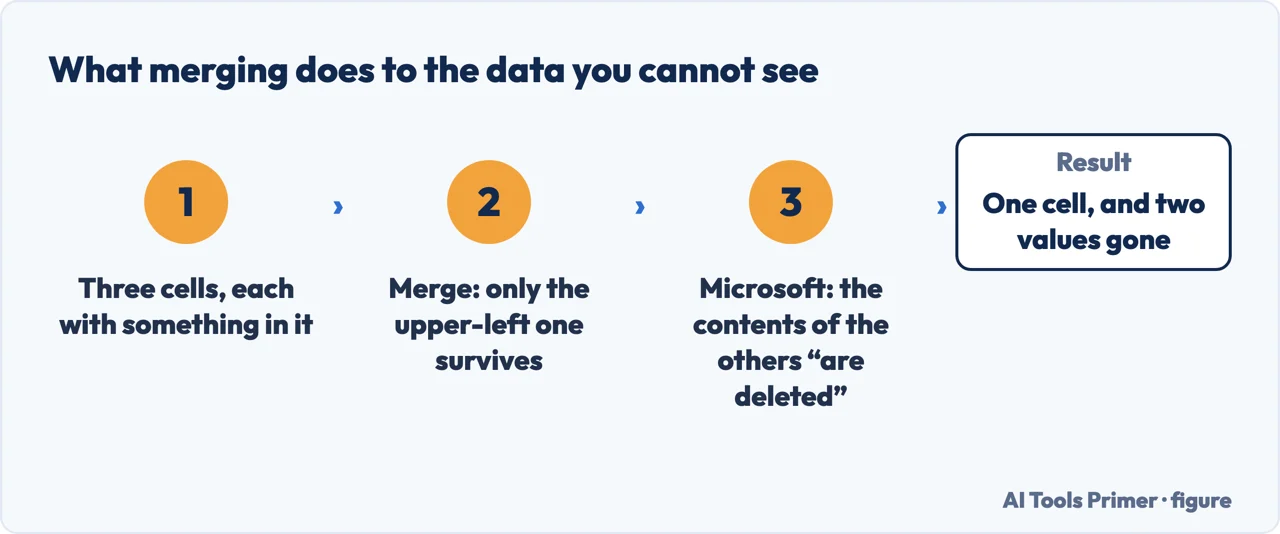
- Move anything you want to keep into the upper-left cell first. Microsoft says it as a warning rather than a step: “make sure that the data you want to retain is in the upper-left cell, and keep in mind that all data in the other merged cells will be deleted.”
- Select two or more adjacent cells. Merging is only for neighbours; a selection with a gap in it is not a merge.
- On the Home tab, select Merge & Center, then Merge Cells. Or use Merge Across to do each row of the selection on its own.
- If the button is greyed out, check two things. Microsoft: “make sure that you’re not editing a cell — and the cells you want to merge aren’t formatted as an Excel table.”
- To undo it later, use Unmerge Cells in the same menu. The grid comes back; the deleted contents do not.
Microsoft’s own warning, marked Important on its page
“When you merge multiple cells, the contents of only one cell (the upper-left cell for left-to-right languages, or the upper-right cell for right-to-left languages) appear in the merged cell. The contents of the other cells that you merge are deleted.”
Read 22 August 2026. And unmerging does not bring them back — Microsoft is equally direct about that: “You cannot split an unmerged cell.” Merging is a formatting command that quietly performs a deletion, which is unusual and worth knowing before you use it on real data.
Two whole families of guide exist to undo this. Combining the text of several cells, and merging “without losing data”, are both attempts to solve a problem the merge button creates — and both are the other command, the one that joins values instead of joining boxes.
Merging cells
What the button does
Joins the cells into one box for appearance. Keeps one value and deletes the rest.
Merge & Center → Merge Cells. Useful for a title across the top of a report, and
for very little else.
Combining the contents
What the question is usually after
Puts the values of two cells together into a third — a first name and a surname, a street and a town. Nothing is deleted.
Done with a formula rather than a button, and it updates itself when the originals change.
Microsoft states the limit and the workaround in the same breath: “You can’t split an individual cell, but you can make it appear as if a cell has been split by merging the cells above it.” The grid is fixed; what changes is which neighbours have been fused. A header that looks like one wide cell sitting over two narrow ones is not a split cell — it is the row above merged across both.
The other reading of the question is about contents rather than appearance: one cell holding Reyes, Javiers that should be two. Microsoft sends that case somewhere else entirely — “if you’re looking for information about how to split the contents of an unmerged cell across multiple cells, see Distribute the contents of a cell into adjacent columns” — which is the Text to Columns wizard, not the merge button. The two questions share a word and share nothing else, and reaching for Merge & Center when you meant the second one is how a column of names ends up as a column of first names with the surnames deleted.
Which one do you want? A quick test: after the operation, do you need the information from both cells? If yes, you want the right-hand column and you should not touch the merge button. If you only want one heading to sit across several columns, merging does that — and so does something safer.
The safer alternative for a heading. Open Format Cells, go to Alignment, and set Horizontal to Center Across Selection. The text appears centred across the whole range exactly as a merge would look, but the cells stay separate — so nothing is deleted and nothing downstream breaks. This is our recommendation rather than something on the Microsoft page quoted above, and it is the single most useful habit in this subject.
What merged cells break afterwards
- Sorting. Excel refuses, or sorts the wrong things, because a merged block is not a row.
- Filtering. A filter reads the first cell of the block and treats the rest as empty.
- Removing duplicates. The tool compares rows, and merged cells stop the sheet being made of rows.
- Copying and pasting. A merged range will not paste cleanly into an unmerged one, and Excel says so with an error rather than an explanation.
- Anything that reads the file later — a pivot table, an import, another program. Merged cells are a presentation decision written into the data.
The last one is worth dwelling on because it is where the cost actually lands. A merged cell is a decision about how a sheet looks, saved inside the data. Weeks later somebody sorts the sheet, or imports it, or runs a de-duplication over it, and the file fights back — and the person who merged the cells is usually not the person who has to work out why.
Finding merged cells you did not make. Inheriting a spreadsheet that misbehaves is common, and Microsoft gives the shortcut on the same page: “If you don’t remember where you have merged cells, you can use the Find command to locate merged cells quickly.” In the Find dialog, open the format options and search for the merged-cells format. It is quicker than scrolling and it usually explains the fault immediately.
The one case where merging is right. A title across the top of a printed report or an invoice with its required fields — a sheet that is a document rather than a dataset, that nobody will sort or filter, and where the only cell with content was going to be the first one anyway. That is a real use, and it is narrower than the button’s prominence suggests.
The quoted warnings and the Find tip are from Microsoft’s own Excel documentation, read on 22 August 2026. The list of what merging breaks, and the Center Across Selection recommendation, are ours.
Where to start
Four ways in.
- “I want a heading across several columns.”
- Use Center Across Selection — then the spreadsheet itself
- “I want both cells’ contents together.”
- Different operation — see combining data
- “I inherited a sheet that will not sort.”
- Find the merged cells — when a sheet misbehaves
- “I already merged and lost something.”
- Go to when a sheet misbehaves
Combining data
Putting two values into one place without destroying either is a formula rather than a formatting command.
When a sheet misbehaves
Sorting that refuses, filters that miss rows, tools that error without explaining. Merged cells are the usual cause.
The spreadsheet itself
A sheet that is a document and a sheet that is a dataset want opposite things, and most problems come from confusing them.
The rest of Office
The same shape recurs: a command that looks cosmetic and changes the file underneath.
Questions people also ask
How do I merge cells in Excel?
Select two or more adjacent cells, then on the Home tab choose Merge & Center, and Merge Cells if you do not want the text centred. Put whatever you want to keep in the upper-left cell first.
Why is Merge & Center greyed out?
Microsoft gives two reasons: “make sure that you’re not editing a cell — and the cells you want to merge aren’t formatted as an Excel table.” A table is the commoner of the two, and it is recognisable by its alternating shaded rows and the filter arrows on the headings.
Does merging delete my data?
Yes, all but one cell. “When you merge multiple cells, the contents of only one cell (the upper-left cell for left-to-right languages…) appear in the merged cell. The contents of the other cells that you merge are deleted.”
How do I split a cell back into two?
You cannot split a cell that was never merged: “you cannot split an unmerged cell.” Unmerge Cells reverses a merge and restores the grid, but not the contents that the merge deleted. To break up text inside one cell, that is a different command — distributing the contents into adjacent columns.
Not covered here. It will not present merging as harmless formatting. Microsoft marks the data loss as Important on its own page, and unmerging does not undo it.
It will not confuse merging with combining. They are different operations and the search results for this question are full of people who found out the hard way.
And it will not recommend an add-in. Center Across Selection is in the Format Cells dialog and costs nothing. What holds instead is simple: the warnings about deleted contents and the Find tip are quoted from Microsoft’s own Excel documentation, with the date it was read.
Step 15 of 21 in half an hour in a spreadsheet
The order the work actually happens in: the data arrives, it gets cleaned, it gets counted, it gets a chart, and then somebody else opens it.
- Before this
- How to wrap text in Excel, and why it sometimes will not
- After this
- How to unhide columns in Excel, including column A
Sources
- Microsoft Support — Merge and unmerge cells in Excel, including the warning that the contents of the other cells are deleted, that an unmerged cell cannot be split, and the Find tip for locating merged cells — support.microsoft.com, read 3 September 2026.
- Google Docs Editors Help — Freeze, group, hide, or merge rows and columns: the same command in Sheets, which keeps the top-left value in the same way — support.google.com, read 3 September 2026.
Written by Alberto Gulotta
Founder and editor of AI Tools Primer, writing from Palermo, Italy. Thirty-five years of taking computers apart, starting with a Commodore 64 — the long version is on the about page.
Something wrong on this page? Write to aitoolsprimer@gmail.com and it gets fixed.
Written on 22 August 2026 · last checked 3 September 2026.
Independence and limits
No affiliate links and no paid placements anywhere on this site. Nobody pays to appear here, and no company has seen this page before you did.
This is general information, not professional advice. Where a page touches money, health, safety or the law, it names its source and the date it was read — and your situation may still differ. See the privacy page and the cookie policy.