
Docs · guide
The Google Sheets merge cells shortcut, and what exists instead
By Alberto Gulotta · Updated · 10 min read
There is no google sheets merge cells shortcut in Google’s own list of them. That list runs to about four thousand words, and the word merge does not appear in it once. What Google does publish are the keys that open the Format menu and the Tool finder, and that is the useful answer.
| Keys | What Google says they do | Where |
|---|---|---|
| Ctrl + / · ⌘ + / | Shows the list of keyboard shortcuts | Windows and Chrome OS; Mac |
| Alt + / · Option + / | Tool finder, which searches the menus | Windows and Chrome OS; Mac |
| Alt + o | Opens the Format menu | In Google Chrome |
| Alt + Shift + o | Opens the Format menu | In other browsers |
| Ctrl + Option + o | Opens the Format menu | On a Mac |
How to merge cells in Google Sheets from the keyboard
- Select the cells. Rows, columns or a block — Google’s instruction is to “Select the rows, columns, or cells to merge”, and what you pick decides which merge options are offered.
- Press Alt + /, or Option + / on a Mac. This is the Tool finder. It searches the menus rather than the sheet.
- Type merge and choose the merge you want from what the finder offers.
- Or open the menu instead. Alt + o in Google Chrome, Alt + Shift + o in other browsers, Ctrl + Option + o on a Mac — then Merge cells, then how you want them merged.
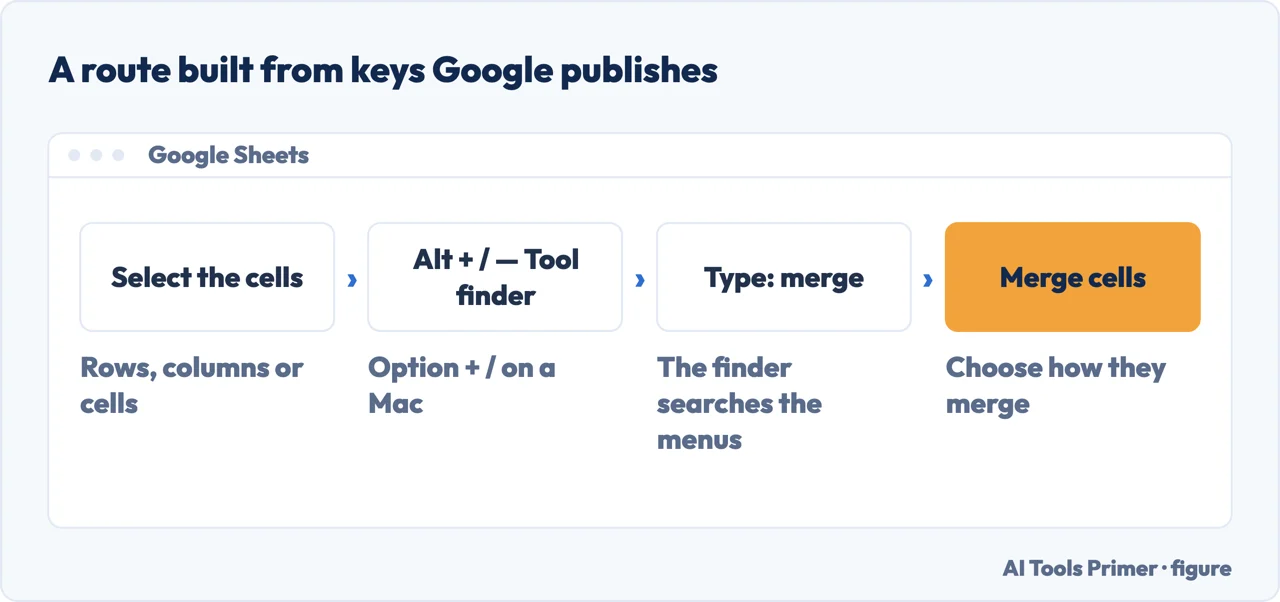
The second step is the one worth keeping: the Tool finder searches the menus, so it does not depend on remembering which menu a command lives in. Google’s page calls it “Tool finder (formerly search the menus)”.
The Alt + O sequence, and who wrote it
Where the sequence comes from. Alt + o, then M, then Enter was written on a Web Applications Stack Exchange thread asked on 21 March 2017, and its first answer opens by saying “There doesn’t seem to be a native shortcut”. A later answer on the same thread gives the Mac form, and another the Linux one. The first key of that sequence is Google’s, published and current. The letters after it are the menu’s own, and Google publishes none of them — which matters, because Google’s page opens by warning that “Some shortcuts might not work for all languages or keyboards.”
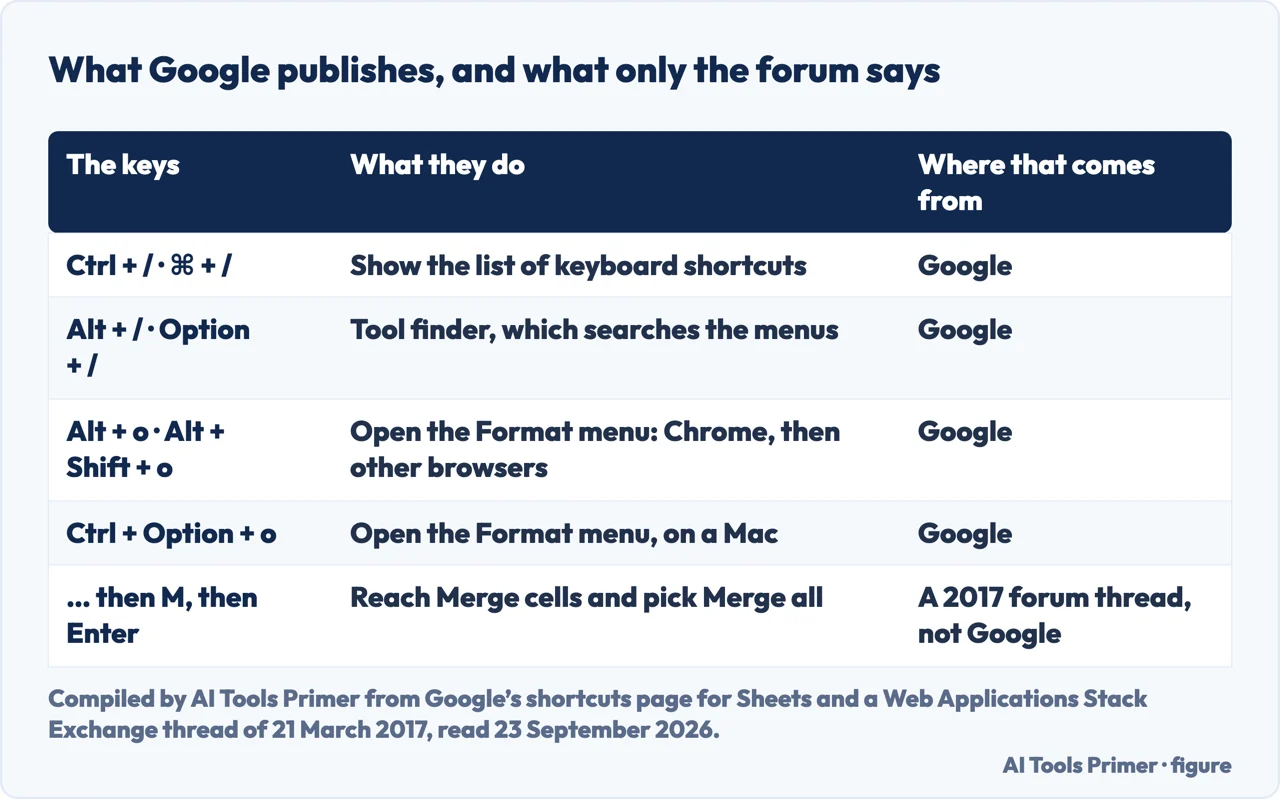
This is not a complaint about the sequence. It is about knowing which half you can rely on: if the menus open in another language, or the browser intercepts the key, the published half still holds and the borrowed half may not.
How the absence was measured
A page that says something does not exist should say how it looked. Google’s keyboard shortcuts page for Sheets was read end to end on 23 September 2026 with two different tools, because a missing word can also mean a page that did not load properly. Both readings returned about four thousand words, and neither contained the word.
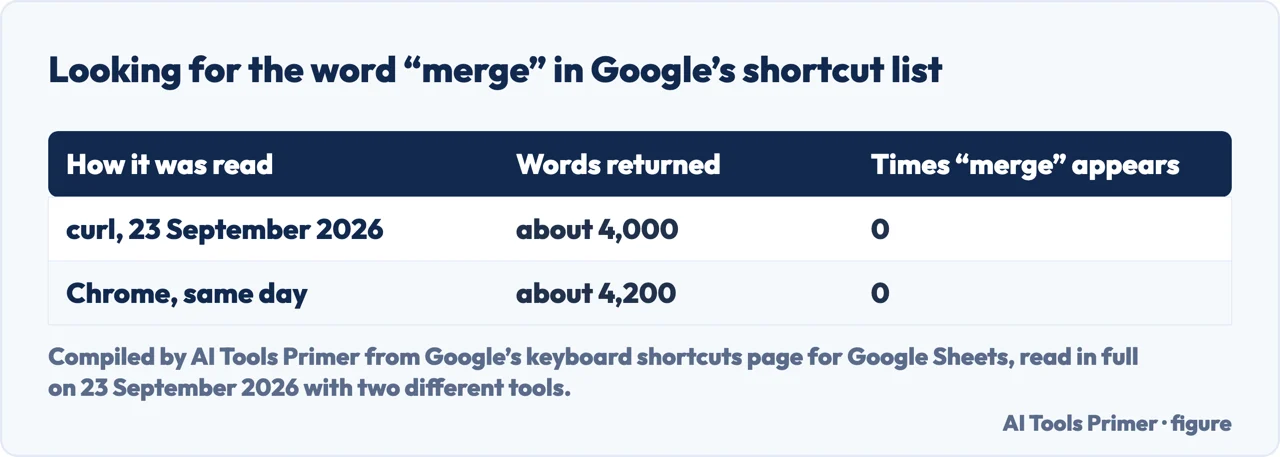
The same page does list “Open a menu” entries for File, Edit, View, Insert, Format, Data, Tools and the rest, and those are the keys in the table above. So the absence is specific: Google publishes how to reach the menu that holds the command, and not the command.
Why merging can cost you something later
Merged cells are not free, and Google says so on the page about sorting and filtering rather than on either of the pages about merging. Listing why the option to create a filter can be unavailable, it gives formatting as a cause and the remedy in one line: “Check for any merged cells or hidden rows or columns in the sheet. Try to unmerge the cells and unhide the rows or columns.” The same page adds a tip: “Filters also apply to merged cells.”
So Google names a merge as something that can stop you creating a filter, and also says that filters apply to merged cells. If a sheet is going to be sorted, filtered or fed into a pivot table, the merge is better done at the end, over a copy, or not at all.
What a merge costs in the cells themselves is set out on the page on merging cells in Excel, where Microsoft states which value is kept; Google’s merge page does not say. If all you want is two columns of text in one column, that is a different job from merging, and joining the values with a formula keeps both. Where you want the look of a merge without the cost, wrapping text and widening the column usually get there.
Where to start
Three ways in, depending on what you came for.
- “Just give me the keys.”
- Four steps, and two of them are keys. Start at how to merge cells in google sheets from the keyboard
- “I read Alt+O, M, Enter somewhere.”
- You did, and it has an author. See the alt o sequence
- “Will merging break my sheet?”
- One documented way, and one folklore that is wrong. Read why merging can cost you something
The same job in the other spreadsheet
These are the Excel sides of this one.
What merged cells get in the way of
Each of these expects rows that line up, and a merge can stop them lining up.
Around the same menus
The commands that live a keystroke away from this one.
Questions people also ask
Is there a keyboard shortcut to merge cells in Google Sheets?
Not in Google’s list. Its keyboard shortcuts page for Sheets was read end to end on 23 September 2026 with two tools, and the word merge does not appear in it. The published key is the Tool finder, Alt + / or Option + /; then you type the word.
How do I merge cells quickly in Google Sheets?
Select the cells, press Alt + / and type merge. That is two keys and a word, and the keys are documented. The menu route is Alt + o in Chrome, then Merge cells.
Does Alt + O, M, Enter work?
It comes from a forum thread of 21 March 2017 rather than from Google. Only the first key is published: the rest are the menu’s own letters, and Google warns on the same page that some shortcuts do not work for all languages or keyboards.
Why can’t I create a filter after merging cells?
Google names merged cells as one of the formatting reasons the option can be unavailable, and the remedy it gives is to unmerge them. The same page also says that filters apply to merged cells.
What happens to the text in the other cells?
Google’s merge instructions do not say; for Excel, Microsoft’s rule is on the page about merging cells in Excel. If the point is to bring two values together rather than to make one wide cell, joining them with a formula keeps both and merges nothing.
Where is Merge cells in the menus?
Under Format. Google’s instruction is to select the rows, columns or cells, then click Format and Merge cells, and then choose how you want them merged.
Not covered here. It does not cover merging cells in a Google Docs table, which is a different command in a different application.
It does not cover mail merge, which shares a word and nothing else.
It does not list every shortcut Google publishes for Sheets: the ones here are the ones that get you to this command, and the full list is a keystroke away at Ctrl + /.
Sources
- Google Docs Editors Help, Keyboard shortcuts for Google Sheets — that the list of shortcuts opens with Ctrl + / or Command + /; that the Tool finder, formerly search the menus, is Alt + / or Option + /; that the Format menu opens with Alt + o in Google Chrome, Alt + Shift + o in other browsers and Ctrl + Option + o on a Mac; and the note that some shortcuts might not work for all languages or keyboards. Read end to end on 23 September 2026 with two different tools, which returned about 4,000 and about 4,200 words, to establish that the word merge does not appear on it — support.google.com, read 23 September 2026.
- Google Docs Editors Help, Freeze, group, hide, or merge rows & columns — the menu route: select the rows, columns or cells to merge, then Format and Merge cells, then choose how they are merged. Read in full on 23 September 2026 — support.google.com, read 23 September 2026.
- Google Docs Editors Help, Sort & filter your data — that the option to create a filter can be unavailable because of formatting, with merged cells and hidden rows or columns named and unmerging given as the remedy; and the tip that filters also apply to merged cells. Read in full on 23 September 2026 — support.google.com, read 23 September 2026.
- Web Applications Stack Exchange, Keyboard shortcut to merge cells in Google Sheets — a reader thread asked on 21 March 2017, whose first answer, of 23 March 2017, says there does not seem to be a native shortcut and gives Alt + O, M, Enter; later answers on the same thread add the Mac form on 2 December 2017 and a Linux form on 16 October 2018. This is a discussion between readers, not documentation, and it is cited here as the origin of a sequence that is repeated everywhere without an author. Read on 23 September 2026 with a browser, because the site returns three words to a plain fetch — webapps.stackexchange.com, read 23 September 2026.
Written by Alberto Gulotta
Founder and editor of AI Tools Primer, writing from Palermo, Italy. Thirty-five years of taking computers apart, starting with a Commodore 64 — the long version is on the about page.
Something wrong on this page? Write to aitoolsprimer@gmail.com and it gets fixed.
Written on 24 September 2026.
Independence and limits
No affiliate links and no paid placements anywhere on this site. Nobody pays to appear here, and no company has seen this page before you did.
This is general information, not professional advice. Where a page touches money, health, safety or the law, it names its source and the date it was read — and your situation may still differ. See the privacy page and the cookie policy.