
Docs · guide
How to remove duplicates in Google Sheets, and what counts as one
By Alberto Gulotta · Updated · 9 min read
The menu path for how to remove duplicates in google sheets is three clicks — Data › Data cleanup › Remove duplicates — and it deletes rows without a preview. What decides whether it does what you wanted is not the clicking. It is the definition of duplicate the program is working to, and Sheets publishes one that will surprise anybody arriving from Excel.
The two programs disagree about what a duplicate is
Not a difference of opinion — a difference in the documentation, on both sides.
“Cells with identical values but different letter cases, formatting, or formulas are considered to be duplicates.”Google Docs Editors Help, read 28 August 2026
“A comparison of duplicate values depends on what appears in the cell—not the underlying value stored in the cell.”
Microsoft’s own example is two cells holding the same date, one shown as 3/8/2006 and the other as Mar 8, 2006: to Excel those are two different values.
Microsoft Support, read 22 August 2026Read those twice, because they are opposite. The same two rows are duplicates in Sheets and unique in Excel. A column of dates arriving from two systems, a list of names typed by two people, a set of amounts where half are text — in Sheets those collapse, in Excel they survive.
This is the reason this guide exists rather than pointing at the Excel one. Most of what is written about spreadsheets treats the two programs as the same thing with different menus, and here that assumption deletes rows — or fails to. If you have ever run Remove Duplicates in Excel on a column of dates and watched it do nothing, the Microsoft sentence above is why; if you run the same job in Sheets expecting the same result, you get a different one.
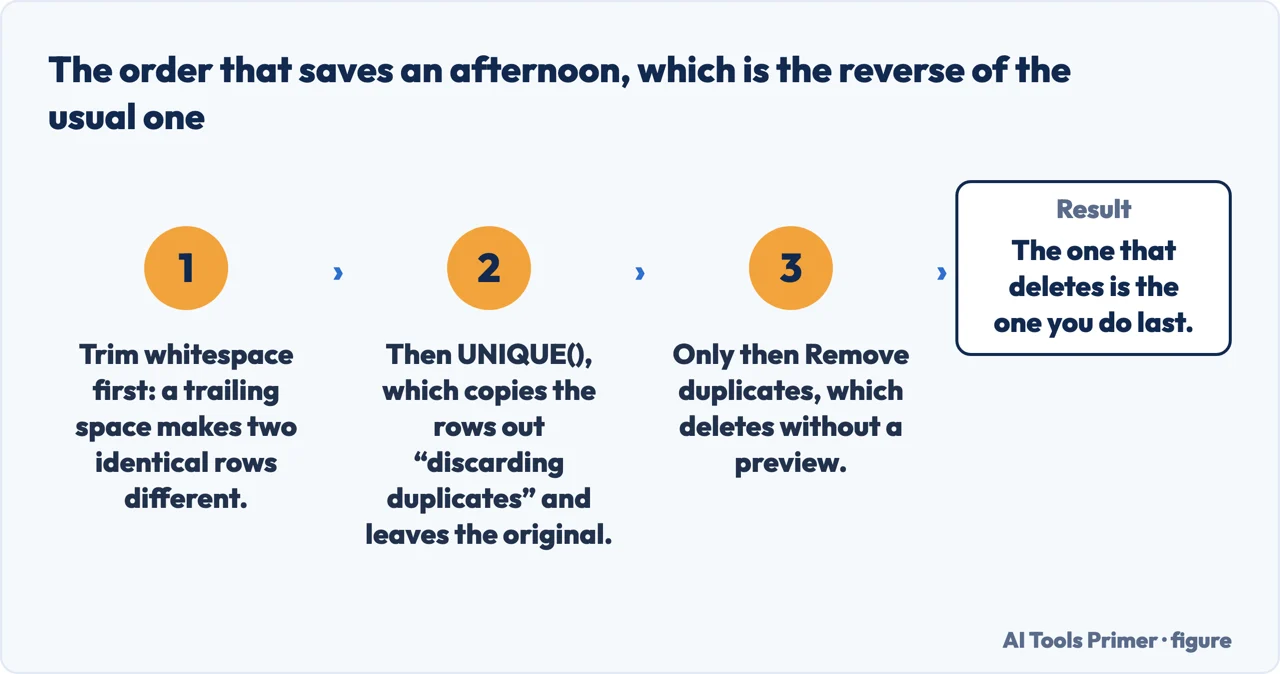
Three tools, and only the first deletes anything. The order that saves an afternoon is the reverse of the order people use: trim the whitespace, look at the result with a formula, and only then remove. The Excel guide makes the same argument with a different set of three, because Excel offers a highlight-only option that Sheets does not put on the same menu.
One line in Google’s instructions is worth more than the rest of them together. “If you select a single cell within a range, duplicates will be removed for the whole range.”
So clicking into the sheet to have a look, then reaching for the menu, is enough. There is no step where Sheets asks whether you meant the whole thing — it decides that you did, and the report of what it removed arrives afterwards. Select deliberately, or select nothing and let it take the range on purpose rather than by accident.
The formula route deserves its own sentence, because it is the one Excel users tend not to look for. UNIQUE() takes a range and returns it without the repeats, into cells of its own: the original stays exactly as it was. Google states the ordering rule too — the rows come back “in the order in which they first appear in the source range” — so it is a list you can compare against the original line by line, rather than a result you have to trust.
That makes it the honest first move on data you did not create. You keep the evidence, you get the answer, and if the answer is wrong you can see it is wrong before anything is gone. Remove duplicates has no preview and reports what it removed only once it has removed it.
Why two identical-looking rows survive. Trim whitespace exists because leading and trailing spaces make rows different. But Google attaches a limit to it that explains the cases where it appears not to work: “Non-breaking space, like  , will not be trimmed.”
A non-breaking space is what arrives when a column is copied out of a web page or a formatted document, and it is invisible in every sense that matters — same width, same look, no way to tell by eye. Trim whitespace leaves it, so the rows stay different, so Remove duplicates leaves them too. Nothing in the interface says this happened.
Where to start
Five ways in. The second one is the whole reason this page is not the Excel page.
- “I just need the repeats gone.”
- Start at the three routes
- “It removed rows I did not think were the same.”
- Read what counts as one
- “It left rows that look identical.”
- That is what counts as one
- “I do not want to delete anything yet.”
- Use the formula in the three routes
- “I came here from Excel.”
- Start at what counts as one
What counts as one
The definition each company publishes, and the fact that the two definitions contradict each other.
The three routes
One deletes, one shows, one cleans. The order matters more than the clicks.
Before you delete
A spreadsheet somebody sent you is a record. The routes that keep it intact come first.
Not covered here. It will not tell you the two programs behave the same. On this exact question they are documented as behaving in opposite ways, and the sentences are quoted above.
It will not tell you what Excel does about letter case. Google states its rule; Microsoft’s quoted rule is about what appears in the cell, and this guide does not fill the gap by guessing.
And it will not recommend deleting first. Every route that keeps the original is listed before the one that does not. What holds instead is simple: the definition of a duplicate and the non-breaking-space limit are Google’s own, with the Excel definition quoted from Microsoft.
The same spreadsheet job, in the other program
Eight guides: sorting, removing duplicates, drop-down lists, locking cells, pivot tables and unhiding columns in Google Sheets, and drop-down lists and alphabetising in Excel.
- The same job, in the other places it comes up
- How to sort in Google Sheets, and who else sees your filter
- How to make a drop down list in Google Sheets, and where Excel stops
- How to lock cells in Google Sheets, and what it will not do
- How to create a pivot table in Google Sheets, and what it does alone
- How to unhide columns in Google Sheets, including the first one
- How to make a drop down list in Excel, and make it hold
- How to alphabetize in Excel, without scrambling your rows
Sources
- Google Docs Editors Help — Split text, remove duplicates, or trim whitespace (that cells with identical values but different letter cases, formatting or formulas are considered duplicates; the Data › Data cleanup › Remove duplicates route with the choice of columns and headers; the note that selecting a single cell within a range removes duplicates for the whole range; and the Trim whitespace tool with the note that a non-breaking space will not be trimmed) — support.google.com, read 28 August 2026.
- Google Docs Editors Help — UNIQUE (that it returns unique rows in the provided source range, discarding duplicates, and that rows are returned in the order in which they first appear in the source range) — support.google.com, read 28 August 2026.
- Microsoft Support — Filter for unique values or remove duplicate values (that a comparison of duplicate values depends on what appears in the cell rather than the underlying value, with the two date formats given as an example of values that are therefore unique) — quoted here for the comparison and in full on the Excel guide — support.microsoft.com, read 22 August 2026.
Written by Alberto Gulotta
Founder and editor of AI Tools Primer, writing from Palermo, Italy. Thirty-five years of taking computers apart, starting with a Commodore 64 — the long version is on the about page.
Something wrong on this page? Write to aitoolsprimer@gmail.com and it gets fixed.
Written on 28 August 2026 · last checked 23 September 2026.
Independence and limits
No affiliate links and no paid placements anywhere on this site. Nobody pays to appear here, and no company has seen this page before you did.
This is general information, not professional advice. Where a page touches money, health, safety or the law, it names its source and the date it was read — and your situation may still differ. See the privacy page and the cookie policy.