
Docs · guide
Google Sheets dark mode: what Google offers on each device
By Alberto Gulotta · Updated · 9 min read
Google Sheets dark mode is a setting in the Android and iPhone apps: Menu, Settings, then the theme. Google’s help page for it does not describe a desktop setting, and the guides we read say the web version has none. This page sets out the steps, what Drive and Chrome offer, and what the workarounds do.
| Question | Answer | Where it comes from |
|---|---|---|
| How do I turn it on in the app? | Android: Menu, Settings, Choose theme. iPhone and iPad: Menu, Settings, Theme | Google Docs Editors Help |
| Is there a setting on the web? | Google’s page on the theme describes only the phone apps; the guides say the web version has none | Google; Night Eye; Bushe; Sheetify |
| Do others see my theme? | No: collaborators cannot see the theme you choose | Google Docs Editors Help |
| What does Drive offer on a computer? | Settings, Appearance: Light, Dark or Device default | Google Drive Help |
| What do the workarounds do? | Extensions darken the interface; Chrome’s flag also inverts cell colours | Bushe; Night Eye |
On the phone: Google’s theme setting
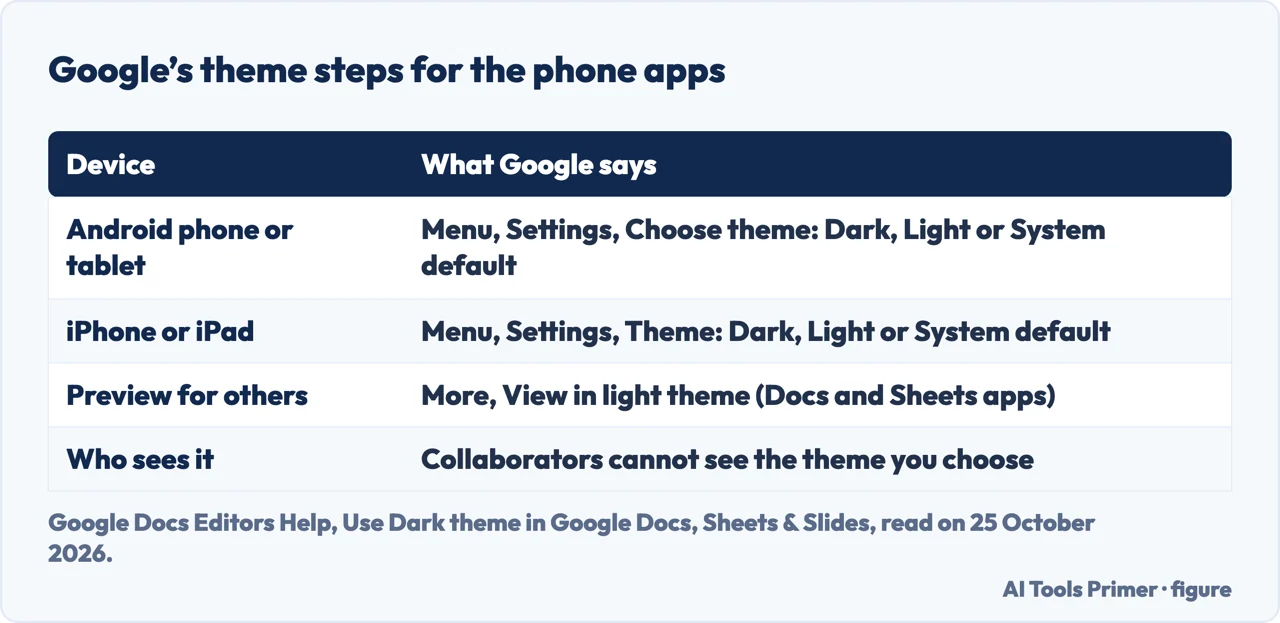
Google’s page, “Use Dark theme in Google Docs, Sheets & Slides”, says you can change the theme setting to make it easier to view documents, presentations and spreadsheets on your mobile device, and that collaborators cannot see the theme you choose. On an Android phone or tablet, open the Docs, Sheets or Slides app, tap Menu at the top left, tap Settings, tap Choose theme and pick Dark, Light or System default. On an iPhone or iPad the steps are Menu, Settings, Theme, with the same three choices.
The page adds that dark theme adjusts your documents and sheets automatically to fit, and that you can preview how a document or sheet looks in light theme for collaborators: open it in the Docs or Sheets app, tap More at the top right and tap View in light theme. That preview does not change your own setting. Google’s Workspace Updates blog announced the iOS version in September 2020, after Android, and said it respects the iOS system settings and can be enabled or disabled in each app under Menu, Settings, Theme.
On a computer: what Google’s pages cover
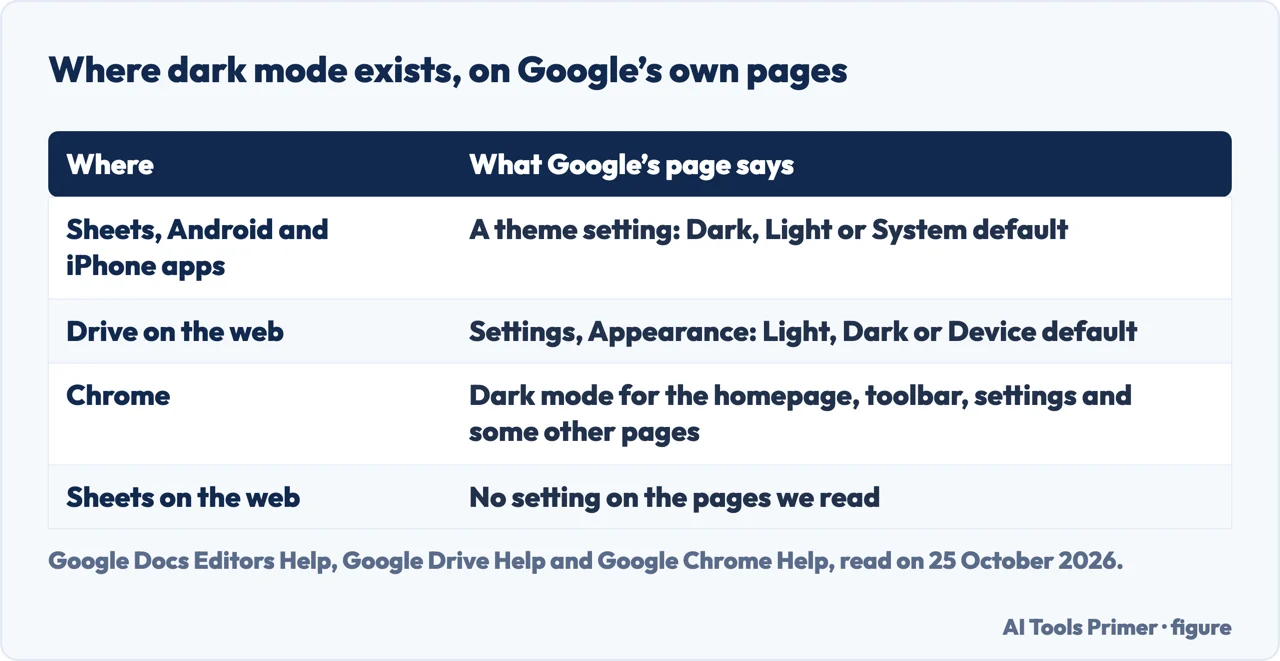
The Google page on dark theme gives the same text under its Computer tab as under the phone tabs, which is to say it describes the phone apps only. We did not find a Sheets setting for the web on it. Two further Google pages are close but are not about Sheets. Google Drive Help says that to turn Dark Mode for the web on or off in Drive you go to Google Drive on a computer, click Settings at the upper right and, under Appearance, choose Light, Dark or Device default. Google Chrome Help says that in Dark mode your homepage, toolbar and settings, and a few further pages, will be dark; you choose it under Customize Chrome, Appearance, or let Chrome follow the device.
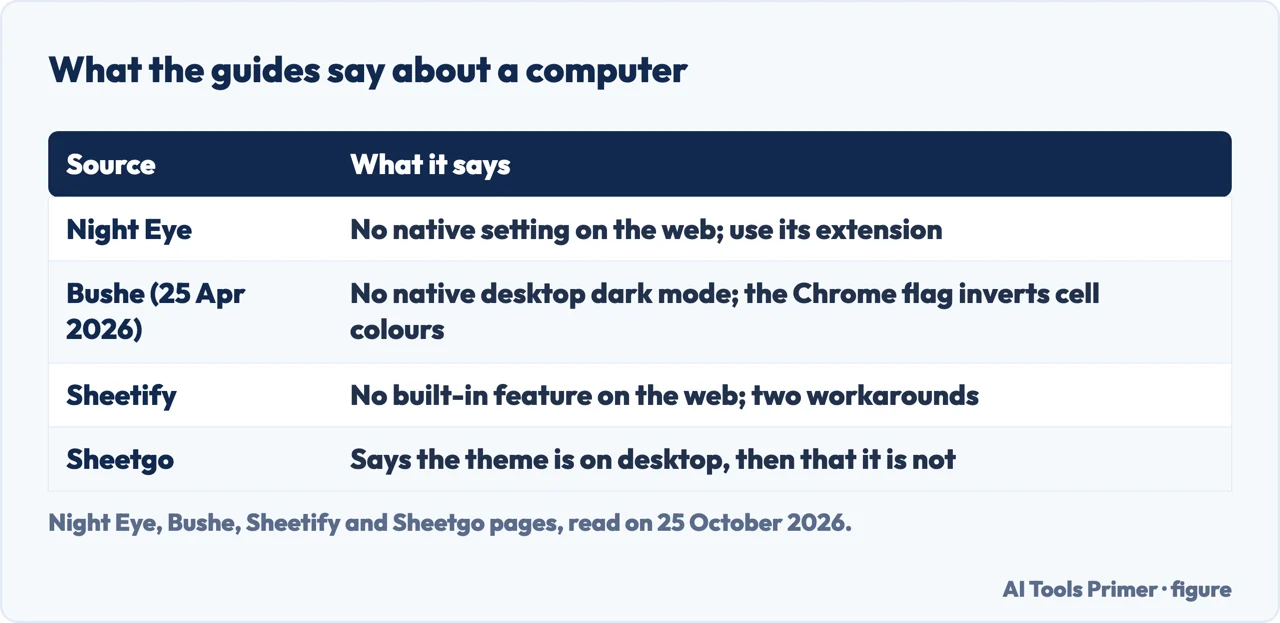
The guides agree on the web version. Night Eye, whose page is for its own extension, says Sheets has native dark mode in its Android, iPhone and iPad apps and that on the desktop the web app does not currently provide an equivalent native setting. Bushe, which offers an extension called Modern Dark Mode, says the mobile app supports dark mode and the desktop version does not. Sheetify says the web version has no built-in dark mode feature. Sheetgo, the odd one out, says the theme is available for mobile and desktop devices and then that it is not currently available for desktop.
The workarounds, and what they do to a sheet
Two routes recur. The first is a browser extension. Bushe explains why Sheets is hard: it uses cell background colours, conditional formatting and chart palettes that assume a white sheet, so inverting the page would invert those colours too, and a working dark mode needs to darken the toolbars, menus and sidebars without inverting the cells. It presents its own extension as doing that. Night Eye presents its extension as making the interface and the workspace dark. Both pages are written by the maker of the extension they recommend, and we did not install or test either.
The second is Chrome’s experimental flag. Bushe names chrome://flags/#enable-force-dark, called Auto Dark Mode for Web Contents, and calls it the wrong tool for Sheets because it inverts everything, including cell colours and conditional formatting; it tells readers who enabled it and see a broken sheet to set it back to Default or Disabled. Night Eye also says experimental browser flags are not the recommended solution because they can change or invert spreadsheet colours unpredictably. Sheetify lists using Chrome’s dark mode as its first option and an extension as its second.
The questions people ask
The people-also-ask box asks whether there is a dark mode for Sheets on the desktop, how to turn it on, why there is none, and whether sheets have one. On what we read: the apps have a theme setting and the web version has no setting on Google’s pages. Bushe’s reason for the absence, that inverting colours would break cell formatting, conditional rules and charts, is its own explanation, not Google’s. For other Google Docs menus, see the page on adding a page in Google Docs; for Sheets itself, sorting in Google Sheets.
Where to start
Four ways in.
- “On my phone.”
- Google’s steps — phone
- “On my computer.”
- What Google covers — computer
- “An extension or a flag?”
- What they do — workarounds
- “Why is there none?”
- The questions — questions
More Google Docs and Sheets
The same menus, other parts of a document.
Questions people also ask
Is there a dark mode for Google Sheets on desktop?
Google’s page on dark theme describes only the Android and iPhone and iPad apps. Night Eye, Bushe and Sheetify say the web version has no native setting; Sheetgo says both that it exists and that it does not.
How do I turn on dark mode in Google Sheets?
In the app: Menu, Settings, then Choose theme on Android or Theme on an iPhone or iPad, and pick Dark, Light or System default.
Why is there no dark mode for Google Sheets?
Google’s pages we read do not say. Bushe’s explanation is that inverting the sheet would invert cell colours, conditional formatting and chart palettes that assume a white background.
Do sheets have dark mode?
The Sheets apps for Android and iPhone do, according to Google. On a computer, Google Drive and Chrome have appearance settings, but the Google pages we read give none for Sheets itself.
Not covered here. We did not try the Sheets theme setting, an extension or a Chrome flag. The statements come from Google Docs Editors Help (the page on dark theme in Docs, Sheets and Slides, read on its Android, iPhone & iPad and Computer tabs), Google Drive Help, Google Chrome Help, the Google Workspace Updates post of September 2020, and guides by Sheetgo, Bushe (25 April 2026), Night Eye and Sheetify, used for what they claim. Menus change with the app version.
The Chrome Web Store and Reddit pages in the results were not read. Google Docs and Slides on a computer, Google Workspace administrator settings and other dark-mode extensions are not covered here.
The search volume and difficulty behind this page were read in Semrush on 29 August 2026.
Sources
- Google Docs Editors Help — Use Dark theme in Google Docs, Sheets & Slides — support.google.com, read 25 October 2026.
- Google Workspace Updates — Dark theme now available for Docs, Sheets, and Slides on iOS (September 2020) — workspaceupdates.googleblog.com, read 25 October 2026.
- Google Drive Help — Use Dark Mode in Google Drive — support.google.com, read 25 October 2026.
- Google Chrome Help — Browse in Dark mode or Dark theme — support.google.com, read 25 October 2026.
- Sheetgo — Use Google Sheets in dark mode (desktop & mobile) — www.sheetgo.com, read 25 October 2026.
- Bushe — Google Sheets Dark Mode on Desktop, Without Flipping Colors (25 April 2026) — bushe.co, read 25 October 2026.
- Night Eye — Google Sheets Dark Mode: Desktop, Android & iPhone — nighteye.app, read 25 October 2026.
- Sheetify — Google Sheets Dark Mode | How To Do It? (2026 Guide) — www.sheetifycrm.com, read 25 October 2026.
Written by Alberto Gulotta
Founder and editor of AI Tools Primer, writing from Palermo, Italy. Thirty-five years of taking computers apart, starting with a Commodore 64 — the long version is on the about page.
Something wrong on this page? Write to aitoolsprimer@gmail.com and it gets fixed.
Written on 25 October 2026.
Independence and limits
No affiliate links and no paid placements anywhere on this site. Nobody pays to appear here, and no company has seen this page before you did.
This is general information, not professional advice. Where a page touches money, health, safety or the law, it names its source and the date it was read — and your situation may still differ. See the privacy page and the cookie policy.