“You can combine two or more table cells in the same row or column into a single cell.” That is the whole of Microsoft’s definition.
If Merge Cells is missing, check first that the cells touch: that is the one reason Microsoft gives.

Docs · guide
By Alberto Gulotta · Updated · 12 min read
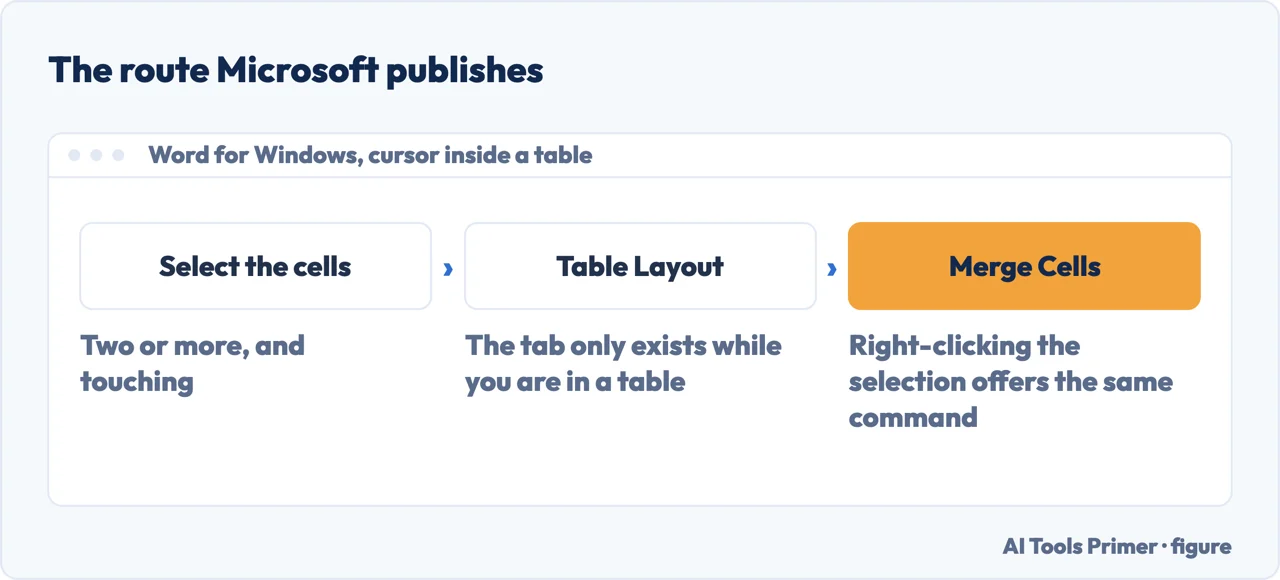
To merge cells in Word, click inside the table, select two or more cells that touch, and choose Table Layout › Merge Cells. Right-clicking the selection offers the same command. If Merge Cells is missing, Microsoft gives the reason in one line: the cells have to be adjacent.
| What you have selected | Is Merge Cells offered? | Microsoft’s own sentence |
|---|---|---|
| One cell | No | “make sure you selected multiple adjacent cells” |
| Two cells side by side in a row | Yes | “two or more table cells in the same row or column” |
| Two cells stacked in a column | Yes | The same sentence covers both directions |
| Two cells that do not touch | No | “multiple adjacent cells”, again |
| A table in Word for the web | It may not be | The page is written for “the desktop versions of Word” |
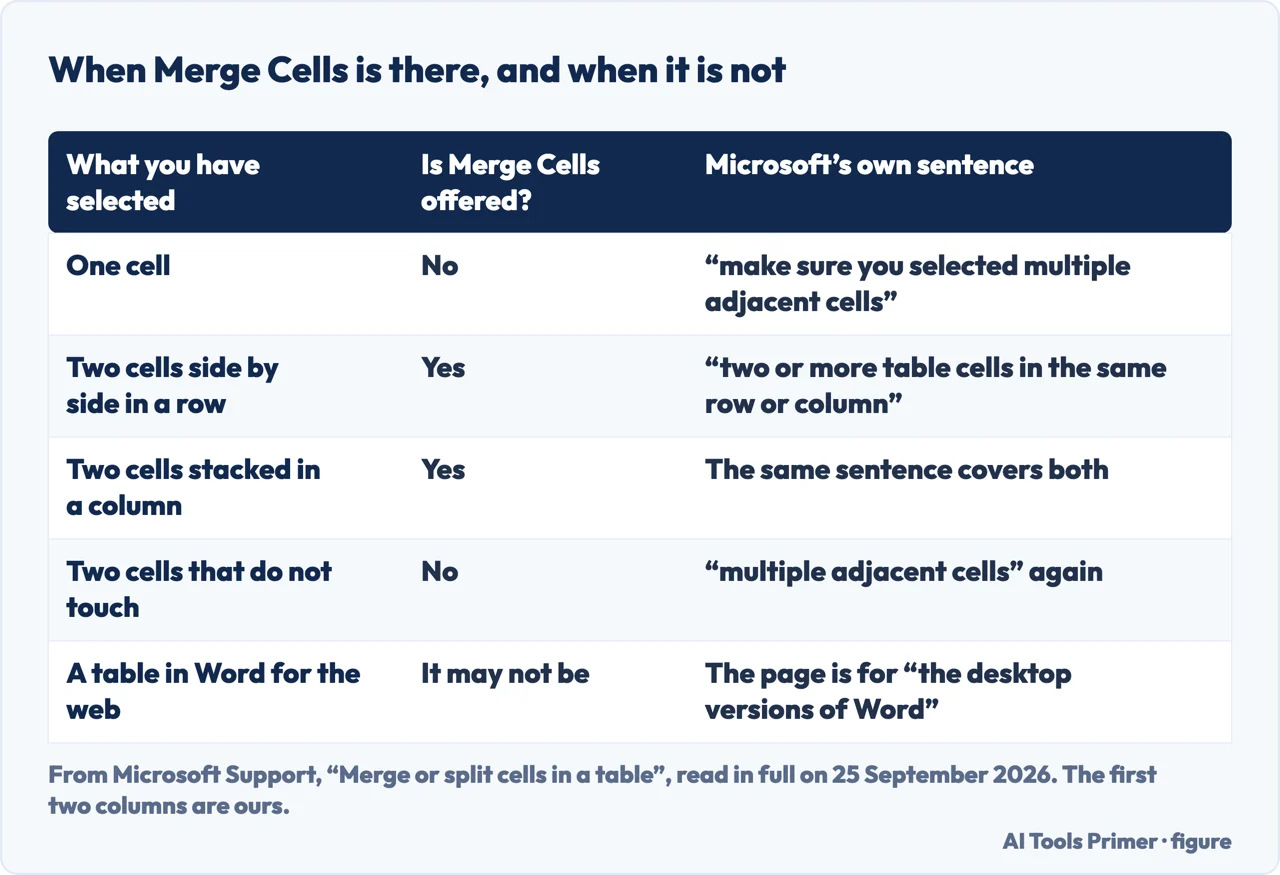
“Why can’t I merge cells in Word?” is the first of the four questions Google printed under the results on 25 September 2026, and Microsoft answers it twice on one page, in identical words under the Windows steps and under the Mac steps: “If you don’t see Merge Cells, make sure you selected multiple adjacent cells.” Adjacent is doing the work in that sentence, and the definition above it says the same: “two or more table cells in the same row or column”.
“You can combine two or more table cells in the same row or column into a single cell.” That is the whole of Microsoft’s definition.
If Merge Cells is missing, check first that the cells touch: that is the one reason Microsoft gives.
Unmerge puts back the cells that were joined. Split asks a question instead: “Enter the number of columns or rows to split the selected cell into.”
So Split on a cell that was never merged still works, and gives you a grid that was not there before.
The note sits above both sets of steps: “This content applies to the desktop versions of Word. Some table features may not be available in Word for the web or mobile apps.”
The scope line underneath names eight desktop versions, Windows and Mac, from Word 2016 onwards.
The shortcut wikiHow prints, and the page it is credited to
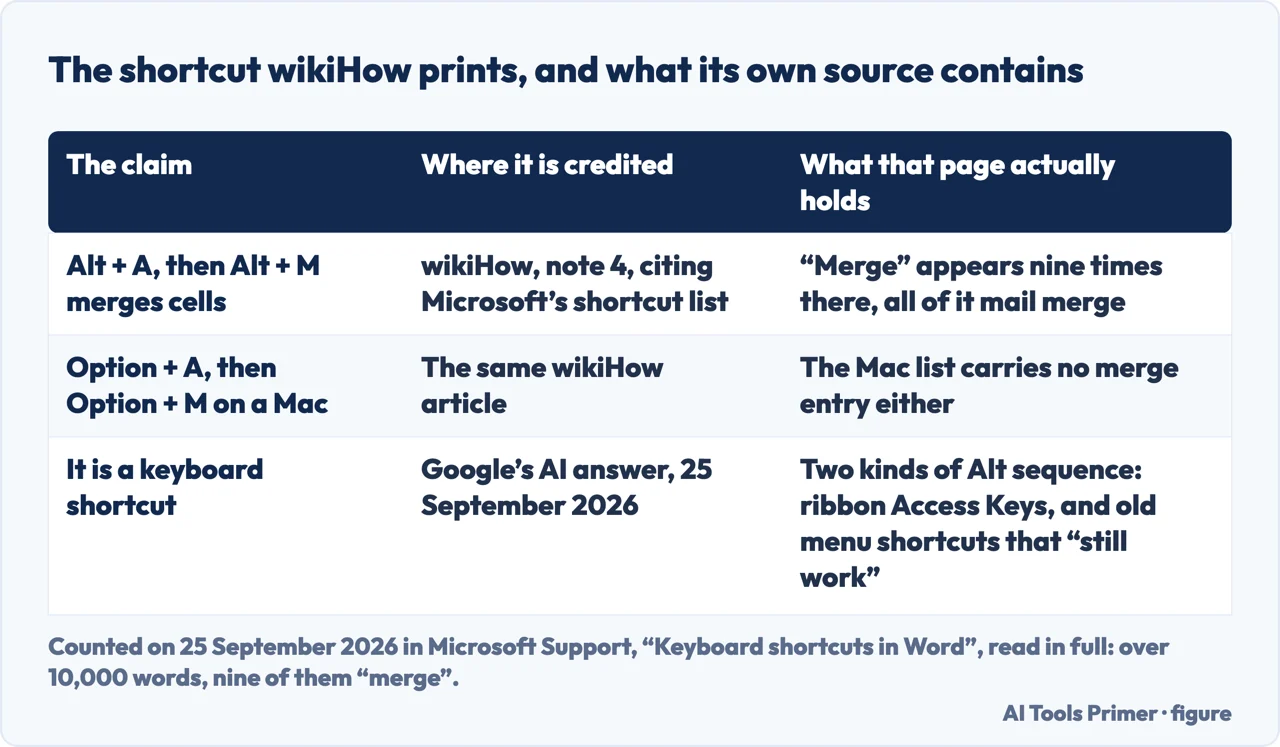
“Alternatively, use the keyboard shortcut Alt + A, Alt + M.”
That is wikiHow, and its footnote 4 credits the claim to Microsoft’s own “Keyboard shortcuts in Word”. We opened that page on 25 September 2026 and counted: over 10,000 words, and the word “merge” appears nine times — all nine about mail merge. Its “Work with tables” section lists Tab, Shift+Tab, Alt+Home, Alt+End, Alt+Page up, Alt+Page down and the arrow keys. There is no merge entry, on the Windows list or the Mac one. Microsoft’s page about merging cells does not contain the word “shortcut” at all.
That does not make the key sequence wrong. The same shortcut page describes two kinds of Alt sequence that could explain it: ribbon Access Keys — “For various ribbon options you can combine the Key Tips letters with the Alt key to make shortcuts called Access Keys” — and the menus of older versions: “most of the old Alt key menu shortcuts still work, too. However, you need to know the full shortcut.” Neither description names this sequence, so whether it works on your copy is something to try, not something Microsoft promises.
One more line from the same section matters here: “Additional tabs might appear depending on your selection in the document.” Table Layout is one of those tabs, which is why Microsoft’s route starts with the cursor inside the table.
Unmerge Cells and Split Cells are two commands, not two names for one. Unmerge gives back the cells that were joined. Split starts from a question — “Enter the number of columns or rows to split the selected cell into, then select OK” — and it will divide a cell that was never merged in the first place.
Five sentences from Microsoft, and what each one settles
All read in full on 25 September 2026, on the two Microsoft pages under Sources.
Where this answer stops. Microsoft puts the same note above both sets of steps: “This content applies to the desktop versions of Word. Some table features may not be available in Word for the web or mobile apps.” The scope line under the title names Word for Microsoft 365 and its Mac version, Word 2024 and its Mac version, Word 2021 and its Mac version, Word 2019 and Word 2016. That is eight desktop products and no browser, which is worth knowing before you go hunting for the button in a browser.
Four ways in.
Two or more cells, touching, in the same row or column — and a Table Layout tab that only exists while the cursor is inside the table.
Microsoft answers “why can’t I merge cells” twice on one page, in the same words, and the word doing the work is adjacent.
Microsoft’s shortcut list for Word, read on 25 September 2026, runs to over 10,000 words and mentions merge nine times, every one of them about mail merge.
One gives back the cells that were joined; the other asks how many pieces you want, and will cut a cell that was never merged.
Microsoft’s reason, printed under both the Windows and the Mac steps: “If you don’t see Merge Cells, make sure you selected multiple adjacent cells.” The cells must touch.
Microsoft’s shortcut list does not carry one. Read on 25 September 2026 it runs to over 10,000 words and uses the word “merge” nine times, all about mail merge. The Alt sequence that circulates is not on it; the same page describes ribbon Access Keys and old Alt menu shortcuts without naming this one.
Select both, then Table Layout › Merge Cells, or right-click the selection and choose Merge Cells. Microsoft: “You can combine two or more table cells in the same row or column into a single cell.”
Select the cell, then Table Layout › Split Cells, and “enter the number of columns or rows to split the selected cell into, then select OK”. That works on any cell, merged or not.
With Unmerge Cells, not Split Cells: “To unmerge cells, select the cells, then select Unmerge Cells.” The two commands do different jobs.
The page that answers this question is not written for it. Microsoft’s note says the content “applies to the desktop versions of Word” and that some table features “may not be available in Word for the web or mobile apps”.
Not covered here. It does not cover merging cells in Word for the web or on a phone, which Microsoft’s page says it is not written for.
It does not cover what a merged cell does to a table that will later be sorted or converted to text.
And it does not cover tables pasted in from a spreadsheet, where the cells arrive already arranged. What holds instead is simple: the counts on this page were made on the day it names, on pages read from top to bottom, and a claim is credited to the page that carries it rather than to the page it points at.
Written by Alberto Gulotta
Founder and editor of AI Tools Primer, writing from Palermo, Italy. Thirty-five years of taking computers apart, starting with a Commodore 64 — the long version is on the about page.
Something wrong on this page? Write to aitoolsprimer@gmail.com and it gets fixed.
Written on 25 September 2026.
Independence and limits
No affiliate links and no paid placements anywhere on this site. Nobody pays to appear here, and no company has seen this page before you did.
This is general information, not professional advice. Where a page touches money, health, safety or the law, it names its source and the date it was read — and your situation may still differ. See the privacy page and the cookie policy.