
Docs · guide
Page break in Word, and the shortcut that lives on another page
By Alberto Gulotta · Updated · 13 min read
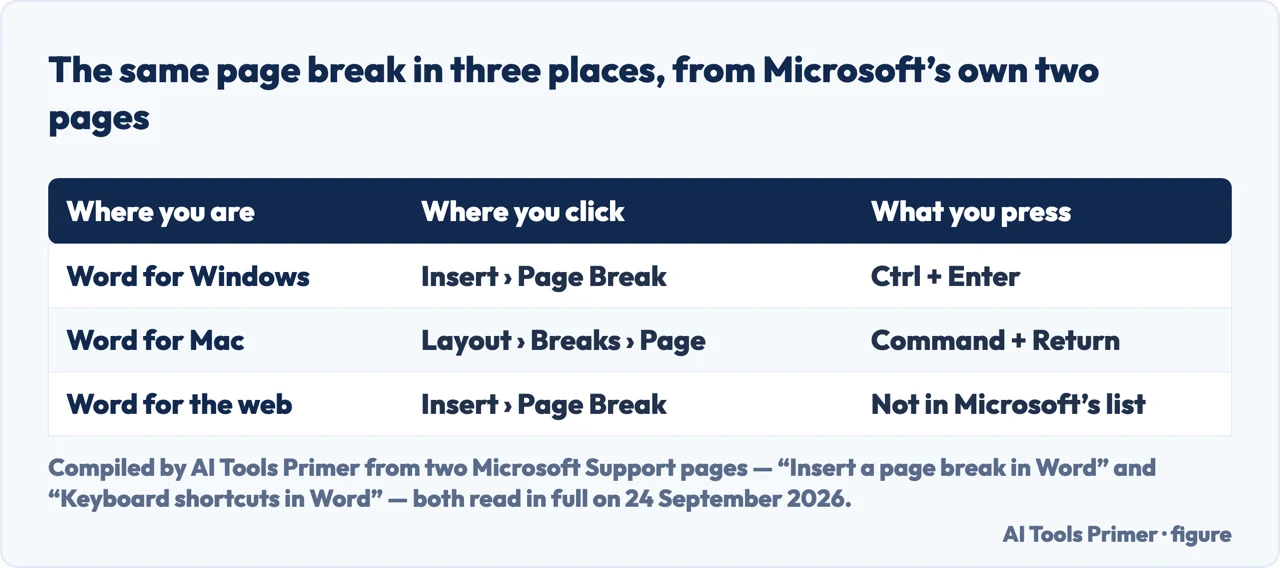
A page break in Word is a mark you put in the text that says: the next page starts here. Put the cursor where one page should end, then Insert and Page Break on Windows, or Layout and Breaks and Page on a Mac. The keys are Ctrl and Enter, or Command and Return.
| Where you are | Where you click | What you press | Source |
|---|---|---|---|
| Word for Windows | Insert › Page Break | Ctrl + Enter | Microsoft, two pages |
| Word for Mac | Layout › Breaks › Page | Command + Return | Microsoft, two pages |
| Word for the web | Insert › Page Break | Not in Microsoft’s list for the web | Microsoft |
| Word for Windows, to see the break | Home › Show/Hide ¶ | — | Microsoft |
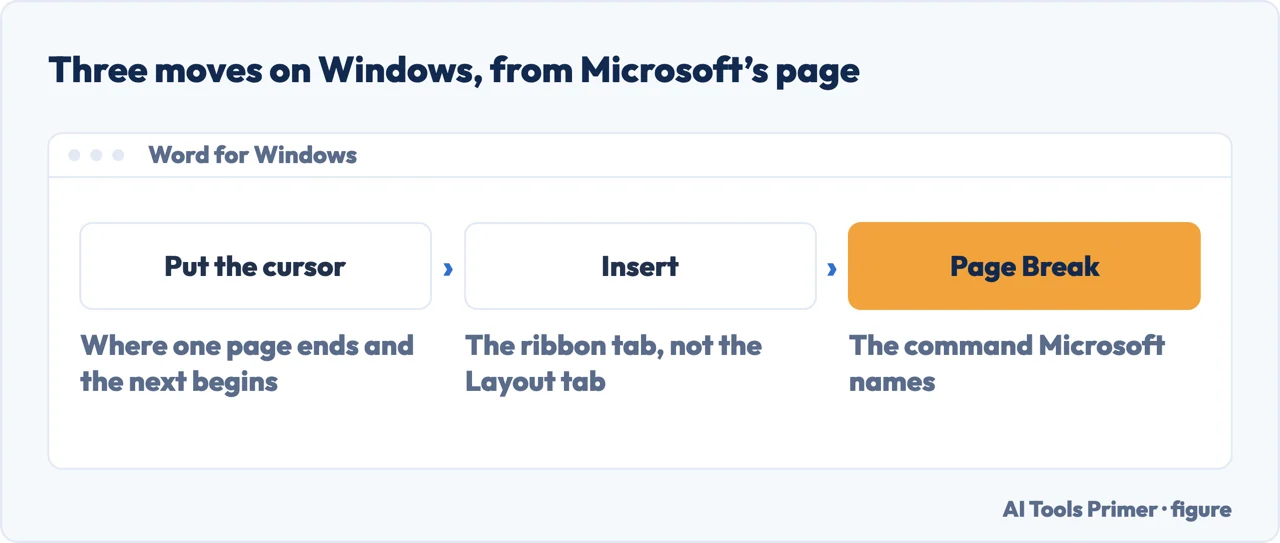
- Put the cursor where one page should end and the next begin. Not on the page you want to move: at the point in the text the move should happen. Microsoft’s wording is exactly that — “put your cursor where you want one page to end and the next to begin”.
- On Windows, go to Insert and choose Page Break.
- On a Mac, go to Layout, then Breaks, then Page. A different tab and a different menu from the Windows route, for the same result. Microsoft’s shorter page for the Windows editions, “Insert a page break”, does not carry this route at all.
- Or press the keys instead. Ctrl + Enter on Windows, Command + Return on a Mac. Same break, no menu.
- Turn on Home › Show/Hide ¶ to see what you just did. The break appears as a dotted line labelled Page Break. If you ever need to remove it, that label is the thing you select, and if a break has left a blank page behind, deleting a page in Word is where that case is worked through.
Why the shortcut is hard to find
Microsoft documents this in two places that do not link to each other. “Insert a page break in Word” gives three menu routes and no keyboard shortcut at all — read in full, twice, on 24 September 2026: the words Ctrl, keyboard and shortcut do not appear on it.
The shortcut lives on a different page, “Keyboard shortcuts in Word”, in a table called Insert special characters, between the line break and the column break. That page prints the Mac modifier as a small picture of the Command key rather than as text, which is part of why it is hard to search for.
So pressing Ctrl and Enter is correct, and the page that teaches the break does not say so. On a Mac that page gives a menu route, Layout › Breaks › Page, and no keys.
The three keys in that table, because they are easy to confuse
They sit next to each other in Microsoft’s table and they are one modifier apart, which is how people end up with a line break where they wanted a page. If the text moved down a line but stayed on the same page, you pressed Shift and Enter. On a Mac the same three run Command and Return, Shift and Return, Command and Shift and Return.
The reason to use one at all is that it survives editing. The alternative is pressing Return until the text falls onto the next page, and that works until somebody adds a sentence higher up — at which point every blank line moves, and the heading that was at the top of a page is now three lines down it. A break is anchored to a point in the text rather than to a count of empty lines, so it moves with the sentence it follows. La Trobe University’s guide for research students puts the same thing in one line: a page break lets you start a new page “without needing to fill the previous page with text”.
Which version each Microsoft page is actually about
Every one of these carries an “Applies To” list, and they are not the same list. Read on 24 September 2026.
- Insert a page break in Word
- Microsoft 365, 2024, 2021, 2019 and 2016 — and the Mac editions of the first three. This is the one with all three routes on it.
- Keyboard shortcuts in Word
- The same eight editions, plus Word for iPad, iPhone, Android and Word Mobile. Each platform has its own tab, and the one for Word for the web has no page-break key.
- Insert a page break
- Microsoft 365, 2024, 2021, 2019 and 2016 — no Mac edition at all. Its route is the Windows one, and its tip about Show/Hide is worth the visit.
- Insert a section break
- Microsoft 365, 2024 and 2021, with their Mac editions — not 2019 or 2016. Which does not mean section breaks are missing from those, only that this page is not about them.
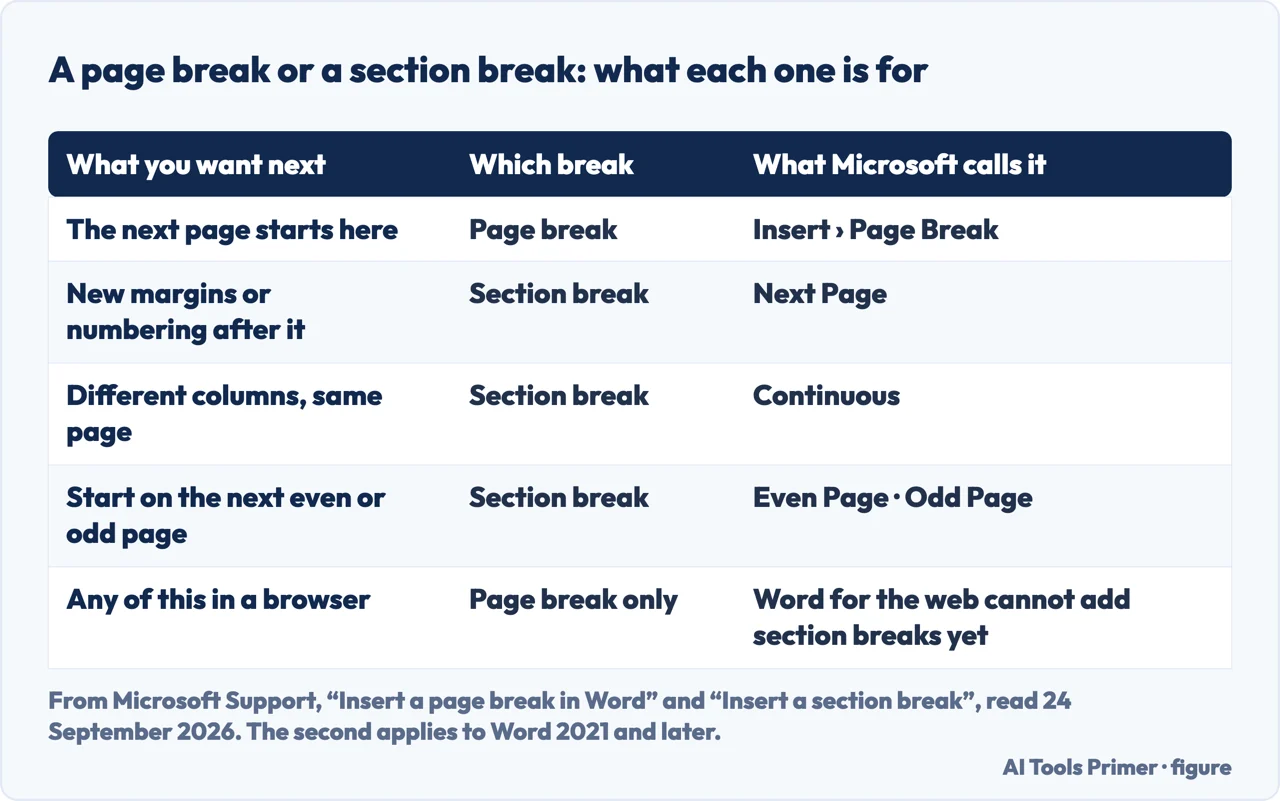
A page break and a section break are not two strengths of the same thing. A page break moves the text. A section break makes what comes after it a separate part of the document, which can then have its own margins, its own columns, its own headers and its own page numbering. La Trobe’s guide draws the line in one sentence — a page break, “unlike a section break”, “does not allow for different formatting to be applied”. So the test is not how big the change is. It is whether anything about the page itself has to change. If the answer is only “the text should start further down”, a page break is the whole answer.
Microsoft publishes four kinds of section break, and the names describe what they do: Next Page starts the new section on the following page, Continuous starts it on the same page, and Even Page and Odd Page start it on the next even- or odd-numbered page. The last two exist for printing and binding, and Microsoft gives the worked example: put an Odd Page break at the end of page 3 and the next section starts on page 5. That is the behaviour that surprises people the first time, and it is deliberate. Where this matters most in practice is page numbering: in La Trobe’s example the numbers run in Roman numerals until the first chapter and in Arabic after it, and each style belongs to its own section.
One thing the browser version cannot do. Word for the web will insert a page break, and Microsoft says plainly that it “can’t add section breaks yet”, with the suggested way round being the Open in Word command. That is worth knowing before you plan a document that needs two columns in the middle of it and nowhere else, because that particular job is a section break and not a page break.
If the break is not doing what you expected, turn the marks on before changing anything. Home and Show/Hide puts a dotted line labelled Page Break where each one sits, as in Microsoft’s own example, and the same switch shows the rest of the hidden formatting. Microsoft attaches the tip to its shorter Windows page, “Insert a page break”: if Word “puts a new page in your document unexpectedly, it might be because of a page break”, and the way to see them is that switch. Almost every question about a page that will not behave is answered by two minutes with the marks visible, and it is the same two minutes that answers a margin that looks wrong.
The routes, the keys, the four section-break names and the note about the web version are quoted from Microsoft’s own documentation, read on 24 September 2026 and listed below. The reading of why the shortcut is hard to find, and the test for choosing between the two kinds of break, are ours.
Where to start
Four ways in.
- “I just want the next page to start here.”
- Three moves — putting one in
- “I want the keys, not the menu.”
- They exist — the keys and where they are written
- “Do I need a section break instead?”
- One test decides — page break or section break
- “Something is pushing my text onto a new page.”
- Make it visible — seeing what is there
Putting one in
The same break in three versions of Word, with two different menu routes and one set of keys.
The keys, and where they are written
Ctrl and Enter is real, and it is published on a different Microsoft page from the one that teaches the break.
Page break or section break
Whether anything about the page has to change, rather than how big the change feels. That is the whole test.
Seeing what is there
Show/Hide costs two minutes and answers most of the questions people ask about a page that will not behave.
Questions people also ask
What is the difference between a section break and a page break?
A page break only moves the text onto the next page. A section break creates a part of the document that can have its own margins, columns, headers and page numbering. Microsoft lists four kinds of section break: Next Page, Continuous, Even Page and Odd Page.
Is there a keyboard shortcut for a page break in Word?
Yes: Ctrl + Enter on Windows and Command + Return on a Mac. It is published on Microsoft’s keyboard shortcuts page, not on the page that explains how to insert a break.
What is the purpose of a page break?
To start a new page at a point in the text, so the break moves when the text does. Pressing Return until the text falls onto the next page looks the same until somebody edits a paragraph above it, and then every blank line shifts.
How do I fix page breaks in Word?
Turn on Home › Show/Hide first. Each break shows as a dotted line with its name on it, so you can see whether the one causing trouble is a page break, a section break or a row of empty paragraphs. Only then is it worth deleting anything.
Can Word for the web insert a page break?
Yes, through Insert › Page Break. It cannot add section breaks “yet” — Microsoft’s own word — and suggests the Open in Word command when you need one.
Not covered here. It does not cover removing a break. Microsoft’s tip is the place to start: turn on Home › Show/Hide to see the breaks “so that you can select and delete them”.
It does not cover Google Docs.
And it does not recommend anything to install. Every route here is a menu or two keys in the program the document is already open in. What holds instead is simple: the menu routes and the keys are quoted from Microsoft’s own Word pages, with the date each was read.
Sources
- Microsoft Support — Insert a page break in Word: the three menu routes, one per platform, and no keyboard shortcut anywhere on the page — support.microsoft.com, read September 2026.
- Microsoft Support — Keyboard shortcuts in Word: Ctrl and Enter on Windows, Command and Return on a Mac, in the Insert special characters table — support.microsoft.com, read September 2026.
- Microsoft Support — Insert a page break, the shorter page for Windows editions, and the tip about Show/Hide when a new page appears unexpectedly. Applies to Windows editions only — support.microsoft.com, read September 2026.
- Microsoft Support — Insert a section break: the four kinds, and the sentence about Word for the web. Applies to Word 2021 and later, not 2019 or 2016 — support.microsoft.com, read September 2026.
- La Trobe University Library — Section and page breaks, from a guide written for graduate researchers using a PC — latrobe.libguides.com, read September 2026.
Written by Alberto Gulotta
Founder and editor of AI Tools Primer, writing from Palermo, Italy. Thirty-five years of taking computers apart, starting with a Commodore 64 — the long version is on the about page.
Something wrong on this page? Write to aitoolsprimer@gmail.com and it gets fixed.
Written on 24 September 2026.
Independence and limits
No affiliate links and no paid placements anywhere on this site. Nobody pays to appear here, and no company has seen this page before you did.
This is general information, not professional advice. Where a page touches money, health, safety or the law, it names its source and the date it was read — and your situation may still differ. See the privacy page and the cookie policy.