
Docs · guide
How to double space in Word, and why it still looks wrong
By Alberto Gulotta · Updated · 7 min read
The mechanical answer to how to double space in word is three clicks, and Microsoft publishes it. It is on this page below. But if you are asking because an assignment or a submission requires double spacing, that is a different requirement from the one the button satisfies.
Design → Paragraph Spacing → Double
The whole document
Microsoft’s instruction for the entire file: “To double-space the whole document, go to Design > Paragraph Spacing, and choose Double.” This is a document-wide preset rather than a change to the paragraphs you happen to have selected.
Home → Line and Paragraph Spacing → 2.0
Only what you selected
Microsoft again: “To double-space only part of the document, select the paragraphs you want to change, go to Home > Line and Paragraph Spacing, and choose 2.0.” This changes line spacing and nothing else.
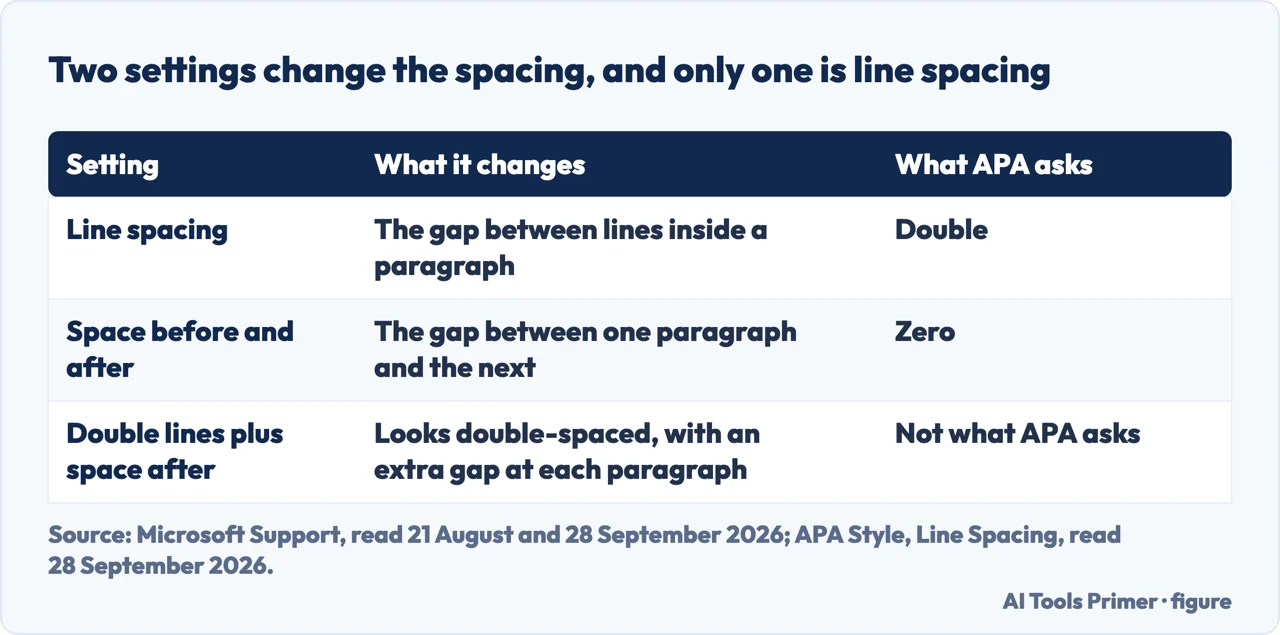
Note that those are two different tools for two different jobs, and the shared name is what blurs them. The Design route sets the whole document; the Home route changes only what you have selected. If you have used the second on a whole document by selecting everything, you have done something subtly different from the first.
Now the part that decides whether your document is actually correct.
“In general, double-space all parts of an APA Style paper… Do not add extra space before or after paragraphs.”
APA Style, on its own site, read 28 September 2026. That second sentence is the one that matters, because in Word, in Microsoft’s own words, “By default, paragraphs are followed by a blank line”, and setting line spacing to 2.0 does not remove it. The result looks double-spaced and has an extra gap at every paragraph break — which is precisely what the style forbids.
The check that settles it
Select the whole document, then go to Home › Line and Paragraph Spacing › Line Spacing Options — Microsoft gives that route for Word for Windows and for Word for Mac. Look at three fields:
Line spacing should read Double. Spacing Before and Spacing After should both read 0 pt. If either of the last two shows anything else, set it to 0 pt: that is the gap APA rules out.
This is worth doing even after using the Design preset, because the three fields show the numbers rather than the look.
Why the default gets in the way. Word’s default adds that space after every paragraph. APA wants no such space — “Do not add extra space before or after paragraphs” — so a paper in that style has to switch the default off. Neither is wrong; they are conventions for different purposes, and for an APA paper Word’s default is the wrong one.
The other place it goes wrong is the reference list. APA is specific that double spacing applies to the reference list too, “including between and within entries”. A bibliography pasted from somewhere else can arrive with its own spacing, and it will not match the rest of your document unless you set it deliberately.
And empty paragraphs are not spacing. Pressing Enter (Return on a Mac) twice between paragraphs adds empty paragraphs, not spacing, and they stay there whatever the spacing fields say. If your document was made that way, the fix is to remove the empty paragraphs first and then set the spacing properly.
If you are using Google Docs. Google keeps line spacing and paragraph spacing apart as well: under Format › Line & paragraph spacing, “Single, 1.15, 1.5, or Double” sit separately from “Remove space before paragraph or Add space after paragraph”. Pages, LibreOffice and the rest are not read here; if yours has separate fields for the space before and after a paragraph, the same check applies.
Before you submit anything. Check the brief for the style it names, then check the three fields above. If the brief says APA, the requirement is quoted on this page in the style body’s own words. If it says something else, read that style’s own rule for line and paragraph spacing, then check the same three fields.
The two routes are quoted from Microsoft’s own support documentation and the spacing requirement from APA Style, read on the dates in the Sources. The route to the three fields is Microsoft’s; the point about empty paragraphs is ours.
Where to start
Four ways in.
- “I just need it double spaced.”
- Three clicks above — then run the check
- “It looks wrong even though I set it.”
- That is the paragraph gap — the check
- “My reference list does not match.”
- Go to the rest of the paper
- “I am not using Word.”
- Line and paragraph spacing — if you are using google docs
Getting it right
Spacing is one of several formatting requirements a brief can name, and they share a shape: each is a setting rather than an appearance.
The rest of the paper
The style that sets your line spacing also sets your citations.
Other editors
The guides below cover other ways of working on a document.
Handing it in
The last steps before submission, where a formatting problem becomes an actual problem.
Not covered here. It will not stop at the three clicks. They are the easy half, and the half that leaves documents failing a requirement they appear to meet.
It will not tell you to press Enter (Return on a Mac) twice. That produces empty paragraphs rather than spacing.
And it will not invent a rule for a style it has not read. The APA requirement here is quoted from APA; if your brief names a different style, that style’s own site is the place to check. What holds instead is simple: the two routes are Microsoft’s own wording and the spacing requirement comes from APA Style, read on the dates this page names.
Sources
- Microsoft Support — Double-space the lines in a Word document, giving the whole-document and selected-paragraph routes — support.microsoft.com, read 21 August and 28 September 2026.
- Microsoft Support — Change the line and paragraph spacing in Word — support.microsoft.com, read 28 September 2026.
- Microsoft Support — Change the default line spacing in Word — support.microsoft.com, read 28 September 2026.
- Google Docs Editors Help — Change how paragraphs & fonts look — support.google.com, read 28 September 2026.
- APA Style — Line spacing, on double-spacing all parts of a paper and not adding extra space before or after paragraphs — apastyle.apa.org, read 28 September 2026.
Written by Alberto Gulotta
Founder and editor of AI Tools Primer, writing from Palermo, Italy. Thirty-five years of taking computers apart, starting with a Commodore 64 — the long version is on the about page.
Something wrong on this page? Write to aitoolsprimer@gmail.com and it gets fixed.
Written on 21 August 2026 · last checked 30 September 2026.
Independence and limits
No affiliate links and no paid placements anywhere on this site. Nobody pays to appear here, and no company has seen this page before you did.
This is general information, not professional advice. Where a page touches money, health, safety or the law, it names its source and the date it was read — and your situation may still differ. See the privacy page and the cookie policy.