It needs a particular browser
condition 1“Important: To automatically back up folders, you must use a Chromium-based browser such as Chrome or Edge.” Safari and Firefox are not named.

Software · guide
By Alberto Gulotta · Updated · 14 min read
Google Photos backup from a phone is a switch, and it is well covered everywhere. From a computer it is a different matter, and in 2026 it changed: the route every older guide describes has a published end date, and it has passed.
Google’s Drive help page, on backing up photos and videos:
- “Note: Backup to Google Photos will soon no longer be available in Google Drive for desktop. To continue backing up their folders to Google Photos, users will need to reselect their preferred backup folders in the new Google Photos interface. Any items previously backed up will remain in Google Photos.”
- “Starting June 15, 2026: In-app notifications will begin prompting users to transition to Google Photos. Configuration of new backup folders in the Drive for desktop interface will no longer be available. Existing folders will continue to sync.”
- “Starting August 10, 2026: Drive for desktop will end support for Google Photos backup.”
The second date has passed. Google’s pages still describe it in the future tense, which is why this page quotes them rather than declaring the switch complete — what is documented is the schedule, not the state of your machine today. On the Photos side the instructions that remain for Drive are headed “Stop backing up folders with Google Drive”, and they carry the same deadline: “Important: Google Drive for desktop ends support for Google Photos backup on August 10, 2026.”
The consequence for anyone reading an older guide is direct. The instruction to install Drive for desktop and tick “Back up to Google Photos” is on a published end-of-life schedule, and the replacement is not another desktop application.
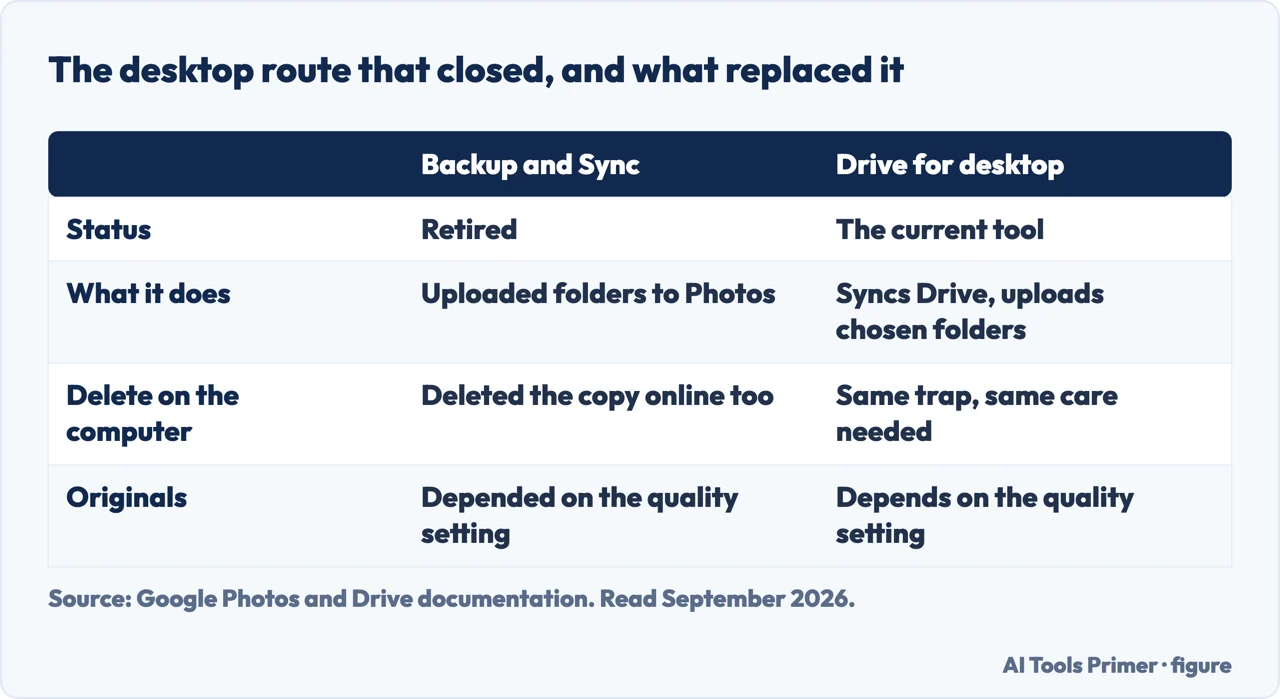
What replaces it is documented on the same Photos page, and it comes with three conditions that decide whether it will work for you at all. They are stated by Google and skipped by almost everything written about this.
It needs a particular browser
condition 1“Important: To automatically back up folders, you must use a Chromium-based browser such as Chrome or Edge.” Safari and Firefox are not named.
The tab has to stay open
condition 2“To allow backup, keep the Google Photos tab open on your browser or have the Photos Web App running. This allows the backup to happen in the background.” And plainly: “If you close the tab, the photos and videos in the selected folders won’t back up automatically.”
One library is excluded
condition 3“Apple Photos Library is not supported when you back up folders from photos.google.com.” On a Mac, that is the library most photographs are already in.
Put those three together and the shape of the new arrangement is clear. Backup from a computer is no longer a background service — it is a browser tab that has to be left running, in one family of browsers, and on a Mac it will not look inside the Photos library at all. That is not a criticism; it is what the documentation says, and it is the difference between setting something up once and remembering to keep it open.
There is one detail in Google’s favour worth quoting, because it removes a common fear about pointing this at a large folder. “When you add a folder to be backed up, Google Photos will try to upload all the content in the folder”, but “only content not previously uploaded, or uploaded and later edited or deleted while backed up, is uploaded”. Re-adding a folder does not re-upload it.
Then the part that costs money, and the one that is genuinely counter-intuitive.
“If you copy an item from Google Drive to Google Photos, the new copy in Google Photos will also count against your storage.” And, from the Drive side: “If you set a folder to both ‘Sync with Google Drive’ and ‘Back up to Google Photos,’ your photos and videos are uploaded twice and use more of your Google storage.”
Both sentences say the same thing from opposite ends: nothing moves between the two services — it is copied, and the copy is charged. Anyone who has kept a folder in both places has been paying for it twice, and anyone following Google’s own migration route will pay for the second copy until the first is deleted. On a work or school account there is not even a copy button: “you’ll have to download from Google Drive and re-upload to Google Photos.”
Two more published rules belong on any page about this, because they concern photographs disappearing rather than arriving. The first is inactivity: “if you don’t use Google Photos for 2 years or more, your photos and videos might be deleted”, with an exemption stated in the same breath — “if you have Google One membership and your account is in good standing, your photos and videos won’t be deleted”. The second is what happens next: content removed for inactivity is “deleted and sent to trash”, and “photos and videos that you delete will stay in your trash for 30 days before they are permanently deleted”.
The family-plan rules are worth knowing before sharing storage as a solution. Google One sharing goes to “up to 5 family members”; “each member of the family group gets up to 15 GB of personal storage space for their files” and “a family member’s files fill up their personal space first”; and, the line that surprises people, “members of a family group can only free up space from their own storage usage. You can’t affect the storage usage of other family members.” Sharing a plan does not let you tidy anybody else’s photographs. Google also notes that “family sharing isn’t available for the Google One Lite plan (30 GB)”.
A note on where this question gets answered. The first page of results for it is made almost entirely of Google’s own properties and the two app stores, plus a personal blog and a community thread. It is a good first page if you want the app. None of the guides read for this page mentions the desktop end-of-life schedule, which is the one thing that has actually changed.
What this page will not do is tell you your backup has stopped. The schedule is published; the state of your particular installation is not something this page can see, and the honest instruction is to open Google Photos and check rather than to trust either an old guide or this one.
It will not recommend a third-party backup tool as a replacement. That is a real category, some of it is good, and none of it has been tested here.
And if the photographs are on an iPhone, Apple’s own route bypasses all of this. Its instruction for getting pictures onto a computer is a USB cable and the Photos app, with the alternative stated in one line: with iCloud Photos “you don’t need to import photos from one device to another”, and it “always uploads and stores your original, full-resolution photos”. That last clause is the one to weigh against any backup service, Google’s included: the question is not whether the photographs are somewhere, but whether what is stored is the original.
And it will not treat a single cloud copy as a backup. Everything above is one company holding one copy under rules it can change, and the schedule quoted at the top of this page is the demonstration.
Three ways in. If you set this up on a computer years ago, take the first.
Drive for desktop carried photo backup for years. Google published a two-date schedule for ending it, and the pages that describe how to set it up now describe how to stop.
Folder backup from photos.google.com, with a browser requirement, a tab that must stay open, and one library it will not read.
Google states from both sides that an item copied between Drive and Photos is charged twice. The migration it prescribes has that cost built in.
Not covered here. It will not tell you Drive for desktop has stopped backing up on your machine. Google published the date; this page quotes it and says to check, because the schedule and your installation are two different facts.
It will not recommend a replacement backup product, free or paid. Nothing here has been tested, and this is a category where untested recommendations pay well.
It will not call a single cloud copy a backup. One company, one copy, rules that change — the schedule at the top of this page is the argument.
And it carries no affiliate links, including for the storage plans, which are subscriptions and therefore the most valuable kind of referral there is. What holds instead is simple: each date, limit and condition above is quoted from Google directly, and where the documentation describes a schedule rather than a completed change this page says so.
Copied is not moved, and synced is not backed up. Four jobs that get confused for each other.
Written by Alberto Gulotta
Founder and editor of AI Tools Primer, writing from Palermo, Italy. Thirty-five years of taking computers apart, starting with a Commodore 64 — the long version is on the about page.
Something wrong on this page? Write to aitoolsprimer@gmail.com and it gets fixed.
Written on 23 August 2026 · last checked 23 September 2026.
Independence and limits
No affiliate links and no paid placements anywhere on this site. Nobody pays to appear here, and no company has seen this page before you did.
This is general information, not professional advice. Where a page touches money, health, safety or the law, it names its source and the date it was read — and your situation may still differ. See the privacy page and the cookie policy.