
Footprint · guide
How to report a post on Facebook: the link, cases and review
By Alberto Gulotta · Updated · 17 min read
How to report a post on Facebook: the Help Center says to use the Report link near the content itself. The pages we read do not list the clicks for a post, and two dated articles name different menus. Groups, privacy and copyright each have their own route, and a second review is offered when a post stays up.
| Question | Answer | Where it comes from |
|---|---|---|
| What does Facebook say to use? | The Report link near the content itself | Facebook Help Center |
| What is the menu entry called? | It depends on the page: Find Support or Report Photo/Post in 2021, Report Post in 2017 | MakeUseOf, How-To Geek |
| Where do I follow the report? | In the Support Inbox, where the decision also arrives | Facebook Help Center |
| Can I take a report back? | Yes, with Delete Report, but only if Facebook has not reviewed it yet | Facebook Help Center |
| What if the post stays up? | Request another review, where the option appears; Facebook puts it at “usually within 24 hours” | Facebook Help Center |
The route Facebook names, and the menus that moved
The Help Center page called Report Content on Facebook says the best way to report abusive content or spam is the Report link near the content itself. It gives a list of what can be reported that way: posts, posts on your timeline, photos and videos, messages, Pages, groups, events, comments, ads on Facebook and hashtags, with a separate heading for a profile. The text we read shows those headings without the steps under them, so we cannot give Facebook’s own wording for the clicks that report a post. The page also says that anyone having other trouble, such as a login problem or a suspected hack, should look at other steps; our page on a hacked Facebook account covers that case.
A second Help Center page, Report something on Facebook, is an index. It lists reports for inappropriate or abusive things, with nudity, hateful conduct and threats as examples, for a profile or Page pretending to be someone, for an app or game, and for Marketplace and payment problems. Further down it names cases that have their own articles: posts about suicide or self-injury, a person under the minimum age, a convicted sex offender, images of a child being abused, threats to share nude or sexual images of you, and human trafficking. The index also links an article on how Facebook works with law enforcement. We read the index, not the articles it links to.
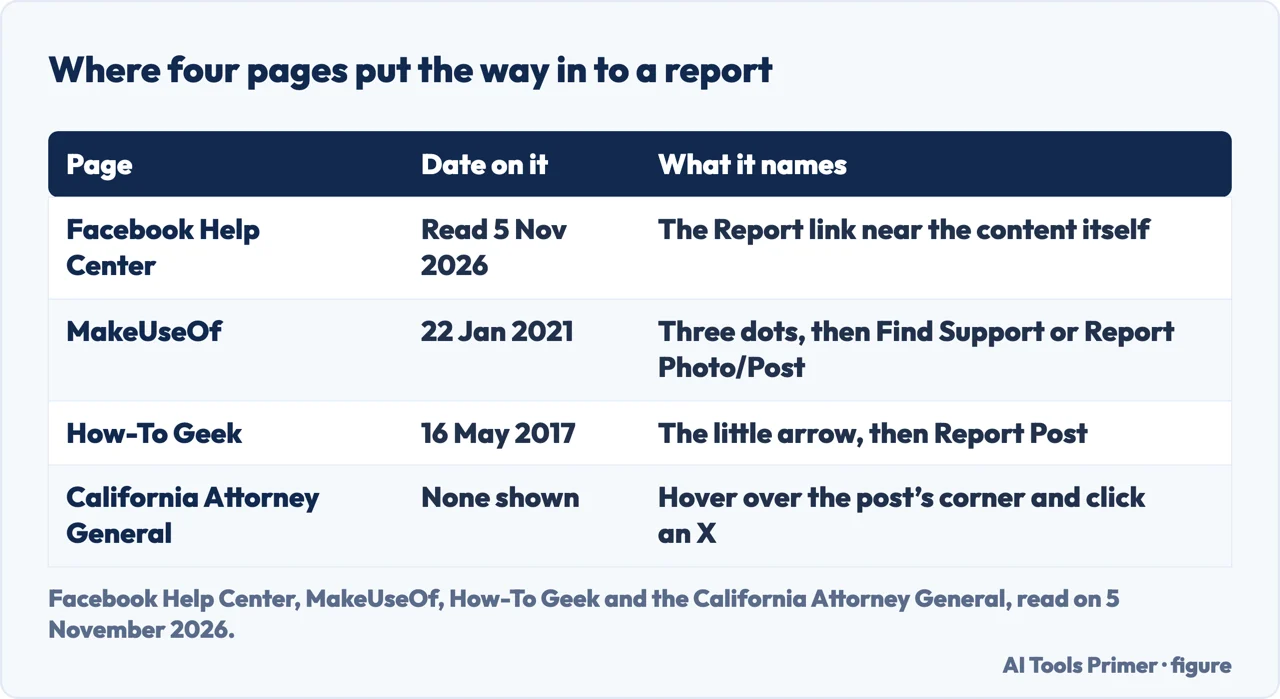
Three pages we read give clicks, and they do not agree. MakeUseOf, in an article published on 22 January 2021, says to open the post or photo, select the three dots in the upper right corner, tap Find Support or Report Photo/Post, and continue through two prompts that ask for the reasons. It adds that this submits a report to Facebook, whose moderation teams will evaluate the post. How-To Geek, in an article published on 16 May 2017, says to click the little arrow in the top right and select Report Post. A popup then offers options; for something abusive the article says it will normally be I Think It Shouldn’t Be On Facebook. Next come a reason, a choice of who the post is targeting, and then a screen that offers to unfriend, unfollow or block the person or to Submit to Facebook for Review. The California Attorney General’s page, which shows no date, gives a third version for an individual post: hover over the corner of the post, an X appears, and you click it.
That makes four pages with four ways in: a link near the content, three dots, an arrow and an X. Facebook’s page names the link; the three articles name a menu entry, and the entries differ. The dated articles are from 2021 and 2017, and we did not open Facebook to see which of the four descriptions matches today’s screen.
The link and the screenshot
Facebook’s clearest line about evidence sits on its page for people who cannot report directly. If you do not have an account, or cannot see the content because someone blocked you, the page says to ask a friend with an account to report it using the Report link near the post, photo or comment. It adds that Facebook will not be able to act on the report until it can find the content, and asks for as much detail as possible, including “links and screenshots of the content”. The remaining Facebook pages we read do not mention evidence, and they do not say whether to save a post before reporting it. We add no advice of our own on that.
A separate Help Center page explains how to get the link to a piece of content you want to report. For a profile, Page, group or event, you type its name into the search box at the top of any page on Facebook, click Search, click the name of the one you are trying to report, and copy the link from your browser’s address bar. For a specific piece of content that a profile, Page, group or event created, such as a comment or a photo, you click the date or time link in the post, comment, photo, share or video, and copy the link from the address bar. The text we read gives these as steps for getting a link and does not say at which point in a report the link is used.
MakeUseOf lists what its article counts as breaking Facebook’s Community Standards: posts made to threaten, exclude or intimidate someone, the non-consensual posting of private and identifying information, violent posts and terrorist threats, organized violence or criminal activity, the incitement of criminal activity, the sale of controlled goods, and posts glorifying self-harm. Its advice is that if a post breaks one of these rules it is wise to report it, because you may assume it has been reported already but it is possible that it has not. How-To Geek puts the limit the other way: Facebook’s terms ban bullying, abuse and harassment, and threatening content, hate speech, nudity or violence, but disagreeing with something does not make it banned. MakeUseOf names the non-consensual posting of private and identifying information; our page on the first hour after doxxing covers that case.
Cases that change the route
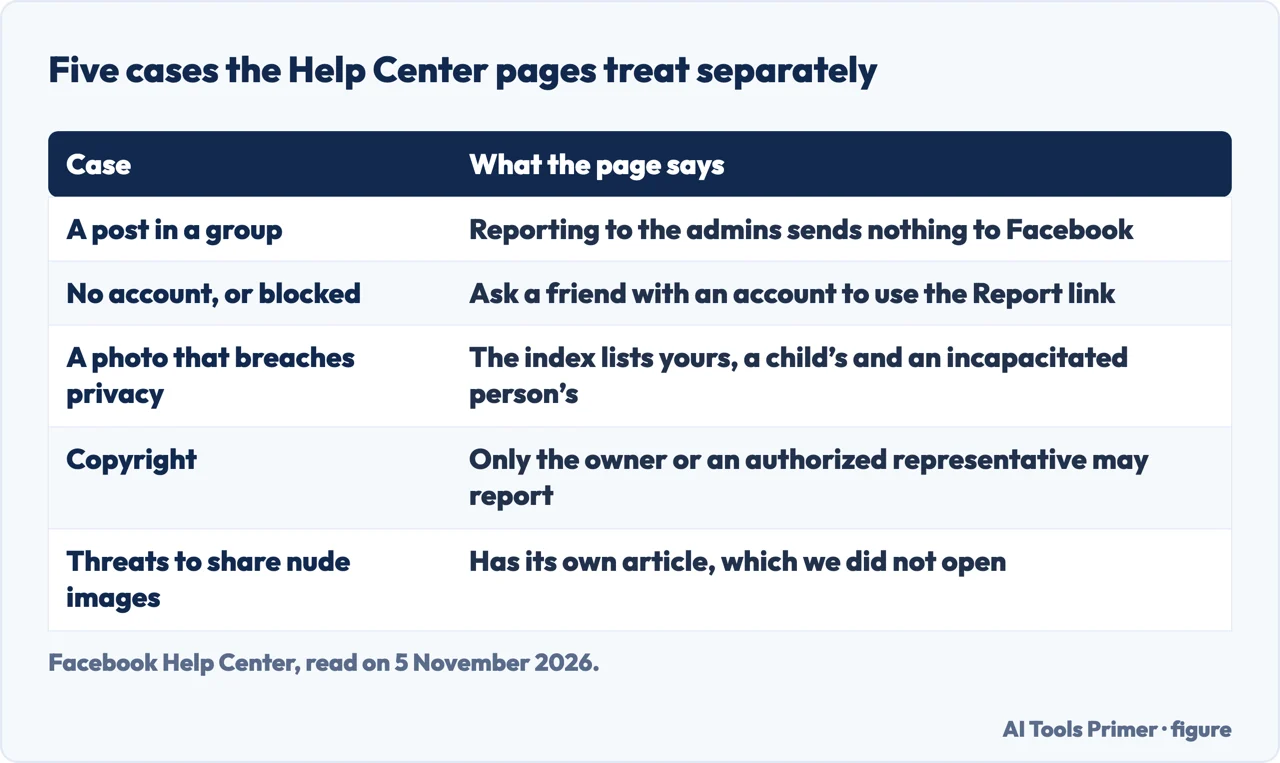
A post in a group. Facebook has a page on reporting a group post or comment to the admins, and its first lesson is what that report is not. It says reporting to the admins does not send a report to Facebook, and that a group will not be taken down just because something was reported to the admins. The same page says the admins will know it was you who reported. The steps it gives are to go to facebook.com/groups and select your group, click Options in the top right of the post or comment, click Report post to group admins for a post or Report comment to group admins for a comment, pick a reason and fill in any other information, and click Next. You can then choose to block or hide the profile that made the post, and click Done. The admins receive a notification that there is content to review, and the page says they may or may not take action. The same page points to separate articles for reporting a group post or comment to Facebook and for reporting a group to Facebook; we did not open them.
No account, or blocked. The route is the friend described above. The page we read does not describe a way for the person without an account to file the report alone.
A photo that breaches your privacy. The Help Center page Reporting a Privacy Violation is an index of three entries: a photo or video on Facebook that violates your privacy, one that violates the privacy of your child, and images that violate the privacy of a sick, hospitalized or otherwise incapacitated person. The text we read has no steps under them, and the form behind the first entry could not be opened by us, so the pages we read do not say what is asked or what the outcome is. If the threat is to publish private photographs, our page on blackmail covers that case in its own order.
Copyright. A separate page says only the copyright owner or an authorized representative may file a report of copyright infringement. It lists one or more of three actions: fill out Facebook’s form, contact its designated agent with a complete copyright claim, or try to settle it without Meta by messaging the person who posted the content. It also gives a warning about privacy: Facebook regularly passes the rights owner’s name, your email and the details of the report to the person who posted, so the page suggests a valid generic business or professional email. For someone reporting as an authorized representative, it says Facebook gives the name of the organization or client that owns the right.
What happens after you report
Facebook’s page on content it did not remove explains the order. When you report a post, photo or comment, Facebook says it will hide or remove it if it finds that it goes against the Community Standards, which define what is and is not allowed on Facebook and apply all over the world. After you report, a notification arrives in your Support Inbox, where you can check the status of what you reported. After the review, Facebook says it will let you know whether the content did or did not go against the Standards. The pages we read do not give a time for that first decision on a post.
MakeUseOf adds one time, for a profile rather than a post: after a profile report you will not receive an automatic response, and Facebook could take several days to analyze the profile and send a decision. It also says Facebook will take action only if the person has broken a rule, and that seeing something you dislike does not mean it breaks Facebook’s rules.
The Support Inbox is also where Facebook says you may have the option to look at a report. From it you can click a report to learn more about the policies, see when Facebook took action on your report and the decision it made, and ask for a review of that decision, though for some types of content a review cannot be requested. To take a report back, you click it and select Delete Report; the page warns that you can cancel a report only if Facebook has not reviewed it yet. The Help Center index also links an article on what happens when you report something to Facebook and whether the person you report is notified. We did not open that article.
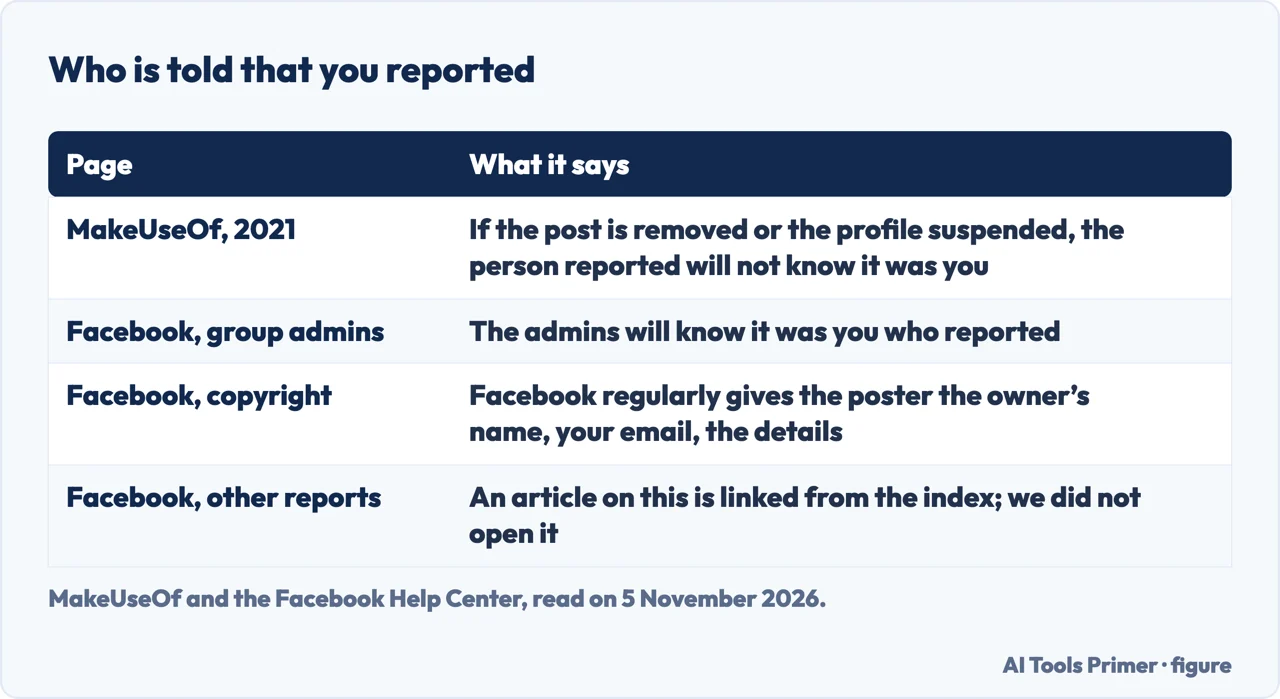
On the question of who finds out, the pages we read say different things, and each is about a different kind of report. MakeUseOf says that if a post is removed or a profile suspended after your report, your personal information is kept confidential and the person you reported will not know it was you. The group page says the admins will know it was you who reported to them. The copyright page says Facebook regularly gives the poster the rights owner’s name, your email and the report details. Each statement is about its own kind of report, and the MakeUseOf article is from 2021.
If the post stays up
Facebook’s page says that if it finds the content does not go against the Community Standards, it will let you know. If you disagree, the page says Facebook “usually” offers the chance to request another review, in which it looks at the content again. For some types of content a second review cannot be requested, and the page says Facebook is adding more options.
On a computer, the page gives these clicks: your profile picture in the top right of Facebook, then Help & support, then Support Inbox, then Reports About Others. Open the message about the decision on the content you reported, click See Options at the bottom, and, if the option is available, click Request another review and follow the on-screen instructions. When the option is not offered for that type of content, Request another review does not appear. Once you ask, Facebook says the content will be reviewed again, “usually within 24 hours”, and that if it finds it made a mistake it will let you know and hide or remove the content.
The page then describes one step further. If Facebook upholds its decision a second time, you may be able to appeal to the Oversight Board. Not all decisions are eligible, and the board selects only some eligible appeals to review. The page does not give how many are taken up.
MakeUseOf and How-To Geek both point to things that do not depend on Facebook’s answer. MakeUseOf says reporting is not the only option and lists unfollowing, muting and blocking, so that you see only what or who you want to see. How-To Geek says that if the review team does not agree, “not a lot will happen”, and that it is up to you to block or unfollow the person. It also says that, to deal with things immediately, you can unfriend, unfollow or block the person on the screen that comes before Submit to Facebook for Review. If the problem is who can see your own posts, our pages on making a Facebook profile private and locking a Facebook profile cover the settings. For a post that is a scam, our page on reporting scams lists where scams are reported outside Facebook.
What we did not use
We reported nothing on Facebook. Several of the Facebook Help Center pages keep their steps inside sections that were closed when we read them, so we have the headings and not the clicks, and the clicks for a post come from the dated articles. We did not open the Facebook form for reporting something. We did not read the article on what happens when you report something, the pages for reporting a group post or a group to Facebook, or the privacy report forms, and a summary from a search tool was not used as a source. MakeUseOf and How-To Geek belong to the same publisher, so we count them as one voice when we weigh agreement. The California Attorney General page is a short step list with no date, and we use it only as an example of a menu that has changed.
Where to start
Four ways in.
- “Where is the Report button?”
- The route Facebook names, and the menus that moved — route
- “It is a post in a group.”
- Cases that change the route — cases
- “Will they know it was me?”
- What happens after you report — after
- “Facebook left it up.”
- If the post stays up — stays
Your own Facebook profile
Who sees what you post, and what happens to a Page.
When it turns hostile
Doxxing, scams and a hacked account.
Questions people also ask
How to get a post taken down on Facebook?
Facebook’s Help Center says to use the Report link near the content, and that it will hide or remove the content if it finds it goes against its Community Standards. The pages we read do not promise removal, and a second review is offered if the post stays up.
How do I contact Facebook to report a post?
The pages we read describe the Report link and the Support Inbox, not a phone number or an address. Their help box also offers a “Chat with Meta AI support assistant”, which we did not open, so we cannot say what it does about a post. The Support Inbox is where the decision arrives.
What to do if someone posts a picture of you on Facebook without your permission?
Facebook’s privacy report index lists a photo or video that violates your privacy, but the text we read has no steps under it. The menu also lists a “Legal Removal Request” heading, which we did not open. Only the copyright owner may file a copyright report, so by our reading that route excludes a photo someone else took.
What happens when I report a post on Facebook?
Facebook says a notification arrives in your Support Inbox and that it will tell you whether the content went against its Community Standards. MakeUseOf says the person reported will not know it was you; the group page says group admins will.
Not covered here. We reported nothing on Facebook. The statements come from nine Facebook Help Center pages, MakeUseOf, How-To Geek and the California Attorney General, all read on 5 November 2026.
The measure behind this page is an Ubersuggest reading of 5 November 2026, not a Semrush one; the Semrush check is still to do.
Sources
- Facebook Help Center — Report Content on Facebook — www.facebook.com, read 5 November 2026.
- Facebook Help Center — Report something on Facebook — www.facebook.com, read 5 November 2026.
- Facebook Help Center — What to do if Facebook didn’t remove content you reported — www.facebook.com, read 5 November 2026.
- Facebook Help Center — Can I check the status of something I’ve reported or cancel a report? — www.facebook.com, read 5 November 2026.
- Facebook Help Center — Report a Facebook group post or comment to the admins — www.facebook.com, read 5 November 2026.
- Facebook Help Center — How do I report something on Facebook if I don’t have an account or can’t see it? — www.facebook.com, read 5 November 2026.
- Facebook Help Center — Get a link (URL) to report a piece of content on Facebook — www.facebook.com, read 5 November 2026.
- Facebook Help Center — Reporting a Privacy Violation — www.facebook.com, read 5 November 2026.
- Facebook Help Center — How do I report copyright infringement on Facebook? — www.facebook.com, read 5 November 2026.
- MakeUseOf — How to Report Spam or Abusive Content on Facebook (22 January 2021) — www.makeuseof.com, read 5 November 2026.
- How-To Geek — How to Report a Facebook Post (16 May 2017) — www.howtogeek.com, read 5 November 2026.
- California Attorney General — Reporting Abuse on a Facebook Individual Post — oag.ca.gov, read 5 November 2026.
Written by Alberto Gulotta
Founder and editor of AI Tools Primer, writing from Palermo, Italy. Thirty-five years of taking computers apart, starting with a Commodore 64 — the long version is on the about page.
Something wrong on this page? Write to aitoolsprimer@gmail.com and it gets fixed.
Written on 6 November 2026.
Independence and limits
No affiliate links and no paid placements anywhere on this site. Nobody pays to appear here, and no company has seen this page before you did.
This is general information, not professional advice. Where a page touches money, health, safety or the law, it names its source and the date it was read — and your situation may still differ. See the privacy page and the cookie policy.