
Scams · guide
Where to report scams: what the FTC, Report Fraud and CAFC say
By Alberto Gulotta · Updated · 17 min read
Where to report scams depends on the country and on what was lost. In the United States the FTC takes reports at ReportFraud.ftc.gov, Report Fraud takes them for England, Wales and Northern Ireland, and the Canadian Anti-Fraud Centre covers Canada. For money already sent, the FTC points to the company you paid.
| Question | Answer | Where it comes from |
|---|---|---|
| Do I report if I lost no money? | The FTC says you can report anything you think may be a fraud, scam or bad business practice, even if you did not lose money | FTC |
| And if I am not sure it is a scam? | The FTC says to report it anyway | FTC |
| Will the report get my money back? | The FTC says it cannot take action for individual consumers; its steps for getting money back go through the company you paid | FTC |
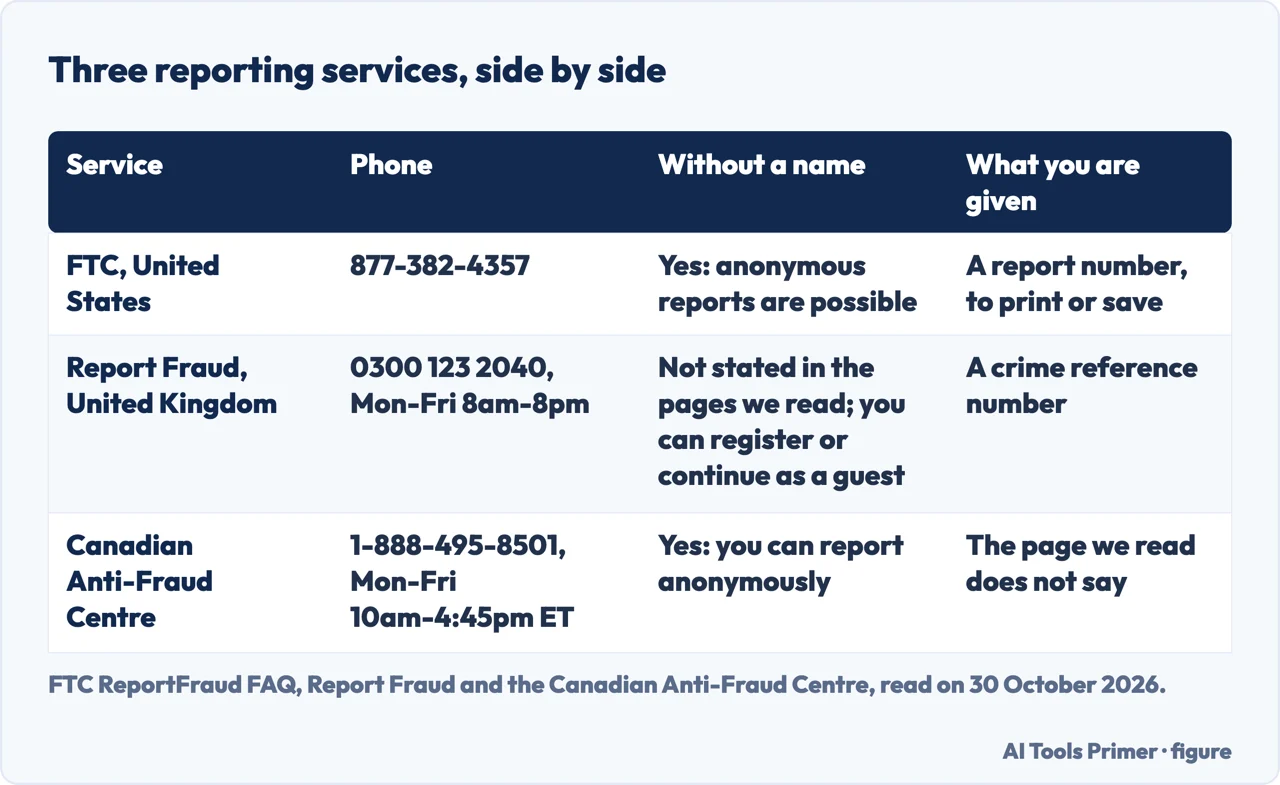
| Can I report without my name? | The FTC and the Canadian Anti-Fraud Centre say yes; the Report Fraud pages we read do not say whether a report can be anonymous; they offer an account or a guest report | FTC, CAFC, Report Fraud |
| I am not in the United States. | Report Fraud takes reports for England, Wales and Northern Ireland, the Canadian Anti-Fraud Centre for Canada, and the FTC points to econsumer.gov for cross-border scams | Report Fraud, CAFC, FTC |
| Is there a phone number? | FTC 877-382-4357; Report Fraud 0300 123 2040; Canadian Anti-Fraud Centre 1-888-495-8501 | FTC, Report Fraud, CAFC |
Report the scam, then call the company you paid
The pages we read give two jobs that are easy to run together. One is the report, which goes to an agency. The other is asking the company that moved your money whether it can be reversed. The FTC’s page What To Do if You Were Scammed, last updated in June 2026, says that if you paid a scammer your money might be gone already, but that it is always worth asking the company you used to send it whether there is a way to get it back. The FTC’s report page says the FTC cannot take action on behalf of individual consumers. When the FTC brings a case it says it tries to get money back for people, and it lists recent cases that ended in refunds at ftc.gov/refunds. The pages we read do not say that a report returns your money.
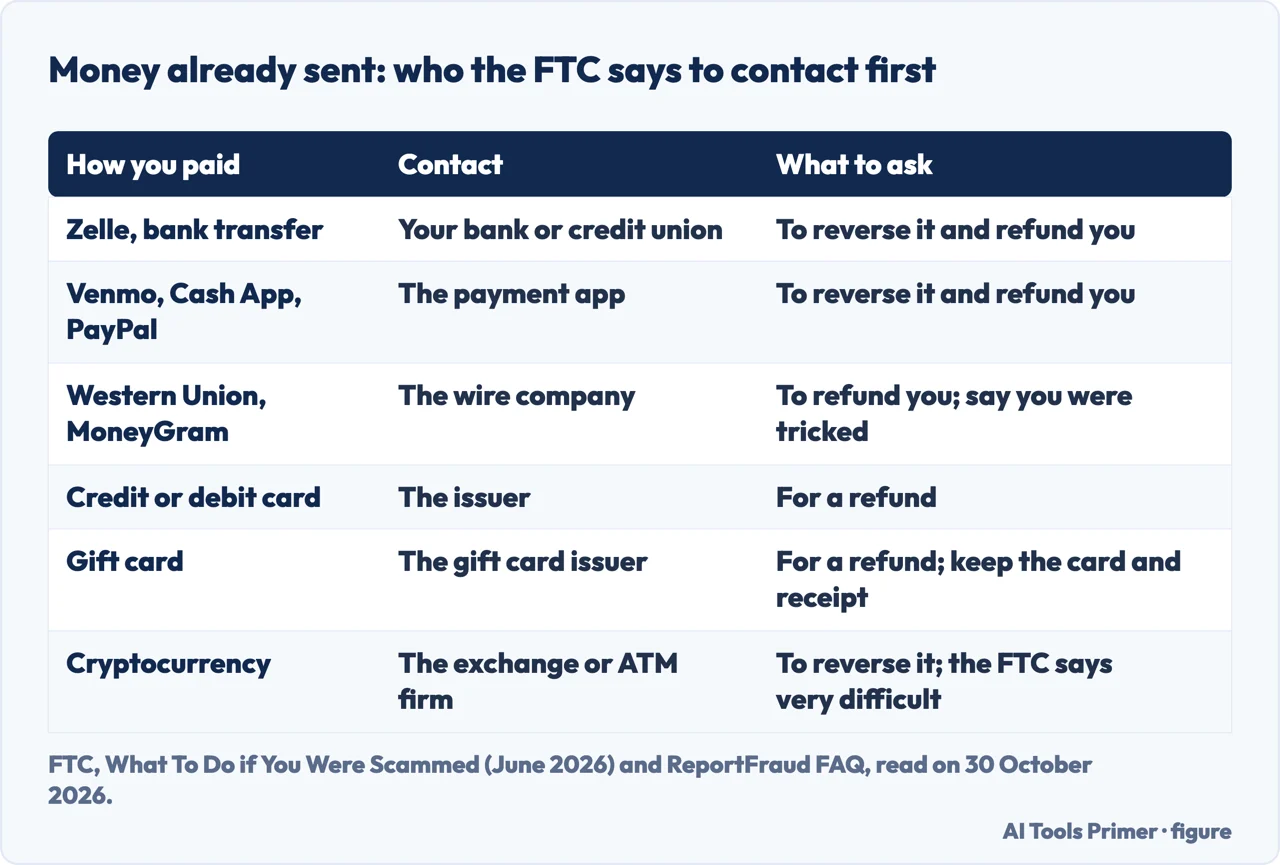
The FTC’s money advice depends on how you paid. It says to act immediately, and its report page adds that the quicker you act, the better the chance of getting money back or stopping a charge. Its steps, with the extra details from its report page, are in the figure below.
For a bank transfer, the report page says to give the bank the account number the money was sent to, and that if the bank will not help you can file a complaint with the Consumer Financial Protection Bureau (CFPB). For a wire transfer it says to ask for the transfer to be reversed, and adds that a reversal is unlikely but that it is important to ask. For a card it says to file a dispute, also called a chargeback, follow up with a letter and keep your records. For cash sent by U.S. mail it names the U.S. Postal Inspection Service, 1-877-876-2455, which for a fee can intercept a package that has not been delivered; for another delivery service such as FedEx or UPS it says to contact them as soon as possible.
Two warnings sit beside those steps. The FTC says that if someone calls and offers to “help” you recover money you have already lost, you are probably dealing with a fake refund scam. And if someone tells you to send money to get a refund from the FTC or any other government agency, it says that is a scam. Before any of it, the FTC’s video Why Report Fraud? gives a first step: tell somebody, such as a family member, friend or neighbor, and then report. We also publish a page on the bank side of recovering scammed money.
In the United States: ReportFraud.ftc.gov
The FTC’s answer to what you can report is wide: anything you think may be a fraud, scam or bad business practice, even without a loss. If you are not sure which category fits, it says to choose “Something Else” and describe what happened, and it will categorize the report. For an unwanted call, there is a category called “Just An Annoying Call” with a streamlined form. If you paid money, the form asks how much and when, and for anything you know about whoever you are reporting, such as a name and contact details. The FTC says anything you can tell it is helpful, and that you can share as much or as little as you like. A report can be filed for someone else, and it can be filed anonymously; the FTC adds that contact details help if it needs to learn more.
Texts and emails are handled by pasting. For a spam text, the FTC says to paste the message into the Comments field and not to click any link in it. It adds that it cannot accept forwarded messages, which is why the text is pasted. It adds two other places for a text: forward it to 7726 (SPAM) so your wireless provider can spot and block similar messages, and report it in the messaging app you use. For a phishing email the same pasting rule applies, and the FTC says you can also forward it to your email provider and to the Anti-Phishing Working Group at reportphishing@apwg.org. The form does not take uploads either: paste the text of any document into Comments and keep the originals, because law enforcement might ask for them. Our pages on phishing email, scam texts and reporting spam texts on a phone go further on each channel.
If you cannot use the website, the FTC’s Consumer Response Center takes reports at 877-382-4357. Spanish speakers can file at ReporteFraude.ftc.gov. For other languages the FTC says to call the same number from 9 am to 5 pm ET, press 3 for a list of languages and then 0 for more. For the platform that does not remove an intimate photo or video, the FTC points to TakeItDown.ftc.gov instead.
USAGov offers a different front door. Its page describes a tool that finds the agency or organization to report a scam to, asks where the scam took place and which category it falls in, and takes about 1-2 minutes. It also says that if your issue is with a legitimate business that wronged you, it may not be an actual scam, and points to its complaints section. The tool is American, so it answers the question for a United States reader only.
When it is identity theft, a password or a computer
The FTC keeps a second site for identity theft. Its report page says to use IdentityTheft.gov if someone has used your information to open a new account or make a purchase, and that you do not need to report that again at ReportFraud.ftc.gov. You can still report the scam that exposed your information there. For a Social Security number that a scammer used, the FTC’s page says to report at IdentityTheft.gov and follow a customized recovery plan; if the scammer did not use it or you are not sure, it sends you to IdentityTheft.gov/databreach. The report page says that if your information has not been misused yet you do not need to file an FTC Identity Theft Report, and that checking, freezing and monitoring your credit are steps you can take. It also says the FTC cannot tell you whether someone misused your information or freeze your credit. Our page on identity theft covers that side.
For a password, the FTC says that if you gave a scammer the username and password and can still log in, create a new strong password and change it anywhere else you reuse it, then turn on two-factor authentication. If you can no longer log in, it points to its guide on getting back into a hacked account. If you gave a scammer access to your computer or phone, it lists three steps: update your security software, run a scan and delete what it flags, and change your passwords and turn on two-factor authentication. For help finding or removing malware it suggests tech support from the manufacturer or a company you know and trust, or a knowledgeable friend or family member.
What happens to the report
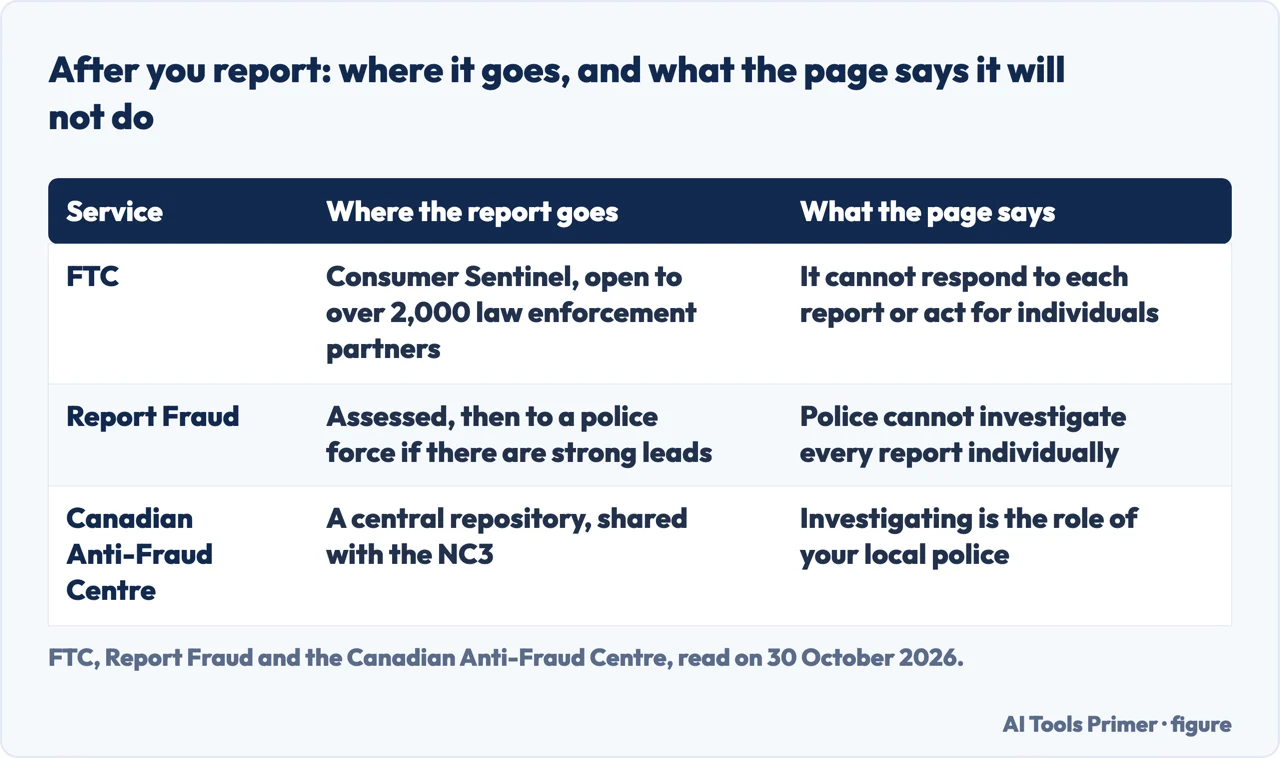
A report to the FTC goes into Consumer Sentinel, a database the FTC says is available to federal, state and local law enforcement across the country, and the FTC says it makes reports available to over 2,000 law enforcement partners. It says it uses reports to investigate and bring cases against fraud, scams and bad business practices, and also to spot trends, educate the public and share data about what is happening in your community. The FTC says that when it files an enforcement action and gets money back for people, it will try to contact those who lost money.
The FTC is plain about the limit. It says it is not able to respond to each report individually, cannot take action on behalf of individual consumers and cannot give updates on a report that has been filed. When you submit, it offers next steps; if you gave an email address it sends those steps and the report number, but not the report itself. You get the chance to print or save a copy with the number, and the FTC says that if you leave the page without doing so you cannot get a copy. To add information later, the FTC says to file a new report and include the earlier number in the comments.
On calls, the FTC says reporting them will not stop them instantly, but that it releases the phone numbers people report to the public each business day, which helps carriers and others working on call-blocking and call-labeling. Our page on phone calls from scammers covers the call itself.
The FTC also warns about its own name. It says it will typically not call you, and if it does call about a report you filed, the caller will have the reference number you were given. Anyone calling for another reason and saying they are from the FTC is probably a scammer, and the FTC says it will never threaten you, tell you to transfer money to “protect it” or tell you to withdraw cash or buy gold. To check a call, the FTC gives (202) 326-2000.
Should you also report elsewhere? The FTC says yes, even if you already reported to another agency, with one exception: a financial issue you already sent to the CFPB, such as debt collection, a credit report or a bank issue. When the FTC sends you to the CFPB, it says your report still ends up in the FTC database. It also names your state attorney general and your local consumer protection agency as other places to file. And while the FTC says it will not automatically share your information with the company you reported, it says there are times it may need to, for example if a judge orders it.
The United Kingdom, Canada and everywhere else
In the United Kingdom, Report Fraud calls itself the UK’s national fraud reporting centre. Its page offers two options. “Report something suspicious” is for scam emails, phone calls, messages, social media or websites when you have not lost money or responded. “Report a cyber crime or fraud” makes a police report for England, Wales or Northern Ireland; for Scotland the page says to contact Police Scotland on 101. If a crime is happening now, it says to stop the report and call 999 for emergencies or 101 for non-emergencies.
Report Fraud’s guide says you can report online at any time, or by phone on 0300 123 2040, Monday to Friday, 8am to 8pm, or +44 300 123 2040 from abroad. Online you can register, log in or continue as a guest. Registering lets you save and resume a partly completed report, track progress, add information, call to discuss the report and receive an update by email; as a guest you can only receive updates by email or post. After you report you are given a crime reference number. The guide describes four phases: the report, an assessment that looks for patterns, links to other reports and potential suspects, a review, and a handover to a police force if there are strong lines of enquiry. A report that cannot be progressed is stored and assessed again against new information. You can also choose to have your details passed to Victim Support, a national charity. A business, charity or other organisation under a live cyber attack is told to call 0300 123 2040 immediately, a service the guide says runs 24 hours a day.
The Canadian Anti-Fraud Centre (CAFC) says that victims or witnesses can report fraud or cybercrime at reportcyberandfraud.canada.ca, with the option to report anonymously, or by phone at 1-888-495-8501, Monday to Friday, 10 am to 4:45 pm Eastern, closed on holidays. It tells victims to contact their local police as soon as possible, and recommends reporting to the CAFC whether or not you are a victim. Its page says it is the role of local police to investigate, and that the CAFC keeps a central repository of information to assist investigations. Its reasons to report include linking crimes in Canada and abroad, helping progress an investigation and showing crime trends, and it shares what you send with the National Cybercrime Coordination Centre.
For scams that cross borders, the FTC’s report page says that if you live outside the United States, or want to report an international scam, you can use econsumer.gov, and the report is then included in the FTC’s Consumer Sentinel database. It describes econsumer.gov as a partnership of more than 65 consumer protection agencies around the world, available in English, Spanish, French, German, Korean, Japanese, Polish, Portuguese and Turkish. The pages we read do not mention services for Australia, India, the European Union or other countries, so we cannot say where to report there.
Is it worth reporting, and what the pages leave open
All the services give reasons, and the reasons differ. The FTC says reports let it build cases, spot trends and educate the public, and its video says every report is a piece of the puzzle because scammers do not scam just one person. Report Fraud says the police cannot investigate every report individually, but the information you give assists them, and it says the police use it to build up intelligence about who is committing what fraud and against whom. It says reports it records as information are passed to the police but are not investigated. The CAFC says a report can link crimes, progress an investigation and show trends. The FTC and the CAFC both say a report can be anonymous; the Report Fraud pages we read describe registering or continuing as a guest.
Report Fraud also addresses the reluctance to report. Its guide says some people choose not to report fraud because they are embarrassed, and that anyone could be a victim.
What the pages do not give is a number. The pages we read do not say how many reports become a case or how long that takes. We did not read the Internet Crime Complaint Center (IC3) or the FBI’s page on common frauds, so nothing here comes from them. We filed no report ourselves.
Where to start
Four ways in.
- “Will it get my money back?”
- Report the scam, then call the company you paid — order
- “How do I file in the US?”
- In the United States: ReportFraud.ftc.gov — us
- “What happens to the report?”
- What happens to the report — after
- “I am not in the US”
- The United Kingdom, Canada and everywhere else — abroad
Reporting what reached you
The report button in your inbox, the message itself and the phone that received it.
Calls and texts
The channel a scam arrives on decides what you report and where.
Questions people also ask
Is it worth reporting a scammer?
The FTC says reports help it build cases, spot trends and educate the public, but that it cannot act for individuals or update you. Report Fraud says police cannot investigate every report individually, and the CAFC says reports can link crimes. The pages we read do not say how many reports become cases.
Where is the best place to report scams?
It depends on where you are. The FTC takes United States reports at ReportFraud.ftc.gov, Report Fraud takes them for England, Wales and Northern Ireland, and the Canadian Anti-Fraud Centre takes Canadian ones. The FTC points to econsumer.gov for international scams.
How do I report a scammer and get my money back?
Report to the agency, but ask the company you paid for the refund: the FTC says to contact your bank, the payment app, the wire company, the card issuer or the gift card issuer straight away. The FTC says getting money back after a crypto payment is very difficult.
Where to report someone who scammed you?
In the United States, the FTC at ReportFraud.ftc.gov, or 877-382-4357 by phone. In the UK, Report Fraud, with Police Scotland on 101 for Scotland. In Canada, the CAFC and your local police. The FTC also names your state attorney general and local consumer protection agency.
Not covered here. We filed no report. The statements come from the FTC (the ReportFraud FAQ, What To Do if You Were Scammed, Why Report Fraud? and econsumer.gov), USAGov, two Report Fraud pages and the Canadian Anti-Fraud Centre, all read on 30 October 2026.
The search volume and difficulty behind this page come from a Semrush reading of 29 August 2026, older than the 60 days the site normally allows.
Sources
- FTC — ReportFraud.ftc.gov frequently asked questions — reportfraud.ftc.gov, read 30 October 2026.
- FTC — What To Do if You Were Scammed (updated June 2026) — consumer.ftc.gov, read 30 October 2026.
- FTC — Why Report Fraud? — consumer.ftc.gov, read 30 October 2026.
- FTC — Report International Scams at econsumer.gov — www.ftc.gov, read 30 October 2026.
- USAGov — Learn where to report a scam — www.usa.gov, read 30 October 2026.
- Report Fraud (United Kingdom) — Reporting cyber crime and fraud — www.actionfraud.police.uk, read 30 October 2026.
- Report Fraud (United Kingdom) — Guide to reporting cyber crime and fraud — www.actionfraud.police.uk, read 30 October 2026.
- Canadian Anti-Fraud Centre — Report fraud and cybercrime — antifraudcentre-centreantifraude.ca, read 30 October 2026.
Written by Alberto Gulotta
Founder and editor of AI Tools Primer, writing from Palermo, Italy. Thirty-five years of taking computers apart, starting with a Commodore 64 — the long version is on the about page.
Something wrong on this page? Write to aitoolsprimer@gmail.com and it gets fixed.
Written on 30 October 2026.
Independence and limits
No affiliate links and no paid placements anywhere on this site. Nobody pays to appear here, and no company has seen this page before you did.
This is general information, not professional advice. Where a page touches money, health, safety or the law, it names its source and the date it was read — and your situation may still differ. See the privacy page and the cookie policy.