
Code · guide
What is a dependency in software, and how to list yours
By Alberto Gulotta · Updated · 17 min read
What is a dependency? In software, it is an outside component, such as a library, module or service, that an application needs in order to run or build. Ubuntu and Sonatype split dependencies into direct and transitive. The npm and pip documentation show the commands that list them, and security pages cover the risks, including packages an AI invents.
| Question | Answer | Where it comes from |
|---|---|---|
| What is it? | A component, such as a library, module or service, that an application relies on to work | Ubuntu, Sonatype |
| What kinds are there? | Direct, which the team declares, and transitive (also called indirect), pulled in by the direct ones | Ubuntu, Sonatype |
| Where are direct ones written down? | In manifest files such as package.json and requirements.txt | Sonatype |
| How do I list them? | npm ls and npm explain for npm; pip list, pip freeze and pip show for Python | npm Docs, pip documentation |
| What can go wrong? | Known vulnerabilities, lookalike package names, and packages an AI model made up | Ubuntu, npm Docs, CSO Online, Infosecurity Magazine |
What a dependency is in software
Ubuntu’s blog post, published by Canonical on 10 September 2025, defines a software dependency as an external component, library, module or service that an application or system relies on to function correctly. It adds that these elements are not part of the core codebase, and that they are brought into the software’s build or runtime environment. Sonatype’s page, which also has a section on how Sonatype helps secure dependencies, gives a plainer test: software that cannot run, build or behave as expected without another piece of software has a dependency on it. It lists libraries, packages, modules, frameworks and services as the things an application can depend on, and database access, networking, authentication and user interface elements as examples of what they provide.
Sonatype’s own example is an application that uses a library to query a database: the application depends on that library, and if the library is unavailable or not working correctly, the application cannot make queries and will not function as intended. More generally, Sonatype says that if a dependency is missing, incompatible or malfunctioning, the application may fail or behave unpredictably. It also says a dependency can be external, maintained by third parties, or internal, developed and maintained within the organization.
Ubuntu explains why projects accept them. It points to the DRY principle, short for “Don’t Repeat Yourself”: you want to avoid duplicating code and repeating logic, and a dependency lets a project use a useful function without copying the code. The same post calls the idea of having no dependencies at all unrealistic, because there is so much useful code to use instead of writing it from scratch. Its advice is to use the smallest number of mandatory packages and to avoid “nice to have” ones that are not required for core functionality. Ubuntu also warns that a large number of direct and indirect dependencies can grow into complex dependency trees that are difficult and time-consuming to secure, patch and upgrade.
The word has other senses. Of the seven results Google listed for this phrase on 5 November 2026, five were a dictionary entry and project-management pages, judging by their titles and addresses, and we did not open them. Two, from Ubuntu and Sonatype, are about software, and this page follows those two.
Direct and transitive, and where they are written down
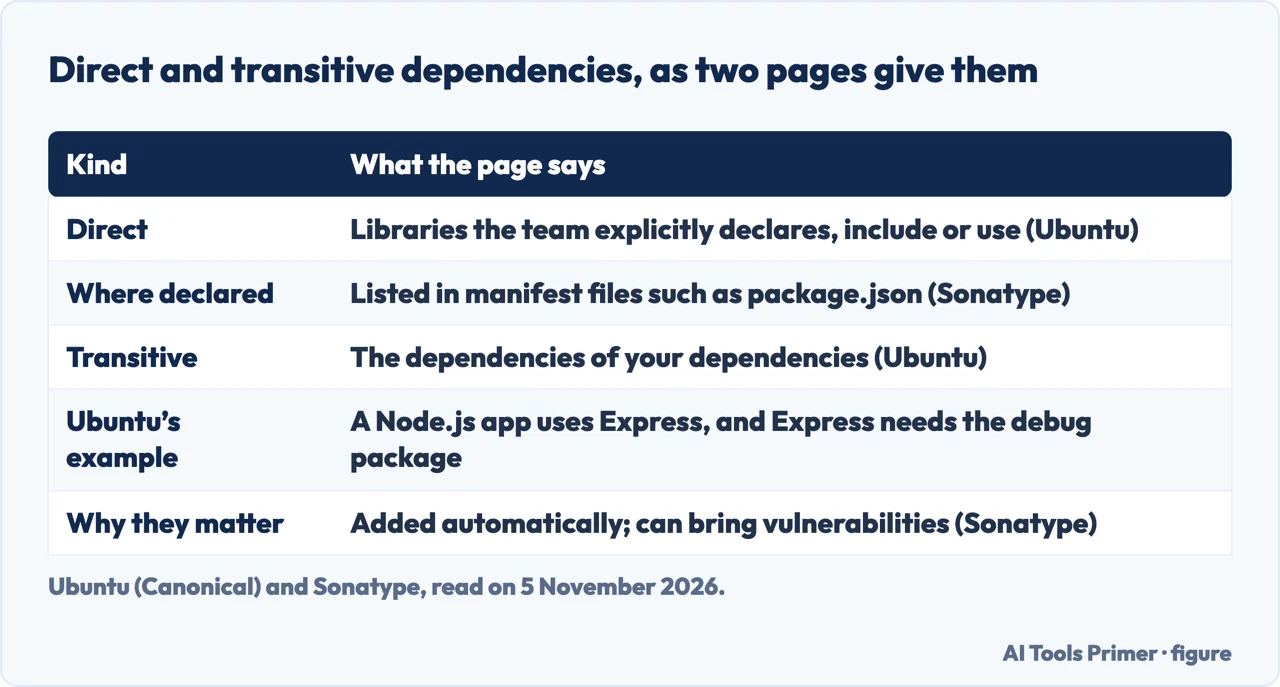
Both pages split dependencies the same way. Ubuntu describes direct dependencies as the libraries you explicitly declare, include or use in your project, and says they are typically essential for it to work and are declared by the project team by definition. Sonatype describes them as components developers explicitly choose and declare, and lists the files where they usually appear: package.json for JavaScript and Node.js, pom.xml for Maven, build.gradle for Gradle and requirements.txt for Python. Its example is a JavaScript file that calls require on the lodash library, which gives that file a direct dependency on lodash.
A transitive dependency is one step removed. Ubuntu calls them indirect dependencies, “also known as transitive,” and defines them as the dependencies of your direct dependencies: libraries, modules or components that the direct ones rely on to function. They are not explicitly declared but are pulled in through the direct ones. Ubuntu’s example is a Node.js application that relies on Express, which in turn needs the debug package, so the application depends on debug indirectly. Sonatype says transitive dependencies are included automatically during the build, often make up most of an application’s total dependencies, and can introduce security vulnerabilities, license risks or version conflicts. It adds that developers may be unaware of them without analyzing the full dependency tree.
Sonatype also gives examples by ecosystem. For npm it names react, express and lodash; for Maven, spring-core, spring-boot-starter-web and log4j; for PyPI, requests, flask and django, which it says are usually listed in requirements.txt or pyproject.toml and installed with pip. Only Sonatype lists the manifest files, and only Ubuntu gives the Express and debug chain. We used Ubuntu’s example for the transitive case and did not use Sonatype’s.
Sonatype names the problem that many chains can cause “dependency hell”: dependencies that become too complex, conflicting or difficult to manage. It lists four causes: conflicting versions of the same library required by different parts of an application, deep chains of transitive dependencies, unclear visibility into what is in use, and inconsistent versions across development, testing and production.
How to see the list: npm and pip
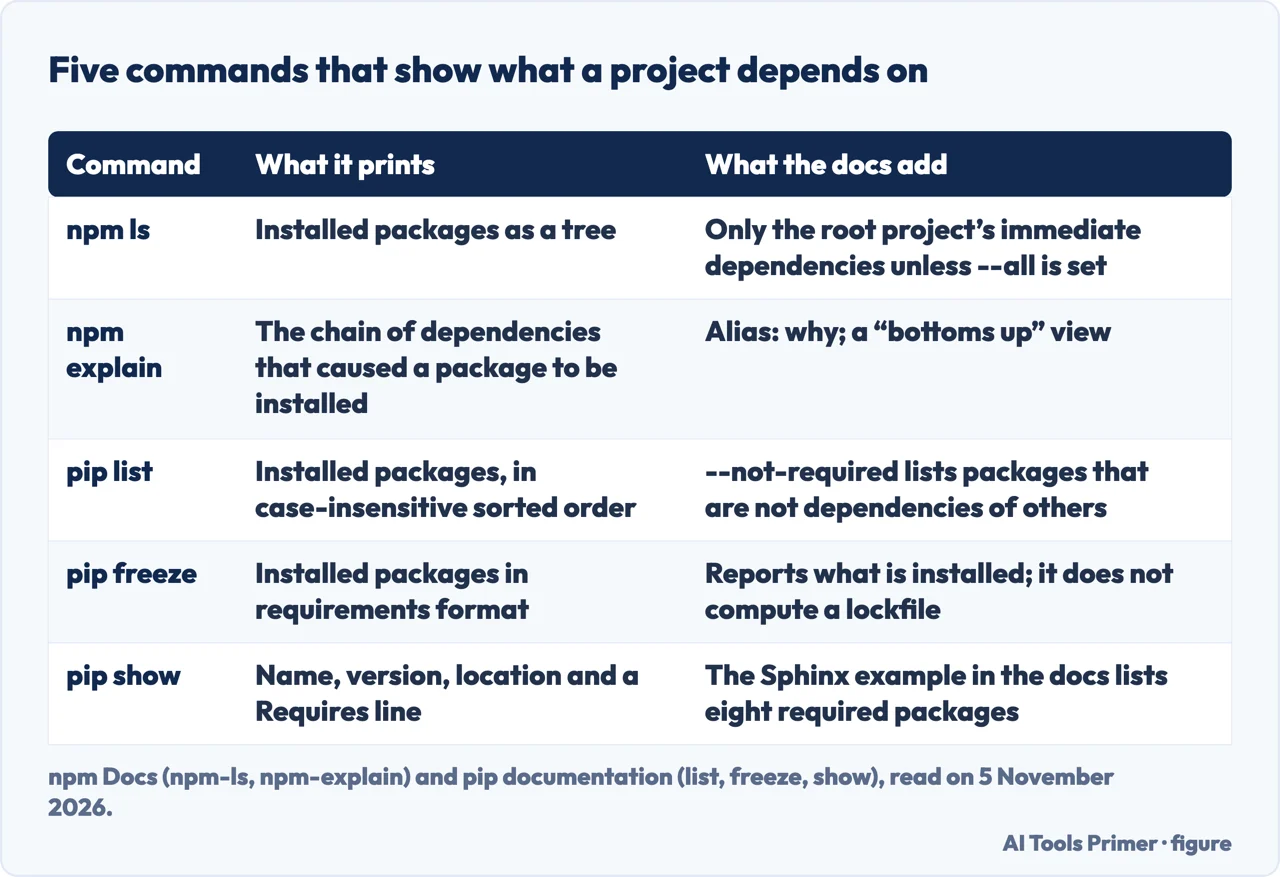
The Ubuntu and Sonatype pages we read do not show a command for printing a project’s dependencies, so we read the documentation of the two package managers that Sonatype names. For npm, the page for npm ls (alias list) says the command prints to stdout the versions of installed packages, “as well as their dependencies when --all is specified,” in a tree. Without --all, the page says, it shows only the immediate dependencies of the root project; the default depth is 0, and Infinity when --all is set. The tree is the logical dependency tree based on package dependencies, not the physical layout of the node_modules folder, and the command also prints extraneous, missing and invalid packages. Give it a name, such as npm ls promzard, and it limits the output to the paths to that package. With the package-lock-only setting, the output follows package-lock.json instead of node_modules. We read the page for npm version 11; the pages for other versions were not read.
For the question “why is this here,” the same page points to npm explain (alias why), a “bottoms up” view. Its own page says it prints the chain of dependencies causing a given package to be installed in the current project. The example runs npm explain glob in npm’s source tree and finds two copies: glob 7.1.6, required by the root project, and glob 7.1.1, a dev dependency reached through rimraf 2.6.2 and tacks 1.3.0. The page says that passing a folder inside node_modules can help work out why a dependency is duplicated to satisfy conflicting version requirements.
For Python, pip’s documentation has three commands. pip list lists installed packages, including editables, in case-insensitive sorted order, with a format of columns (the default), freeze or json. Its --not-required option lists packages that are not dependencies of other installed packages, and --outdated lists old ones. pip freeze outputs installed packages in requirements format. By default it leaves out the bootstrap tools: pip, setuptools, wheel and distribute on Python 3.11 and earlier, and only pip on 3.12 and later, which --all adds back. The page states that it reports what is installed and does not compute a lockfile or a solver result, and shows pip freeze > requirements.txt followed by pip install -r requirements.txt in another environment. pip show prints information about one or more installed packages in mail-header format; the Sphinx example ends with a Requires line naming eight packages.
The two tools print different things. The npm page describes a tree, with a second command for the reverse view. The pip pages we read describe a sorted list and a Requires line, not a tree. Those pages describe what each command prints. They do not say what to do with the list once you have it.
What can go wrong, and what npm audit checks
Ubuntu’s post lists several ways a dependency becomes a risk. A package, framework or library can be affected by known vulnerabilities, and the post says attackers can exploit flaws in many of them, from SQL injection to buffer overflows. Malicious actors can also put malicious code into legitimate packages. Ubuntu names account compromise, where a developer’s credentials are taken and used to upload malicious code, as one of the biggest threats in software supply chain management. It adds that every package is a potential pathway for malicious code, and that regulations can set strict requirements: it gives the example of FedRAMP controls, which it says require high-risk vulnerabilities to be fixed within 30 days.
Ubuntu and npm describe lookalike names differently. Ubuntu groups them under dependency confusion: an attacker uploads a package with the same name as a legitimate, internal or private one into a different namespace, though it says perhaps the most common approach is to name something very similar to the legitimate project. The npm page on threats and mitigations separates two cases. Typosquatting is registering a name similar to a popular package in the hope that people mistype or confuse the two, and npm says it can detect those attacks and block the publishing of such packages. Dependency confusion, in npm’s words, is a public package registered with the name of a private package an organization uses; npm encourages scoped packages and says it is not able to detect that kind. The page was last edited on 8 July 2024. For changes to an existing package, npm says that with Microsoft it scans packages for known malicious content and runs them to look for new patterns of malicious behavior.
The check npm documents is npm audit. The page on auditing describes it as submitting a description of the dependencies configured in your package to your default registry and asking for a report of known vulnerabilities. It checks dependencies, devDependencies, bundledDependencies and optionalDependencies, and does not check peerDependencies. It needs both package.json and package-lock.json; without a lock file it reports an EAUDITNOLOCK error, and the page gives npm i --package-lock-only as the fix. The report names the affected package, the severity, a description and a path. When updates exist, npm audit fix installs compatible ones, and a recommended change that could break things carries a SEMVER WARNING. When no patch exists, the report gives information so you can investigate further, and the page suggests checking mitigating factors, updating the dependent package or opening an issue.
The page also says what a clean result means: packages with known vulnerabilities were not found in the dependency tree. Because the advisory database can be updated at any time, npm recommends running the audit regularly or adding it to a continuous integration process, and says npm audit runs automatically on npm install unless you pass --no-audit. The page describes known vulnerabilities. It does not say that the audit finds packages that are new and malicious. The pip pages we read do not describe a matching audit command.
Packages an AI model made up
Ubuntu lists what it calls hallucination attacks among the ways in. A generative AI tool writing code for a project may reference packages or libraries that do not exist. Ubuntu says attackers work out which names are consistently hallucinated, register them, may first upload working code and later upload malicious code, then wait for someone to use AI-written code that looks fine.
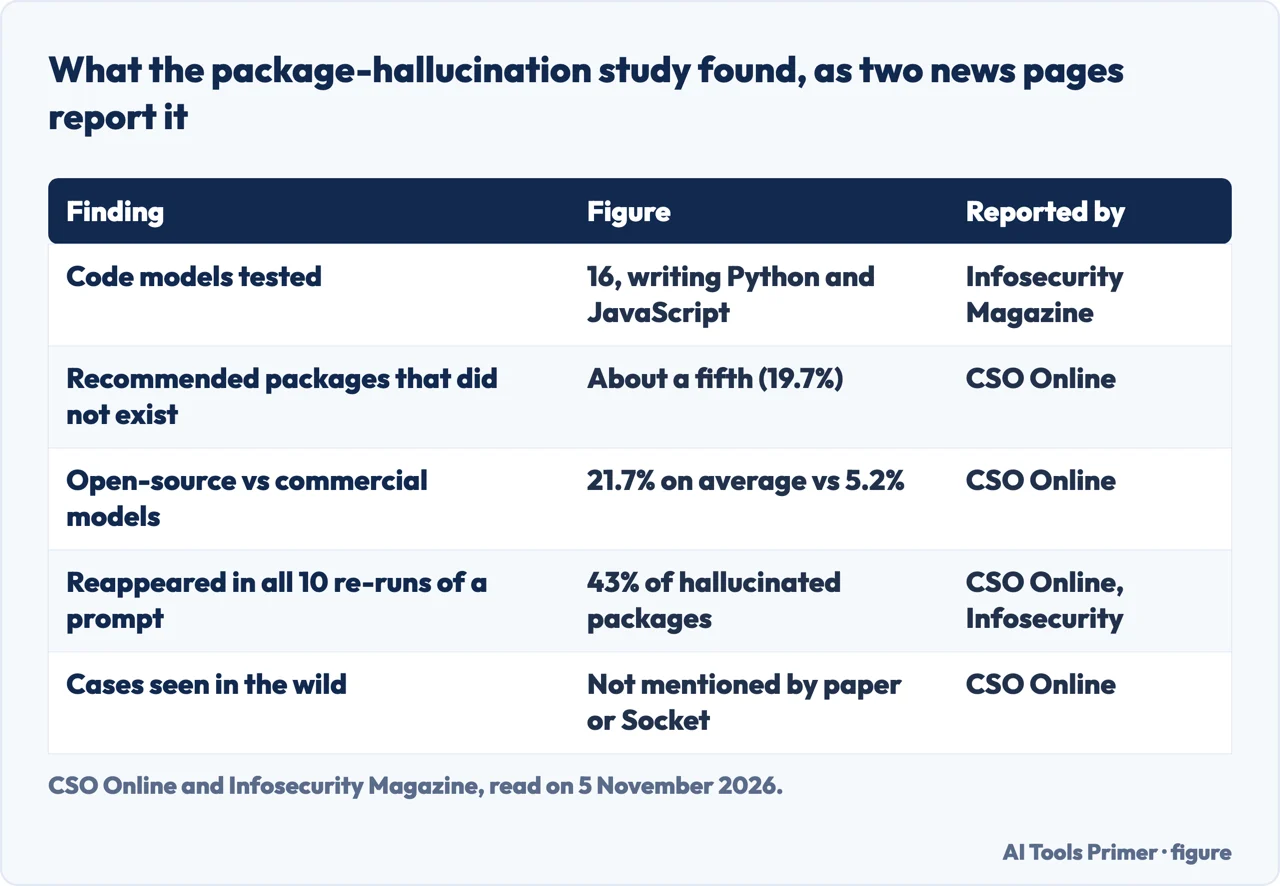
CSO Online and Infosecurity Magazine, both dated 14 April 2025, report a study behind that warning, by researchers at the University of Texas at San Antonio, Virginia Tech and the University of Oklahoma. The technique is called slopsquatting, a term CSO and Infosecurity credit to Seth Larson of the Python Software Foundation, in the first case as a security developer-in-residence. It resembles typosquatting, but relies on the model’s mistake rather than the user’s. The study looked at 16 code-generation models, among them GPT-4, GPT-3.5, CodeLlama, DeepSeek and Mistral, and had them write Python and JavaScript samples. About a fifth of the packages they recommended did not exist.
The two pages report the figures in different forms. CSO puts the share of fake packages at 19.7% and says open-source models such as DeepSeek and WizardCoder hallucinated more often, at 21.7% on average, against 5.2% for commercial ones. It names CodeLlama as the worst, with over a third of its outputs, and GPT-4 Turbo as the best, at 3.59%. Infosecurity says “a fifth,” and adds that higher temperature, meaning more random responses, made hallucinated packages more likely. Both report that 43% of hallucinated packages came back every time when prompts were re-run 10 times and that 58% were repeated more than once; Infosecurity adds that 39% never reappeared. CSO adds that 38% of the invented names had moderate string similarity to real packages, and that only 13% were simple off-by-one typos.
Infosecurity quotes Socket, a cybersecurity vendor, on why that repetition matters: attackers do not need to scrape prompt logs, and can simply observe a model’s behavior, find commonly hallucinated names and register them. CSO quotes Socket on the stakes: if a single hallucinated package becomes widely recommended by AI tools and an attacker has registered that name, the potential for widespread compromise is real. CSO reports that neither the Socket analysis nor the research paper mentioned any instances of slopsquatting in the wild, and the pages were published in April 2025. For defense, CSO says Socket recommended installing dependency scanners before production and runtime, and Infosecurity says Socket’s advice is to monitor every dependency and use tools to vet dependencies before adding them to a project. Infosecurity ties the risk to “vibe coding,” where developers are more likely to trust AI output without checking it.
The npm and pip pages we read do not mention packages invented by an AI, and the news pages do not mention the list commands. Joining the two is our own reasoning, not something these pages say: after listing what is installed with npm ls or pip list, check each name you do not recognize against the registry before you install it. The only advice the sources give is Socket’s, as Infosecurity reports it: monitor every dependency and use tools to vet it before adding it to a project.
What we did not use
We did not run these commands on a project, so the descriptions of npm ls, npm explain, npm audit, pip list, pip freeze and pip show are what the documentation says, not what we saw on a screen. We did not read the dictionary entry or the four project-management pages that Google listed, and the Google AI box was not read. The pages we read do not say how many dependencies a typical project has. We did not read the documentation for pip-audit or for npm versions other than 11, and the pip pages are the stable documentation as it stood on 5 November 2026. Where Sonatype and Ubuntu overlap we say so; where only one of them says something, we name it.
Where to start
Five ways in.
- “What does it mean?”
- What a dependency is in software — meaning
- “What is the difference between direct and transitive?”
- Direct and transitive, and where they are written down — kinds
- “How do I see mine?”
- How to see the list: npm and pip — list
- “Is a dependency a risk?”
- What can go wrong, and what npm audit checks — risks
- “Can an AI add a fake one?”
- Packages an AI model made up — invented
Checking what a model wrote
Code from an assistant still needs a reader.
Tools that install and run things
A command-line client that is installed with npm.
Questions people also ask
What does having a dependency mean?
Sonatype puts it this way: if one piece of software cannot run, build or behave as expected without another, it has a dependency on it. If the other one is missing, incompatible or malfunctioning, the application may fail or behave unpredictably.
What is an example of a dependency?
Ubuntu’s example is a Node.js application that relies on Express, which needs the debug package, so the application depends on debug indirectly. Sonatype names react, express and lodash for npm, and requests, flask and django for PyPI.
What does dependencies mean?
Components an application relies on to work: libraries, packages, modules, frameworks or services. Ubuntu and Sonatype both divide them into direct ones, which the team declares, and transitive ones, which the direct ones pull in.
What is a dependency in programming?
A library or module a program needs. Sonatype says direct ones are usually listed in manifest files such as package.json, pom.xml, build.gradle or requirements.txt. npm ls and pip list print what is installed.
Not covered here. We ran no command on a project. The statements come from Ubuntu’s blog (Canonical), Sonatype, the npm Docs, the pip documentation, CSO Online and Infosecurity Magazine, all read on 5 November 2026.
The search figures behind this page come from an Ubersuggest reading of 5 November 2026, within the 60 days the site normally allows. Its difficulty score is Ubersuggest’s own, not Semrush’s, and has not been confirmed with Semrush.
Sources
- Ubuntu (Canonical) — What are dependencies, and how do you secure them? — ubuntu.com, read 5 November 2026.
- Sonatype — What is a Software Dependency? — www.sonatype.com, read 5 November 2026.
- npm Docs — npm-ls — docs.npmjs.com, read 5 November 2026.
- npm Docs — npm-explain — docs.npmjs.com, read 5 November 2026.
- npm Docs — Auditing package dependencies for security vulnerabilities — docs.npmjs.com, read 5 November 2026.
- npm Docs — Threats and mitigations — docs.npmjs.com, read 5 November 2026.
- pip documentation — pip list — pip.pypa.io, read 5 November 2026.
- pip documentation — pip freeze — pip.pypa.io, read 5 November 2026.
- pip documentation — pip show — pip.pypa.io, read 5 November 2026.
- CSO Online — AI hallucinations lead to a new cyber threat: Slopsquatting — www.csoonline.com, read 5 November 2026.
- Infosecurity Magazine — AI Hallucinations Create “Slopsquatting” Supply Chain Threat — www.infosecurity-magazine.com, read 5 November 2026.
Written by Alberto Gulotta
Founder and editor of AI Tools Primer, writing from Palermo, Italy. Thirty-five years of taking computers apart, starting with a Commodore 64 — the long version is on the about page.
Something wrong on this page? Write to aitoolsprimer@gmail.com and it gets fixed.
Written on 5 November 2026.
Independence and limits
No affiliate links and no paid placements anywhere on this site. Nobody pays to appear here, and no company has seen this page before you did.
This is general information, not professional advice. Where a page touches money, health, safety or the law, it names its source and the date it was read — and your situation may still differ. See the privacy page and the cookie policy.