
Code · guide
What an AI code generator sees: context, search and compaction
By Alberto Gulotta · Updated · 15 min read
An AI code generator that works on a whole project, such as Claude Code or GitHub Copilot, works from what fits in its context window. Claude Code, Cursor and GitHub document three ways of finding your code; Claude Code and GitHub also say a compacted chat can lose early detail. GitHub’s pages explain how to check the output.
| Question | Answer | Where it comes from |
|---|---|---|
| What does the tool work from? | Its context window: conversation, file contents, command output and instructions | Claude Code, GitHub Copilot |
| How does it find your code? | Claude Code searches by name and pattern, Cursor by exact match, GitHub Copilot by meaning | Claude Code, Cursor, GitHub |
| Does a new session remember the last one? | Claude Code starts fresh; CLAUDE.md and auto memory carry over | Claude Code |
| What happens when the window fills? | The conversation is compacted into a summary, and early detail can be lost | Claude Code, GitHub |
| What do you check on the output? | Tests and static analysis first, then fit, dependencies and skipped tests | GitHub Docs |
What the label covers, and what these pages are about
The phrase ai code generator is a search label, and the tools that answer to it differ widely, so this page covers only some. It follows one question about the assistants that work on a whole project: what the tool sees of the project you point it at.
For that we read the documentation of three assistants that work on a whole project: Claude Code, Cursor and GitHub Copilot. Claude Code’s page “How Claude Code works” describes an agentic assistant that runs in your terminal. Its loop has three phases, which it says blend together: gather context, take action and verify results. A bug fix, the page says, cycles through all three repeatedly, and Claude decides each step from what it learned in the previous one. The loop is powered by models that reason and tools that act, and Claude Code is the layer around the model that provides the tools and manages the context the model sees, which the page calls the “agentic harness”.
The page lists what Claude Code can reach when you start it in a directory: the files in that directory and its subdirectories, plus files elsewhere with your permission, the terminal, the git state (current branch, uncommitted changes and recent commit history), the project’s CLAUDE.md, auto memory and the extensions you configure. It sets this against inline code assistants that see only the current file. The rest of this page is about what happens to all of that once it has to fit into one window.
The context window is the whole picture
Claude Code’s page says the context window holds the conversation history, file contents, command outputs, CLAUDE.md, auto memory, loaded skills and system instructions. GitHub’s page on managing context for Copilot gives the same kind of list: the messages you send, the responses, the tool calls and their results, and the system instructions, plus the schemas of the available tools. It adds that tool results can be especially large, for example when a tool reads a long file or runs a command with extensive output.
The Claude Agent SDK page says the same of its own agents. The window does not reset between turns, so the system prompt, tool definitions, conversation history and the inputs and outputs of tools all accumulate. Reading a big file or running a command with verbose output, it says, can use thousands of tokens in a single turn, and longer sessions with many tool calls build up significantly more context than short ones.
Two things follow from this on the pages we read. The first is that a new session starts empty: Claude Code’s page says each session begins with a fresh context window, without the history of earlier ones, and that what carries over comes from auto memory and CLAUDE.md. Of auto memory, the first 200 lines or 25KB of MEMORY.md, whichever comes first, load at the start of a session. The second is that big reads can be kept out of the main window. Claude Code says a subagent works in its own context window, so its tool calls stay out of yours and Claude gets a summary back when it finishes. GitHub says Copilot can delegate to subagents whose context windows are separate from the main agent’s, and that in the Copilot CLI a tool output larger than 20 KiB is saved to a temporary file by default, so the model receives the file path and a preview.
Three answers to how it finds your code
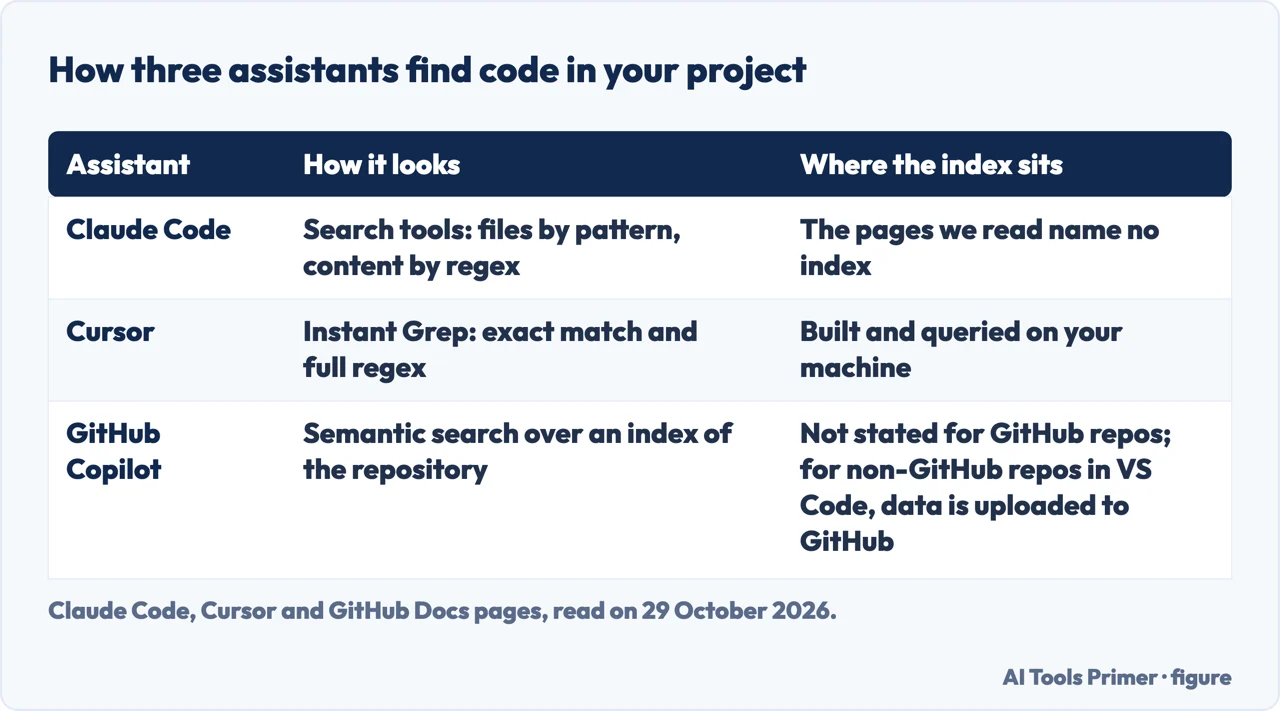
The three pages describe three different ways of locating the right file, and the pages do not compare themselves with one another. Claude Code’s table of built-in tools has a Search category: find files by pattern, search content with regex, explore codebases. Its example of fixing failing tests has Claude run the suite, read the errors, search for the relevant source files, read them, edit and run the tests again. The Claude Code pages we read do not use the words embedding, semantic or vector.
Cursor’s Search page puts exact matching first: a function name, a variable, an error string or a regex pattern. Cursor ships Instant Grep, a search engine of its own that runs automatically and supports full regex and word-boundary matching. On privacy the page is specific: Instant Grep builds and queries its index on your machine, and Cursor does not upload file paths or code to build a search index and does not store embeddings of your codebase for search. It then adds a limit: when Agent opens a match, that file’s content can still be included in the model request. The same page describes an Explore subagent that runs in its own context window with a faster model, runs many searches in parallel and returns only the relevant findings.
GitHub’s page on repository indexing describes a semantic code search index. When you start a Copilot Chat conversation with a repository context, the repository is indexed automatically. The Copilot cloud agent uses that search to find code based on meaning, rather than relying only on exact text matches with tools like grep. Initial indexing can take up to 60 seconds for a large repository, and the index is typically updated within seconds of your starting a new conversation. GitHub says Copilot will not use your indexed repository for model training. For repositories hosted outside GitHub, such as GitLab or local ones, Copilot in Visual Studio Code can use semantic indexing, and the page says this uploads your data to GitHub. That feature is disabled by default, needs a policy to be enabled by an owner for Copilot Business and Enterprise, and is available only on GitHub.com.
So the same word, search, stands for three different things on three pages: a pattern search run by the agent, an exact-match index kept on your machine, and a semantic index of the repository that GitHub says it builds automatically. The pages we read do not say how often each method finds the right file, so we do not rank them.
What gets lost when the conversation is compacted
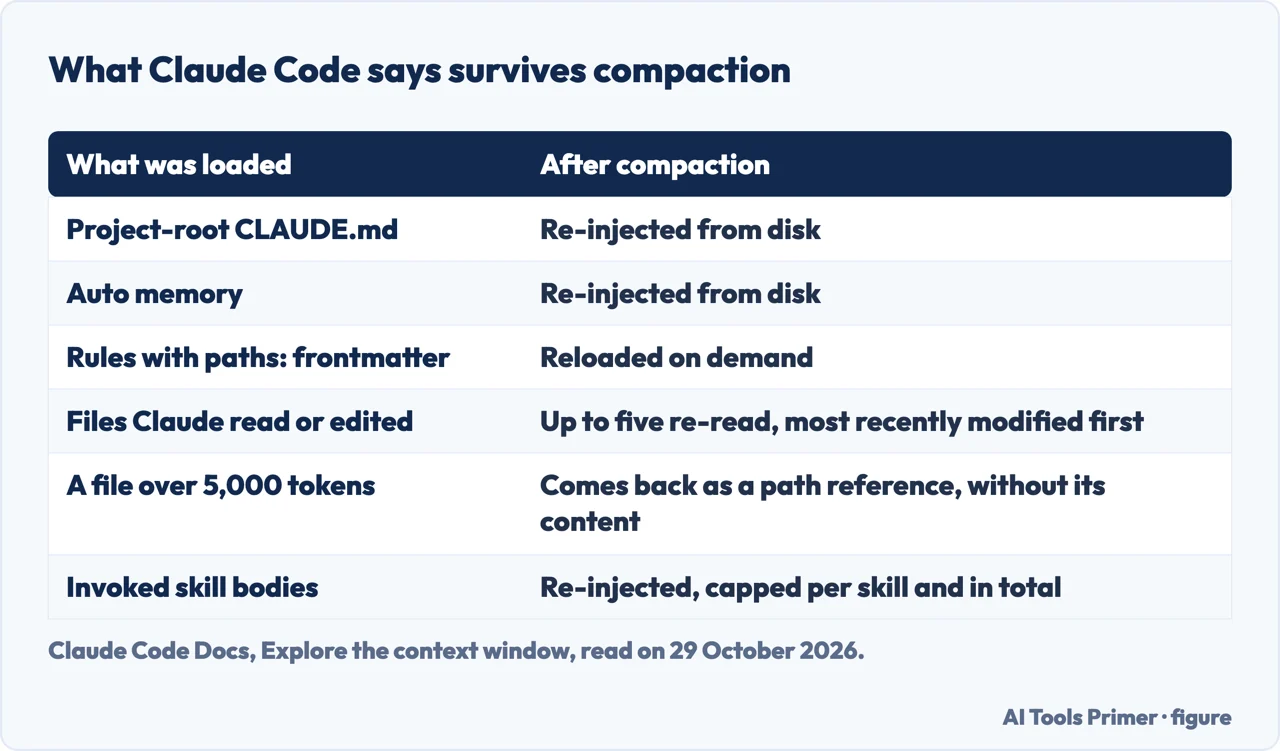
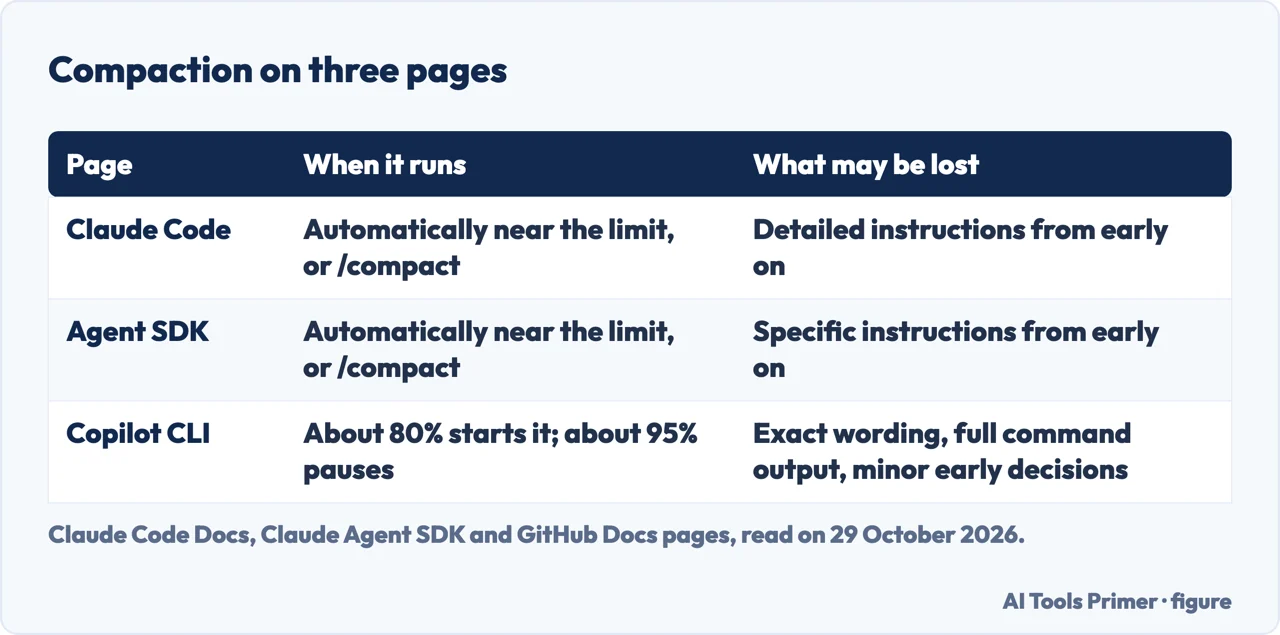
Claude Code says that as you approach the limit it compacts the conversation into a summary. The summary keeps your requests and key code snippets, but detailed instructions from early in the conversation may be lost, so the page tells you to put persistent rules in CLAUDE.md. Its page on the context window adds a table of what happens to each kind of content, shown below. The project-root CLAUDE.md and unscoped rules, and auto memory, are re-injected from disk. Up to five files Claude read or edited are re-read, the most recently modified first, and a file over 5,000 tokens comes back as a path reference without its content.
Two rows of that table matter for rules. Rules with paths: frontmatter and nested CLAUDE.md files are reloaded on demand, and the page explains that they enter the history when Claude touches their trigger file, so compaction summarizes them away with everything else. If a rule must persist, it says, drop the paths frontmatter or move the rule to the project-root CLAUDE.md. Skill bodies are re-injected, capped at 5,000 tokens per skill with a cap on the total, and truncation keeps the start of the file.
You can steer it before it happens. The page lists /compact with a focus, with the example “focus on the auth bug fix”, /context to see what is using space, and /clear between unrelated tasks, because old conversation crowds out the files you need next and costs tokens each time you send a message. Claude Code’s page also says you can add a Compact Instructions section to CLAUDE.md, and the Agent SDK page says a section in CLAUDE.md can tell the compactor what to preserve.
GitHub describes its own version. In the Copilot CLI, when the conversation reaches approximately 80% of the window, compaction starts in the background, and if it reaches approximately 95% before that finishes, the CLI pauses briefly. The summary captures the goals, what was done, key technical details, important files and planned next steps, and the old history is replaced by the summary together with any original user instructions and the current state of plans or to-do lists. GitHub says fine-grained details, such as the exact wording of messages, the full output of commands or minor decisions made early on, may not be included, and that a completed compaction cannot be reversed. Without compaction, it says, old messages would simply be dropped. Compaction is not available in the Xcode IDE.
The Claude Code and GitHub pages agree that early detail can go missing. They give different thresholds: the 80% and 95% figures are GitHub’s for its CLI, while Claude Code’s page says the point depends on the model and configuration and sends you to a page of default thresholds that we did not read. For persistent rules, the pages we read name CLAUDE.md (or AGENTS.md, which Claude can read in its place) only for Claude Code; the Copilot and Cursor pages we read do not cover where such rules live, so we say nothing about them.
Does a bigger window fix it?
Claude Code’s page says that if you need a larger window rather than a smaller conversation, several of its models support a window of 1 million tokens, and that compaction works the same way at the larger limit. The same page says its visualization uses representative numbers, and that to see your actual context usage you run /context, which gives a live breakdown by category with optimization suggestions. Cursor’s page frames its Explore subagent as context management: searching many files generates a lot of context, and the subagent keeps the main conversation focused by summarizing results instead of dumping raw file contents.
Augment Code, a company with coding products of its own, argues the other way in a guide on context windows. The guide argues that bigger windows often make assistants worse at programming tasks, that models pay less attention to the middle of a long context, and that the real bottleneck is the relevance of what is shown rather than the size of the window. The text we read does not cite a measurement for these claims, so we give them as the guide’s argument and not as a finding.
Read side by side, the pages leave one question open. The pages we read do not say how many tokens a real project takes or how much code the tool actually looks at in practice. What they do give is the mechanics: what is loaded, what is searched, what is summarized and what is re-read afterwards.
What to check before you trust the output
The GitHub tutorial “Review AI-generated code” is the page we read on checking what comes out. It begins with functional checks: always run automated tests and static analysis first, make sure the code compiles and the tests pass, and look for new warnings or errors. Next it asks you to check that the code fits the purpose and architecture of the project, with the question of whether it solves the right problem and follows your conventions.
On dependencies it says to check that suggested packages exist and are actively maintained, to review their licensing, and to watch out for hallucinated or suspicious packages. Under AI-specific pitfalls it lists hallucinated APIs, ignored constraints and incorrect logic, and says to watch for tests that are deleted or skipped instead of fixed. It also says to be skeptical of code that looks right but does not match your intent. The rest of the page covers review with teammates, checklists and automated checks in CI.
The tutorial says how to check the code and not how often generated code is wrong; the pages we read do not measure that. For related pages on this site, the code hub collects the coding guides, AI automation between apps covers how Zapier, Make and n8n count work, and Gemini CLI not working covers a terminal assistant and the sign-in routes it accepts.
Where to start
Four ways in.
- “What does the tool actually see?”
- The context window is the whole picture — window
- “How does it find my code?”
- Three answers to how it finds your code — finding
- “Why did it forget what I said?”
- What gets lost when the conversation is compacted — compaction
- “Can I trust what it wrote?”
- What to check before you trust the output — check
Other coding tools
Automation between apps and a terminal assistant.
Chat assistants
How to ask a chat assistant for what you need.
Questions people also ask
What does an AI coding assistant see of my project?
Claude Code’s page lists the files in your directory and subdirectories, the terminal, the git state, CLAUDE.md, auto memory and configured extensions. It contrasts this with inline assistants that see only the current file. Everything it reads goes into one context window.
Why does an AI coding tool forget what I told it earlier?
When the window fills, the conversation is compacted into a summary. Claude Code says detailed instructions from early on may be lost and to put persistent rules in CLAUDE.md. GitHub says fine-grained details, such as minor early decisions, may not be included.
Does Cursor upload my code to search it?
Cursor says Instant Grep builds and queries its index on your machine and that it does not upload file paths or code to build a search index. It adds that when Agent opens a match, that file’s content can still be included in the model request.
How do I check code an AI wrote?
GitHub’s tutorial says to run automated tests and static analysis first, then check that the code fits the project, that suggested packages exist and are licensed compatibly, and that no tests were deleted or skipped instead of fixed.
Not covered here. We ran no code generator. The statements come from Claude Code, Cursor and GitHub Docs pages, the Claude Agent SDK page and an Augment Code guide, all read on 29 October 2026. We did not read the product pages Google listed, the Claude Code page of default compaction thresholds or Cursor’s Data Use page.
The search volume and difficulty behind this page come from a Semrush reading of 29 August 2026, older than the 60 days the site normally allows.
Sources
- Claude Code Docs — How Claude Code works — code.claude.com, read 29 October 2026.
- Claude Code Docs — Explore the context window — code.claude.com, read 29 October 2026.
- Claude Code Docs — How the agent loop works (Agent SDK) — code.claude.com, read 29 October 2026.
- Cursor Docs — Search — cursor.com, read 29 October 2026.
- GitHub Docs — Indexing repositories for GitHub Copilot — docs.github.com, read 29 October 2026.
- GitHub Docs — Managing context for GitHub Copilot — docs.github.com, read 29 October 2026.
- GitHub Docs — Review AI-generated code — docs.github.com, read 29 October 2026.
- Augment Code — AI Context Windows: Why Bigger Isn’t Always Better — www.augmentcode.com, read 29 October 2026.
Written by Alberto Gulotta
Founder and editor of AI Tools Primer, writing from Palermo, Italy. Thirty-five years of taking computers apart, starting with a Commodore 64 — the long version is on the about page.
Something wrong on this page? Write to aitoolsprimer@gmail.com and it gets fixed.
Written on 29 October 2026.
Independence and limits
No affiliate links and no paid placements anywhere on this site. Nobody pays to appear here, and no company has seen this page before you did.
This is general information, not professional advice. Where a page touches money, health, safety or the law, it names its source and the date it was read — and your situation may still differ. See the privacy page and the cookie policy.