
Code · guide
AI automation between apps: tasks, credits and executions
By Alberto Gulotta · Updated · 15 min read
AI automation between apps is billed in three different units: Zapier counts tasks, Make counts credits, and n8n counts executions of a whole workflow. Their own pages, read on 29 October 2026, show how each unit is counted, what the free options allow and what happens at the limit.
| Question | Answer | Where it comes from |
|---|---|---|
| What does each platform count? | Zapier counts tasks, Make counts credits, n8n counts whole-workflow executions | Zapier, Make, n8n |
| What does Zapier Free allow? | 100 tasks a month, in Zaps of one trigger and one action | Zapier help article |
| What does Make Free allow? | 1,000 credits a month | Make pricing page |
| What does n8n offer without paying? | A trial of 1,000 executions, and a self-hosted Community Edition on GitHub | n8n pricing page |
| What does an AI step cost on Zapier? | 1 task at the standard rate, 3 at advanced, 5 at premium; an MCP tool call is 2 | Zapier task article |
| What happens at the limit? | Zapier Zaps pause or move to pay-per-task, Make scenarios stop, n8n lists overage fees as capped | Zapier, Make, n8n |
What the two definitions say
AWS and Salesforce each publish a definition of the phrase, both read on 29 October 2026, and the two pages describe it in different terms. AWS’s page says AI automation is the use of AI technologies to expand the capabilities of robotic process automation, which repeats digital tasks such as clicking, moving files or copying data. AI, it says, lets that automation handle more complex tasks, and it lists categorizing documents, labeling images and responding to customer queries as examples. The page also separates the two halves: automation suits “well-defined actions and procedures”, and falls short with a task that has no certain outcome.
Salesforce’s page describes AI automation as machine learning and natural language processing applied to data, so that a system can review it, recognize patterns and make logical choices. It contrasts this with traditional automation, which it says follows a fixed set of rules to repeat tasks. The page also says “humans still play a vital role”: they give feedback, review predictions and make corrections by hand where needed. Its example is a system that detects a potentially fraudulent transaction, may block it automatically and escalate the case to a person to investigate.
The AWS and Salesforce pages we read do not mention what it costs to run such a flow between apps you already use. That cost is set by the platforms that connect the apps, and the rest of this page reads the pages of three of them: Zapier, Make and n8n. On these platforms a flow is a sequence the platform runs, a trigger followed by actions, and an AI step is one of the actions. Zapier counts AI actions at a higher rate when the model is advanced, n8n lists agents, MCP and AI nodes on its Starter plan, and Make says some advanced features that use its AI Provider may use more than one credit.
Three units: tasks, credits and executions
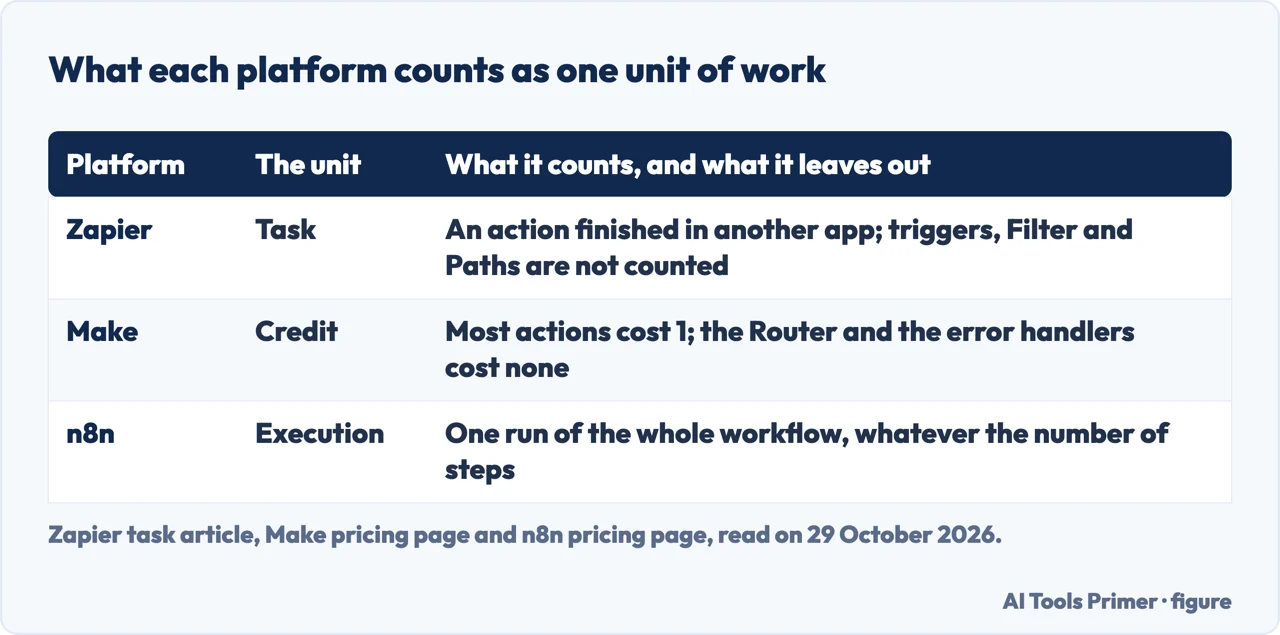
Zapier counts tasks. Its task article says a task is anything Zapier successfully completes on your behalf, such as sending an email, creating a row in a spreadsheet or posting a message in Slack. Triggers, Filter and Paths, failed steps, and built-in tools such as Tables, Forms, Delay, Looping and Digest are not counted. The article names exceptions: the two Sub-Zap actions use one task each, Code by Zapier uses one task and then runtime-based billing if the code runs longer than the plan’s runtime, and each successful Human in the Loop action counts as one. AI actions are counted with a multiplier: a standard AI step on the default model is 1x, an advanced step 3x, a premium step 5x, and a Zapier MCP tool call 2x. The article says the multiplier only applies when the Zap runs, so building a Zap with AI steps does not change the count. On Zapier’s pricing page, Zaps, AI steps, code, MCP and the SDK draw from one shared task pool.
Make counts credits. Its pricing page says that as of August 27 credits are the billing unit, and that most actions use 1 credit while some advanced features that use Make’s AI Provider may use more. The page lists what counts: reading, searching, creating, updating or deleting data in an app, transforming data with the built-in tools, aggregating a row of data into an array or text, and iterating a row. The Router and the error handler modules (Rollback, Break, Resume, Commit and Ignore) are not counted. A scenario, the page says, can use anywhere from two credits to thousands in a single run.
n8n counts executions. Its pricing page says pricing is based on monthly workflow executions, regardless of complexity, and that all plans include unlimited users and workflows. The n8n blog says the company charges for a full workflow execution, where other tools charge by operation, step or task, and that a workflow with hundreds or thousands of operations still counts as a single execution.
What the free options allow
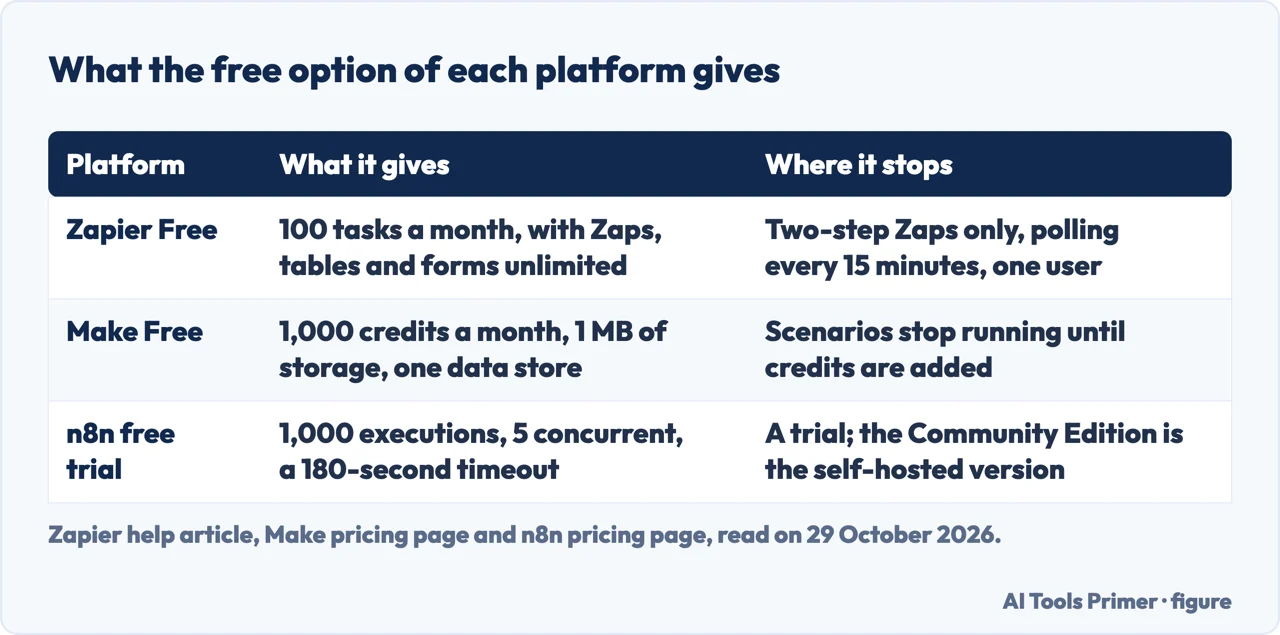
Zapier’s help article, updated on 21 August 2026, lists what a Free plan has: unlimited Zaps, tables and forms, 100 tasks a month shared between Zaps and MCP server actions, 2,500 table records, 10 form pages, one user, a 15-minute polling interval, two-step Zaps of one trigger and one action, and Copilot. Multi-step Zaps, premium apps, Autoreplay and polling times of up to 1 minute are on the article’s list of what a paid plan adds. The article also says a new account gets a 14-day trial of the premium features, which are no longer available if you decline to upgrade or downgrade to Free.
Make’s Free plan is 1,000 credits a month, which its page says equals 1 MB of data storage and one data store. n8n’s pricing page shows Starter, Pro and Business plan cards, a free trial and a Community Edition. The trial is described as 1,000 executions, 5 concurrent executions, a 180-second execution timeout and one team project, with no credit card required for the Cloud trial. The Community Edition is described as a standard, self-hosted version of n8n available on GitHub; the text we read does not give its limits.
The same 500 orders, counted three ways
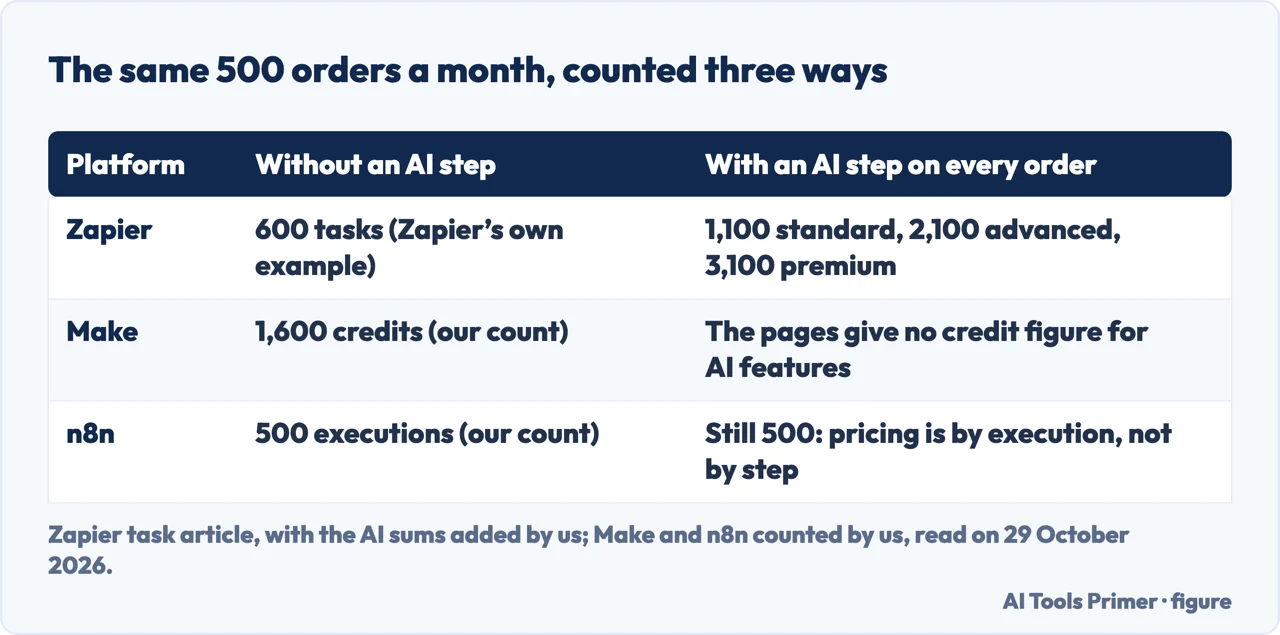
Zapier’s task article walks through a store that gets 500 Shopify orders a month. A Formatter step standardizes the phone number, then Path A, for orders over $200, creates a deal in a CRM and posts a Slack message, and Path B adds the customer to an email list. Only the actions inside the path that runs are counted: 2 tasks on Path A, 1 on Path B. With 100 orders on Path A and 400 on Path B the article’s total is 600 tasks. That is above the 100 tasks of Free and below the 750 of Professional, and the help article limits Free to one trigger and one action, which this flow exceeds.
We counted the same flow under Make’s rules. This is our count, not a figure Make published, and it rests on one assumption: that the module watching for each new order counts as one read, because the page lists reading data from an app among the things that count. Per order that is 1 credit for the watch, 1 for transforming the phone number, none for the Router, and then 2 credits on Path A or 1 on Path B. A Path A order costs 4 credits and a Path B order 3, so the month is (4 x 100) + (3 x 400) = 1,600 credits, above the 1,000 of Free. Make’s own page we read does not say whether a check that finds no new order is counted; Zapier’s task article, a competitor, claims that on Make polling triggers, internal logic steps and failed runs also use credits, which is a rival’s statement we did not confirm.
Under n8n’s rule the flow is one execution per order, so 500 executions in the month if each order starts one run of the workflow. That is our reading of the pricing page, and the figure is below the 2.5K of Starter and below the 1,000 of the trial.
Now add one AI step to every order. On Zapier the step is counted at its multiplier: 500 more tasks at the standard rate (1,100 in all), 1,500 more at the advanced rate (2,100) and 2,500 more at the premium rate (3,100). The article gives 2,250 as the ceiling for a Professional plan of 750 tasks with pay-per-task, so the advanced total sits under that ceiling and the premium total over it. Make says only that some AI Provider features may use more than 1 credit, and the pages we read neither give a number nor name the features. For n8n the pricing is by execution regardless of complexity, so the order stays one execution. Zapier’s article calls 1x the rate of the default model without naming that model, and the pages we read do not say how many tasks a step on a given model uses.
What happens at the limit
Zapier. The pricing page says that with pay-per-task billing turned on, Zaps keep running after the plan’s limit and the extra tasks are charged at a higher rate, and that with it turned off, Zaps pause until the start of the next usage period. The task article gives the rates: extra tasks are billed at 1.25x the plan’s normal task cost on an annual plan and 2.5x on a monthly plan, and pay-per-task use is capped at 3x the plan’s task limit. Its example is Professional with 750 tasks: up to 1,500 more, for a maximum of 2,250 in the month. After the cap the Zaps pause until the next billing cycle or an upgrade, and the article says the automations stay intact.
Make. The page says that when credits run out the scenarios stop running until credits are added, and that incoming webhooks are queued up to the available queue storage and processed when the scenarios resume. The options it lists are to upgrade, to buy extra credits in bundles of 1,000 or ten times that at the fixed price in the subscription, or to switch on automatic purchase of the larger bundle, on Core, Pro and Teams only. Credits expire at the end of the term; extra credits expire after one month on a monthly subscription or at the end of the year on an annual Pro or Teams one.
n8n. The limits table on the pricing page lists overage fees as Capped for Starter and Pro and as Custom for Enterprise; the pages we read do not say what the cap is. The same table lists maximum saved executions of 2.5k, 25k and 50k, which is about stored runs and not the monthly allowance that the plan cards give as 2.5K, 10K and 40K executions, at 20, 50 and 667 EUR a month billed annually (Business is available only self-hosted). It lists a maximum execution duration of 5 minutes on Starter and 40 on Pro. For Business and Enterprise the FAQ says workflows continue running if the quota is exceeded, though overage charges may apply if you do not move to the next usage tier.
Where the sources disagree, and what they leave out
On Zapier’s Professional plan the pages give two prices. Zapier’s pricing page text prints “Starting from $19.99 /month” beside a “Pay yearly (Save 33%)” switch, and the task article labels $19.99 the starting price billed annually. A monthly price of $29.99 appears on two pages, from Jetadmin (checked on 26 September 2026) and Activepieces (checked on 25 October 2026), each of which sells a product of its own. Jetadmin also gives $103.50 a month for Team on monthly billing, against $69 billed annually. The $29.99 figure is theirs and not Zapier’s, as far as the Zapier text we read goes.
On n8n’s Pro plan the figures are 10K executions on the plan card and 25k in the limits table. The table’s row is labeled maximum saved executions, which explains the second number. The n8n blog, dated 8 August 2023, says a workload of around 100K tasks could cost over $500 a month on other platforms and about $50 on its Pro plan. That is n8n’s own comparison, in dollars and dated 2023, older than the pricing page we read, which lists Pro at 50 EUR a month billed annually; we did not check it.
Jetadmin’s page says that the limit which usually forces the first upgrade is the two-step limit and not the task count, and works through a four-step example. That is the opinion of a vendor with a product to sell, though Zapier’s help article does list two-step Zaps among the Free plan’s limits.
Some things are missing from the pages we read. The Make text has no prices in dollars or euros, so a comparison in money across the three platforms cannot be built from it; its usage-allowance heading still says operations, although the page has moved to credits. The pages do not say how many automations an individual typically runs in a month, and the AWS and Salesforce definitions do not mention the cost of the platforms above or the errors an AI step can make.
What we did not use
We read no vendor definition other than AWS and Salesforce. Make prices that appeared only in search result snippets were not used, because the Make page we read does not contain them. The Make and n8n pages are what each vendor says about itself, and the same goes for Zapier’s.
Where to start
Four ways in.
- “What does AI automation mean?”
- What the two definitions say — meaning
- “What is a task, a credit, an execution?”
- Three units: tasks, credits and executions — units
- “Can I start for free?”
- What the free options allow — free
- “What happens when I reach the limit?”
- What happens at the limit — limit
The assistants
One page per tool that helps you write code is planned, and each will answer the same questions: what it sees of your project, what it sends where, what it costs, and what its terms say about the output.
Questions people also ask
What is AI automation?
AWS says it is the use of AI technologies to expand the capabilities of robotic process automation. Salesforce describes it as machine learning and natural language processing applied to data, with people who give feedback, review predictions and correct by hand.
What jobs can I get with AI automation?
The pages we read are definition and pricing pages and do not list jobs. Salesforce’s page says that roles will change and that people who guide the AI in creative and strategic work will have more opportunities, which is a vendor’s view.
How to make money from AI automation?
The pages we read do not describe how an individual earns money from it, so we have no answer to give. The nearest material is about organizations: AWS’s page says to measure cost savings, efficiency gains, time to market and productivity to calculate return on investment, which is a company’s saving and not income from selling the service.
How to do AI automation for beginners?
AWS’s page gives steps for organizations: plan the automation, select a model of operation, design it end to end, measure its results and assess maturity. On the platforms, Zapier’s Free plan includes Copilot, Make’s Free plan gives 1,000 credits a month, and n8n’s trial needs no credit card.
Not covered here. We ran no workflow on Zapier, Make or n8n. The statements come from their pages, the AWS and Salesforce definitions and two pages from other vendors, Jetadmin and Activepieces, all read on 29 October 2026; the counts marked as ours are our arithmetic from those pages.
The search volume and difficulty behind this page come from a Semrush reading of 29 August 2026, older than the 60 days the site normally allows.
Sources
- Zapier — Pricing — zapier.com, read 29 October 2026.
- Zapier Help — What’s included in Zapier’s Free plan — help.zapier.com, read 29 October 2026.
- Zapier Blog — What is a task in Zapier? — zapier.com, read 29 October 2026.
- Make — Pricing — www.make.com, read 29 October 2026.
- n8n — Pricing — n8n.io, read 29 October 2026.
- n8n Blog — n8n execution advantage — blog.n8n.io, read 29 October 2026.
- AWS — What is AI automation? — aws.amazon.com, read 29 October 2026.
- Salesforce — What is AI automation? — www.salesforce.com, read 29 October 2026.
- Jetadmin — Zapier pricing — www.jetadmin.io, read 29 October 2026.
- Activepieces — Zapier pricing — activepieces.com, read 29 October 2026.
Written by Alberto Gulotta
Founder and editor of AI Tools Primer, writing from Palermo, Italy. Thirty-five years of taking computers apart, starting with a Commodore 64 — the long version is on the about page.
Something wrong on this page? Write to aitoolsprimer@gmail.com and it gets fixed.
Written on 29 October 2026.
Independence and limits
No affiliate links and no paid placements anywhere on this site. Nobody pays to appear here, and no company has seen this page before you did.
This is general information, not professional advice. Where a page touches money, health, safety or the law, it names its source and the date it was read — and your situation may still differ. See the privacy page and the cookie policy.