
Code · guide
What is agent mode in ChatGPT? Gone, and an agent defined
By Alberto Gulotta · Updated · 17 min read
What is agent mode in ChatGPT? A setting that let ChatGPT work through a task on its own virtual computer, which OpenAI’s Help Center now says is no longer available. What an AI agent is, and how it differs from an assistant, is set out by IBM and Anthropic.
| Question | Answer | Where it comes from |
|---|---|---|
| Is agent mode still there? | The Help Center says ChatGPT agent is no longer available and points to ChatGPT Work | OpenAI Help Center |
| What did it do? | It worked on its own virtual computer, with a visual browser, a text browser, a terminal and API access | OpenAI launch post |
| Assistant or agent? | Assistants are reactive; agents are primarily proactive and plan toward a defined goal | IBM |
| Workflow or agent? | Predefined code paths on one side, a model that directs its own process on the other | Anthropic |
| What were the limits? | Plus 40 messages a month, Pro 400, Business and Enterprise 40 | OpenAI Help Center |
| Who checks the work? | Each of the three sources names a human check: confirmation, oversight or review | OpenAI, IBM, Anthropic |
Agent mode was a ChatGPT setting, and OpenAI says it is gone
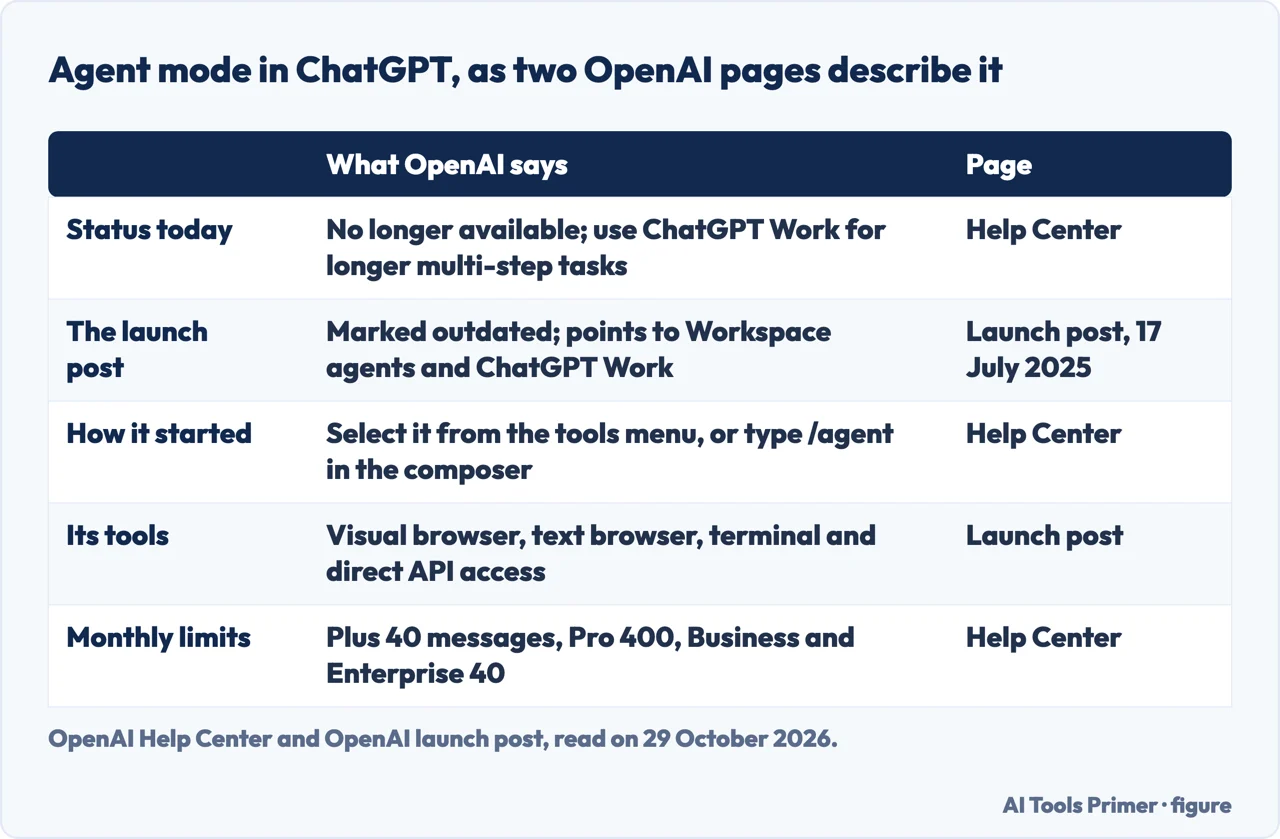
The OpenAI Help Center page on ChatGPT agent opens its overview with a plain sentence: ChatGPT agent is no longer available. It points to ChatGPT Work for longer, multi-step tasks and finished deliverables, and to a page called Using cloud browser in ChatGPT for supported browser workflows. The page showed an update stamp of 2 days when we read it on 29 October 2026, and the rest of its text still describes agent mode in the present tense: how to start it, which plans have it and what the limits are. We report that mismatch and do not try to settle it.
The launch post tells the same story from another side. OpenAI published it on 17 July 2025 under the headline Introducing ChatGPT agent, and the page now carries a banner saying that this launch post is outdated. For current agentic work and team workflows the banner points to Workspace agents and ChatGPT Work. The pages we read do not say what ChatGPT Work is beyond those pointers, and they give no date for the withdrawal of the agent.
The Help Center says agent mode was started by selecting it from the tools menu or by typing /agent in the composer, and then describing the task. It says the agent pauses for clarification or confirmation when needed and can be guided or interrupted in the middle of a task. It also says that Operator, an earlier OpenAI product that interacted with websites, is integrated into agent mode and that the Operator website is no longer accessible.
What agent mode did
The launch post says ChatGPT can take on a task for you on its own computer and carry it through from start to finish, complex ones included. It calls the result a unified agentic system that brings together three strengths: Operator’s ability to interact with websites, deep research’s skill in synthesizing information, and ChatGPT’s conversational fluency. Its examples include a briefing on upcoming client meetings built from a calendar and recent news, planning and buying ingredients for a breakfast for four, and an analysis of three competitors turned into a slide deck.
The post lists four tools: a visual browser that works through a graphical interface, a text browser meant for simpler web queries that need reasoning, a terminal and direct API access. The agent could also use connectors, which the post illustrates with Gmail and GitHub. The Help Center adds how the visual browser works: the agent takes screenshots of its virtual browser window to “see” a page, which lets it click buttons, fill out forms and navigate websites.
On control, the launch post says ChatGPT requests permission before taking actions of consequence, and that you can interrupt, take over the browser or stop a task at any point. Its list of mitigations gives three examples: an explicit confirmation before an action with real-world consequences, such as a purchase; “Watch Mode” for certain critical tasks, such as sending emails; and a refusal of high-risk tasks, such as bank transfers.
Two practical details come from the Help Center. After a task finishes it can be set to repeat daily, weekly or monthly with the clock icon, and recurring tasks are managed at chatgpt.com/schedules. Agent mode was supported on ChatGPT on the web, on mobile (iOS and Android) and in the desktop apps (macOS and Windows), and its outputs include links to sources or screenshots.
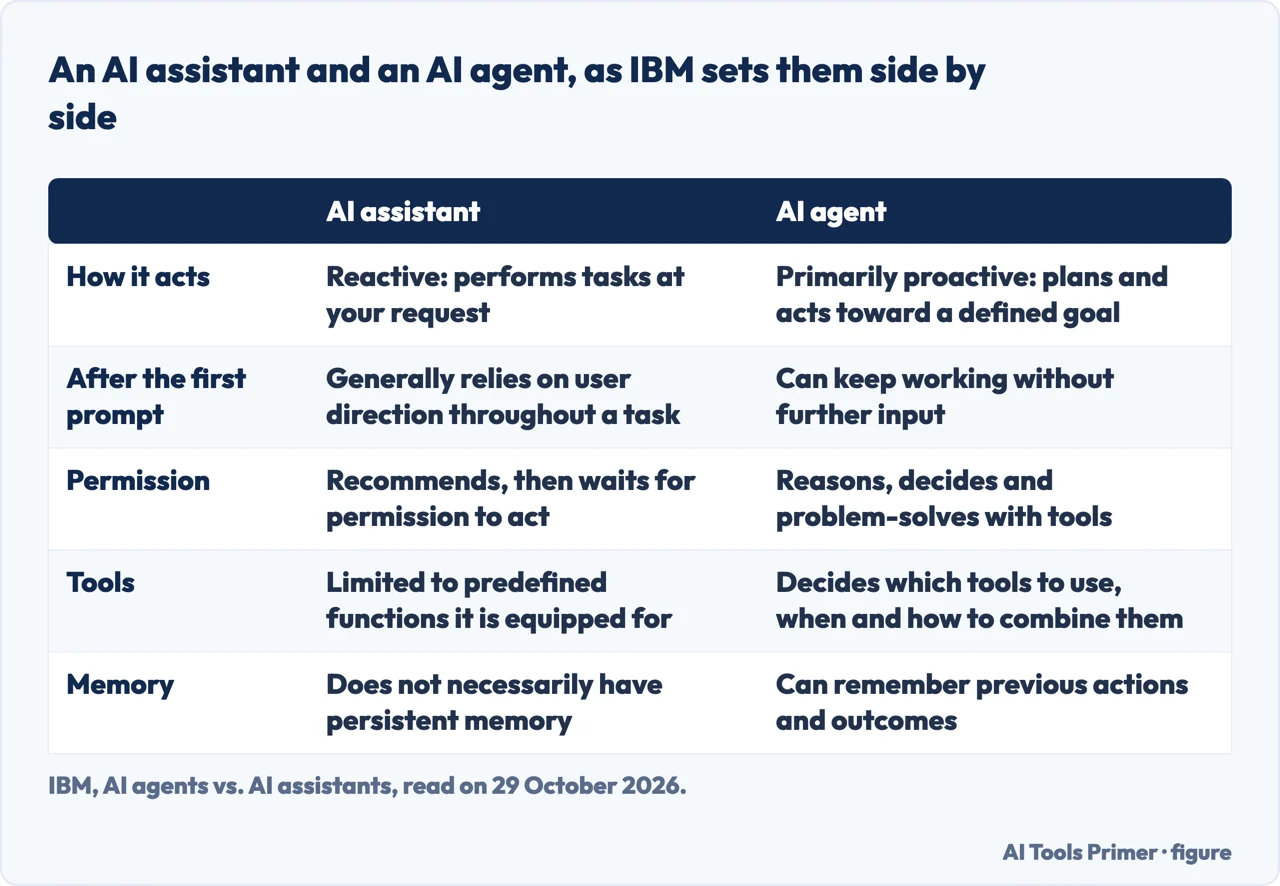
An assistant versus an agent, as IBM puts it
IBM’s page starts from an analogy. A movie star or a star footballer probably has both an agent and an assistant. The assistant does tasks on request, such as dinner reservations, the dry cleaning, fan mail and the calendar. The agent uses expertise day and night to maximize the star’s opportunities and income, and can act on a prompt but does not need one to keep doing the job. IBM then states the line for software: AI assistants are reactive and perform tasks at your request, while AI agents are primarily proactive, planning and acting on their own toward a defined goal within the tools and permissions they have.
For the assistant, IBM gives a definition: an intelligent application that understands natural language commands and uses a conversational interface to complete tasks. Its examples are Alexa and Siri, and, among chatbots, Microsoft Copilot, ChatGPT, Salesforce Agentforce and IBM watsonx Assistant. An assistant begins with a prompt, generally relies on user direction throughout a task, and when it recommends something it waits for permission to act. IBM lists its limits: it requires defined prompts, and although it can use tools, it is limited to predefined functions. IBM’s example is a spreadsheet table comparing “x vs. y” that the assistant makes when asked and does not decide to make on its own. It does not necessarily have persistent memory, and the model behind it does not learn from use.
For the agent, IBM gives a definition too: a system that completes tasks on its own for users or other systems, planning its own workflow and using the tools it has. After an initial prompt it can continue working without further input, evaluate its goals and break them into subtasks. IBM adds a test: the ability to call tools does not by itself make a language model an agent, because the agent decides which tools to use, when to use them and how to combine them. An agent can remember previous actions and outcomes, while the underlying model is not continually retrained, and IBM names Anthropic’s Claude as an example of an agent with computer use, where a model can click, type and operate a computer.
IBM does not set the two against each other only. It calls them complementary: agents can orchestrate multi-step tasks, while assistants give conversational support, summarize results and help users review outputs. IBM mentions ChatGPT once, in its list of chatbots, and the pages we read from IBM do not discuss agent mode.
Where agent mode sat between the two
Put the OpenAI and IBM pages side by side and the comparison is ours, because neither page draws it. IBM says an agent can continue after an initial prompt, and that assistants suggest actions for users to approve. OpenAI’s launch post says ChatGPT works through a task on its own computer, and also that it requests permission before actions of consequence and can be interrupted, taken over or stopped. On those two descriptions the product had traits from both columns of the table above, and the Help Center’s own wording is that the agent pauses for clarification or confirmation when needed. Anthropic describes a similar shape for agents in general: they start from a command or a discussion with the user, then plan and work independently, and may come back to the person for more information or a decision.
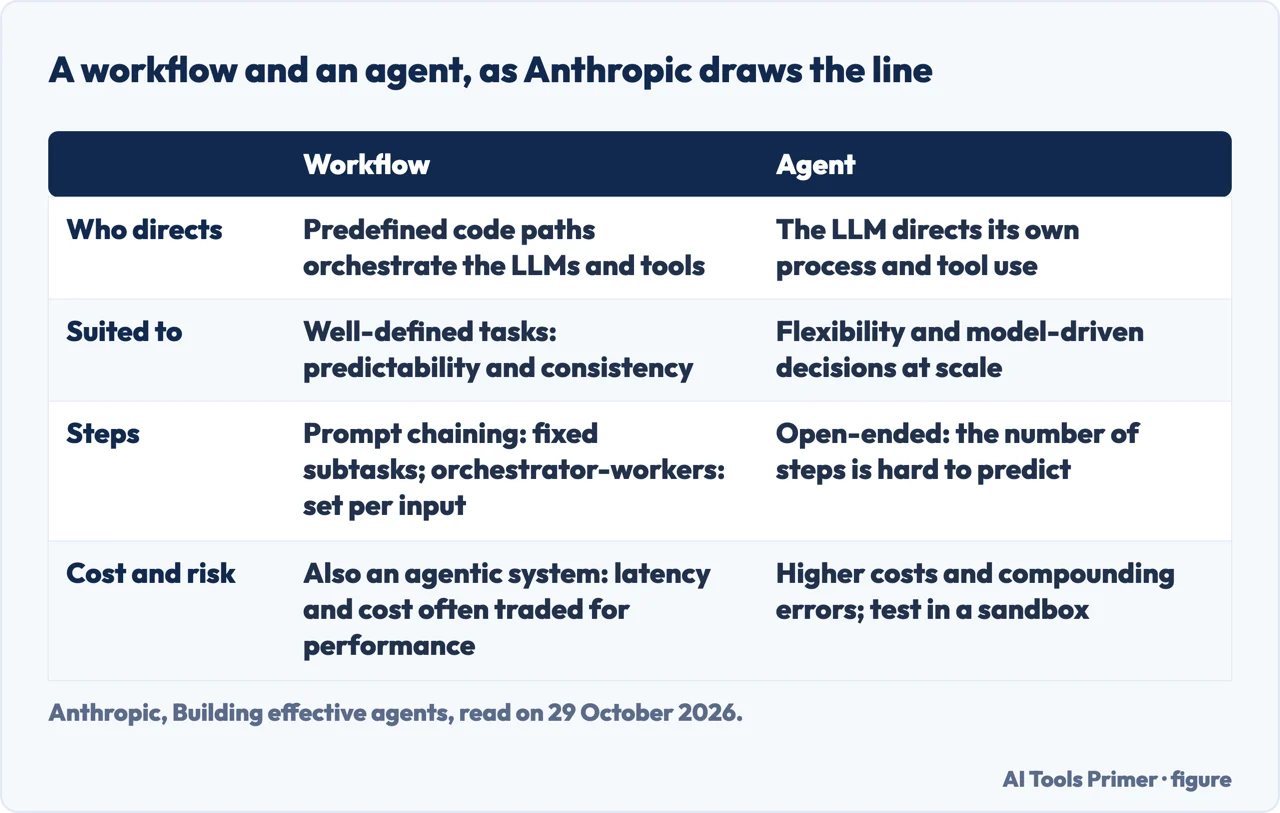
Workflows versus agents, as Anthropic draws the line
In its section What are agents?, Anthropic’s engineering post says the word is used in different ways. Some customers mean fully autonomous systems that work independently for long periods with a range of tools. Others use the word for more prescriptive implementations that follow predefined workflows. Anthropic calls all these variations agentic systems and draws an architectural distinction between two of them. Workflows are systems where language models and tools are orchestrated through predefined code paths. Agents are systems where the model itself steers how the work proceeds and which tools it uses, and keeps control of how the task gets done.
The two definitions look at different things. IBM’s line runs between reactive and proactive and asks whether there is a defined goal; Anthropic’s line asks who directs the process, the code or the model. That is our reading of the two pages, and neither says it.
Anthropic’s advice is to find the simplest solution possible and to increase complexity only when needed, which it says might mean not building agentic systems at all. It also suggests that developers start by using the model APIs directly, since several of its patterns can be implemented in a few lines of code, and that optimizing single model calls with retrieval and in-context examples can be enough before an agent is built. It says agentic systems often trade latency and cost for better task performance. When more complexity is warranted, it says workflows offer predictability and consistency for well-defined tasks, and agents fit better when the job needs flexibility and the model has to make the decisions at scale.
The post describes an agent as typically just a model using tools based on feedback from its environment in a loop. At each step the agent gets “ground truth” from the environment, such as tool call results or code execution, to assess its progress. It can pause for human feedback at checkpoints or when it meets a blocker, and the post adds stopping conditions, such as a maximum number of iterations, to maintain control. Agents suit open-ended problems where it is hard or impossible to predict the number of steps and a fixed path cannot be hardcoded. Anthropic also says their autonomy means higher costs and the potential for compounding errors, and recommends extensive testing in sandboxed environments along with appropriate guardrails.
Two cautions on the source. The post carries a note that much of the tooling landscape it describes has changed since December 2024, and the note points to a newer Anthropic approach that we did not read, so we use the post here for its definitions only. And its section on coding agents says software development suits agents because code can be verified by automated tests; Anthropic says its agents can solve real GitHub issues in the SWE-bench Verified benchmark from the pull request description alone, and that human review remains crucial.
What agent mode cost in messages, and what it risked
The Help Center lists monthly message limits for agent mode: 40 on Plus, 400 on Pro, and 40 on Business and Enterprise. Business and Enterprise plans on flexible pricing are listed at 30 credits per message. Only the initial user-initiated request counts; clarifications and authentication steps do not. Each unique invocation counts, including requests that are part of scheduled tasks. The launch post gives the same 400 for Pro and 40 for other paid users, with more usage available through credit-based options. The pages we read do not give a price in dollars for going past the limits.
On plans, the Help Center lists Pro, Plus, Business, Enterprise and Edu, and says in its FAQ that agent mode is available only on paid plans, so not on Free. The two OpenAI pages differ here: the July 2025 post starts the rollout with Pro, Plus and Team and says Enterprise and Education users would get access in the coming weeks, while the Help Center lists Pro, Plus, Business, Enterprise and Edu and has no Team.
On risk, the Help Center says that when the agent is signed in to websites or given apps, it can reach sensitive data such as emails, files or account settings and act on the user’s behalf, which creates privacy risks including prompt injection. It lists four safeguards: confirmation before high-impact actions, refusals for disallowed tasks, monitoring for prompt injection and a watch mode that asks for supervision on certain sites. It then says that these measures “don’t eliminate all risks”. The launch post says the expanded tools and broader reach mean the agent’s “overall risk profile is higher”.
The Help Center gives an example of prompt injection. Asked to find a restaurant for a group dinner by checking a calendar and recent emails, the agent might meet a malicious comment that steers it into pulling a password reset code out of Gmail and sending it on to a malicious site. The launch post defines the attack as malicious instructions the agent may encounter on the web, for instance hidden in invisible elements or metadata of a page.
The Help Center’s best practices are to avoid vague, open-ended prompts such as asking the agent to check email and handle everything, to enable only the apps a task needs, to use takeover mode for passwords and other sensitive inputs, to stop a task immediately if something seems suspicious, and to clear remote browser data after sensitive sessions. It says screenshots are not captured while you control the browser, that cookies persist across sessions, and that chats, browsing history and screenshots stay until you delete them, with deleted chats removed from OpenAI’s systems within 90 days.
On reliability, the launch post says ChatGPT agent was in its early stages and could still make mistakes, and that its slideshows were in beta with formatting that could feel rudimentary. IBM lists general limits for agents: hallucinations, getting stuck repeating the same actions, dependence on outside applications that change, a need for careful design and testing, and a possibility of taking longer to complete tasks and costing more to deploy and operate than assistants. IBM adds that today’s foundation models are not yet consistently reliable enough to operate as fully autonomous agents in many real-world situations, and that “for most current business applications, human oversight remains important”.
What the pages we read do not say
The pages we read do not say what ChatGPT Work is beyond the pointer to it, or whether it does what agent mode did. They do not give a date for the end of agent mode. They do not put a price in dollars on the messages, and IBM’s page does not discuss agent mode at all. They also do not describe a way to measure whether a task succeeded: the benchmark results in OpenAI’s launch post are OpenAI’s own, and we did not repeat them.
What the three sources share is a human check. OpenAI says to monitor the agent, to stop tasks that seem suspicious and to confirm consequential actions. IBM says “for most current business applications, human oversight remains important”. Anthropic says human review remains crucial for coding agents and recommends sandboxed testing. Anthropic and IBM both name cost among the drawbacks of agents, in different terms: Anthropic ties higher costs and compounding errors to the autonomy of agents, and IBM says agents might take longer and can be more expensive to deploy and operate than assistants.
For where to go next, the Help Center points to ChatGPT Work and to Using cloud browser in ChatGPT, and we did not read either. Our page on asking ChatGPT properly covers the rules OpenAI’s Help Center gives for prompts, and our page on AI automation between apps covers what Zapier, Make and n8n count.
Where to start
Four ways in.
- “Is agent mode still there?”
- Agent mode was a ChatGPT setting, and OpenAI says it is gone — gone
- “What did it do?”
- What agent mode did — did
- “What is an agent, next to an assistant?”
- An assistant versus an agent, as IBM puts it — assistant
- “How many uses did I get?”
- What agent mode cost in messages, and what it risked — cost
Code and asking well
Where agents meet code, automation between apps and the way to ask.
ChatGPT itself
Its plans, its limits and what the safety question covers.
Questions people also ask
What exactly is agent mode?
OpenAI’s launch post describes ChatGPT doing work for you on its own computer, handling complex tasks from start to finish. The Help Center now says ChatGPT agent is no longer available and points to ChatGPT Work.
How many times can I use agent mode in ChatGPT?
The Help Center lists 40 messages a month on Plus, 400 on Pro, and 40 on Business and Enterprise. Only the initial request counts, and each invocation counts, including scheduled tasks. The same page also says the agent is no longer available.
How much does ChatGPT agent mode cost?
The pages we read give no price in dollars for agent mode. They say it was available on paid plans and not on Free, and list 30 credits per message for Business and Enterprise plans on flexible pricing.
How to use GPT agent?
The Help Center says to select agent mode from the tools menu or type /agent, then describe the task, and that the agent pauses for clarification or confirmation. The same page says the agent is no longer available and points to ChatGPT Work.
Not covered here. We tested nothing in ChatGPT. The statements come from the OpenAI Help Center page on ChatGPT agent, OpenAI’s launch post of 17 July 2025, an IBM page on agents and assistants and an Anthropic engineering post, all read on 29 October 2026.
The search volume and difficulty behind this page come from a Semrush reading of 29 August 2026, older than the 60 days the site normally allows.
Sources
- OpenAI Help Center — ChatGPT agent — help.openai.com, read 29 October 2026.
- OpenAI — Introducing ChatGPT agent: bridging research and action — openai.com, read 29 October 2026.
- IBM — AI agents vs. AI assistants — www.ibm.com, read 29 October 2026.
- Anthropic — Building effective agents — www.anthropic.com, read 29 October 2026.
Written by Alberto Gulotta
Founder and editor of AI Tools Primer, writing from Palermo, Italy. Thirty-five years of taking computers apart, starting with a Commodore 64 — the long version is on the about page.
Something wrong on this page? Write to aitoolsprimer@gmail.com and it gets fixed.
Written on 29 October 2026.
Independence and limits
No affiliate links and no paid placements anywhere on this site. Nobody pays to appear here, and no company has seen this page before you did.
This is general information, not professional advice. Where a page touches money, health, safety or the law, it names its source and the date it was read — and your situation may still differ. See the privacy page and the cookie policy.