The program on your machine
“Gemini CLI software is licensed under the Apache 2.0 license.” You can read it, fork it, change it, ship it.
This is the part the phrase “open-source AI agent” is describing, and it is true.

Code · guide
By Alberto Gulotta · Updated · 17 min read
When gemini cli not working is the thing you typed, the first question is not what broke. It is which door you came in through: on 18 June 2026 Gemini CLI stopped serving the free tier, Google AI Pro and Ultra, while paid API keys and enterprise licences kept access untouched. If you are in the second group, four things can still stop it, and Google documents all four. If you are in the first, no setting will bring it back. This page separates the two cases, because most of what is written about this tool still describes the world before that date.
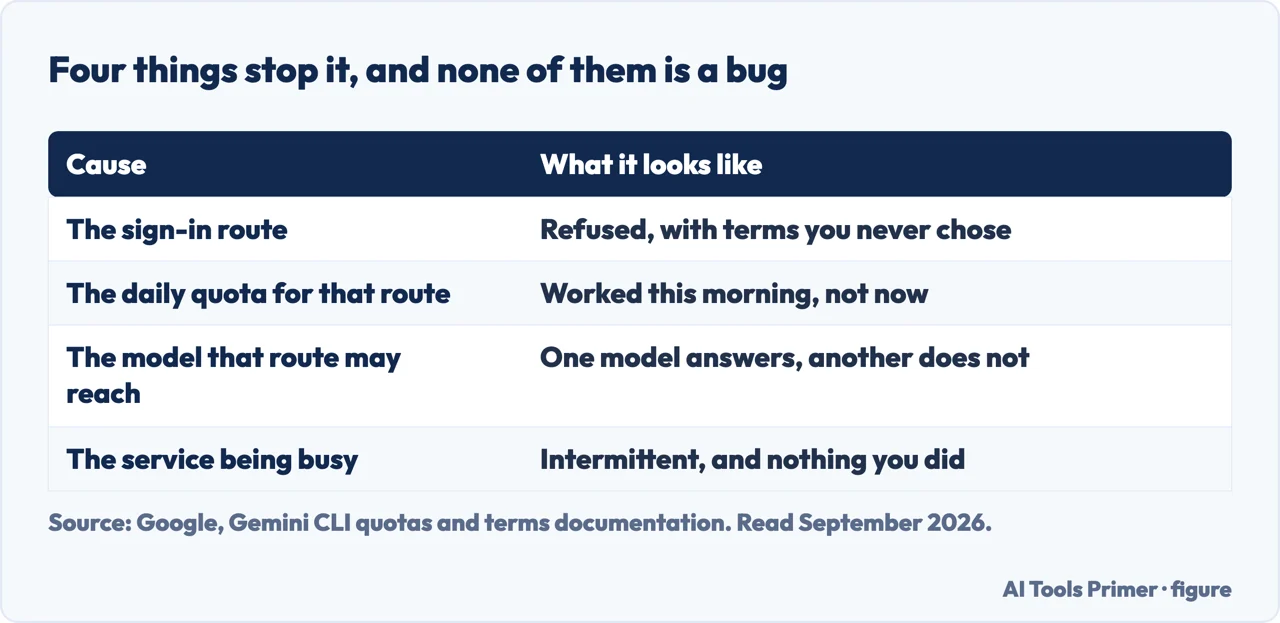
The four things that stop it, in the order worth checking
None of them is a bug, and each one has a different fix. Three are documented by Google; the fourth is what the documentation calls the ceiling.
The program on your machine
“Gemini CLI software is licensed under the Apache 2.0 license.” You can read it, fork it, change it, ship it.
This is the part the phrase “open-source AI agent” is describing, and it is true.
The service it talks to
“When you use Gemini CLI to access or use Google’s services, the Terms of Service and Privacy Notices applicable to those services apply to such access and use.”
The model does not run on your machine. The licence on the client says nothing about the terms on the other end.
That distinction is not a criticism. Google says it plainly on the same page, and it follows from what the program is: a client. The model is somewhere else, and the client is the part that was opened. But it changes what the word “open” settles. It settles what the program does with your files and how it behaves, because you can read it. It does not settle what happens to what you send. For that you have to know which door you came in through.
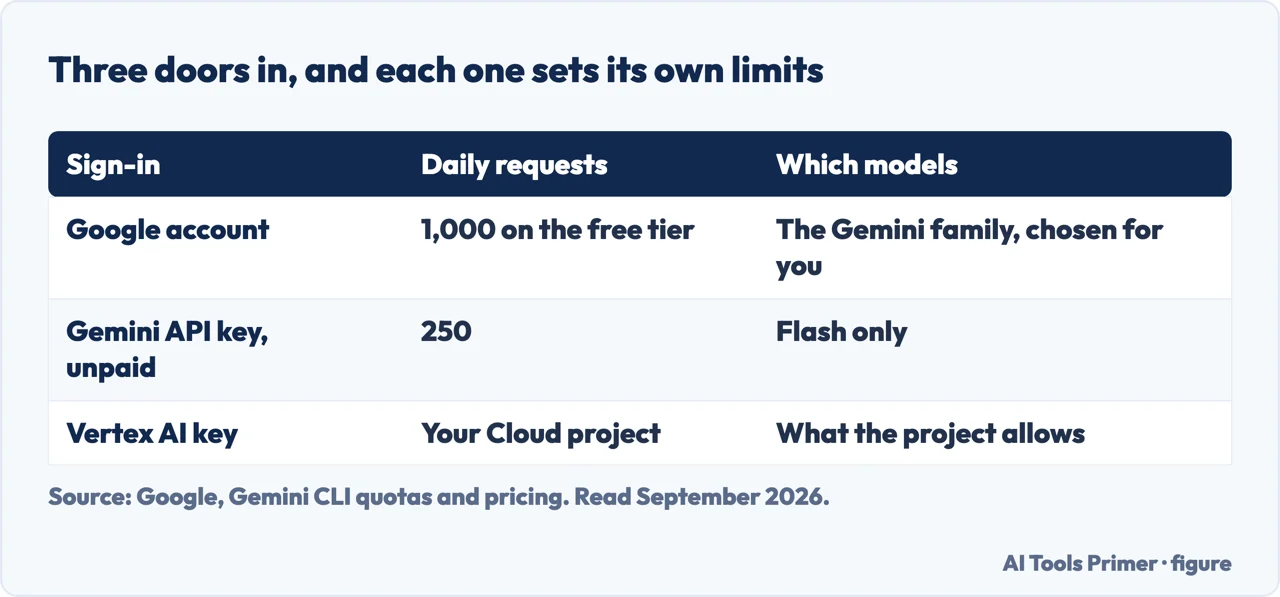
Three ways to sign in, three different sets of terms
Google lists them separately, and which one you used decides which documents govern your use.
That table is the most useful thing on this page for anybody deciding whether to point this at work code. The same command, typed the same way, sits under Google Terms of Service, Gemini API terms, or Google Cloud Platform terms depending on which sign-in was used. That choice is made once, during setup, and it is not restated afterwards — so if the answer matters, the thing to go and check is how you authenticated.
The other number people arrive looking for is the limit, and Google publishes it as a table rather than a headline.
What the free tier gives you
Maximum model requests per user per day, from Google’s own table.
Two details in that table are worth pulling out, because the numbers alone do not carry them. The free route through a Google account gives four times the daily requests of the free route through an API key — and the difference is not only volume. Google says the API-key free tier makes “model requests to Flash model only”, while the Google-account route spreads requests “across the Gemini model family as determined by Gemini CLI”. So one free tier is larger and picks its own model; the other is smaller and fixed.
And a caveat attached to all of it: requests “are limited per user per minute and are subject to the availability of the service in times of high demand”. A published ceiling is not a guarantee of a guide.
“Directly accessing the services powering Gemini CLI… using third-party software, tools, or services… is a violation of applicable terms and policies. Such actions may be grounds for suspension or termination of your account.”
This is the sentence that shows where the open licence stops. The code is yours to modify; the credentials are not yours to lend to another program. Google gives an example in the same line — pointing a different tool at the Gemini CLI login — and attaches the consequence directly. It is a specific prohibition rather than general boilerplate: Google names an example — pointing another tool at the Gemini CLI login — and states the consequence in the same sentence.
Getting it, in Google’s own words. Three routes are listed:
run it without installing with npx @google/gemini-cli, install it globally with
npm install -g @google/gemini-cli, or on macOS and Linux with
brew install gemini-cli. The first of those is the one to know about — it lets you
try the thing without leaving anything behind on the machine, which for a tool that reads your
files and runs shell commands is a reasonable way to start.
What the tool can reach once it is running is stated plainly in the same README, and it is a wider set than “a chat window in a terminal” suggests: Google Search grounding, file operations, shell commands, web fetching, plus support for MCP — the Model Context Protocol — “for custom integrations”. Two items on that list deserve to be read slowly. File operations and shell commands mean the agent is not only answering; it is acting, on the machine you are sitting at.
That is worth being clear-eyed about, and it is stated by Google rather than inferred here: file operations and shell commands are on the published list of what the tool can do. What no documentation settles is how much room to give it. This page’s own suggestion, offered as such: point it first at something you could throw away and rebuild, rather than at the repository you could not.
One last thing Google publishes, and it is a control rather than a warning. “Your Gemini CLI Usage Statistics are handled in accordance with Google’s Privacy Policy” — and there is an opt-out: the documentation links to a Usage Statistics configuration page for turning the sending off. That is separate from what happens to your prompts, which is governed by whichever of the three sets of terms applies to you.
What this page will not tell you is whether Google trains on what you send. That answer lives in the individual privacy notices for Gemini Code Assist, the Gemini API and Vertex AI respectively — three different documents, for three different sign-in routes, and it is those that have to be read rather than a summary of them.
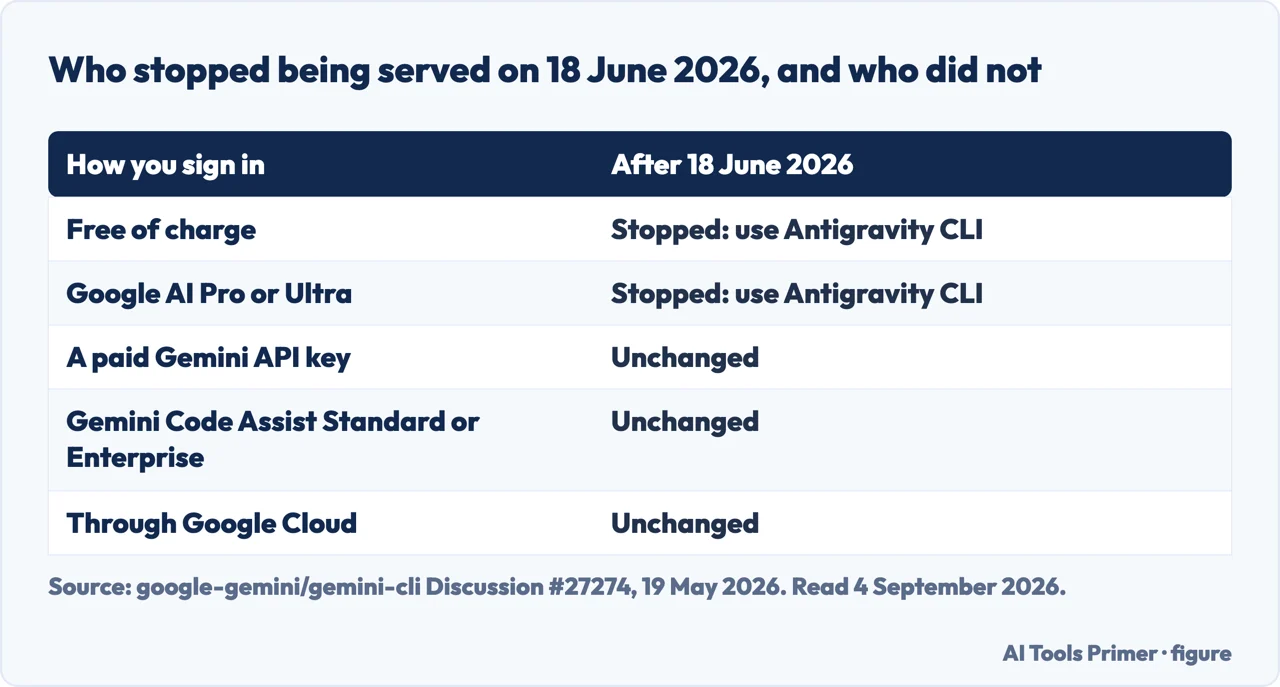
If you are typing this on a free account, on Google AI Pro or on Ultra, the answer is not a setting. Gemini CLI stopped serving those tiers on 18 June 2026. It was announced on 19 May 2026 by a maintainer, in the repository’s own Announcements section: “we are unifying our agent-first development tools… we are transitioning our terminal experience from Gemini CLI to the brand-new Antigravity CLI.” The sentence that decides your case is the next one: “On June 18, 2026, Gemini CLI will stop serving requests for Google AI Pro and Ultra, as well as those using it free of charge. These tiers are now supported via Antigravity CLI.” The same change applies to the Gemini Code Assist IDE extensions and to Gemini Code Assist on GitHub.
If you have a paid key or an enterprise licence, nothing has changed, and the four causes below are still your answer. Google names who kept access: “If your organization uses Gemini CLI or our IDE extensions via a Gemini Code Assist Standard or Enterprise license, or through Google Cloud, your access remains fully supported. Gemini CLI will also remain accessible via paid Gemini and Gemini Enterprise Agent Platform API keys.” So the first question is not what broke. It is which door you came in through, and whether that door closed on 18 June.
Why the repository looks alive — and is. There is no notice in the README, the documentation still opens with the old description, and releases are still shipping. All of that is true, and it is true because of the exception rather than in spite of it: “You will continue to see us work on GitHub as we keep Gemini CLI updated with latest model releases, bugs and security fixes for our enterprise customers. The project remains available to the community as an Apache 2.0 licensed repository with no changes.” A project that still serves paying customers does not put up a closing sign, and an announcement lives in the announcements, not in the README.
What you get if you move. Antigravity CLI is built in Go, “supports asynchronous background workflows”, and keeps “Agent Skills, Hooks, Subagents, and Extensions (now Antigravity plugins)”. One caveat is Google’s own, and it is worth having before you plan the move: “There won’t be 1:1 feature parity right out of the gate.” There is a migration guide with an FAQ.
The guides below take it three ways: the licence and the terms, the limits, and the wider question of what it means to let a program act on your machine.
Three ways in. The first is the one people get wrong.
An Apache 2.0 client in front of a service governed by whichever of three agreements matches how you signed in. The licence and the terms are answering different questions.
A published table of daily requests, two free tiers that differ in size and in which models they reach, and a caveat about high demand attached to all of it.
File operations and shell commands are on the published feature list. That makes the setup question — what you point it at — the real safety question.
Not covered here. It will not tell you the open licence covers your data. Google states in the same document that the terms of the services being called apply to that, and names three different sets of them.
It will not quote one free limit. Google publishes a table with different numbers for different sign-in routes, and picking one figure out of it would be right for some readers and wrong for the rest.
And it will not judge whether the tool is any good. That needs running it against real work for long enough to have an opinion worth publishing, which this site has not done. What holds instead is simple: what Gemini CLI allows, and on which terms, is Google’s own documentation, quoted as Google wrote it rather than retold.
More guides from the site, in no particular order.
Written by Alberto Gulotta
Founder and editor of AI Tools Primer, writing from Palermo, Italy. Thirty-five years of taking computers apart, starting with a Commodore 64 — the long version is on the about page.
Something wrong on this page? Write to aitoolsprimer@gmail.com and it gets fixed.
Written on 5 September 2026 · last checked 23 September 2026.
Independence and limits
No affiliate links and no paid placements anywhere on this site. Nobody pays to appear here, and no company has seen this page before you did.
This is general information, not professional advice. Where a page touches money, health, safety or the law, it names its source and the date it was read — and your situation may still differ. See the privacy page and the cookie policy.