
Chat · guide
Is ChatGPT free: the plan, the ads and your chats
By Alberto Gulotta · Updated · 18 min read
Is ChatGPT free? Yes: OpenAI's help page says ChatGPT is free to use, with unlimited everyday text chats under abuse-prevention safeguards. Uploads, images, voice and data analysis have separate limits. The pages we read also say ads may appear on Free, and that data sharing for training is on by default until you switch it off.
| Question | Answer | Where it comes from |
|---|---|---|
| Is there a free plan? | Yes: OpenAI’s FAQ says ChatGPT is free to use | Free Tier FAQ |
| How long does it last? | There is no set time limit; anyone who signs up can use Free | Free plan page |
| What is capped? | Text chats are unlimited with safeguards; uploads, images, voice and data analysis have separate limits | Free Tier FAQ |
| Are there ads? | They may appear on Free and Go, in selected regions | Ads in ChatGPT |
| Are my chats used for training? | Data sharing is on by default for Free; there is a switch to turn it off | Data controls |
The short yes, and its edges
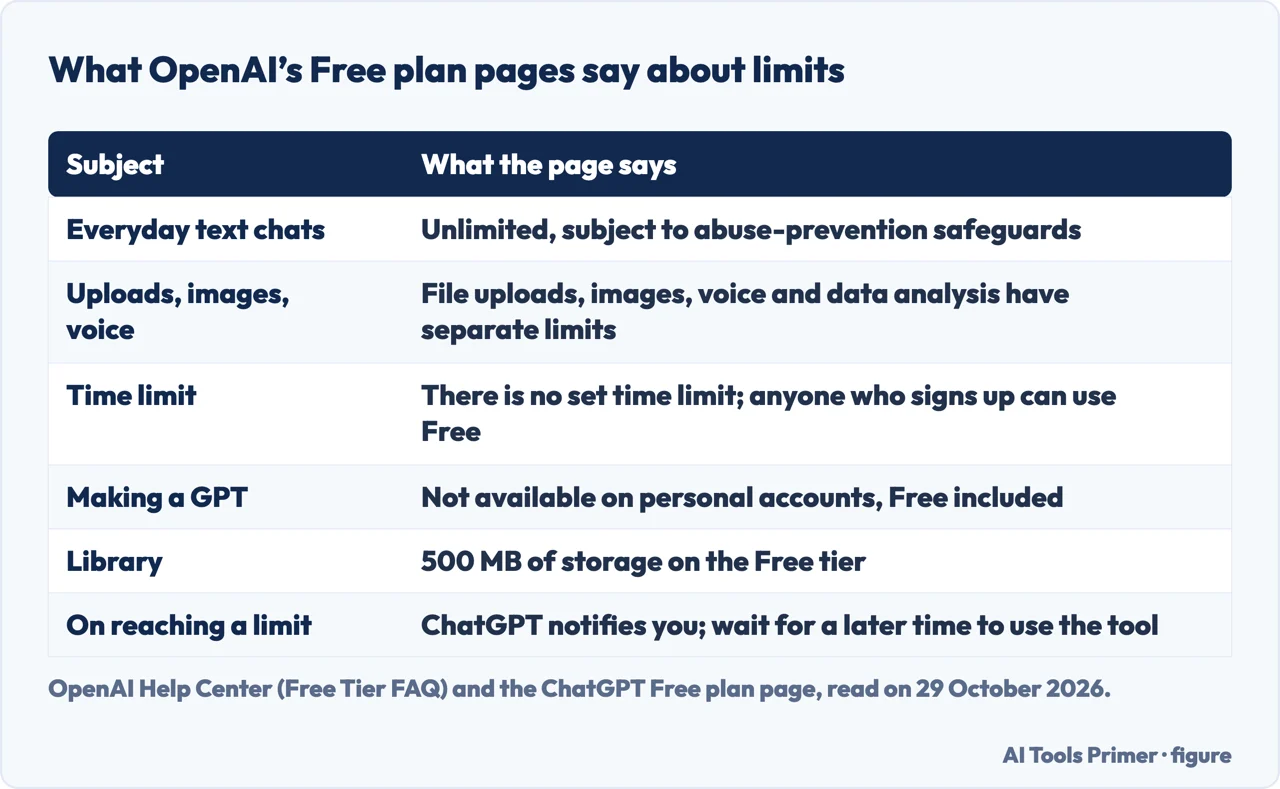
OpenAI’s Free Tier FAQ starts with a plain sentence: “ChatGPT is free to use.” It adds that Free users have access to a range of chat capabilities, tools and GPTs, and that the default model and the available limits can change over time. The page for the Free plan on chatgpt.com answers the question of how long in the same spirit: there is no set time limit, and the plan is available to anyone who signs up for an account.
The edge of the yes is the word unlimited. The FAQ says Free users have unlimited everyday text chats, subject to abuse-prevention safeguards, and the pricing page repeats the idea with a footnote saying that usage must be reasonable and comply with OpenAI’s policies. The pages we read do not say how many text messages the safeguards allow before they step in, so the word describes a rule of the plan and not a number you can plan around.
Everything else is counted separately. According to the FAQ, file uploads, image generation, voice, data analysis and other tools have their own usage limits, and ChatGPT notifies you when you reach one. For data analysis, file and image uploads and image creation, the FAQ says that once a limit is reached you will need to wait for a later time before using any of those tools. For GPTs, it says access pauses until the limit resets and that ChatGPT shows the reset timing in the product. The FAQ does not give a figure for any of these limits.
One thing the Free plan does not include, and neither does any personal plan: making a GPT. The FAQ says new GPT creation and publishing are not available on personal accounts, Free, Go, Plus and Pro alike, though existing GPTs can still be used. It says creation remains available in Business, Enterprise and Edu workspaces when their settings and permissions allow it.
What Free includes, and where the ceiling is written
The FAQ lists what Free users can do: search the web for up-to-date information, analyze and extract insights from data, upload images or files in prompts, discover and use GPTs, create images, and use a Library with 500 MB of storage. The FAQ also says Free users have a Think option that is available in the ChatGPT mobile app and rolling out on the web, opened from the + menu on mobile, and the pricing table marks GPT-5 Thinking Mini as included for Free; neither page gives a limit for it. The Free plan page describes the same ground in its own words: search, chatting with files and images, a study mode, help with writing and planning, and image creation. The FAQ also says the Free limit resets if you move to Plus, Pro or Business.
The pricing page is where the ceiling shows up as words. Its Free column lists a price of zero a month, then limited messages with uploads, limited image creation, limited voice chats, limited deep research, limited memory and context, and limited Codex access. Further down, a comparison table gives two numbers for the Free plan that OpenAI’s help pages do not repeat: a total context window of 27K for the GPT Instant model against 54K on Go and Plus, and an input maximum of about 12 pages of text against about 40. For the reasoning models it says “Varies” for Free and lists 256K for Go and Plus, and it describes Free response times as limited on bandwidth and availability.
The pricing page we loaded showed prices in euro, because it was read from a browser without a country, so we do not copy them here. For dollars and for what Go and Plus add, see our page on ChatGPT Go and Plus.
The pages also disagree about the model. The FAQ says Free users have GPT-5.6 Luna. The pricing page says unlimited text chats with GPT-6 in its Free column, and in its table it marks a GPT-6 Luna row as included for Free and a GPT-5.6 Luna row as not included. A May 2026 blog says GPT-5.3. We read all three pages on 29 October 2026, and the FAQ itself says the default model can change, so we name no model for the Free plan.
The blog is the only page we read that gives counts of messages, uploads and images. Gmelius, a company that sells shared-inbox software for Gmail and ends its article with an invitation to its own free trial, says in a page updated on 6 May 2026 that free accounts hit a ceiling of roughly 10 messages every five hours on the flagship model, and that logged-in free users have uploads capped at three per day and image generation of around five images daily. The OpenAI pages we read do not carry those figures, and they say text chats are unlimited with safeguards, so the two accounts differ. The blog also says use without an account keeps no conversation history. OpenAI’s data controls page says only that, when using ChatGPT without signing in, you can turn off the training setting and that the choice is saved in that browser. It does not mention history, so we cannot confirm the blog’s claim.
Ads on the Free plan
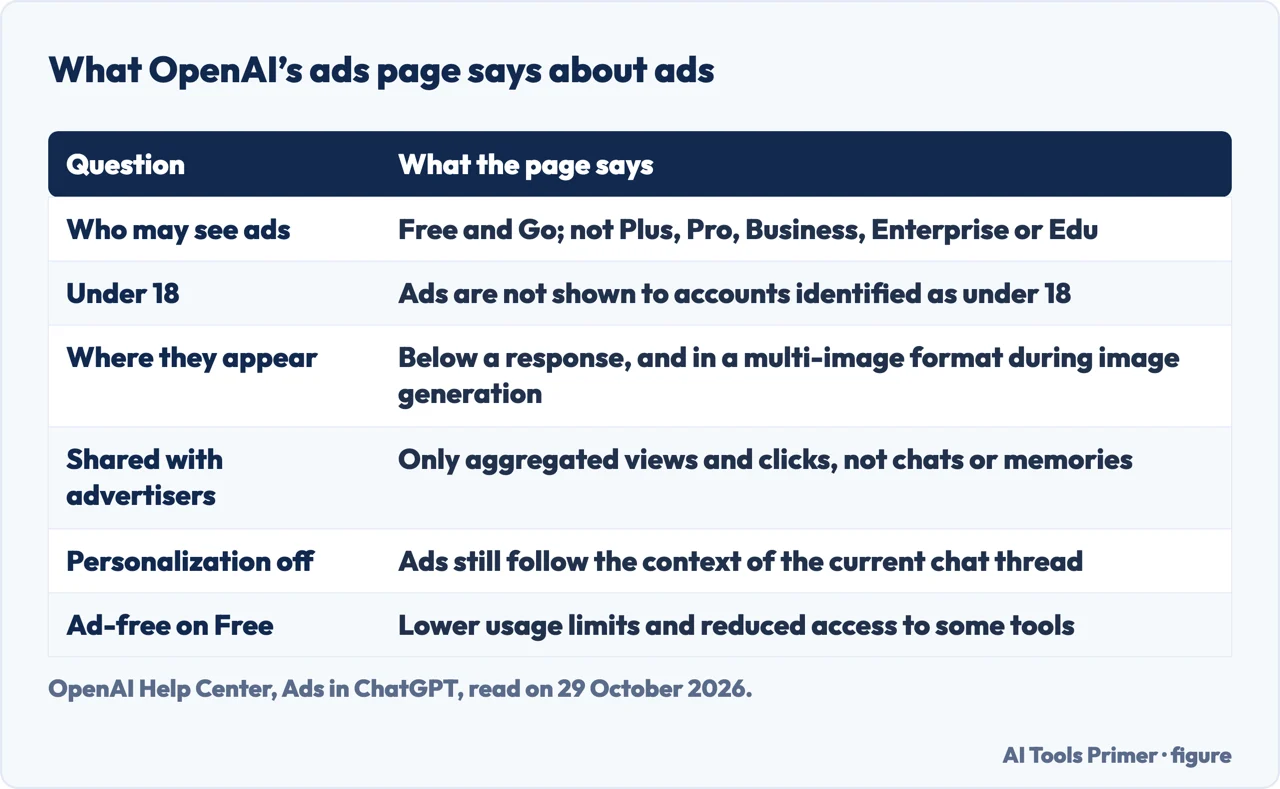
The Free Tier FAQ says in one sentence that ads may appear in the Free tier in certain countries, and sends you to the ads FAQ. That page, which showed itself as updated 18 hours earlier when we read it, says ads may appear for users on the Free and Go plans and that Plus, Pro, Business, Enterprise and Edu accounts will not have them. It says ads are not shown to accounts identified as belonging to people under 18. Ad testing started in the United States on 9 February 2026, and OpenAI says it is rolling ads out gradually to eligible users on Free and Go in select regions. The list of countries sits on an Ads Manager availability page that we did not read.
The pricing page is less direct. In the text we read, the sentence saying a plan may include ads appears under Go and not under Free. The FAQ, the ads page and the pricing page therefore describe the same plans from different angles, and the ads page itself says the availability is still changing as testing expands.
On where ads appear, OpenAI says you may see one below a ChatGPT response and that it is testing a multi-image format during image generation. Ads are labeled and shown apart from the answer. OpenAI says ads do not influence ChatGPT’s answers, that they are paid placements, and that seeing one does not mean OpenAI recommends the advertiser. The ads page also says temporary chats do not show ads and that ads are not eligible to appear near personal health, mental health or politics; it adds that political advertising is currently not allowed in ChatGPT.
On data, OpenAI says it does not share your conversations with advertisers and does not sell your data to them. Advertisers receive aggregated reporting such as views and clicks. Which signals choose an ad depends on a setting. Among the signals the page lists are the context and intent of the current conversation; with ads personalization on, it adds the current chat thread, how you interact with ads, and past chats and memory. With personalization off, you still see ads based on the current thread. Turning personalization off makes ads less tailored, in the page’s words, and does not remove them. Personalized ads are not initially available in the European Economic Area or Switzerland.
The controls sit in Settings under Ad Controls. The page lists turning personalization off, hiding an ad and sharing feedback, seeing why you were shown one, and clearing the data used for ads; cleared ads data is retained for up to 30 days before it is removed from OpenAI’s servers.
The page also describes a way out that is specific to Free. In Settings you open Ads controls, choose Change plan to go ad-free, and choose Reduce message limits. The page says this removes ads for free, with lower usage limits and reduced feature access, for example no image generation or deep research. When you reach a limit, a banner can offer Show ads to return to the ad-supported experience. For ad-free use without the reduced Free limits, the page points to Plus or Pro. It also says the options may appear only in regions where ads are being tested. Our page on Go and Plus sets the paid plans side by side.
What Free costs in data
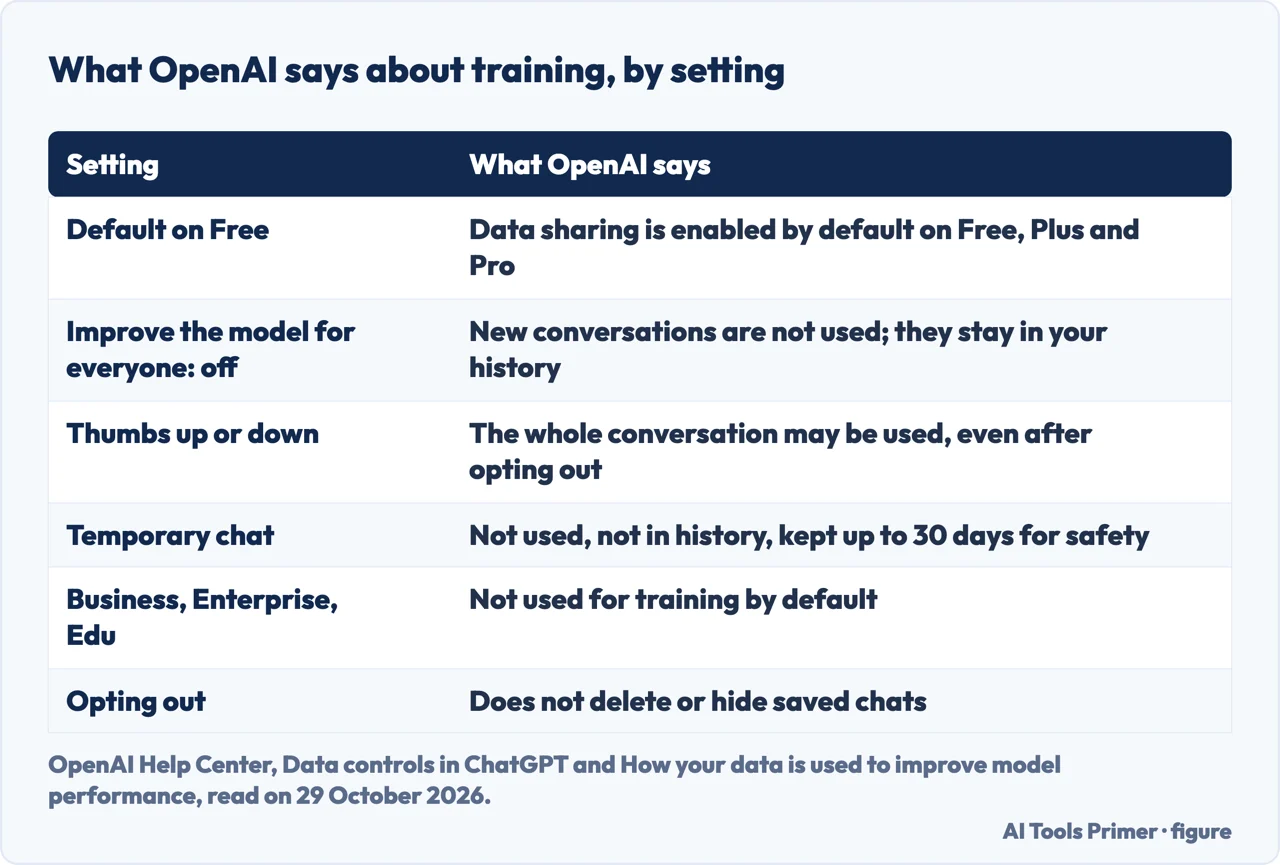
The Data controls page says that on personal workspaces with ChatGPT Free, Plus or Pro, data sharing is enabled by default. The setting is called Improve the model for everyone, and it is found under Settings, then Data controls. The page says that with it off, your new conversations will not be used to train OpenAI models and can still appear in your chat history. Signed in, the setting applies to your account across web and mobile. Signed out, you open Settings and turn it off, and the choice is saved in that browser.
The page on how data is used to improve model performance gives the same default from the other side. For services for individuals, Free, Plus and Pro, OpenAI says it may use your content to train its models, and that before using eligible content it takes steps to reduce the amount of personal information in training datasets. To opt out you can turn the setting off, or choose “Do not train on my content” in the Privacy Portal, which we did not open; either is enough. The pricing page agrees: its privacy row for Free, Go, Plus and Pro reads “Opt-out available.”
Two details change what an opt-out covers. First, both help pages say that giving feedback, such as a thumbs up or thumbs down on a response, can lead to the entire conversation associated with that feedback being used for training even after you opt out. For Business, Enterprise and Edu, the page on improving models says the feedback does not permit training on the conversation. Second, opting out does not delete or hide anything: regular chats remain in your history, archived chats stay archived, and archiving does not change the setting. The Data controls page says to delete a chat or your account separately when you want content removed. Our page on deleting your ChatGPT history covers what each of those does, and our page on whether ChatGPT is safe walks through the same Improve the model switch and temporary chats from the safety side.
A temporary chat is the third option the pages describe. While it remains temporary, OpenAI says it does not appear in your history, does not create or update memories, is not used to improve models, and may be retained for up to 30 days for safety purposes. If you save it, it becomes a regular chat and follows your account settings. Memory and model training are separate settings, according to the Data controls page, and turning off memory or personalization does not disable safety features that may use limited, safety-relevant context in rare, high-risk situations.
The managed plans work differently by default. OpenAI says it does not use content from ChatGPT Business, Enterprise, Edu or the API to train its models unless an organization agrees otherwise. Free is not on that list. Conversations with OpenAI Support may be used to improve services if the training setting is on, and Codex has its own separate setting for training on full environments.
The app, the account and what stays unchecked
The App Store listing for ChatGPT shows the app as Free with in-app purchases, rated 13+, from the developer OpenAI OpCo, LLC. Among the purchases it lists ChatGPT Plus at $19.99 and ChatGPT Go at $8.00; OpenAI’s help page for Plus says $20 a month, billed monthly, and adds that Plus subscriptions may include usage limits such as message caps, especially during high demand. The listing is a store page and OpenAI’s help page is the service’s own, so the two figures should be read as two sources.
The listing’s privacy section starts with a caution. It says the developer indicated that the app’s privacy practices may include handling of data as described, and that this information has not been verified by Apple. Under the heading of data linked to you, the developer lists health and fitness, location, contact info, user content, search history, identifiers, usage data and diagnostics, grouped under purposes that include third-party advertising, analytics, product personalization and app functionality. The listing adds that practices may vary with the features you use or your age. The listing is Apple’s page and not OpenAI’s, and it labels these entries as the developer’s declaration.
Getting your data out, or leaving, is covered on the Data controls page. Signed-in Free, Go, Plus and Pro users can request a copy of their data from settings, and can delete their account from settings; the page says deleting an OpenAI account is permanent and affects its data and subscriptions. Our page on deleting a ChatGPT account follows those steps.
What is left to do, and what the pages leave open
Read together, the pages point to a short list of places to look. Open Settings, then Data controls, and check whether Improve the model for everyone is on. Where ads are available to you, open Ad Controls to see the personalization options, and read the ad-free option with its lower limits before choosing it. For a conversation you want out of your history and out of training, the pages describe a temporary chat. For removal, delete the chat or the account. Each of these is a step OpenAI’s own pages describe, as read on 29 October 2026.
The same pages leave several things open. They do not say how many text messages the safeguards allow, or give numbers for uploads, images, voice and data analysis on Free. They do not state how long OpenAI keeps chats that you do not delete on a Free account; the only periods they give are 30 days for temporary chats and for ads data. The ads FAQ points to a country list we did not read. And the statements about data and ads come from OpenAI itself, the position published by the service, with Apple saying that the app declarations it displays are unverified.
We opened no account and tested no limit. We used only the pages listed under Sources and nothing else. If your question is whether ChatGPT is safe to use, our page on whether ChatGPT is safe takes it up, and for the same question about another assistant there is our page on whether Claude is free.
Where to start
Four ways in.
- “Is it really free?”
- The short yes, and its edges — yes
- “What do I get for nothing?”
- What Free includes, and where the ceiling is written — included
- “Will I see ads?”
- Ads on the Free plan — ads
- “Are my chats used for training?”
- What Free costs in data — data
What happens to your chats
Safety, history and accounts: the privacy questions that follow from a free plan.
Plans and other assistants
The paid plans, how to cancel one, and the same question asked of Claude.
Questions people also ask
How long can I use ChatGPT for free?
OpenAI’s Free plan page says there is no set time limit and that the plan is available to anyone who signs up for an account. The Free Tier FAQ adds that the default model and the available limits can change over time.
How much does ChatGPT cost?
The Free plan costs nothing. OpenAI’s help page for Plus says $20 a month, and the App Store listing shows ChatGPT Go at $8.00 and Plus at $19.99 as in-app purchases. The pricing page we loaded showed euro, so we do not quote it; our page on Go and Plus covers the paid plans.
Is ChatGPT paid or free?
Both exist. The FAQ says ChatGPT is free to use, and the pricing page lists Free, Go, Plus and Pro, among other plans. The FAQ says your Free limit resets if you move to Plus, Pro or Business.
What shouldn’t you tell ChatGPT?
The pages we read do not list topics to avoid. They describe what is done with what you type: training is on by default for Free, a thumbs up or down can bring in the whole conversation, and a temporary chat is not used for training. Our page on whether ChatGPT is safe takes the wider question.
Not covered here. We opened no account and tested no limit. The statements come from seven pages of OpenAI, the App Store listing for ChatGPT and a blog by Gmelius, all read on 29 October 2026. The statements about ads and data are OpenAI’s description of its own service.
The search volume and difficulty behind this page come from a Semrush reading of 29 August 2026, older than the 60 days the site normally allows.
Sources
- OpenAI Help Center — ChatGPT Free Tier FAQ — help.openai.com, read 29 October 2026.
- ChatGPT — Free plan page — chatgpt.com, read 29 October 2026.
- OpenAI — ChatGPT pricing — openai.com, read 29 October 2026.
- OpenAI Help Center — Ads in ChatGPT — help.openai.com, read 29 October 2026.
- OpenAI Help Center — Data controls in ChatGPT — help.openai.com, read 29 October 2026.
- OpenAI Help Center — How your data is used to improve model performance — help.openai.com, read 29 October 2026.
- OpenAI Help Center — What is ChatGPT Plus? — help.openai.com, read 29 October 2026.
- Apple App Store — ChatGPT — apps.apple.com, read 29 October 2026.
- Gmelius — Is ChatGPT Free? (blog, updated 6 May 2026) — gmelius.com, read 29 October 2026.
Written by Alberto Gulotta
Founder and editor of AI Tools Primer, writing from Palermo, Italy. Thirty-five years of taking computers apart, starting with a Commodore 64 — the long version is on the about page.
Something wrong on this page? Write to aitoolsprimer@gmail.com and it gets fixed.
Written on 29 October 2026.
Independence and limits
No affiliate links and no paid placements anywhere on this site. Nobody pays to appear here, and no company has seen this page before you did.
This is general information, not professional advice. Where a page touches money, health, safety or the law, it names its source and the date it was read — and your situation may still differ. See the privacy page and the cookie policy.