
Chat · guide
How to delete ChatGPT account: OpenAI’s steps, and what follows
By Alberto Gulotta · Updated · 9 min read
How to delete ChatGPT account is documented in one OpenAI Help Center article: web steps, app steps and a Privacy Portal route if you cannot sign in. The article also says what deletion does not do. This page puts those steps and limits in order, and marks what the guides add.
| Question | Answer | Where it comes from |
|---|---|---|
| Where do I delete it? | On the web: Settings, Account, Delete account; in the app: Data controls, Delete account | OpenAI Help Center |
| What if I cannot sign in? | Submit a deletion request through the Privacy Portal | OpenAI Help Center |
| How long until the data is gone? | Deleted within 30 days, with a limited set kept longer where law requires or permits | OpenAI Help Center |
| Does it cancel my subscription? | Only one billed directly by ChatGPT; not Apple App Store or Google Play ones | OpenAI Help Center |
| Can I undo it? | No: deleted accounts cannot be reactivated | OpenAI Help Center |
Before you delete: the options OpenAI lists first
OpenAI’s article, which showed “Updated: 5 hours ago” when we read it, begins by saying account deletion is permanent and that you may not need it. To stop paying it points to the page on cancelling a ChatGPT subscription, to change an email address or sign-in method it points to its page on that, and to remove a conversation it points to the page on deleting and archiving chats. The site has two pages on those: cancelling ChatGPT, which says that deleting the account is not needed to stop charges, and deleting your history.
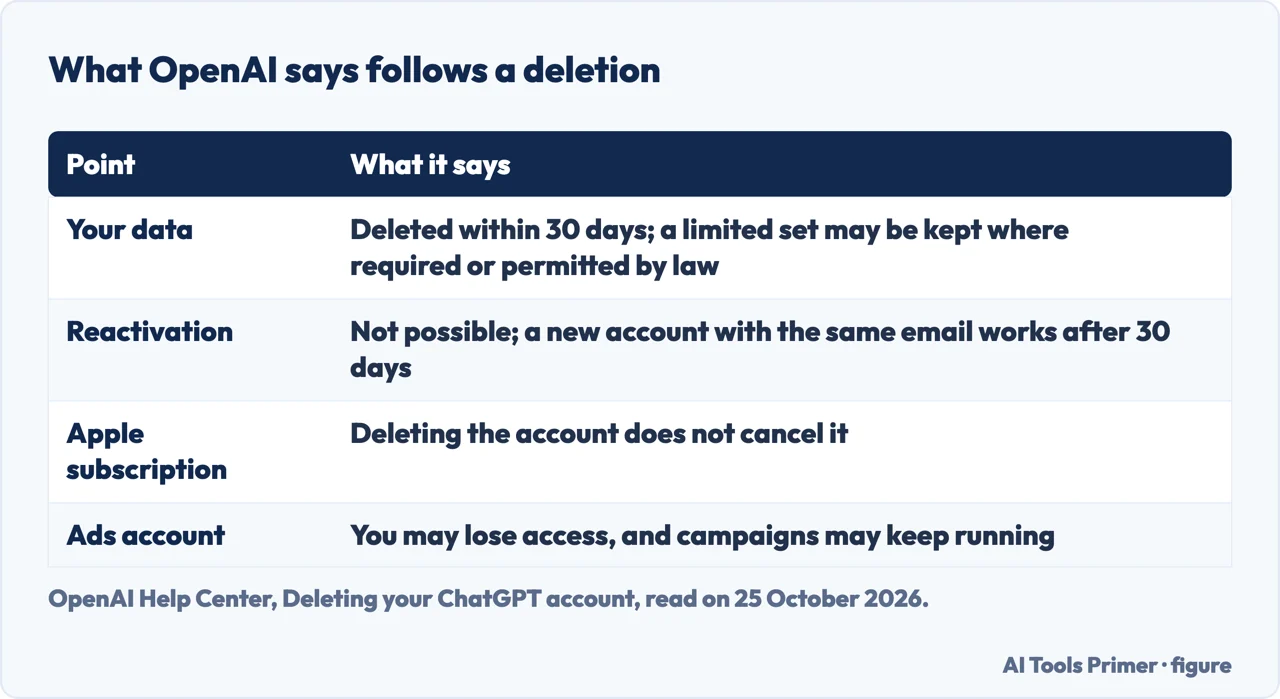
Two checks come before the button. If you have a subscription billed through the Apple App Store or Google Play, OpenAI says that deleting the account does not cancel an Apple subscription, so cancel it first. And if the email address of your OpenAI account is also used for an Ads account, OpenAI says deletion may prevent you from accessing or managing it and may not pause or cancel active campaigns, which could keep serving and accruing charges; it says to pause or end the campaigns, make sure another authorised user can reach the Ads account, or contact Support if you are the only one with access.
The steps, on the web and in the app
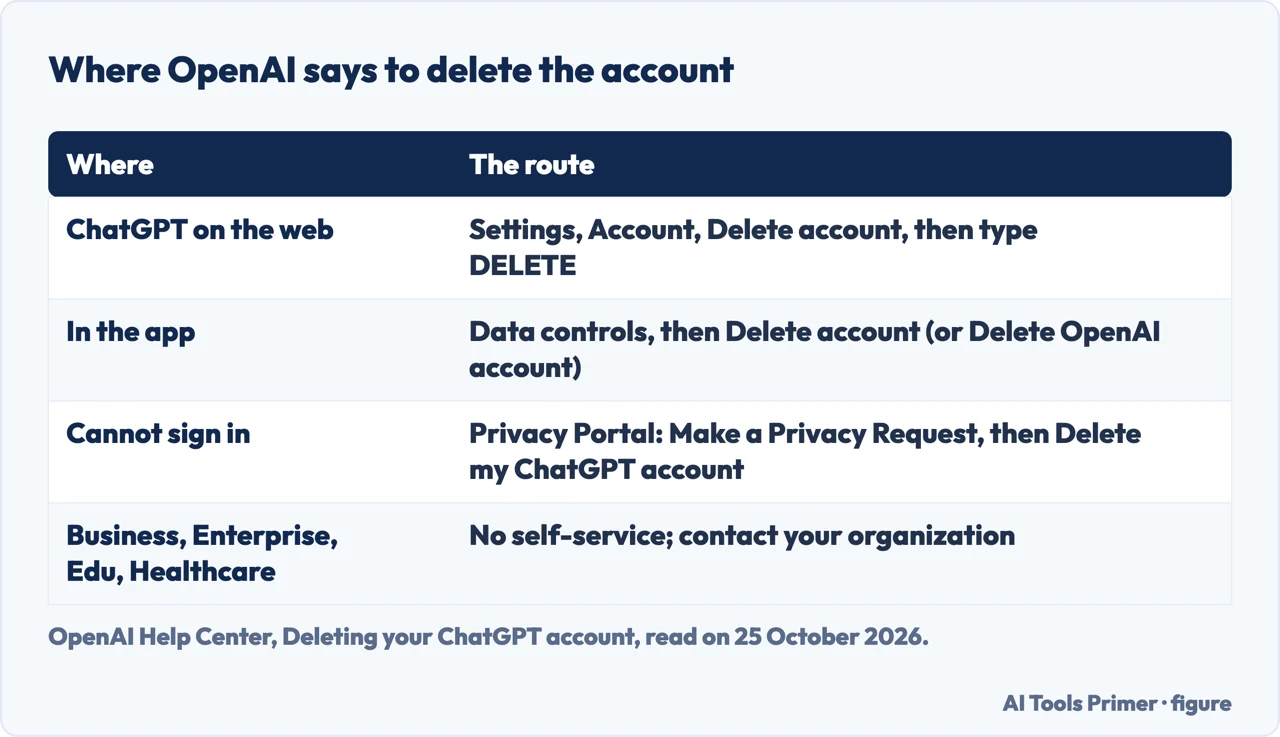
On the web, OpenAI’s steps are: sign in to ChatGPT, open your account menu and select Settings, select Account, and next to Delete account select Delete. Then enter your account email or phone number, type DELETE when prompted and select Permanently delete my account.
In the app, the article lists two flows. In the first you open your account settings, select Data controls and then Delete account; with an active Apple subscription there is a warning and a Manage subscriptions button to cancel it before continuing. In the second you open Settings from your profile menu, select Data controls and then Delete OpenAI account, which older app versions call Delete Account. In both you review the confirmation, and follow any sign-in or verification prompts. If the app returns to your chats without a deletion confirmation, or you cannot finish the mobile flow, OpenAI says to use the Privacy Portal, and that completing a sign-in prompt by itself does not confirm that the account was deleted.
When you cannot sign in, and for work accounts
For an account you cannot open, OpenAI says to go to the Privacy Portal, select Make a Privacy Request, select I have a consumer ChatGPT account, then Delete my ChatGPT account, and follow the verification steps. You must be able to verify the email address or phone number already linked to the account; if you cannot, or a deactivated phone-only account cannot complete verification, it says to contact OpenAI Support for an ownership review.
Self-service deletion is not available in ChatGPT Business, Enterprise, Edu or ChatGPT for Healthcare workspaces; OpenAI says to contact your organization. Coursiv, a blog, gives the same advice for a work or school account: ask the administrator which controls apply.
What happens afterwards
OpenAI says deletion prevents you from using the account to access its services, including ChatGPT and the API, and that it deletes your data within 30 days, except that it may retain a limited set longer where required or permitted by law. Deleted chats are removed within 30 days unless they were already de-identified and disassociated from your account or must be kept for security or legal reasons. Memory controls depend on your account; for personal accounts, eligible content may be used to improve models depending on your settings.
The article answers several questions that people ask next. A deleted account cannot be reactivated, but you can create a new account with the same email address after 30 days, if the prior account was fully deleted and not deactivated. A phone number can verify the first API key for up to three accounts, and deleting an account does not reset that limit. Deleting the account does not let you change your sign-in method; if you signed up with Google, Apple or Microsoft you may be able to add a password under Settings, Security and login. For the message “You do not have an account because it has been deleted or deactivated”, OpenAI says a self-deleted account cannot be restored, and that waiting 30 days does not reactivate a deactivated one.
What the guides add
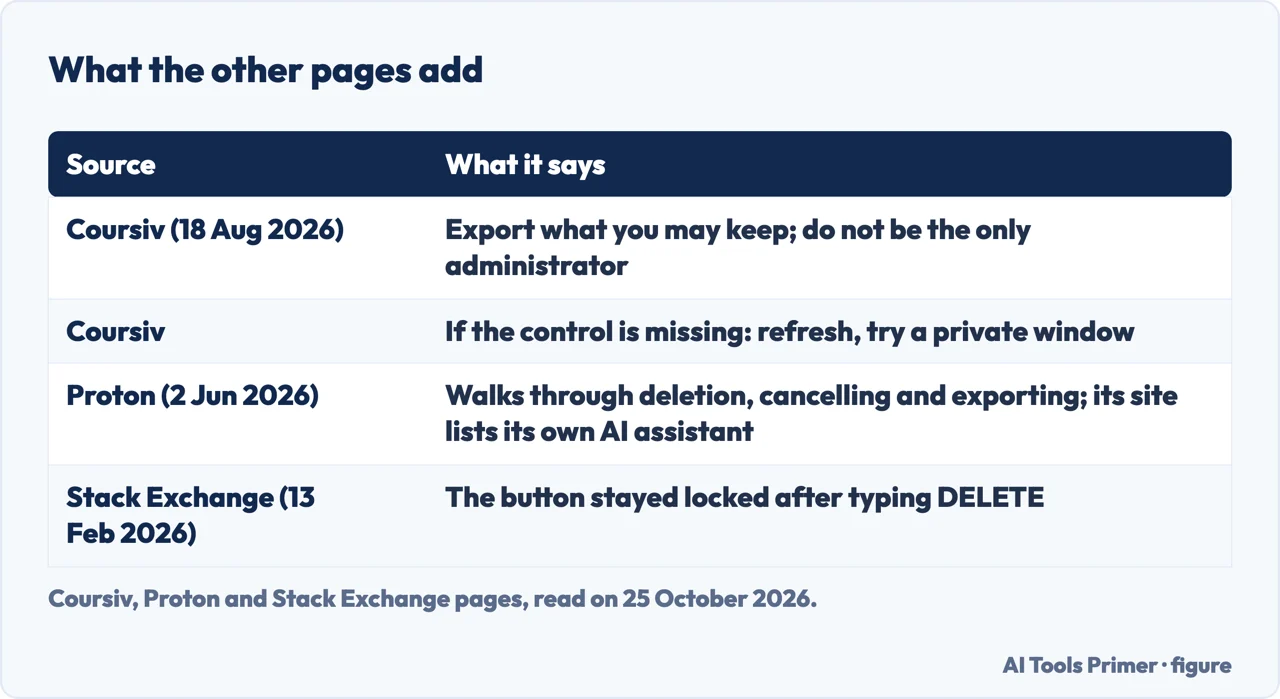
Coursiv published its guide on 18 August 2026. It adds advice that is not in OpenAI’s article: export anything you are allowed to keep, make sure the account is not the only administrator for a workspace or related service, and, if the control is missing, refresh the page and try a private browser window. Proton, whose page is dated 2 June 2026, walks through deleting, cancelling and exporting, and its site lists its own AI assistant, Lumo; we take its steps as secondary to OpenAI’s.
A question on Stack Exchange, asked on 13 February 2026, describes the case behind one of the people-also-ask boxes: after typing DELETE in the confirmation box, the button stayed “Locked”. An answer there says it looks like a failure of the web app and should be reported to OpenAI; this is a user’s report, not something OpenAI’s article mentions.
Where to start
Four ways in.
- “Should I delete it at all?”
- The options first — before
- “Where is the button?”
- Web and app — steps
- “I cannot sign in.”
- The Privacy Portal — portal
- “What happens to my data?”
- Thirty days and more — after
ChatGPT, accounts and data
Stopping the charges, clearing the history, and what the data does.
Questions people also ask
Why is ChatGPT not allowing me to delete my account?
OpenAI’s article does not list a cause. It says to follow the sign-in or verification prompts and, if the app returns to your chats without a confirmation or you cannot finish, to use the Privacy Portal. A Stack Exchange user reports a button that stayed locked; Coursiv suggests refreshing and trying a private window.
How do I delete my data from ChatGPT?
OpenAI says deleting the account deletes your data within 30 days, with a limited set retained longer where required or permitted by law. To remove only conversations, its article points to its page on deleting and archiving chats.
Does deleting a ChatGPT account delete everything?
Not necessarily: OpenAI says a limited set of data may be retained longer where law requires or permits, and deleting the account does not cancel an Apple App Store subscription.
How do I delete my chat account?
OpenAI’s article describes the web route (Settings, Account, Delete account) and the app routes (Data controls). If you cannot sign in, it describes a deletion request through the Privacy Portal.
Not covered here. We did not delete an account. The statements come from OpenAI’s Help Center article “Deleting your ChatGPT account” (it showed “Updated: 5 hours ago” on 25 October 2026), read with a headless browser, from guides by Proton (2 June 2026) and Coursiv (18 August 2026) used for what they claim, and from one Stack Exchange question of 13 February 2026. Menu names and rules change; check the current OpenAI page before you act.
The Reddit, forum and OpenAI community pages in the results were not read, and neither were the videos. ChatGPT Business, Enterprise, Edu and Healthcare workspaces, the API Platform and other OpenAI products are not covered beyond what the article says.
The search volume and difficulty behind this page were read in Semrush on 29 August 2026.
Sources
- OpenAI Help Center — Deleting your ChatGPT account — help.openai.com, read 25 October 2026.
- Proton — How to delete your ChatGPT account (2 June 2026) — proton.me, read 25 October 2026.
- Coursiv — How to Delete Your ChatGPT Account: A Step-by-Step Guide (18 August 2026) — coursiv.io, read 25 October 2026.
- Stack Exchange — Why can’t I delete my OpenAI (ChatGPT/Dall-E) account? (asked 13 February 2026) — webapps.stackexchange.com, read 25 October 2026.
Written by Alberto Gulotta
Founder and editor of AI Tools Primer, writing from Palermo, Italy. Thirty-five years of taking computers apart, starting with a Commodore 64 — the long version is on the about page.
Something wrong on this page? Write to aitoolsprimer@gmail.com and it gets fixed.
Written on 25 October 2026.
Independence and limits
No affiliate links and no paid placements anywhere on this site. Nobody pays to appear here, and no company has seen this page before you did.
This is general information, not professional advice. Where a page touches money, health, safety or the law, it names its source and the date it was read — and your situation may still differ. See the privacy page and the cookie policy.