
Chat · guide
How to cancel ChatGPT subscription where it was bought
By Alberto Gulotta · Updated · 12 min read
How to cancel ChatGPT subscription: cancel where you bought it. On chatgpt.com, Settings › Billing › Cancel plan › Cancel; through Apple, iPhone Settings › your name › Subscriptions › ChatGPT; through Google Play, the Play Store’s Subscriptions. OpenAI asks for it at least 24 hours before the next billing date.
| Bought on | Cancel in | Refund asked from | Source |
|---|---|---|---|
| chatgpt.com | ChatGPT › Settings › Billing › Cancel plan | OpenAI Support, Help Center chat | OpenAI articles 7232927 and 7232895 |
| Apple App Store | iPhone or iPad Settings › your name › Subscriptions › ChatGPT | Apple | OpenAI article 7232927; Apple article 118428 |
| Google Play | Play Store › Subscriptions › ChatGPT | OpenAI Support, Help Center chat | OpenAI articles 7232927 and 7232895 |
| ChatGPT Business, self-service | Workspace settings › Billing › Manage plan | OpenAI Support, Help Center chat | OpenAI articles 7232927 and 7232895 |
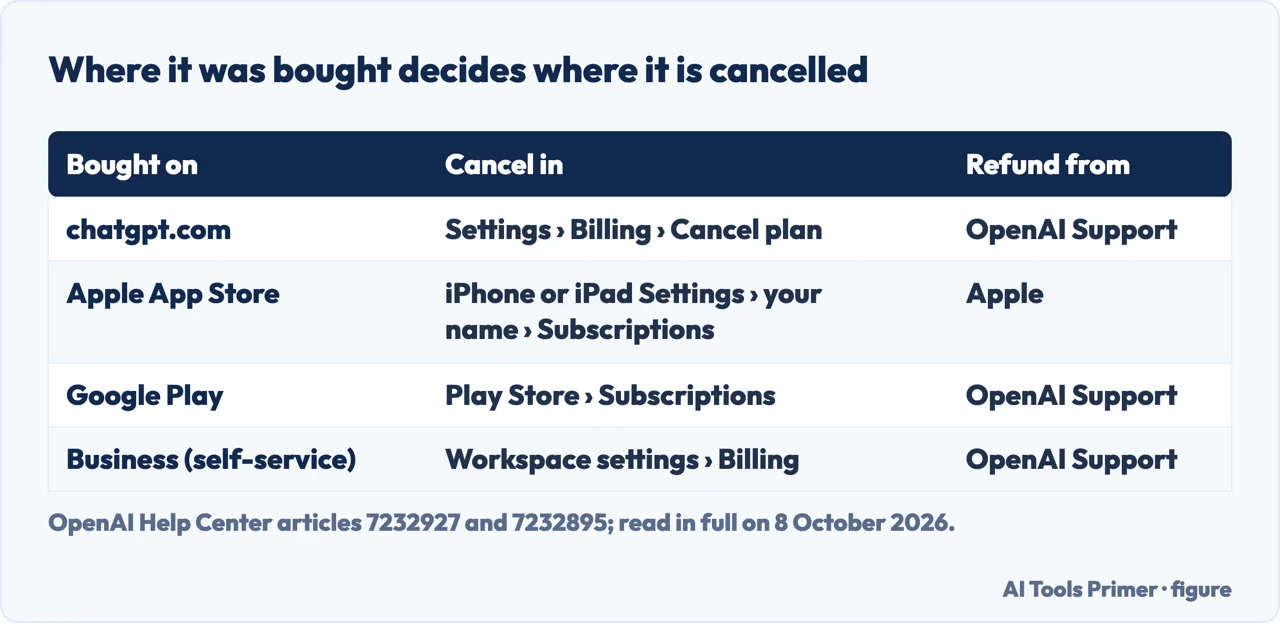
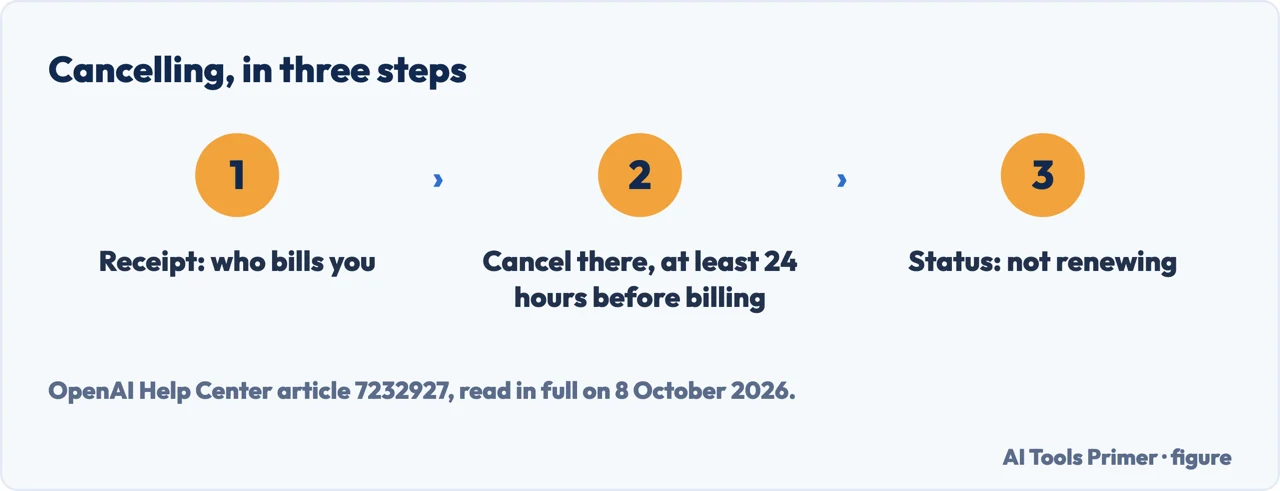
- Find out who bills you. OpenAI’s cancellation article says to cancel through the platform where the subscription was bought, and to check the purchase receipt to see which one billed you. A subscription bought on chatgpt.com does not appear among the Apple or Google Play subscriptions.
- On chatgpt.com, sign in and open Settings. The same article gives the account menu, then Settings.
- Select Billing. The cancel option is under Cancel plan.
- Select Cancel. OpenAI asks for this at least 24 hours before the next billing date, or the next period may already be charged.
- Check that it will not renew. OpenAI’s step after cancelling is to look at the subscription status on the platform that billed you and confirm it is no longer set to renew.
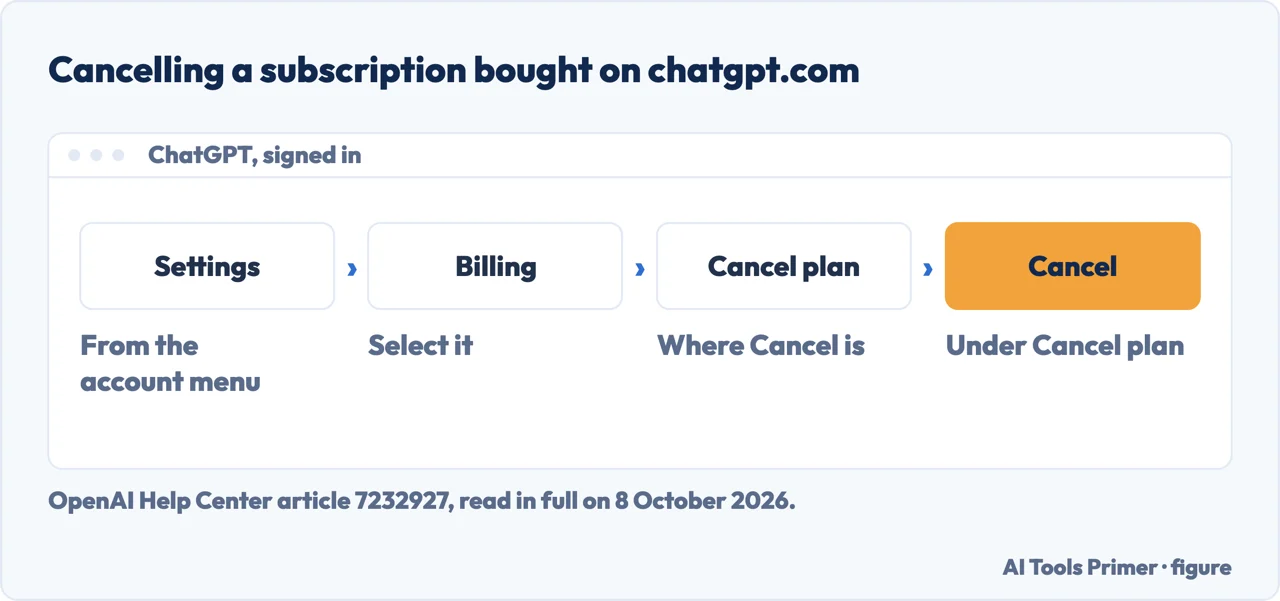
Two routes in OpenAI’s own pages. The cancellation article gives Settings › Billing › Cancel plan. OpenAI’s article on duplicate charges, read the same day, gives a different route for chatgpt.com: profile icon › Settings › the Account tab › Manage › Cancel subscription. The two do not match, and this page cannot tell from them which one a given account shows; by our reading, if Billing is not there, the Account tab is the other place to look; the same article’s check step also names Plan management.
Bought through the App Store on an iPhone or iPad
The steps. Apple manages these, OpenAI says, and the route starts in the device’s Settings: your name, Subscriptions, ChatGPT, Cancel Subscription, then confirm. Apple’s own page, published 29 September 2026, adds that the Cancel Subscription button may need a scroll to find.
No button. Apple: if there is no Cancel button, or an expiration message in red text, the subscription is already cancelled. OpenAI says the same in its own words: an expiration date with no Cancel Subscription may mean it is already done.
From a Mac, a Windows PC or an Android phone. Apple gives the App Store on a Mac (your name, then Subscriptions), the Apple Music or Apple TV app on Windows (View My Account, then Manage next to Subscriptions), and account.apple.com on Android.
Deleting the account first does not help. OpenAI’s cancellation article says deleting a ChatGPT account does not cancel an Apple App Store subscription, and its refund article asks for Apple or Google Play subscriptions to be cancelled in the store before the account is deleted.
Bought through Google Play
In the Play Store app. OpenAI: open the Google Play Store app, Subscriptions, ChatGPT, Cancel subscription, and follow the instructions. It asks to be signed in to the Google account that made the purchase first.
On the Google Play website. Google Play subscriptions in a browser, signed in with the same account, then Manage next to ChatGPT, Cancel subscription, a reason if asked, and Continue.
Not in the list. Google’s help page says a missing subscription may be on a different account; OpenAI says to check each Google account on the device.
A self-service ChatGPT Business workspace. OpenAI gives Workspace settings › Billing › Manage plan › Cancel subscription, and sends anyone without access to those settings to the workspace owner. Enterprise and Edu plans are outside the article.
What happens after cancelling
The paid features stay until the period ends. OpenAI: after an ordinary cancellation, paid features remain until the end of the current billing period. Google says a cancelled Play subscription can still be used for the time already paid, with an example: a yearly plan bought on 1 January and cancelled on 1 July runs to 31 December.
No refund comes with it. OpenAI says cancelling stops future renewals and does not automatically refund previous charges. Its refund article calls payments generally non-refundable: OpenAI may approve refunds for a verified OpenAI billing error, validated unauthorised charges or a documented OpenAI service or access failure, and for an unused individual subscription a discretionary refund may be available within seven days of the charge, if its eligibility requirements are met. Forgetting to cancel or a plan change does not by itself qualify, it adds, and legal rights still apply. A refund granted normally ends the access the charge paid for.
Where the refund is asked. For chatgpt.com and Google Play purchases, OpenAI’s own Help Center chat, signed in to the charged account; for App Store purchases, Apple. OpenAI writes that residents of the EU, the UK and Turkey are eligible for a prorated refund if they cancel within 14 days of purchase, and gives a separate rule for the Republic of Korea.
No need to delete the account. OpenAI says the ChatGPT account does not have to be deleted to stop future charges; deleting it cancels a subscription billed directly by ChatGPT, not an App Store one, and for Google Play it says to check the store subscription and cancel it there.
When it will not cancel, or charges twice
Uninstalling is not cancelling. OpenAI and Google both say removing the app leaves the subscription running. OpenAI also notes that new ChatGPT Pro $200 (Pro 20X) subscriptions are temporarily paused: if that plan is cancelled and ends, it cannot be bought again until the pause is lifted.
Two subscriptions. OpenAI’s article on duplicate charges says that starting a subscription on one platform before cancelling the old one on another can leave you paying for both. Its order is to cancel on the original platform first, then subscribe on the new one.
A failed Apple payment. The same article says a failed Apple renewal does not cancel the subscription: Apple may keep trying to recover it, and an updated Apple payment method can renew it after a new subscription was started elsewhere. OpenAI gives two ways to avoid it: update the Apple payment method and let Apple recover the subscription without starting another, or cancel the Apple one first, even if it looks inactive. Two separately purchased subscriptions, it adds, do not automatically qualify for a refund.
No access to the email. For a subscription billed directly by ChatGPT, OpenAI Support may be able to cancel it; OpenAI asks for the account’s email address, the last four digits of the card and the date of the latest payment. OpenAI asks never to send the full card number. For Apple and Google Play, account recovery is with Apple or Google.
Other subscriptions on the same phone. Apple’s route also covers other App Store subscriptions, and is in how to cancel a subscription on iPhone; what Go and Plus include is in ChatGPT Go vs Plus, and clearing the chats themselves is in how to delete ChatGPT history.
Where to start
Five ways in.
- “I paid on the website.”
- chatgpt.com — the steps on chatgpt com
- “I paid through my iPhone.”
- App Store — cancel on an iphone
- “I paid through Google Play.”
- Android — cancel on android
- “Do I get my money back?”
- After cancelling — what happens after
- “There is no Cancel button.”
- When it will not cancel — when it will not cancel
More on ChatGPT
The plans, the chats and the account each have a guide of their own.
Questions people also ask
Why is ChatGPT not letting me cancel my subscription?
OpenAI says to cancel through the platform where it was bought, and a chatgpt.com subscription does not appear in the Apple or Google Play lists. The purchase receipt shows which. With no Cancel Subscription button and an expiration date shown, OpenAI says it may already be cancelled; Apple says it is.
How do I completely cancel my subscription?
Cancel on the platform that bills you, then check there that it is no longer set to renew. OpenAI says uninstalling the app does not cancel it, and deleting the ChatGPT account cancels only a subscription billed directly by ChatGPT, not an App Store one. If two platforms bill you, OpenAI says to keep one and cancel the other.
What happens if I cancel my ChatGPT Plus subscription?
OpenAI says the paid features remain until the end of the current billing period, and renewals stop. Cancelling does not automatically refund previous charges: payments are generally non-refundable, though OpenAI may approve a refund for a verified billing error, and one may be available for an unused individual subscription within seven days. By our reading, the account stays.
How do I manage my ChatGPT subscription?
OpenAI says the platform where you subscribed manages it: Apple for App Store purchases, Google for Google Play, and chatgpt.com for web purchases, in Settings. To move from one to another, OpenAI says to cancel on the original platform first, or you may end up with multiple active subscriptions.
Not covered here. It does not cover ChatGPT Enterprise or Edu plans, which OpenAI’s cancellation article leaves out, nor subscriptions bought through a wireless carrier, which Apple sends to the carrier.
Nor does it say which of the two web routes a given account shows: the two OpenAI articles read on 8 October 2026 give different ones, and both are above.
Living with ChatGPT: the plan, the history and the data
Five guides: ChatGPT Go and Plus, deleting ChatGPT history, whether ChatGPT is safe, cancelling a subscription on an iPhone, and cancelling ChatGPT where it was bought.
- The same job, in the other places it comes up
- ChatGPT Go vs Plus: what each one actually buys
- How to delete ChatGPT history, and what deleting means
- Is ChatGPT safe? It depends which question you mean
- How to cancel a subscription on iPhone, and when you cannot
Sources
- OpenAI Help Center article 7232927 — Canceling your ChatGPT subscription: the four platforms, the steps on each, the 24 hours, access until the period ends, refunds, and cancelling without account access — help.openai.com, read 8 October 2026.
- OpenAI Help Center article 20001043 — How do I avoid being charged twice if I subscribe to ChatGPT on iOS, Android, and the web?: which platform manages a subscription, the order for moving, and failed Apple payments — help.openai.com, read 8 October 2026.
- OpenAI Help Center article 7232895 — How do I request a refund for my ChatGPT subscription?: eligibility, the seven days, where to ask, and the EU, UK, Turkey and Korea notes — help.openai.com, read 8 October 2026.
- Apple Support article 118428 — Cancel a subscription from Apple: iPhone, iPad, Mac, Windows and Android, the missing Cancel button, and receipts, published 29 September 2026 — support.apple.com, read 8 October 2026.
- Google Play Help — Cancel, pause, or change a subscription on Google Play (Android): the steps, uninstalling, access after cancelling, and subscriptions on another account — support.google.com, read 8 October 2026.
Written by Alberto Gulotta
Founder and editor of AI Tools Primer, writing from Palermo, Italy. Thirty-five years of taking computers apart, starting with a Commodore 64 — the long version is on the about page.
Something wrong on this page? Write to aitoolsprimer@gmail.com and it gets fixed.
Written on 8 October 2026.
Independence and limits
No affiliate links and no paid placements anywhere on this site. Nobody pays to appear here, and no company has seen this page before you did.
This is general information, not professional advice. Where a page touches money, health, safety or the law, it names its source and the date it was read — and your situation may still differ. See the privacy page and the cookie policy.