
iPhone · guide
How to cancel a subscription on iPhone, and when you cannot
By Alberto Gulotta · Updated · 9 min read
The instruction for how to cancel a subscription on iPhone is four taps. Apple documents two ways it goes wrong anyway, and gives an answer for each: the button appears to be missing, or the subscription is not in the list at all.
The route on an iPhone
Four taps, and Apple attaches a note to the last one that saves a lot of scrolling.
- In the Settings app, tap your name.
- Tap Subscriptions.
- Tap the subscription.
- Tap Cancel Subscription. Apple: “You might need to scroll down to find the Cancel Subscription button.”
“If there is no Cancel button or you see an expiration message in red text, the subscription is already canceled.”
Apple repeats that sentence for every device in the article — iPhone, iPad, Mac, Vision Pro, Windows — which is unusual emphasis for a support page. A missing button is not a fault and not a hidden control: by Apple’s account it is the screen reporting that the job is done. Before hunting for a cancel option, it is worth reading what is already there.
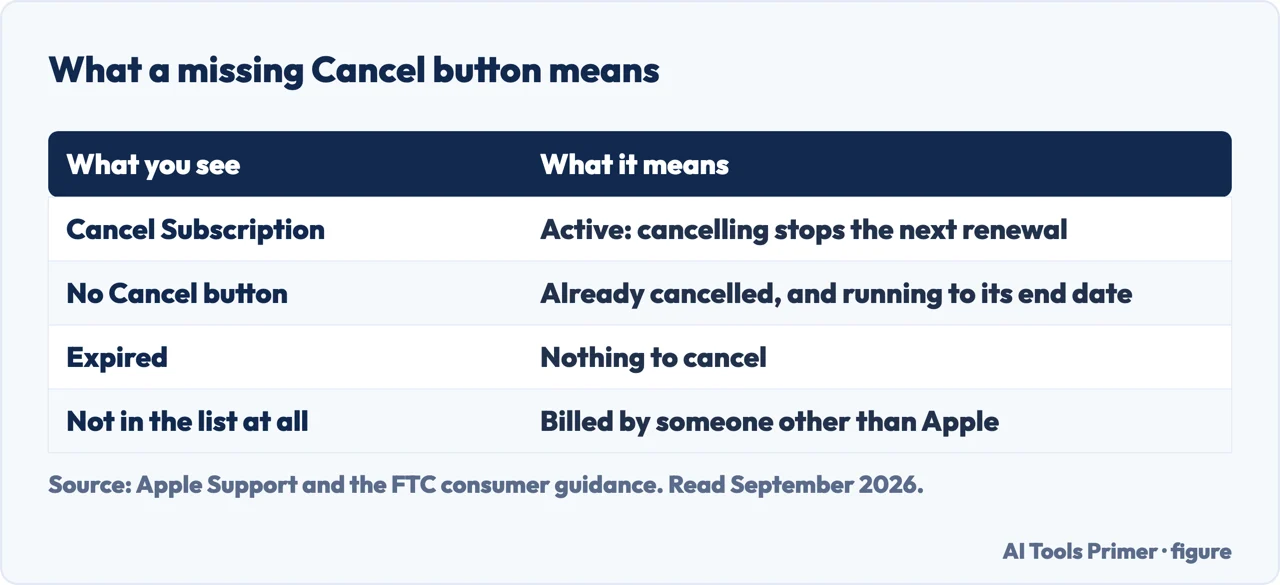
Worth adding what the screen does not tell you, because Apple does not say it either. This page is not going to describe what happens to your access after cancelling, or when the last charge falls, because that is not on the page these steps come from. Where the source stops, this guide stops — and for anything about billing dates the receipt in your email is a better authority than a guide.
If the subscription is not in the list
Apple’s diagnostic is a search in your email rather than a search in Settings.
- Find out who is being billed
- “Search your email for the words ‘receipt from Apple’ or ‘invoice from Apple’. On the receipt for the subscription, check which Apple Account was used.”
- If it is a family member’s account
- Apple: ask that person to cancel it themselves. You cannot cancel a family member’s subscription from your own device.
- If it came through a carrier or another provider
- “Contact your wireless carrier or other provider for support.” Apple points at them rather than at a screen of its own.
That first check is the useful part, and it is not obvious: the way to find a subscription that is missing from Settings is to search your email. The receipt names the Apple Account being charged, and that single fact sorts the situation into one of three — your account, somebody else’s account, or not Apple at all. Only the first of those can be dealt with on your own phone.
The third case is worth stating plainly because it is the one where people go round in circles. A subscription arranged through a phone company or another provider appears on your bill but not in Apple’s list, and no amount of looking in Settings will produce it. Apple’s instruction is to contact them, and it adds a specific note for anybody who also needs to change the Apple Account linked to a subscription: contact Apple Support first, then set the subscription up again with the provider.
“If you signed up for a trial subscription and you don’t want to renew it, cancel it at least 24 hours before the trial ends.”
The one deadline on this page, and the one worth putting in a calendar on the day you sign up rather than remembering later. Cancelling on the last day is not cancelling in time by Apple’s own instruction.
One more thing about where you cancel, since the phone is not the only door. Apple documents the same job on iPad, Mac, Apple Vision Pro, Windows and Android, and the routes differ — on a Mac it is the App Store app rather than Settings; on Windows it is the Apple Music or Apple TV app; on Android, a subscription “billed through Google Play” is cancelled in Google Play rather than anywhere Apple controls. If the iPhone is not to hand, the job can still be done.
And a line that decides whether this page applies to you. Apple: “Canceling subscriptions is slightly different in some countries and regions. There are special circumstances for Germany, Israel, South Africa, and Türkiye.” Apple links a separate article for those four rather than describing them here — so if you are in one of them, the steps above are the general case and not necessarily yours.
And what the law now asks of the company on the other side. The US Federal Trade Commission’s consumer guidance sets out how these arrangements are supposed to work — three things to know before a free trial, starting with the plainest: “if you don’t cancel on time, you’ll probably be charged” — and it treats subscriptions you did not knowingly start as a reportable problem rather than bad luck. Worth knowing when the cancel button is genuinely absent: the route out is not always through the phone.
The guides below take it three ways: the route and the missing button, finding a subscription that is not listed, and the neighbouring settings about apps and what they cost.
Where to start
Three ways in.
- “There is no Cancel button.”
- Start at the missing button
- “It is not in my list.”
- Go to finding the subscription
- “I am on a free trial.”
- That is the deadline
The missing button
Apple repeats the same note on every device: no Cancel button, or an expiry date in red, means it is already cancelled. The commonest answer is on the screen already.
Finding the subscription
Apple’s diagnostic runs through your email, not your settings. The receipt names the account being charged, which decides who can cancel it.
The deadline
Twenty-four hours before a trial ends, by Apple’s own instruction. Cancelling on the last day is not cancelling in time.
Not covered here. It will not tell you when your access ends or when the last charge lands. Apple’s page on these steps does not say, and the receipt in your email is the better authority.
It will not treat a missing Cancel button as a trick. Apple says on every device that it means the subscription is already cancelled.
And it will not pretend every subscription on your phone is Apple’s to cancel. Some are billed by a carrier, some by another family member’s account, and Apple gives a way to tell which. What holds instead is simple: the four-tap route and the twenty-four-hour trial deadline are Apple’s own, with the note on country differences quoted from the same documentation.
Living with ChatGPT: the plan, the history and the data
What you are paying for, what it keeps, and how to stop both.
- The same job, in the other places it comes up
- ChatGPT Go vs Plus: what each one actually buys
- How to delete ChatGPT history, and what deleting means
- Is ChatGPT safe? It depends which question you mean
Sources
- Apple, If you want to cancel a subscription from Apple, Published Date: September 14, 2026 (the iPhone route via Settings → your name → Subscriptions → the subscription → Cancel Subscription, with the note that you might need to scroll down and that no Cancel button or an expiration message in red text means the subscription is already cancelled; the equivalent routes on iPad, Apple Vision Pro, Mac via the App Store app, Windows via the Apple Music or Apple TV app or older iTunes, and Android including that a subscription billed through Google Play is cancelled in the Google Play app while one billed by Apple is cancelled at account.apple.com; the instruction to search email for “receipt from Apple” or “invoice from Apple” and check which Apple Account was used; that a subscription on a family member’s Apple Account must be cancelled by that family member; that a subscription received through a wireless carrier or other provider must be cancelled with that provider, and that changing the Apple Account linked to a subscription means contacting Apple Support and then setting it up again with the provider; that a trial should be cancelled at least 24 hours before it ends; and that cancelling is slightly different in Germany, Israel, South Africa and Türkiye) — support.apple.com, read 16 September 2026.
- Federal Trade Commission consumer advice — Getting in and out of free trials, auto-renewals and negative option subscriptions: how the arrangement is meant to work, and where to report one that does not — consumer.ftc.gov, read 4 September 2026.
Written by Alberto Gulotta
Founder and editor of AI Tools Primer, writing from Palermo, Italy. Thirty-five years of taking computers apart, starting with a Commodore 64 — the long version is on the about page.
Something wrong on this page? Write to aitoolsprimer@gmail.com and it gets fixed.
Written on 22 August 2026 · last checked 23 September 2026.
Independence and limits
No affiliate links and no paid placements anywhere on this site. Nobody pays to appear here, and no company has seen this page before you did.
This is general information, not professional advice. Where a page touches money, health, safety or the law, it names its source and the date it was read — and your situation may still differ. See the privacy page and the cookie policy.