
Chat · guide
How to use ChatGPT effectively: the rules OpenAI and Anthropic give
By Alberto Gulotta · Updated · 17 min read
How to use ChatGPT effectively comes down to a few asks in the OpenAI pages we read: say the result you want, give the context that matters, name the format, set a boundary where a mistake would cost you, and follow up instead of starting over; the Help Center page itself lists only three rules.
| Question | Answer | Where it comes from |
|---|---|---|
| What goes in a larger prompt? | Goal, context, output and boundaries, using only the parts that help | OpenAI prompting page |
| Must the first prompt be perfect? | It need not be: review the result, then ask for the specific change | OpenAI prompting page |
| Where do lasting preferences go? | In custom instructions, under Settings and Personalization | OpenAI prompting page, Help Center |
| Say what to do, or what to avoid? | Say what to do instead of only what not to do | OpenAI API page, Anthropic |
| Is the answer a final source? | OpenAI says to treat it as a first draft and check quotes, data and references | OpenAI Help Center |
What the Help Center page actually says
OpenAI’s Help Center page on prompt engineering for ChatGPT, read on 29 October 2026, is short. It defines a prompt as a text input that starts a conversation or triggers a response from the model, and adds that a prompt can also be an image or audio. It defines prompt engineering as designing and optimizing input prompts to guide a language model’s responses.
Under general best practices it lists three things. Be clear and specific: give prompts that carry enough context for the model to understand what you are asking, avoid ambiguity and be as precise as possible. Iterative refinement: start with an initial prompt, review the response, then adjust the wording, add more context or simplify the request. Requesting a different tone: use descriptive adjectives such as formal, informal, friendly, professional, humorous or serious, and the page’s example asks for an explanation in a friendly and engaging tone.
The page also points elsewhere. It says some of the resources it links may reference the API, but that their recommendations are relevant for ChatGPT, and it lists custom instructions and ChatGPT capabilities as guides that are not prompting specific but will also help. The rest of this page therefore draws on longer pages: OpenAI’s prompting page, titled Prompting | ChatGPT Learn, and the OpenAI Academy page on prompting, which says it was last updated on 4 September 2026 and sits in its Work Users area. The Academy page gives three steps: outline the task, give helpful context and describe your ideal output. It also says there is no single perfect way to prompt and compares it to a simple conversation with a colleague.
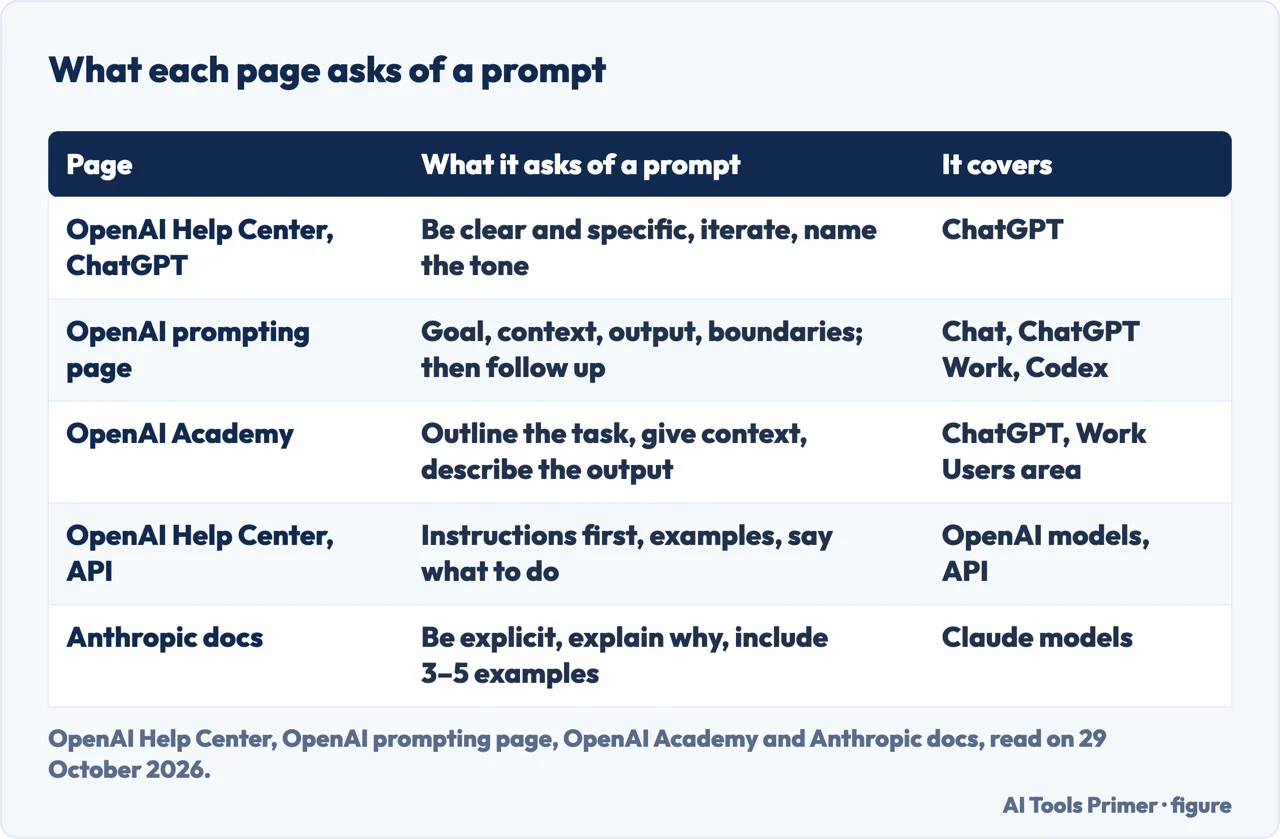
Goal, context, output, boundaries
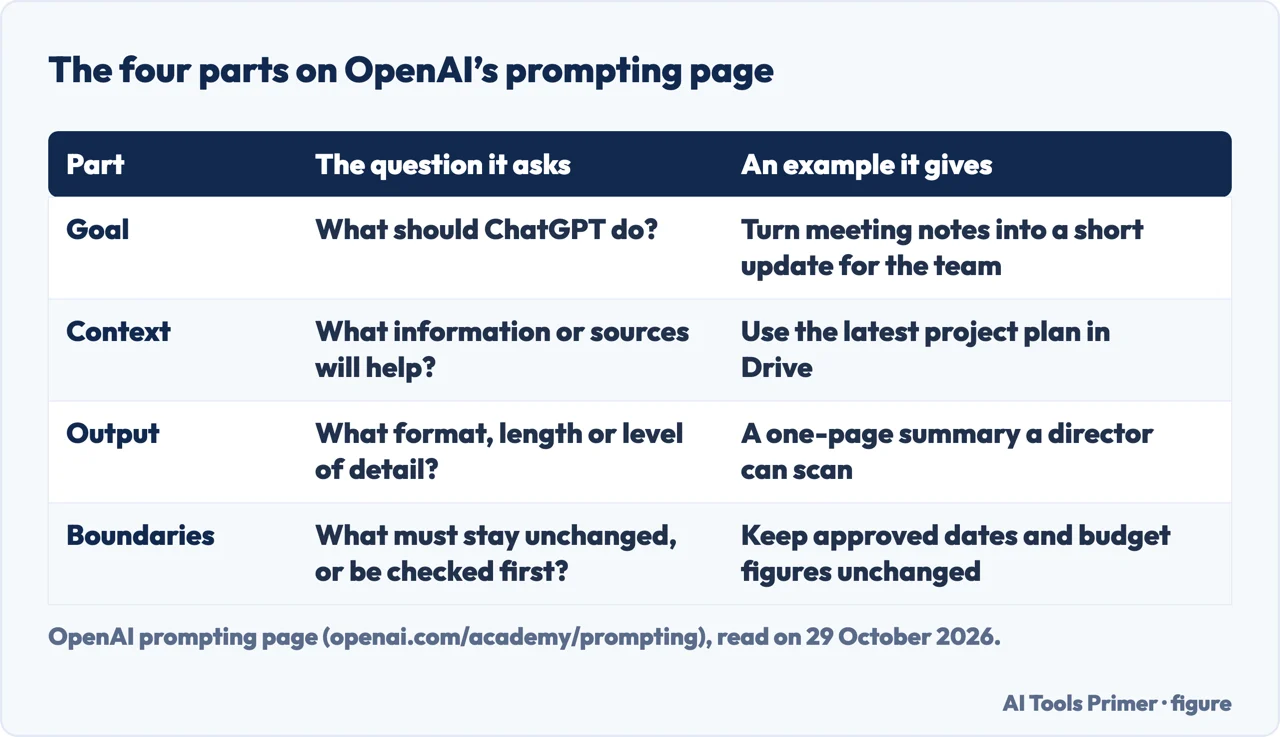
OpenAI’s prompting page says a prompt can be a question, an instruction or a goal, and that you do not need technical syntax or a rigid formula. A short prompt is often enough. For larger or more important tasks it lists four parts: Goal, what ChatGPT should do; Context, what information or sources will help; Output, the format, length or level of detail you need; and Boundaries, what must stay unchanged and what ChatGPT should avoid or check with you before it acts. It adds that you should use only the parts that help, with no need to fill in every item.
The result, not the steps. The page says to start with the result rather than a detailed list of steps, and to name the audience or format when those details change what ChatGPT should produce. Its example asks for meeting notes to become a short update for the project team, with the decisions and next steps first. It also says to describe a process when the process itself matters, and otherwise to leave ChatGPT room to search, compare information and adjust its approach.
Context. Share information that could change the result, add only the sources that matter, and explain what ChatGPT should take from each one. The page says you can attach documents, spreadsheets, presentations or PDF files, add an image when the task depends on visual context and point out the area that matters, and ask for web search when the answer depends on current information, asking for sources when you need to check the result. It also suggests a project when related chats should share files or sources.
Boundaries. The page describes them as the few instructions ChatGPT needs to avoid creating extra work or taking an action you did not intend. Its examples are to keep approved dates and budget figures unchanged, to use only the supplied sources and flag missing information instead of guessing, to keep recommendations within a stated budget, and to prepare a message as a draft rather than send it. It says to focus on the one or two boundaries that matter most.
Ready to use. Tell ChatGPT how you plan to use the result, because the page says this helps it choose the right length, level of detail and organization; one example is a one-page summary a director can scan before a meeting. For important work it suggests asking for a final check, such as confirming that every action item has an owner and a due date or flagging information ChatGPT could not verify, and then reviewing the result yourself before you use or share it.
What the Academy page adds. It says specifying role, audience or format produces the most accurate and relevant results, and its tips include asking for options, setting priorities such as accuracy, creativity or speed, and guiding the tone and format. To get deeper reasoning it says to ask explicitly, with phrases such as think deeper, think hard, think more or think carefully, and that GPT-5 can produce tables, outlines or JSON if you specify. The prompting page ends its Chat section with four ready prompts: explain compound interest with one concrete example, draft a decline email under 120 words, compare two phone plans in a table with a recommendation, and plan five weekday dinners under 30 minutes that avoid peanuts, with one shopping list.
Say what to do, and show what you mean
This section leans on two pages written for other settings. One is OpenAI’s Help Center page on prompt engineering with the OpenAI API. The other is Anthropic’s Prompting best practices, in its Claude Platform docs, which covers Claude models and is not written for ChatGPT. We use Anthropic as a second voice from a different organization on what a clear instruction looks like, not as advice about ChatGPT.
Explicit instructions and a colleague test. Anthropic says Claude responds well to clear, explicit instructions, and compares it to a brilliant but new employee who lacks context on your norms and workflows. Its key test is to show the prompt to a colleague with minimal context on the task and ask the colleague to follow it; if the colleague would be confused, it says, Claude will be too. It also says that if you want more than the task strictly requires, you should ask for it explicitly, and its example adds a request for as many relevant features and interactions as possible to a plain request for an analytics dashboard.
Give the reason. Anthropic’s example replaces a bare instruction to never use ellipses with an explanation that the response will be read aloud by a text-to-speech engine, which cannot pronounce them. It says Claude can generalize from the explanation.
Examples. The OpenAI API page says to show the output format you want through examples, and to start with zero-shot, then few-shot, before anything heavier. Anthropic calls examples one of the most reliable ways to steer output format, tone and structure, says they should be relevant, diverse and structured, and recommends three to five. The ChatGPT Help Center page, the prompting page and the Academy page do not name few-shot examples; the prompting page shows complete prompts instead.
What to do, not only what to avoid. The OpenAI API page lists this as a rule: instead of just saying what not to do, say what to do instead. Its example swaps an all-capitals ban on asking for a username or password for an instruction to refrain from questions about personal information and to point the user to a help article. Anthropic gives a matching example: instead of telling Claude not to use markdown, ask for a response composed of smoothly flowing prose paragraphs. It adds that the formatting style of the prompt might influence the style of the answer, and that removing markdown from the prompt can reduce the volume of markdown in the output. We did not find this rule on the ChatGPT Help Center page, the prompting page or the Academy page.
Specific, not fluffy. The OpenAI API page asks for specifics on context, outcome, length, format and style, and says to reduce fluffy and imprecise descriptions: its example replaces a request for a description that is fairly short, a few sentences only, with a request for a paragraph of three to five sentences. It also puts instructions at the beginning of the prompt and separates them from the context with ### or triple quotation marks; that delimiter advice appears only on the API page.
Steps or result? OpenAI’s prompting page says to describe the result and not a list of steps, while Anthropic says to give instructions as numbered lists or bullet points when the order or completeness of steps matters. The two fit together: the OpenAI page itself says to describe a process when the process matters. For very long documents, Anthropic says to put them at the top and the question at the end, and reports an improvement of up to 30 percent in its tests. That figure is Anthropic’s, for Claude, and the pages we read do not give a matching figure for ChatGPT.
Say it once: custom instructions and projects
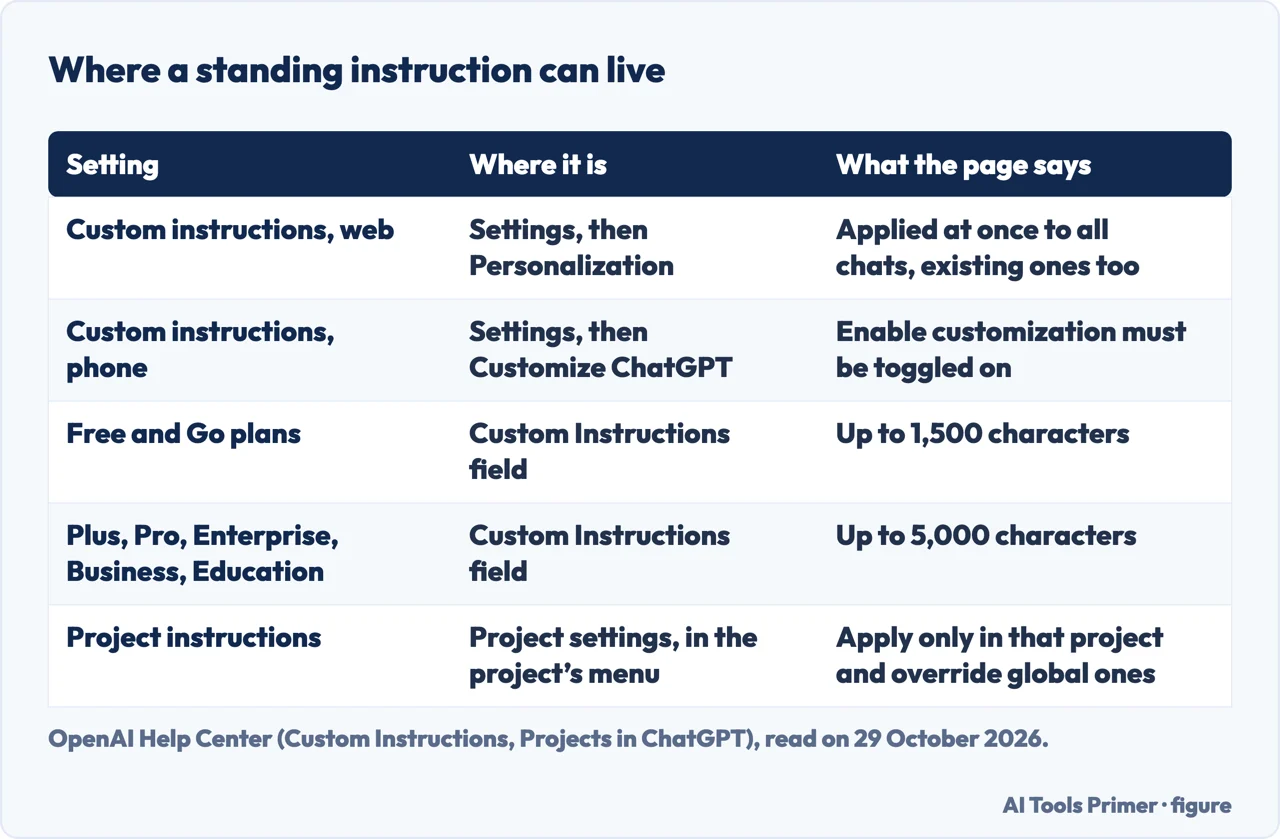
OpenAI’s prompting page says to put preferences that should apply across chats in Settings and Personalization as custom instructions, and to keep details that matter only to the current chat in the prompt. The Help Center page on custom instructions describes them as a way to share anything you would like ChatGPT to consider in its response, applied immediately to all chats.
Where and how many characters. The page says custom instructions are available on all plans on web, desktop, iOS and Android. On web and desktop you open Settings, select Personalization, make sure Enable customization is toggled on and enter the text in the Custom Instructions field; on iOS and Android you select Customize ChatGPT instead. Changes apply immediately across all chats, existing conversations included. Free and Go users can save up to 1,500 characters, and Plus, Pro, Enterprise, Business and Education users up to 5,000.
What happens to them. The page says you can edit or delete custom instructions at any time for future conversations, and that updates are reflected only in future conversations; to remove them from earlier ones, you clear those conversations. Your instructions are not shared with people who open a shared link, they are included in your ChatGPT data export, and when you delete your OpenAI account the instructions tied to it are deleted within 30 days. The page also says that information from your use of custom instructions will be used to improve model performance, and points to a separate page about opting out. If you use third party plug-ins, it says the model may give plug-in developers relevant information from your instructions, and it advises using only plug-ins you trust. Our pages on whether ChatGPT is safe and on deleting your ChatGPT account go further on both points.
Projects. The Help Center page on projects says a project keeps related chats, files and instructions together so ChatGPT can use the same context. Its example project instruction asks ChatGPT to act as a marketing mentor, be concise, use bullet points and ask clarifying questions. The page says project instructions apply only within that project and override your global custom instructions. How many files you can upload depends on your plan, and our page on Go or Plus compares those two plans.
Follow up, then check
The prompting page says your first prompt does not need to be perfect: review the result, then ask for the specific change you want. You can add a missing source, correct the direction, ask for another option or change the level of detail without starting over, and its example asks for a more direct opening, the evidence kept and the recommendation moved above the background section. The Academy page says the same about GPT-5: if the first answer is not quite right, clarify or adjust mid-conversation rather than starting over. The Help Center page lists iterative refinement as one of its three rules.
Two tips on one page. The Academy page says GPT-5 can handle longer, multi-step prompts, so you can consolidate context and related instructions into one request instead of fragmenting them. Its list of tips also says to break big tasks into smaller steps, and to be specific but keep it simple, because too much extra information can sometimes make the answer less helpful. The page gives all of these and does not say how to choose between them for a given task.
Checking the answer. OpenAI’s Help Center page asking whether ChatGPT tells the truth says it can sound confident even when it is wrong. It lists as examples incorrect definitions, dates or facts, fabricated quotes, studies, citations or references to sources that do not exist, and overconfident answers to ambiguous or complex questions. Its practical tips are to use ChatGPT as a first draft rather than a final source, to verify quotes, data, technical information and references to external documents, and, when accuracy matters, to use search or deep research and check the sources by visiting the links directly. It adds that without search enabled, answers are based on what the model learned in training, with a knowledge cutoff, and that ChatGPT cannot reliably tell whether a text was written by AI.
What the pages do not give. The pages we read do not measure how much each tip improves ChatGPT’s answers. The pages we read do not mention saying please or thank you, offering a tip or using other fixed phrases, and they do not say how long a good prompt should be.
What we read and what we left out
We read eight pages: five from the OpenAI Help Center, OpenAI’s prompting page, the OpenAI Academy page and one from Anthropic. We tested nothing inside ChatGPT, and every statement here comes from OpenAI or Anthropic; we read no independent test of any tip. The prompting page also covers ChatGPT Work and Codex, and we used only its general sections and its Chat examples, not the ChatGPT Work and Codex parts. The Help Center page on the OpenAI API is aimed at developers, so we used its writing advice and left out its code and settings advice.
Where to start
Five ways in.
- “What does OpenAI’s Help Center say?”
- What the Help Center page actually says — help
- “What goes in a good prompt?”
- Goal, context, output, boundaries — pattern
- “Should I give examples?”
- Say what to do, and show what you mean — show
- “Can I set it once?”
- Say it once: custom instructions and projects — standing
- “Can I trust the answer?”
- Follow up, then check — iterate
What it can and cannot do
What a service says it will accept, in its own words and with the day it was read.
Safety, plans and your account
What the published pages say about risk, what each plan adds and what deleting an account does.
Questions people also ask
What is the best way to use ChatGPT?
OpenAI’s prompting page says to start with the result you need, add the context and sources that matter, say the format, set one or two boundaries and follow up with the specific change you want. It says a short prompt is often enough.
How to make ChatGPT most effective?
The Help Center page lists three rules: be clear and specific, refine the prompt step by step, and name the tone. The prompting page adds telling ChatGPT how you will use the result and asking for a final check, and custom instructions hold preferences that apply to every chat.
What not to tell ChatGPT?
The custom instructions page says not to share anything you would not want a third-party plug-in developer to have, and that information from using them is used to improve model performance unless you opt out. The OpenAI and Anthropic pages we read do not give a list. Our page on whether ChatGPT is safe takes up privacy.
How to maximize the use of ChatGPT?
The Academy page suggests asking for options, setting priorities such as accuracy, creativity or speed, and asking explicitly for deeper reasoning. The Help Center pages add custom instructions for standing preferences and projects for related chats, files and instructions.
Not covered here. We tested nothing inside ChatGPT. The statements come from OpenAI Help Center pages, OpenAI’s prompting page, the OpenAI Academy page and Anthropic’s Prompting best practices, all read on 29 October 2026; the section above lists what we left out.
The search volume and difficulty behind this page come from a Semrush reading of 29 August 2026, older than the 60 days the site normally allows.
Sources
- OpenAI Help Center — Prompt engineering best practices for ChatGPT — help.openai.com, read 29 October 2026.
- OpenAI — Prompting (ChatGPT Learn) — openai.com, read 29 October 2026.
- OpenAI Academy — Prompting (Work Users) — academy.openai.com, read 29 October 2026.
- OpenAI Help Center — Best practices for prompt engineering with the OpenAI API — help.openai.com, read 29 October 2026.
- OpenAI Help Center — ChatGPT Custom Instructions — help.openai.com, read 29 October 2026.
- OpenAI Help Center — Projects in ChatGPT — help.openai.com, read 29 October 2026.
- OpenAI Help Center — Does ChatGPT tell the truth? — help.openai.com, read 29 October 2026.
- Anthropic — Prompting best practices (Claude Platform Docs) — docs.anthropic.com, read 29 October 2026.
Written by Alberto Gulotta
Founder and editor of AI Tools Primer, writing from Palermo, Italy. Thirty-five years of taking computers apart, starting with a Commodore 64 — the long version is on the about page.
Something wrong on this page? Write to aitoolsprimer@gmail.com and it gets fixed.
Written on 29 October 2026.
Independence and limits
No affiliate links and no paid placements anywhere on this site. Nobody pays to appear here, and no company has seen this page before you did.
This is general information, not professional advice. Where a page touches money, health, safety or the law, it names its source and the date it was read — and your situation may still differ. See the privacy page and the cookie policy.