Per file, hard
“All files uploaded to a GPT or a ChatGPT conversation have a hard limit of 512MB per file.”

Chat · guide
By Alberto Gulotta · Updated · 15 min read
Can ChatGPT analyze videos? Yes, and OpenAI says so in one sentence — published in its FAQ about images, not the one about files. A video goes in as an attachment, on Free plans too. The live camera is a separate feature, in the iOS and Android apps. Below: where each sentence is published, and what each one leaves out.
“Yes. ChatGPT can accept video files as attachments through supported upload methods, including on Free plans. Availability varies by platform, upload method, and account.”
That is how OpenAI’s answer opens. It is published under the heading “Can I upload videos to ChatGPT?” — inside the FAQ about image inputs. Not the FAQ about file uploads, and not either of the two pages that list which file types are supported.
That placement is not a curiosity. A reader who wants to know whether a file type is accepted opens a page that lists file types — and there are two such pages, and neither of them names a video format. “What types of files are supported?” answers “most common file extensions for text files, spreadsheets, presentations, and documents… including XLSX, XLS, CSV, TSV, DOCX, PPTX, PDF, and TXT”. The list inside the image FAQ answers “PNG (.png), JPEG (.jpeg and .jpg), and non-animated GIF (.gif)”. Both are on help.openai.com.
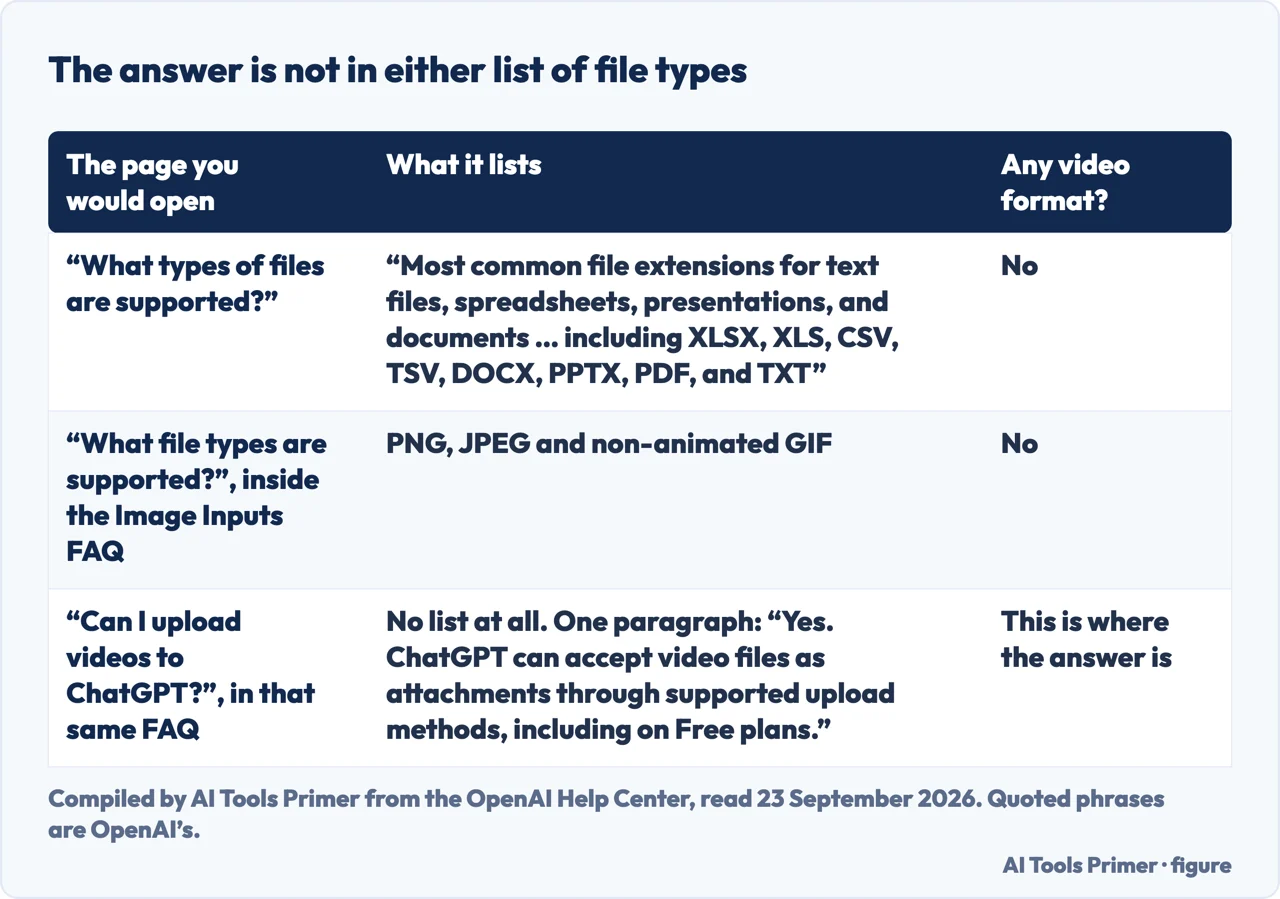
So the honest shape of the answer is: the yes is in prose, and the lists are about something else. That is worth knowing before you conclude from a list that a thing is not allowed — which is what most of the pages answering this question have done.
Saying a file is accepted is not the same as saying it is understood. OpenAI writes the second half itself, in the sentence immediately after the first.
“ChatGPT may use tools to analyze uploaded videos, but its analysis can be incomplete or inaccurate. It may not analyze the entire video or accurately interpret its audio.”
This sentence sits directly under the one that says yes, and it is the part that decides whether the answer is useful to you. OpenAI is not promising that the whole video is watched, and it is not promising that the words spoken in it are heard correctly. If a detail matters, the sentence you are relying on has to be checked against the video itself.
Two practical things follow from it. The first is that a summary you get back is not a transcript: if the answer turns on a number said out loud, or on which of two people spoke, that is exactly the kind of detail the warning covers. The second is that a short clip is a different proposition from a long one, because “may not analyze the entire video” has more room to bite the longer the video runs.
There is also a small instruction in the same paragraph, about the step before the upload. OpenAI: “If you can’t select a video in Photos, check whether you can attach it through Files instead.” If Photos will not let you select the video, the upload has not started yet; try Files before anything else.
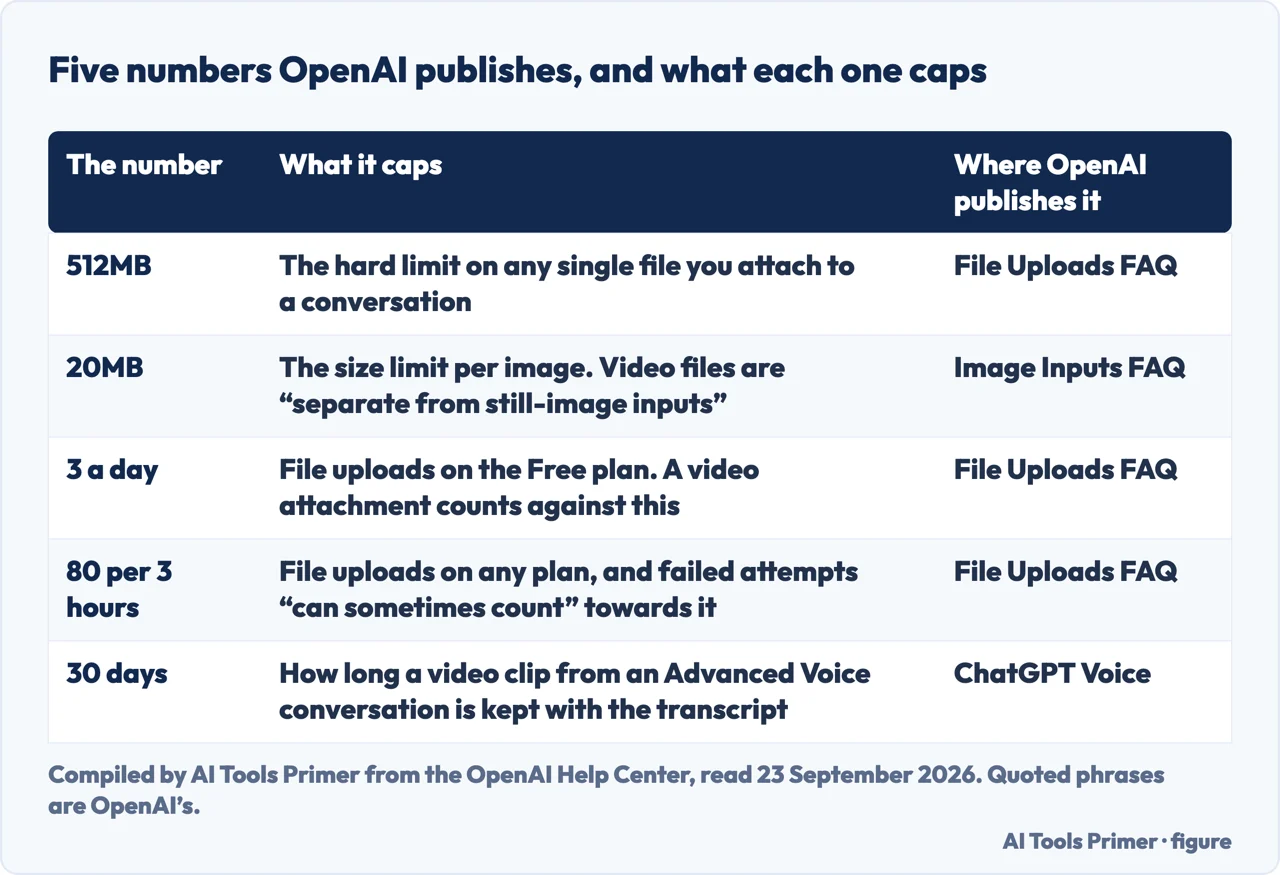
Everything above assumes the file gets in at all. Three published limits decide that, and none of them is specific to video — which is the point, because OpenAI says video attachments “count toward your plan’s file-upload limits” like anything else.
Per file, hard
“All files uploaded to a GPT or a ChatGPT conversation have a hard limit of 512MB per file.”
On the Free plan
“Free users are limited to 3 file uploads per day.” A video attachment is a file upload, so it spends one of the three.
On any plan
“Users can upload up to 80 files every 3 hours.” And “failed upload attempts can sometimes count toward the upload-rate cap” — so retrying a video that will not go through costs you the attempt anyway.
The storage caps sit behind those: 25GB per user and 100GB per organisation, shared across chats, Projects and custom GPT knowledge. They matter less day to day than the rate, but they are the reason an “upload limit reached” message can appear on a day you have uploaded almost nothing.
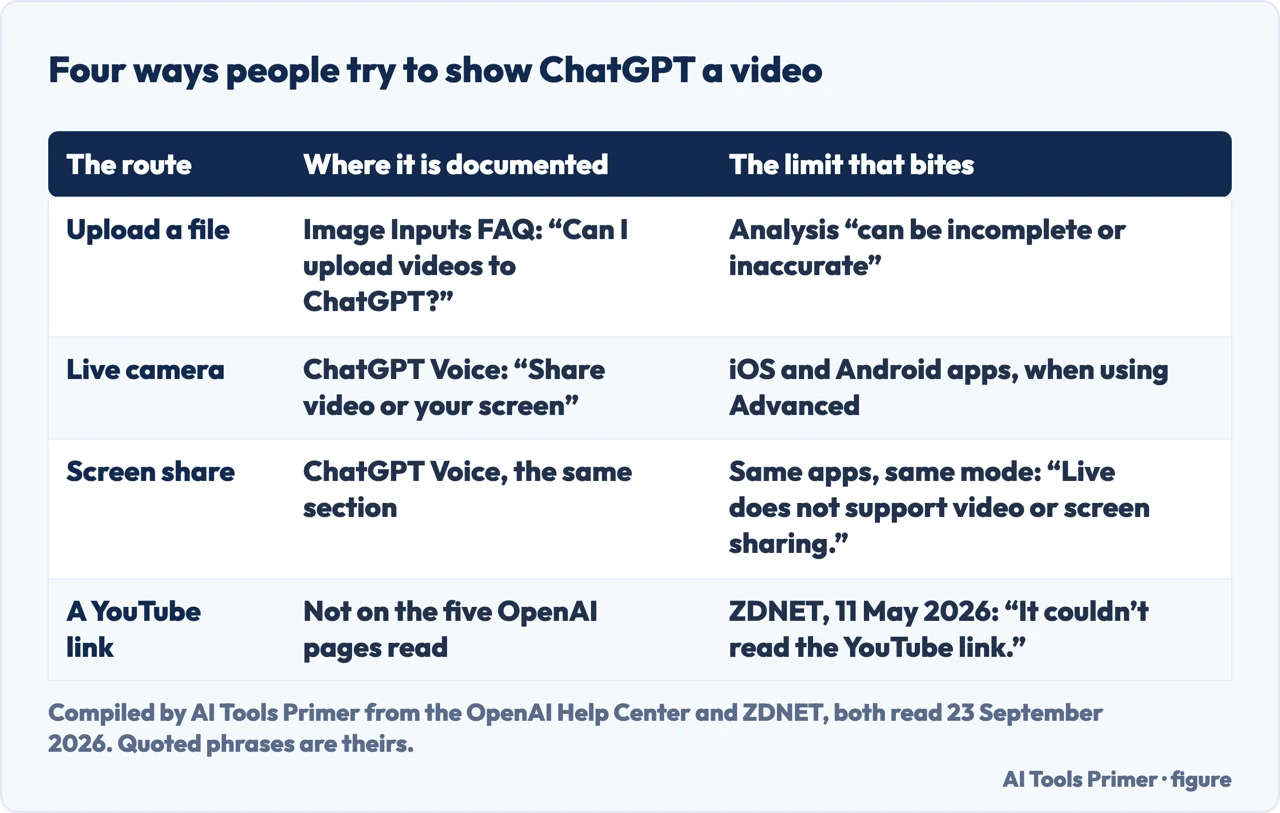
This is a different feature with a different answer, and OpenAI keeps them apart on purpose: “Live camera video and screen sharing in Voice are separate features with their own availability and limits.” What the camera does is show ChatGPT what is in front of you, live, during a voice conversation — and the instruction is one line: “To share live video, select the camera button during a Voice conversation.”
Two conditions come with it, and both are narrower than the short answer suggests. It is in the iOS and Android apps, for eligible subscribers. And it belongs to one of the voice modes and not the other: “Live does not support video or screen sharing.” Live runs on GPT-Live-1 or GPT-Live-1 mini, depending on your plan. Advanced is the one that carries the camera, and you reach it under Settings → Voice.
That last line matters if the camera button seems to have gone. It has not been withdrawn: OpenAI says video and screen sharing “remain available” in Advanced.
Why the camera button moved
Two entries from OpenAI’s own release notes, almost nineteen months apart.
One more thing about the camera is documented and worth knowing before you point it at anything: the clips are kept. “Audio clips from Live and Advanced Voice conversations, and video clips from Advanced Voice conversations, are stored with the transcript that appears in your chat history. Clips are retained for 30 days.” They are not used for training unless you turn that on yourself — OpenAI names the switch, “Include your video recordings”, under Data Controls.
Of the ways people try, this is the one with nothing behind it. None of the five help.openai.com pages read for this guide on 23 September 2026 describes handing ChatGPT a video URL and getting the video back as understanding — and that includes the release notes, about 35,000 words of them, read end to end the same day. That is not the same as a rule forbidding it, and it should not be read as one. It means that nothing in the five pages read for this guide says what would happen, so the only evidence available is somebody trying it.
The link route, tested by somebody else. ZDNET’s David Gewirtz put the same job to three assistants, in an article dated 11 May 2026, and wrote the result plainly: “ChatGPT itself failed my tests. It couldn’t read the YouTube link. And while it theoretically can understand videos, they need to be under 500MB in size. Mine were not.” What worked for him was pairing ChatGPT with OpenAI’s Codex app rather than asking ChatGPT alone. Worth reading for exactly what it is — one person’s test, on one day, with his own files.
Between the documentation and that test, a workable order emerges for anyone who actually has a video and a question about it. Attach the file rather than the link. Keep it short and well under the size limit. Ask for the specific thing you need rather than “summarise this”, because a narrow question makes a gap in the analysis easier to spot. And if the answer will be quoted or acted on, check the part that matters against the video, because OpenAI warns that the analysis “can be incomplete or inaccurate”.
Three ways in, depending on what you came for.
If what you want from the video is the words in it, a transcript is the shorter road and it does not depend on any of the limits above.
The 512MB limit is the one people hit first. These are the guides on getting a video under a size without ruining it.
The ones with documented answers: what the plans differ on, what is kept, and who holds what.
Yes. OpenAI: “ChatGPT can accept video files as attachments through supported upload methods, including on Free plans.” It adds that availability “varies by platform, upload method, and account”, and that a video attachment counts against your plan’s file-upload limits like any other file.
Start with the picker, not the file. OpenAI: “If you can’t select a video in Photos, check whether you can attach it through Files instead.” After that, check size against the 512MB hard limit per file, and on the Free plan the three uploads a day.
It analyses them rather than watching them through. OpenAI warns that its analysis “can be incomplete or inaccurate” and that it “may not analyze the entire video or accurately interpret its audio”. Live camera video is a separate feature with its own limits.
OpenAI publishes a size limit, not a length: 512MB per file, hard. How many minutes that buys depends on how the video was recorded, so a short 4K clip can be larger than a long one recorded at 1080p.
None of the five help.openai.com pages read for this guide on 23 September 2026 describes handing it a video URL, release notes included. ZDNET reported trying exactly that, in an article dated 11 May 2026: “It couldn’t read the YouTube link.” Attaching the file is the documented route.
The documented answer does not turn on the plan. OpenAI says video attachments work “including on Free plans”; what the plan changes is the allowance, since Free users get three file uploads a day against 80 every three hours.
Not covered here. It will not tell you which formats are accepted. OpenAI names video as a category, and none of the five pages read for this guide lists an extension for it; inventing one from the image or document lists would be guessing in the direction the lists already got wrong.
It will not say what ChatGPT understood of any particular video. That depends on the file and on the day, and OpenAI’s own sentence is that the analysis may be incomplete.
And it will not cover generating a video, which is a different product with a different page. What holds instead is simple: the sentence that answers this is quoted from the page OpenAI publishes it on, with the date it was read, and the one route with no page behind it is named as such.
Written by Alberto Gulotta
Founder and editor of AI Tools Primer, writing from Palermo, Italy. Thirty-five years of taking computers apart, starting with a Commodore 64 — the long version is on the about page.
Something wrong on this page? Write to aitoolsprimer@gmail.com and it gets fixed.
Written on 23 September 2026.
Independence and limits
No affiliate links and no paid placements anywhere on this site. Nobody pays to appear here, and no company has seen this page before you did.
This is general information, not professional advice. Where a page touches money, health, safety or the law, it names its source and the date it was read — and your situation may still differ. See the privacy page and the cookie policy.