The number
A counter, starting at 1 and going up. It marks where one caption ends and the
next begins.

Video · guide
By Alberto Gulotta · Updated · 10 min read
An SRT file is a plain text file with a very short structure, and the quickest way to understand it is to look at one. This example is published by YouTube in its own documentation.
What is actually inside one
YouTube publishes this example of a SubRip file. The whole format is here.
1
00:00:00,599 --> 00:00:04,160
>> ALICE: Hi, my name is Alice Miller and this is John Brown

2
00:00:04,160 --> 00:00:06,770
>> JOHN: and we’re the owners of Miller Bakery.

3
00:00:06,770 --> 00:00:10,880
>> ALICE: Today we’ll be teaching you how to make
our famous chocolate chip cookies!

4
00:00:10,880 --> 00:00:16,700
[intro music]
That is the entire specification as a reader needs it: a number, a time range, the words, a blank line, repeated. Nothing else is required, which is why YouTube says these files “can be edited using any plain text editing software”.
The number
A counter, starting at 1 and going up. It marks where one caption ends and the
next begins.
The time range
hours:minutes:seconds,milliseconds, twice, joined by -->. Note the
comma before the milliseconds rather than a full stop.
The blank line
The separator between blocks. Easy to lose when editing by hand, and the file stops working without it.
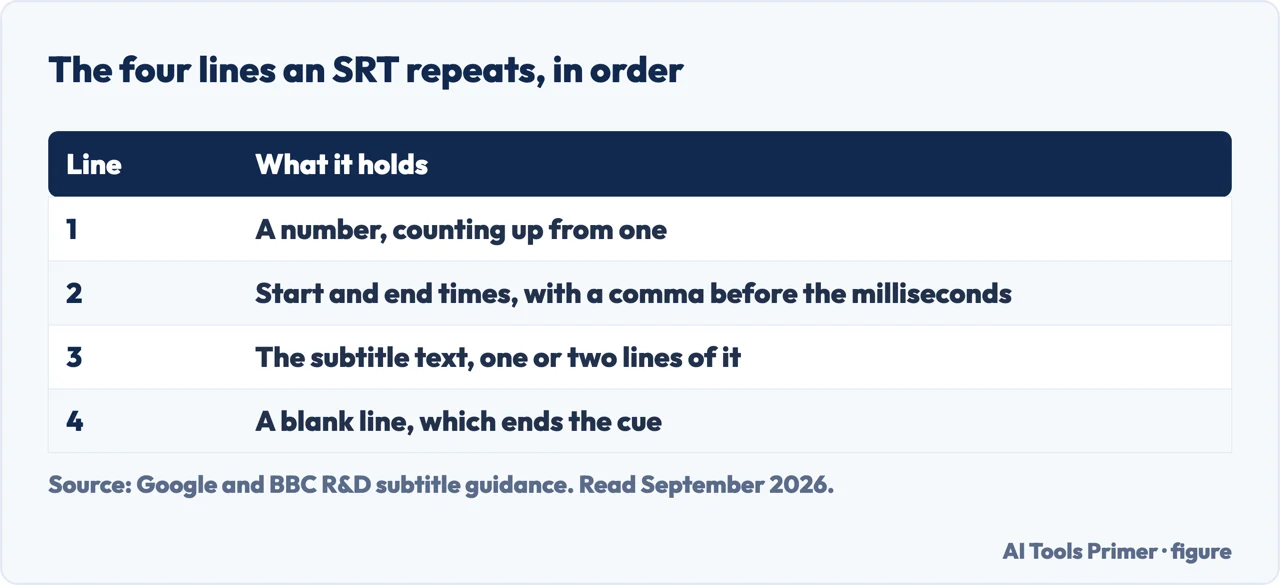
Once the shape is clear, so is what the format does not involve. There is no special program required to make one, no format to convert into, and nothing hidden. If you can type, you can write a subtitle file — the work is in getting the timings right, not in the file itself.
Two constraints are not about structure at all, and YouTube states both in the same sentence.
“Only basic versions of these files are supported. No style info (markup) is recognized. The file must be in plain UTF-8.”
Two constraints from YouTube, and between them they explain most rejected files. UTF-8 is a text encoding — a file saved in something else may upload and then show the accented and non-Latin characters as nonsense, because the words were correct and the encoding was not. And markup is not read: bold tags, colours and positioning put into an SRT are either ignored or make the file unreadable, depending on where they land.
The encoding one is worth expanding, because it is a property of how the file was saved rather than of what is written in it. UTF-8 is a way of representing characters; a file saved another way can contain exactly the right words and still not be the file YouTube says it requires. YouTube states the requirement and not the consequence of missing it, so this page will not describe what a wrongly-encoded file does. What is worth knowing is where the setting lives: text editors generally offer the encoding as a choice at the moment of saving, and UTF-8 is the one the requirement names.
The markup one is simpler: SRT has no way to say “put this in the corner” or “make this red”. Anything of that kind belongs in a different format.
What a caption file is for, and when SRT is the wrong one
YouTube divides them into basic and advanced, and says what each division buys you.
That division is the useful thing to take away when choosing. SRT is the format that does one job — words on a clock — and does it in a file anybody can read and edit. The advanced formats exist because that job is sometimes not enough: a caption that has to sit away from a burned-in graphic, or a colour that distinguishes two speakers, cannot be expressed in the four lines above.
Opening one, and why nothing seems to happen. An SRT file is plain text, so any text editor opens it — Notepad, TextEdit, anything. What it will not do is play: it holds no video and no audio, only words and timings. If you double-click one and get a window of numbers, that is the file working correctly. To see it as subtitles, the file has to be given to something that has the video too — a player, or the platform you are uploading to. Which of the two you are doing decides where the file needs to go, and that is a question for the player’s or the platform’s own instructions rather than for the file.
One more thing follows from the format being plain text, and it is the reason these files are worth keeping rather than regenerating. An SRT file is editable forever, by anything. A transcript produced automatically will have errors in it — names, technical words, anything spoken quickly — and correcting them is a matter of opening the file and typing. There is no proprietary editor to install and no version to be locked out of.
What this page will not do is tell you which tool to make one with. There are many, they change constantly, and recommending any of them would mean running it against real recordings for long enough to have a view worth publishing. What can be said without testing anything is that the output you want from any of them is this file — plain, UTF-8, four lines repeated — because that is the one that will still open in a decade.
The two constraints are not arbitrary, and somebody has measured them. BBC Research & Development treats subtitle speed as a research question rather than a house style: current guidelines “advise a maximum rate for subtitles (defined as the number of words per minute on screen)”, and its own work found that the rate “varies widely and is often to be expected” — slow on children’s programmes and nature documentaries, fast elsewhere. The useful conclusion for anyone writing an SRT by hand: a cue that is too fast is not a formatting error, it is a reading problem, and the fix is fewer words rather than a longer line.
The guides below take it three ways: the file itself, the video it belongs to, and getting the words out of a recording in the first place.
Three ways in. If you have one and it will not open, start with the first.
Four lines repeated, in plain text, with no program required to read or write it. The neighbouring guides are the other formats that carry a video around.
Plain UTF-8, and no markup. Between them they explain most files that are rejected, and most files that upload and then look wrong.
A caption file starts as a transcript. These guides are about producing one, and about the recording it comes from.
Not covered here. It will not recommend a subtitle tool. Choosing one means running it against real recordings, and this site does not publish verdicts it has not earned.
It will not send you to a converter for a file you can already open. An SRT is plain text; anything that offers to convert it into readable form is offering to do what your text editor does.
And it will not tell you SRT can do styling. YouTube states that no markup is recognised, and a page that suggested otherwise would be setting up a file that fails. What holds instead is simple: the four lines are YouTube’s own example, kept in YouTube’s own format, and this page does not improve it into something YouTube never wrote.
The work that happens after the record button, whatever made the file.
Written by Alberto Gulotta
Founder and editor of AI Tools Primer, writing from Palermo, Italy. Thirty-five years of taking computers apart, starting with a Commodore 64 — the long version is on the about page.
Something wrong on this page? Write to aitoolsprimer@gmail.com and it gets fixed.
Written on 22 August 2026 · last checked 23 September 2026.
Independence and limits
No affiliate links and no paid placements anywhere on this site. Nobody pays to appear here, and no company has seen this page before you did.
This is general information, not professional advice. Where a page touches money, health, safety or the law, it names its source and the date it was read — and your situation may still differ. See the privacy page and the cookie policy.