The honest answer to how to transcribe audio to text is that you probably already own something that does it, and that the free route which fits you depends on one thing almost nobody asks first: whether you have a recording, or a person about to speak.
Dictation and transcription are not the same job, and most free advice confuses them.
Voice typing types what you are saying now. Transcription takes a recording you already have
and turns it into text. Google’s own description of voice typing is about speaking into a document —
it has no way to open your audio file. Half the pages that answer this question send people there
anyway, and they arrive with a two-hour interview and no way to feed it in.
So the three routes below are not ranked by quality — they are all good enough now, which was not true five years ago. They are separated by what they can accept and where the audio ends up.
Word — for a file you already have
uploads your audio
Home › Dictate dropdown › Transcribe, then Upload audio. It is the only free-with-a-subscription
route that separates speakers and timestamps the text, which for an interview is the difference between
a transcript and a wall of words.
Formats: Microsoft lists “.wav, .mp4, .m4a, .mp3”.
Ceiling: “Users with a Microsoft 365 subscription can transcribe a maximum of 300 minutes of uploaded audio per month.” With a Copilot licence, 30,000.
The trap: “This feature is currently only available in Word for Microsoft 365 on Windows in Commercial Tenants.” A personal subscription is not a commercial tenant.
Where the audio goes: “The recordings will be stored in the Transcribed Files folder on OneDrive.” They stay there until you delete them.
iPhone — Voice Memos
no subscription
Apple: “Speech in your audio recordings can be transcribed to text in Voice Memos. You can view the
transcription while you’re recording or after.” The app is in the Utilities folder. Tap the recording,
then Copy Transcript for the lot or View Transcript to take part of it.
Requirement: “available on iPhone 12 or later”, and Apple adds: “It’s not available in all countries or regions”.
Languages: English in all variants, plus Spanish, Portuguese, Italian, French, German, Japanese, Korean and both written forms of Chinese.
Old recordings count: open one made under iOS 17 or earlier and “Voice Memos will transcribe it automatically if it includes recorded speech”.
Google Docs — voice typing
live speech only
Tools › Voice typing, in Chrome, Edge or Safari. Useful, free, and not a transcriber:
it writes down what you say into the microphone and cannot open a file.
One detail worth knowing, because Google states it and nobody repeats it: “your web browser
controls the speech-to-text service. It determines how your speech is processed and then sends the
text to Google Docs.” The recognition is the browser’s, not the document’s — which is why the
same feature behaves differently in Chrome and in Safari.
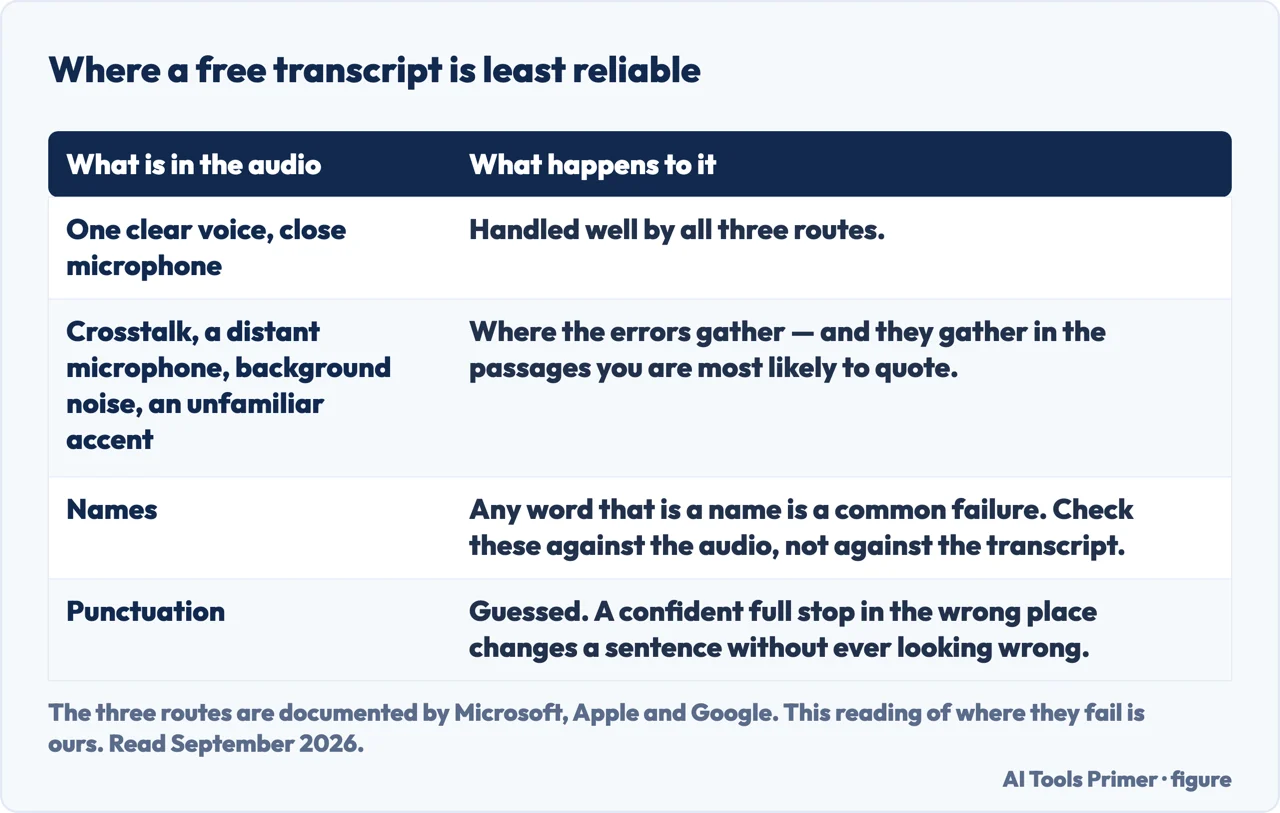
What all three get wrong in the same way. Speech recognition handles a clear single voice very well and a room badly. Crosstalk, a far microphone, an accent the model has seen little of, background noise, and any word that is a name — these are where the errors cluster, and they cluster in exactly the passages you are most likely to quote. Read the transcript against the audio at the points that matter rather than trusting it end to end.
It also punctuates by guessing. A transcript with confident full stops in the wrong places changes the meaning of a sentence without ever looking wrong, which is a specific hazard if the recording is going to be quoted by somebody who was not there.
Read the transcript against the audio at these points rather than end to end. Figure drawn by AI Tools Primer.
The question to settle before you upload anything
Whose recording is it, and what is in it? Transcription is the one tool category where the
input is almost always somebody else’s voice — an interview, a meeting, a lecture, a consultation.
That makes the upload a decision about a third party who is not in the room when you make it.
Two of the three routes above send the audio somewhere. Word puts it in your OneDrive, which is at
least your own storage under terms you have already accepted. A free transcription website is a
company you have not read the terms of, holding a recording of a named person saying things they
said in private.
The iPhone route is the only one here that asks nothing of anyone. If the recording is sensitive and
you own an iPhone 12 or later, that is the answer, and the fact that it is also free is secondary.
If you have to record the conversation first, that is a separate question with a legal answer that changes by country and sometimes by state — whether one party may consent or all of them must. It is worth settling before the meeting rather than after, and it has its own guide below.
What we have not tested. This guide does not rank the paid transcription services. Doing that honestly means the same audio through each one — a clean single voice, a noisy room, an accented speaker — with the error rates published and the recordings kept. Until that exists, naming a favourite here would be an impression, and there are plenty of those already.
Every quoted limit above is from Microsoft’s, Apple’s and Google’s own documentation, read on 22 August 2026 and listed below. The distinction between dictation and transcription, and the argument about whose voice you are uploading, are ours.
Not covered here. It will not send you to a paid service first. Three things you may already own do this, and the page says which one fits which situation.
It will not call voice typing a transcriber. It types what you say now and cannot open a file, and confusing the two wastes people’s afternoons.
And it will not rank the paid tools until we have run the same audio through each of them and published what came out. What holds instead is simple: the limits and the languages above are quoted from Microsoft, Apple and Google on the dates this page names.
Getting the material down
Four ways of getting the material down so you can work from it later.
Microsoft Support — Transcribe your recordings, including the 300-minute monthly ceiling, the supported formats, the Commercial Tenants requirement and where the recordings are stored — support.microsoft.com, read 6 September 2026.
Apple — iPhone User Guide, View a Voice Memos transcription on iPhone, including the iPhone 12 requirement, the supported languages and the automatic transcription of older recordings — support.apple.com, read 22 August 2026.
Google Docs Editors Help — Type and edit with your voice, including the supported browsers and the note that the browser, not Google Docs, controls the speech-to-text service — support.google.com, read 22 August 2026.
AG
Written by Alberto Gulotta
Founder and editor of AI Tools Primer, writing from Palermo, Italy. Thirty-five years of
taking computers apart, starting with a Commodore 64 — the long version is on the
about page.
Written on 22 August 2026 · last checked 23 September 2026.
§
Independence and limits
No affiliate links and no paid placements anywhere on this site. Nobody pays to appear here,
and no company has seen this page before you did.
This is general information, not professional advice. Where a page touches money, health,
safety or the law, it names its source and the date it was read — and your situation may
still differ. See the privacy page and the
cookie policy.