
Chat · guide
Why is ChatGPT so slow: thinking levels, long chats and the browser
By Alberto Gulotta · Updated · 10 min read
Why is ChatGPT so slow? OpenAI’s help pages give three kinds of answer: peak hours or an incident, checked on its status page; your setup, from browser cache and extensions to a VPN or the network; and the conversation, where the advice for a long chat is to start a new one. OpenAI calls its Instant thinking level fast.
| What OpenAI names | What it says to do |
|---|---|
| Peak hours or an incident | Check status.openai.com for reported issues or maintenance |
| A long conversation, or one with many turns | Start a new chat |
| Outdated cache data in the browser | Clear the browser’s cache and cookies |
| Browser extensions, especially those that block scripts or ads | Disable them, or try an incognito window |
| A VPN, proxy or secure DNS tool | Turn it off, or try a different network or device |
| A company network or VPN with new policies | Talk to your IT administrator |
First: is it everyone, or only you?
The status page. OpenAI says users may notice slowness at specific times of the day during peak hours, and that OpenAI’s Status Page, status.openai.com, shows reported issues or maintenance that could affect response times.
Your setup. OpenAI’s article on slow responses starts with the browser, before the status page: when the experience was normal before and is suddenly slow, it says the cause is most often outdated cache data, and that clearing the browser’s cache and cookies can often resolve unexpected behaviour with certain web applications. It then lists a different browser or device, disabling extensions, closing unnecessary programs or tabs to free system resources, and checking the connection, with a note that a company network or VPN may sometimes have new policies that make ChatGPT hard to access, a case for the IT administrator, and that mobile data may mean lower bandwidth. If the connection itself is slow everywhere, that is in how to fix slow internet.
When a reply hangs: OpenAI’s sequence
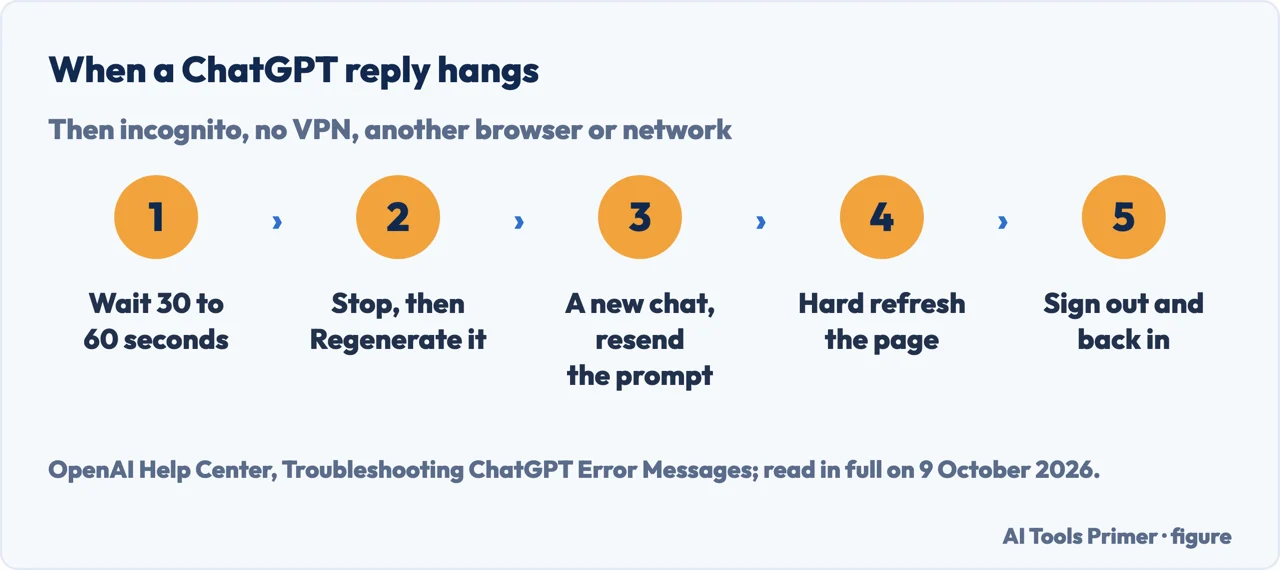
OpenAI’s troubleshooting article gives these steps, in this order, for a reply that seems stuck on Thinking or never completes. If the problem persists across browsers, devices and networks, it asks for a HAR file and browser console errors with timestamps, the model used and the conversation URL or ID before contacting Support.
- Wait 30 to 60 seconds. OpenAI’s troubleshooting article says to see whether the response completes first.
- Stop generating, then Regenerate. OpenAI gives it as the way to retry.
- Start a new chat and resend the prompt. In the same article’s list for a slow ChatGPT, OpenAI gives a new chat for a conversation that is long or has many turns; its article on Work and Codex says to try one in a long conversation.
- Hard refresh. Cmd or Ctrl + Shift + R in the browser, or reload the desktop app.
- Sign out of ChatGPT and sign back in. For a blank or frozen page, OpenAI’s article on slow responses adds clearing the site data for chat.openai.com, not just the cache.
- Open ChatGPT in an incognito or private window with extensions disabled. OpenAI’s article on slow responses notes that incognito mode disables most extensions by default.
- Turn off VPNs, proxies and secure DNS services, then try a different browser, network or device, and check status.openai.com once more.
Thinking levels and the wait
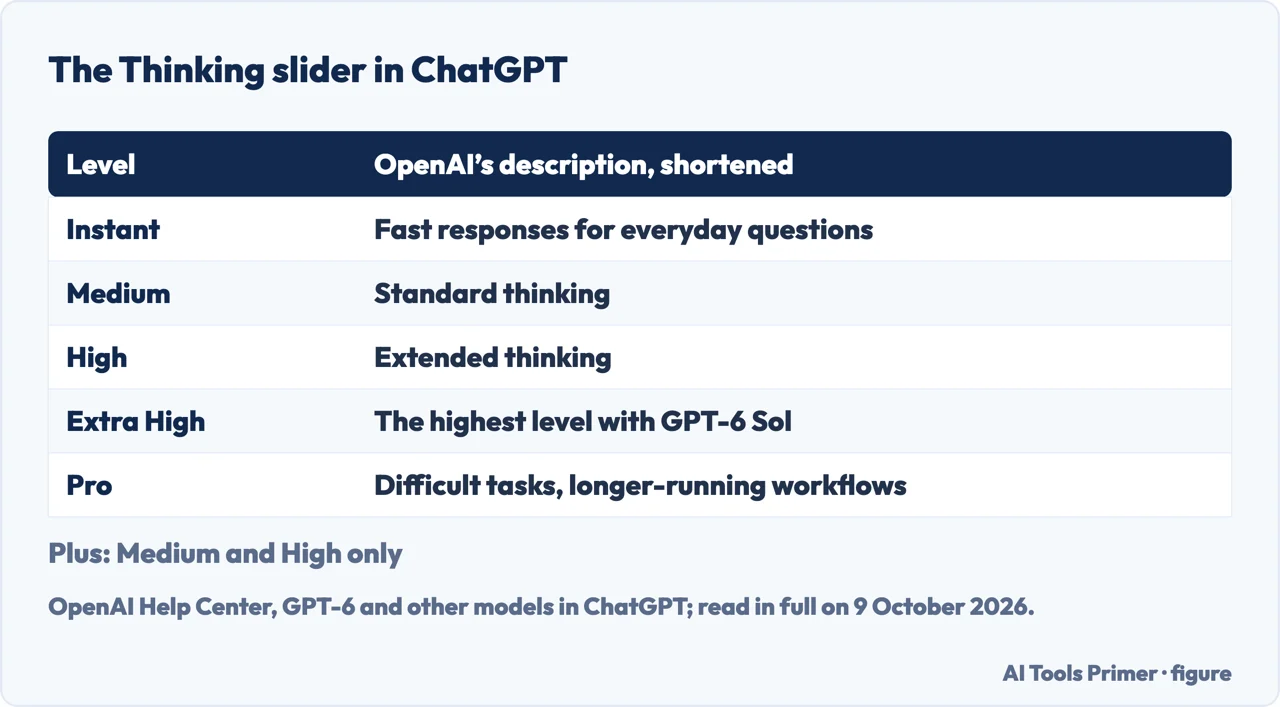
What the menu offers. OpenAI’s page on GPT-6 and other models in ChatGPT says GPT-6 is rolling out in Chat to eligible Pro, Plus, Enterprise and Business users, and that you choose how much it thinks with a Thinking slider: Instant, described as fast responses for everyday questions; Medium, standard thinking; High, extended thinking; Extra High, the highest thinking level available with GPT-6 Sol; and Pro, for difficult tasks and longer-running workflows, powered by GPT-6 Astra on eligible plans. OpenAI says GPT-5.6 Luna is becoming the default for Free and Go users, with Think for harder questions, and that the levels on offer depend on plan and workspace: its table gives Plus Medium and High, but not Extra High or Pro.
What doesn’t change the level on Plus and Pro. On those plans, OpenAI says, Instant doesn’t automatically switch to a higher thinking level for complex requests, and asking ChatGPT to think harder won’t automatically switch to a different level either. OpenAI adds that ChatGPT can still switch automatically for safety, and, as below, that reaching a Thinking limit can move it to another model.
Thinking time changes. OpenAI’s model release notes say it periodically adjusts the default thinking time of its reasoning models, looking for the balance between answer quality and response speed; on 10 January 2026 it lowered the Standard and Light thinking time for GPT-5.2 Thinking because, it says, users prefer faster responses. At GPT-5’s launch, the same notes said that GPT-5 Thinking Pro takes a bit longer to think; they record GPT-5 being retired from ChatGPT on 13 February 2026. With GPT-6 in Chat, OpenAI says a response may begin while ChatGPT continues thinking, at Instant through Extra High, not with Pro effort.
When a limit is reached. If you reach a Thinking limit, ChatGPT may continue with another available model; on Pro $200, reaching the GPT-6 Pro weekly limit switches it automatically to GPT-5.6 Thinking at Medium. What each plan includes is in Go or Plus.
The browser and the device
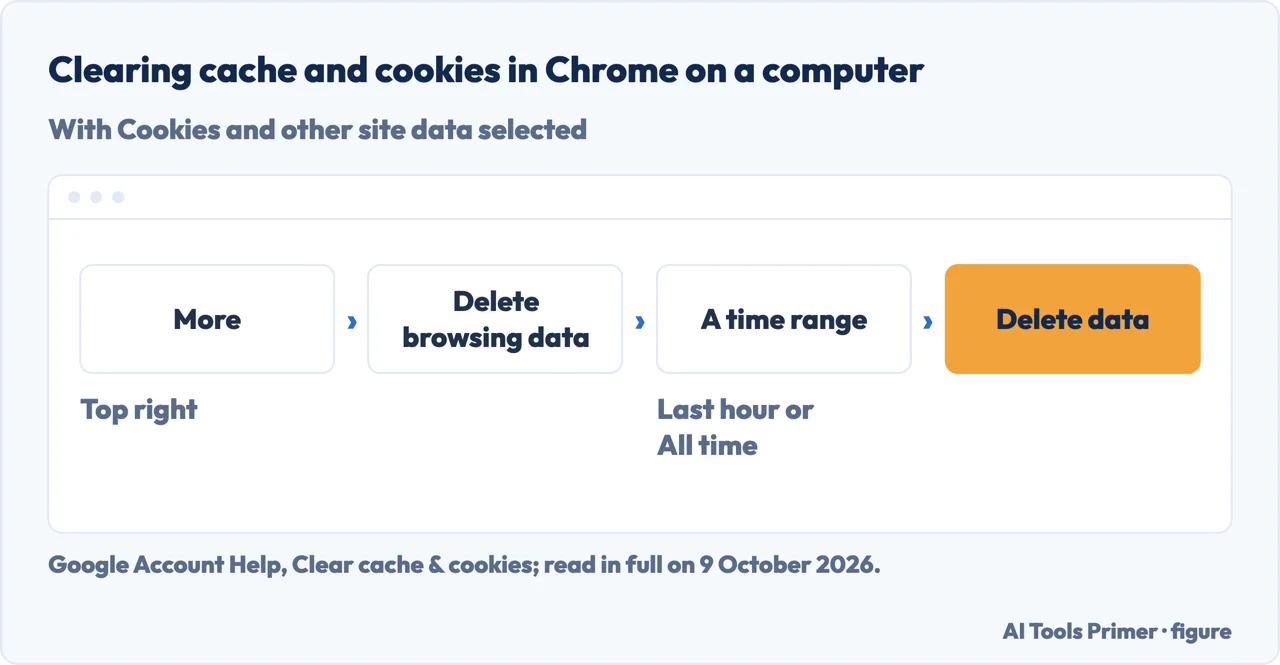
Clearing cache and cookies. In Chrome on a computer, Google’s steps are More, then Delete browsing data, a time range such as Last hour or All time, Cookies and other site data, any other items, and Delete data. Google says some settings on sites get deleted and you’ll need to sign in again where you were signed in, and that some sites can seem slower because content such as images needs to load again. Signing in to ChatGPT again is covered in a ChatGPT password.
Computer against phone. OpenAI suggests a different browser or device to find out whether the slowness belongs to one setup. A computer that is slow where the phone app is quick points, in our reading, at what the computer adds: the browser’s cache, its extensions, other programs and tabs, or a VPN or company network, all of which OpenAI names. OpenAI also notes the opposite case: mobile data may mean lower bandwidth. A computer that is slow at everything, not only in ChatGPT, is a different question, in why a computer is slow.
Long conversations. OpenAI’s advice is to start a new chat, and it doesn’t explain the mechanism; this page doesn’t either. What happens to old chats you archive or delete is in deleting your history, and what OpenAI says about data and safety in is ChatGPT safe.
Which versions. The model names are those on OpenAI’s pages on 9 October 2026: GPT-6, with GPT-6 Sol behind Instant to Extra High and GPT-6 Astra behind Pro, rolling out; GPT-5.6 Sol, Terra and Luna, of which OpenAI says Terra and Luna are not selectable in standard ChatGPT conversations. In its article on Work and Codex, OpenAI says tasks may need time to reason, use tools or complete several steps, and that faster text generation, about 50% for GPT-6 Astra and GPT-6.1 Sol at the default speed setting, doesn’t speed up every part of that work; the 50% applies when the ChatGPT subscription is used in OpenAI products or supported partner apps, and OpenAI says Support can’t currently verify the speed improvement for an account.
Where to start
Five ways in.
- “Is ChatGPT down?”
- The status page — is it everyone
- “The reply is stuck.”
- The sequence — when it hangs
- “It thinks for ages.”
- Thinking levels — thinking levels
- “Only on my computer.”
- The browser — the browser
- “Which models?”
- The versions — which versions
Other ChatGPT guides
Plans, history, safety and cancelling.
Questions people also ask
How to make ChatGPT faster?
OpenAI’s steps: check status.openai.com, start a new chat if the conversation is long, refresh the page or restart the app, disable extensions, VPNs, proxies or secure DNS tools, try another browser, device or network, and clear cache and cookies. OpenAI also describes the Instant thinking level as fast responses for everyday questions.
Does ChatGPT get slower the more you use it?
The OpenAI pages read here don’t say so. For a conversation that is long or has many turns, OpenAI says to start a new chat; and when ChatGPT was normal before and is suddenly slow, it says the cause is most often outdated cache data.
Why is ChatGPT Pro taking so long to use?
OpenAI describes the Pro thinking level as Pro models for difficult tasks and longer-running workflows; on eligible plans that includes GPT-6 Pro, powered by GPT-6 Astra. Its release notes said the earlier GPT-5 Thinking Pro takes a bit longer to think. For an everyday question, Instant is the level OpenAI calls fast.
Why is ChatGPT so slow on my computer but not my phone?
In our reading, what the computer adds: OpenAI names outdated browser cache, extensions that block scripts or ads, programs and tabs using system resources, and a VPN or company network. An incognito window disables most extensions by default, OpenAI says, and can help show whether the browser is the cause.
Not covered here. It does not cover the OpenAI API, latency in apps built on it, or Codex beyond the note on response speed.
Sources
- OpenAI Help Center — Why is my ChatGPT taking so long to respond? — help.openai.com, read 9 October 2026.
- OpenAI Help Center — Troubleshooting ChatGPT Error Messages — help.openai.com, read 9 October 2026.
- OpenAI Help Center — GPT-6 and other models in ChatGPT — help.openai.com, read 9 October 2026.
- OpenAI Help Center — Model Release Notes — help.openai.com, read 9 October 2026.
- OpenAI Help Center — Response speed and usage resets in Work and Codex — help.openai.com, read 9 October 2026.
- Google Account Help — Clear cache & cookies (computer) — support.google.com, read 9 October 2026.
Written by Alberto Gulotta
Founder and editor of AI Tools Primer, writing from Palermo, Italy. Thirty-five years of taking computers apart, starting with a Commodore 64 — the long version is on the about page.
Something wrong on this page? Write to aitoolsprimer@gmail.com and it gets fixed.
Written on 9 October 2026.
Independence and limits
No affiliate links and no paid placements anywhere on this site. Nobody pays to appear here, and no company has seen this page before you did.
This is general information, not professional advice. Where a page touches money, health, safety or the law, it names its source and the date it was read — and your situation may still differ. See the privacy page and the cookie policy.