
Chat · guide
ChatGPT error in message stream: what OpenAI does and does not say
By Alberto Gulotta · Updated · 9 min read
ChatGPT error in message stream is not named on the two OpenAI help pages we read on errors. The blogs explain it as the stream carrying the reply breaking before it finished. OpenAI’s pages give steps for neighbouring errors: check status.openai.com, start a new chat, clear the cache, disable extensions and VPNs, and switch network.
This page puts what OpenAI says next to what only the blogs say, with the network rules for company and school Wi-Fi.
| Question | Answer | Where it comes from |
|---|---|---|
| Does OpenAI explain this message? | The two help pages we read do not name it; AI Toolbox says OpenAI has no article for it | OpenAI Help Center; AI Toolbox |
| What does it mean? | Per the blogs, the stream carrying the reply broke before it finished | Axentix; AI Toolbox |
| What does OpenAI say to try for similar errors? | Refresh or start a new chat, check status.openai.com, clear the cache, disable extensions and VPNs, switch network | OpenAI Help Center |
| Why would a network matter? | Some features use WebSocket connections; blocked WebSocket traffic can make them stall or fail to stream | OpenAI Help Center |
| Where do I check for an outage? | status.openai.com | OpenAI Help Center |
What the message means, and who says so
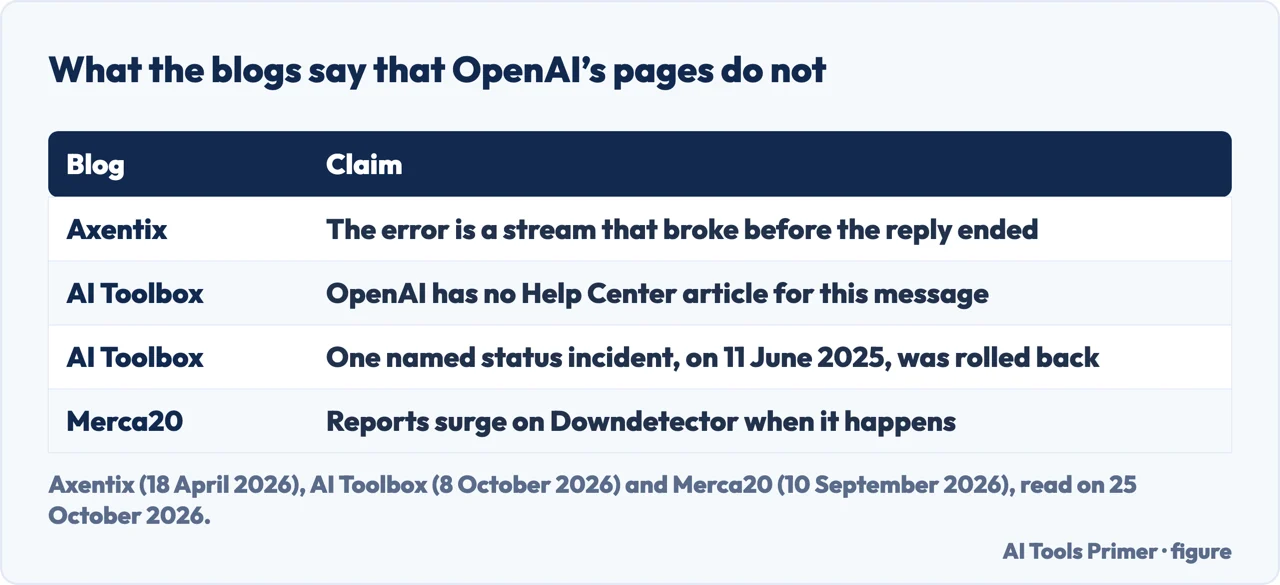
OpenAI’s two help pages on errors, the troubleshooting article and the network recommendations, do not contain the words “message stream” in the text we read. AI Toolbox, a blog, says the same in terms: “OpenAI has no Help Center article for this exact message.” What the blogs add is an explanation. Axentix says ChatGPT streams its reply instead of waiting until it is complete, and that “Error in message stream”, sometimes shown as “Error in body stream”, is that stream failing. AI Toolbox puts it as the stream of text from OpenAI’s servers to your app breaking before the reply finished. These are explanations by third parties, consistent with each other, and we cannot check them against an OpenAI page.
What OpenAI’s page says about the errors it does list
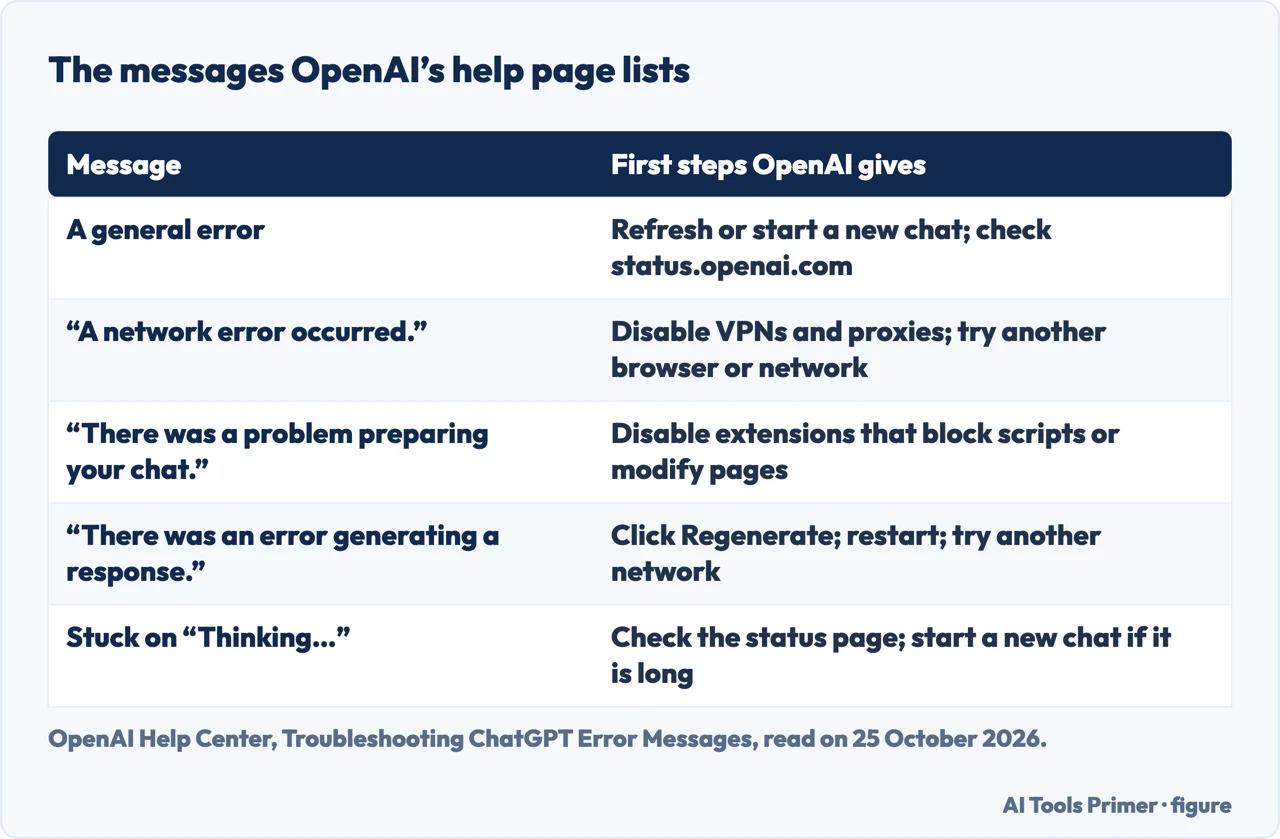
The troubleshooting article opens with the causes: “ChatGPT may occasionally encounter technical issues due to factors like network configuration, browser extensions, or transient server-side problems.” For a general error, which it says “may indicate a temporary server issue or a problem with your local setup”, its steps are to refresh the page or start a new chat, check status.openai.com for known outages, clear the browser cache and cookies, use an incognito window, disable browser extensions, especially privacy or security tools, turn off VPNs or secure DNS tools, and switch to a different network.
For “A network error occurred.” and “An error occurred while connecting to the websocket.”, which the page says suggest that your device is unable to establish a reliable connection to OpenAI’s servers, it adds turning off Web Protect or other security filters and trying another browser or device. For “There was a problem preparing your chat.” it points to an extension or URL blocker; for “There was an error generating a response.” it says it may be a one-time error and to click Regenerate; and for a chat stuck on Thinking, or a slow one, it adds starting a new chat if the conversation is long. The existing page on why ChatGPT is slow covers that last sequence.
On a company or school network
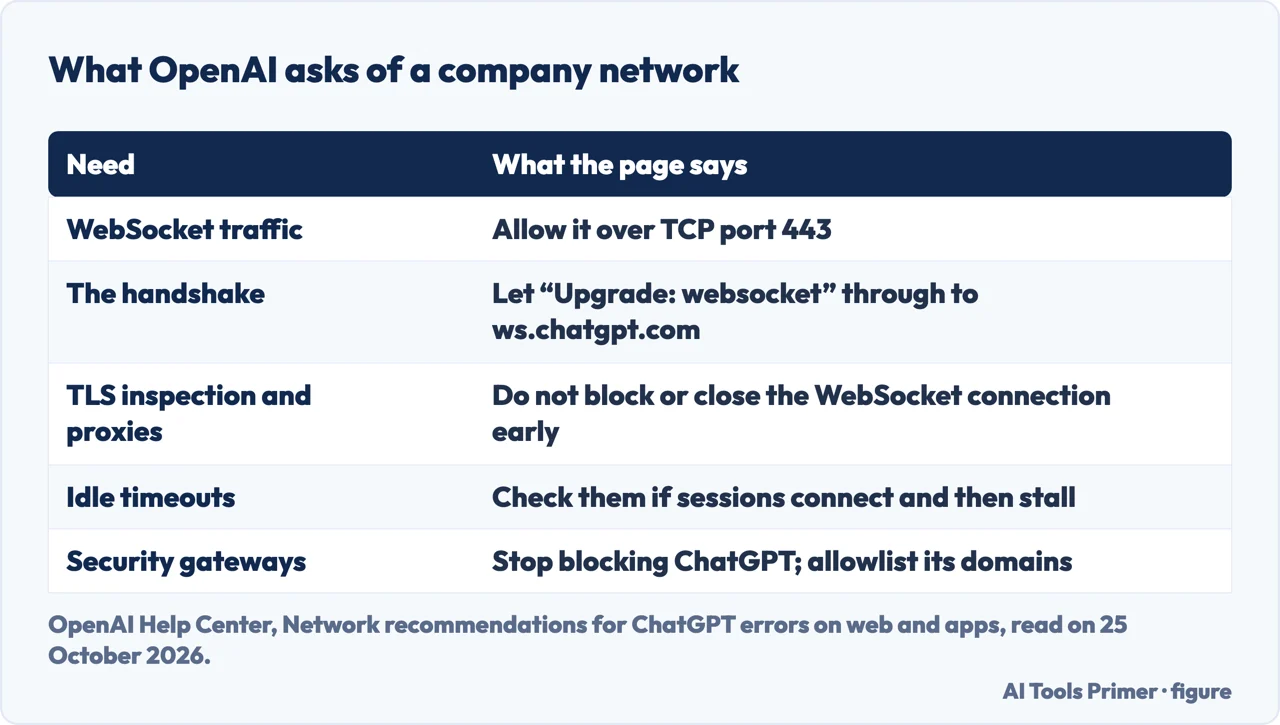
OpenAI’s network article is written for IT departments and for people on a company Wi-Fi. It says: “Some ChatGPT and Codex features use secure WebSocket connections in addition to standard HTTPS requests. If your organization blocks WebSocket traffic by default, some features may stall, disconnect, or fail to stream updates correctly.” It asks for WebSocket traffic over TCP port 443 and a proxy, firewall or secure web gateway that permits the “Upgrade: websocket” handshake to ws.chatgpt.com for conversation updates and notifications. For networks that inspect TLS or enforce a proxy, it asks that these controls do not block, rewrite or prematurely close the WebSocket handshake or connection; if sessions connect but later stall or disconnect, check the idle timeout and the maximum message-size policies for WebSocket traffic. It lists security gateways it knows are used to filter web traffic, such as McAfee Web Gateway, Cisco Umbrella and Zscaler Internet Access, and says that commonly the software has to stop blocking ChatGPT or explicitly allowlist OpenAI’s domains.
If the message appears only on one network, that is the page to give the administrator. A message that appears everywhere is a different case: check the status page first. For a similar error in another product, the page on Roblox error 524 follows the same order, from the account to the network.
What the blogs add
AI Toolbox, dated 8 October 2026, is a blog of a Chrome extension for ChatGPT, Gemini, Claude and Grok. It says the message is usually server-side, during an incident, on a very long reasoning run, or in one broken chat or Project; that you should click Retry first; that if one chat fails every time you should start a new chat and carry over a short summary; and that the only status incident named after the message was on 11 June 2025 and was fixed by rolling back a change. Merca20, a news site dated 10 September 2026, reports surges on Downdetector. Axentix, dated 18 April 2026, mentions an incident in November 2025. None of this is on the OpenAI pages we read, and we did not check the status history ourselves.
OpenAI Developer Community threads about the message appear first in the search results, but the pages we could read were empty shells, so we do not report what they say. OpenAI’s pages and AI Toolbox give the same first steps: check the status page and start a new chat.
Where to start
Four ways in.
- “What does it mean?”
- Who says what — means
- “What does OpenAI say to try?”
- Its list — openai
- “It only happens at work.”
- The network rules — network
- “A blog told me something else.”
- What backs it — blogs
ChatGPT, when it misbehaves
Slow replies, safety, history and the plan behind it.
A similar error elsewhere
The same order of checks for a game error.
Questions people also ask
Why is my ChatGPT giving me an error message?
OpenAI says technical issues may come from network configuration, browser extensions or transient server-side problems, and gives steps by message: refresh or start a new chat, check status.openai.com, clear the cache, disable extensions and VPNs, switch network.
Is ChatGPT down when it says error in message stream?
OpenAI tells you to check status.openai.com for known outages. AI Toolbox says one status incident named after the message was on 11 June 2025; Merca20 reports surges on Downdetector. We did not check the status history.
How do I fix the “File Stream Access Denied” error in ChatGPT?
We did not find that message on OpenAI’s help pages that we read, so we cannot say what it means.
Why can I not message ChatGPT anymore?
OpenAI lists several causes: a network error, an extension or blocker, an error generating a response, or a message about suspicious activity, for which it says to disable VPNs and proxies and to make sure you are not sharing the account.
Not covered here. We did not use a ChatGPT account to trigger the message. The statements come from two OpenAI Help Center pages (Troubleshooting ChatGPT Error Messages; Network recommendations for ChatGPT errors on web and apps), read on 25 October 2026 with a headless browser, and from three blogs used only to say what they claim. Menu and message wording may change.
AI Toolbox is the blog of a Chrome extension; Merca20 is a news site. Reddit and the OpenAI Developer Community threads in the results were not read, because the threads returned empty pages. The Apps SDK, the API and Codex are not covered.
The search volume and difficulty behind this page were read in Semrush on 29 August 2026.
Sources
- OpenAI Help Center — Troubleshooting ChatGPT Error Messages — help.openai.com, read 25 October 2026.
- OpenAI Help Center — Network recommendations for ChatGPT errors on web and apps — help.openai.com, read 25 October 2026.
- Axentix — ChatGPT “Error in Message Stream”: What It Means and How to Fix It (18 April 2026) — useaxentix.com, read 25 October 2026.
- AI Toolbox — ChatGPT Error in Message Stream: Causes and Fixes (8 October 2026) — www.ai-toolbox.co, read 25 October 2026.
- Merca20 — ChatGPT Error in Message Stream: What Does It Mean and OpenAI Status Today (10 September 2026) — www.merca20.com, read 25 October 2026.
Written by Alberto Gulotta
Founder and editor of AI Tools Primer, writing from Palermo, Italy. Thirty-five years of taking computers apart, starting with a Commodore 64 — the long version is on the about page.
Something wrong on this page? Write to aitoolsprimer@gmail.com and it gets fixed.
Written on 25 October 2026.
Independence and limits
No affiliate links and no paid placements anywhere on this site. Nobody pays to appear here, and no company has seen this page before you did.
This is general information, not professional advice. Where a page touches money, health, safety or the law, it names its source and the date it was read — and your situation may still differ. See the privacy page and the cookie policy.