
Software · guide
Error code 524 Roblox: what it means, and the fixes in order
By Alberto Gulotta · Updated · 9 min read
Error code 524 Roblox means, in Roblox’s words, that you do not have permission to join a specific experience or private server. Roblox calls the account’s private-server settings the most common cause and gives six steps in order, from those settings to a reinstall. A guide from PCrisk adds three things that Roblox does not say.
This page puts Roblox’s article in order, gives its reinstall steps, and says what is only in the third-party guide.
| Question | Answer | Where it comes from |
|---|---|---|
| What does error 524 mean? | You do not have permission to join a specific experience or private server | Roblox Support |
| What is the most common cause? | The account’s private-server settings | Roblox Support |
| What do I check first? | Settings, Privacy and content restrictions, Visibility & private servers, Private servers | Roblox Support |
| I am under 13? | You can only join private servers created by your friends | Roblox Support |
| Is an account age or a 30-day wait involved? | PCrisk says so; Roblox’s page does not | PCrisk |
What Roblox says it means
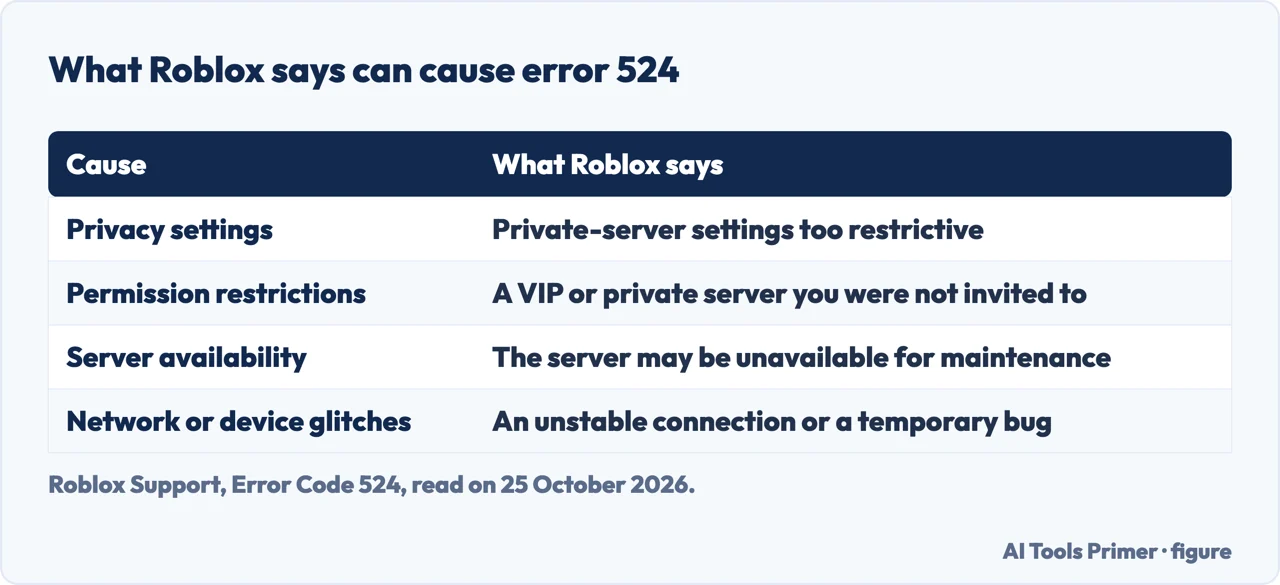
Roblox’s help article is titled “Error Code 524: You do not have permission to join this game”. It says the code “typically indicates that you do not have permission to join a specific experience or private server”, and lists four causes: privacy settings that are too restrictive for private servers; permission restrictions, meaning the server is a VIP or private server and you have not been invited or added to the guest list; server availability, as the game or server may be temporarily unavailable for maintenance or other issues; and network or device glitches such as an unstable connection, a browser problem or a temporary bug. It adds a note about the platform: Roblox is not supported on virtual machines, cloud-based computers or mobile devices running altered or unofficial versions of their operating system, and the internet speed should be 4-8 Mb/s or above.
Roblox’s steps, in its order
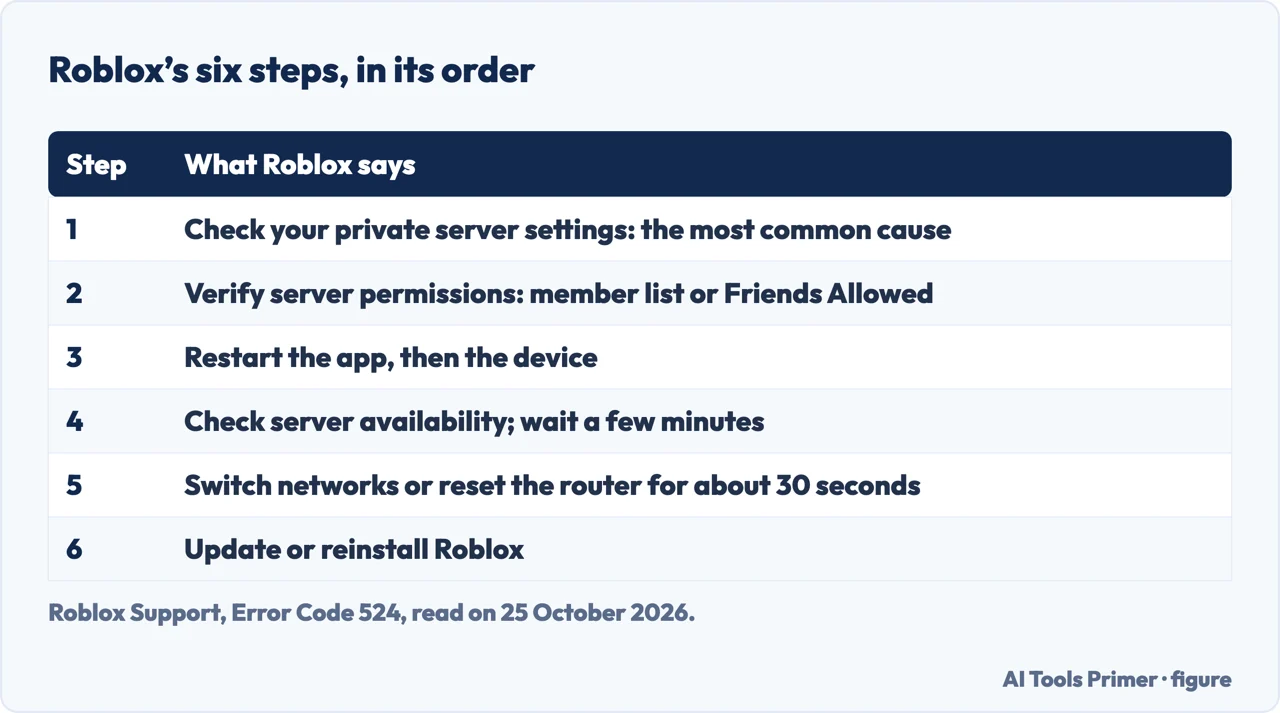
The article tells you to follow the steps in order, from the easiest, and to try joining again after each. The first is the one it calls the most common cause: “This is the most common cause of Error Code 524.” Go to Settings, which on the mobile or desktop app is More and the gear icon, and on the website the gear icon at the top right; then Privacy and content restrictions, Visibility & private servers, Private servers, and choose who can add you as a member of their private server. “If you are under 13, you can only join private servers created by your friends.”
The second step is to verify server permissions. For private servers, the owner has to have added your username to the Server Members list or enabled Friends Allowed; for group-only games, you have to have joined the right group. Third, close the Roblox app completely and restart the device. Fourth, check server availability and wait a few minutes, looking at the game’s social media or community pages for news. Fifth, the network: switch from Wi-Fi to mobile data or to a different Wi-Fi network, or unplug the router for about 30 seconds. The sixth is to update or reinstall Roblox.
The reinstall, as Roblox writes it
For Windows, Roblox says to uninstall the app from Settings, Apps, Apps & features, or from the Control Panel under Programs and Features. For a cleaner removal it adds steps after the uninstall: open Command Prompt (Win+R, type CMD), type cd AppData\Local, then rmdir /s Roblox, type y to confirm, restart the computer and reinstall Roblox. Roblox’s page gives these as its own steps; we did not run them. On a Mac, drag the Roblox app to the Trash, or choose Move to Trash, or press Command-Delete, and check that the Roblox app has permission under Privacy & Security. On a phone, force-close the app, then press and hold its icon to delete it and install it again. The page on uninstalling programs properly covers what any removal leaves behind.
What PCrisk adds, and what Roblox does not say
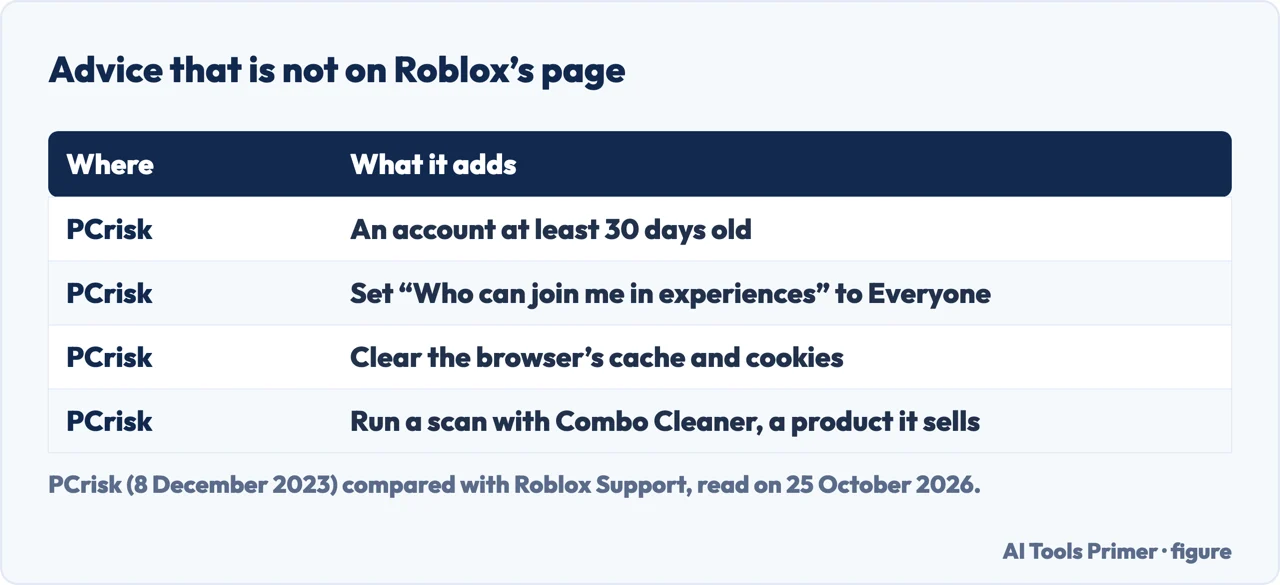
PCrisk’s guide, dated 8 December 2023, is the other page we read. It agrees that most cases come from privacy settings, and then goes further than Roblox does. It says “You must have an account at least 30 days old to join such experiences”, that you should set both “Who can make me a member of their private server” and “Who can join me in experiences” to Everyone, and that corrupted cache files in the browser can trigger the error, with steps to clear the cache and cookies in Chrome and Firefox. Roblox’s page mentions none of these three. PCrisk also says the guest account feature was removed in 2017, so a guest cannot join. We could not check those statements against a Roblox page.
PCrisk is a security blog, and it recommends running a scan with Combo Cleaner, a product sold by its parent company, more than once in the article. That is an advertisement, not a step Roblox gives. The three developer-forum threads and the ExitLag blog in the results were not readable or not read, so the Roblox page is the only primary source here.
The network steps
Roblox’s fifth step is the same kind of check as on the page on lowering ping and the page on the Wi-Fi signal: switch networks, restart the router. If the Wi-Fi itself is the problem, the page on Wi-Fi that stopped working comes first.
Where to start
Five ways in.
- “What does 524 mean?”
- In Roblox’s words — causes
- “What do I try first?”
- The six steps — steps
- “Do I reinstall?”
- As Roblox writes it — reinstall
- “A guide told me to wait 30 days.”
- What is only third-party — others
- “It might be my internet.”
- The network — network
The network side
Roblox suggests switching networks and resetting the router; these cover the connection itself.
Other games and their accounts
Removing a game cleanly, and cancelling a subscription tied to one.
Questions people also ask
What does Roblox error code 524 mean?
Roblox says it typically indicates that you do not have permission to join a specific experience or private server, for example because of your privacy settings, or because the server is a VIP or private server you were not invited to.
How do I fix Roblox error 524?
Follow Roblox’s steps in order: check your private-server settings, verify the server’s permissions, restart the app and the device, check whether the server is available, check the network, then update or reinstall Roblox.
Why can I not join a private server on Roblox?
Either the settings under Privacy and content restrictions, Visibility & private servers are too restrictive, or the server owner has not added you to the Server Members list or enabled Friends Allowed. Under 13, you can only join private servers created by your friends.
Does my Roblox account have to be 30 days old?
PCrisk says you must have an account at least 30 days old to join some experiences. Roblox’s own error 524 article does not say so, and we could not confirm it.
Not covered here. We did not test an account or a device for this page. The steps come from Roblox Support (Error Code 524: You do not have permission to join this game), read on 25 October 2026. The reinstall commands are Roblox’s, not ours; we did not run them. Menu names follow that page and may differ by platform and version.
PCrisk is a security blog that sells a cleaner and is used here only to say what it claims. Reddit, three developer-forum threads and the ExitLag blog in the results were not read. Error codes other than 524 are not covered.
The search volume and difficulty behind this page were read in Semrush on 29 August 2026.
Sources
- Roblox Support — Error Code 524: You do not have permission to join this game — en.help.roblox.com, read 25 October 2026.
- PCrisk — How to Fix Roblox Error Code 524 (8 December 2023) — www.pcrisk.com, read 25 October 2026.
Written by Alberto Gulotta
Founder and editor of AI Tools Primer, writing from Palermo, Italy. Thirty-five years of taking computers apart, starting with a Commodore 64 — the long version is on the about page.
Something wrong on this page? Write to aitoolsprimer@gmail.com and it gets fixed.
Written on 25 October 2026.
Independence and limits
No affiliate links and no paid placements anywhere on this site. Nobody pays to appear here, and no company has seen this page before you did.
This is general information, not professional advice. Where a page touches money, health, safety or the law, it names its source and the date it was read — and your situation may still differ. See the privacy page and the cookie policy.