
Software · guide
Cancel Xbox Game Pass: the steps, and what to expect on refunds
By Alberto Gulotta · Updated · 10 min read
Cancel Xbox Game Pass from the Subscriptions page of your Microsoft account or from the Xbox console: select Manage, then Cancel subscription. Xbox Support says turning off recurring billing stops future charges and keeps the benefits until the expiration date. Refunds are a separate question, and the guides do not agree on them.
This page gives the two routes from Xbox Support, what each choice does to your access, who says what about refunds, and the cases where the usual route does not fit.
| Question | Answer | Where it comes from |
|---|---|---|
| Where do I cancel on the web? | The Subscriptions page, signed in with the Microsoft account that bought it, then Manage and Cancel subscription | Xbox Support |
| Where do I cancel on a console? | Xbox button, Profile & system, Settings, Account, Subscriptions, then Cancel subscription | Xbox Support |
| What does turning off recurring billing do? | Stops future charges and keeps the benefits until the expiration date | Xbox Support |
| Can I get a refund? | Within 30 days of the first purchase by cancelling, unless the offer says it is non-refundable; not all charges can be refunded | Xbox terms; Xbox Support |
| I pay for someone else’s subscription | The owner of the Microsoft account that has it must sign in to cancel | Xbox Support |
The two routes
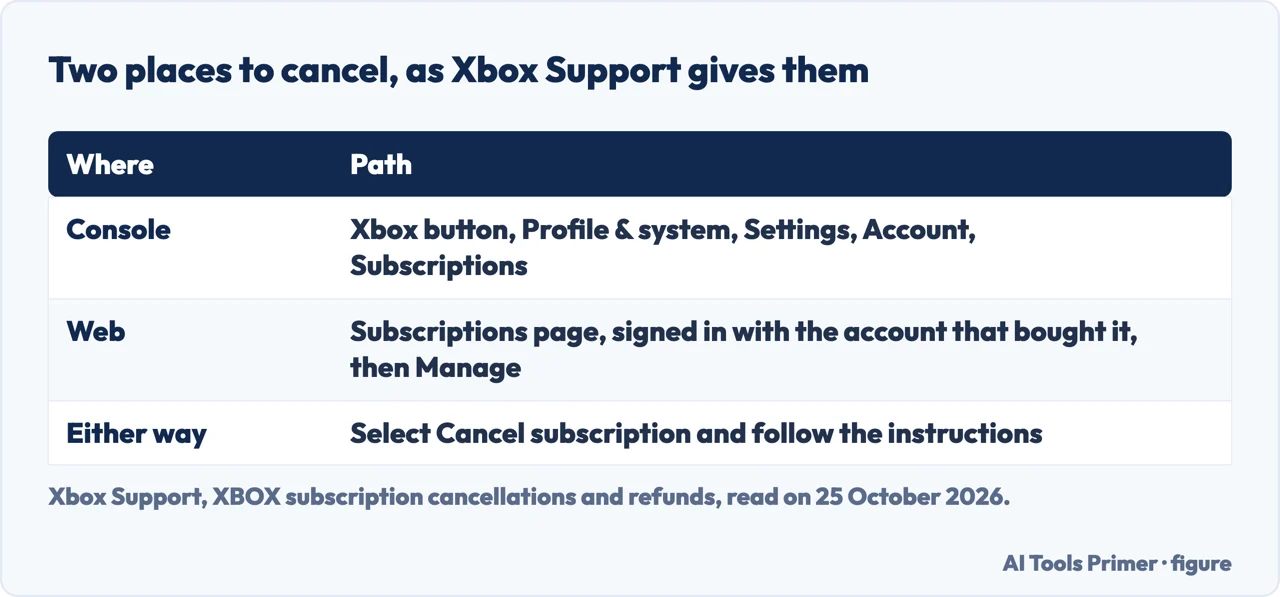
Xbox Support gives two ways to cancel, and says you can cancel at any time. On a console, press the Xbox button to open the guide, go to Profile & system, Settings, Account, Subscriptions, choose the subscription you want to manage and select Cancel subscription. The page adds that if you are eligible, you may be prompted to start a refund.
On the web the page says to start from Subscriptions, in a browser on a phone or a computer, and to sign in with the Microsoft account you used to purchase the subscription: “It’s important to use that account.” Find the subscription, select Manage, then Cancel subscription and follow the instructions. Microsoft’s general page on cancelling Microsoft subscriptions gives the same route under Subscriptions, Manage, Cancel, and adds that for a subscription bought from Google Play or the Apple App Store you contact that store’s customer support.
Asurion says the Xbox mobile app has no way to manage the subscription and sends you to a phone browser. The Xbox page we read names only the console and a mobile or desktop browser, so the two do not conflict.
What happens to your access
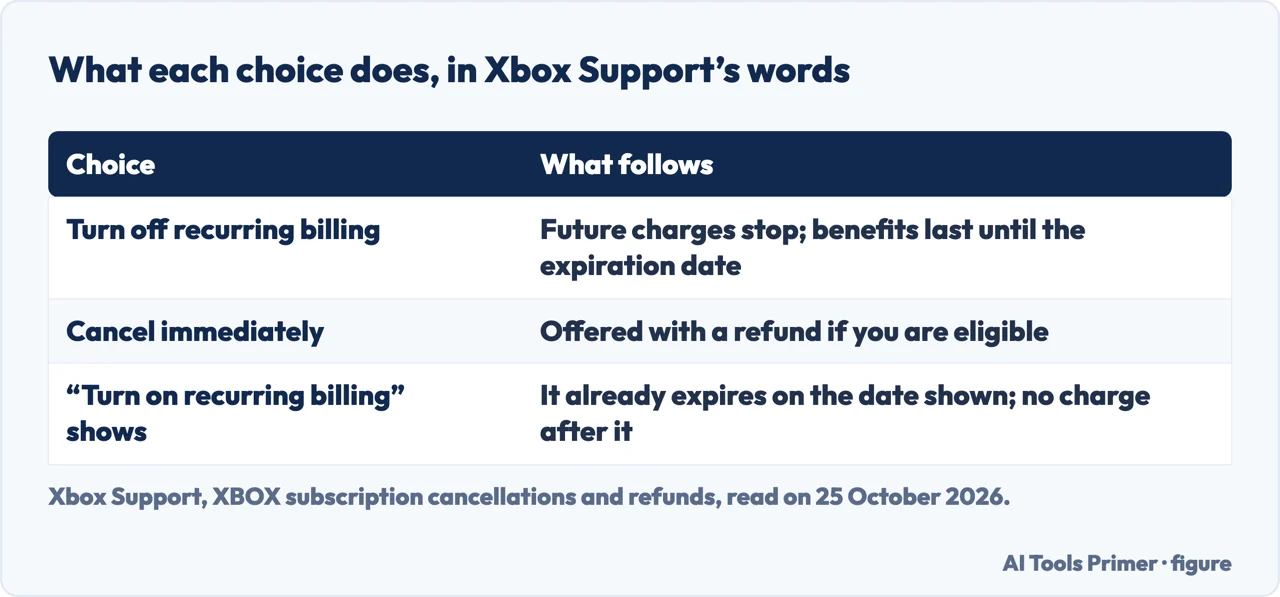
Xbox Support puts it in one sentence: “Turning off recurring billing will stop future charges for a subscription and grant you its benefits until its expiration date.” A refund is a different route, in which you cancel immediately; the page says you may be eligible for that, and not always.
The same page explains a button that confuses people. If you find Turn on recurring billing instead of a link that says Manage, “this means your subscription is already set to expire on the date shown and you won’t be charged after this date.” In its troubleshooting section it says the same to someone who has no cancel option, and adds that you can continue to use the subscription’s benefits until it expires.
What you lose when it expires is described by the guides, not by the Xbox pages we read. Insider Gaming says that games you installed through Game Pass will no longer be playable once the subscription ends unless you buy them separately, and that discounted purchases you made as a member remain yours. Asurion says you lose access to games you don’t own. We could not check either on an Xbox page.
Refunds: who says what
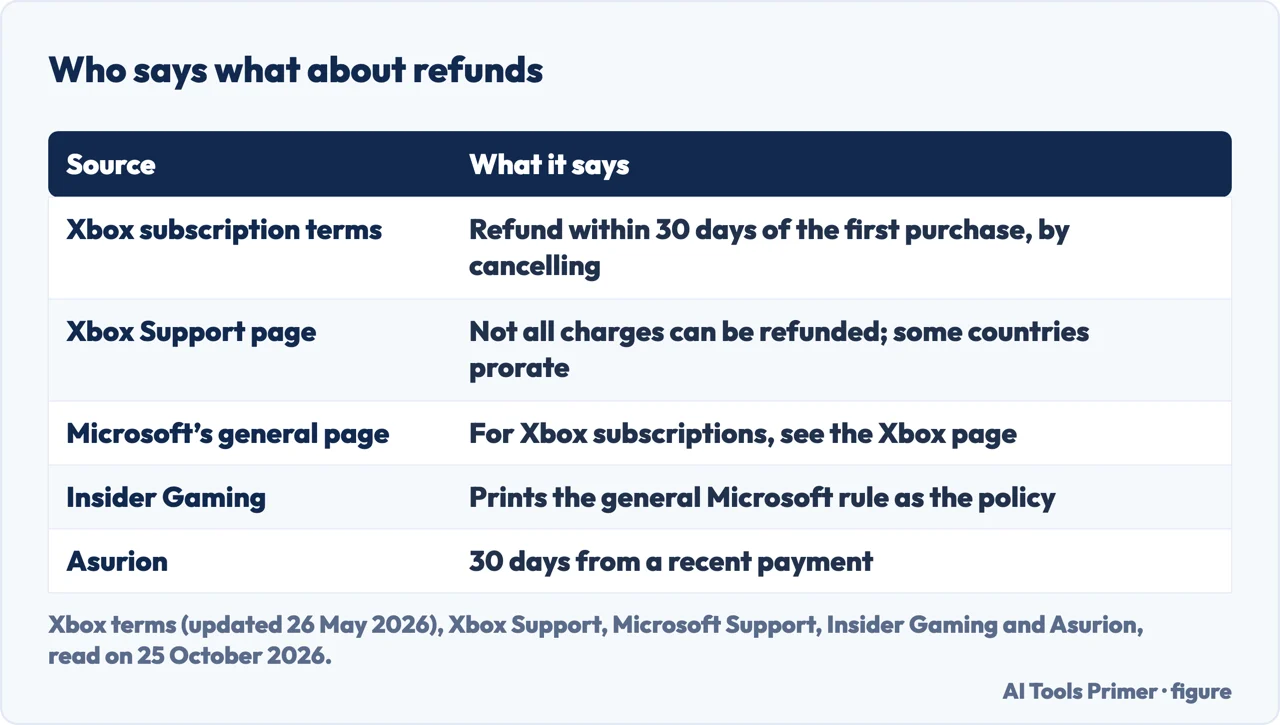
The Xbox subscription terms, last updated on 26 May 2026, say: “You can receive a refund within 30 days from your initial purchase by cancelling your subscription”, unless a particular offer says the purchase is non-refundable. Xbox Support’s page is more cautious: you may be eligible to cancel immediately with a refund, “however, not all subscription charges can be refunded.” It also lists countries where you have the right to cancel with immediate effect and a prorated refund: in Finland, Germany, the Netherlands, Poland and Portugal it covers the last renewal charge for terms longer than one month, and in Canada, Denmark, France, Israel, Korea and Türkiye the last subscription charge.
Microsoft’s general page on its refund policy has a different rule: a refund within 30 days of the initial purchase or before the first recurring billing date, whichever is sooner, and a refund of your most recent recurring charge if you cancel within 30 days after payment, once per account and product. That page then says: “For refund information on Xbox subscriptions, please see Xbox subscription cancellations and refunds”. So Microsoft itself treats Xbox refunds apart from the general rule.
The guides blur this. Insider Gaming prints the general Microsoft rule, including the most-recent-charge refund, under the words “Microsoft’s refund policy” in a guide about Xbox. Asurion says that if you cancel within 30 days of a recent payment you can ask Microsoft for a refund. The Xbox pages we read give the initial-purchase rule and do not state the recent-charge rule. Microsoft’s general page adds that eligibility is determined automatically during the cancellation process.
When the usual route does not fit
- You pay for someone else’s subscription. The owner of the Microsoft account that has it must sign in to cancel, using the same console or web steps.
- A third party bills you. Xbox Support says to contact them about cancellations and refunds.
- A charge you did not expect. If no Xbox subscription is set to renew but a card is still charged, the payment option may be associated with another account holder who has a subscription, such as another member of your Xbox family group.
- The price changed. Xbox says it will tell you at least 30 days before a new price takes effect, and that you have the chance to cancel before then.
- Your subscription is not working. It might be suspended because of an overdue charge.
A message that claims to be from Microsoft about your account is a different problem; the page on the Microsoft security alert scam has the test that settles it.
Where to start
Five ways in.
- “Where do I cancel?”
- Console and web — routes
- “Do I lose access right away?”
- What happens — access
- “Can I get my money back?”
- Who says what — refunds
- “There is no Cancel button.”
- When the route does not fit — cases
- “My subscription says Premium.”
- Which subscription — premium
Cancelling and accounts
Other subscriptions, the Microsoft account behind this one, and the scam that looks like a billing problem.
Questions people also ask
How do I cancel Xbox Game Pass?
On a console: Xbox button, Profile & system, Settings, Account, Subscriptions, then Cancel subscription. On the web: the Subscriptions page, signed in with the Microsoft account that bought it, then Manage and Cancel subscription.
Do I keep Game Pass after I cancel?
Xbox Support says turning off recurring billing stops future charges and gives you the benefits until the expiration date. Cancelling immediately with a refund is a different route, offered if you are eligible.
Can I get a refund for Xbox Game Pass?
The Xbox terms say you can receive a refund within 30 days from your initial purchase by cancelling, unless the offer says it is non-refundable. Xbox Support says not all subscription charges can be refunded.
Why is there no Cancel button for my subscription?
If you see Turn on recurring billing instead of Manage, Xbox Support says the subscription is already set to expire on the date shown and you will not be charged after that date.
Not covered here. We did not cancel a subscription for this page. The steps and the refund rules come from Xbox Support (XBOX subscription cancellations and refunds; How to cancel your Premium subscription), the Xbox Subscriptions Terms & Conditions (last updated 26 May 2026), and Microsoft Support (Cancel your Microsoft subscription; Microsoft subscription refund policy), read on 25 October 2026. The Xbox page keeps its steps in expandable sections, which we opened by hand. Menu names follow those pages and may differ by region and console.
Asurion, Insider Gaming (1 October 2025) and Recharge are guides by third parties; what they say about installed games and about the mobile app is not on an Xbox page we read. Reddit in the results was not read. Refunds depend on your country and your offer; the Xbox pages list some countries, not all.
The search volume and difficulty behind this page were read in Semrush on 29 August 2026.
Sources
- Xbox Support — XBOX subscription cancellations and refunds — support.xbox.com, read 25 October 2026.
- Xbox — XBOX Subscriptions Terms & Conditions (last updated 26 May 2026) — www.xbox.com, read 25 October 2026.
- Microsoft Support — Microsoft subscription refund policy — support.microsoft.com, read 25 October 2026.
- Microsoft Support — Cancel your Microsoft subscription — support.microsoft.com, read 25 October 2026.
- Xbox Support — How to cancel your Premium subscription (Microsoft Casual Games) — support.xbox.com, read 25 October 2026.
- Asurion — How to cancel your Xbox Game Pass subscription — www.asurion.com, read 25 October 2026.
- Insider Gaming — How To Cancel Xbox Game Pass (1 October 2025) — insider-gaming.com, read 25 October 2026.
Written by Alberto Gulotta
Founder and editor of AI Tools Primer, writing from Palermo, Italy. Thirty-five years of taking computers apart, starting with a Commodore 64 — the long version is on the about page.
Something wrong on this page? Write to aitoolsprimer@gmail.com and it gets fixed.
Written on 25 October 2026.
Independence and limits
No affiliate links and no paid placements anywhere on this site. Nobody pays to appear here, and no company has seen this page before you did.
This is general information, not professional advice. Where a page touches money, health, safety or the law, it names its source and the date it was read — and your situation may still differ. See the privacy page and the cookie policy.