
Video · guide
How to cancel CapCut subscription, and what the refund rules say
By Alberto Gulotta · Updated · 11 min read
How to cancel CapCut subscription: cancel where you subscribed, in your Apple ID, Google account or CapCut account, at least 24 hours before renewal. CapCut says you keep access until the end of the period you paid for. Refunds are another matter: the Help Center and the Terms of Service do not say the same thing.
This page gives the steps CapCut publishes for the App Store and Google Play, what cancelling leaves you with, the three statements on refunds, and what to do if you cannot cancel.
| Question | Answer | Where it comes from |
|---|---|---|
| Where do I cancel? | Through your Apple ID account, Google account or CapCut account, as applicable: where you subscribed | Terms of Service |
| By when? | At least 24 hours before the renewal date, or you are charged and a new billing cycle begins | Help Center |
| Do I keep Pro until the end? | Yes: access until the end of the then-current subscription period | Terms of Service |
| Can I get a refund? | The Help Center says purchases generally do not support refunds; the Terms give a full refund within 14 calendar days if unused | Help Center; Terms of Service |
| I cannot cancel | Contact CapCut support with your login method, platform, a screenshot and the order number | Help Center |
Cancel where you subscribed
The Terms of Service put the rule in one sentence: to stop recurring charges, “you must cancel your subscription to the Premium Services through your Apple ID account, Google account and/or CapCut account (as applicable) before the end of the then-current subscription period.” The place you cancel is the place you paid.
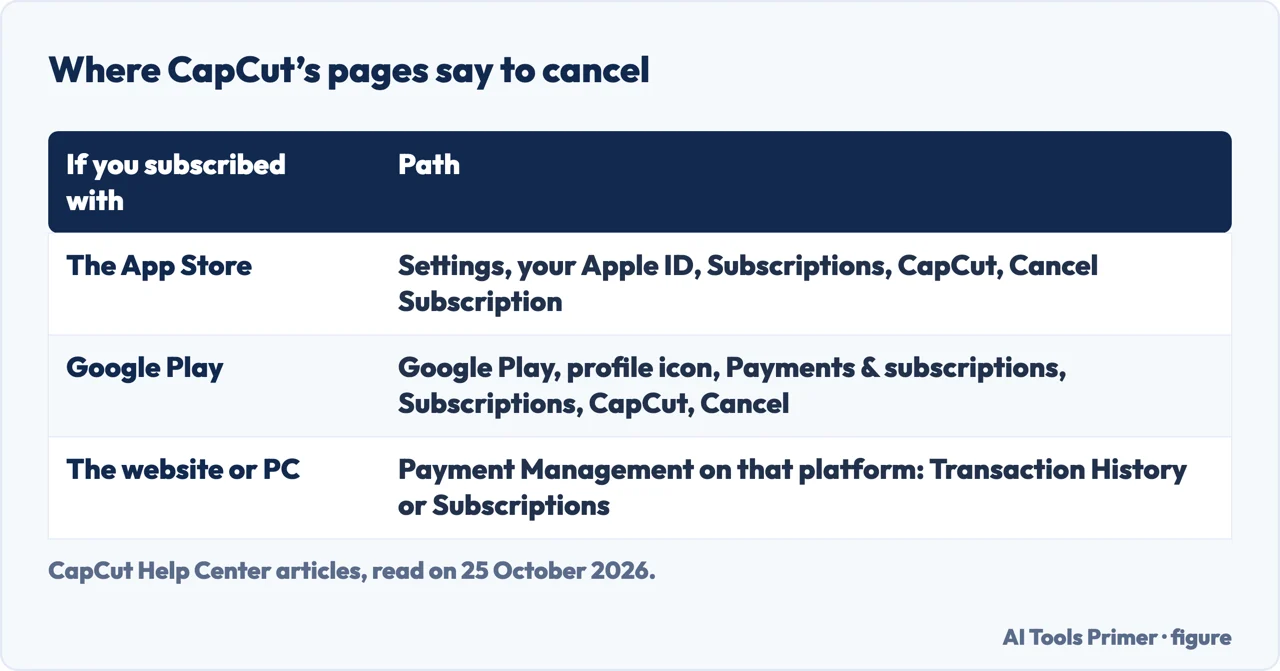
CapCut’s Help Center gives the steps for the two stores in its article on refunds during an age-restriction appeal. On an iPhone or iPad: open Settings, tap your Apple ID, tap Subscriptions, select CapCut, tap Cancel Subscription. On Android: open Google Play, tap your profile icon, tap Payments & subscriptions and then Subscriptions, select CapCut, tap Cancel. The page adds that processing may take 5–14 working days. For a subscription bought on the CapCut website or the PC client, the Help Center points to the Payment Management section of that platform, where you look for Transaction History or Subscriptions. We found no click-by-click web steps on a CapCut page we read.
The guides fill that gap differently. Sparrow Blog says to find your active plan on capcut.com and click Cancel Subscription; CancelMates says to click your profile icon, choose Manage space or Pro, and click Cancel or turn off the auto-renewal. Both are third-party guides, and menu names on the site may differ.
The 24 hours, and what you keep
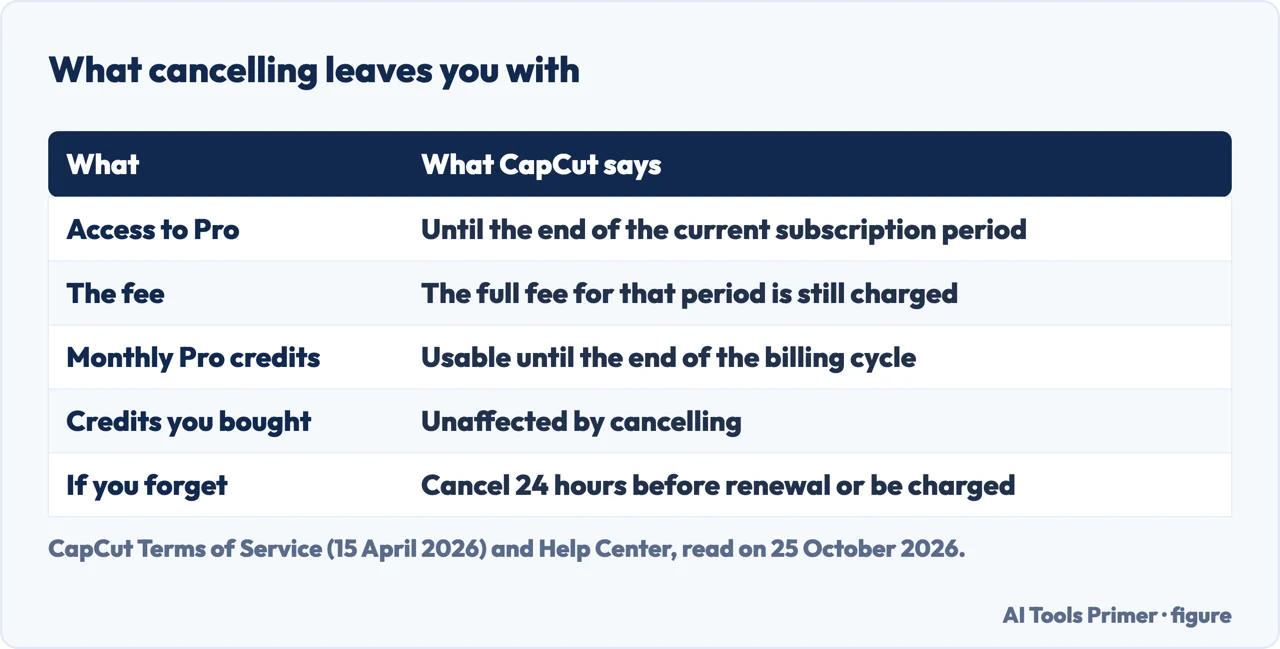
The Help Center is blunt about timing: “If you forget to cancel your subscription at least 24 hours before the renewal date, your account will be charged, and a new billing cycle will begin.” Pro and Teams plans are set to auto-renewal.
After you cancel, the Terms say you will still have access to the Premium Services until the end of the then-current subscription period, and that you are charged the full subscription fee for that period, unless a jurisdiction-specific term or the law says otherwise. So cancelling early does not shorten what you have already paid for, and it does not reduce it.
Credits are a separate matter. The Help Center says that, as of 2026, CapCut’s credit system is only active on CapCut Online (Web); the desktop and mobile apps do not support credit-based features or show a balance. On the web, the monthly credits that come with Pro “remain fully usable until the end of your current billing cycle, even after cancellation”, and they do not roll over. Credits bought in the web store, and credits earned from events, are not affected by cancelling.
Refunds: three statements
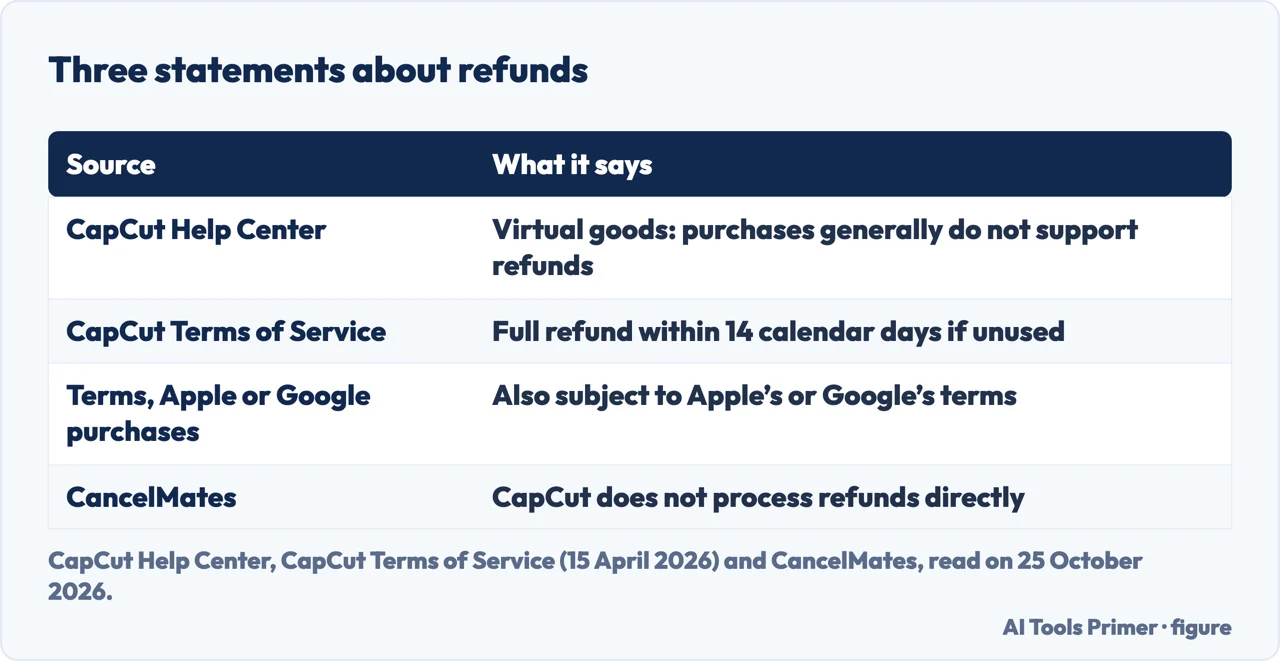
CapCut says two different things about refunds, and a guide says a third. The Help Center: “CapCut subscriptions are considered virtual goods, and generally, purchases do not support refunds.” It adds that in a special circumstance, such as accidental double billing, you can submit an appeal and should refer to the Terms of Service.
The Terms of Service, last updated on 15 April 2026, are more specific: unless a jurisdiction-specific section says otherwise, you may cancel “with a full refund within 14 calendar days following the start of your subscription”, provided you have not used the Premium Services in any form since you subscribed. To claim it you contact CapCut through its ticket form, and a refund goes to the payment method you used. If you subscribed through Apple or Google, the Terms add that your cancellation and refund are also subject to their terms and conditions.
For an App Store purchase, CapCut’s own article on refunds sends you to Apple: open Settings, tap your Apple ID, then Media & Purchases, then Purchase History, select the CapCut subscription, tap Report a Problem, and submit the request. CancelMates says CapCut does not process refunds directly and that you must ask the platform that billed you. That is true for the App Store route in the CapCut article, and not the whole picture for a purchase made on CapCut’s own site, where the Terms point to CapCut’s ticket form.
If you cannot cancel
CapCut has a page for it. It says that cancellation permissions and subscription records cannot always be modified directly by users, and: “please contact our support team to fix it through customer service.” It asks you to prepare four things: the email or login method used for your CapCut account, your device type and platform (iOS, Android, PC or Web), a screenshot showing that you are unable to cancel auto-renewal, and your subscription order number or payment receipt, if available.
What the guides add that CapCut does not say
CancelMates says that deleting the CapCut app, or deleting the account, does not stop the billing, because Apple or Google bills you. The CapCut pages we read do not say this. CancelMates also describes a 7-day free trial that must be cancelled at least 24 hours before it ends, and calls CapCut “notoriously strict” about refunds; neither is on a CapCut page we read. Sparrow Blog, published on 29 September 2025 and marked as verified on 18 October 2025, repeats the 24-hour rule and says refunds are generally not available after renewal.
Where to start
Five ways in.
- “Where do I cancel?”
- Where you paid — where
- “When is too late?”
- The 24 hours — after
- “Can I get my money back?”
- Three statements — refunds
- “The cancel button is not there.”
- Contact support — stuck
- “The guides say something else.”
- What backs it — guides
Cancelling other subscriptions
The same job for an Apple subscription, ChatGPT and Xbox Game Pass.
Editing video on a phone
What the editors do once you are in them, on an iPhone and on a desktop.
Questions people also ask
How do I cancel my CapCut subscription?
Cancel where you subscribed. On iPhone: Settings, your Apple ID, Subscriptions, CapCut, Cancel Subscription. On Android: Google Play, profile icon, Payments & subscriptions, Subscriptions, CapCut, Cancel. For the website or PC, look in Payment Management for Subscriptions.
Do I lose CapCut Pro right after I cancel?
No. CapCut’s Terms say you will still have access until the end of the then-current subscription period, and you are charged the full fee for that period.
Can I get a refund for CapCut Pro?
The Help Center says purchases generally do not support refunds. The Terms give a full refund within 14 calendar days of the start if you have not used the Premium Services. Apple and Google purchases are also subject to their own terms.
What if I cannot cancel the auto-renewal?
CapCut says to contact its support team, and to prepare your login method, device and platform, a screenshot and your order number.
Not covered here. We did not cancel a subscription for this page. The steps and the rules come from CapCut’s Help Center (What Happens If I Forget to Cancel My Subscription?; What Should I Do If I Can’t Cancel Auto-renewal?; the refund article for the age-restriction appeal, 12 January 2026; Are My Credits Still Valid After I Cancel My Pro Subscription?, 23 March 2026) and its Terms of Service, last updated on 15 April 2026, read on 25 October 2026. Menu names follow those pages and may differ by version and region.
Sparrow Blog and CancelMates are third-party guides; CancelMates is a renewal-reminder service. Reddit and CapCut’s account settings page in the results were not read. The Terms contain jurisdiction-specific sections that change the refund rules in some places; we did not read them country by country. The age-restriction appeal process itself is not covered.
The search volume and difficulty behind this page were read in Semrush on 29 August 2026.
Sources
- CapCut Help Center — What Happens If I Forget to Cancel My Subscription? — www.capcut.com, read 25 October 2026.
- CapCut Help Center — What Should I Do If I Can’t Cancel Auto-renewal? — www.capcut.com, read 25 October 2026.
- CapCut Help Center — How to Request A Refund for My Subscription or Renewal Under The “Appeal Age Restriction” Stage? (12 January 2026) — www.capcut.com, read 25 October 2026.
- CapCut Help Center — Are My Credits Still Valid After I Cancel My Pro Subscription? (23 March 2026) — www.capcut.com, read 25 October 2026.
- CapCut — Terms of Service (last updated 15 April 2026) — www.capcut.com, read 25 October 2026.
- Sparrow Blog — How to cancel Capcut subscriptions (29 September 2025) — usesparrow.com, read 25 October 2026.
- CancelMates — How to Cancel CapCut Pro on Any Device — cancelmates.com, read 25 October 2026.
Written by Alberto Gulotta
Founder and editor of AI Tools Primer, writing from Palermo, Italy. Thirty-five years of taking computers apart, starting with a Commodore 64 — the long version is on the about page.
Something wrong on this page? Write to aitoolsprimer@gmail.com and it gets fixed.
Written on 25 October 2026.
Independence and limits
No affiliate links and no paid placements anywhere on this site. Nobody pays to appear here, and no company has seen this page before you did.
This is general information, not professional advice. Where a page touches money, health, safety or the law, it names its source and the date it was read — and your situation may still differ. See the privacy page and the cookie policy.