
Video · guide
Is CapCut free? What CapCut’s own pages say, and where they differ
By Alberto Gulotta · Updated · 10 min read
Is CapCut free? There is a free plan: CapCut’s pricing page lists Free at EUR 0, with free templates and basic editing tools, and the App Store lists the app as Free with in-app purchases. CapCut’s own pages give three different prices for Pro and do not agree on watermarks and 4K.
This page puts CapCut’s pages next to each other, and next to two third-party pages, so that you can see which statements are CapCut’s and where they conflict.
| Question | Answer | Where it comes from |
|---|---|---|
| Is there a free plan? | Yes: the pricing page lists Free at EUR 0, with free templates and basic editing tools | CapCut pricing page |
| Is the app free to install? | The App Store lists it as Free, with in-app purchases | App Store listing |
| What does Pro cost? | It depends on the page: $19.99 a month on the App Store and in CapCut’s guide, EUR 29.99 on the pricing page copy we read | Three CapCut pages |
| Is there a watermark on the free plan? | The pages disagree; see below | CapCut pages; two third-party pages |
| Is free cloud storage included? | No: the 1 GB of free storage ended in August 2024 | CapCut’s Standard vs Pro guide |
What the free plan is
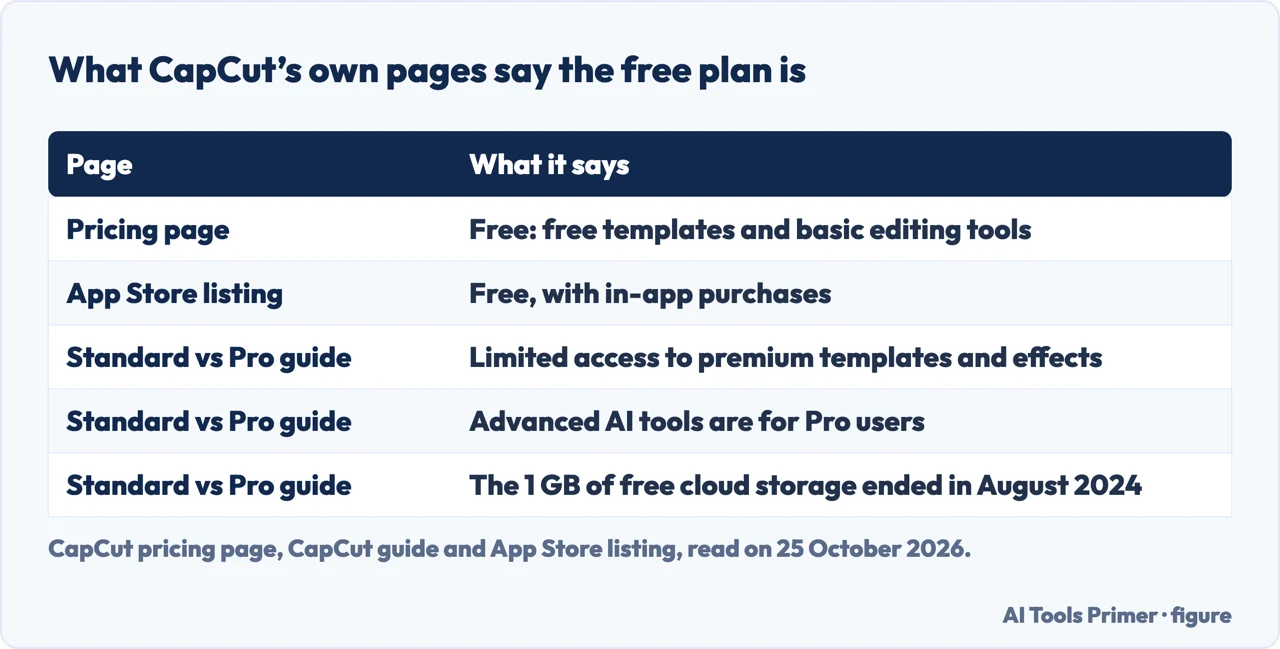
CapCut’s pricing page opens its list of plans with Free, at EUR 0 in the copy we read: “Start for free with the basics you need to create.” It lists free templates to start fast and basic editing tools. The App Store lists the app as Free with in-app purchases, and the subscriptions named there include a Standard monthly plan, a Pro monthly plan and a yearly plan.
CapCut’s own comparison guide calls the Standard plan “commonly referred to as the free version”. It says the free version has cutting, trimming, merging and splitting, a selection of free filters, transitions and effects, text and stickers, and basic audio editing. It also says that “The free version offers limited access to premium templates, advanced effects, fonts, and music tracks”, and that the advanced AI tools, including motion tracking and the auto caption generator, are exclusive to Pro users. One loss is dated: “Previously, users had 1 GB of free cloud storage for saving and syncing projects; however, this service was discontinued as of August 2024.” Some reviews on the App Store listing complain that features have moved to Pro; we cannot say which ones from the listing.
Prices: CapCut’s pages disagree
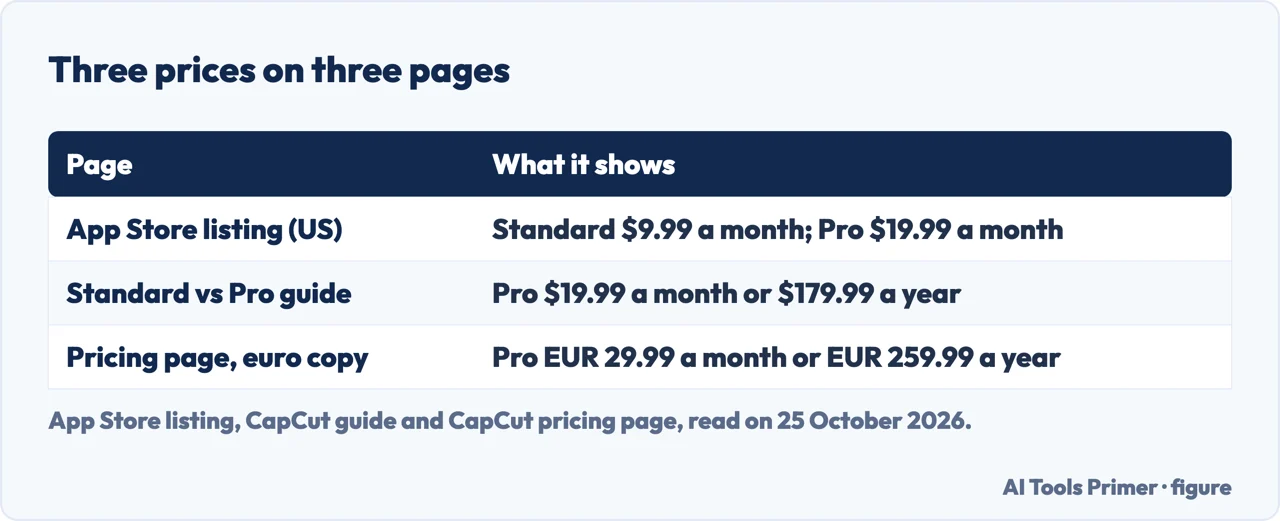
Three CapCut pages give three different sets of prices. The App Store listing for the United States names a Standard monthly subscription at $9.99 and a Pro monthly subscription at $19.99, a yearly subscription at $89.99 and a monthly subscription at $7.99. CapCut’s comparison guide gives Pro as “Monthly plan: $19.99 per month” and “Yearly plan: $179.99 per year”, with a team plan from around $24.99 a month, and adds: “Prices can vary by region, platform (mobile, desktop, or web), taxes, and promotional discounts.” The pricing page, in the copy we read, lists Free, Pro at EUR 29.99 a month or EUR 259.99 a year, Ultra at EUR 68 a month, and Teams at EUR 14.99 a month per seat.
The pricing page says why it will not settle the question: “Displayed pricing is for reference only. Sign in to see final pricing, taxes, and any applicable offers for your account.” So the number that matters is the one shown to you when you are signed in, on the platform you will pay on. A subscription bought through an app store is also subject to that store’s terms, as CapCut’s Terms of Service say; see the page on cancelling CapCut.
Watermarks and 4K: the pages disagree
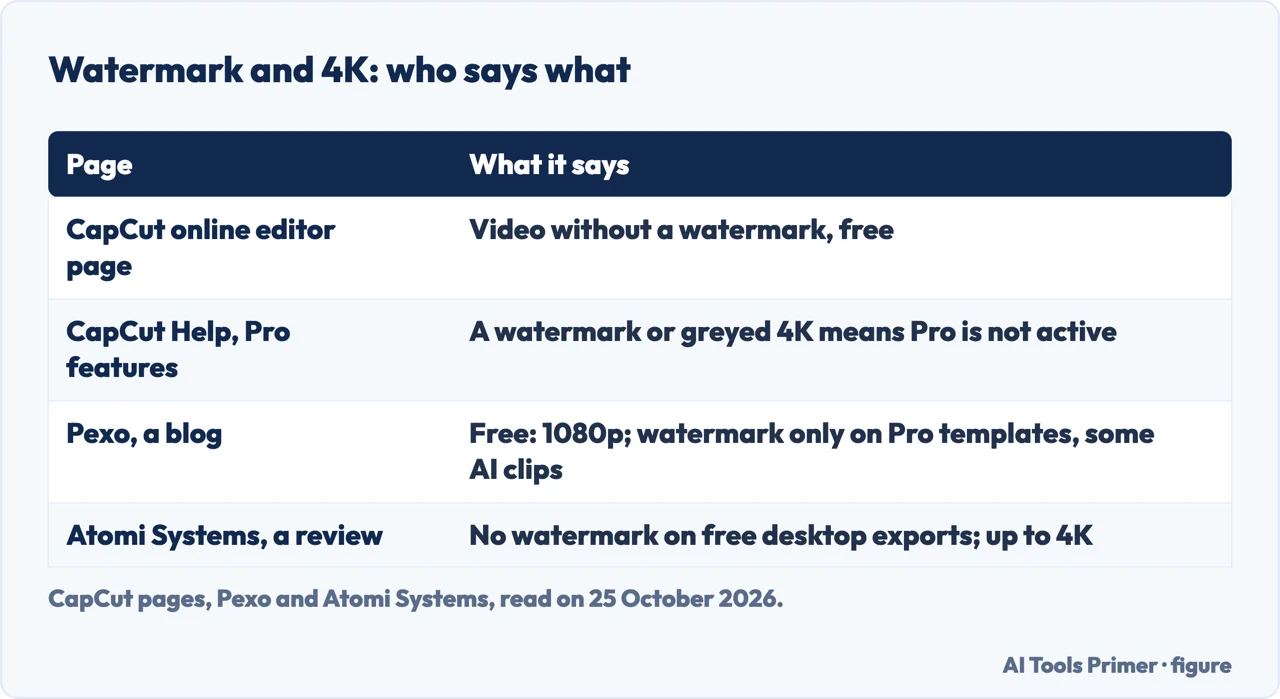
CapCut’s page for its online editor says that its online video creator provides the tools “to make a video online without a watermark”. Its help page for people who cannot use Pro features treats a watermark as a sign: for CapCut Desktop it says to try exporting a project in 4K with no watermark, and “If the watermark appears or 4K is grayed out”, Pro is not active on that account. Both are CapCut pages, and they do not describe the same case: the first is about the online editor, the second about checking a Pro subscription on the desktop app.
Third parties differ again. Pexo, a blog, says the free plan gives full manual editing and 1080p exports with no watermark on standard content, and that you pay to remove watermarks on premium templates and AI clips, or to unlock 4K and HDR. Atomi Systems, in a review of the desktop app, says exports have no watermark even on the free plan, and that export options reach 4K. We tested no export, so we cannot say which is right for your version; our reading is that a watermark can come from a Pro-tagged template or effect, and that 4K may depend on the plan.
If you pay and Pro still does not work
CapCut’s help page lists the likeliest causes: the subscription is not active (expired, not yet processed or cancelled), you are in a region where CapCut Pro is restricted, you are logged into the wrong account, the app or browser is outdated, or there is a sync delay or cache issue. Its most reliable check is on CapCut Online: sign in, click your profile icon, open Membership or Pro Status, and look for “Pro: Active” with a valid expiration date. On the desktop app it says to wait 1–2 minutes after subscribing, because Pro status has to sync from the cloud.
To stop paying, the steps are on the page on cancelling CapCut; for editing without a subscription, see editing videos on an iPhone.
Where to start
Four ways in.
- “What do I get for nothing?”
- The free plan — free
- “What does Pro cost?”
- Three prices — prices
- “Will my video have a watermark?”
- Watermarks and 4K — marks
- “I paid and nothing unlocked.”
- The usual causes — broken
CapCut, the other half
Cancelling a CapCut subscription, and the video tools that need no subscription.
Exporting and sharing video
Making a video smaller, adding subtitles and recording the screen, with free tools.
Questions people also ask
How much does CapCut cost?
It depends on the page and region. The App Store listing for the United States names Standard at $9.99 a month and Pro at $19.99 a month; CapCut’s guide gives Pro as $19.99 a month or $179.99 a year; the pricing page copy we read shows Pro at EUR 29.99 a month. CapCut says displayed pricing is for reference only.
Can I use CapCut without paying for it?
Yes. CapCut’s pricing page lists a Free plan at EUR 0 with free templates and basic editing tools, and the App Store lists the app as Free with in-app purchases.
What are the disadvantages of using CapCut?
We cannot weigh them. What CapCut documents is that the free version has limited access to premium templates, effects, fonts and music, that the advanced AI tools are Pro-only, and that the 1 GB of free cloud storage ended in August 2024.
Is CapCut still free in 2026?
The pricing page we read on 25 October 2026 still lists a Free plan at EUR 0. What the free plan includes has changed before, as the end of free cloud storage in August 2024 shows.
Not covered here. We did not use any CapCut plan or export a video for this page. The statements come from CapCut’s pricing page, its guide on Standard and Pro, its help page on Pro features and its online editor page, and from the App Store listing for the United States, read on 25 October 2026. Prices change by region and platform, and the euro prices are those of the copy we read.
Pexo and Atomi Systems are third-party pages and are used only to say what they claim; Reddit and the Google Play listing add nothing we could check. The video in the search results was not watched. AI credits and the Seedance tools on CapCut’s pricing page are not covered.
The search volume and difficulty behind this page were read in Semrush on 29 August 2026.
Sources
- CapCut — Pricing — www.capcut.com, read 25 October 2026.
- CapCut — CapCut Standard vs Pro: Full Comparison of Features and Pricing — www.capcut.com, read 25 October 2026.
- CapCut Help Center — Why Am I Unable to Use CapCut Pro Features/Materials? — www.capcut.com, read 25 October 2026.
- CapCut — Free Online Video Editor — www.capcut.com, read 25 October 2026.
- App Store — CapCut: Photo & Video Editor (United States) — apps.apple.com, read 25 October 2026.
- Pexo — Is CapCut Free? CapCut Free vs Paid in 2026 (last updated 10 September 2026) — pexo.ai, read 25 October 2026.
- Atomi Systems — CapCut PC Review 2026 — atomisystems.com, read 25 October 2026.
Written by Alberto Gulotta
Founder and editor of AI Tools Primer, writing from Palermo, Italy. Thirty-five years of taking computers apart, starting with a Commodore 64 — the long version is on the about page.
Something wrong on this page? Write to aitoolsprimer@gmail.com and it gets fixed.
Written on 25 October 2026.
Independence and limits
No affiliate links and no paid placements anywhere on this site. Nobody pays to appear here, and no company has seen this page before you did.
This is general information, not professional advice. Where a page touches money, health, safety or the law, it names its source and the date it was read — and your situation may still differ. See the privacy page and the cookie policy.