
Chat · guide
Make ChatGPT sound human: the settings, examples and limits
By Alberto Gulotta · Updated
To make ChatGPT sound human, the pages we read point to three levers: a personality and characteristics in Personalization, custom instructions of up to 1,500 or 5,000 characters, and examples of your own writing. Claude offers instructions, project instructions and skills. The pages do not promise that the text will sound human or go unnoticed by detectors.
| Question | Answer | Where it comes from |
|---|---|---|
| Where do I tell ChatGPT how to write? | Settings, Personalization: custom instructions, a personality under Base style and tone, and four characteristics | OpenAI Help Center |
| How long can custom instructions be? | Up to 1,500 characters on Free and Go; up to 5,000 on Plus, Pro, Enterprise, Business and Education | OpenAI Help Center |
| Does a personality change every text? | No: for an email, code, a post or a résumé, ChatGPT matches your instructions and the context | OpenAI Help Center |
| What does OpenAI say to do about tone? | Use descriptive adjectives such as formal, friendly or humorous | OpenAI Help Center |
| What does Claude offer? | Account instructions, project instructions and skills, and three to five examples in a prompt | Claude Help Center, Claude Platform Docs |
Where ChatGPT is told how to write
OpenAI’s Help Center describes custom instructions as a way to share anything you would like ChatGPT to consider in its response, and says they are “applied immediately to all chats”. They are available on all plans, on web, desktop, iOS and Android. On web and desktop you open Settings, select Personalization, make sure Enable customization is toggled on and type into the Custom Instructions field; on iOS and Android you select Customize ChatGPT instead. Free and Go users can save up to 1,500 characters, and Plus, Pro, Enterprise, Business and Education users up to 5,000.
A personality is a separate setting. OpenAI’s page on personalities says it is the style and tone ChatGPT uses in its replies, chosen under Personalization with the dropdown next to Base style and tone, and that a change applies across all chats, existing conversations included. It adds that changing the personality does not change what ChatGPT can do or the safety rules it follows. The pages we read do not list a setting for sounding human; what they describe is style and tone, set in three places: instructions, a personality and characteristics.
The page also marks the edge of a personality. It does not control every type of content: for an email draft, a code snippet, a social media post or a résumé, ChatGPT matches the tone and style to your instructions and the context, not necessarily to the personality you selected. OpenAI’s example is a Friendly personality asked for Python code to calculate shipping costs, which gets clear, functional code without Friendly’s conversational style.
The settings OpenAI gives you
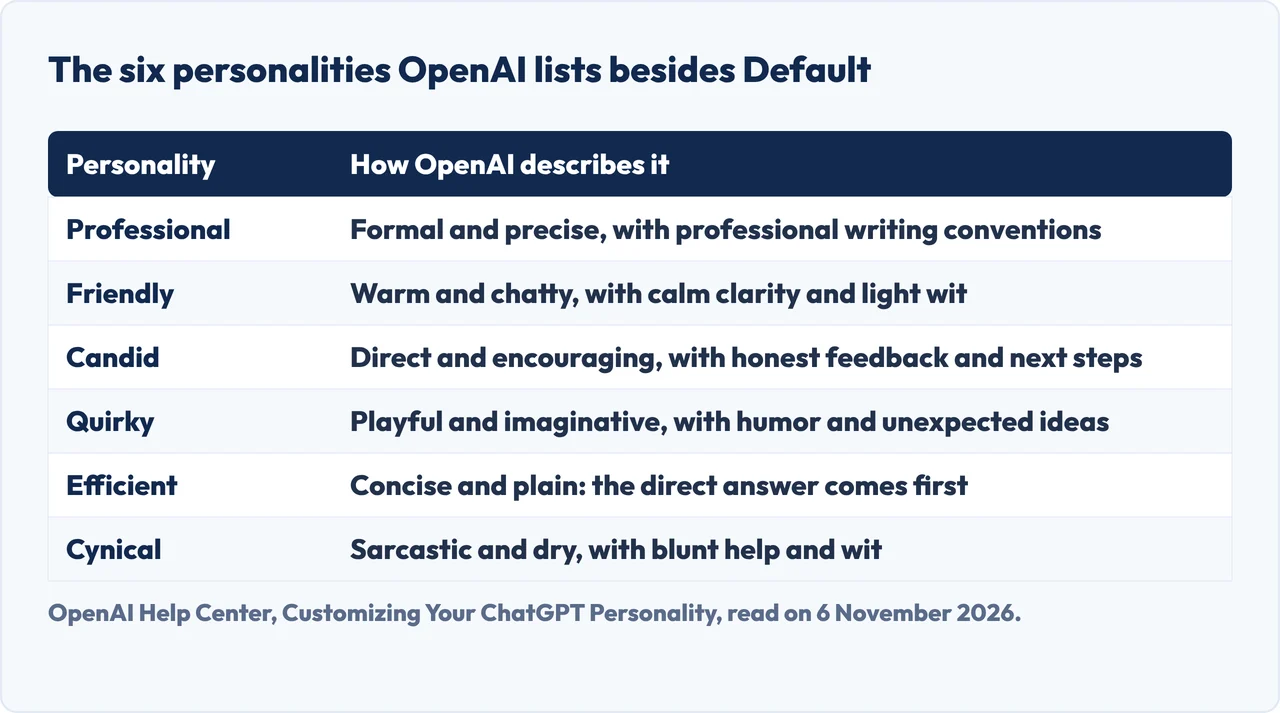
Seven personalities. Default is the standard ChatGPT style, which OpenAI calls clear and neutral. The list has changed over time: our page on when ChatGPT agrees with you reports an OpenAI statement of August 2025 naming four opt-in presets (Cynic, Robot, Listener and Nerd), while the Help Center page we read on November 6, 2026, lists the seven here and does not mention Nerdy. Six others sit beside it. Professional is polished and precise, with formal language and professional writing conventions. Friendly is warm and chatty, reflecting your thoughts back with calm clarity and light wit. Candid is direct and encouraging, with honest feedback and clear next steps. Quirky is playful and imaginative, with humor and unexpected ideas. Efficient is concise and plain, with the direct answer first. Cynical is sarcastic and dry, and OpenAI says it still gives practical answers when it matters.
OpenAI also lists, for each personality, who it is best for. Professional: workplace communication and documentation that needs a polished tone. Friendly: a conversational sounding board, decision support, personal reflection and planning. Candid: gut checks on plans, drafts or decisions where sugarcoating would get in the way. Quirky: brainstorming, creative writing and what-if explorations. Efficient: technical tasks, code walkthroughs, checklists and troubleshooting. Cynical: sarcastic, entertaining replies that are still actionable. The page does not say which of them sounds most human, so the choice is yours to test.
The page shows how the same question comes out differently. Asked how to spend a rainy day indoors, Efficient answers with a short run of verbs such as read, cook, clean and repair, while Cynical answers with a quip about the projects you keep putting off. We read those as OpenAI’s illustrations, not as a measurement.
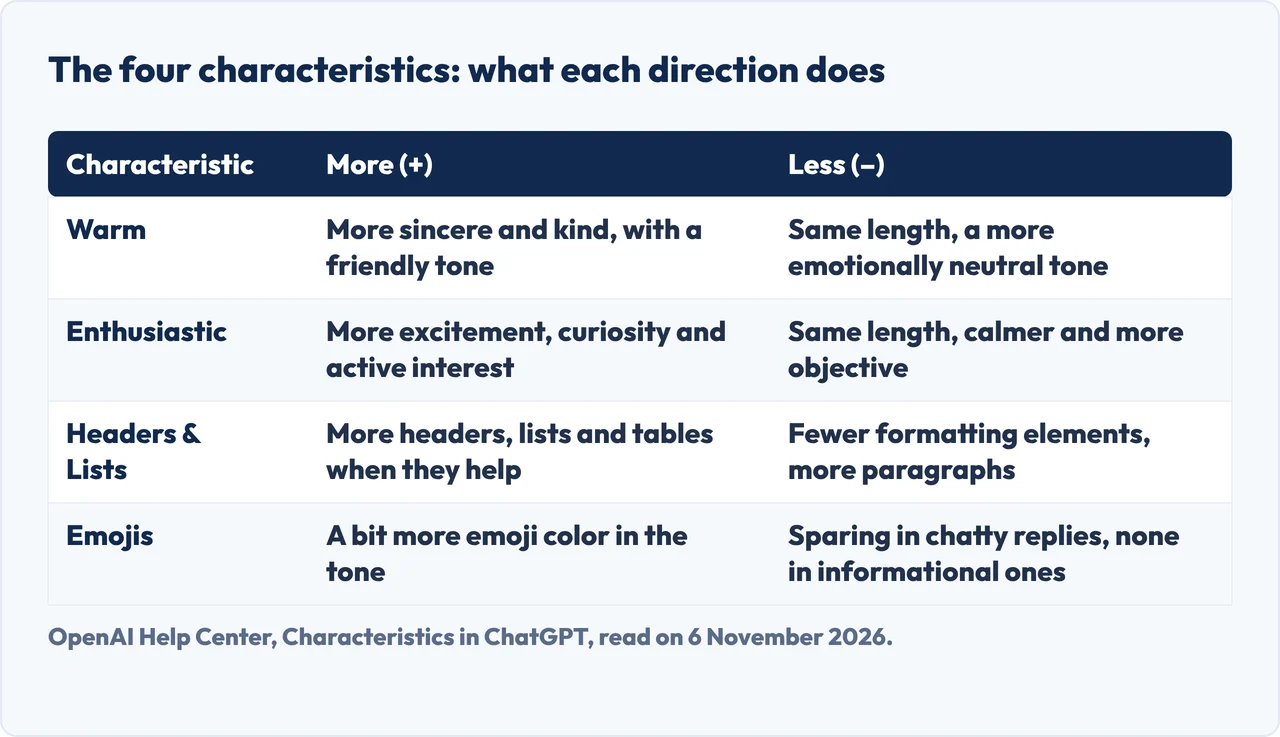
Four characteristics. A separate page covers Warm, Enthusiastic, Headers & Lists and Emojis. For each one you can nudge replies in a more direction (+) or a less direction (–), from the profile icon, then Personalization, then Characteristics. OpenAI says that when you set one, ChatGPT tries to follow that style in the current chat and in new chats. Turning warmth or enthusiasm down keeps the same length and completeness but gives a more neutral or more objective tone. Less markdown means more paragraphs and fewer formatting elements, and fewer emojis means sparing use in chatty replies and none in informational ones.
What sits on top of what. Both pages say these settings work alongside the others. The personality page says it works with saved memories and custom instructions, and that a memory with conflicting guidance, such as a preference for serious and professional responses, may override or reduce the visible traits of a personality. Instructions you give during a conversation can also adjust or obscure it. The characteristics page says they work alongside the selected personality, custom instructions and saved memories. Beyond that memory example, the pages we read do not say which of them weighs more when two disagree.
Describe the voice, then show it
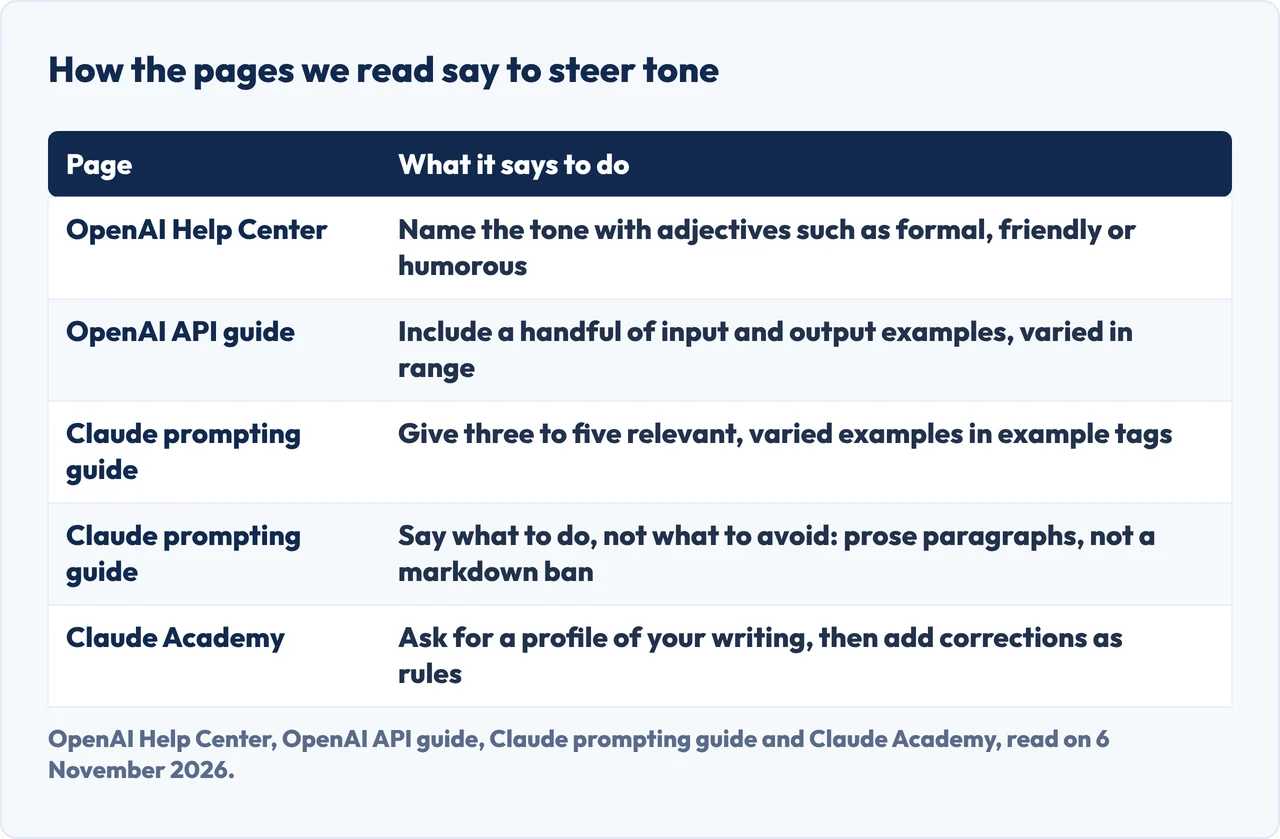
OpenAI’s Help Center. Our page on how to use ChatGPT effectively already covers this page in full; in short, the page on prompt engineering for ChatGPT has a short entry called Requesting a different tone. It says to use descriptive adjectives to indicate the tone and lists formal, informal, friendly, professional, humorous and serious, with the example of asking for “a friendly and engaging tone”. Its two other general tips are to be clear and specific, and to refine in steps: start with a prompt, review the response and adjust the wording or add context.
OpenAI’s guide for developers. The API guide is written for people building with the models, but its ideas carry over. It says a developer message usually holds four sections: Identity, which covers purpose, communication style and goals, then Instructions, Examples and Context. On examples, it says few-shot prompting steers a model by including a handful of input and output examples, and that you should show a diverse range of inputs with the outputs you want. The OpenAI Cookbook page on prompt personalities, dated January 5, 2026, says you can steer an agent in the same way as ChatGPT’s built-in presets, by defining a personality in the instructions. Its example prompt for the Professional personality adds a line that the personality should not be forced onto requested written artifacts such as emails, code comments and posts, leaving user intent to guide the tone.
Anthropic’s prompting guide. The Claude Platform Docs call examples one of the “most reliable ways to steer” Claude’s output format, tone and structure. It asks for examples that are relevant, diverse and wrapped in example tags, and says three to five give the best results. It also says that a single sentence setting a role in the system prompt focuses Claude’s behavior and tone. For formatting, it says to tell Claude what to do instead of what not to do: a response composed of smoothly flowing prose paragraphs, rather than a ban on markdown. It adds that the style of your prompt can influence the style of the reply, so removing markdown from a prompt can reduce the markdown in the output. Separately, it describes Claude’s latest models as more conversational, slightly more fluent and colloquial, and less machine-like than earlier ones.
An example of our own. The three lines below are our illustration, built from the advice above. They are not taken from any page.
- Write in friendly, plain sentences, in short paragraphs rather than lists.
- Match the length and rhythm of the writing sample that follows.
- Sample: paste a few paragraphs you wrote yourself.
The first line names the tone with adjectives, as OpenAI’s Help Center suggests, and says what to do rather than what to avoid, as Claude’s guide suggests. The third line supplies an example, which both companies recommend. The pages we read do not measure how closely an example of your own brings the style to yours.
What Claude offers
Anthropic’s Help Center page on personalization lists three routes. Instructions are account-wide settings, found by clicking your initials, then Settings, then Your Claude; the page suggests describing preferred approaches, common terms, typical scenarios and general communication instructions, and says they apply to all your conversations. Project instructions apply only to chats inside that project. Skills add behaviors to your conversations, and the page lists adjusting the tone and format of Claude’s responses and applying communication patterns based on your own writing or preferences among their uses.
The page is not consistent about plans. It says projects are available to all users, including free accounts, with a maximum of five projects for free users, while its closing summary says to use project instructions for specific guidance on a project “(paid plans only)”. We report both and cannot tell you which is current. The Claude pages we read do not describe a style preset in the chat app like OpenAI’s personalities; they describe instructions, project instructions and skills.
The Academy page on writing in your voice. Claude Academy has a page called Write in my voice, marked as a ten-minute task. It is written for Claude Cowork, with connectors to services such as Gmail and Slack, or a folder of writing samples if you prefer not to connect your mail. Its prompt asks Claude to read your sent messages and describe your tone and writing style. The profile is saved as a skill called /my-voice, and the page says the first profile is “a snapshot” because your voice keeps moving. Each time you edit a draft and want it said differently, you feed the correction back so it is added as a rule, and the edited draft can be added to the examples. It also suggests asking Claude to flag anything it is not confident about, and a scheduled monthly refresh that re-reads the last 90 days and keeps your hand-added rules. This is a Cowork workflow with connected accounts.
Limits, data and neighbouring pages
When a change takes effect. OpenAI’s custom instructions page says that updates to the settings are applied immediately across all chats, including existing conversations. Its FAQ answers a different question, whether earlier versions of your instructions stay in your chat history, and says updates are reflected only in future conversations, and that to remove them from earlier conversations you can clear those conversations from your chat history. We report both statements as they stand.
What happens to what you type. The page says information from your use of custom instructions is also used to improve model performance, with a link to how to opt out. If you use third-party plug-ins, the model may give plug-in developers relevant information from your instructions. Your instructions are not shared with people who open a shared link, they are included in your data export, and when you delete your OpenAI account the ones tied to it are deleted within 30 days. On the API, the page says there will be no API for custom instructions and that Chat Completions system messages should be used for a similar effect.
What the pages do not say. The pages we read do not promise that the text will sound human or go unnoticed by detectors, and they do not mention detectors. They do not say how much the custom instructions in the app weigh against a specific prompt, apart from the personality not governing emails and code. Our page on whether AI humanizers work takes up rewriting tools and what they do to a text; this page gives no steps for getting past a check.
Neighbors. For the general habits of a good prompt, see how to use ChatGPT effectively. A separate question, what OpenAI says about a model agreeing too readily, is covered by our page on when ChatGPT agrees with you.
About the sources
The OpenAI Help Center pages show “Updated” with a number of days that changes. The pages we read do not give a list of words or marks to take out of a text, and the Claude guide prefers saying what to do.
Where to start
Five ways in.
- “Where do I set it?”
- Where ChatGPT is told how to write — start
- “Which personality?”
- The settings OpenAI gives you — settings
- “What do I write in the box?”
- Describe the voice, then show it — show
- “What about Claude?”
- What Claude offers — claude
- “Will it pass a detector?”
- Limits, data and neighbouring pages — limits
Asking and steering
How to ask, when a model agrees too readily and what rewriting tools do.
What it can and cannot do
What a service says it will accept, in its own words and with the day it was read.
Questions people also ask
How can I humanize text generated by ChatGPT?
The pages we read describe steering the style, not rewriting afterwards: a personality, characteristics, custom instructions and adjectives such as friendly or formal. They do not promise that text will sound human. Our page on whether AI humanizers work covers rewriting tools.
How does ChatGPT sound so human?
The pages we read do not explain why. OpenAI describes a personality as the style and tone of its replies and Default as clear and neutral, and Anthropic describes its latest Claude models as more conversational and less machine-like.
How to make ChatGPT talk like a normal person?
OpenAI says to name the tone with adjectives such as informal or friendly. Personality, characteristics and custom instructions work together, and Claude’s guide adds three to five relevant examples. The pages give settings and examples, not a promise.
Can you make ChatGPT sound like a woman?
The pages we read do not mention gender. They offer tone: a personality such as Friendly or Candid, characteristics for warmth, enthusiasm, lists and emojis, and custom instructions.
The statements come from OpenAI and Anthropic pages, all read on November 6, 2026.
Sources
- OpenAI Help Center — ChatGPT Custom Instructions — help.openai.com, read November 6, 2026.
- OpenAI Help Center — Customizing Your ChatGPT Personality — help.openai.com, read November 6, 2026.
- OpenAI Help Center — Characteristics in ChatGPT — help.openai.com, read November 6, 2026.
- OpenAI Help Center — Prompt engineering best practices for ChatGPT — help.openai.com, read November 6, 2026.
- OpenAI Developers — Prompt engineering (API guide) — developers.openai.com, read November 6, 2026.
- OpenAI Cookbook — Prompt Personalities — developers.openai.com, read November 6, 2026.
- Claude Help Center — Understanding Claude’s personalization features — support.claude.com, read November 6, 2026.
- Claude Platform Docs — Prompting best practices — platform.claude.com, read November 6, 2026.
- Claude Academy — Write in my voice — academy.claude.com, read November 6, 2026.
Written by Alberto Gulotta
Founder and editor of AI Tools Primer, writing from Palermo, Italy. Thirty-five years of taking computers apart, starting with a Commodore 64 — the long version is on the about page.
Something wrong on this page? Write to aitoolsprimer@gmail.com and it gets fixed.
Independence and limits
No affiliate links and no paid placements anywhere on this site. Nobody pays to appear here, and no company has seen this page before you did.
This is general information, not professional advice. Where a page touches money, health, safety or the law, it names its source and the date it was read — and your situation may still differ. See the privacy page and the cookie policy.