
Chat · guide
Is ChatGPT safe for confidential information? The sources
By Alberto Gulotta · Updated · 16 min read
Is ChatGPT safe for confidential information? OpenAI’s help pages for personal plans ask you to keep out sensitive information you would not want reviewed or used, while its business pages describe different defaults. The NCSC and ESET add their own advice. We read all of it on 4 November 2026.
| Question | Answer | Where it comes from |
|---|---|---|
| Who can read what I type on a personal plan? | A limited number of authorized OpenAI personnel and service providers, for four listed reasons | OpenAI Help Center |
| Can it train the models? | On Free, Plus and Pro it may; the opt-out is Improve the model for everyone in Data controls | OpenAI Help Center |
| What does a temporary chat keep? | It stays out of history and training; a copy may be kept for up to 30 days for safety | OpenAI Help Center |
| Do business plans differ? | OpenAI does not use their data for training by default, and describes AES-256 and TLS 1.2 or higher | OpenAI business pages |
| What do the outside sources add? | The NCSC and ESET both advise keeping sensitive information out of public tools; ESET calls public plans unsuitable for confidential data | NCSC, ESET |
Who can read what you paste on a personal account
OpenAI’s help page on how it handles data in consumer services says that content is stored on OpenAI’s systems and on those of its trusted service providers, in the US and around the world. It adds that select portions of content may be sent to service providers for data annotation and safety purposes, and that those providers are subject to confidentiality and security obligations.
The same page answers the question of who can look. A limited number of authorized OpenAI personnel, and service providers bound by confidentiality and security obligations, may access user content only as needed for four reasons: investigating abuse or a security incident; giving you support when you ask about your account or a problem with the product; handling legal matters; and improving model performance, unless you have opted out. The page says access is subject to technical access controls and limited to authorized personnel on a need-to-know basis, that all access is monitored and logged, and that those personnel must complete security and privacy training first.
Directly after that list, the page asks you not to enter sensitive information that you would not want reviewed or used. That sentence is the plainest instruction on OpenAI’s side, and the rest of this page reads the other sources against it. A separate section of the page says OpenAI does not sell your data or share your ChatGPT conversations with advertisers, and that it does not share chat content for marketing or advertising purposes. That describes where content does not go; the four reasons above describe who can read it.
What the free and self-paid plans do with it
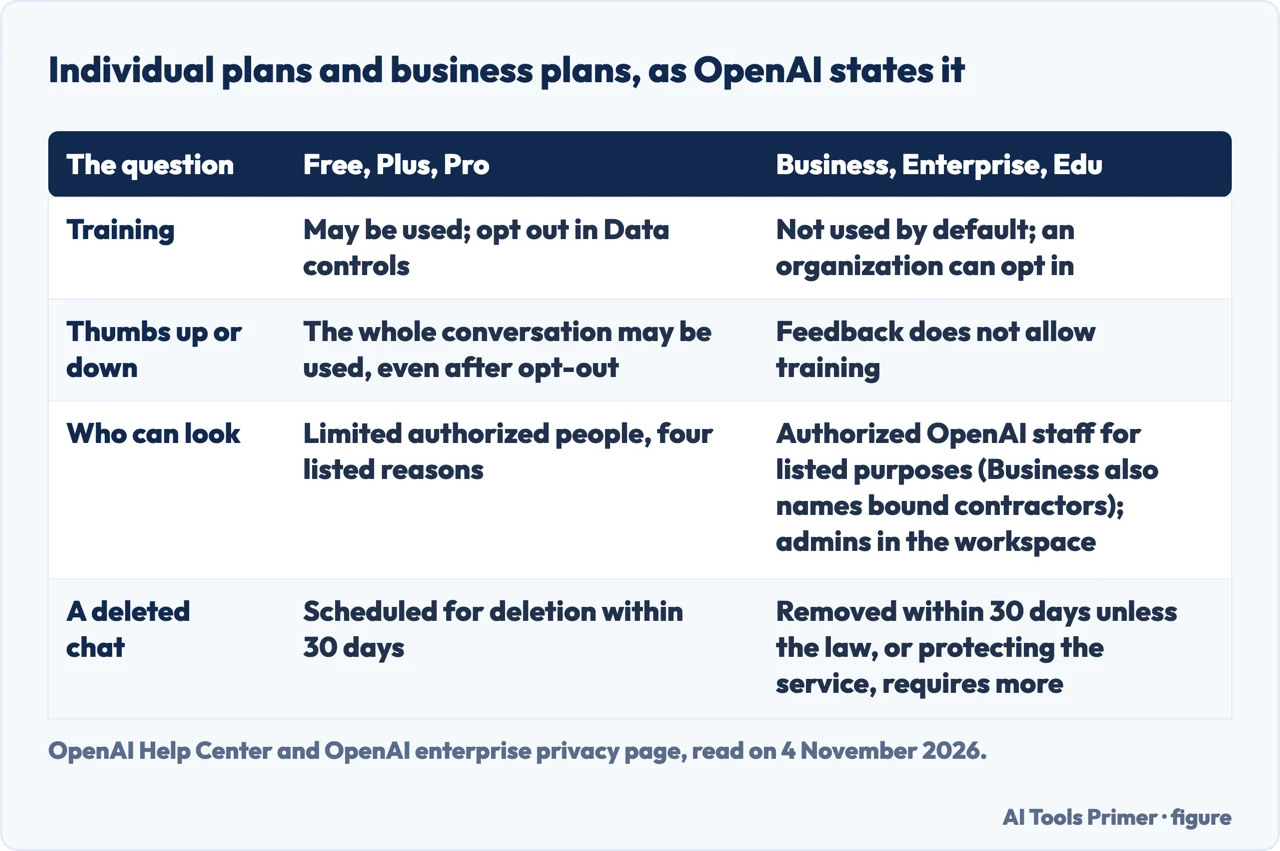
For the individual services, Free, Plus and Pro, OpenAI’s page on improving model performance says it may use your content to train its models. The Data controls page adds that on personal workspaces with Free, Plus or Pro, data sharing is enabled by default. To opt out you turn off Improve the model for everyone under Settings, then Data controls, or you select Do not train on my content in the OpenAI Privacy Portal; the page says either option is sufficient and you do not need both.
Read the wording closely. After you opt out, the page says, OpenAI will not use your new conversations to improve its models. The pages we read do not describe what applies to conversations from before the switch. The page also lists conversations with OpenAI Support, which may be used to improve services if the setting is enabled.
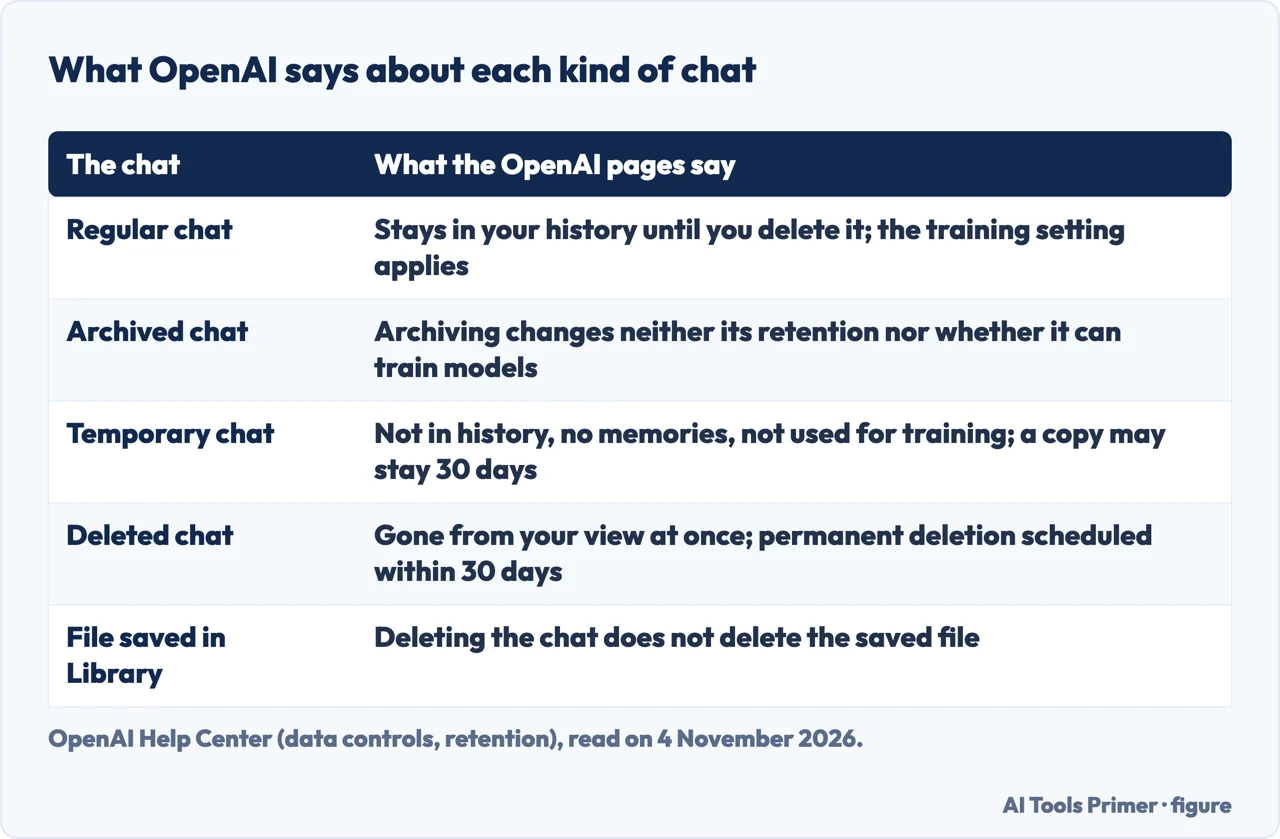
Three details sit beside the switch. First, feedback: even if you have opted out, selecting thumbs up or thumbs down on a response means the entire conversation associated with that feedback may be used to train OpenAI’s models. Second, saved chats: turning off the setting does not delete or hide them, regular chats remain in history, and archiving a chat does not change whether it can be used for training. Third, separate controls: Codex has its own Include environments setting, which a change in ChatGPT does not touch, and voice mode has its own control for sharing data for training.
The Data controls page also describes Trusted Access programs such as Daybreak. During a Daybreak session on a personal account, it says, OpenAI may use content from the interactions to improve its models even when the setting is off, and the setting still applies to your other activity. Our page on whether ChatGPT is safe covers the account and settings side in more detail.
Temporary chat, and what deleting does
OpenAI describes temporary chats as chats that stay out of your history, do not create or update memories, and are not used to improve its models while they remain temporary. The Data controls page, the consumer-services page and the retention page all add the same limit: OpenAI may keep a copy for up to 30 days for safety purposes. If you save a temporary chat, it becomes a regular chat and follows your account’s personalization and model-improvement settings. ESET’s guide describes temporary chat the same way, with a copy retained for up to 30 days, and recommends it for sensitive topics.
Deleting is a second route with its own clock. OpenAI’s retention page says that when you delete a saved chat, ChatGPT removes it from your account view immediately, and OpenAI schedules it for permanent deletion from its systems within 30 days. It names two exceptions: the chat was already de-identified and disassociated from your account, or OpenAI must keep it longer for security or legal obligations. It says you cannot restore a deleted chat in ChatGPT or through OpenAI Support.
Files are handled separately. A file saved to Library or Space is not deleted when you delete the chat that used it; files added to a custom GPT are retained until the GPT is deleted, and files added to a project until the project or file is deleted. For the steps, see our page on deleting your ChatGPT history.
ESET adds a reported episode: it writes that a court order in a newspaper lawsuit once required OpenAI to keep consumer content, including deleted chats, and that OpenAI says the order ended on 26 September 2025. We read that only in ESET’s guide, so treat it as ESET’s account.
What the business plans change, and what the pages leave to you
OpenAI’s business data page states that it does not use data from ChatGPT Enterprise, Business, Edu, Healthcare, Teachers or the API platform, inputs and outputs included, for training or improving its models by default. The enterprise privacy page, updated on 8 January 2026, says the same and adds that an organization which has explicitly opted in to share data may have that shared data used. On the feedback question, the page on improving models says that for Business, Enterprise and Edu a thumbs up or thumbs down does not permit training on the conversation.
On security, the business data page gives AES-256 encryption at rest and TLS 1.2 or higher in transit, and says customers can control their own encryption keys with Enterprise Key Management. It lists a SOC 2 Type 2 audit and alignment with four ISO/IEC certifications. For health data, it says OpenAI offers a Business Associate Agreement to ChatGPT for Healthcare and API healthcare customers to support HIPAA compliance; the enterprise privacy page says OpenAI can sign one for API customers who need it.
Who can look differs by plan. For Enterprise, Edu and Healthcare, the enterprise privacy page says authorized OpenAI employees access conversations to resolve incidents, to recover end-user conversations with your explicit permission, or where applicable law requires it, and that workspace admins can reach an audit log through the Compliance API. For Business, it says workspace admins can view, access, export and delete end-user conversations, and that OpenAI’s own access is limited to authorized employees for engineering support, investigating platform abuse and legal compliance, plus specialized contractors bound by confidentiality who review only for abuse and misuse.
Retention is in the workspace’s hands for Enterprise, Edu and Healthcare, with deleted conversations removed within 30 days unless OpenAI is legally required to keep them. For Business the same 30 days applies unless longer retention is required by law or is reasonably necessary to protect services or a third party from harm. For the API, the page says inputs and outputs may be kept up to 30 days to provide the service and identify abuse, and that zero data retention can be requested for eligible endpoints with a qualifying use case. On ownership, it says you keep your rights to inputs and own the outputs to the extent permitted by law.
What the pages leave out matters for a work decision. They describe how OpenAI handles business data: training, encryption, access and retention. The pages we read do not list which kinds of confidential data an organization may paste into a Business or Enterprise workspace, so that decision falls to the organization’s own policy.
What the NCSC and ESET add
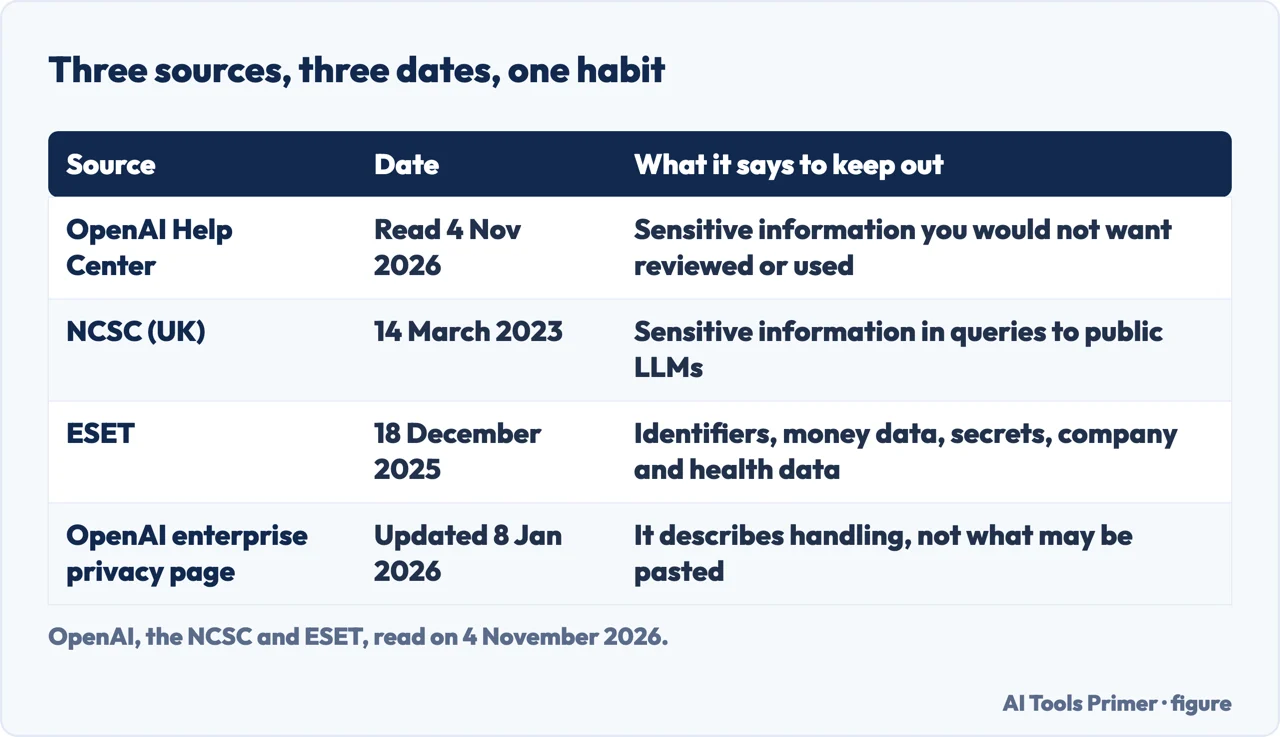
The UK’s National Cyber Security Centre published a blog post on ChatGPT and large language models on 14 March 2023, earlier than the OpenAI pages we read. It writes about public LLMs in general. Its point is that an LLM does not, as of writing, add information from queries to its model for others to query. The query itself, though, is visible to the organization providing the LLM, which for ChatGPT means OpenAI; the NCSC says queries are stored and that it is almost certain they will be used, at some point, to develop the service or model, and that the provider or its partners or contractors may be able to read them.
The NCSC also widens what counts as sensitive. A question can be sensitive because of the data in it or because of who is asking and when; its example is a chief executive asking how best to lay off an employee. It also asks readers to bear in mind aggregation across several queries on the same login. As risks it names stored queries being hacked or leaked, or, more likely in its view, accidentally made publicly accessible, and an operator later being acquired by an organization with a different approach to privacy. Its two recommendations are not to include sensitive information in queries to public LLMs and not to submit queries that would lead to issues if made public.
For sensitive information, the NCSC does not recommend public LLMs. It points to private LLMs, which a cloud provider might offer or an organization might host itself. For a cloud-provided one, it says the terms of use and privacy policy are key. For a self-hosted one, it says the cost is likely to be high and a security assessment should come first. The pages we read do not say whether the NCSC has updated its post since 2023, and OpenAI’s opt-out and business defaults are the later, more specific layer.
ESET’s guide, dated 18 December 2025, turns the idea into a list it calls the Red List. It tells readers to treat every chat as if it might be shared publicly and not to enter personal identifiers such as social security or passport numbers and addresses; financial information such as card numbers and bank details; passwords, API keys and multi-factor authentication tokens; company data such as source code, client lists, internal documents, non-public financial reports and legal documents; and health information. It writes that Samsung staff uploaded source code and meeting notes in 2023 and that Samsung then banned external AI tools; we read that claim only in ESET’s guide. Its conclusion for businesses is that public ChatGPT plans are not suitable for confidential data, that Enterprise offers better security and privacy, and that a locally managed open-source chatbot could suit a security-conscious business, with extra management overhead.
A way to decide at work
The pages we read do not hand over a checklist for a workplace, so what follows is only the sources put side by side. On a personal Free, Plus or Pro account, the test comes from OpenAI’s own sentence: if you would not want a person at OpenAI or a service provider to review the text, or the company to use it, leave it out. Both outside sources give the same direction in their own words: keep sensitive information out of public tools.
At work, the first question is which plan your organization has and what its policy says, because the business pages describe different training, retention and access terms from the personal pages. If the answer is a public plan, the NCSC and ESET advise against confidential material in it. If the answer is a Business or Enterprise workspace, the pages describe the handling and leave the list of permitted data to your organization.
Whichever plan applies, ESET’s Red List is a ready-made list of what to leave out: identifiers, financial data, secrets, company data and health data. It is ESET’s list rather than OpenAI’s, and the pages we read do not give an OpenAI list beyond the sentence about sensitive information. ESET goes further for high-risk professions: it says doctors, lawyers and financial advisors should never input client or patient data into the public tool, and ties that to HIPAA, attorney-client privilege and SEC, FINRA and GDPR rules.
Where to start
Four ways in.
- “Can people see what I put in?”
- Who can read what you paste on a personal account — read
- “Does it train on my chats?”
- What the free and self-paid plans do with it — plans
- “What changes at work?”
- What the business plans change, and what the pages leave to you — business
- “What should I leave out?”
- What the NCSC and ESET add — outside
What OpenAI keeps, and how to remove it
The safety question, the history and the account.
The plan and the prompt
The free plan and how to ask.
Questions people also ask
Can I trust ChatGPT with my personal information?
OpenAI says a limited number of authorized people may access content for four reasons, and asks you not to enter sensitive information you would not want reviewed or used. ESET’s Red List includes personal identifiers, financial data, passwords, company data and health information.
What should you not tell ChatGPT?
ESET’s Red List names personal identifiers, financial information, passwords and other secrets, company data such as source code and client lists, and health information. OpenAI’s consumer page gives one general sentence about sensitive information.
Can people see what I put in ChatGPT?
OpenAI says authorized personnel and bound service providers may access content for four listed reasons, and on Business, workspace admins can view and export conversations. ESET names two more routes: a March 2023 Redis bug that briefly exposed other users’ chat titles and messages, and stolen passwords, which let a thief read your whole history.
Is it safe to share sensitive/personal data with ChatGPT or other AI chatbots?
The NCSC recommends not putting sensitive information in queries to public LLMs, and ESET calls public ChatGPT plans unsuitable for confidential data. OpenAI describes no training by default on business plans. ESET also compares ChatGPT with Google Gemini and Anthropic Claude and says enterprise-tier plans offer comparable protections when configured properly; we did not check those providers’ own pages.
Not covered here. We tested nothing in ChatGPT. The statements come from six OpenAI pages, the NCSC blog post of 14 March 2023 and the ESET guide of 18 December 2025, all read on 4 November 2026. The OpenAI Help Center pages show a relative “updated” time rather than a date, so we give the day we read them.
The search volume and difficulty behind this page come from a Semrush reading of 29 August 2026, older than the 60 days the site normally allows.
Sources
- OpenAI Help Center — How OpenAI handles data in consumer services — help.openai.com, read 4 November 2026.
- OpenAI Help Center — Data controls in ChatGPT — help.openai.com, read 4 November 2026.
- OpenAI Help Center — How your data is used to improve model performance — help.openai.com, read 4 November 2026.
- OpenAI Help Center — Chat and file retention in ChatGPT — help.openai.com, read 4 November 2026.
- OpenAI — Business data privacy, security, and compliance — openai.com, read 4 November 2026.
- OpenAI — Enterprise privacy at OpenAI (updated 8 January 2026) — openai.com, read 4 November 2026.
- NCSC — ChatGPT and large language models: what’s the risk? (14 March 2023) — www.ncsc.gov.uk, read 4 November 2026.
- ESET — Is ChatGPT safe to use? The 2026 security & privacy risks (18 December 2025) — www.eset.com, read 4 November 2026.
Written by Alberto Gulotta
Founder and editor of AI Tools Primer, writing from Palermo, Italy. Thirty-five years of taking computers apart, starting with a Commodore 64 — the long version is on the about page.
Something wrong on this page? Write to aitoolsprimer@gmail.com and it gets fixed.
Written on 4 November 2026.
Independence and limits
No affiliate links and no paid placements anywhere on this site. Nobody pays to appear here, and no company has seen this page before you did.
This is general information, not professional advice. Where a page touches money, health, safety or the law, it names its source and the date it was read — and your situation may still differ. See the privacy page and the cookie policy.