
Detect · guide
The GPTZero free plan: characters, words and your text
By Alberto Gulotta · Updated · 14 min read
GPTZero free is a plan the pricing page lists at 0 EUR with up to 10,000 words per month. The home page counts differently: 10,000 characters for each scan before you need an account. GPTZero’s pages and Wikipedia give both numbers, and the pages we read do not say how the two limits fit together.
| Question | Answer | Where it comes from |
|---|---|---|
| What does the free plan cost? | 0 EUR on the pricing page, with prices shown in euros to the browser we used | GPTZero pricing page |
| How much can I scan? | Up to 10,000 words per month on the pricing and students pages; 10,000 characters a scan on the home page | GPTZero, Wikipedia |
| Do I need an account? | The home page says to create a free account first for scans over 10,000 characters | GPTZero home page |
| What does the free plan include? | Basic AI Scan, 1 Free Advanced Scan, and five free AI highlights in the Chrome Extension | GPTZero pricing page |
| What happens to my text? | GPTZero says it stores inputs from dashboard calls and uses them in aggregate; the FAQ gives no storage time | GPTZero FAQ |
| Was the free plan different in 2023? | Yes: TechRepublic described Classic, with 5,000 characters per document and three files per upload | TechRepublic |
What the pricing page says about the free plan
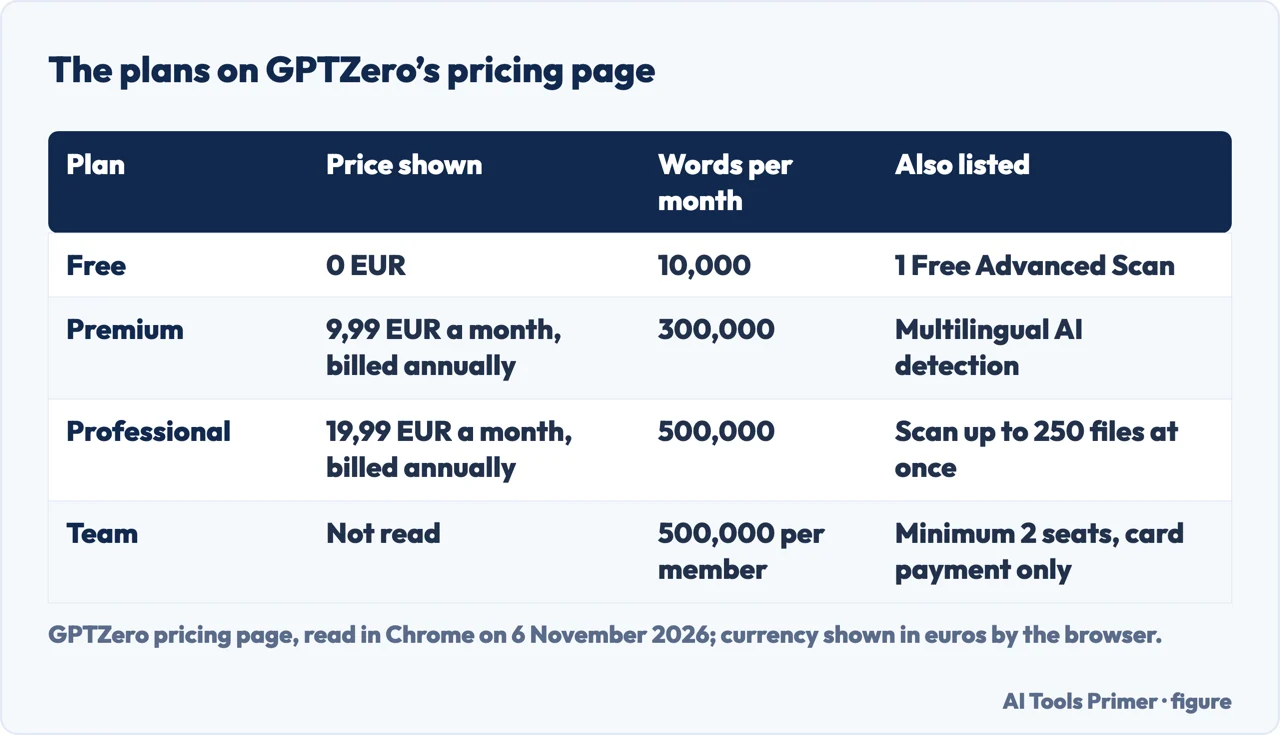
GPTZero’s pricing page, read in a browser on 6 November 2026, sets out three plans. The Free plan costs 0 EUR and lists up to 10,000 words per month, a Basic AI Scan, 1 Free Advanced Scan and five free AI highlights in the Chrome Extension. The text we downloaded from the page did not show the plan cards, so these figures come from the page as a browser displays it. The prices appeared in euros for the browser we used, and we report them in euros, written as the page wrote them, with a comma before the cents.
Premium is 9,99 EUR a month billed annually, with up to 300,000 words per month, an Advanced AI Scan, Multilingual AI detection, reports to download and AI highlights in the Chrome Extension. Professional is 19,99 EUR a month billed annually, with up to 500,000 words per month, everything in Premium, an overage of up to 2 million words, page by page scanning and an LMS integration with enterprise grade security. It also lists “Scan up to 250 files at once”. A switch at the top of the page offers Annual, marked Save 45%, or Monthly. We read the annual view, so the monthly prices are not in this page.
The same page describes a Team plan. Every seat gets the Professional plan with shared team credits, unified billing and seat management, and up to 500,000 words per member, per month. The minimum is 2 seats, payment is by card only, and the page sends purchase orders, invoicing and larger teams to sales. We did not read a price for the Team plan.
One detail of the Free plan is left open. The page says 1 Free Advanced Scan and does not say whether that is one a month or one in all. The pages we read do not explain it.
Two limits: characters for a scan, words for a month
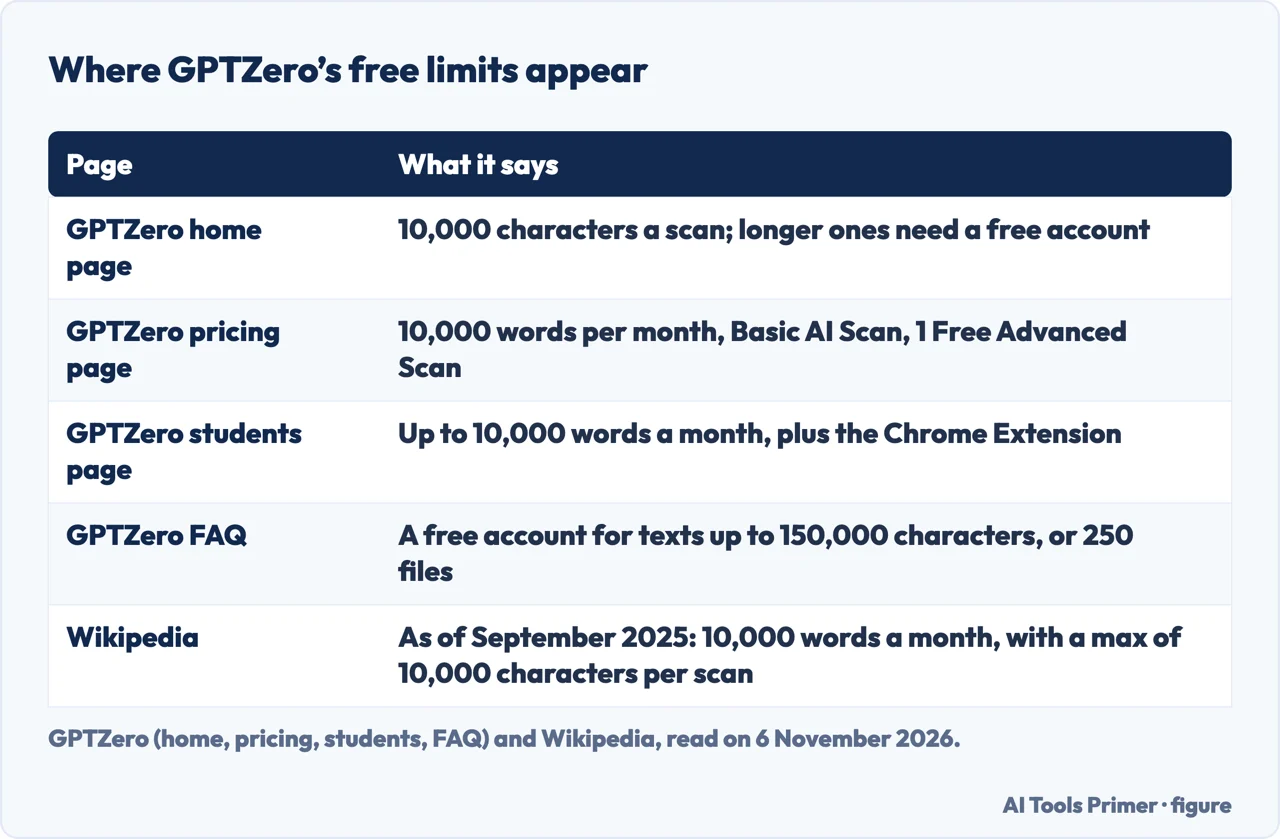
The home page of GPTZero shows a scan box with a counter that reads 0 / 10,000 characters, followed by the word Upgrade. Its first step says to paste text or upload a document, and that for scans over 10,000 characters you should create a free account first. So 10,000 characters is the size of a scan before an account is opened.
The monthly figure is in words. The pricing page lists up to 10,000 words per month for Free, and the students page answers its own question about the best free detector by saying GPTZero offers a free plan built for education, with up to 10,000 words a month and the Chrome Extension. Wikipedia puts both limits in one sentence: as of September 2025, free tier users can scan up to 10,000 words a month, with a maximum of 10,000 characters per scan. Read together, they describe one plan with two limits, one for each scan and one for each month.
Characters and words are two different measures, and the pages we read use each one for a different limit.
The FAQ adds a third figure. To get the detector for texts up to 150,000 characters, or a batch of up to 250 files, it says to sign up for a free account. The pricing page, on the other hand, puts “Scan up to 250 files at once” under Professional. The pages we read do not say how the two fit. They also do not say how the scan limit and the monthly allowance combine, or what happens when the allowance is used.
The Chrome Extension and what the free plan lists
The Chrome Extension page says the extension is free to install and use with a GPTZero account, including “a monthly allowance” of AI detection scans, highlighting sessions and chat messages, and that paid plans raise those limits. That page gives no number. The pricing page does give one, for the Free plan: five free AI highlights in the extension, while its Premium plan lists AI highlights with no number. The two pages use different wording, and the pages we read do not say whether they describe the same allowance.
The extension page lists what the extension does: it scans any webpage, runs automatic scans and sentence-level AI highlighting in Google Docs, shows AI labels on a Gmail inbox, replays a document’s writing history, grades papers against a rubric and offers a chat with an AI writing assistant beside the document. It calls all of this one free extension. Which of these uses count against the monthly allowance is not written on that page.
On what a scan returns, the FAQ says GPTZero shows where AI is used at document, sentence and word level, and that it gives confidence scores. The home page presents Advanced Scan and Writing Replay as separate parts of its toolkit, and a section called Premium Features lists video proof of the writing process, Advanced Insights, a plagiarism detector and “Free grammar check and feedback”. The Free list on the pricing page names a Basic AI Scan and 1 Free Advanced Scan; it does not mention Writing Replay or the plagiarism detector.
The free plan in 2023 and in 2026
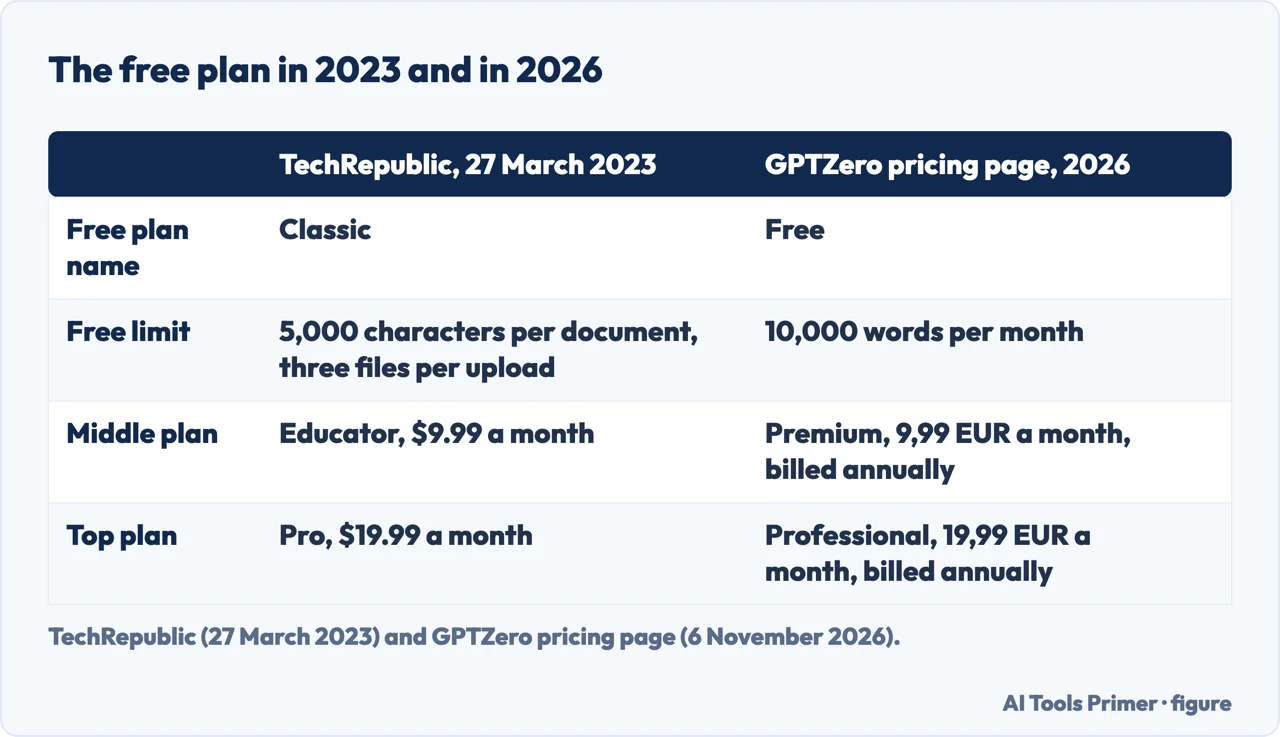
A TechRepublic guide dated 27 March 2023 describes a different set of plans. The free one, GPTZero Classic, limited a document to 5,000 characters and an upload to three files. Educator cost $9.99 a month, allowed 50,000 characters per document and analysed up to 1 million words per month. Pro cost $19.99 a month, allowed 50,000 characters per document and analysed up to 2 million words per month, with an API Beta trial.
Set beside the pricing page of November 2026, two things have changed. The names are different: Classic, Educator and Pro are not the names on the 2026 pricing page, which lists Free, Premium and Professional (the pages we read do not say which plan replaced which). And the free limit is counted differently: the 2023 guide counts characters per document and files per upload, while the 2026 pages count words per month and characters per scan. The prices are in dollars in one and euros in the other, so we do not set them side by side as a rise or a fall.
The 2023 article is more than three years old and says what the plans were then, not what they are. We use it for one reason: a figure for a free GPTZero plan on an older page can be right for its date and wrong for today. Wikipedia’s sentence is dated September 2025, and we read the pricing page on 6 November 2026.
What GPTZero says about the text you paste
The FAQ answers the question directly for one route. It says GPTZero does not store or collect the documents passed into calls to its API. It then says it does store inputs from calls made from its dashboard, and that this data is used only in aggregate to “further improve the service”. The FAQ does not say whether the scan box on the home page counts as the dashboard, and it does not say how long inputs are kept.
The privacy policy, last updated on 20 May 2026, has a section called User-submitted data. It says text and file contents submitted by API subscribers directly by API are “not stored by default” and are not used for product improvement, and that API subscribers may opt in to having their content stored for viewing in the application. Among the data it lists as collected is submitted content for use of providing the service. The section does not name text that people paste into the site without being API subscribers.
On security, the privacy and security page says GPTZero is SOC 2 Type II compliant and describes its work on GDPR and CCPA. The Chrome page says the extension is compliant with FERPA, GDPR and CCPA, and that personal data is deleted on request. These are statements by GPTZero about itself, and we did not audit them.
The terms of use, last updated on 21 August 2026, say the site is provided on an “AS-IS AND AS-AVAILABLE” basis and disclaim warranties. They also say GPTZero cannot guarantee that the site will be available at all times. For the longer treatment of how this company handles text, see our page on GPTZero; for the same question across other free detectors, see free AI detectors.
What GPTZero says about its results, and one test of the free tool
The FAQ lists the limits of the classifier in GPTZero’s words. Results should not be used to punish students. Accuracy rises as more text is submitted, so it is greater for a whole document than for a paragraph, and greater for a paragraph than for a sentence. It is also higher for text like the training data, most of which is English prose written by adults. The classifier is not trained to identify AI text after it has been heavily modified, and it can sometimes flag other machine-generated or highly procedural text as AI-generated.
On the home page, GPTZero says independent benchmarking shows its Advanced Scan has “best-in-class accuracy”. That is the company’s statement about a scan named on the pricing page, where the Free plan lists one Advanced Scan. Wikipedia reports that in September 2025 Business Insider compared GPTZero with seven other tools and called it the “best free AI detector”; we did not read that article.
Scribbr, which sells its own detector, included GPTZero in a guide published on 22 April 2026 and revised on 21 July 2026. It lists GPTZero as free, with “No sign-up required” to paste in text, and reports an accuracy of 52% in its own test, because in its testing GPTZero gave only binary judgments. That is one test by a company that sells a rival tool, and our copy of the page carried a warning that part of it may not have loaded, so we report only what the text says. Its note about signing up concerns pasting text; the home page’s account rule concerns scans over 10,000 characters.
We do not rank detectors. Our page on Turnitin’s AI detection covers Turnitin’s own AI detector.
Where to start
Four ways in.
- “What does the free plan list?”
- What the pricing page says — plan
- “Is the limit words or characters?”
- Two limits, characters and words — limits
- “Was it different before?”
- The free plan in 2023 and in 2026 — then
- “What happens to my text?”
- What GPTZero says about the text you paste — text
Detectors named on this page
Free detectors, GPTZero and Turnitin.
Numbers and paid plans
Accuracy, scores and a paid tier.
Questions people also ask
Which free AI detector is the best?
The pages we read do not settle it. GPTZero says its Advanced Scan has “best-in-class accuracy”, Wikipedia reports that Business Insider called GPTZero the “best free AI detector” in September 2025, and Scribbr, which sells its own detector, reported 52% for GPTZero. See free AI detectors for the limits of each free version.
Is GPTZero better than Turnitin?
The pages we read do not compare the two. GPTZero’s FAQ describes the limits of its own classifier. Our page on Turnitin’s AI detection covers the other tool.
Is there a free AI better than ChatGPT?
The pages we read are about GPTZero’s plan, a detector, and do not compare it with a chatbot. The FAQ lists ChatGPT, Gemini and Claude among the models the detector works across.
Is GPTZero a safe and accurate AI detector?
GPTZero says it is SOC 2 Type II compliant and that it stores dashboard inputs and uses them in aggregate. Its FAQ lists limits and says results should not be used to punish students. Wikipedia reports 2023 warnings about its error rate and false positives from Futurism and the Washington Post; Scribbr reported 52% in its own test.
Not covered here. The statements come from GPTZero’s pricing page, FAQ, home page, students page, Chrome Extension page, privacy and security page, privacy policy and terms of use, from Wikipedia, from a 2023 TechRepublic guide and from Scribbr, all read on 6 November 2026.
The search volume and difficulty behind this page come from an Ubersuggest reading of 5 November 2026 (United States), which gives search volume and its own SEO difficulty score, not Semrush’s; a Semrush check is still to be made.
Sources
- GPTZero — Pricing — gptzero.me, read 6 November 2026.
- GPTZero — AI detector (home page) — gptzero.me, read 6 November 2026.
- GPTZero — FAQ — gptzero.me, read 6 November 2026.
- GPTZero — For students — gptzero.me, read 6 November 2026.
- GPTZero — Chrome Extension — gptzero.me, read 6 November 2026.
- GPTZero — Privacy and security — gptzero.me, read 6 November 2026.
- GPTZero — Privacy policy — gptzero.me, read 6 November 2026.
- GPTZero — Terms of use — gptzero.me, read 6 November 2026.
- Wikipedia — GPTZero — en.wikipedia.org, read 6 November 2026.
- TechRepublic — How to use GPTZero to check for AI-generated text (27 March 2023) — www.techrepublic.com, read 6 November 2026.
- Scribbr — Best AI detectors — www.scribbr.com, read 6 November 2026.
Written by Alberto Gulotta
Founder and editor of AI Tools Primer, writing from Palermo, Italy. Thirty-five years of taking computers apart, starting with a Commodore 64 — the long version is on the about page.
Something wrong on this page? Write to aitoolsprimer@gmail.com and it gets fixed.
Written on 6 November 2026.
Independence and limits
No affiliate links and no paid placements anywhere on this site. Nobody pays to appear here, and no company has seen this page before you did.
This is general information, not professional advice. Where a page touches money, health, safety or the law, it names its source and the date it was read — and your situation may still differ. See the privacy page and the cookie policy.