
Images · guide
Pixelate image: four programs, and when blocks are not enough
By Alberto Gulotta · Updated · 11 min read
Pixelate image files in Photoshop with Filter, Pixelate, Mosaic; in GIMP with Filters, Blur, Pixelize; in Paint.NET with Effects, Distort, Pixelate; or in Canva with the Pixelify app. Each one replaces detail with square blocks, and a slider or a number sets how big they are.
That is enough for a retro look. For hiding a password, a plate or a face, published research shows pixelated text being matched and pixelated faces being recognised, so the last part of this page is about when to use a solid box instead.
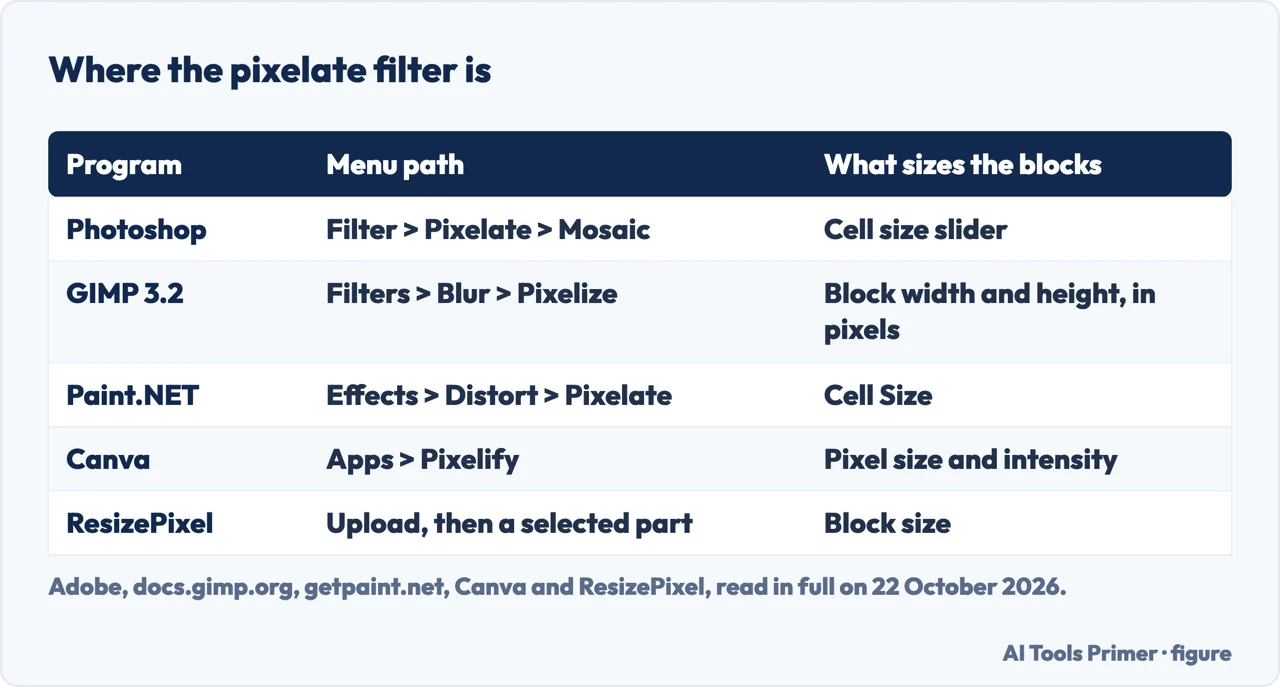
| Program | Menu path | What sets the block size |
|---|---|---|
| Adobe Photoshop | Filter, Pixelate, Mosaic | A cell size slider in the preview window |
| GIMP 3.2 | Filters, Blur, Pixelize | Block width and block height, in pixels |
| Paint.NET | Effects, Distort, Pixelate | Cell Size |
| Canva | Apps, then search for Pixelify | Pixel size and intensity |
| ResizePixel (browser) | Upload, select a part, apply | Block size |
In Photoshop: the Mosaic filter
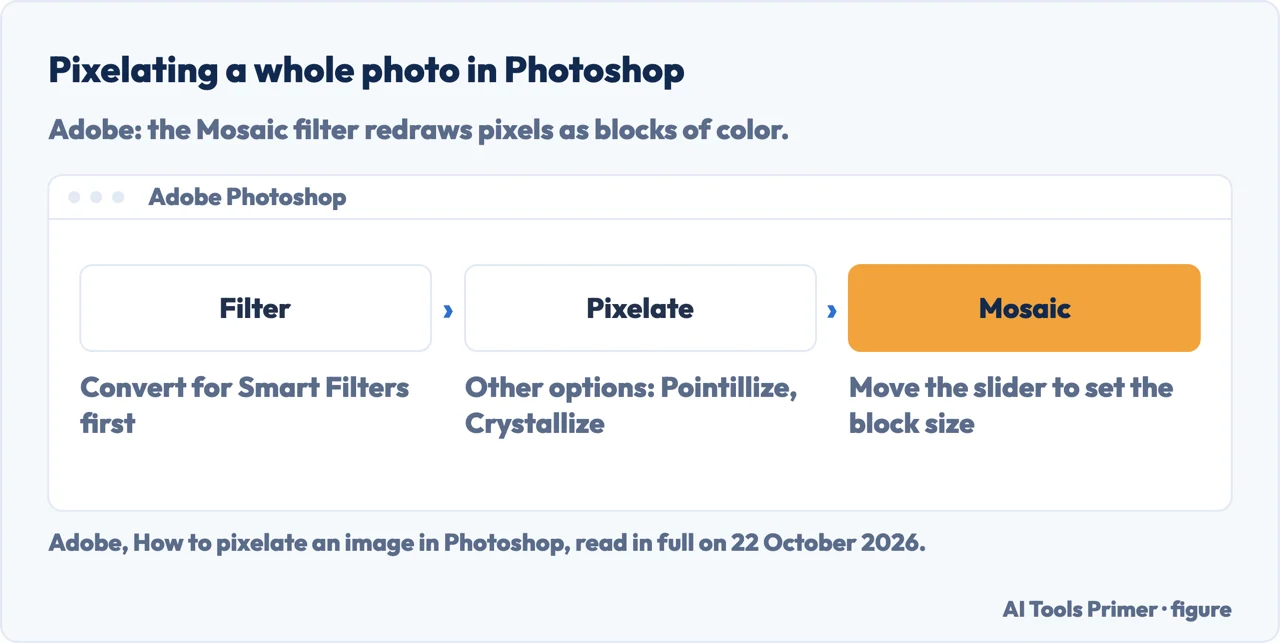
Adobe’s own guide gives four steps for pixelating a whole photo:
- Open the photo in Photoshop.
- Choose Filter from the top menu and click Convert for Smart Filters. Adobe says smart filters can be added, removed, adjusted or hidden, so the edit is nondestructive.
- Choose Filter, Pixelate, Mosaic. The Mosaic filter redraws the pixels as blocks of color.
- Move the slider in the preview window to the right for bigger blocks, or to the left for smaller ones.
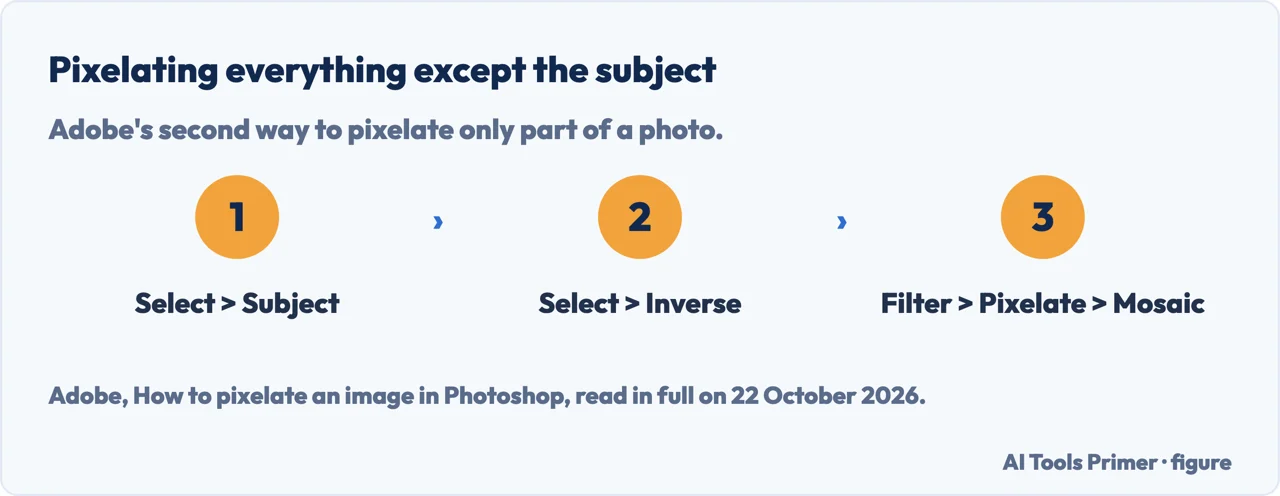
Only part of the photo. Adobe describes two ways. After the steps above, click OK, select the Smart Filters rectangle in the Layers panel, and remove the effect where you do not want it: with the Eraser for small areas, or with the Marquee or Lasso tool and the Delete key for larger ones. The other way pixelates everything except the person or object: Select, Subject, then Select, Inverse, then Filter, Pixelate, Mosaic.
The same Pixelate menu holds other effects. Adobe’s filter reference lists Color Halftone, Crystallize, Facet, Fragment, Mezzotint, Mosaic and Pointillize, and says Mosaic clumps pixels into square blocks. Photoshop Elements has the Mosaic filter too: its help page says it redraws a layer as square blocks of color and that you can set the mosaic cell size.
In GIMP and Paint.NET
GIMP. The manual for GIMP 3.2 puts the filter under Filters, Blur, Pixelize. It says the filter renders the image using large color blocks, and that it is “very similar to the effect seen on television when obscuring a criminal during trial”. The options:
- Block width and Block height, in pixels. They are linked by default; click the chain symbol next to them to set each one on its own.
- Shape: Square, the default, Diamond or Round. The manual says the other two shapes only show once you lower the size ratio to about 0.6 for Diamond or 0.5 for Round.
- Offset and Size ratio, which move and shrink the shape inside each block, and a background color for the space left around it.
The GIMP 2.10 manual gives the same path, Filters, Blur, Pixelize, for older installations.
Paint.NET. Its documentation lists Pixelate under Effects, Distort. The effect, in its words, “greatly reduces detail by enlarging regularly sampled pixels”. Cell Size sets how big the enlarged pixels are, and the cells are usually square; choosing Scale Up with Bilinear or Bicubic gives rounded results instead.
Canva and the browser tools
Canva. Its pixelate page gives five steps: open Canva in the app or a browser and start a design; click Apps in the left sidebar and search for Pixelify; upload the photo and apply the effect; adjust the pixel size and intensity; download the result as PNG or JPG. For only part of an image, its answer is to mark the area with the selection or brush tool first. Its FAQ also names a built-in Pixel Art tool. How Canva uses what you upload is in its Privacy Policy, which the page links to rather than summarises.
The tools at the top of the search results. ResizePixel tells you to upload the image to the website, enter a block size and apply it to a selected part. PineTools asks for a block size in pixels. Two others, pixelateimage.net and pixelateimage.co, say the work is done in your browser and the file is not sent to a server. We did not test that claim.
If the photo is private, the programs on your own computer avoid the upload question entirely. A photo can also carry more than you see in it: our page on removing metadata from photos covers the location and device details that travel inside the file.
When pixelation does not hide enough
Most of these pages sell pixelation as a way to protect a face, a plate or an address. Two pieces of published work show where that stops being true.
Text can be matched. Depix is a proof of concept that recovers plaintext from pixelated screenshots. Its author says it was made for a company “because someone pixelated part of a password for an account with Domain Admin rights”. The method types the characters that might be hidden in the same editor, font and colors, takes a screenshot, pixelates it the same way and compares block by block. Its own limits are written down: it works on images pixelated with a linear box filter, it needs the font settings of the original, and it fails if the image was compressed again afterwards. The GitHub copy was archived on 14 April 2026 and the project moved to Codeberg. Even pixelateimage.co, a pixelation tool, says text from a small set of possibilities can be guessed this way, and tells you to use a solid box for names, numbers and license plates.
Faces can be recognised. In 2016 Richard McPherson, Reza Shokri and Vitaly Shmatikov trained neural networks on obfuscated photos. On a set of 40 people, the networks identified faces with over 95% accuracy against every size of mosaic they tried; random guessing among 40 gives 2.5%. On photos of more than 530 celebrities, they reached 57% with 16 by 16 pixel blocks. Their paper says it plainly: “Mosaicing and blurring do not remove all information from an image”. This is recognition, not reconstruction: the network picks a face from people it was trained on. Our reading: it matters when someone can list the likely people, a team or a class for example, and has other photos of them.
Blur is not the fix. Adobe offers a blur as the alternative way to obscure information. In the same paper, YouTube’s face blur still let the network identify a face from 40 people more than half the time, and pixelateimage.co says a blur can be partially inverted.
For a password, an account number, a name or a plate, the safer choice is an opaque box drawn over it, the full redaction the 2016 paper sets against pixelation. That is our reading of the two sources, not a test we ran.
Before you share the file
The smart filter that makes Photoshop’s edit nondestructive cuts both ways. Adobe’s guide says it lets you easily remove the changes to the original photo and start over. A Photoshop document saved that way still holds the original under the filter, so the copy you send is the exported image, not the working file. That follows from Adobe’s description; we did not open such a file ourselves.
On the format, pixelateimage.co suggests PNG for anything with sharp block edges, because JPG compression adds soft halos at the block boundaries. Depix’s own notes say extra compression is one of the things that defeats its method, but that is a limit of one tool, not a protection to rely on.
Pixelation also has the opposite problem: a photo that came out blocky by accident. That is a different job, covered on our page about fixing pixelated photos, and for moving pictures on our page about fixing pixelated video.
Where to start
Five ways in.
- “I have Photoshop.”
- The Mosaic filter — photoshop
- “I want a program, not a website.”
- GIMP and Paint.NET — gimp paint net
- “I just want it done in a browser.”
- Canva and the rest — online
- “I am hiding a password or a face.”
- Read this first — not enough
- “What do I send?”
- Before sharing — before sharing
More on editing a photo
The same filters fix and break pictures. These pages cover the jobs next to this one.
Questions people also ask
How do I pixelate my image?
Open it in an editor and apply the pixelate filter: Filter, Pixelate, Mosaic in Photoshop; Filters, Blur, Pixelize in GIMP; Effects, Distort, Pixelate in Paint.NET. Then set the block size. To pixelate only part of it, select that area first.
What does pixelate image mean?
It means replacing detail with larger blocks of single color. Adobe describes the Mosaic filter as redrawing pixels as blocks of color, and GIMP’s manual says its Pixelize filter renders the image using large color blocks.
How can I pixelate an image for free?
Canva’s page says you can pixelate images with its free tools, using Pixelify or its Pixel Art tool. ResizePixel calls itself a free online service, and asks you to upload the image to its website.
Is pixelation enough to hide a password or a face?
Not always. Depix matches pixelated text against the same characters pixelated the same way, and a 2016 study recognised mosaiced faces from a set of 40 people with over 95% accuracy. For text and numbers, cover them with an opaque box.
Not covered here. We did not apply any of these filters ourselves: the menus and options are those of Adobe, the GIMP manual, the Paint.NET documentation and Canva, read on 22 October 2026, and they can move between versions.
It does not cover phone photo editors or video. The Reddit thread among the search results could not be read, and the claims of the browser tools that files stay on your device were not tested.
The search volume and difficulty behind this page were read in Semrush on 29 August 2026.
Sources
- Adobe — How to pixelate an image with mosaic or blur effects (Photoshop: smart filters, Filter > Pixelate > Mosaic, selected areas, blur) — www.adobe.com, read 22 October 2026.
- Adobe Help — Photoshop filter effects reference: Pixelate filters — helpx.adobe.com, read 22 October 2026.
- Adobe Help — Photoshop Elements, Pixelate filters (last updated 2 February 2023) — helpx.adobe.com, read 22 October 2026.
- GIMP 3.2 Manual — 3.7. Pixelize — docs.gimp.org, read 22 October 2026.
- GIMP 2.10 Manual — 3.7. Pixelize — docs.gimp.org, read 22 October 2026.
- Paint.NET documentation — Effects > Distort Menu: Pixelate — www.getpaint.net, read 22 October 2026.
- Canva — Pixelate image online for free (Pixelify, five steps, FAQ) — www.canva.com, read 22 October 2026.
- ResizePixel — Pixelate image online — www.resizepixel.com, read 22 October 2026.
- PixelateImage.co — Pixelate Image Online Free: Faces, Text & Pixel Art (a pixelation tool; its statements on safety) — www.pixelateimage.co, read 22 October 2026.
- spipm — Depix, a PoC for recovering plaintext from pixelized screenshots (Codeberg, migrated from GitHub) — codeberg.org, read 22 October 2026.
- GitHub — spipm/Depixelization_poc, archived by the owner on 14 April 2026 — github.com, read 22 October 2026.
- McPherson, Shokri, Shmatikov — Defeating Image Obfuscation with Deep Learning, arXiv:1609.00408 (2016) — arxiv.org, read 22 October 2026.
- McPherson, Shokri, Shmatikov — Defeating Image Obfuscation with Deep Learning, full text (HTML, v2) — arxiv.org, read 22 October 2026.
Written by Alberto Gulotta
Founder and editor of AI Tools Primer, writing from Palermo, Italy. Thirty-five years of taking computers apart, starting with a Commodore 64 — the long version is on the about page.
Something wrong on this page? Write to aitoolsprimer@gmail.com and it gets fixed.
Written on 22 October 2026.
Independence and limits
No affiliate links and no paid placements anywhere on this site. Nobody pays to appear here, and no company has seen this page before you did.
This is general information, not professional advice. Where a page touches money, health, safety or the law, it names its source and the date it was read — and your situation may still differ. See the privacy page and the cookie policy.