
Malware · guide
What are Trojans, and how do they get in?
By Alberto Gulotta · Updated · 17 min read
What are Trojans? Malware disguised as something worth running, not a self-copying program: NIST calls it code that looks useful but hides a malicious function, and Microsoft adds why it matters — a Trojan cannot spread on its own, so someone has to download it, or another piece of malware has to install it first.
| Fact | Source |
|---|---|
| Over 450,000 new malware samples are registered every day | AV-TEST Institute |
| A Trojan cannot copy itself; a person or another piece of malware has to install it | Microsoft Learn |
| Microsoft security software finds malware on more than half of PCs with keygens installed | Microsoft Support |
| Emotet, a banking Trojan found in 2014, was dismantled on 27 January 2021 | Europol |
| Microsoft Defender Antivirus and the free Safety Scanner both detect and remove Trojans on Windows | Microsoft Learn |
What is a Trojan, in the terms security agencies actually use?
Whether the question was typed as what is Trojan or what are Trojans, the two definitions below answer both the same way. The U.S. National Institute of Standards and Technology keeps two definitions of a Trojan horse in its glossary. The first describes a program that “appears to have a useful function, but also has a hidden and potentially malicious function”, drawing on NIST SP 800-12 and CNSSI 4009. Its second definition, from NIST SP 800-28, says much the same thing in fewer words: a useful or seemingly useful program that hides malicious code, set to run once the program itself is run.
Microsoft Learn adds the detail that makes the word matter in practice: Trojans “can’t spread on their own”. Either a person downloads and runs one by mistake, or another piece of malware installs it — there is no third route in. Trojans also often use the same file names as real, legitimate apps, Microsoft notes, which is part of how the disguise works rather than a side detail. The UK’s National Cyber Security Centre keeps its own definition of the wider category to one line: “malware is any kind of software that can damage computer systems, networks or devices”, and lists Trojans as one of the kinds it covers, alongside viruses and ransomware.
Virginia Tech’s IT Security Office puts the disguise plainly: “Trojan Horses generally masquerade as legitimate software, or piggybacks on a file that a user downloads and runs, allowing an attacker to gain access to the computer.” Once in, Virginia Tech adds, a Trojan can open a backdoor into the machine, bypassing authentication and getting around whatever security was already running — the same mechanism a rootkit uses. None of this is a behaviour a Trojan performs by itself across a network; it is a costume, worn until someone opens the box.
How does a Trojan differ from a virus and a worm?
CISA’s guidance on malicious code — marked as archived content by the agency itself since 2019, a historical position rather than its newest page on the subject — sorts it into the same three families: “viruses, worms, and Trojan horses”. The difference between them is less about the damage each one does and more about how each one moves.
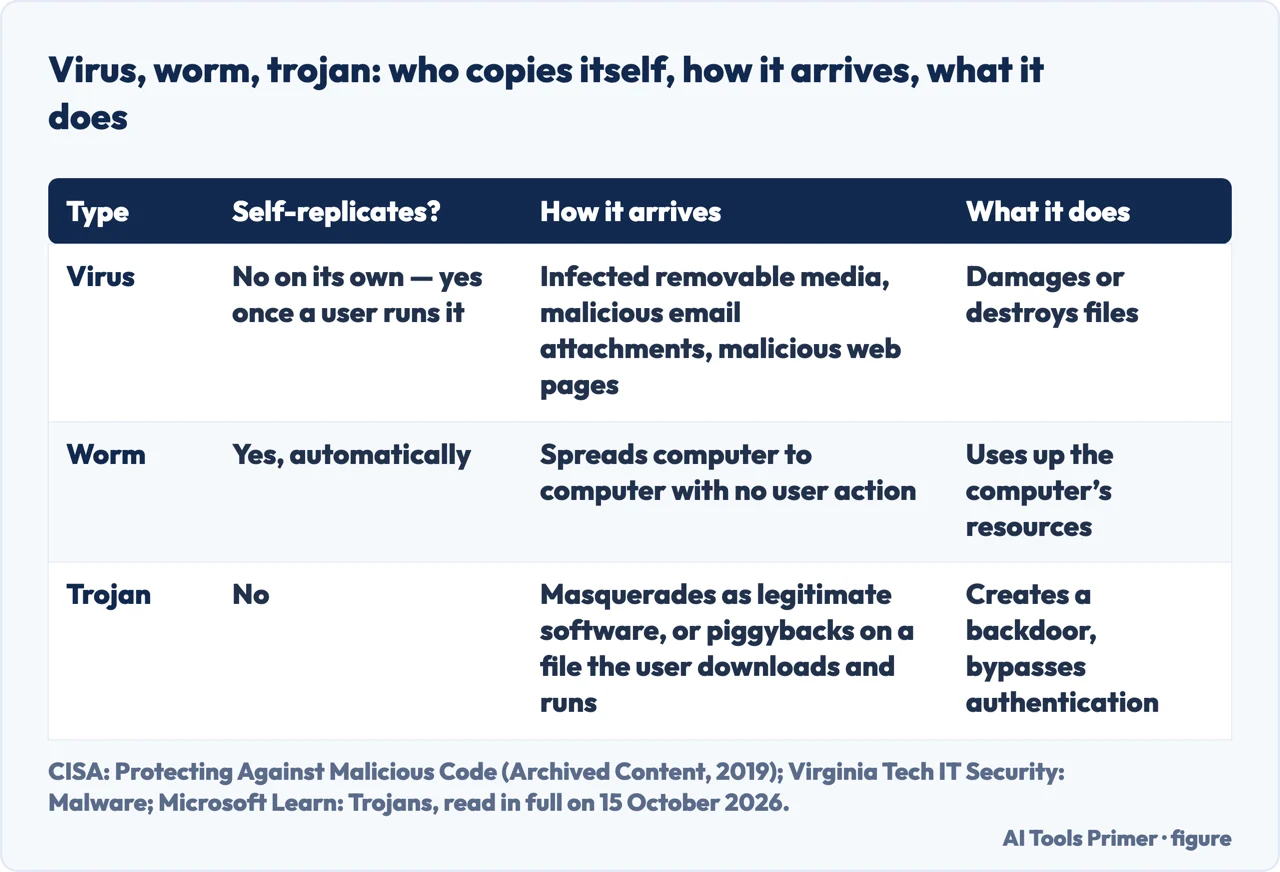
A virus, CISA says, has “the ability to damage or destroy files on a computer system” and spreads through infected removable media, malicious email attachments and malicious web pages — but only once a person runs the program it has infected. Virginia Tech’s account agrees: a virus “infects a legitimate program, replicates and spreads to other computers when activated by a user”. A worm removes that human step: CISA calls it “a type of virus that self-propagates from computer to computer”, spreading on its own and using up a machine’s resources as it goes, rather than waiting to be let in.
A Trojan sits apart from both. It does not copy itself across a network like a worm, and it does not infect an existing program like a virus. It arrives as its own file, pretending to be something worth running, and depends entirely on a person — or another piece of malware — to put it there. That single difference, no self-replication, is why the same word covers banking Trojans, remote-access tools and the loaders described next: all of them get in the same way, by being let in.
Why is a Trojan the way almost everything else gets in?
Microsoft Learn lists what a Trojan typically does once it is running: it can “download and install other malware, such as viruses or worms”, record keystrokes and websites visited, send a victim’s passwords and browsing history to an attacker, or hand the attacker control of the device outright. The first of those — installing more malware — is what turns a single Trojan into an entry point for everything that follows.
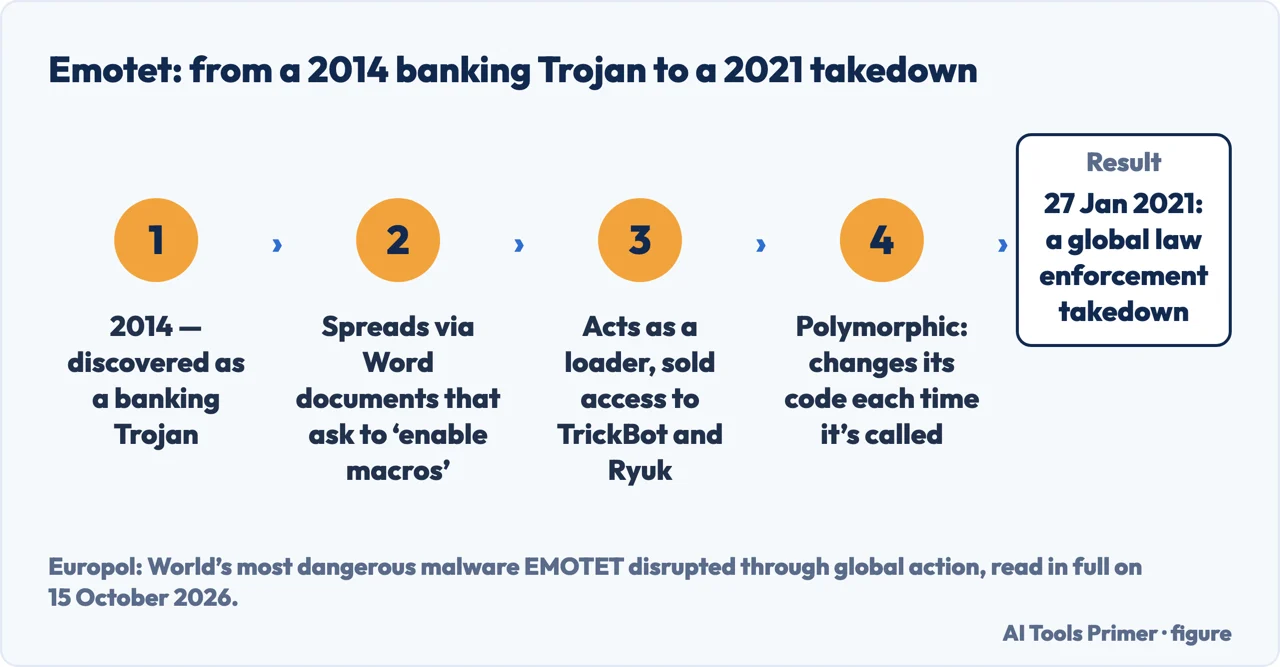
Europol’s own case against Emotet shows what that looks like at scale. First discovered as a banking Trojan in 2014, it reached victims mainly through infected email attachments — malicious Word documents that prompted a user to enable macros so the hidden code inside could run and install the Trojan, the same macro vector Microsoft Support documents separately as a path onto a Windows PC. Once installed, Emotet did not just spy; it opened the door for others. “This type of attack is called a ‘loader’ operation, and EMOTET is said to be one of the biggest players in the cybercrime world as other malware operators like TrickBot and Ryuk have benefited from it”, Europol wrote when announcing the takedown, describing access it gained being sold on to other criminal groups for data theft and ransomware extortion. It also kept changing shape: “Many botnets like EMOTET are polymorphic in nature. This means that the malware changes its code each time it is called up”, per the same statement. Law enforcement and judicial authorities worldwide disrupted the operation on 27 January 2021.
The disguise keeps being reinvented. Ars Technica’s September 2026 account of the ClickFix technique describes an attack built from little more than a compromised website and “a fake CAPTCHA overlay, and the inclusion of a single terminal command”. A visitor sees what looks like a normal Cloudflare verification check, copies a line of text as instructed, and pastes it into the Windows Run dialog, PowerShell or the macOS terminal — running the attacker’s command themselves rather than being tricked into downloading a file.
The technique has moved with the platform it targets. Earlier ClickFix-style campaigns relied on digitally signed installer packages that looked legitimate because of a trusted signing certificate; more recent waves, the security firm BlueVoyant told Ars Technica, dropped that requirement altogether in favour of getting a visitor to run the command themselves. On the Mac side, Ars Technica reports that the security firm Jamf and a researcher have both “documented macOS variations of ClickFix that can bypass Gatekeeper protections” — the same Gatekeeper check described later on this page, and in more detail on what the Gatekeeper message means.
What are the six ways Microsoft says a Trojan gets onto a Windows PC?
Microsoft Support’s guide on how malware reaches a Windows PC names six distinct routes a Trojan can take to arrive, the last one the same role a Trojan plays in opening the door for everything else: spam, Office macros, removable drives, bundled software, compromised webpages, and malware that installs malware.
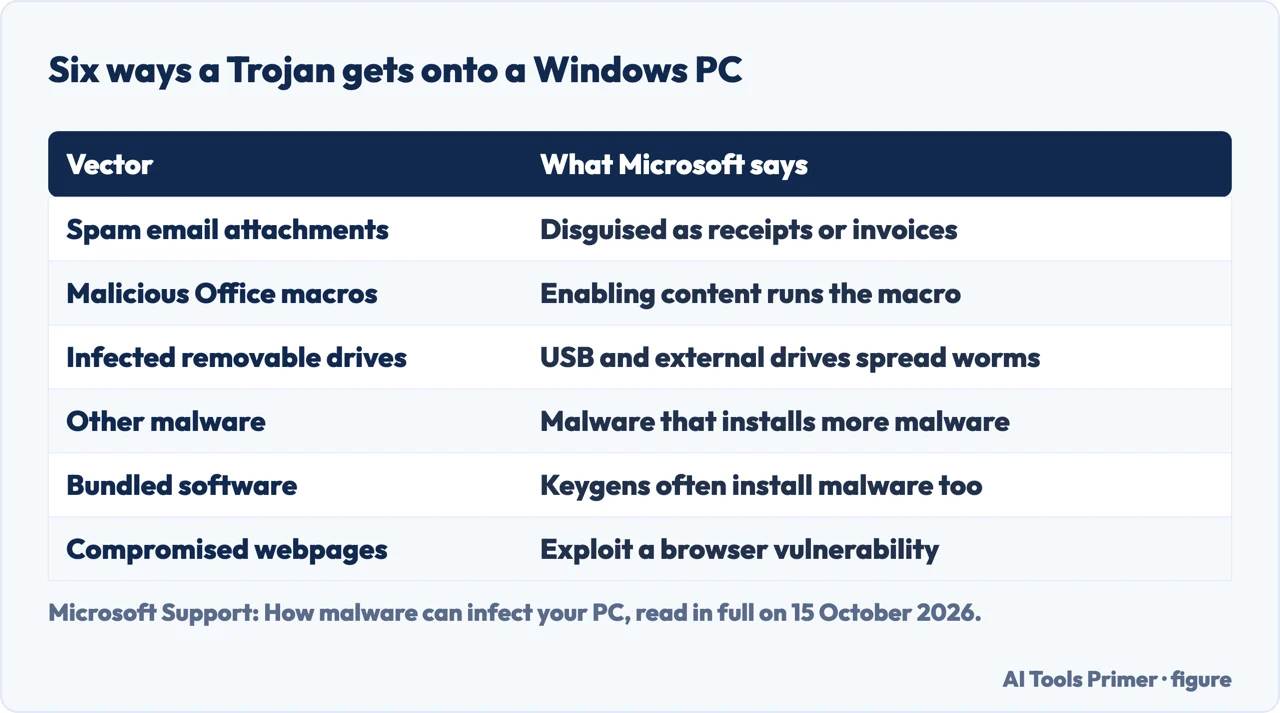
Spam email remains the simplest route: malware authors disguise an attachment as a receipt, a tax refund or a ticket invoice to get someone to open it. Office documents add a second route, and Microsoft’s own warning on it is direct: don’t enable macro content unless you’re certain exactly what it does, even if the file looks like it came from someone you trust, because once that content is enabled on a malicious file, the hidden macro runs and infects the system right away. (That warning, and the four settings behind it, are covered in full on enabling macros in Excel.)
Removable drives are a third route: Microsoft notes that worms in particular spread by infecting USB flash drives and external hard drives, and names the deliberate version of this — leaving an infected drive somewhere for someone to find and plug in — a “USB drop attack”. A fourth is bundled software, and cracked programs are the clearest example: key-generator tools meant to unlock paid software often install malware along with the key, and Microsoft puts a number on it — “Microsoft security software finds malware on more than half of PCs with keygens installed”. A fifth is a compromised webpage exploiting a vulnerability in the browser itself, simply by visiting it. And the sixth closes the loop: other malware installing more malware, which is exactly how a single Trojan becomes the way almost everything else gets in.
How does a Trojan try to reach a phone or a Mac, before it runs?
Android and macOS add a check Windows does not have in the same form: a gate the operating system itself runs before an app is ever opened, not only after. Google says “Google Play Protect checks your apps and devices for harmful behavior”, and the checking does not stop at the Play Store’s own front door — “it checks your device for potentially harmful apps from other sources” too, so an app installed outside the store is still scanned, not waved through because it skipped the store’s review. Play Protect can also stop an install outright, blocking an app that is unverified and asks for the kind of sensitive permissions scammers commonly misuse for financial fraud.
On a Mac, Apple calls the equivalent gate Gatekeeper, “designed to ensure that only trusted software runs on your Mac”. Since macOS Catalina, Apple adds a second requirement on top of that: software must also be notarised, which is what lets someone trust that it doesn’t contain known malware. Software that fails either check doesn’t get a chance to run quietly; it stops at the door, with a message covered in detail on the full breakdown of that Gatekeeper message.
What does the protection already installed do about it?
On Windows 10 and 11, the tool is already there: Microsoft Learn names “Microsoft Defender Antivirus for Windows 10 and 11” alongside the free Microsoft Safety Scanner as what it recommends to detect and remove Trojans. Microsoft Support’s general advice for the wider malware category is the same: use a security product that stays current and scans in real time — which is what Defender already does by default. See whether that built-in protection is actually enough for the lab scores and the one-minute check that confirms it is switched on.
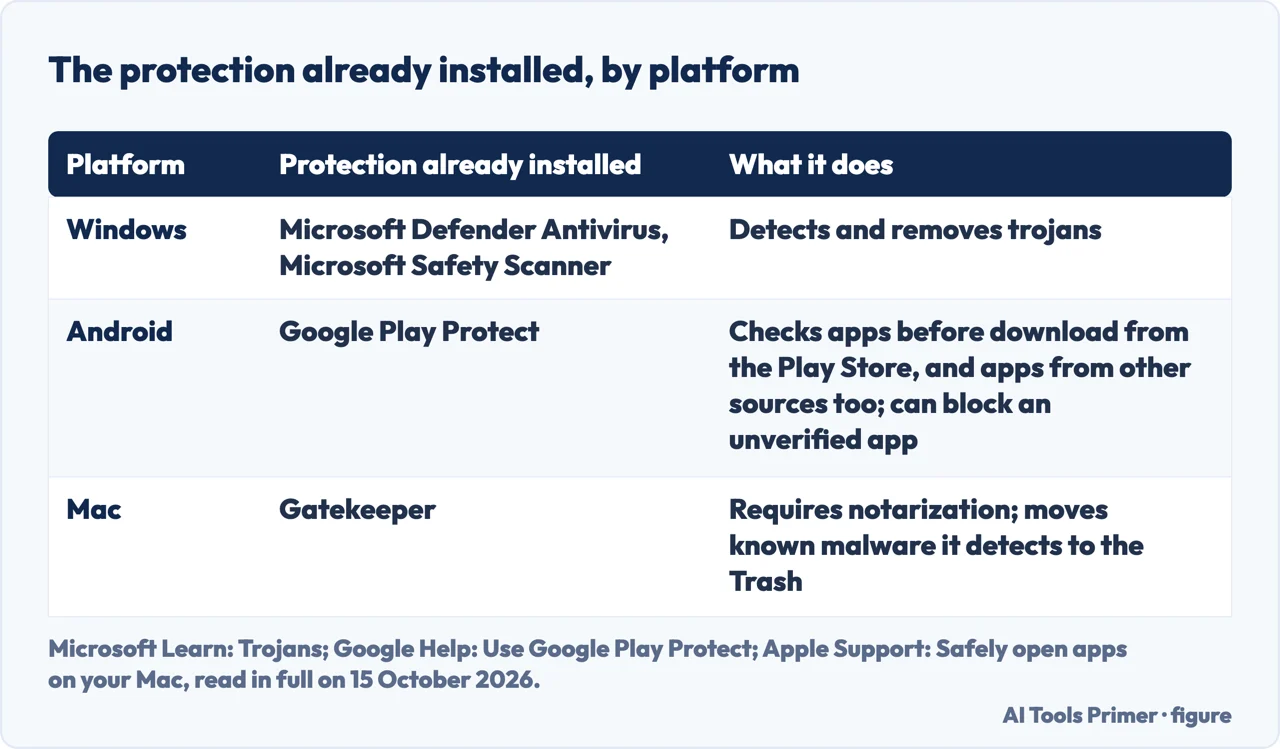
On Android, the same Play Protect scanning described above is also the removal mechanism: it is what checks a device after installation, not only before it. On a Mac, Gatekeeper does not stop at refusing to open a file: Apple says “if macOS detects known malware, your Mac notifies you that the app can’t be opened and moves it to the Trash” — automatic quarantine, not a warning someone has to act on themselves. The full detail behind that message is on the dedicated page on the Apple warning.
Where to start
Six questions, each one a different piece of the disguise.
- “What actually makes something a Trojan?”
- The disguise, not a behaviour — what a trojan actually disguises itself as
- “How is a Trojan different from a virus?”
- Who replicates and who does not — how a trojan differs from a virus and a worm
- “Why do Trojans matter so much?”
- The door for everything else — why a trojan is the door for almost everything else
- “How does a Trojan get onto a Windows PC?”
- Six vectors, one Microsoft page — six ways a trojan gets onto a windows pc
- “What about a phone or a Mac?”
- Checked before it ever runs — how a trojan tries to reach a phone or a mac
- “What stops it once it is there?”
- What is already installed — what the protection already installed does
Where this goes on a Windows PC
Three pages this one points to inside Windows itself.
The same question on a phone or a Mac
Neither half of a PC carries over to a phone or a Mac.
Questions people also ask
What are Trojans in simple words?
A Trojan is malware that looks useful or harmless — a game, a file, an attachment — but hides a function that steals data, spies on someone or opens a backdoor. Unlike a virus, it cannot copy itself: someone has to run it, or another piece of malware has to install it.
What are Trojans in Greek?
The name comes from the wooden horse of Greek mythology, the trick used to get inside Troy. That is where the word comes from; the mythology itself is not what this page is about.
Can Trojan virus be removed?
Yes. On Windows, Microsoft Defender Antivirus and the free Microsoft Safety Scanner are both built to detect and remove them; see the full sequence on Windows, on Android and on iPhone.
What does it mean to be called a Trojan?
Outside computing, a Trojan can mean a native of ancient Troy or, idiomatically, someone hard-working and determined. Neither sense is about malware, and neither is the subject of this page.
Not covered here. This page does not walk through Microsoft Defender’s lab scores or the one-minute check that confirms it is switched on — see Microsoft Defender for that. It does not explain what counts as a sign of infection in the first place, which how to tell if your computer has a virus covers on its own, and it does not turn into Defender for Endpoint’s business-only features — onboarding, EDR, tamper protection — which the Microsoft Learn source documents for an organisation’s managed fleet, not a home PC. The Greek myth and the English idiom stay inside the two short answers above, in two lines each. What holds instead is simple: every definition above comes from NIST, CISA, Microsoft or an equivalent agency in its own words, the Emotet and ClickFix cases are dated to the reports that describe them, and nothing here recommends one piece of security software over another.
Sources
- NIST Computer Security Resource Center — Trojan horse, Glossary: the two official definitions used to open this page, each citing its own source standard by name — csrc.nist.gov, read 15 October 2026.
- CISA, U.S. Department of Homeland Security — Protecting Against Malicious Code: the virus/worm/Trojan classification and the virus and worm definitions used in the comparison. Marked Archived Content by CISA since 2019; used here as the agency’s historical position, not its newest guidance on the subject — www.cisa.gov, read 15 October 2026.
- NCSC UK — Malware: the short definition of malware, with Trojans listed as one of its forms — www.ncsc.gov.uk, read 15 October 2026.
- Microsoft Learn — Trojans: how a Trojan behaves, that it cannot spread on its own, and Microsoft Defender Antivirus/Safety Scanner as the recommended removal tools. Applies to Windows 10 and 11 — learn.microsoft.com, read 15 October 2026.
- Microsoft Support — How malware can infect your PC: the vectors — spam, Office macros, removable drives, bundled software including keygens, compromised webpages. Applies to Windows — support.microsoft.com, read 15 October 2026.
- Apple Support — Safely open apps on your Mac: Gatekeeper and notarization, and what happens when macOS detects known malware. Applies to macOS Catalina and later — support.apple.com, read 15 October 2026.
- Google Help — Use Google Play Protect to help keep your apps safe & your data private: scanning before and after installation, including apps installed outside the Play Store. Applies to Android — support.google.com, read 15 October 2026.
- Europol — World’s most dangerous malware EMOTET disrupted through global action: the Emotet case, from its 2014 discovery as a banking Trojan to the takedown on 27 January 2021 — www.europol.europa.eu, read 15 October 2026.
- AV-TEST Institute — Malware Statistics & Trends Report: the daily new-sample count and the year the total count has been accumulated from. Only the static figures in the text; the live counters are JavaScript and are not cited — www.av-test.org, read 15 October 2026.
- Ars Technica — ClickFix attacks infecting PCs and Macs are going viral: the ClickFix case, September 2026, including the Jamf/researcher findings on bypassing Gatekeeper on a Mac — arstechnica.com, read 15 October 2026.
- Virginia Tech IT Security Office — Malware: the academic description of how a virus, a worm and a Trojan each spread — security.vt.edu, read 15 October 2026.
Written by Alberto Gulotta
Founder and editor of AI Tools Primer, writing from Palermo, Italy. Thirty-five years of taking computers apart, starting with a Commodore 64 — the long version is on the about page.
Something wrong on this page? Write to aitoolsprimer@gmail.com and it gets fixed.
Written on 16 October 2026.
Independence and limits
No affiliate links and no paid placements anywhere on this site. Nobody pays to appear here, and no company has seen this page before you did.
This is general information, not professional advice. Where a page touches money, health, safety or the law, it names its source and the date it was read — and your situation may still differ. See the privacy page and the cookie policy.