
Password · guide
How to create strong passwords when six sources disagree
By Alberto Gulotta · Updated · 17 min read
How to create strong passwords has no single answer on length: NIST asks 15 characters for a password used alone, CISA and the National Cybersecurity Alliance 16, the FTC 12, George Mason 10. NIST and the NCSC also say not to require capitals and symbols, while CISA, the FTC and George Mason mention mixed characters.
| Question | Answer | Where it comes from |
|---|---|---|
| How long? | The pages give 10, 12, 15 and 16 characters; the NCSC gives three random words instead of a count | George Mason, FTC, NIST, CISA, NCSC |
| Capitals and symbols? | NIST and the NCSC say not to require them; CISA, the FTC and George Mason mention mixed character types | NIST, NCSC, CISA, FTC, George Mason |
| Words or characters? | Three random words (NCSC), four to seven unrelated words (CISA), or a random string from a generator | NCSC, CISA, FTC |
| One for every account? | Yes: a different password for each account | CISA, National Cybersecurity Alliance |
| Change it on a schedule? | NIST and the NCSC say not to require it; the Alliance says change only with a reason | NIST, NCSC, National Cybersecurity Alliance |
Why capitals and symbols stopped being the rule
NIST’s appendix on the strength of passwords explains the change. It says online services introduced composition rules, which require a mix of character types such as at least one digit, one uppercase letter and one symbol, but that analyses of breached password databases found the benefit “less significant than initially thought”, while the effect on usability and memorability is severe. The same appendix says research has shown that users respond to these rules in very predictable ways: a user who might have chosen “password” is relatively likely to choose “Password1” if an uppercase letter and a number are required, and “Password1!” if a symbol is required as well.
The requirement itself, in SP 800-63B-4, is short. Services shall not impose other composition rules, such as mixtures of different character types, apart from refusing a password that is on a blocklist. The appendix ends by saying that length and complexity requirements beyond the ones it recommends increase user frustration and the difficulty of using passwords, that these restrictions are often worked around, and that blocklists, hashed storage, machine-generated random passwords and rate limiting are more effective against modern brute-force attacks.
The National Cyber Security Centre (NCSC) in the United Kingdom says the same from two angles. Its page for people who run systems says it does not recommend complexity requirements for passwords that users choose, because users follow predictable patterns, such as replacing the letter o with a zero, and attackers know them. Its page for the public adds that swapping an o for a zero leaves a password not significantly stronger and harder to remember.
The pages do not all go that far. The National Cybersecurity Alliance says complexity matters less than length and randomness and that a long random password is far stronger than a short one with substitutions like P@ssw0rd!, yet it also tells readers to put a number and a special character along with letters, because websites will require complexity. George Mason University’s IT page says length is more important than complexity and, in the next line, to use all the different characters a system permits. The FTC suggests mixing uppercase and lowercase letters, numbers and symbols when an account does not allow a long password. CISA gives two ways to be random: a string of mixed-case letters, numbers and symbols, or a phrase of unrelated words.
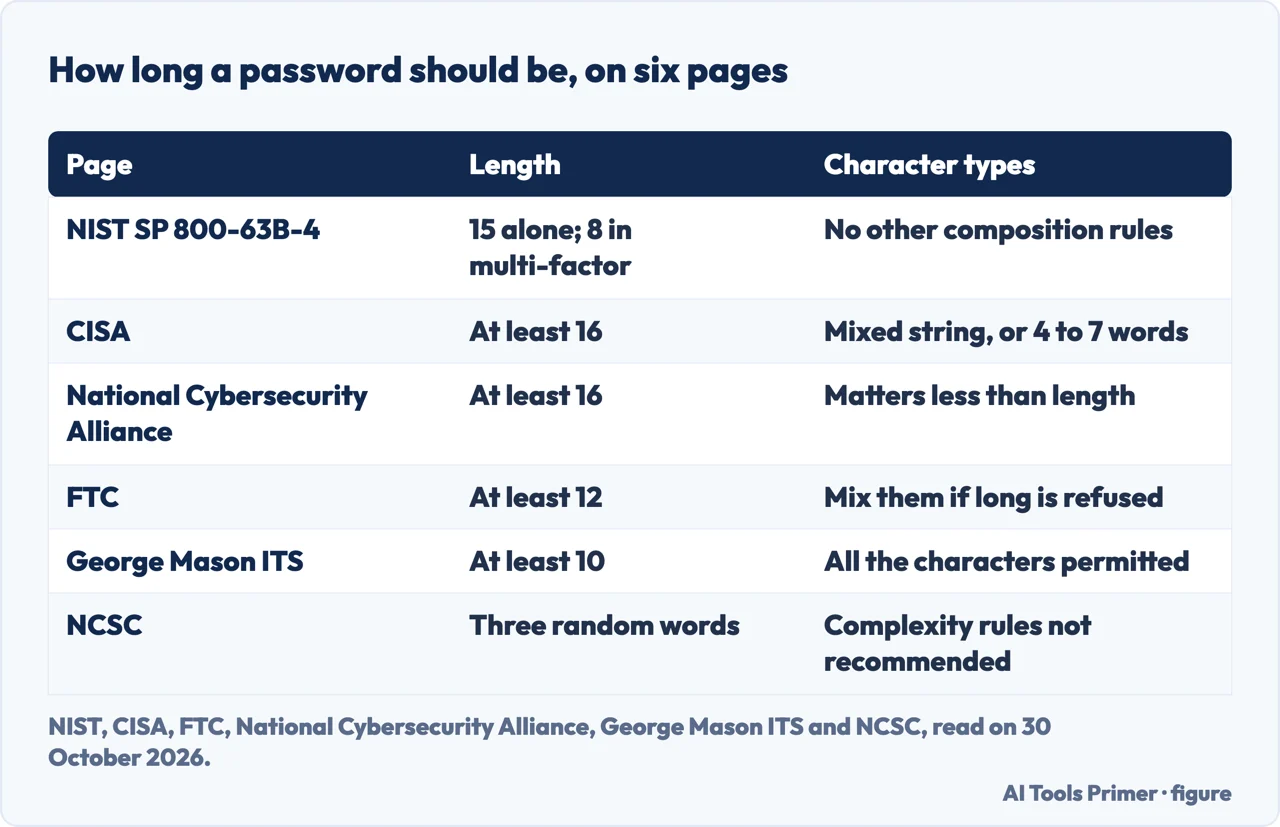
How long, on six pages
NIST gives the most exact figure, and it is written as a requirement for services rather than as advice: a password used as the only authentication factor must be at least 15 characters, and a password used only as part of multi-factor authentication may be shorter but at least eight. CISA says at least 16 characters and adds that longer is stronger. The National Cybersecurity Alliance also says at least 16, and says shorter passwords can be cracked quickly; it contrasts the time to crack shorter passwords with the time for 16-character ones but gives no method, so we repeat no figure. The FTC says to aim for at least 12. George Mason University’s IT page says at least 10. Proton, which sells a password manager, says to aim for at least 12 to 15 characters.
The NCSC is the odd one out. Its page for the public does not give a number of characters; it says to combine three random words to make a password that is “long enough and strong enough”. Its page for system owners says to set a minimum length but, in the text we read, names no figure. The pages we read do not explain why the thresholds differ and do not set them side by side.
NIST does say what the right length depends on. The minimum depends on the threat model: online guessing can be limited by capping how often a login may be tried, while an attacker who has taken hashed passwords from a breached database can compute many billions of hashes per second, which NIST says calls for passwords orders of magnitude more complex than those expected to resist only online attacks. The appendix adds that length is a primary factor, and that passphrases, meaning passwords of several words, are often an effective way to get a longer password.
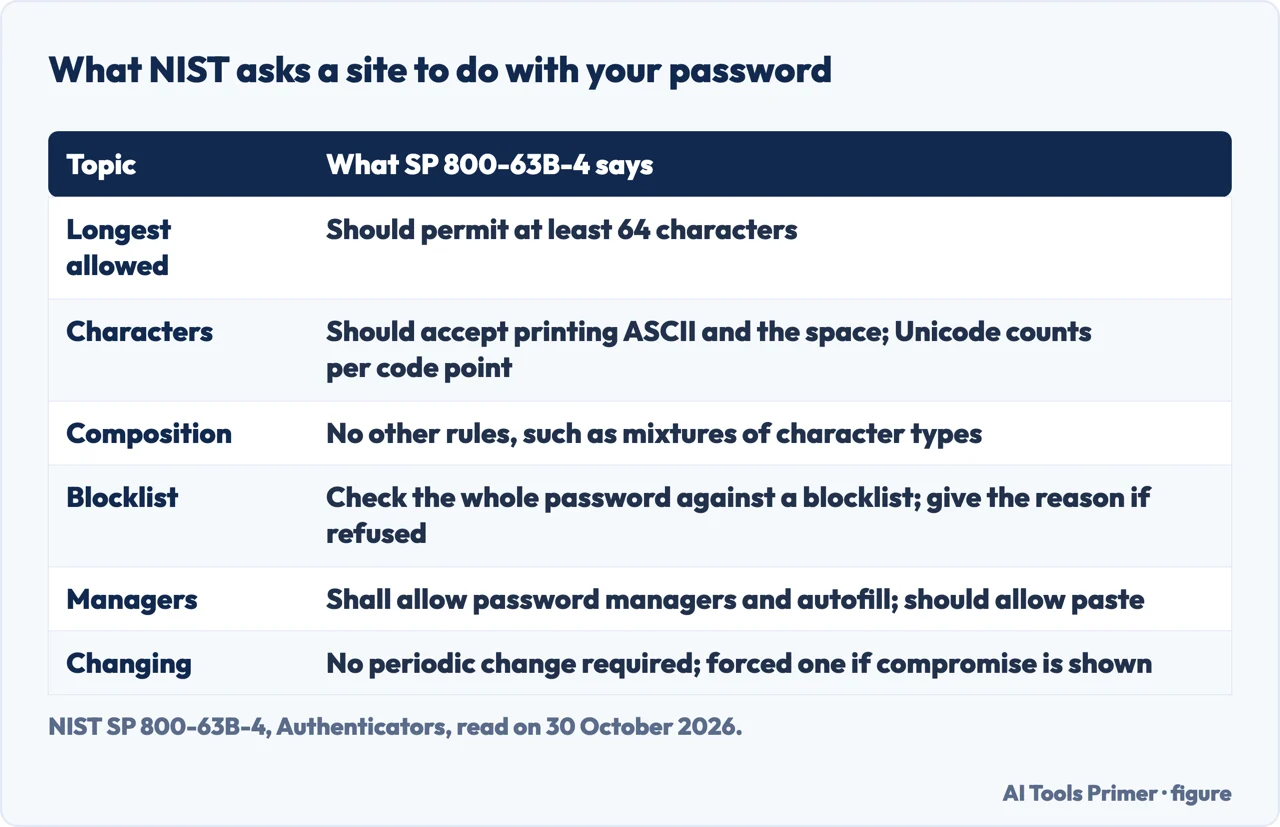
Going the other way, NIST says services should permit a maximum length of at least 64 characters, and that each Unicode code point counts as one character. The appendix says users should be encouraged to make passwords as long as they want within reason, since the size of a hashed password does not depend on its length, with a limit being reasonable because extremely long ones, perhaps megabytes, could take too long to hash. The NCSC page for system owners warns against maximum lengths that a user might try to exceed.
Three ways to build one, and what does not help
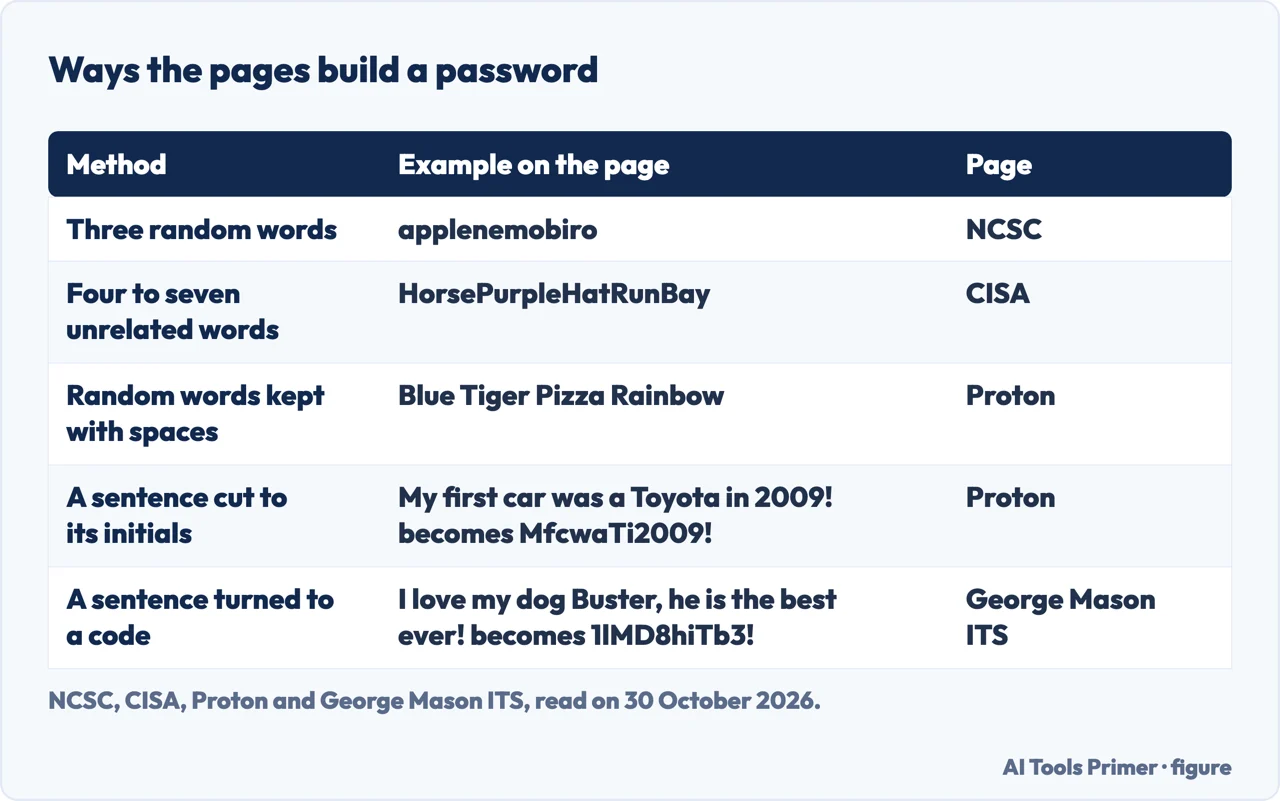
Random words. The NCSC’s method is three random words joined together, with applenemobiro as its example. CISA gives a longer range: a memorable phrase of four to seven unrelated words, which it calls a passphrase, with HorsePurpleHatRun marked Good, HorsePurpleHatRunBay Great and a six-word version with spaces Amazing; the page says spaces are allowed. The FTC also suggests a passphrase of random words separated by spaces and warns against common phrases, song lyrics and movie quotes. Proton gives Blue Tiger Pizza Rainbow as an example, keeps the spaces between words, and names Diceware as a low-tech tool for picking the words. So the count of words runs from three to seven depending on the page, and the pages we read do not say why.
A sentence cut down. George Mason University’s page turns a sentence into a short code with numbers and punctuation: “I love my dog Buster, he is the best ever!” becomes 1lMD8hiTb3!. Proton does it with the first letter of each word of “My first car was a Toyota in 2009!”, giving MfcwaTi2009!, and suggests linking the password to a mental image to remember it. The FTC page, on another point, says studies show people are not good at creating random, strong passwords.
A generator. The FTC says a web or mobile browser can create a password for you, and so can a third-party password manager. CISA says a manager generates, stores and fills in passwords. The Alliance’s samples are random strings of 16 characters, and NIST says password managers have been shown to increase the likelihood of stronger passwords, particularly when they include password generators. Our page on the Bitwarden password generator goes through the options of one generator.
What does not help. The NCSC lists common passwords such as “password”, significant dates, a favourite sports team and family and pet names as things to avoid. The Alliance says that adding a number or symbol to a reused password does not make it unique. George Mason University’s page lists dictionary words, any form of your name, repeated characters such as AAA, sequences such as abc or 123 and keyboard runs such as Qwerty. And George Mason University’s page says not to use the login of one site to sign in to another, because one hacked account then exposes the rest.
What a site should let you do, and what to do when it refuses
NIST’s requirements for services are a useful checklist for what a good sign-up form looks like. A service should accept all printing ASCII characters and the space, and Unicode characters too. It should permit at least 64 characters. It shall allow password managers and autofill and should allow paste, because pasting is how a generated password gets in when autofill is not available. It should offer an option to show the password while it is typed. And it shall compare a new password with a blocklist of known common, expected or compromised passwords, checking the whole password and not pieces of it. The list may hold passwords from earlier breaches, dictionary words and context-specific words such as the name of the service and the username. A password on the list is refused, and the service shall give the reason.
NIST also says why spaces matter. Its appendix notes that services often reject spaces and special characters, sometimes to guard against attacks such as SQL injection, but says an unhashed password would not be sent intact to a database, so such precautions are unnecessary, and that users should be able to include spaces so they can use phrases. It adds that an excessively large blocklist is of little benefit, because the list is there to stop common passwords, and that guidance after a refusal discourages trivial changes to a listed password.
When a site does not follow that, the pages give two pieces of advice. The FTC says that if an account does not allow long passwords, mix uppercase and lowercase letters, numbers and symbols. CISA suggests checking whether your email, bank and other important accounts enforce strong password requirements, and says that if they allow a short password or a dictionary word, ask them why.
One for each account, and where to keep them
CISA’s third rule is to use a different strong password for each account, and the Alliance says each account should have its own, with no exceptions. The Alliance explains the risk: if one account is breached, attackers will try the same password elsewhere. Both pages answer the memory problem with a password manager, which CISA describes as a program that generates, stores and fills in passwords and tells you which ones are weak or reused. CISA notes that browsers have built-in managers and that some managers are free. With a manager, only one strong password has to be remembered, the manager’s own, and CISA suggests a long passphrase for it. The FTC says to make sure the password used with the manager is strong, and George Mason University calls the tool a password safe.
Writing passwords down is treated differently by different pages. The NCSC says writing a password down is also fine if it is kept somewhere safe. The Alliance says it understands keeping a physical notebook, as long as the three guidelines are followed and the notebook is treated like cash. NIST’s appendix makes a related point: highly complex passwords are less memorable and more likely to be written down or stored electronically in an unsafe way, and it says some methods of recording such secrets will be vulnerable.
The FTC puts email first. It says it is critical to protect the email account with a strong password because password reset links often go to the inbox, so someone who takes over the email can reset the passwords of other accounts. The Alliance also says to update the most important accounts first, such as email, banking and work services. For a second layer, CISA says to turn on multifactor authentication, especially for email, social media and financial accounts. The FTC says a code sent by text message or email is the least secure type of two-factor authentication and names an authenticator app or a security key as more secure choices; our pages on two-factor and two-step and on codes by text message cover that. The Alliance also mentions passkeys, which it says can replace passwords entirely on some sites, while passwords remain essential for other accounts.
Changing it, and the security questions
On changing a password, the pages agree more than they do on length. NIST says services shall not require subscribers to change passwords periodically, but shall force a change if there is evidence of compromise. The NCSC page for system owners says regular password changing harms rather than improves security, naming intervals of 30, 60 or 90 days. The Alliance says long, unique, random passwords do not need regular changing, lists suspected unauthorized access and a notice of a data breach as reasons to change, and cites NIST for the point that unnecessary changes often lead to weaker habits. The FTC says that if a company tells you it lost your password in a data breach, you should change it right away and change any reuse of the same or a similar password elsewhere. Our page on changing passwords goes further into what NIST and the NCSC say about schedules.
Two more NIST lines belong beside the password itself. A service shall not let a subscriber store a hint that an unauthenticated person can see, and shall not prompt for security questions, such as the name of a first pet, when a password is chosen. The FTC treats the questions that sites still ask: pick answers only you can give, avoid questions with a limited number of answers, like the colour of a first car, and skip ones whose answers can be found online or in public records, such as a zip code, birthplace or mother’s maiden name. If those cannot be avoided, the FTC says to treat the answer like a password, random and long, and to make sure it is remembered.
What we did not use
We tested no password on an account, and nothing here is a ranking of the methods. The CISA page carries a notice that it is archived content that may not reflect current policy, and we used it with that notice in mind. We did not read the SecurityMetrics blog post, the Security Stack Exchange question or the Reddit thread on the same subject. The part of NIST’s requirements on how often failed logins may be tried was not read. Proton sells a password manager, so we took only plain facts from its page. The pages we read do not mention an 8 4 rule, so we say nothing about it.
Where to start
Six ways in.
- “Do I need symbols?”
- Why capitals and symbols stopped being the rule — rules
- “How long?”
- How long, on six pages — length
- “How do I make one I can remember?”
- Three ways to build one — build
- “The site will not take mine.”
- What a site should let you do — site
- “Where do I keep them?”
- One for each account, and where to keep them — keep
- “Do I change it?”
- Changing it, and the security questions — change
Making and keeping them
Generators, managers and changes.
When the password is not enough
A second factor, and a way back in.
Questions people also ask
What are 5 strong passwords?
The pages we read do not list five passwords to use. The Alliance prints three sample strings and says not to use them as passwords; the NCSC gives applenemobiro as an example of three random words, and CISA gives HorsePurpleHatRunBay as an example of a passphrase.
What are some good ideas for strong passwords?
Three random words (NCSC), four to seven unrelated words (CISA), a sentence cut down to a short code (George Mason, Proton), or a password that a browser or password manager generates (FTC).
What are your 7 best tips for creating a strong password?
The pages we read do not number seven. The points that recur across them are length, a different password for each account, random words or characters and a password manager; a second factor is named by CISA, the FTC and the Alliance, and changing only with a reason by NIST, the NCSC and the Alliance.
What is the 8 4 rule for passwords?
The pages we read do not mention an 8 4 rule, so we cannot say what it is. The nearest figures are NIST’s 8 characters for a password used inside multi-factor authentication and 15 for one used alone.
Not covered here. We tested no password on an account. The statements come from NIST SP 800-63B-4, CISA, the FTC, the National Cybersecurity Alliance, George Mason University IT services, two NCSC pages and Proton, all read on 30 October 2026.
The search volume and difficulty behind this page come from a Semrush reading of 29 August 2026, older than the 60 days the site normally allows.
Sources
- NIST — SP 800-63B-4, Authenticators (Passwords) — pages.nist.gov, read 30 October 2026.
- NIST — SP 800-63B-4, Appendix A, Strength of Passwords — pages.nist.gov, read 30 October 2026.
- CISA — Use Strong Passwords (archived content) — www.cisa.gov, read 30 October 2026.
- FTC Consumer Advice — Creating Strong Passwords and Other Ways To Protect Your Accounts — consumer.ftc.gov, read 30 October 2026.
- National Cybersecurity Alliance — How to Create Strong Passwords (and Remember Them!) — www.staysafeonline.org, read 30 October 2026.
- George Mason University IT Services — Tips for Creating a Strong Password — its.gmu.edu, read 30 October 2026.
- NCSC — Three random words — www.ncsc.gov.uk, read 30 October 2026.
- NCSC — Password administration for system owners — www.ncsc.gov.uk, read 30 October 2026.
- Proton — How to create and remember strong passwords — proton.me, read 30 October 2026.
Written by Alberto Gulotta
Founder and editor of AI Tools Primer, writing from Palermo, Italy. Thirty-five years of taking computers apart, starting with a Commodore 64 — the long version is on the about page.
Something wrong on this page? Write to aitoolsprimer@gmail.com and it gets fixed.
Written on 30 October 2026.
Independence and limits
No affiliate links and no paid placements anywhere on this site. Nobody pays to appear here, and no company has seen this page before you did.
This is general information, not professional advice. Where a page touches money, health, safety or the law, it names its source and the date it was read — and your situation may still differ. See the privacy page and the cookie policy.