
Password · guide
How does a YubiKey work? The sign-in, PIN and reset
By Alberto Gulotta · Updated · 16 min read
How does a YubiKey work? It plugs into USB or taps over NFC with no battery or software to install, and answers each site's sign-in challenge with a signature. This page follows Yubico, the FIDO Alliance and web.dev through touch, PIN and reset, and shows where the pages give different numbers.
| Question | Answer | Where it comes from |
|---|---|---|
| What does it plug into? | A USB port, or a tap over NFC; no battery and no software to install | Yubico |
| What does it do at sign-in? | Signs a random challenge from the site with a private key that stays on the key | FIDO Alliance |
| Does it need a PIN? | Not by default: a new key is generally shipped without one, and a PIN makes it two-factor | Yubico Technical Manual |
| What do wrong PINs do? | Three in a row: power-cycle. Eight in a row: the FIDO2 application locks until a reset | Yubico Technical Manual |
| How many passkeys fit? | Up to 25 on the FIDO Specifics page of the manual, 100 as of firmware 5.7.4 on the 5.7 firmware page | Yubico Technical Manual |
| Is one key enough? | Yubico recommends registering a backup when you first set the key up | Yubico |
One key, several protocols
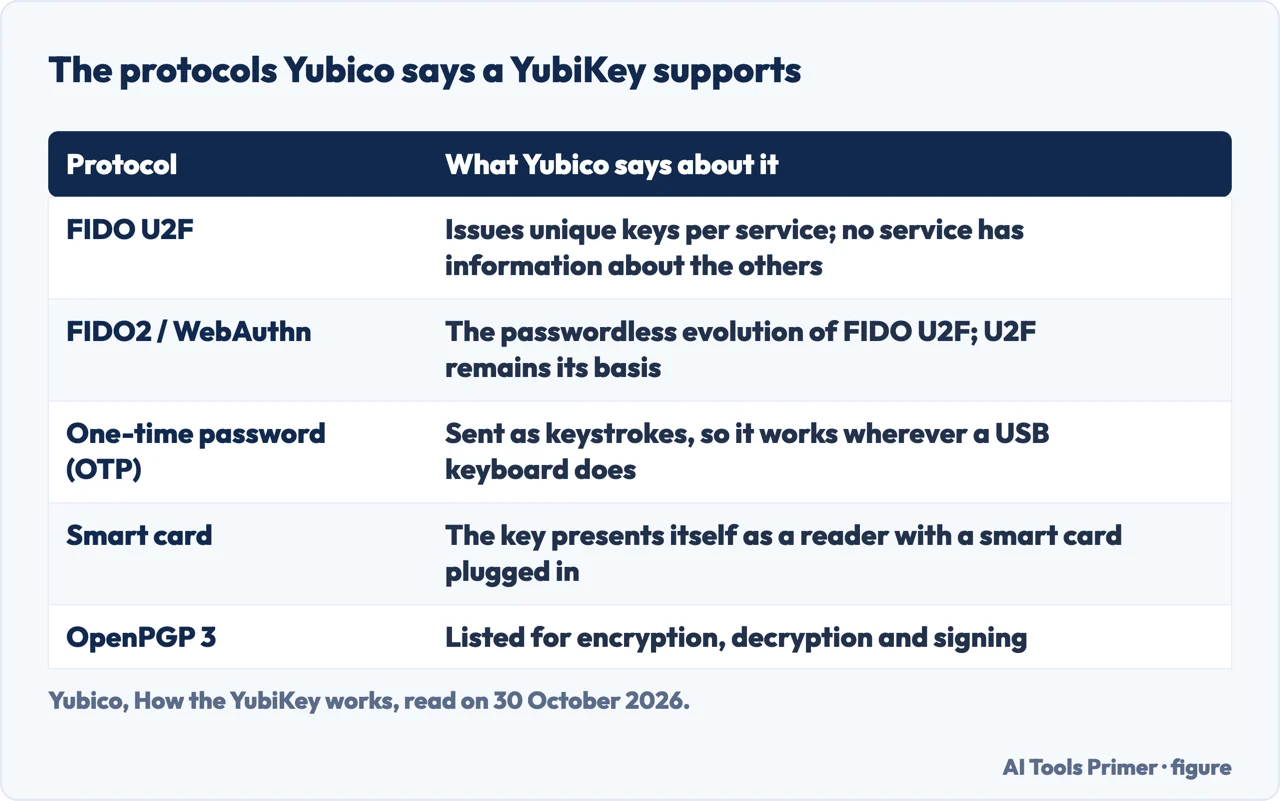
Yubico’s page on how the key works says the YubiKey needs no software installation and no battery: you plug it into a USB port and touch the button, or tap it over NFC. The same page lists what it supports: WebAuthn/FIDO2, FIDO U2F, one-time password (OTP), OpenPGP 3 and smart card authentication, a list that Yubico describes as a solution that bridges legacy and modern applications. Each of those does a different job, and a single key can carry several of them at once.
The older ones are easy to place. For OTP, Yubico says the key communicates through the HID keyboard interface and sends its output as a series of keystrokes, which is why it can work with any system that accepts input from a USB keyboard. For smart cards, it says the key identifies itself as a smart card reader with a card plugged in, and that three protocols can run together: PIV, defined by a NIST standard for authentication; OpenPGP, for encryption, decryption and signing; and OATH, for client apps such as Yubico Authenticator.
The two that matter most for signing in to a website come from the FIDO family. Yubico says FIDO U2F makes the authentication device the authentication provider: it issues unique keys to each service and makes sure no service has any information about the others. FIDO2 is, in Yubico’s words, the passwordless evolution of U2F; U2F remains its basis. The technical manual adds a compatibility note for keys with firmware older than 5.7.4: a key registered on a site that used U2F keeps working if the site later upgrades to FIDO2.
One detail concerns NFC. The 5.7 firmware page says new NFC keys with firmware 5.7 or later ship in a Restricted NFC mode, meant to stop tampering before the key leaves its packaging. In that mode the only thing a tap does is open a Yubico setup page; plugging the key into USB power for 3 seconds switches full NFC operation on.
What happens at registration and at sign-in
The FIDO Alliance describes both steps as public key cryptography. To register, you first sign in to the service with a method you already have, then approve the new credential with a fingerprint, face or PIN, or with an external hardware security key. The key creates a pair of keys that is unique to that account on that service. The private key stays on the key; the public key goes to the service. The Alliance adds that each service gets its own set of credentials, which protects you from cross-site tracking.
At sign-in the server sends a random challenge. You approve by interacting with the key, and the key signs the challenge with the matching private key. The server checks the signature against the public key it has on record and lets you in. Yubico’s FAQ gives the practical consequence: once a key is set up for an account, a person who gets hold of your login details still cannot get into the account without the YubiKey, and the key generates a unique cryptographic signature for each service you register it with.
The FIDO Alliance explains the phishing resistance by design. A passkey is only presented to the site it was registered with, so there is nothing to type into an attacker’s site. The service holds only the public key, not the equivalent of a password hash, and the Alliance says it is not computationally feasible to extract the private key from the public one. SuperTokens, which sells authentication software, describes the mechanism as origin binding: the browser passes the origin to the key, and the key rejects a request whose origin does not match the one it was registered with.
A security key differs from a synced passkey in one way the FIDO Alliance spells out. With a security key the passkey does not sync; the private key remains bound to that physical key, and to use it on a new device you plug the key in or tap it. Whatever you use to unlock it stays local too: the Alliance says biometric information never leaves the device, and the service receives only public keys and signatures.
Touch, PIN and fingerprint, and what a wrong PIN costs
Yubico’s FAQ says a YubiKey requires a physical touch or tap to authenticate. web.dev, in its guide for developers, gives that touch a name, user presence: a flag showing that someone interacted with the device. A second flag, user verification, goes further and asserts that the correct person was there, not just some person, by PIN or biometric. Both flags travel in the authenticator data, which is signed, so a server can treat them as genuine when the signature is valid. A site can ask for verification as “preferred” (the default), “required” or “discouraged”; web.dev notes, in a page last updated on 7 March 2024, that Google’s own sign-in used “preferred”.
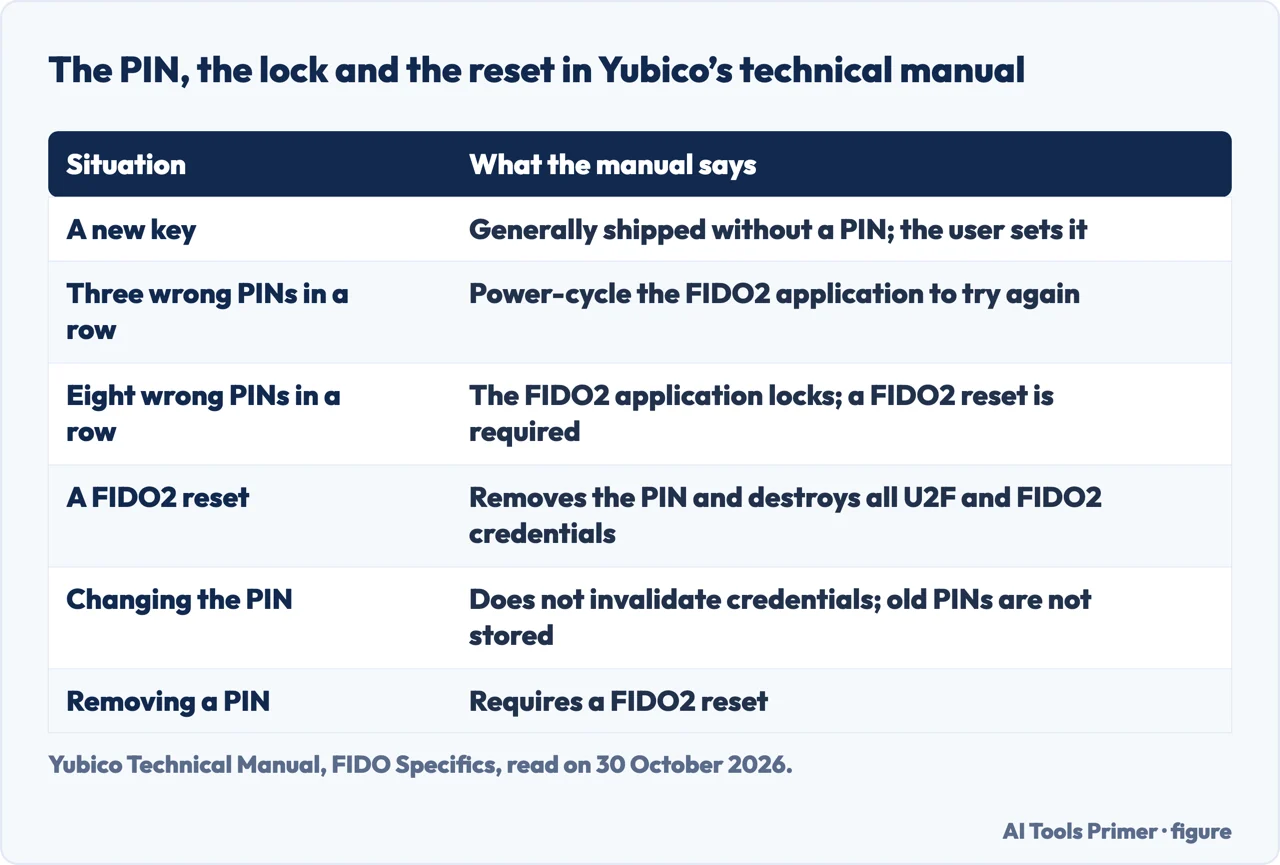
On a YubiKey the technical manual calls PIN and fingerprint templates user verification, and says they let one device provide two factors: something you have, the key, and something you know, the PIN, or on the YubiKey Bio a fingerprint. By default no PIN is set. Without one, the stored credentials can be used as strong single-factor authentication; with one, they become two-factor. The manual says the PIN is generally between 4 and 63 alphanumeric characters, with the minimum depending on firmware, FIPS models and PIN complexity. It also lists an “always require user verification” setting whose default differs by series: disabled on the YubiKey 5 Series and enabled on the Bio Series. It explains that people are often confused because the preferred and discouraged settings behave differently on macOS and Windows.
The manual states the limits plainly. After three wrong PINs in a row you have to power-cycle the FIDO2 application before trying again. After eight in a row the application locks, FIDO2 authentication stops working, and only a FIDO2 reset unlocks it. SuperTokens also gives the figure of eight. The manual says the PIN is not a password but local to the key, that there is no security benefit to changing it on a schedule, and that changing it does not invalidate any credential. Old PINs are not stored, so an older one will not be recognised if the current one is forgotten, and a PIN can be changed but only a reset can remove it.
The reset is the step to understand before you need it. Yubico says it removes the PIN but also destroys every U2F and FIDO2 credential on the key, discoverable or not, and that the key must then be registered again on every FIDO2 and U2F site. The manual says there is no way to recover the previous credentials or PIN. A FIDO U2F Security Key, the U2F-only model, cannot be reset at all. Before a reset, Yubico suggests logging in to each affected account, unregistering the key, and checking that you can still change the account’s two-factor settings without it. The manual says services listing only Yubico OTP or OATH-TOTP in the Works with YubiKey catalog should not be affected.
The manual lists where a reset can be done: Yubico Authenticator and the ykman tool on Windows, macOS and Linux, Chrome on macOS, Linux and ChromeOS, and the built-in Windows security key tools. It says Chrome on Windows does not offer it and that the iOS and Android versions of Yubico Authenticator do not reset the FIDO2 application or set a PIN. The manual also says no backdoors bypass user verification, which is why Yubico recommends registering at least two keys on each site. The tables below set the lock and the reset side by side.
How many passkeys fit, and why the pages give two numbers
A discoverable credential, formerly called a resident key, is one that contains the site and the account username. The manual says that lets you sign in with a tap and no typed username. If a site does not offer discoverable credentials, the manual says nothing is stored on the key. For keys with firmware 5.2.1 or later it describes viewing and deleting single credentials in Yubico Authenticator or in Chrome on macOS and Linux; a PIN is needed each time, and a deletion is permanent.
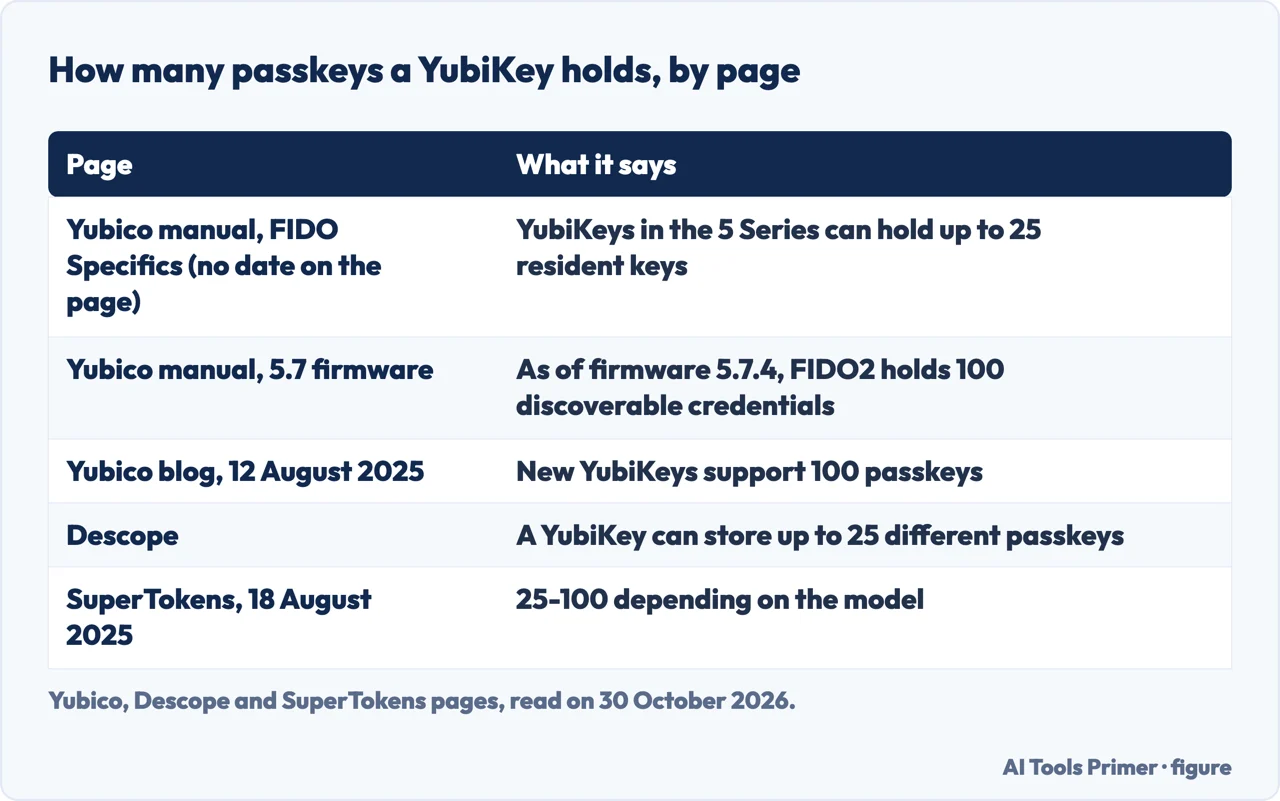
On how many fit, the pages disagree. The FIDO page of the technical manual says YubiKeys in the 5 Series can hold up to 25 resident keys. The 5.7 firmware page says that as of firmware 5.7.4 the FIDO2 application holds 100 discoverable credentials and OATH holds 64 seeds, with limits that apply per application. Yubico’s FAQ, dated 12 August 2025, says new YubiKeys support 100 passkeys. Descope, which sells authentication software, writes that a YubiKey stores up to 25 and that Yubico intends to expand this, and SuperTokens gives a range of 25 to 100 depending on the model. SuperTokens also limits OATH to 32 slots, where the 5.7 page lists 64 OATH credentials.
The 5.7 page ties the 100 to firmware 5.7.4, but the pages we read do not say which number applies to a particular key or how to find its firmware version. The figure below sets the pages next to each other. The same 5.7 page adds one more fact: as of firmware 5.7.4 all keys with firmware 5.7 and later have achieved FIDO Level 2 certification, which the manual ties to e-government use cases and corporate compliance mandates.
The one-time password, and how the key compares
The code a YubiKey types is not the six digits of an authenticator app. SuperTokens describes the Yubico OTP as a 44-character string holding an encrypted counter, timer and random values, which the server decrypts through Yubico’s API or its own implementation. Descope says the seeds behind the codes are protected by AES-128 and that the service validates a code with Yubico’s validation servers or, in an enterprise setup, its own. NordPass, a password manager company, says the key was first built to produce these 44-character codes, that WebAuthn is now the preferred method, and that pressing the button fills the code in so you do not type 44 characters.
Against text messages, NordPass names phone spoofing (callers posing as a legitimate service who ask for the SMS code) and SMS swapping (calling the victim’s phone provider pretending to be the victim), and says the key is an offline device that needs no network. Our page on codes by text message covers that method on its own. For authenticator apps, SuperTokens says a new code appears every 30 seconds and the server accepts a code within a window to allow for clock drift; our page on authenticator apps explains the secret and the clock behind it. Yubico’s FAQ, which is Yubico’s own view, says the key ranks highest on the authentication scale of trust.
Against passkeys, NordPass says both fall under FIDO2 and that the difference is where they live: a passkey can be synced by a password manager, while, in NordPass’s words, YubiKey codes cannot be replicated or transferred to a different device. The FIDO Alliance says the same about the private key on a security key. Our page on passkeys covers the synced kind. The difference between a second factor and a second step is on the page about two-factor and two-step.
Losing the key: the spare, the recovery and the price
Yubico’s FAQ compares the spare to a spare car or house key and recommends registering a backup with your accounts when you first set up the primary one. If you lose the primary key, you use the backup or your recovery method to get back in and then remove the lost key from the account’s settings. The technical manual gives the reason for two keys on each site: there is no backdoor around the PIN or fingerprint. Our page on backup codes covers one such method.
NordPass notes that a key is easy to lose because of its size. It adds that the key does not act as a storage device and that a thief who does not know your password cannot break into the account. For its own accounts, NordPass says that if you lose the key you can switch your preferred method to an authenticator app. Those are NordPass’s statements about its own accounts.
On price, Yubico’s FAQ, published in August 2025, says its Security Key Series starts at $29, and SuperTokens, published the same month, estimates roughly $50 per key. We did not check a store, so read both as the pages gave them. Yubico says the key works with hundreds of services including Google, Apple, Microsoft, Facebook, X and many password managers, and points to a Works with YubiKey catalog that we did not open.
Where to start
Four ways in.
- “What does it do when I sign in?”
- What happens at registration and at sign-in — signin
- “What if I get the PIN wrong?”
- Touch, PIN and fingerprint, and what a wrong PIN costs — pin
- “How many accounts fit on one?”
- How many passkeys fit, and why the pages give two numbers — count
- “What if I lose it?”
- Losing the key: the spare, the recovery and the price — lost
The same sign-in, another way
Passkeys, apps and text messages.
Around the second factor
Recovery, vocabulary and switching it off.
Questions people also ask
What is a yubikey, simplified?
Yubico describes a key with no battery and no software to install: plug it into USB and touch it, or tap it over NFC. At sign-in it signs a random challenge from the site with a private key that stays on the key, and the site checks the signature with the public key registered earlier.
What are the disadvantages of YubiKey?
NordPass says the key is easy to lose because of its size. Yubico says a FIDO2 reset destroys every U2F and FIDO2 credential, and eight wrong PINs lock FIDO2 until that reset. Passkey capacity is 25 on one Yubico page and 100 on others, and SuperTokens limits OATH codes to 32 slots (Yubico’s 5.7 page lists 64).
Can I leave my YubiKey plugged in all the time?
The pages we read do not say whether you can leave it plugged in. Yubico’s FAQ says a YubiKey requires a touch or tap to authenticate, and SuperTokens says each touch approves one operation. The FAQ also says some verified apps do not ask for the key at every sign-in, which is about how often you are asked.
Are YubiKeys actually secure?
Yubico says a device-bound passkey like a YubiKey offers the highest level of protection; that is Yubico’s own claim. The FIDO Alliance explains the design: the credential goes only to the site it was registered with, and the site holds a public key, not a password hash. The manual adds that no backdoor bypasses a PIN or fingerprint.
Not covered here. We did not use a YubiKey for this page. The statements come from two Yubico pages, two pages of the Yubico Technical Manual, the FIDO Alliance, web.dev, NordPass, Descope and SuperTokens, all read on 30 October 2026.
Yubico’s own page says users have experienced “0 account takeovers”; we did not verify that claim and did not use it. We did not use the W3C WebAuthn page, which came back as an almost empty shell, the OLOID page or the Reddit thread that Google listed.
The search volume and difficulty behind this page come from a Semrush reading of 29 August 2026, older than the 60 days the site normally allows.
Sources
- Yubico — How the YubiKey works — www.yubico.com, read 30 October 2026.
- Yubico — Your top YubiKey questions, answered — www.yubico.com, read 30 October 2026.
- Yubico Technical Manual — FIDO Specifics — docs.yubico.com, read 30 October 2026.
- Yubico Technical Manual — 5.7 - 5.6 Firmware Specifics — docs.yubico.com, read 30 October 2026.
- FIDO Alliance — How Passkeys Work — fidoalliance.org, read 30 October 2026.
- web.dev — userVerification deep dive — web.dev, read 30 October 2026.
- NordPass — What is a YubiKey and do you need one? — nordpass.com, read 30 October 2026.
- Descope — What Is YubiKey Authentication & How It Works — www.descope.com, read 30 October 2026.
- SuperTokens — What Is a YubiKey and When to Use It vs. Authenticator Apps — supertokens.com, read 30 October 2026.
Written by Alberto Gulotta
Founder and editor of AI Tools Primer, writing from Palermo, Italy. Thirty-five years of taking computers apart, starting with a Commodore 64 — the long version is on the about page.
Something wrong on this page? Write to aitoolsprimer@gmail.com and it gets fixed.
Written on 30 October 2026.
Independence and limits
No affiliate links and no paid placements anywhere on this site. Nobody pays to appear here, and no company has seen this page before you did.
This is general information, not professional advice. Where a page touches money, health, safety or the law, it names its source and the date it was read — and your situation may still differ. See the privacy page and the cookie policy.