Asking how to clear cache on iphone assumes the phone has a cache you can clear, the way a computer has a folder you can empty. It does not. Apple documents exactly one cache with a control attached to it — Safari’s — and it documents two different ways to clear that one, which cost you different things.
So the honest form of the question is narrower than the one people type: what they can do is clear safari cache, and everything else on offer is a different operation wearing the same word. This explains why so many guides promise six ways, or nine. There are two, they are both below, and the rest of any such list is padding: the same Safari route described twice, or offloading apps described as though it were a cache clear, or a cleaner app that cannot do what its name implies because iOS does not let any app reach inside another one.
Clear History and Website DataSettings › Apps › Safari
The one everybody means. It takes a timeframe — you are not forced to erase everything —
and it removes history, recent searches, cookies and cached files together.
It also removes “the cookies and permissions you granted to websites to use your location or
send you notifications”, so sites you had allowed will ask again.
Apple adds one reassurance: “This doesn’t change your AutoFill information.”
Costs you: your history
Remove All Website DataSettings › Apps › Safari › Advanced › Website Data
The route buried four levels down, and the one that matches what the question is asking: it clears
the cache and cookies and leaves your history alone.
Apple is exact about what goes: “This clears data that’s used for tracking and by websites to save login information for faster browsing.”
Read that second half as the warning it is — you will be signed out of things.
Costs you: your sign-ins
The second of those is the more useful discovery and the reason this guide is worth reading rather than skimming. This question is rarely a wish to lose your history — it is usually a wish for a site to stop misbehaving, or a page to stop showing them something stale. That is a cache and cookie problem, not a history problem, and Apple provides a control that does precisely the narrow thing. It is three levels down in Settings and no listicle points at it.
A middle option exists too, for the case where one site is the problem and the rest are fine. In Safari, open Bookmarks, go to History, tap the More button, then Select Websites, choose the offenders, and delete them. Precision beats demolition, and it is the same three taps.
And if you keep separate Safari profiles, the clearing screen asks which one. You can clear a single profile or All Profiles — worth noticing before assuming the work did not happen because the other profile still remembers everything.
If the button is grey and will not tap, that is documented too, and the second cause is not one the screen hints at. Apple: “If this button is gray, there is either no data to clear, or you
might need to check your web content restrictions in Screen Time.” On a phone set up for a
child, or one that had restrictions switched on years ago and forgotten, the control is disabled
rather than broken.
Now the harder half, which is what this operation does not achieve. It is worth being blunt, because the gap between what the phrase “clear the cache” promises and what the command delivers is where the cleaner-app industry lives.
What clearing it does not do
It does not make you private. Apple: “Clearing your browsing history in Safari doesn’t clear
any browsing histories kept independently by websites you visited, or your browsing history in
other apps.” The record at the other end is untouched.
It does not touch other apps. Safari’s cache is Safari’s. Nothing in Settings clears the cache
of an app you installed. Apple documents a control for Safari and none for anything else.
It does not free up much space, usually. Website data is small next to photographs and videos.
If storage is the problem, the guide on that is a better use of ten minutes.
It does not speed up a slow phone. That is a different diagnosis with different causes, and
“clear your cache” has been the folk answer to it for twenty years without becoming true.
That first point deserves restating in plain terms, because it is the one that matters and the one that is quietly implied away. Clearing your history removes your copy of the record. It does not remove anybody else’s. The websites, the network, and the accounts you were signed in to all kept their own, and no button in Settings reaches them.
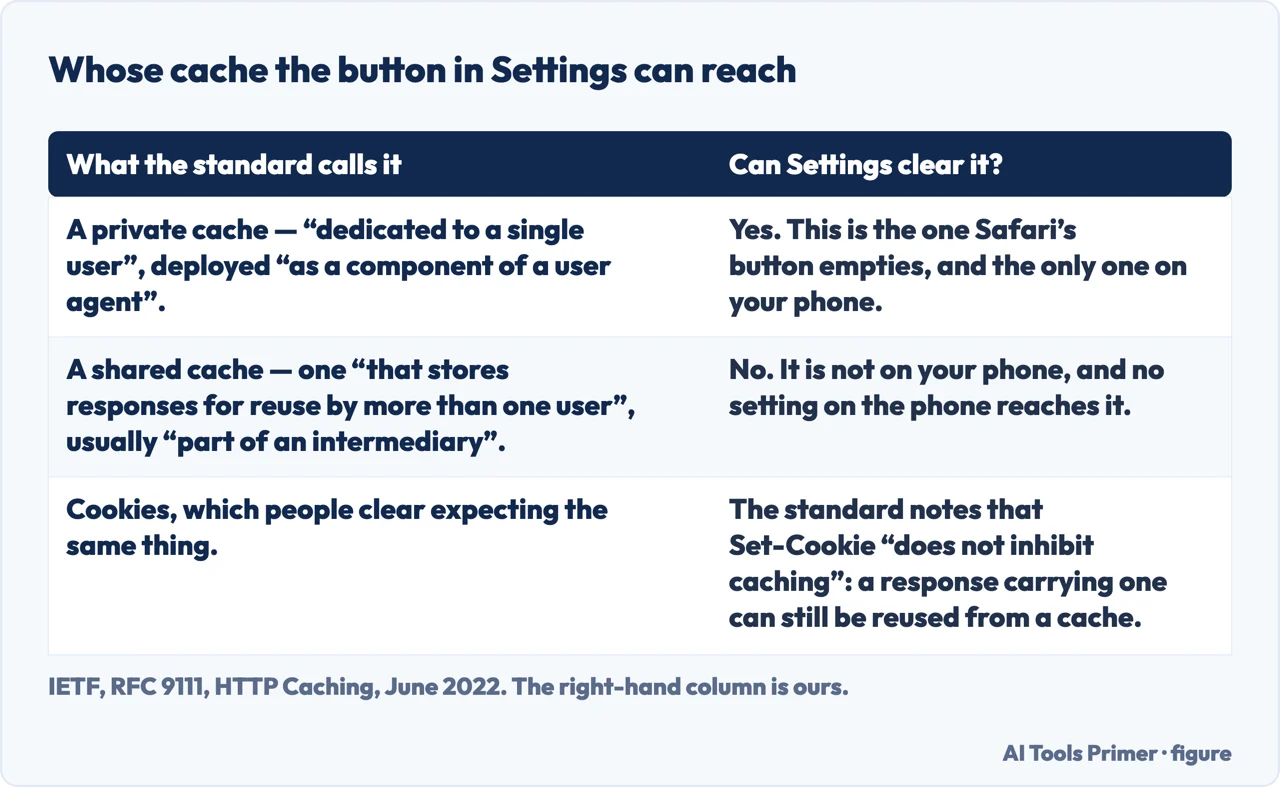
The standard that defines what a cache is says the same thing in colder words, and it is worth having because it names the thing the button cannot reach. RFC 9111 separates a private cache, “dedicated to a single user” and often deployed “as a component of a user agent”, from a shared cache — one “that stores responses for reuse by more than one user”, “usually (but not always) deployed as a part of an intermediary”. Safari’s button empties the first. The second is not on your phone, and no setting on your phone reaches it. The same document adds a detail that explains a common surprise about cookies: the Set-Cookie header “does not inhibit caching”, so a response carrying one “can be (and often is) used to satisfy subsequent requests to caches”.
Quotations from RFC 9111. The right-hand column is ours. Figure drawn by AI Tools Primer.
The related search — how to clear app cache on iphone — runs into the same wall from the other side. There is no per-app cache control on iOS: Apple documents one for Safari and none for anything else. What exists instead is offloading — removing the app while keeping its documents and data — and that lives in the storage screen rather than here. It is a real and useful tool, it is simply not a cache clear, and calling it one is how the six-ways lists reach six.
One honest note to finish, about cookies. There is a Block All Cookies switch in the same Advanced screen, and it is tempting. Apple states what it does: it removes all existing cookies and website data, Safari quits and reloads your tabs, and afterwards “you will likely not be able to sign in to a site, even when using your correct username and password.” That is not a bug being reported. That is the setting working.
The guides below take it in four parts: the Safari routes in detail, what the words actually mean, the apps question, and the cleaner software that is sold to answer all of it.
Two controls in two places, doing overlapping but different jobs. These guides cover which to use, what each costs, and the reasons a button refuses to work.
Cache, cookies, history and website data are four different things that get used as synonyms. Telling them apart is most of the answer to why a clear did not do what you hoped.
The other half of this question, where iOS simply does not offer what is being asked for — and what it offers instead, which is genuinely useful under a different name.
An entire category of software sold against this question. The guides here are about what those apps can actually reach on a phone, which is less than the marketing suggests.
Not covered here. It will not list six ways. There are two, plus a precise third for a single site, and inventing more would mean describing the same screen twice.
It will not recommend a cleaner app. On iOS no app can reach inside another one, which is the whole point of the design and the reason this category cannot do what it implies.
And it will not tell you that clearing your cache makes you private, or makes your phone faster. Apple documents what it removes, and it is your copy of the record and nothing else. What holds instead is simple: every route, warning and grey-button cause on this page is quoted from Apple’s own support pages and iPhone User Guide, listed below.
Sources
Apple Support — Delete your Safari history, cache, and cookies on iPhone (both routes, the AutoFill note, the grey button and Screen Time, the single-site deletion and what Block All Cookies breaks) — support.apple.com, read 16 September 2026.
Apple — iPhone User Guide, Clear your cache and cookies on iPhone (the timeframe choice, the permissions that are reset, Safari profiles, and the statement that clearing does not touch histories kept by the websites themselves) — support.apple.com, read 22 August 2026.
IETF — RFC 9111, HTTP Caching, June 2022, section 1 and section 7.3, for the distinction between a private cache dedicated to a single user and often deployed inside a user agent and a shared cache storing responses for reuse by more than one user and usually deployed as part of an intermediary, and for the note that the Set-Cookie header does not inhibit caching, so a response carrying one can still be reused from a cache — www.rfc-editor.org, read 6 September 2026.
AG
Written by Alberto Gulotta
Founder and editor of AI Tools Primer, writing from Palermo, Italy. Thirty-five years of
taking computers apart, starting with a Commodore 64 — the long version is on the
about page.
Written on 22 August 2026 · last checked 16 September 2026.
§
Independence and limits
No affiliate links and no paid placements anywhere on this site. Nobody pays to appear here,
and no company has seen this page before you did.
This is general information, not professional advice. Where a page touches money, health,
safety or the law, it names its source and the date it was read — and your situation may
still differ. See the privacy page and the
cookie policy.