
Software · guide
How to FaceTime on Android: join with a link from an Apple device
By Alberto Gulotta · Updated · 8 min read
How to FaceTime on Android means joining a call, not starting one: an iPhone, iPad or Mac user creates a FaceTime link, and you open it in the latest Chrome or Edge, enter your name and wait to be let in. This page sets out the steps, what the browser lacks and where the guides differ from Apple.
| Question | Answer | Where it comes from |
|---|---|---|
| Can an Android phone join a FaceTime call? | Yes, from a web browser, through a FaceTime link | Apple Support |
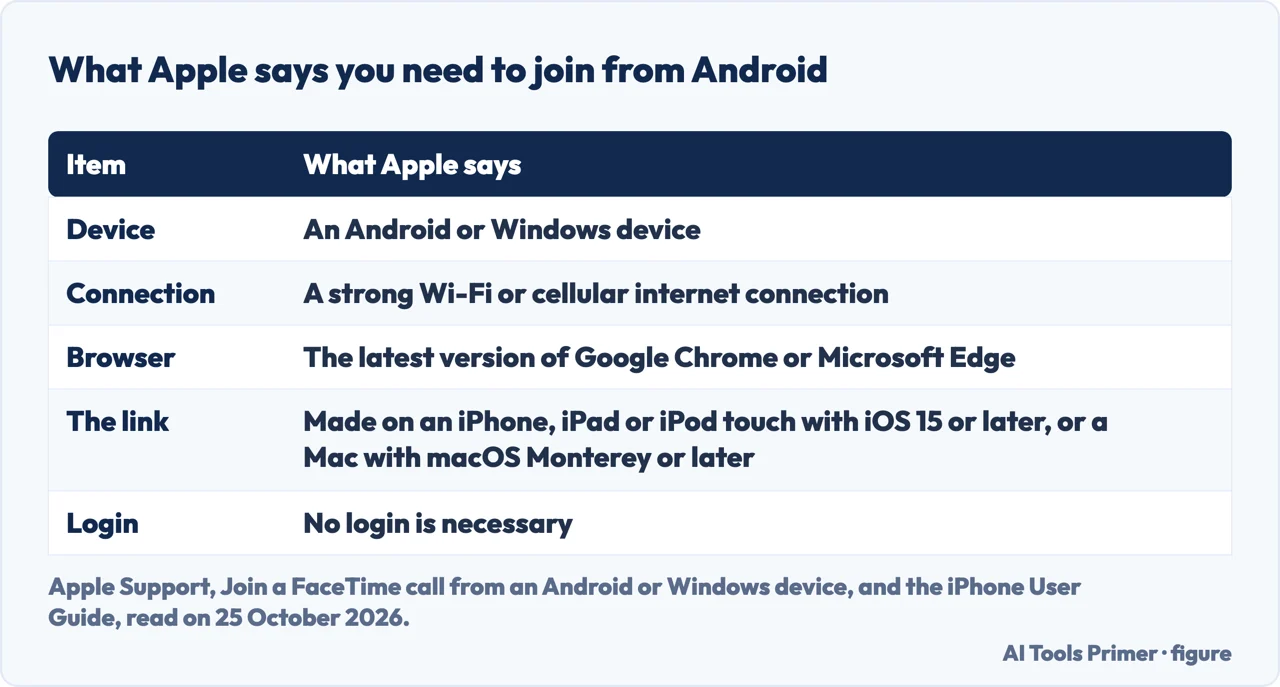
| What does it need? | A strong Wi-Fi or cellular connection and the latest Google Chrome or Microsoft Edge | Apple Support |
| Who can create the link? | Someone with an iPhone, iPad or iPod touch on iOS 15 or later, or a Mac on macOS Monterey or later | Apple Support |
| Is a login needed? | No login is necessary | Apple Support |
| What is missing in the browser? | SharePlay and screen sharing | Apple Support |
| Can the Android phone start the call? | The guides say it cannot, and that there is no FaceTime app to download | Engadget, CNET, ZDNet, WhistleOut |
Joining: Apple’s steps
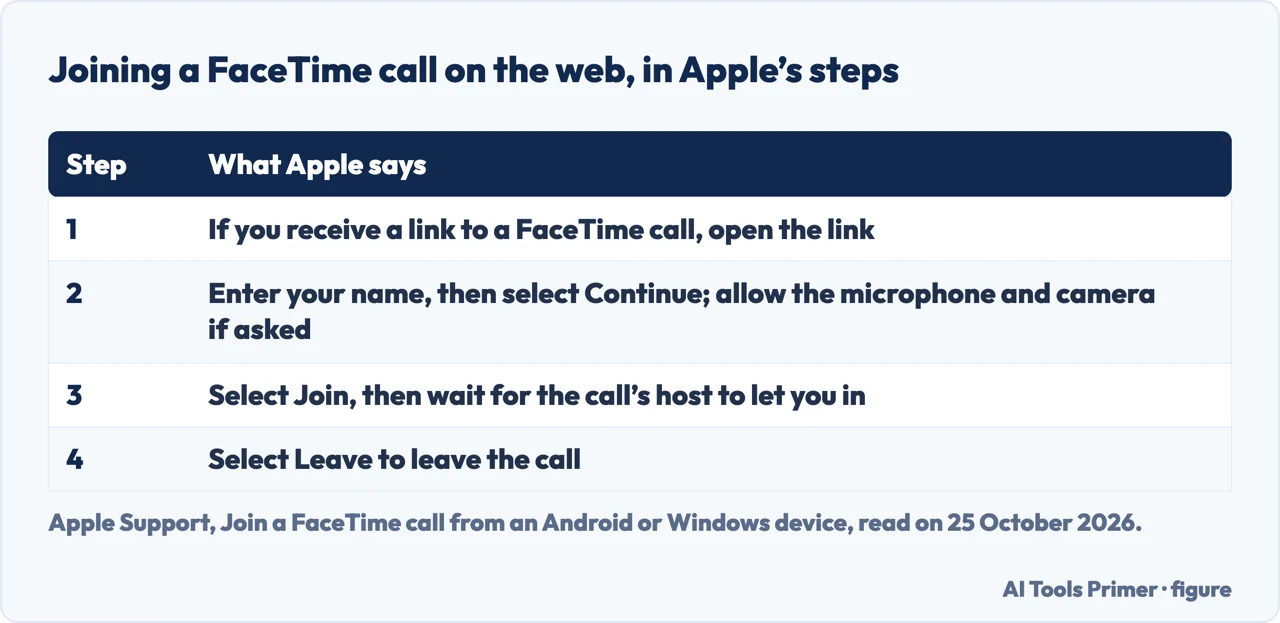
Apple’s support article, published on 29 May 2026, says that with FaceTime links in iOS 15, macOS Monterey and later, anyone can join a FaceTime call from their web browser. The steps are four. If you receive a link to a FaceTime call, open it. Enter your name, then select Continue; you might need to allow FaceTime to use your microphone and camera. Select Join, then wait for the call’s host to let you in. Select Leave to leave the call. Apple’s page asks for a strong Wi-Fi or cellular connection and the latest version of Google Chrome or Microsoft Edge. ZDNet describes the host side as being prompted to accept or decline the entry request, much like hosting a Zoom meeting.
Once you are in, Apple lists what the web version offers: a Microphone button to mute, a Camera button, a Full Screen button where it appears, a Flip Camera button to switch between the front and rear cameras where it appears, and a Grid Layout button in the Participant List and Settings menu for group calls. The More button copies or shares the link. That is the whole answer to how to FaceTime on Android: there is no Android app to install, and the browser does it.
The other end: making the link
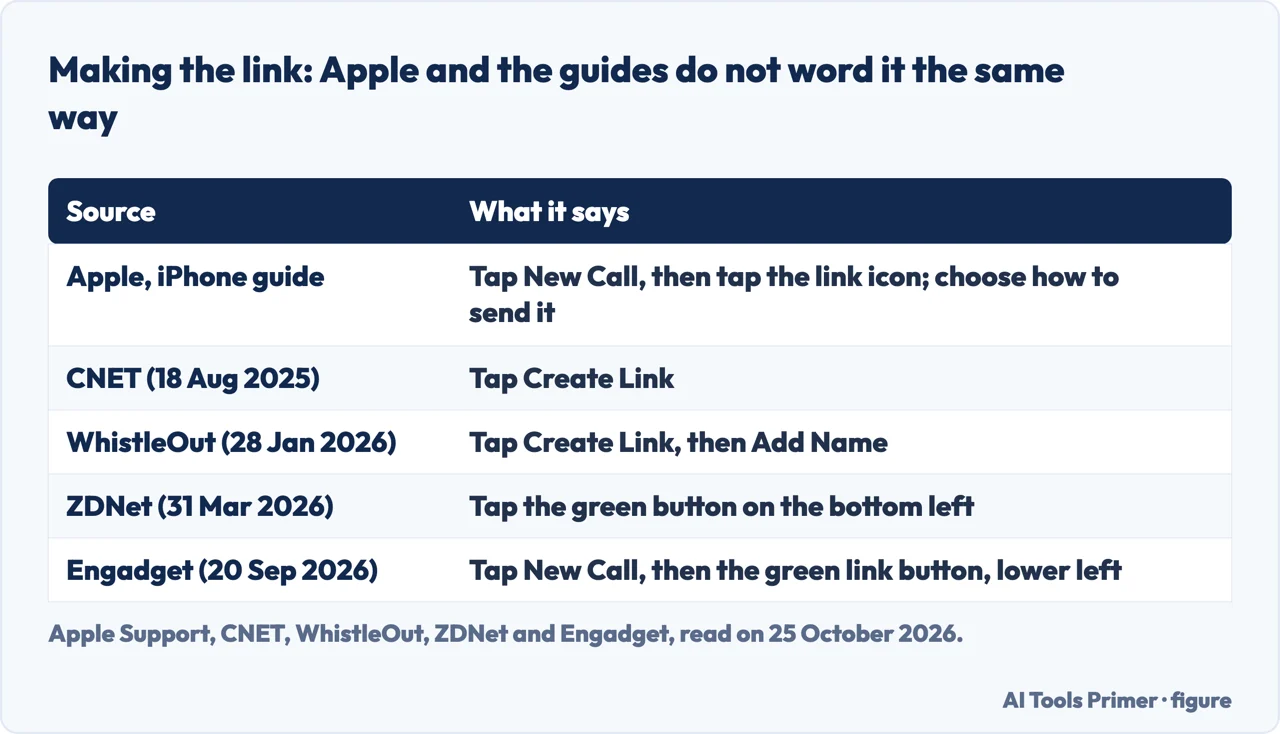
The link has to come from an Apple device. Apple’s iPhone guide says to go to the FaceTime app, tap New Call, then tap the link icon, and choose how to send it, such as Messages or Mail. On a Mac the guide says to click New Call, then the link icon; during a call, click the call information at the top of the window and then Share Link. Apple adds that in Calendar you can schedule a remote video meeting by inserting a FaceTime link as the location. Apple’s iPhone guide also says the guest needs a browser that supports WebRTC, such as the latest Chrome or Edge, and that sending video requires H.264 video encoding support.
The guides do not word the button the same way. CNET, in an article dated 18 August 2025, says to tap Create Link. WhistleOut, updated on 28 January 2026, says to tap Create Link, then Add Name to give the link a name, and tells the Android user to ask the friend to start it. ZDNet, dated 31 March 2026, says to tap the green button on the bottom left, and Engadget, dated 20 September 2026, says to tap New Call and then the green link button in the lower-left corner. Apple’s page shows an icon and does not name the button, and a WhistleOut image caption places the Create Link option in iOS 18.
What the browser does not do
Apple says SharePlay and screen sharing aren’t available in FaceTime on the web. Engadget says the same and adds that it does not work quite as seamlessly as on an Apple device. Apple also says FaceTime links aren’t supported in China mainland and that creating a link isn’t supported on iPhone models purchased there. The four guides we read do not mention the H.264 requirement or the China limit. All four say the Android side cannot start a call: CNET says Android and PC users can’t start a FaceTime call on their own, and ZDNet says they can’t download the FaceTime app. WhistleOut says there is no native FaceTime app for Android.
Calls between Android and iPhone without FaceTime
Engadget says there are plenty of other cross-platform options for video calls, naming WhatsApp, Telegram, Zoom and Google Meet, and that most are easy to set up, with a native app usually better than relying on a web browser. It adds that if FaceTime is your only option, you can use it on Android through a link. The pages we read describe no single Android equivalent of FaceTime. For turning on messages between an iPhone and other phones, see enabling iMessage.
Where to start
Four ways in.
- “Just the steps.”
- Joining — steps
- “Who makes the link?”
- The other end — link
- “What won’t work?”
- The limits — limits
- “Something else?”
- Other apps — others
Apple features and Android pages
iMessage and more Android pages.
Questions people also ask
Can you receive a FaceTime call on an Android phone?
You can join one: an Apple user sends a FaceTime link, you open it in Chrome or Edge, and the host lets you in. Apple does not describe an Android app.
How do I video call between Android and iPhone?
With a FaceTime link from the iPhone, as Apple describes, or with a cross-platform app such as WhatsApp, Telegram, Zoom or Google Meet, which Engadget names.
How to video call on Android?
For FaceTime, open the link in the latest Chrome or Edge, enter your name, select Continue and then Join. Other video call apps are outside what the pages we read cover.
Is there an Android equivalent to FaceTime?
Engadget points to several cross-platform apps rather than one equivalent, and WhistleOut says there is no native FaceTime app for Android.
Not covered here. We did not make a FaceTime call. The statements come from Apple Support (the article on joining a call from an Android or Windows device, published 29 May 2026, the iPhone User Guide and the FaceTime guide for Mac) and from guides by WhistleOut (updated 28 January 2026), CNET (18 August 2025), ZDNet (31 March 2026) and Engadget (20 September 2026), used for what they claim. Menus and button names can differ between versions.
The Reddit thread and the video in the results were not used. Group calls, Windows PCs and calendar invitations are covered only as far as the pages above say.
The search volume and difficulty behind this page were read in Semrush on 29 August 2026.
Sources
- Apple Support — Join a FaceTime call from an Android or Windows device (published 29 May 2026) — support.apple.com, read 25 October 2026.
- Apple Support — Create a link to a FaceTime call on iPhone — support.apple.com, read 25 October 2026.
- Apple Support — Start or join a call from a FaceTime link (Mac) — support.apple.com, read 25 October 2026.
- WhistleOut — Androids Can Join FaceTime Calls, Here’s How (updated 28 January 2026) — www.whistleout.com, read 25 October 2026.
- CNET — Apple FaceTime Calls on an Android or PC (18 August 2025) — www.cnet.com, read 25 October 2026.
- ZDNet — How to FaceTime on Android (31 March 2026) — www.zdnet.com, read 25 October 2026.
- Engadget — How To Join A FaceTime Call With Your Android Phone Or Windows PC (20 September 2026) — www.engadget.com, read 25 October 2026.
Written by Alberto Gulotta
Founder and editor of AI Tools Primer, writing from Palermo, Italy. Thirty-five years of taking computers apart, starting with a Commodore 64 — the long version is on the about page.
Something wrong on this page? Write to aitoolsprimer@gmail.com and it gets fixed.
Written on 25 October 2026.
Independence and limits
No affiliate links and no paid placements anywhere on this site. Nobody pays to appear here, and no company has seen this page before you did.
This is general information, not professional advice. Where a page touches money, health, safety or the law, it names its source and the date it was read — and your situation may still differ. See the privacy page and the cookie policy.