
Software · guide
Clipboard on Android: where it lives and what it keeps
By Alberto Gulotta · Updated · 9 min read
Clipboard on Android is not an app: it is a panel in your keyboard. Google’s Gboard Help says to tap Clipboard at the top of the keyboard and pin what you want to keep, because the history clears shortly after you last use it. This page sets out Gboard, Samsung and what Android 13 shows.
| Question | Answer | Where it comes from |
|---|---|---|
| Where is the clipboard? | In the keyboard: with Gboard, tap Clipboard at the top of the keyboard | Gboard Help |
| Is it an app? | No: it is a temporary holding space for what you copy | Honor, 24 July 2026 |
| How long does it keep things? | Gboard clears the history shortly after you last use it, except pinned text | Gboard Help |
| How do I keep an item? | Touch and hold it in the clipboard and tap Pin | Gboard Help |
| What does Android show when I copy? | From Android 13, a default confirmation from the system | developer.android.com |
Where it is: in the keyboard
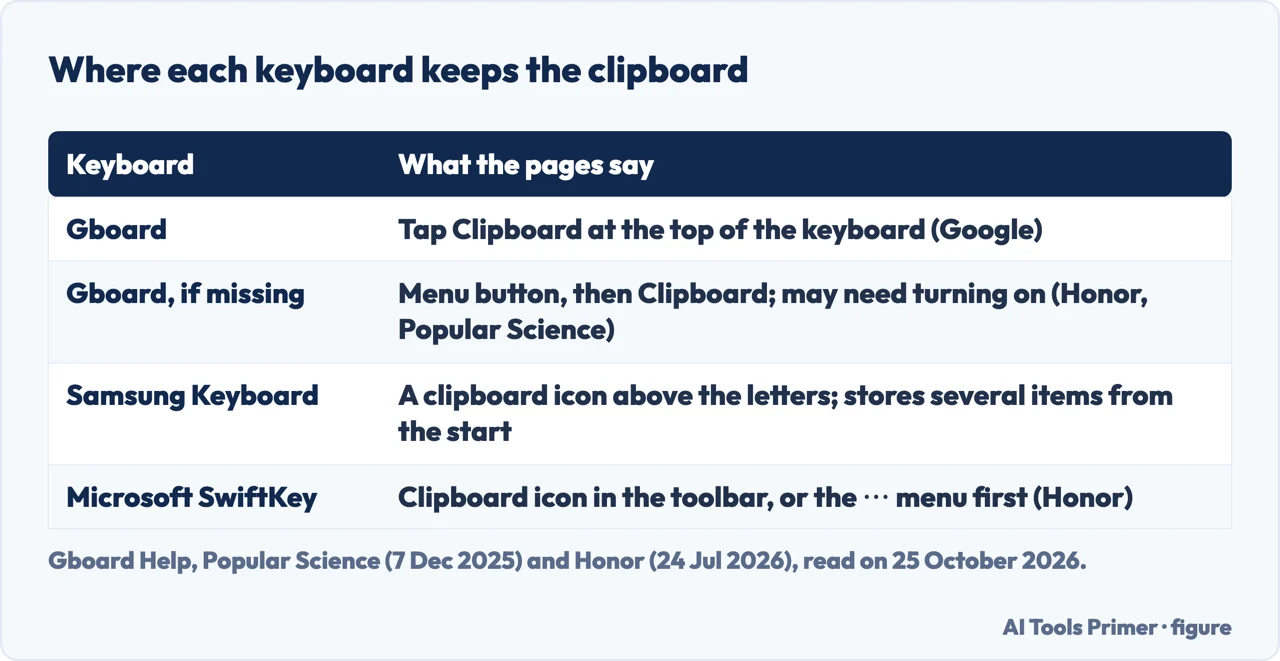
Honor’s guide, dated 24 July 2026, says the clipboard is not an app you open but a temporary holding space for things you copy, such as text, links and images. For the last thing you copied, the basics apply: press and hold on text to highlight it, tap Copy, then press and hold in a text field in another app and tap Paste. For something you copied earlier, it points to the keyboard’s clipboard panel. With Gboard, Google’s keyboard, you tap in a text field and then tap the clipboard icon in the top bar; if you do not see it, you tap the menu button and select Clipboard, and you may need to turn it on the first time.
Popular Science, in an article of 7 December 2025, says the features depend on the keyboard you have installed. On a Pixel it is Gboard, where you tap the clipboard icon and then the toggle or Turn on clipboard to get the full set of features. On a Samsung Galaxy the default is Samsung Keyboard, which has a clipboard icon of its own above the rows of letters, with no need to enable it, and which stores multiple items from the start. Honor adds Microsoft SwiftKey, with its clipboard icon in the toolbar and sometimes behind a menu. These Samsung and SwiftKey details come from articles, not from a Samsung or Microsoft page that we read.
How long it keeps what you copy
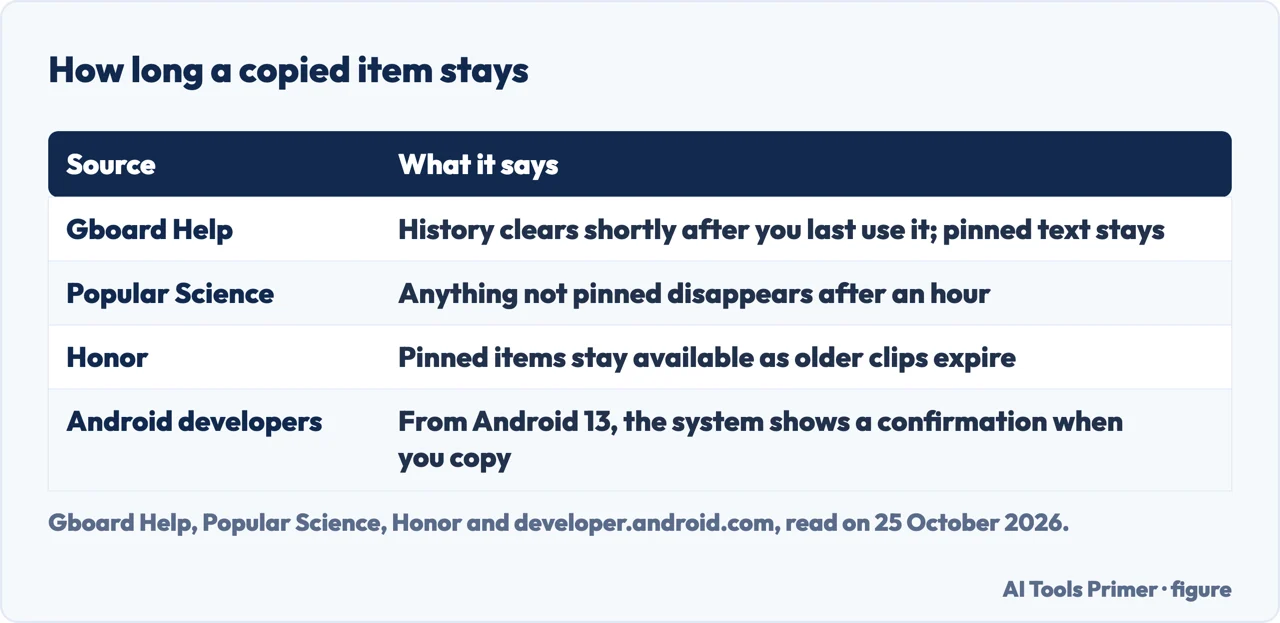
Google’s Gboard Help says that the clipboard clears your history shortly after you last use it, and that this does not apply to pinned text. Popular Science puts a number on it: anything that is not pinned disappears from the clipboard after an hour. Honor says that pinned items stay available even as older clips expire. The Google page gives no time; the hour is Popular Science’s statement.
Android’s developer documentation adds a point about what you see when you copy: because users expect feedback when copying to the clipboard, Android shows a default UI when copying on Android 13 (API level 33) and higher. Popular Science describes the same thing as a small preview in the lower left corner as soon as you copy or cut, with a share button to its right for pasting the text, link or image straight into another app. The same documentation has a section on adding sensitive content to the clipboard, which we did not read in full, so we say nothing about how to hide a password you copy.
Pinning, and pasting part of a text
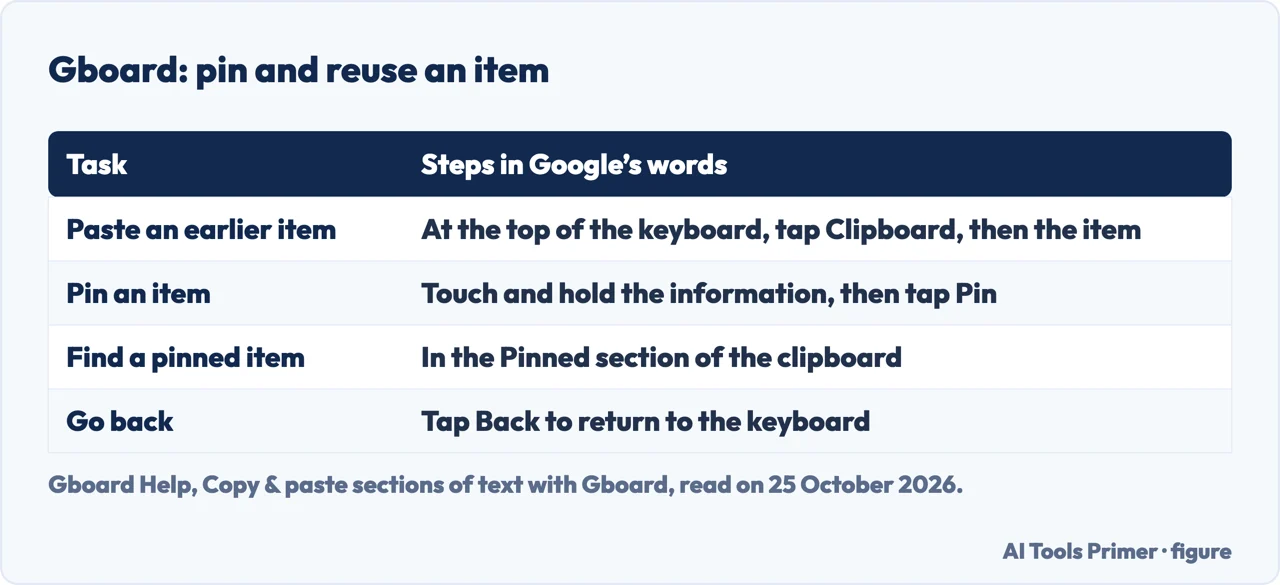
Gboard Help describes three jobs. To paste something you copied earlier, you tap Clipboard at the top of the keyboard and then the information you want, and tap Back to return to the keyboard. To save an item, you touch and hold it in the clipboard and tap Pin; it is then found in the Pinned section of the clipboard. And if you copy a block of text that includes an email, a URL, a phone number, a number, an address, a date or a time, you can choose which part to paste from the strip at the top of the keyboard. Google says that addresses, dates and times are available only in certain countries, regions and languages, and that dates are pasted only if written in numbers, such as 3/12/2021, not as March 12, 2021.
Popular Science adds that in Gboard you tap and hold an item to paste, delete or pin it, and that the clipboard settings are under the four dots at the top left of Gboard, then Settings, then Clipboard, where the toggles include showing recent clipboard items in the suggestions bar. Honor names the same path, Gboard Settings, Clipboard. For the same job on a computer, see how to copy and paste and copy and paste on a Mac.
The questions people ask
The people-also-ask box asks where things saved to the clipboard are, how to open it, where a copy goes when the phone says “copied to clipboard”, and what copying means on an Android phone. On the pages we read the answers are the same: the item goes to a temporary holding space that the system keeps, you reach the history through the keyboard, and what you do not pin does not last. For the other Android jobs the site covers, see screen capture on Android and the application tray.
Where to start
Four ways in.
- “Where is it?”
- In the keyboard — where
- “It disappeared.”
- How long it keeps — how long
- “I want to keep one.”
- Pinning — pin
- “What does it mean?”
- The questions — questions
Copying, pasting and Android
The same job on other devices, and other Android jobs.
Questions people also ask
How do I find things saved to my clipboard?
With Gboard, tap in a text field, then tap Clipboard at the top of the keyboard. Pinned items are in the Pinned section. Honor says you may need to tap the menu button first and turn the clipboard on.
How do I open my clipboard?
Through the keyboard: Gboard has a Clipboard button at the top, and Samsung Keyboard has a clipboard icon above the letters, according to Popular Science. There is no clipboard app, says Honor.
When it says copied to clipboard, where does it go?
To a temporary holding space that the system keeps for what you copy. Gboard clears its history shortly after you last use it, except pinned text.
What does copy to clipboard mean on an Android phone?
It means the text, link or image is held temporarily so you can paste it into another place. From Android 13 the system shows a default confirmation when you copy.
Not covered here. We did not test the clipboard on a phone. The statements come from Google’s Gboard Help, Android’s developer documentation on copy and paste, an article by Popular Science (7 December 2025) and a guide by Honor (24 July 2026), read on 25 October 2026. Menus and keyboards differ between phones and change with updates.
The Android Central forum guide, the Google Play listing and a second Honor page in the results were not cited. Samsung Keyboard and Microsoft SwiftKey are described only by the articles. Apps that manage the clipboard and Android Auto are not covered here.
The search volume and difficulty behind this page were read in Semrush on 29 August 2026.
Sources
- Gboard Help — Copy & paste sections of text with Gboard — support.google.com, read 25 October 2026.
- Android Developers — Copy and paste — developer.android.com, read 25 October 2026.
- Popular Science — You’re not making the most of the clipboard on your Android phone (7 December 2025) — www.popsci.com, read 25 October 2026.
- Honor — Where Is the Clipboard on My Android Phone? Find It Here (24 July 2026) — www.honor.com, read 25 October 2026.
Written by Alberto Gulotta
Founder and editor of AI Tools Primer, writing from Palermo, Italy. Thirty-five years of taking computers apart, starting with a Commodore 64 — the long version is on the about page.
Something wrong on this page? Write to aitoolsprimer@gmail.com and it gets fixed.
Written on 25 October 2026.
Independence and limits
No affiliate links and no paid placements anywhere on this site. Nobody pays to appear here, and no company has seen this page before you did.
This is general information, not professional advice. Where a page touches money, health, safety or the law, it names its source and the date it was read — and your situation may still differ. See the privacy page and the cookie policy.