
Software · guide
Macbook is disabled? Which lock it is, and the way back
By Alberto Gulotta · Updated · 11 min read
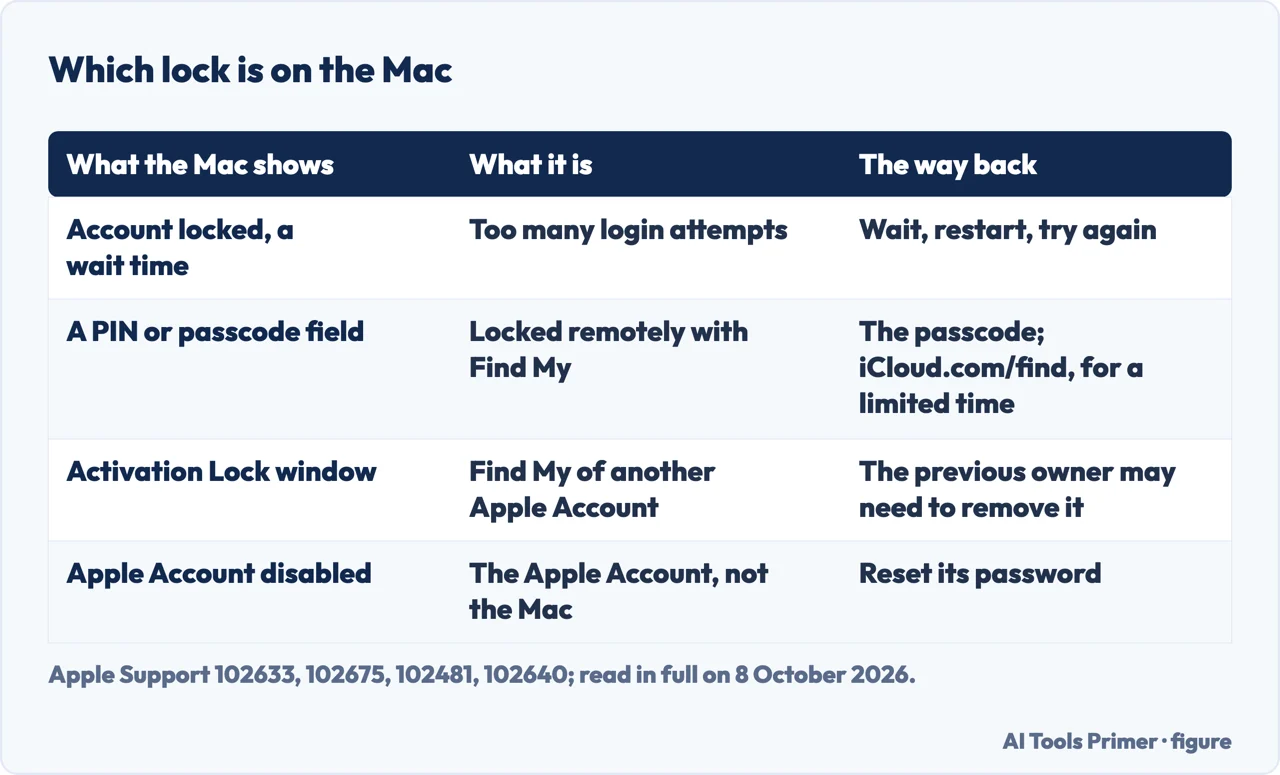
When a macbook is disabled, Apple’s pages, read together, give each lock its own screen. After wrong passwords comes a wait time; Apple says wait, restart, try again. A PIN field follows a remote lock, by Find My or by a managing organisation; a Find My passcode, Apple says, can be looked up at iCloud.com/find for a limited time.
| What the Mac shows | What it is | The way back |
|---|---|---|
| Account locked, with a wait time | Too many login attempts | Wait, restart, try again (Apple) |
| A four- or six-digit PIN field | Locked remotely with Find My; on a work Mac, see also the last row | The passcode, which can be looked up at iCloud.com/find for a limited time (Apple) |
| An Activation Lock window | Find My of another Apple Account | The previous owner may need to remove it (Apple) |
| Apple Account disabled | The Apple Account, not the Mac | Reset its password; Request Access is for a locked or not active account (Apple) |
| A six-digit PIN on a work Mac | A remote lock from the organisation | The PIN the administrator set (Microsoft Intune) |
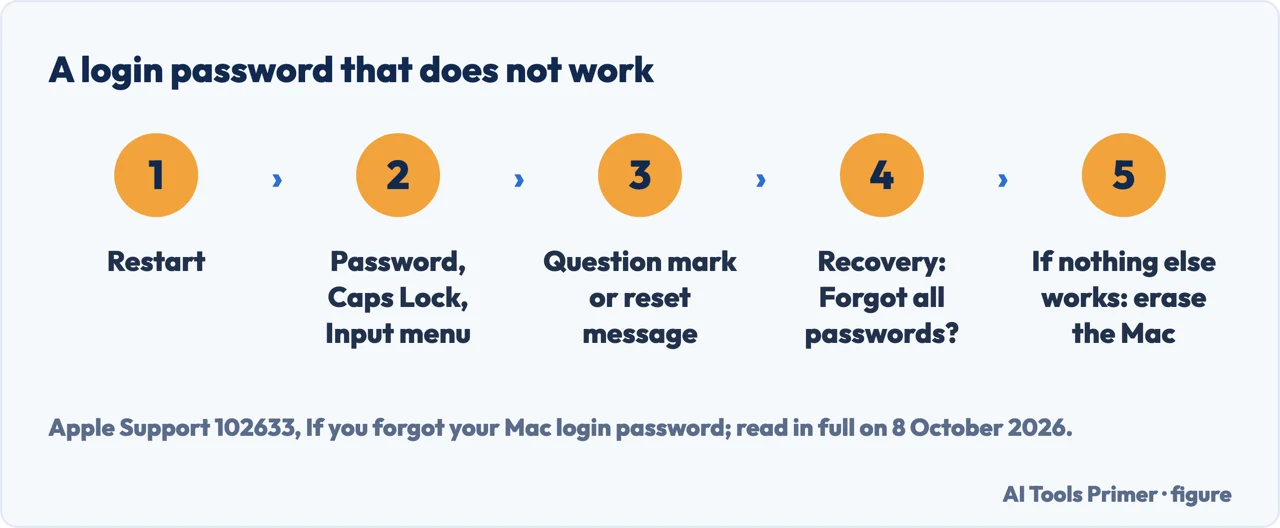
- If the screen shows a wait time. When the account locks after repeated login attempts, Apple says to let the stated time pass, then restart the Mac and try again; if that does not help, the reset options in Recovery.
- Restart to the login window. If there is no option to restart, Apple says to hold the power or Touch ID button for up to 10 seconds until the Mac turns off, then turn it on. A lock screen looks similar to the login window but, Apple notes, has no password-reset options.
- Type the Mac login password. Not the Apple Account password, email or phone number. Apple says to check the Caps Lock symbol in the password field and the keyboard language in the Input menu.
- Use the question mark. If one is next to the password field, Apple says to click it: it might show a hint, if one was set, or a reset message such as Reset Password. If neither appears, check again after entering a password up to three times.
- Then macOS Recovery, and erasing last. From macOS Recovery, Apple says, the password might be reset, starting with Forgot all passwords? If no other solution works, Apple says the Mac can be erased, which permanently removes each user account and its data.
The reset itself. The reset routes, and the new keychain a reset can ask to create, are in forgotten Mac password; erasing and what survives it are in how to factory reset a MacBook.
A PIN field: the Mac was locked with Find My
What it means. Apple’s page on startup screens: a Mac might ask for a PIN code when it has been locked remotely with Find My because its owner thinks it is lost or stolen. The code has four or six digits.
Which Mac asks for what. When a Mac with Apple silicon is marked as lost, Apple says it is locked with the Apple Account password; an Intel-based Mac without a T2 security chip can be locked with a passcode instead. To turn Lost Mode off on the Mac itself, the Find My User Guide for macOS 27 gives the Apple Account password on a Mac with Apple silicon and, on an Intel-based Mac, the passcode set when it was marked as lost.
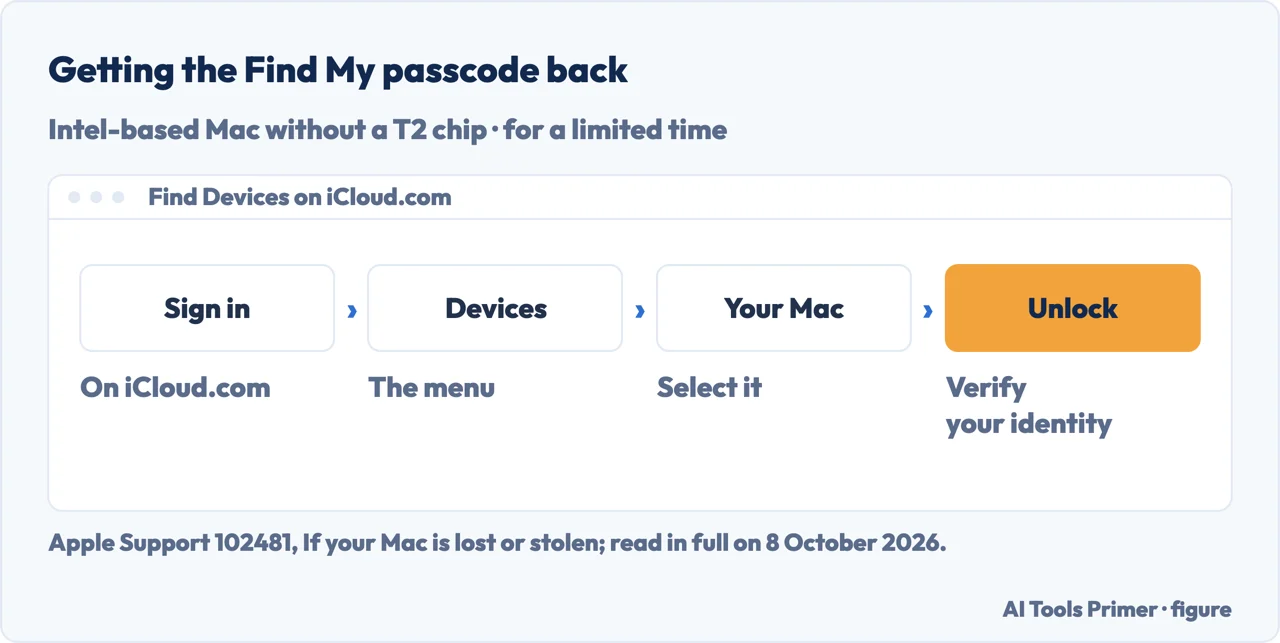
A forgotten passcode. Sign in at iCloud.com/find, choose the Mac from the Devices menu, select Unlock and follow the steps to verify your identity; Apple says the passcode can be looked up for a limited time. Apple’s list for a Mac that cannot be unlocked also includes taking it to an Apple Authorized Service Provider with the proof of purchase.
For the lock to work. Apple: to lock or erase a Mac remotely, the Mac must be powered on and connected to the internet.
Activation Lock: someone else’s Apple Account
What it does. With Activation Lock, Apple says the Apple Account password or the device passcode is needed before anyone can turn off Find My, erase the Mac, or reactivate and use it. On a Mac that meets Apple’s requirements, it stays on as long as Find My is on: Apple silicon or the T2 chip, macOS Catalina 10.15 or later, the default startup security settings, and two-factor authentication.
On a second-hand Mac. If a previously owned Mac asks for someone else’s Apple Account, Apple says the previous owner may need to remove Activation Lock. Apple’s Activation Lock article gives the owner two ways: turning off Find My Mac in System Settings or, if the Mac is offline, removing it at iCloud.com/find; on a second-hand Mac, by our reading, these fall to the previous owner. If you need help and have proof of purchase, Apple says you can start an Activation Lock support request.
When it is the Apple Account that is disabled
A different lock. Apple’s page on locked accounts: an Apple Account can lock automatically for security, which might happen when its password or other account information was entered incorrectly too many times; then you cannot sign in to any Apple service. To regain access, Apple says, reset the Apple Account password.
Locked or not active. With that message, Apple says you might be able to request access by tapping Request Access in the alert. If access cannot be regained, Apple gives a new Apple Account or, for help removing Activation Lock with proof of purchase, an Activation Lock support request. A disabled Media & Purchases account is separate again: you might be able to request reactivation with Continue in the alert.
A Mac from work or school
The administrator’s lock. Microsoft’s documentation for Intune describes the remote lock from the administrator’s side: the administrator sets a six-digit recovery PIN, shown on the device overview pane for up to 30 days or until another device action is sent, and not retrievable afterwards; Microsoft’s note on it speaks of macOS devices.
Who has the PIN. By our reading of Microsoft’s page, which is written for administrators, a Mac locked this way has its code with the organisation’s IT, not in iCloud.
Other screens that look like a lock
A lock icon at startup. Apple: on a Mac using a firmware password, a lock icon appears when it is started from another disk or volume, such as macOS Recovery; entering the firmware password continues the startup.
A drawing of a mouse or keyboard. A line drawing of a Magic Mouse or Magic Keyboard with an arrow next to the power switch means, Apple says, that the Mac cannot detect a built-in or external mouse, trackpad or keyboard.
A blank screen. An empty grey, black or blue screen is on Apple’s list of screens where a Mac can stop during startup, with an article of its own; it is not one of the locks above.
Other fixes on the same Mac. A plain restart is in how to restart a MacBook, a start that takes too long in how to fix slow boot on a Mac, and the passwords the Mac saves for websites in the Apple password manager.
Where to start
Six ways in.
- “It wants me to wait.”
- After wrong passwords — after wrong passwords
- “It wants a PIN.”
- A Find My passcode — a find my passcode
- “It wants someone else’s account.”
- Activation Lock — activation lock
- “My Apple Account is disabled.”
- The Apple Account — a disabled apple account
- “It is a work Mac.”
- A work or school Mac — a work mac
- “It shows something else.”
- Other startup screens — other startup screens
More on a Mac that will not let you in
The password, the reset and the start each have a guide of their own.
Questions people also ask
How do I force a Mac to turn on?
Apple’s page on a forgotten login password: if there is no option to restart, press and hold the power or Touch ID button for up to 10 seconds, until the Mac turns off, then turn it on again. If it then stops on a lock, a PIN field or a blank screen, Apple’s startup page says what each one means.
My Mac keyboard is disabled. What can I do to fix it?
If startup shows a drawing of a Magic Mouse or Magic Keyboard with an arrow next to the power switch, Apple says the Mac cannot detect the mouse, trackpad or keyboard, and links an article for one that won’t connect during Mac setup. At the login window, Apple also says to check Caps Lock and the Input menu.
What is the Mac Black Screen of Death?
Apple’s startup page does not use that name. It lists a blank screen, such as an empty grey, black or blue screen, as one of the screens where a Mac can stop during startup, with an article of its own. Apple lists it apart from the PIN field of Find My and the Activation Lock window.
Not covered here. It does not cover getting into a Mac that is not yours, MDM enrolment, or a Mac that does not power on at all.
Nor does it say which lock a given Mac has: by our reading, the screen and the account it names say that.
Sources
- Apple Support — If you forgot your Mac login password: the locked account, the reset options in the login window and in Recovery, and erasing, published 22 September 2026 — support.apple.com, read 8 October 2026.
- Apple Support — If your Mac doesn’t start up all the way: the PIN code of Find My, Activation Lock, the firmware lock and the other startup screens, published 15 September 2025 — support.apple.com, read 8 October 2026.
- Apple Support — If your Mac is lost or stolen: Lost Mode, passcode or Apple Account password by model, and looking up the passcode, published 14 September 2026 — support.apple.com, read 8 October 2026.
- Apple Support — Activation Lock for Mac: what it requires, the system requirements, and turning it off, published 5 June 2026 — support.apple.com, read 8 October 2026.
- Apple Support — If your Apple Account is locked, not active, or disabled, published 5 December 2025 — support.apple.com, read 8 October 2026.
- Apple Find My User Guide for macOS 27 — Turn off Lost Mode in Find My on Mac — support.apple.com, read 8 October 2026.
- Microsoft Learn — Device action: remote lock (Microsoft Intune): the six-digit recovery PIN, last updated 28 September 2026 — learn.microsoft.com, read 8 October 2026.
Written by Alberto Gulotta
Founder and editor of AI Tools Primer, writing from Palermo, Italy. Thirty-five years of taking computers apart, starting with a Commodore 64 — the long version is on the about page.
Something wrong on this page? Write to aitoolsprimer@gmail.com and it gets fixed.
Written on 8 October 2026.
Independence and limits
No affiliate links and no paid placements anywhere on this site. Nobody pays to appear here, and no company has seen this page before you did.
This is general information, not professional advice. Where a page touches money, health, safety or the law, it names its source and the date it was read — and your situation may still differ. See the privacy page and the cookie policy.