
Study · guide
Is Notion free: the Free plan, its limits and what you keep
By Alberto Gulotta · Updated · 14 min read
Is Notion free? Its pricing page lists a Free plan at 0 EUR per member per month, with databases, basic forms and a trial of Notion AI. Blocks are limited only with two or more members, and the number is not written there. Evernote caps a free account at 50 notes; Obsidian says it is free for all purposes.
| Question | Answer | Where it comes from |
|---|---|---|
| What does Notion Free cost? | 0 EUR per member per month; Plus is 9.50 EUR and Business 19.50 EUR | Notion pricing page |
| Where does it limit you? | Files up to 5 MB each, 7 days of page history, and blocks limited with 2 or more members | Notion pricing page |
| Do students pay? | Plus with one member is free with a school email address | Notion pricing page |
| What leaves with you? | Pages and databases as HTML, Markdown, CSV or PDF; a whole workspace as HTML, Markdown and CSV | Notion Help Center |
| What do Evernote and Obsidian cap? | Evernote Free: 50 notes and 1 notebook. Obsidian: free for all purposes | Evernote, Obsidian |
Yes, with limits: what the Free plan is
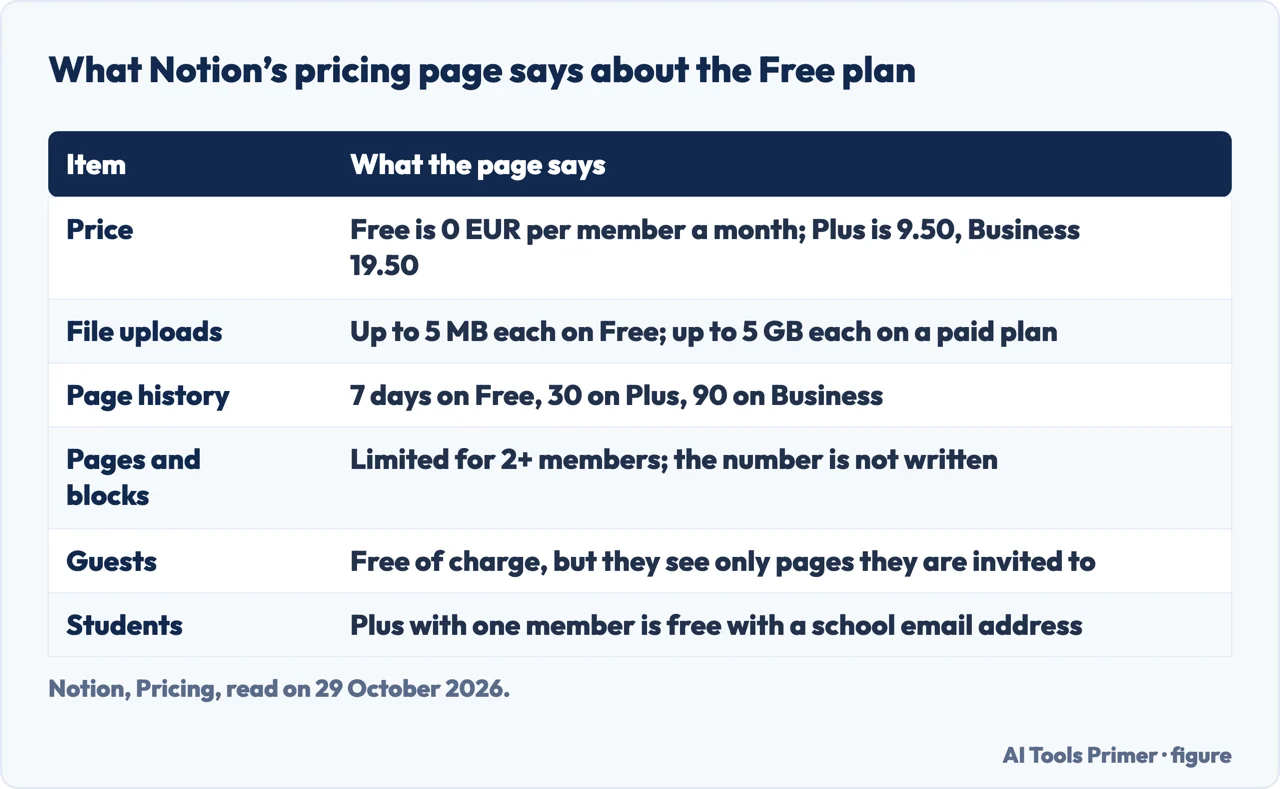
Notion’s pricing page lists four plans: Free, Plus, Business and Enterprise. Free is priced at 0 EUR per member per month and is described as the plan for individuals who organize personal projects. Plus is 9.50 EUR and Business 19.50 EUR per member per month, and Enterprise is priced on request. The page has a switch between euros and dollars and says annual billing saves up to 20 percent. We read the euro view, so we give no dollar amounts. Notion’s pricing page FAQ adds that if you upgrade a workspace to a paid plan, you are charged a fee per member.
The page lists what Free includes: a trial of Notion AI, basic forms, publishing a page to the web, basic sites, Notion Calendar, and databases with subtasks, dependencies and custom properties. The Notion AI item on that list is worded as a trial.
Two groups get more without paying. Notion’s FAQ says the Plus plan, with a limit of one member, is free for students and educators who sign up with a school email address, and adds that eligible domains are not only .edu ones. The same FAQ says that, compared with Free, this Plus plan gives more guests, more version history and larger file uploads. It also says guests are free of charge, though a guest can only reach the individual pages they are invited to.
Where the Free plan stops
The comparison table on the pricing page shows the limits in rows. For files, Notion says that on Free you can upload images, videos and file attachments up to 5 MB each, and that a paid plan allows files up to 5 GB each. For page history, the row reads 7 days on Free, 30 on Plus, 90 on Business and custom on Enterprise. History matters when you want to restore a page to an earlier version, and the row sets how far back that goes. The offline row adds one more difference: on Free you choose pages to download for offline use, while the paid plans download Recents and Favorites automatically.
The block limit is the one the table words most carefully. A block is a single piece of content on a page, such as a paragraph, a to-do item, an image or an embedded file. The row for pages and blocks says “Limited for 2+ members”. The FAQ spells out both cases. If you use a Free workspace by yourself, you can add as many pages and blocks as you like. If a Free workspace has several members, you can add a limited number of blocks before you have to upgrade. At the limit you can still read, edit and organize what is there, but you cannot add new content blocks. The pages we read do not write the number of blocks.
An older source gives a number, with a date attached. TechCrunch reported on 19 May 2020 that Notion had stripped many of the user limitations from its personal free tier, including the limit on the amount of text and data you can log, and that the previous free tier was limited to 1,000 blocks. The same article says people who had tied several accounts to one free account were moved to a free trial of the team product, and that once they hit the 1,000 block limit they would have to upgrade. The two sources differ, and the difference is in their dates. The 1,000 figure belongs to 2020; today’s pricing page does not repeat it and limits blocks only when a workspace has two or more members.
The Notion pages we read do not say how long the Free plan will stay as it is, so a question about whether it lasts has no answer in them. What they do give is today’s price, today’s limits, and a way to leave with your content, which the next sections cover.
Evernote: the limits that arrive first
Evernote’s compare-plans page puts its limits in numbers. Free allows 50 notes, 1 notebook, 5 spaces, 20 tags, 200 attachments, 1 device and 1 GB of storage. Starter allows 1,000 notes, 20 notebooks, 10 spaces, 100 tags, 1,000 attachments, 3 devices and 5 GB. Advanced is listed as unlimited, with an asterisk, and Evernote’s help page explains that safeguard limits apply to ensure performance and prevent abuse. The compare page we read shows no prices for the paid plans, so we give none. It does say that, unless otherwise specified, free trials of Evernote last 7 days and that eligible college students can get 40 percent off a one-year Advanced subscription.
Evernote’s help page on note limits describes what happens when you go over. You can still view, edit, share and export your existing notes, but you cannot create new notes or notebooks until the account is back within the plan’s limits. Notes in the trash still count toward the note limit, and shared notes still arrive in a Shared with Me section even when you are at the limit. A second help page separates two storage limits that behave differently. The monthly upload limit, 250 MB on Free, resets every month. The storage limit, 1 GB on Free, is a total cap that does not reset. Starter is 10 GB monthly and 5 GB in total.
One sentence on the note-limits page concerns change. It says that all customers, including Free users, agree to the Terms of Service, that the Terms give Evernote the right to modify the service, and that as a result it does not need to give users advance notice of account changes such as the new device limit. We report that as Evernote’s statement about its own terms.
Obsidian: free, and the notes are files
Obsidian’s pricing page opens with “Free without limits” and says no sign-up is required. Its license page says Obsidian is free for all purposes, including personal, commercial and non-profit use, so a commercial license is optional. That page is dated 20 February 2025, and the phrase “free, forever” appears on it. Paid items are add-ons: Sync is 4 USD per user per month billed annually (5 USD billed monthly), Publish is 8 USD per site per month billed annually (10 USD monthly), a Catalyst license is a one-time 25 USD, and a Commercial license is 50 USD per user per year. The page lists a 40 percent discount on Sync and Publish for students, educators and non-profits.
The difference from the other two is where the notes live. Obsidian’s help page says it stores notes as Markdown-formatted plain text files in a vault, which is a folder on your local file system, and that because they are plain text you can edit them with other text editors and file managers. The settings, shortcuts, themes and plugins sit in a separate folder inside the vault. The license page says your data is saved locally on your device and is not sent to Obsidian’s server, and that Sync data is encrypted and inaccessible to Obsidian’s staff; the pricing page lists end-to-end encryption under Sync.
Obsidian also publishes a page that compares itself with Notion. It is a page by one of the two products, so we read it as that and take none of its figures.
What you can take with you
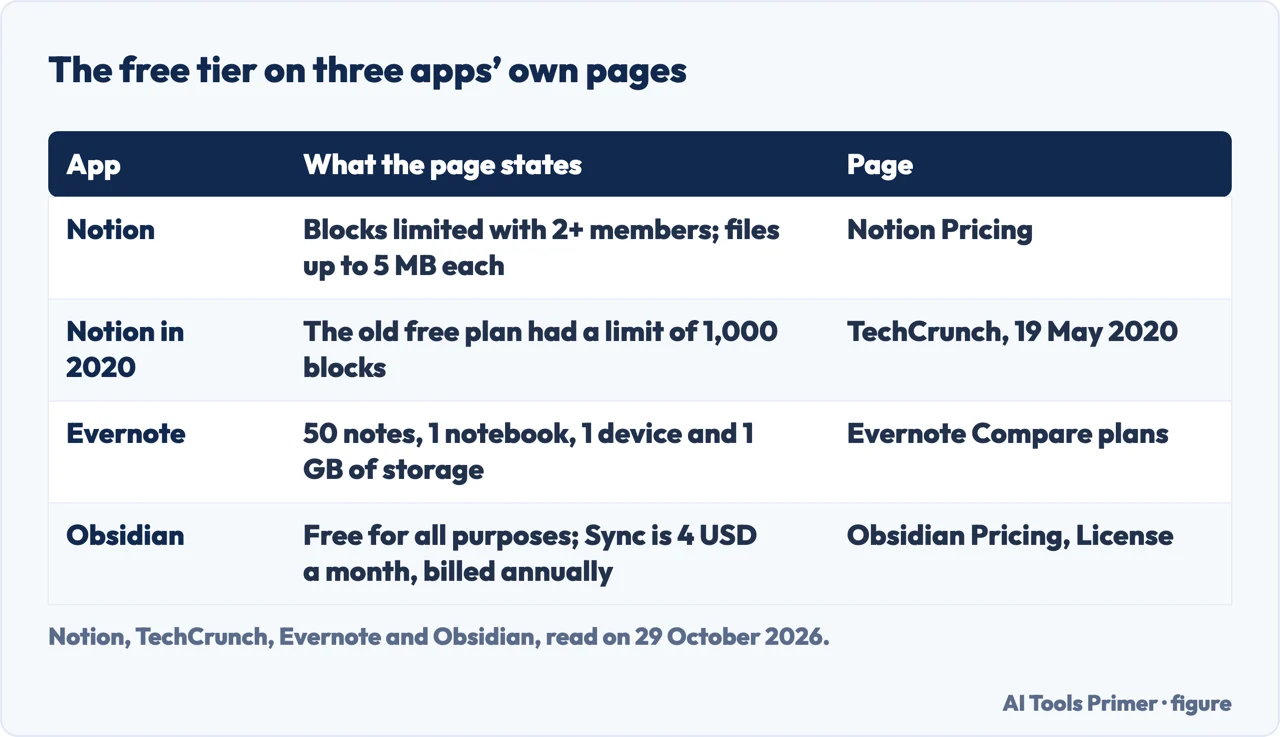
Notion’s export page says you can export a page or database as PDF, HTML, Markdown or CSV, and the choice shapes the result. A page with no database exports as Markdown. A full-page database exports as CSV, with a Markdown file for each subpage. Callout blocks come out as HTML, because Markdown has no equivalent. The Include subpages option for PDF is listed for Business and Enterprise. A database in Form view cannot be exported, and exporting every view at once is not supported: you choose the current view or the default view.
To export a whole workspace you go to Settings, then General, then “Export all workspace content”. Notion emails a link that expires after 7 days, and the page says an export can take up to 30 hours depending on the size of the workspace. It works only on desktop or web. Private pages of other users are not included. One sentence matters for anyone planning a move: you cannot instantly recreate your workspace by reuploading the exported content. The export also includes a sitemap file, index.html, that links to the exported pages.
The back-up page adds two notes. Exporting the whole workspace as PDF is listed for Business and Enterprise, and Notion says that option is going away, with a gradual rollout that ran until 31 August 2026, a date already past when we read the page, and the pages we read do not say whether it has finished, while HTML, Markdown and CSV remain and single pages can still be exported as PDF. The pricing table lists “Export entire workspace as HTML, Markdown, & CSV”, but its per-plan cells are icons that do not come through as text, so we do not say which plans include it. The same back-up page says Notion keeps per-minute backups of page content on its server and can restore a snapshot of a page from the past 30 days.
For the other two, the pages are shorter. Evernote’s compare page lists exporting notes and notebooks as PDFs under sharing, and its help page says existing notes can be exported even over the limit. Obsidian’s notes are already files in a folder you own.
Before you move notes: the numbers and dates on each page
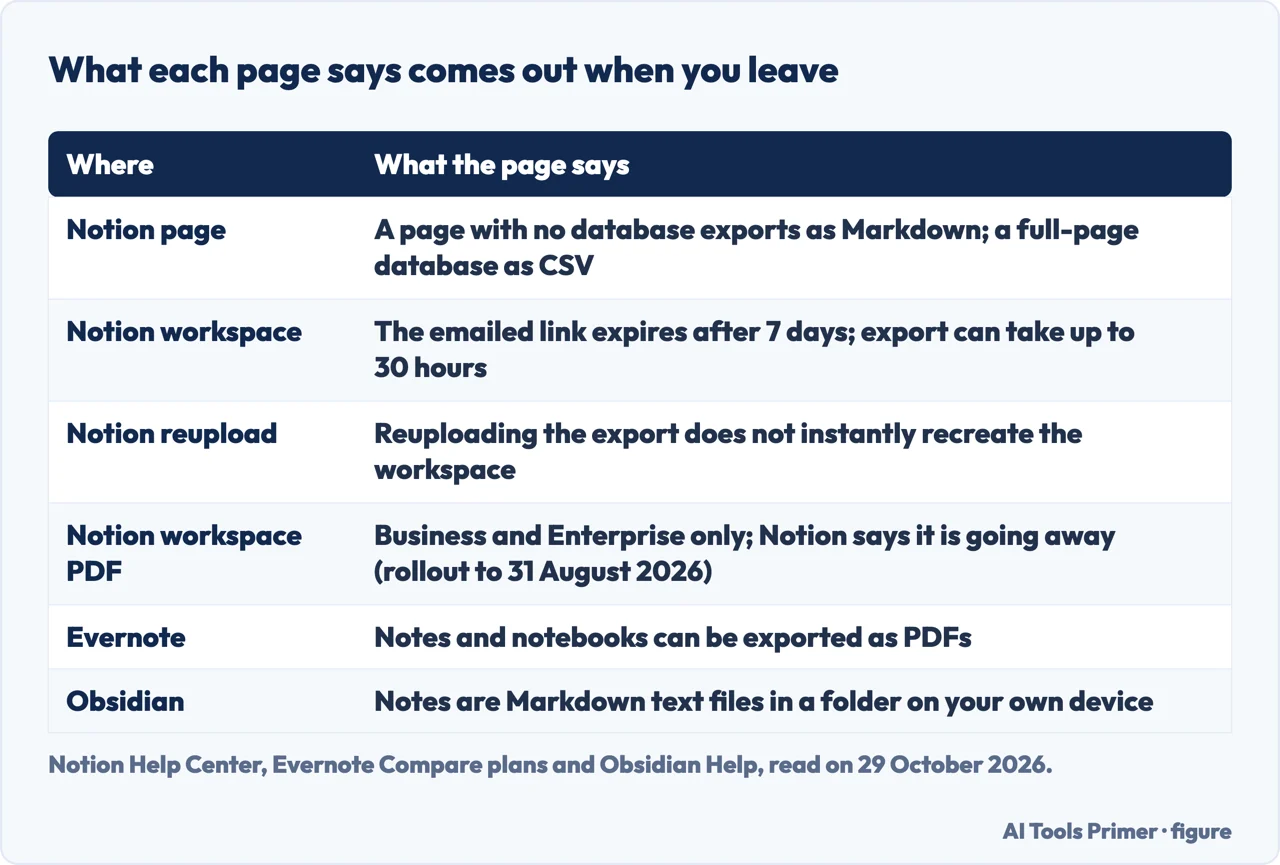
The pages we read do not compare the three apps with each other, so the table above puts their separate statements side by side. Each line below restates what the pages named in the sections above say; none is a measurement of ours.
- Evernote counts notes. The help page gives 50 notes and 1 notebook on Free, and says notes in the trash still count.
- Notion counts members. The block limit applies with 2 or more members; the pricing page does not write the number.
- File size is capped differently. Notion Free takes uploads of up to 5 MB each; Evernote Free has a 250 MB monthly upload limit and 1 GB in total.
- The export format depends on the content. Notion gives Markdown for a plain page and CSV for a database; its help page says a reupload does not instantly rebuild the workspace.
- The pages carry dates. The Notion and Evernote figures here were read on 29 October 2026, and Notion’s notice about withdrawing the PDF workspace export gives a rollout end date, 31 August 2026, that was already past when we read it.
We tested none of the apps.
Where to start
Four ways in.
- “What does the Free plan include?”
- Yes, with limits — yes
- “Where does it stop?”
- Where the Free plan stops — stops
- “What are the other apps like?”
- Evernote and Obsidian — evernote
- “What do I keep if I leave?”
- What you can take with you — leave
Notes that last
Where notes live and how to keep them.
Free plans, read closely
What the Free tier includes on other services.
Questions people also ask
How long can I use Notion for free?
Notion’s pricing page does not give the Free plan an end date. It lists Free at 0 EUR per member per month and limits blocks only when a workspace has two or more members.
Is Notion truly free?
Free costs 0 EUR per member per month on the pricing page. Plus is 9.50 EUR and Business 19.50 EUR, files on Free are limited to 5 MB each, and page history is 7 days.
Is Notion going to be free forever?
The Notion pages we read do not say how long the Free plan will stay as it is. TechCrunch reported in May 2020 that Notion had stripped many of the user limitations from the personal free tier.
What are the pros and cons of using Notion?
On the pages we read, the Free plan includes databases, basic forms and Notion Calendar, while files are capped at 5 MB, history at 7 days and blocks with 2 or more members. An export does not instantly recreate a workspace.
Not covered here. We tested none of the apps. The statements come from Notion’s pricing and help pages, a TechCrunch article, Evernote’s compare-plans and help pages, and Obsidian’s pricing, license and help pages, all read on 29 October 2026.
The search volume and difficulty behind this page come from a Semrush reading of 29 August 2026, older than the 60 days the site normally allows.
Sources
- Notion — Pricing plans — www.notion.com, read 29 October 2026.
- Notion Help Center — Export your content — www.notion.com, read 29 October 2026.
- Notion Help Center — Back up your data — www.notion.com, read 29 October 2026.
- TechCrunch — Notion drops usage limit on its personal free tier — techcrunch.com, read 29 October 2026.
- Evernote — Compare plans — evernote.com, read 29 October 2026.
- Evernote Help — note and notebook limits explained — help.evernote.com, read 29 October 2026.
- Evernote Help — monthly upload and storage limits explained — help.evernote.com, read 29 October 2026.
- Obsidian — Pricing — obsidian.md, read 29 October 2026.
- Obsidian — License overview — obsidian.md, read 29 October 2026.
- Obsidian Help — How Obsidian stores data — obsidian.md, read 29 October 2026.
Written by Alberto Gulotta
Founder and editor of AI Tools Primer, writing from Palermo, Italy. Thirty-five years of taking computers apart, starting with a Commodore 64 — the long version is on the about page.
Something wrong on this page? Write to aitoolsprimer@gmail.com and it gets fixed.
Written on 29 October 2026.
Independence and limits
No affiliate links and no paid placements anywhere on this site. Nobody pays to appear here, and no company has seen this page before you did.
This is general information, not professional advice. Where a page touches money, health, safety or the law, it names its source and the date it was read — and your situation may still differ. See the privacy page and the cookie policy.