
Temp mail · guide
SimpleLogin explained: Proton, the free plan and switching off
By Alberto Gulotta · Updated · 17 min read
SimpleLogin is an alias service that Proton owns. It gives each site its own address, forwards the mail to your real mailbox, and lets you switch off one alias without touching the rest. The free plan holds 10 aliases. Switching off, blocking a sender and deleting do three different things, and the service says its aliases are not throwaway.
| Question | Answer | Where it comes from |
|---|---|---|
| Who owns it? | Proton: SimpleLogin’s pages call it the product of Proton AG | SimpleLogin pricing page, Proton |
| What is it used for? | An alias for each site that forwards to your real mailbox and can be switched off | SimpleLogin Docs, Proton |
| What does it cost? | A free plan with 10 aliases; Premium is $36 a year or $4 billed monthly | SimpleLogin pricing page |
| What does switching an alias off do? | SimpleLogin accepts the mail but discards it, and you can switch the alias back on | SimpleLogin Docs |
| Is it a throwaway address? | SimpleLogin says no: its aliases are permanent until you delete them | SimpleLogin Docs and FAQ |
What SimpleLogin is, and who owns it
Proton’s announcement of 8 April 2022 says that SimpleLogin has joined Proton. The post describes SimpleLogin as a browser extension, a web app and a mobile app that gives you an anonymous email address whenever you sign up for a service. If a service gets hacked, sends spam or sells your email to advertisers, the post says, you can disable that alias. It adds that SimpleLogin would keep working as a separate service. The same post places the company in France, which it calls next door to Switzerland. SimpleLogin’s own pages today carry a footer that calls the service the product of Proton AG, and says Proton AG is registered in Switzerland.
Proton also offers email aliases inside its password manager, Proton Pass. Its page on aliases says Proton Pass uses SimpleLogin for the forwarding, and that you can also manage the aliases in SimpleLogin itself. SimpleLogin’s pricing page says Premium now includes Proton Pass premium features. The two products share an owner, so for the comparisons further down we use Mozilla and Apple, and GitHub for the licence.
On the technical side, SimpleLogin’s home page and FAQ describe the service as open source. The GitHub repository for the app shows an AGPL-3.0 licence. The FAQ also says the service can be run on your own server, which is a claim the service makes for itself. The home page says SimpleLogin does not store emails, and the Proton Pass page says its aliases work as a relay that never stores any of your emails. Both are statements by the owner of the service, and we could not check them from outside.
The pages do not agree on the size of the user base. The home page claims more than a million users, while the anti-spam page speaks of 250 thousand. Neither figure comes from a reader independent of the service, so we give neither as a count. Both counts are the service’s own, read on 29 October 2026.
One alias for each site, and what the free plan holds
The Create Aliases page describes two kinds. A custom alias lets you choose the left part of the address, and the page suggests putting the website name in it so you remember it; there is also an optional note for where the alias is used. A random alias is built from random words or from a UUID. The anti-spam page recommends creating one unique alias for each website you sign up on, which it says helps you identify the biggest spammers and block them. The Proton Pass page makes the same point: a unique alias lets you know which company sold your email.
Replies run through what the docs call a reverse alias. When a sender writes to your alias, SimpleLogin forwards the message from a special address. When you press Reply, the message goes out from your alias and your real mailbox address stays hidden. The reverse alias is unique for each sender and alias, and by default it is made of random characters. A setting called “Include sender address in reverse-alias” changes that. A SimpleLogin blog post of 6 December 2020 explains why the default is anonymous. A change that put the sender in the reverse alias was reverted, because PGP encrypts only the body of a message and leaves headers such as From, To and Subject in plain text. Starting from 23 December 2020 the anonymous version became the default again.
Writing first to someone new is a paid feature. The Send emails page says it needs a paid plan, naming SimpleLogin Premium and Proton Pass Plus and higher. You create a contact on the alias, which makes a reverse alias, and send the message to that instead of to the contact’s address.
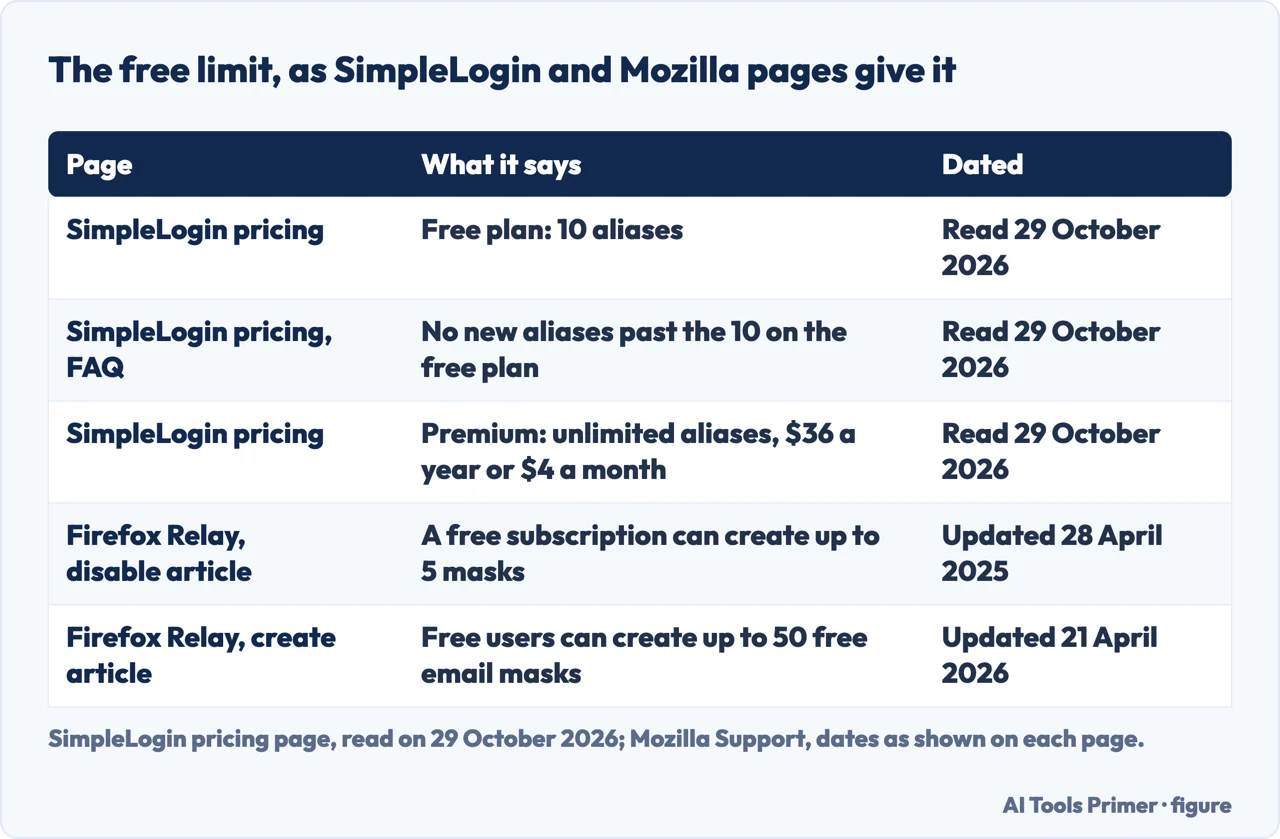
The pricing page, read on 29 October 2026, lists the free plan at $0 with 10 aliases, one mailbox, unlimited bandwidth, replies from the alias, extensions for Chrome, Firefox and Safari, and iOS and Android apps. Premium is $36 a year or $4 billed monthly. It adds unlimited aliases and custom domains, a catch-all domain, writing first from an alias, 5 subdomains, 50 directories, unlimited mailboxes and PGP encryption. The page also lists discounts for students and staff of educational institutes, for activists, dissidents and journalists, and for charities. It says refunds are not offered because of the trial period, and that payments go through Paddle.
The page says what happens if you stop paying: the aliases you created keep receiving and sending. You cannot create new ones while you hold more than 10, and the aliases that catch-all and directories would have made on the fly cannot be created either. The numbers are not the same everywhere on the web. A user review quoted on the anti-spam page says 15 aliases are allowed on the free plan, while the pricing page and its FAQ say 10. We use 10, because it is the service’s own statement. Mozilla’s pages for the similar Firefox Relay differ too: the support article updated on 28 April 2025 says 5 free masks, the one updated on 21 April 2026 says 50, so the newer figure is the one to trust, with its date.
Switching off the address that started leaking
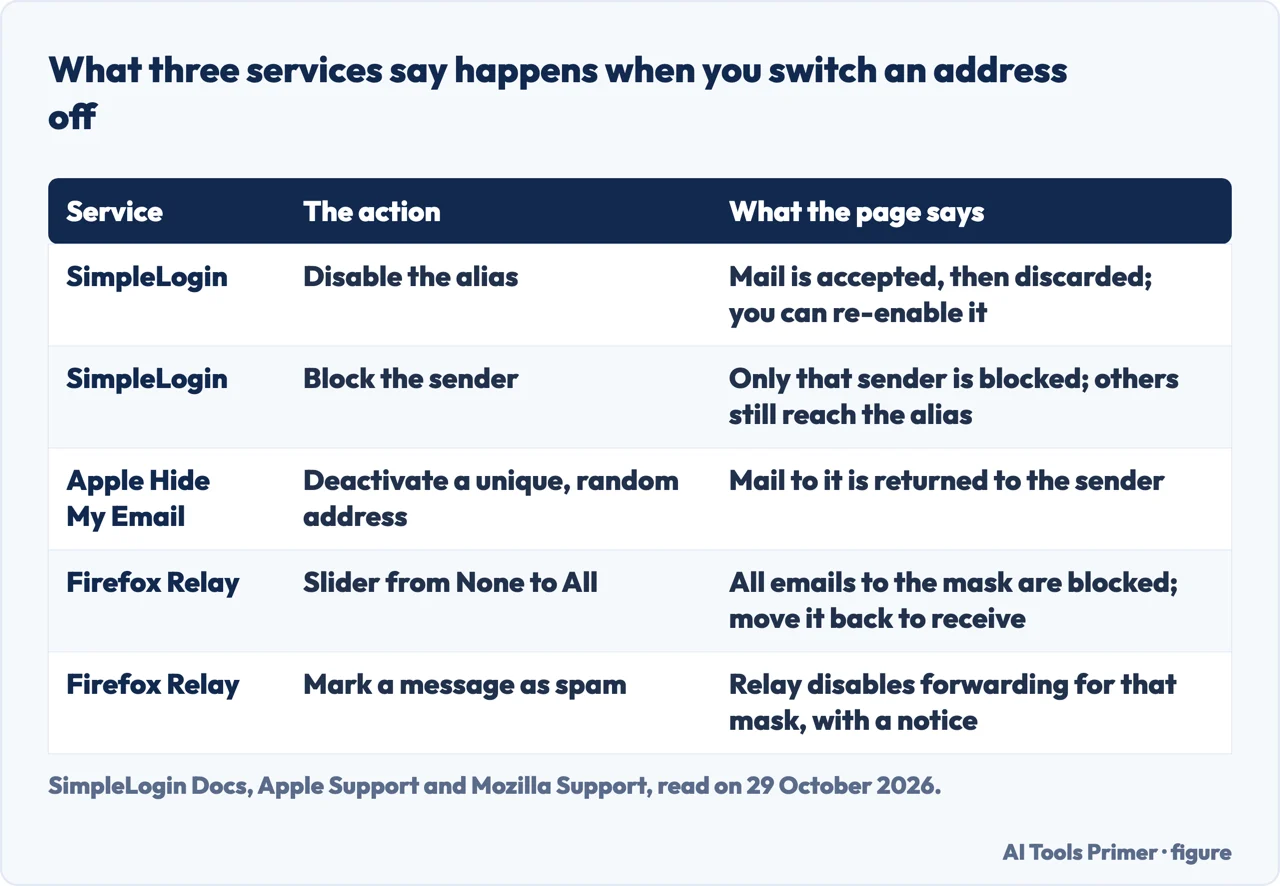
The Block sender page gives two choices when unwanted mail starts arriving at an alias. You can disable the alias: mail sent to it stops being forwarded to your mailbox, and SimpleLogin still accepts the mail but discards it. The page adds that you can re-enable the alias if you want mail again later. Or you can block the sender: that one sender is blocked while other people can still reach the alias, and the page says this is preferable if the alias is public. You disable an alias with the toggle on the dashboard. You block a sender from the dashboard too, or from the contact’s page.
The One-click unsubscribe page covers a shortcut. Some mail programs offer a button defined in RFC 8058, and the docs show examples from Proton Mail, Hotmail/Outlook and Mac Mail.app. The page says every forwarded email from SimpleLogin carries that button; pressing it disables the alias, and SimpleLogin sends a confirmation email. A setting lets the button block the sender instead, so that the alias stays active for other senders. The anti-spam page describes the same button as the third step of a three-step routine: create an alias, identify the spammers, then unsubscribe or turn the alias off.
The Troubleshooting page warns against one reflex. If SimpleLogin’s own messages land in a Spam folder, it recommends a filter that marks mail from simplelogin.io and simplelogin.co as safe. It also asks you not to put SimpleLogin emails into Spam, which it says is harmful to its delivery reputation; for spam that reaches an alias, it says to disable the alias or block the sender. In the page’s own test, adding the safe-sender entry in Outlook/Hotmail took up to 6 hours to take effect. The same page says that when SimpleLogin cannot deliver a message to your mailbox, it creates a notification and sends an email, and you can download the message. A message sent from your mailbox to its own alias is dropped, because that could form a loop.
The pages we read do not agree on what “off” means across services, which matters if you use more than one. SimpleLogin accepts the mail and discards it. Apple’s page for Hide My Email says that when you stop using a unique, random address, any emails sent to that address are returned to the sender, and that you can reactivate it at any time. Mozilla’s Firefox Relay uses a slider for each mask, from None to All, to block everything sent to that mask, and its page says that marking a message from a mask as spam makes Relay disable forwarding for that mask and send you a notice. Mozilla’s page ties the blocking of promotional emails to Relay Premium.
Deleting, and getting an address back
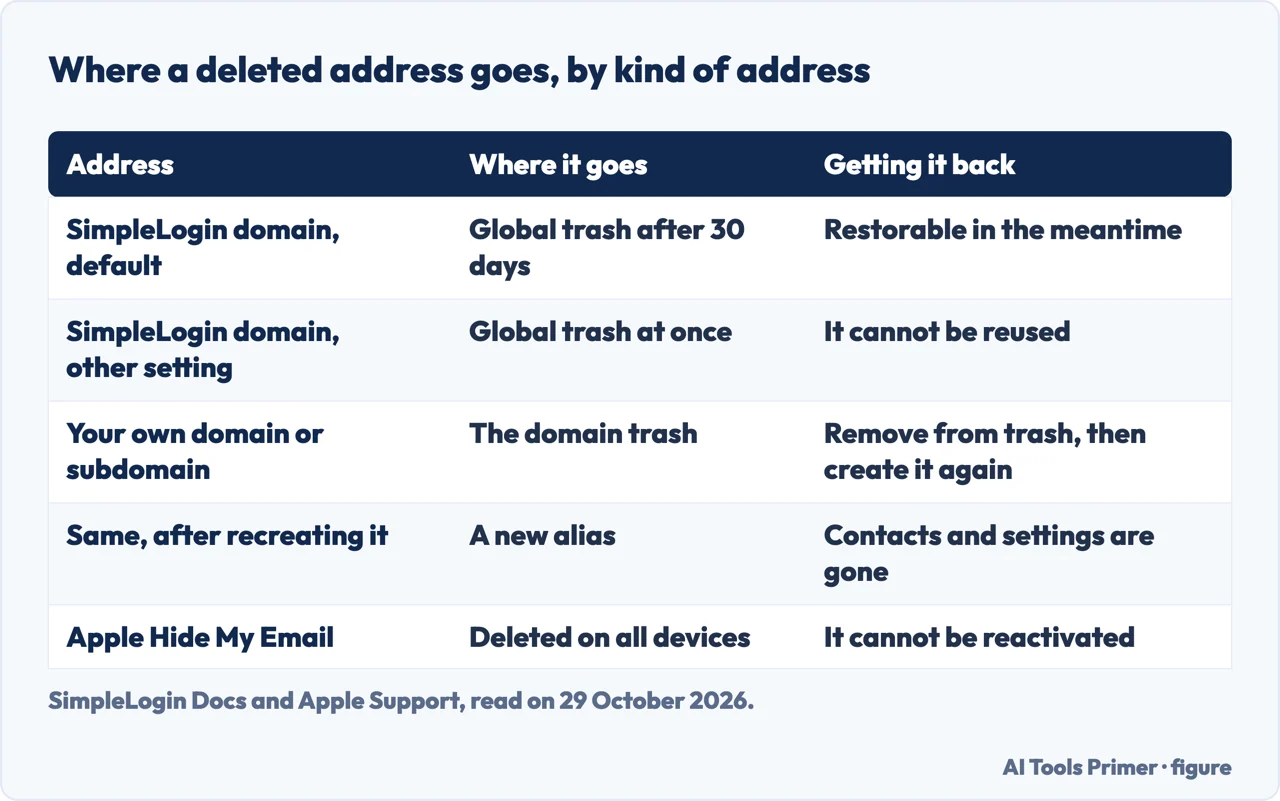
The Delete an alias page says SimpleLogin recommends against deleting, and suggests disabling the alias or blocking some of its senders. If you do delete, the result depends on a setting. In one case the alias goes at once into a global trash and cannot be reused, and all its history, including the account that created it and its contacts, is deleted. In the other, which the page says is the default, it moves to the global trash after 30 days and can be restored in the meantime. The page says this applies to aliases created with SimpleLogin’s own domains.
The Restore an alias page gives the way back for those. For aliases on domains such as aleeas.com or simplelogin.com, go to Settings on the dashboard, find the Alias delete action section, open the alias trash and restore chosen aliases or all of them. Aliases on your own domain or on a SimpleLogin subdomain are handled differently: they land in a domain trash, and you can recreate them, but the page says this is not a restore, because contacts and settings were deleted with the alias.
To recreate one, the page says to open the domain’s page, choose Details and then Deleted Alias, remove the address from the trash, and create it again as a custom alias or through the catch-all option. It advises against emptying the trash first, because that deletes the list of addresses you need, and suggests copying the address before you remove it. If you see the message “You have deleted this alias before”, the page says the alias is probably still in the domain trash. Recreating many at once can bring a 429 rate-limit error, and the page says to stop, wait a few minutes and carry on one by one.
Apple’s page is stricter. It says you can delete only an address that is inactive, and that deleting a Hide My Email address is permanent on all your devices, with no way to reactivate it. Mozilla’s disable article says a mask can be permanently deleted. The 30-day window appears in SimpleLogin’s pages; the Apple and Mozilla pages we read describe permanent deletion.
Is it a throwaway address?
SimpleLogin says it is not, and has a docs page for the question. The page lists six reasons: you need an account to use it, all aliases generated are unique, there are several anti-abuse automations, there are limits against spam, aliases are permanent until the user decides to delete them, and its terms do not allow one user to register several accounts on the same service. The FAQ puts it briefly: SimpleLogin aliases are permanent, as opposed to temporary addresses on services like temp-mail.org, and it calls itself a different product for a different need. The FAQ also says that, like a normal email address, an alias is always there unless you delete it. The Proton Pass page makes the same distinction between its aliases and the temporary addresses of other email services.
The terms of service go a step further and forbid using a disposable or forwarding email address to register a SimpleLogin account or as a SimpleLogin mailbox. In other words, the mailbox you forward to cannot itself be a disposable or forwarding address.
Where a throwaway would be a risk, the FAQ answers directly. Asked whether aliases can be used for important services such as a bank or a government, it says yes, and that the people behind it use aliases to run their business, manage taxes and handle bank operations. It adds that email is almost never lost, that SimpleLogin notifies you when it cannot deliver, and that you can set up a secondary mailbox as a backup. Mozilla’s support article on Relay, updated on 21 April 2026, takes a more careful line for its own masks. It recommends them for less critical sign-ups and says to share your true address with your bank, your doctor and your lawyer, and when receiving concert or flight boarding passes. So the two services advise differently on the same question, and the difference is between the sources, not something we tested.
What the pages do not say, and what we did not use
The pages we read do not say how to trace which site passed on the address that started to leak, beyond creating one alias for each site and watching who sends spam. They do not say how long the mail that a disabled alias discards stays available, since they use only the word discard. They do not give a number for the rate limit behind the 429 error, only the advice to wait a few minutes. The docs also point to a page called Report blocking website for the case where a site refuses an alias; we did not read it, so we say nothing about why a site might refuse one.
We did not open the app-store or extension listings or any video review of the service. The user testimonials on the pricing and anti-spam pages are opinions, and we used one of them only to show that the pages give different numbers. The prices and limits are those of 29 October 2026 and can change.
Where to start
Four ways in.
- “Is SimpleLogin owned by Proton?”
- What SimpleLogin is, and who owns it — what
- “How much does it cost?”
- One alias for each site, and what the free plan holds — aliases
- “How do I switch one off?”
- Switching off the address that started leaking — off
- “Is it a disposable email?”
- Is it a throwaway address? — disposable
Other throwaway inboxes
The kind of address SimpleLogin says it is not.
Taming the post
Unsubscribing, spotting a fake and keeping a list private.
Questions people also ask
Is SimpleLogin owned by Proton?
Proton’s post of 8 April 2022 says SimpleLogin has joined Proton and would continue as a separate service. SimpleLogin’s pages today call it the product of Proton AG, registered in Switzerland.
What is SimpleLogin used for?
Hiding your real address. An alias forwards mail to your mailbox, replies go out from the alias, and you can switch off the one alias that starts attracting spam while the others keep working.
How much does SimpleLogin cost?
The pricing page, read on 29 October 2026, lists a free plan at $0 with 10 aliases, and Premium at $36 a year or $4 billed monthly with unlimited aliases and custom domains.
Is SimpleLogin.com a disposable email?
SimpleLogin’s docs and FAQ say it is not: its aliases are permanent until you delete them. The pages we read put the service at simplelogin.io; simplelogin.com appears there only as a domain for aliases (such as @simplelogin.com) and subdomains, according to the Restore an alias page. Its terms forbid registering with a disposable or forwarding address.
Not covered here. We tested nothing: we created no account and no alias. The statements come from SimpleLogin Docs, FAQ, pricing, anti-spam and terms pages and a SimpleLogin blog post, two Proton pages, two Mozilla support articles, an Apple support article and the GitHub repository, all read on 29 October 2026.
The search volume and difficulty behind this page come from a Semrush reading of 29 August 2026, older than the 60 days the site normally allows.
Sources
- SimpleLogin — home page — simplelogin.io, read 29 October 2026.
- SimpleLogin — Pricing — simplelogin.io, read 29 October 2026.
- SimpleLogin — FAQ — simplelogin.io, read 29 October 2026.
- SimpleLogin — Terms — simplelogin.io, read 29 October 2026.
- SimpleLogin — Anti-spam — simplelogin.io, read 29 October 2026.
- SimpleLogin Docs — Create Aliases — simplelogin.io, read 29 October 2026.
- SimpleLogin Docs — Send emails from your alias — simplelogin.io, read 29 October 2026.
- SimpleLogin Docs — Block sender — simplelogin.io, read 29 October 2026.
- SimpleLogin Docs — Reverse alias — simplelogin.io, read 29 October 2026.
- SimpleLogin Docs — One-click unsubscribe — simplelogin.io, read 29 October 2026.
- SimpleLogin Docs — Delete an alias — simplelogin.io, read 29 October 2026.
- SimpleLogin Docs — Restore an alias — simplelogin.io, read 29 October 2026.
- SimpleLogin Docs — Troubleshooting — simplelogin.io, read 29 October 2026.
- SimpleLogin Docs — Why SL is not disposable mail — simplelogin.io, read 29 October 2026.
- SimpleLogin blog — Revert reverse-alias generation algorithm — simplelogin.io, read 29 October 2026.
- Proton — Proton and SimpleLogin are joining forces — proton.me, read 29 October 2026.
- Proton — Hide-my-email aliases (Proton Pass) — proton.me, read 29 October 2026.
- Mozilla Support — Disable email forwarding (Firefox Relay) — support.mozilla.org, read 29 October 2026.
- Mozilla Support — Create an email mask through Firefox Relay — support.mozilla.org, read 29 October 2026.
- Apple Support — Stop using, reactivate, or delete a Hide My Email address — support.apple.com, read 29 October 2026.
- GitHub — simple-login/app — github.com, read 29 October 2026.
Written by Alberto Gulotta
Founder and editor of AI Tools Primer, writing from Palermo, Italy. Thirty-five years of taking computers apart, starting with a Commodore 64 — the long version is on the about page.
Something wrong on this page? Write to aitoolsprimer@gmail.com and it gets fixed.
Written on 29 October 2026.
Independence and limits
No affiliate links and no paid placements anywhere on this site. Nobody pays to appear here, and no company has seen this page before you did.
This is general information, not professional advice. Where a page touches money, health, safety or the law, it names its source and the date it was read — and your situation may still differ. See the privacy page and the cookie policy.