
Temp mail · guide
Mailinator: how the public inbox works and what to keep out
By Alberto Gulotta · Updated · 15 min read
A Mailinator public inbox needs no signup: Mailinator says every address at mailinator.com already exists, with no signup, and BounceCheck notes that anyone who types the same handle sees the same mail. Its pages say there is no privacy by design, that messages are deleted after a few hours, and that secrets and credentials should not be sent there.
| Question | Answer | Where it comes from |
|---|---|---|
| Do I create an address? | No: Mailinator says every possible address at mailinator.com already exists, with no signup and no login | Mailinator FAQ |
| Who can read the inbox? | Anyone who opens it; the documentation says readable and deletable by anyone | Mailinator FAQ and documentation |
| How long does a message stay? | Several hours, says the FAQ; a few hours, says the documentation; neither gives a number | Mailinator FAQ and documentation |
| What should not go there? | Secrets, production credentials, customer data and private tokens, says the documentation | Mailinator documentation |
| Will every site accept the address? | Bouncer says some third-party services block disposable domains; BounceCheck advises sites to block them | Bouncer, BounceCheck |
What a public inbox is
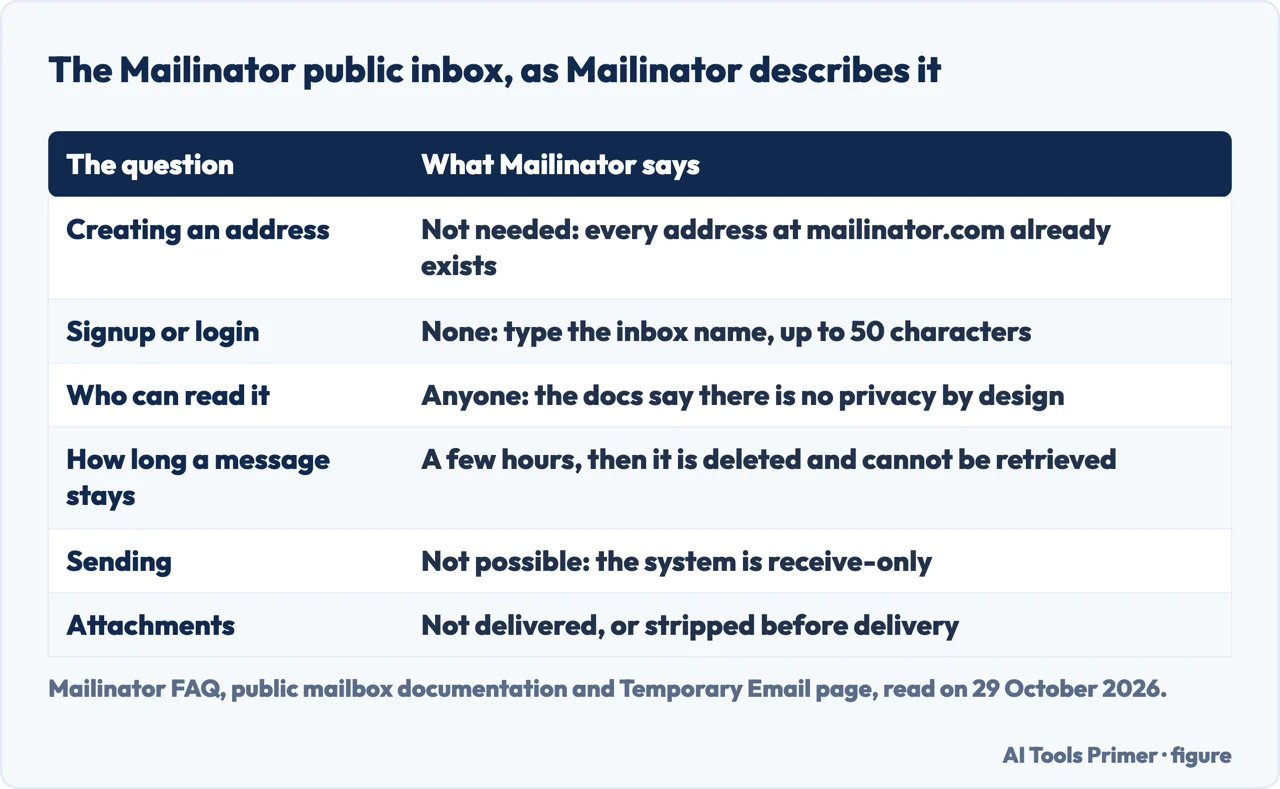
Mailinator’s FAQ describes Public Mailinator as a free, disposable email service. Its explanation is that every possible address at mailinator.com already exists, so anyone can use it, and that with no signup and no login you do not need to create an address at all. The FAQ gives joe123@mailinator.com and happybill@mailinator.com as examples of names made up on the fly: you visit the Mailinator website, open that inbox and read any email sent to it. Asked how to create a Mailinator email, the FAQ answers that you do not, because all the inboxes already exist; you send a message to any name at the domain and then open that inbox in the public system. The documentation says the inbox is created when an email arrives for it, and that the home page takes an inbox name of anything you wish, up to 50 characters.
The Temporary Email page turns this into four steps: pick any address, such as quick.signup.42@mailinator.com; use it anywhere; check the inbox at mailinator.com by typing the username into the search bar, with no password; and walk away, because public messages expire by themselves. The page lists newsletter walls, app trials, one-time downloads and test flows as places to use it. It also says that temporary, disposable and throwaway email all mean the same thing in everyday use, and that every address at mailinator.com, plus hundreds of alternate domains, already exists. The pages we read do not list those alternate domains.
The FAQ says people typically use Public Mailinator when they need to share an address without risking spam to their real one. Today, though, the service presents itself differently. BounceCheck, a vendor of email verification, calls Mailinator a platform for testing email and SMS workflows, aimed at developers and QA teams, and says it was founded in 2003 by Manybrain LLC. The FAQ says Mailinator is used mainly by developers and QA testers to test automated workflows, and the footer of its pages carries a copyright line for Manybrain. The same pages also describe a receive-only system, which the third section covers.
Who can read it, and for how long
The FAQ lists the limits of the free system, and the first is that all emails are public: any person can read anywhere, and you should not expect privacy. The documentation is blunter. It says all inboxes and emails in the public system are in the public domain, readable and deletable by anyone, and that there is no privacy by design. Because the public system has no accounts, the FAQ adds, a public address has no owner, which is why it says a question about who owns one does not quite make sense. BounceCheck puts the consequence plainly: anyone who types the same handle sees the same mail.
On duration, the FAQ says public emails last several hours and are then auto-deleted, and that once deleted they are gone for good. The documentation says they auto-delete after a few hours and cannot be retrieved afterwards. Bouncer says messages are automatically deleted after a short period, and quotes a senior HRIS analyst who, while testing a chatbot integration, said the mailbox sometimes needed to last longer than it did. The pages we read do not say how many hours “several” or “a few” means.
The Temporary Email page separates the address from the message. The address itself never expires, it says, because it always exists and is ready to receive, while individual messages in public inboxes are deleted after a few hours. EmailProbe, a vendor that sells detection of disposable domains, describes it differently: it says the inbox is shown until the address expires or is recycled, and that an address can last from a few minutes to an hour or as long as a browser session stays open. That description does not match Mailinator’s own, and the pages we read do not settle the difference. EmailProbe also calls Mailinator’s operators anonymous third parties, while Mailinator’s pages and BounceCheck name Manybrain, and the pricing page says the service is owned and operated in the U.S.A.
The FAQ also says what the public site records. It says Mailinator keeps no logs of website access and does not store identifying information such as an IP address, and that this could change if law enforcement compels it. It tracks real-time data to detect abuse and bans abusers. It keeps several days of aggregate usage data with no identifying information, and a small number of emails, far less than 1% of total volume, for a few days of spam analysis. The FAQ says this policy covers the public site only, not the private domains of paying subscribers.
What not to send, and what it cannot do
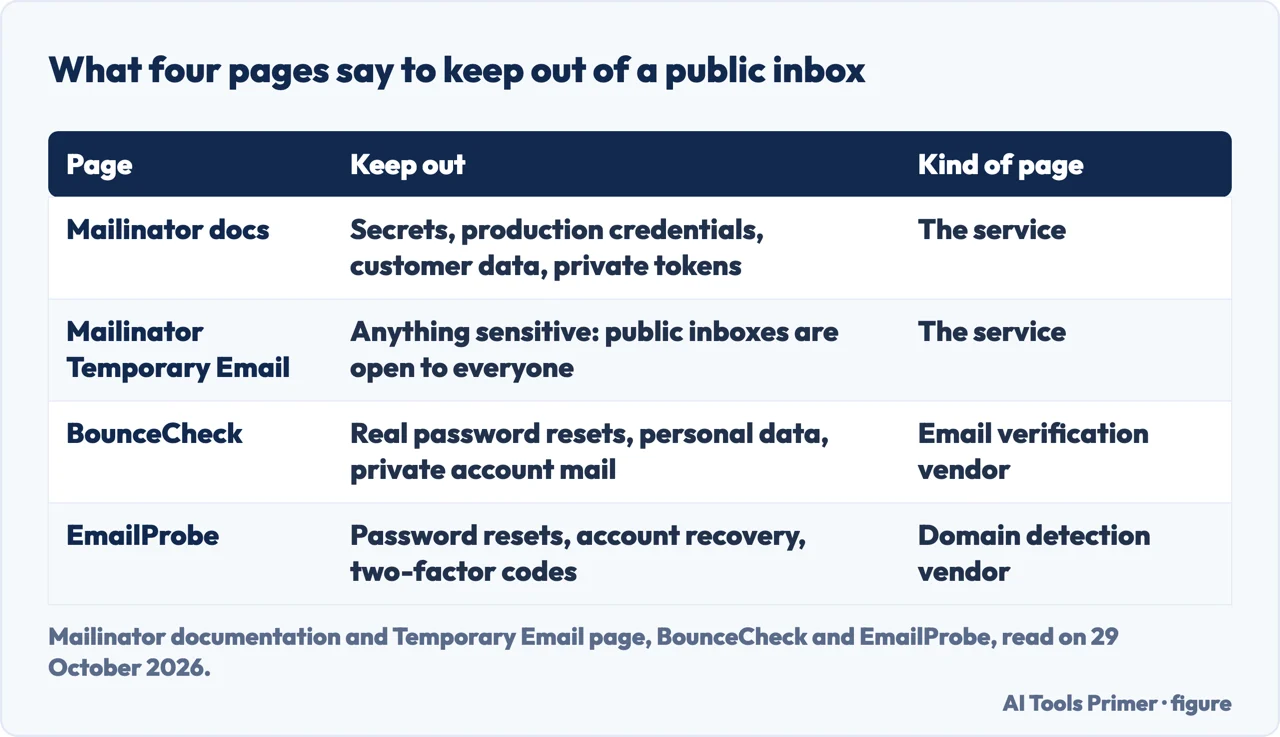
The documentation describes the public mailbox as intended for occasional personal use, quick demos, experiments and non-sensitive testing. It says not to send secrets, production credentials, customer data, private tokens or sensitive workflow data to public inboxes, and that tests needing privacy, repeatability, API automation or private-domain identities belong on a Private Mailbox. The Temporary Email page makes the same split: public inboxes are open to everyone, which it says is fine for dodging spam and wrong for anything sensitive, and it names OTP codes, password resets and transactional receipts as the work of a team testing a real product on a private domain.
Two vendor pages go further on accounts. BounceCheck says nothing sensitive should be sent to a public inbox: no real password resets, no personal data and no private account mail. EmailProbe says not to use Mailinator addresses for password resets, account recovery, two-factor authentication codes or anything you expect to stay private. It adds that an attacker who guesses or pre-claims an address could intercept the messages sent to it. These two are vendors of verification and detection, so we use them for facts only.
The public system is also narrower than a normal mailbox. The FAQ says Mailinator is receive-only and cannot send email, and that its SPF, DMARC and DKIM records confirm this, so a message claiming to be sent from a Mailinator address carries a forged sender and should be treated that way. It says Mailinator does not fill out forms either. For the public system it lists no attachments and certain limits on email size, rate and spam prevention. The documentation says an attachment is either not delivered or stripped before delivery, and that public mail may be filtered or blocked for legal, compliance or abuse-prevention reasons.
If the mail you are worried about is the kind that keeps coming, our pages on unsubscribing and on why email does not arrive deal with the inbox you already have.
Why a form may refuse the address
Bouncer says some third-party services block disposable domains. Its page, written by a vendor of email verification, adds that a sender can block such a domain or apply its own filtering and rate limits, which it distinguishes from Mailinator being unable to receive mail. Bouncer quotes a consultant who says Salesforce stopped sending to Mailinator addresses after a while, and, in a separate passage about missing mail rather than blocking, an owner in the software industry who says a lot of emails do not get received. These are reviewers’ remarks quoted by a vendor, not measurements, and the pages we read do not say which sites refuse the domain.
BounceCheck, also a verification vendor, explains the refusal from the receiving side. It says that people who sign up with a Mailinator address hand a site a throwaway that, in its words, stops working within hours (Mailinator itself says the address never expires and only the messages are deleted), so it never confirms a subscription or becomes a real user, and that disposable signups inflate lists, distort metrics and raise bounces. It says throwaway addresses are the main tool behind free trial abuse, and answers the question of whether to block Mailinator on a signup form with usually yes, if you want real users. It names the fix as detecting disposable domains at signup.
EmailProbe says it tracks 43 domains for Mailinator, a count from a vendor that we did not find in another source, and says a plain double opt-in will not filter these addresses because they do receive verification mail. It adds that disposable services rotate domains, so a fixed block list has to be updated whenever a new domain appears. On legality, EmailProbe says using a temporary email service is legal in most jurisdictions but that a site’s terms may prohibit disposable addresses, and that using one to bypass paid-account limits or fraud controls can breach those terms.
That last point marks a line the vendor pages draw. The Mailinator pages describe the public inbox as a way to keep spam away from a real address. The vendors describe what happens when the same address is used to get around a limit a site has set. The pages we read do not say what to do when a form rejects the domain, and we do not suggest a workaround.
Public, private, or an address that lasts
The FAQ says subscriptions add a private domain, web and API access to all inboxes, emails and SMS messages, optional private SMS numbers, persistent storage and high rate limits, with the public spam filters turned off for private domains. It lists webhook actions, user accounts for team members and, for enterprise accounts, single sign-on. The Temporary Email page compares the two sides in a small table: a public inbox is instant with no signup, not private, limited on API and webhooks and rate-limited for high volume, while a private domain is team-only, has a full REST API and runs at production speed.
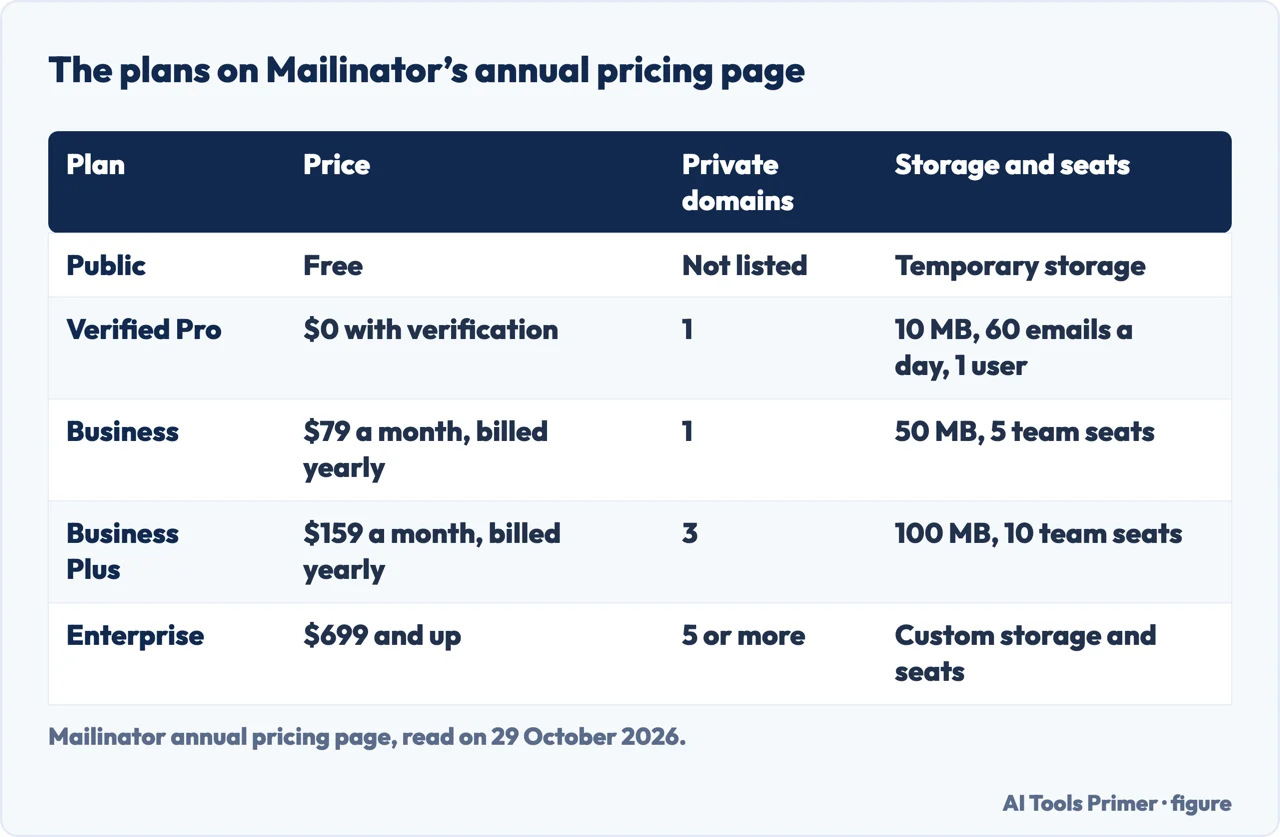
Mailinator’s annual pricing page, read on 29 October 2026, lists Public as free. Verified Pro is $0 with verification and shows one private domain, 10 MB of permanent storage, 60 emails a day, 2K emails a month and one user. Business is $79 a month billed yearly, with one private domain, 50 MB, 5 team seats and 100K emails a month. Business Plus is $159 a month billed yearly, with three private domains and 10 team seats. Enterprise starts at $699, with custom terms. The text we extracted does not show which features are ticked in each column, so we do not state them. Bouncer and BounceCheck give Business as $99 a month, or $79 billed annually, and Bouncer gives Business Plus as $199 monthly or $159 annually.
The sources differ on Verified Pro. The Temporary Email page says it is free once you verify your contact details and gives you a private domain, API access and webhooks; Bouncer says it can be free after verification for an individual user; the pricing page shows the 60 emails a day limit. The documentation says Private Mailboxes start at $0 a month. Prices change, so check the pricing page before relying on these.
A paid plan is not the same as an address you keep. A private domain is a testing tool for teams. If what you want is an address that is not your real one but still reaches you, our temp mail page separates a throwaway from an alias, and the pages in the groups below cover codes, phishing and unwanted mail.
When it fits, and what we did not use
Read together, the pages describe one fit. Mailinator’s documentation names occasional personal use, quick demos, experiments and non-sensitive testing. The Temporary Email page names signups, one-time downloads and app trials. EmailProbe lists a whitepaper download, a software trial, a one-time event or webinar, and a first look at a product before sharing real contact details, and calls these low-stakes uses. BounceCheck’s rule of thumb is public inboxes for throwaway testing and private domains when the data matters.
What does not fit is anything that must stay private and, according to BounceCheck (real password resets, private account mail) and EmailProbe (password resets, account recovery), accounts you may need to get back into. The Mailinator pages we read describe the address as permanent and the message as temporary, so an account tied to a public Mailinator address would be tied to an inbox that anyone can open.
We tested nothing: we sent no message to Mailinator and opened no inbox. We did not read the Mailinator home page, the Hacker News comments, a Reddit thread about private inboxes or a short YouTube video. The search volume and difficulty behind this page come from a reading older than the 60 days the site normally allows, as the notes at the foot of the page say.
Where to start
Four ways in.
- “What is a Mailinator inbox?”
- What a public inbox is — what
- “Who can read it?”
- Who can read it, and for how long — readers
- “What should I not send?”
- What not to send, and what it cannot do — keepout
- “Is it still free?”
- Public, private, or an address that lasts — plans
Mail you want less of
The inbox you already have, and the mail that does not arrive.
Codes and scams
Messages that ask for something, and the code that guards an account.
Questions people also ask
What is a mailinator?
Mailinator’s FAQ calls Public Mailinator a free, disposable email service where every address at mailinator.com already exists. The vendor pages we read describe a receive-only platform that developers and QA teams use to test email and SMS workflows.
Is Mailinator still free?
The public inbox is free, according to Mailinator’s pricing page, which also lists Verified Pro at $0 with verification. Business is $79 a month billed yearly on that page, which also offers the Business plan free for two weeks, and paid plans add private domains.
How do I use Mailinator?
Make up a name, such as joe123 in the FAQ’s example, give or send mail to that name at mailinator.com, then open the inbox on the Mailinator site and type the name. The documentation allows names of up to 50 characters.
Is Mailinator legit?
Mailinator’s pages show a company, Manybrain, and EmailProbe calls the operators anonymous third parties, so the sources differ. The pages we read say the inboxes are public, and the documentation says not to send secrets, production credentials, customer data or private tokens to it.
Not covered here. We tested nothing on an inbox. The statements come from four Mailinator pages (the FAQ, the Temporary Email page, the pricing page and the public mailbox documentation) and from pages by Bouncer, BounceCheck and EmailProbe, all read on 29 October 2026. The three vendors sell email verification or domain detection, so we used them for facts and not for judgments.
The search volume and difficulty behind this page come from a Semrush reading of 29 August 2026, older than the 60 days the site normally allows.
Sources
- Mailinator — Mailinator FAQs — www.mailinator.com, read 29 October 2026.
- Mailinator — Temporary Email — www.mailinator.com, read 29 October 2026.
- Mailinator — Annual Pricing — www.mailinator.com, read 29 October 2026.
- Mailinator — Public Mailbox (documentation) — mailinator.com, read 29 October 2026.
- Bouncer — Mailinator Review for Email Validation — www.usebouncer.com, read 29 October 2026.
- BounceCheck — Mailinator: Is It Safe to Use? — bouncecheck.email, read 29 October 2026.
- EmailProbe — Is Mailinator a Disposable Email? — www.emailprobe.dev, read 29 October 2026.
Written by Alberto Gulotta
Founder and editor of AI Tools Primer, writing from Palermo, Italy. Thirty-five years of taking computers apart, starting with a Commodore 64 — the long version is on the about page.
Something wrong on this page? Write to aitoolsprimer@gmail.com and it gets fixed.
Written on 29 October 2026.
Independence and limits
No affiliate links and no paid placements anywhere on this site. Nobody pays to appear here, and no company has seen this page before you did.
This is general information, not professional advice. Where a page touches money, health, safety or the law, it names its source and the date it was read — and your situation may still differ. See the privacy page and the cookie policy.