
Tor · guide
Whonix explained: what the project, Wikipedia and Tor Project say
By Alberto Gulotta · Updated · 16 min read
Whonix is an open-source Linux system for anonymity that runs as two virtual machines: a Gateway that runs Tor and a Workstation where your applications live, joined by an isolated network. This page sets what Whonix says about itself beside Wikipedia and the Tor Project, including the Tor Project's 2020 note withdrawing its endorsement.
| Question | Answer | Where it comes from |
|---|---|---|
| What is it? | An anonymity-focused Linux system based on Kicksecure, made of two virtual machines | Wikipedia, Whonix wiki |
| What does each machine do? | The Gateway runs Tor; the Workstation runs your applications | Whonix wiki |
| Where does the traffic go? | Whonix says every machine connected to the Gateway reaches the Internet through Tor only | Whonix wiki |
| Is it just a browser? | Whonix says it is a complete operating system, with Tor Browser among its applications | Whonix FAQ, Whonix home page |
| Does the Tor Project endorse it? | A note added in August 2020 says it can no longer do so | Tor Project blog |
| Is it perfectly anonymous? | Whonix’s own threat model says anonymity is not binary | Whonix threat model |
What Whonix is, in the project’s own words
Wikipedia describes Whonix as an anonymity-focused Linux distribution based on Kicksecure, and says the system consists of two virtual machines, a workstation and a Tor gateway, on a Debian base. The project’s own technical introduction puts the aim in one line, “Whonix aims to be safer than Tor alone,” and states the primary goal as keeping the user’s IP address and location from being found and the user from being de-anonymised. Its basic assumption, the page says, is that all applications are untrustworthy: an application must never be able to obtain the user’s real external IP address, and direct connections, which it calls leaks, must be impossible. Applications can therefore only connect through Tor.
The Tor Project’s blog post of 27 December 2016 describes the same design. It calls Whonix a privacy ecosystem that uses compartmentalization, made of two or more virtual machines running on top of the operating system already installed, and says the main purpose of the split is to isolate the critical Tor software from the risky environments that often host web browsers and email clients. The Whonix FAQ says it is a complete operating system that can be installed on top of your existing one, not just a browser, with a web browser, an office suite and more pre-configured with security in mind. It lists Windows, macOS, Linux, Qubes and USB as places to install it, and the Whonix home page says it runs like an app inside your operating system.
On the download, the FAQ says there used to be separate files for the Gateway and the Workstation and that there is now a single Whonix file containing both virtual machines; the split design, it says, is unchanged. Images exist for VirtualBox (.ova), KVM (.qcow2) and Qubes.
Wikipedia traces the project to TorBOX, which began as a guide on the Tor Project website with some shell scripts. The concept was announced by Patrick Schleizer under the pseudonym Proper, later changed to Adrelanos, with the identity revealed in 2014. TorBOX development ended with version 0.2.1, released on 16 July 2012, and the project was renamed the following day. Wikipedia gives the name as a compound of two words, who and nix, nix being a German word that means nothing. The first release under the new name was 0.4.4, rebased on Debian. Whonix templates became officially available with the release of Qubes OS R3.0 in October 2015. Wikipedia’s infobox lists a point release dated 24 October 2026.
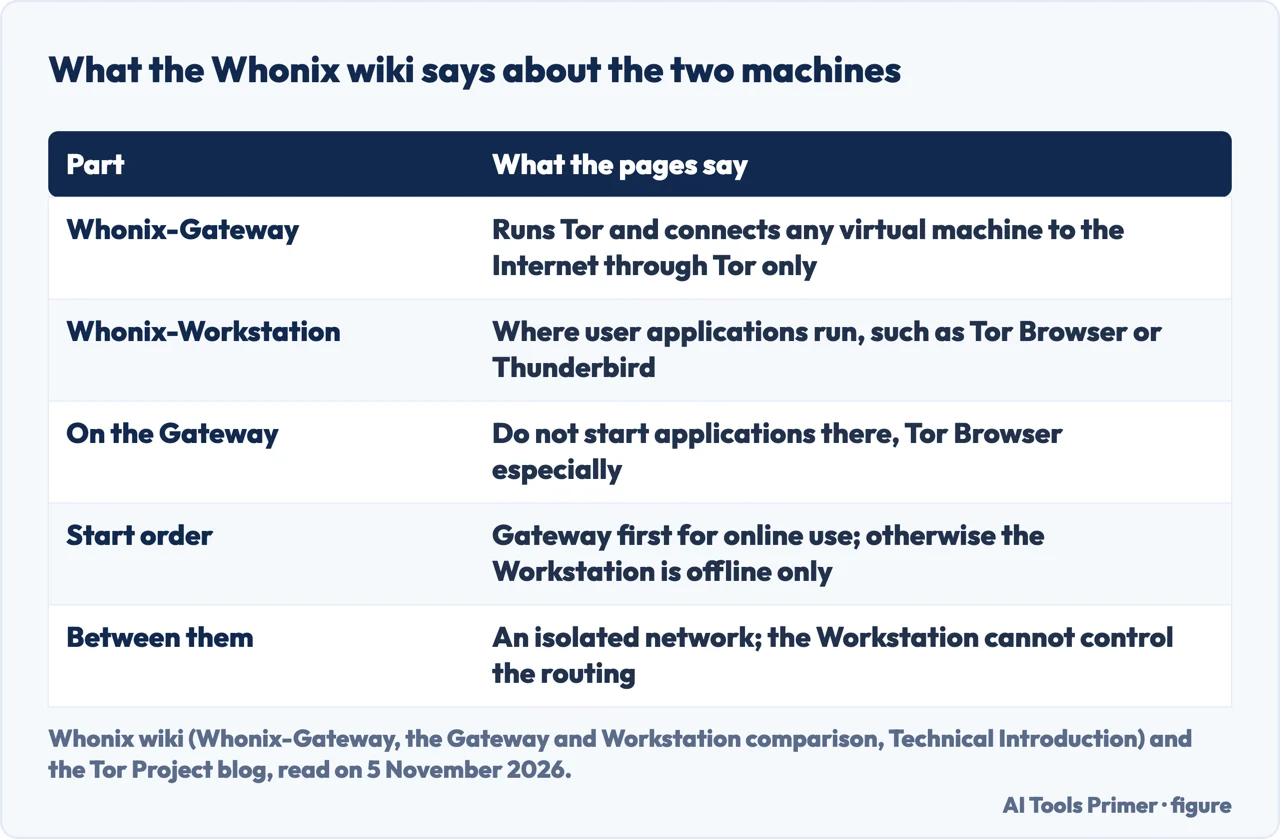
The two machines: Gateway and Workstation
The Whonix wiki’s page on the Gateway calls it a software component that runs Tor and connects any virtual machine to the Internet using Tor only, while user applications should be run inside the Workstation. Every virtual machine properly connected to the Gateway, the page says, is connected to the Internet using Tor and only Tor. The comparison page describes its purpose as minimal user interaction. Apart from Tor configuration, for specific cases described in the documentation, controlling Tor, which the page says is intended for advanced users, and installing updates, there is not much else to do there. Activities such as running applications, especially Tor Browser, should never be started on the Gateway.
On the first start of the Gateway a wizard appears, called the First Time Connection Wizard or the Anon Connection Wizard. It offers a choice: connect to the public Tor network or configure bridges. What a bridge does and does not do has its own page here.
The wiki’s comparison page sets the Workstation against it. The Workstation is designed for running user applications and online tasks, with Tor Browser and Thunderbird given as examples, and it is pre-configured for use with the Gateway. All applications use the Tor network when launched from there. The page also gives the start order: the Gateway must be started first for online functionality, and otherwise the Workstation can only be used offline.
The Tor Project’s 2016 post explains why the second machine matters. Even if the user’s workstation is compromised with root privileges, it says, the workstation cannot easily reveal IP addresses, leak DNS requests or bypass Tor, because it does not fully know or control how its traffic is routed. The post calls this security by isolation. Whonix’s technical introduction says the two machines are connected through an isolated network, and describes DNS this way: an application in the Workstation that is not set up for stream isolation uses the default DNS server, which points to the Gateway, and the Gateway’s firewall redirects those requests to Tor’s DnsPort. The home page adds that distinct applications are routed through different network paths, which it calls stream isolation. The same introduction says that since version 0.2.1 the Gateway’s own traffic is also routed over Tor, which it says conceals the use of Whonix from entities monitoring the network.
Two machines do not have to be two virtual machines. The technical introduction describes physical isolation, with the Gateway and the Workstation on two different pieces of hardware. It says this is more secure than VirtualBox or KVM virtual machines alone, needs more physical space and costs more in hardware and electricity, though the computers do not need to be powerful, and that physical isolation with Qubes-Whonix is unsupported.
Beside Tor Browser, Tails and a VPN
Tor Browser. The Whonix FAQ answers the question directly: Whonix is a complete operating system, not just a browser. Its argument is that browsers are huge, complex applications, vulnerable to IP leaks and to malware, and that inside Whonix the user’s IP address stays protected when the browser has a bug that leaks it, or when malware has taken the browser over. The FAQ says this “has happened in the past” and that only Whonix users remained safe. Tor Browser itself is one of the applications the home page lists as reviewed and pre-configured in Whonix. The home page also lists features it says Whonix adds: kloak, which it calls a keystroke anonymizer, boot clock randomization with secure time synchronization through sdwdate, and re-anonymised mouse movements.
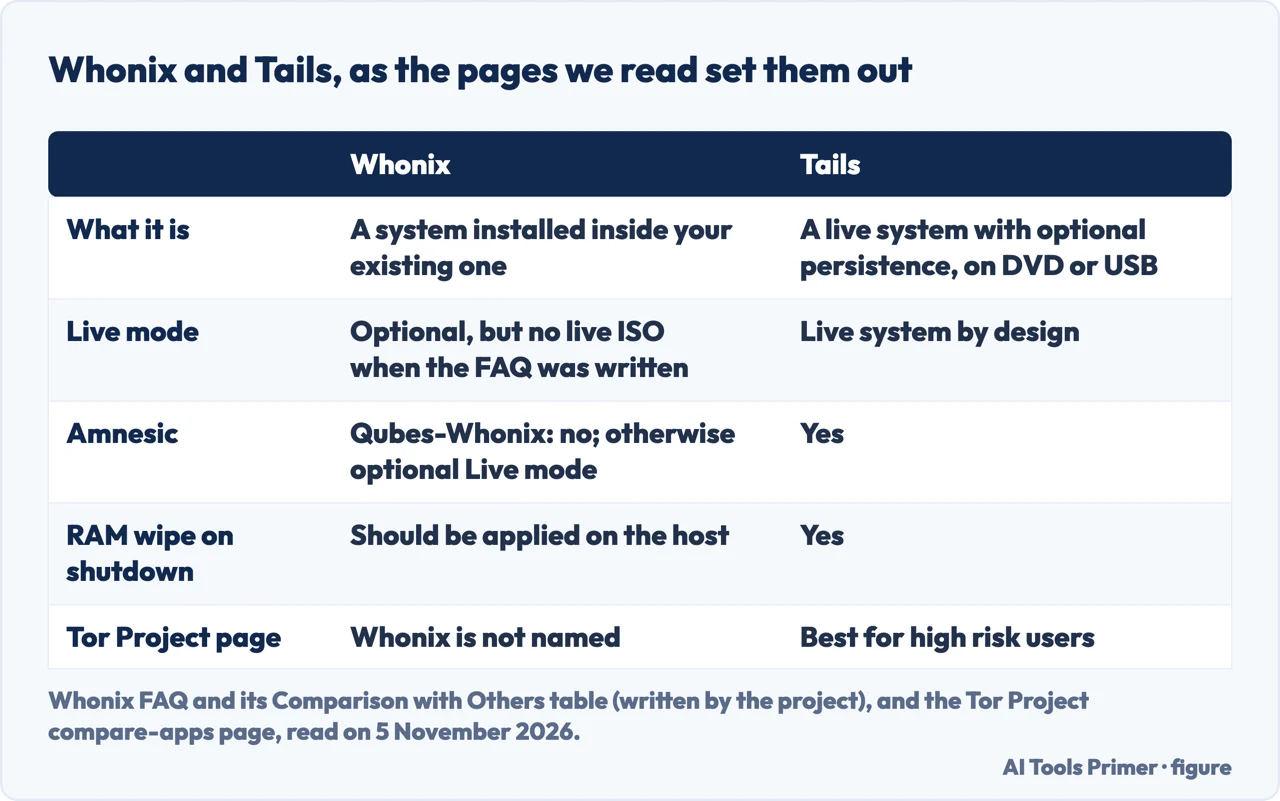
Tails. The FAQ describes Tails as a live operating system, with persistence as an option, that goes on an external drive such as a DVD or a USB stick. Whonix, it says, is installed inside your existing system, and can run from an internal or an external hard drive. It has an optional live mode, but the FAQ says there is no Whonix live ISO at the time of writing and that this is likely to change. Whonix’s Comparison with Others page, a table written by the project, lists Tails as amnesic, with a RAM wipe on shutdown. For Whonix it says Qubes-Whonix is not amnesic and other versions have an optional live mode, and that disk encryption and RAM wiping should be applied on the host. It also says all Gateway and Workstation traffic is tunneled through Tor while host traffic uses clearnet. In the same table’s Hardware Serials row, Whonix is marked Yes for hiding hardware serials from malicious software with default settings, and Tails and Tor Browser No; this too is the project’s own table.
The Tor Project’s page, Which app is best for me, looks at it from the other side. It describes Tails as a Tor-powered portable operating system, best for “High risk users,” and does not name Whonix. The pages we read do not say which of the two is better, and the comparison on Whonix’s site is written by one of the two projects. For the Tails side, what Tails needs and where it stops has its own page here.
A VPN. The FAQ says VPNs know your identity and online activity and can be compelled legally to share it, and that Tor provides anonymity by design rather than by policy. On adding one, it answers “In a word, no.” Its reasons include that a provider cannot be verified as trustworthy, that VPN traffic is vulnerable to website traffic fingerprinting and so does not hide the use of Whonix and Tor from an internet provider or skilled adversaries, and that, depending on the configuration, a VPN tunnel combined with Tor can worsen anonymity. The same FAQ points to a page on how to combine tunnels with Tor. Tor or a VPN sets out the wider comparison.
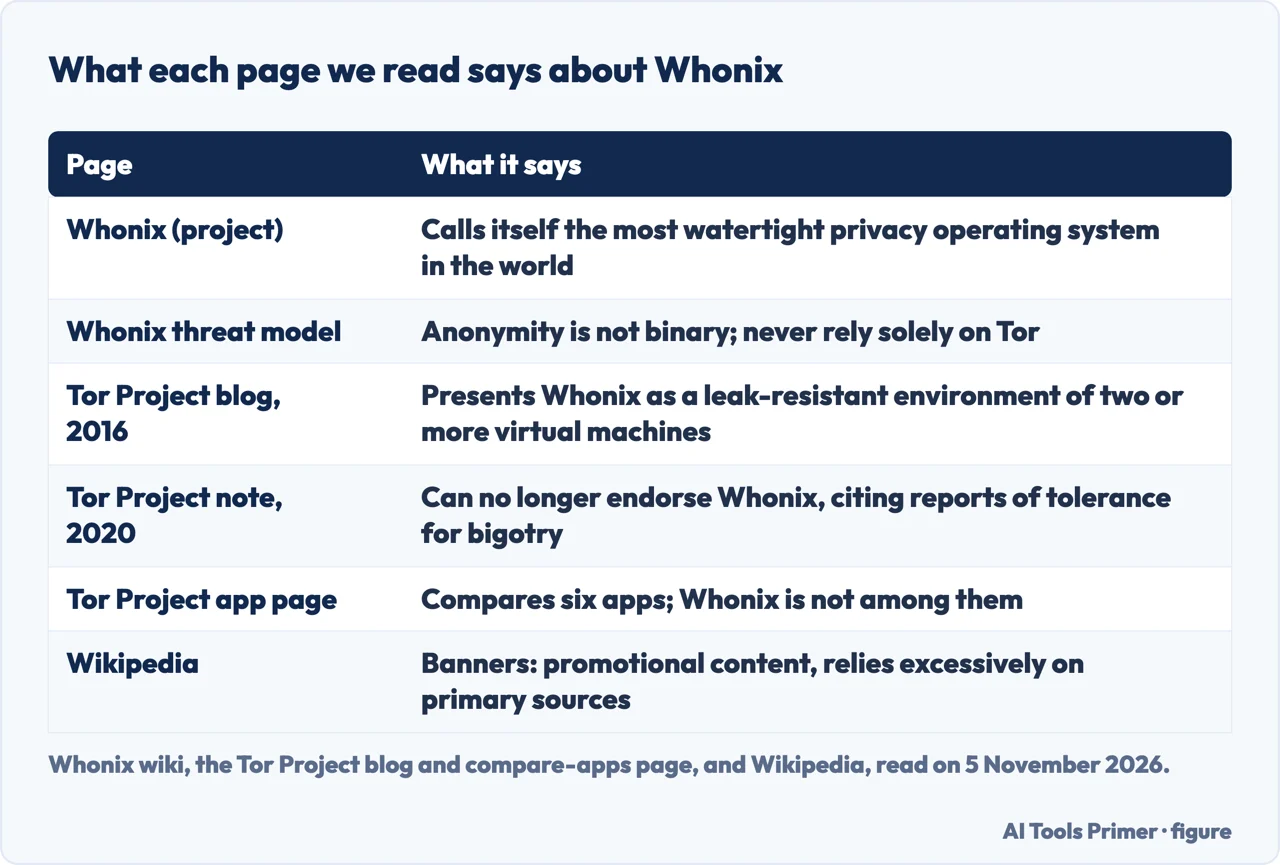
What the Tor Project and Wikipedia say
Whonix. The footer of every Whonix wiki page we read describes the project as the most watertight privacy operating system in the world, and the FAQ repeats the phrase. The home page says Whonix gives greater reliability and security than any other tool on the market, and that the project has a strong organisational separation, so that, it says, the project itself does not have access to IP connection logs. These are the project’s statements about itself.
The Tor Project. Its page Which app is best for me compares six apps: Tor Browser, Tor VPN, Tails, Onion Browser, Orbot and OnionShare. Whonix is not among them. Its blog post “Tor at the Heart: Whonix”, dated 27 December 2016, was part of a month of posts highlighting projects that rely on or build on Tor. It describes a safe default configuration with a restrictive firewall, privacy-enhanced settings for Debian, AppArmor profiles and pre-configured, stream-isolated applications, says Whonix is based in Germany, and says it is shipped by default with Qubes OS and supports Qubes’ DisposableVMs.
At the top of that post is an update from August 2020. It says the Tor Project Community had grown worried by reports of tolerance for sexism, racism and other bigotry in the Whonix community, and that for this reason the Tor Project no longer endorses Whonix and does not encourage others to get involved with it. We did not read any reply from Whonix. Wikipedia reports the same note, and adds, with the word “apparently”, a reason involving a Whonix account on another platform that the note itself does not give.
Wikipedia. The article carries two banners dated December 2020: one says it contains promotional content, the other that it relies excessively on references to primary sources. Both are worth keeping in mind for the history in the first section, which Wikipedia sources to Whonix’s own pages, to the Tor Project’s old bug-tracker wiki and to mailing-list posts, among other references.
The limits Whonix states itself
Whonix’s threat model page says “anonymity is not binary”: a person is not simply anonymous or not, but has some degree of anonymity that is above zero and imperfect. The same page says one should never rely solely on Tor, especially when robust anonymity is needed against well-funded adversaries, and gives as a reason that it is plausible vulnerabilities in Tor are being sold discreetly. The same threat model also says you do not want to be on the “high profile target” list of any resourceful adversary, and that if you are, neither Whonix nor any other computer-based system can protect you (Whonix threat model, section on high profile target considerations). That sits beside the superlatives in the previous section, and the page is part of the project’s own documentation.
The technical introduction and the home page both say that hiding your identity is harder than hiding your IP address. The introduction calls merely hiding IP addresses an outdated threat model, because adversaries use data-collection techniques that do not need one, and the FAQ opens its answer to how Whonix works by saying that being anonymous on the internet is extremely difficult and that the users themselves have to be vigilant too. That is why, it says, Whonix also provides guides on online traps, scams and tracking.
The comparison table adds limits about the machine Whonix runs on. Traffic from the host operating system uses clearnet, and local disk encryption and the RAM wipe on shutdown should be applied on the host. The FAQ also notes that most packages inside Whonix come from the Debian stable repository, so the latest version of a program is often not available there, and quotes the Debian team saying that this does not mean the software is too old to be useful.
On whether using it is legal, the FAQ says millions of people use Tor daily for “wholly legitimate reasons” and points to its own page on Tor myths. The pages we read do not say whether Whonix is legal in a given country. On who it is for, the FAQ sends readers to a page called About Whonix, for the design and the intended user groups; we did not read it.
What we did not read
We tested nothing: we did not install or run Whonix. We did not read third-party comparisons, forum threads or catalogue entries about Whonix. We also did not read Whonix’s About page, so what we say about its intended users comes from the FAQ, the threat model and the Tor Project’s page, and we did not read its requirements for memory and processor. The Wikipedia footnote that cites a Whonix forum thread on the Tor Project’s support was not opened. The reader comments under the Tor Project blog post are not statements by the Tor Project, and we did not use them.
Where to start
Four ways in.
- “How do the two machines work?”
- The two machines: Gateway and Workstation — machines
- “Whonix or Tails, or a VPN?”
- Beside Tor Browser, Tails and a VPN — versus
- “What did the Tor Project say?”
- What the Tor Project and Wikipedia say — sayings
- “Is it really anonymous?”
- The limits Whonix states itself — limits
Beside Whonix
Tails, the browser and the VPN question.
Around the network
Bridges, the one network page this page links to.
Questions people also ask
What is Whonix used for?
The Whonix FAQ calls it software for running applications anonymously, with all connections forced through Tor. The Tor Project’s 2016 post lists a web browser, an IRC client and a word processor as pre-installed. Wikipedia’s infobox gives personal computing and servers hosting onion services as the marketing target.
Is Whonix really anonymous?
Whonix describes itself in strong terms, but its own threat model says anonymity is not binary and that one should never rely solely on Tor. The Tor Project’s 2016 post says a compromised Workstation cannot easily reveal the IP address. We tested nothing.
Is using Whonix illegal?
The pages we read do not say whether Whonix is legal in a given country. The Whonix FAQ says millions of people use Tor daily for wholly legitimate reasons. The Wikipedia and Tor Project pages we read do not address the question.
Which is better, Whonix or Tails?
The pages we read do not say. Whonix’s comparison table is written by the project; the Tor Project’s page does not name Whonix and lists Tails as best for high risk users. Whonix installs inside your existing system; Tails is a live system on a DVD or USB stick.
Not covered here. We tested nothing: the statements come from Whonix’s home page, FAQ and wiki, Wikipedia and two Tor Project pages, all read on 5 November 2026.
The search volume and difficulty figures behind this page were read from Ubersuggest on 5 November 2026; its difficulty score is its own and not Semrush’s.
Sources
- Whonix — Superior Internet Privacy (home page) — whonix.org, read 5 November 2026.
- Whonix wiki — Frequently Asked Questions — www.whonix.org, read 5 November 2026.
- Whonix wiki — What is Whonix-Gateway? — www.whonix.org, read 5 November 2026.
- Whonix wiki — Comparison of Whonix-Gateway and Whonix-Workstation — www.whonix.org, read 5 November 2026.
- Whonix wiki — Dev/Technical Introduction — www.whonix.org, read 5 November 2026.
- Whonix wiki — Dev/Threat Model — www.whonix.org, read 5 November 2026.
- Whonix wiki — Comparison with Others — www.whonix.org, read 5 November 2026.
- Wikipedia — Whonix — en.wikipedia.org, read 5 November 2026.
- Tor Project — Tor at the Heart: Whonix (blog) — blog.torproject.org, read 5 November 2026.
- Tor Project — Which app is best for me? — download.torproject.org, read 5 November 2026.
Written by Alberto Gulotta
Founder and editor of AI Tools Primer, writing from Palermo, Italy. Thirty-five years of taking computers apart, starting with a Commodore 64 — the long version is on the about page.
Something wrong on this page? Write to aitoolsprimer@gmail.com and it gets fixed.
Written on 5 November 2026.
Independence and limits
No affiliate links and no paid placements anywhere on this site. Nobody pays to appear here, and no company has seen this page before you did.
This is general information, not professional advice. Where a page touches money, health, safety or the law, it names its source and the date it was read — and your situation may still differ. See the privacy page and the cookie policy.