
Web · guide
Wix vs Squarespace: what each service says about leaving
By Alberto Gulotta · Updated · 16 min read
Wix vs Squarespace comes down to rules each service publishes. Wix says a template cannot be switched on an existing site; Squarespace says the same for version 7.1 but allows it on 7.0. Squarespace documents a WordPress-format export file; the Wix page we read lists none. Sources were read on 30 October 2026.
| Question | Answer | Where it comes from |
|---|---|---|
| Can the template of an existing site be switched? | Wix says it is not possible; Squarespace says no on version 7.1 and yes on version 7.0 | Wix Help Center, Squarespace Help Center |
| Where does a Wix site run? | On Wix’s servers; a domain can be bought and managed with another provider | Wix Help Center |
| What does Squarespace export? | An .xml file in WordPress format with layout pages, one blog page, text and image blocks | Squarespace Help Center |
| Is there a free option? | Wix lists a free plan; Squarespace says it has no free plan, only a 14-day trial | Wix plans page, Squarespace pricing page |
| Do the comparisons agree? | Not on template counts or on Business Elite collaborators; PCMag also says neither builder lets you switch templates, which Squarespace’s version 7.0 page contradicts | Zapier, PCMag, Squarespace Help Center |
Two builders that come with their hosting
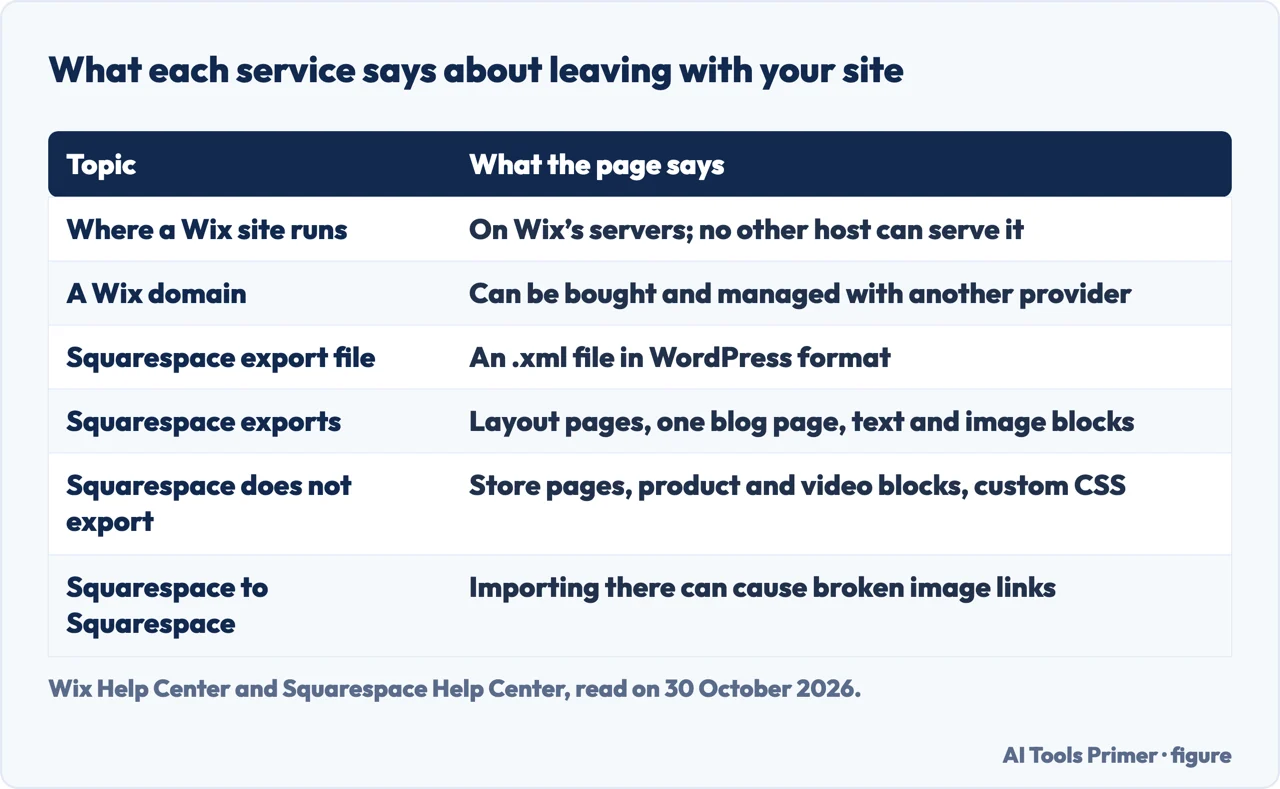
Wix’s Help Center describes the service as cloud-based software that runs on its own infrastructure. The page on exporting a Wix site says a Wix site is a standard HTML5 site built with Wix’s technology and that, for it to work properly, it has to be hosted and operated on Wix’s servers. The same page names the trade-off: the software-as-a-service design must run on the provider’s infrastructure, so external hosting is not supported. Squarespace’s pricing page says all Squarespace plans include fully-managed cloud hosting. In both services the builder and the hosting come in one subscription.
Two points on the Wix side soften that. The page says the content you build on Wix belongs to you, and points to Wix’s Terms of Use. It also says a domain can be bought and managed with another provider and then connected to a Wix site, although connecting a domain requires upgrading the site with a plan. For a Wix site embedded in an outside location, the page says Wix cannot provide support and no longer controls how the site appears or functions, and that Google Analytics and search engines “may not work properly” with embedded sites.
The rest of the page takes three differences in turn: the template, what can be taken out, and the plan tiers. The rules come from the help and pricing pages of the two services, each read on 30 October 2026. Two comparison articles, from Zapier and PCMag, are used only where they differ from those pages or from each other. The pages we read do not say which service is better, and this page does not rank them.
The template you pick
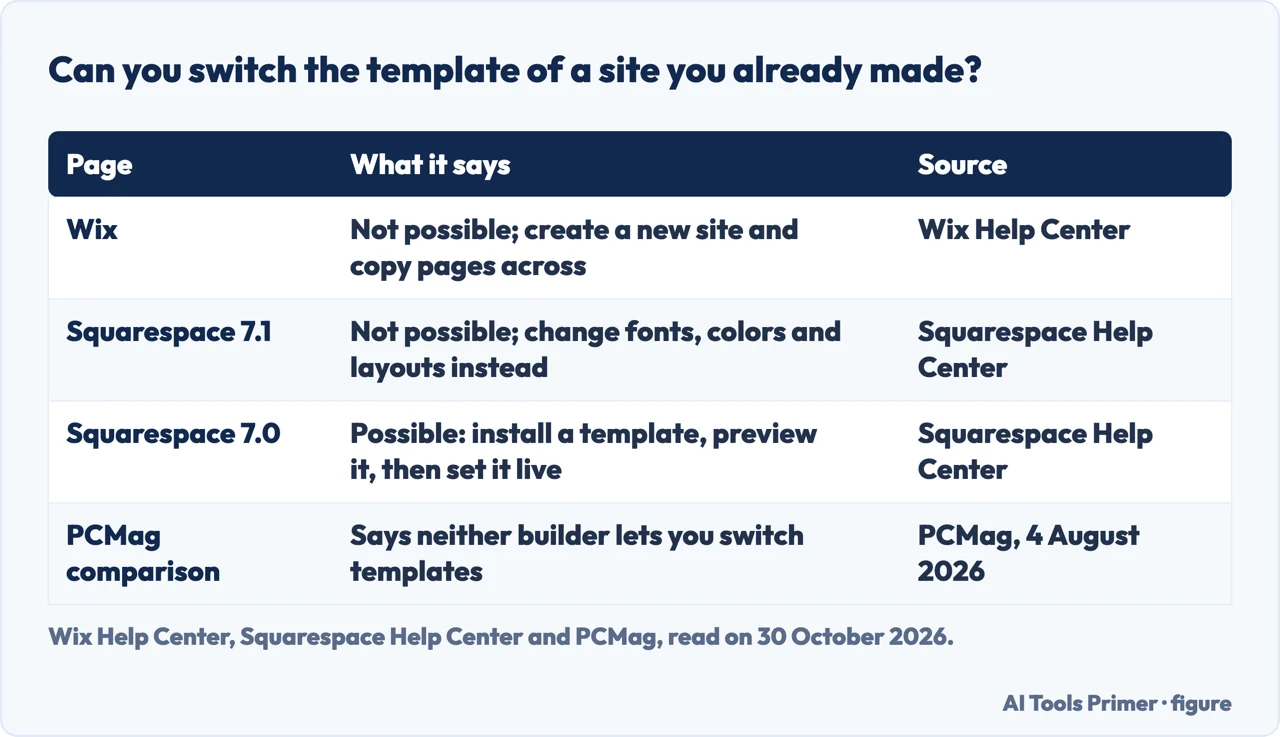
Wix’s page on switching templates says it is not possible to switch to a different template for a site you have already created. What it offers instead is a new site. An account can hold as many sites as you want, so you start over with a new template, copy pages and elements across in the Wix Editor, import media from the Site Files folder in the Media Manager, and then move the plan and the domain to the new site. The Studio Editor works differently, the page says: whole pages cannot be copied, but sections can be saved as design assets and reused.
Step four of that page splits the features in two. Business email and Wix Blog can be transferred to the new site. The site theme, design and layout cannot, and the page lists as not transferable premium apps, contacts, site members, Wix Inbox messages, Wix Invoices, Wix Stores, Wix Video, Wix Bookings, Wix Photography apps, email marketing and marketing integrations. The old site stays active until you delete it. To reuse the domain you reassign it to the new site, which has to be published first. Wix says changing templates can affect a site’s SEO, and that after reassigning a domain you should set up 301 redirects from the old site to the new one.
Squarespace has two answers because it has two versions. Its page on finding a site’s version says that on version 7.1 you cannot switch templates, because all 7.1 sites share the same basic structure and style options. You change fonts, colors and layouts instead, and the design picked when a trial starts sets the starting layout and styling. Version 7.0 is different. The page on switching templates says you can install, preview and switch templates at any time, as many times as you like, that most of your content stays intact, and that only one template is live to visitors at a time. A preview is visible only to you while you are logged in. Some page types do not carry over to every template: an index page converts to a dropdown, a project page converts to a gallery page, and an info page does not display until you switch back to a template that supports it.
To find out which version a site is on, open the Pages panel and scroll to the bottom. A Version 7.1 label means 7.1; on 7.0 the template’s name appears instead. The version page, updated on 8 October 2026, says version 7.0 has 22 template families, that 10 of them include more than one template, and that some 7.0 templates are discontinued. It also points to a route for an older design: the version 7.0 template store, with a new trial. The switching page was updated on 7 July 2026.
PCMag’s comparison, updated on 4 August 2026, says neither site builder lets you switch templates once you have chosen one, and that you must rebuild the site. That matches Wix’s page and Squarespace’s page for 7.1. It does not match Squarespace’s page for 7.0, which describes switching. PCMag also says Squarespace’s Fluid Engine editor works only with newer templates, those compatible with the 7.1 update.
What you can take with you
Squarespace’s page on exporting content, updated on 9 October 2026, describes one route out: an .xml file you can import into WordPress. The page says the exported file can only be in a WordPress format, and that you do not have to import it into WordPress. It says many features rely on the platform’s JavaScript and CSS, so some content does not export. What exports is layout pages, one blog page with all of its posts and up to 1000 comments per post, text blocks, image blocks and, on version 7.0 only, gallery pages. Text from other blocks, such as the embed and Instagram blocks, exports with minimum structure.
The list of what stays behind is longer. It names other page types (album, cover, index, info, calendar, portfolio and store pages), content in page-specific headers, footers and sidebars, more than one blog page, dropdowns, audio blocks, product blocks, video blocks, drafts, style settings and custom CSS. If a site has more than one blog page, one is chosen as the primary blog and only that one exports.
Conditions apply. The site has to be published with its availability set to Public, and the page says you cannot export from a trial site. Content exported from one Squarespace site cannot be imported into another Squarespace site, it says, because that can cause broken image links and other issues. Images are a separate matter: importing into a self-hosted WordPress site with the WordPress Importer plugin might not migrate them, because WordPress can pull reference links that stop working after the Squarespace site is canceled. The page recommends importing into WordPress.com, which copies images to WordPress’ servers, or downloading the images by hand. For an expired site, it says the content might be recovered by reactivating the subscription, but may already be deleted.
On the Wix side, the page we read is titled Exporting or Embedding Your Wix Site Elsewhere, and it does not list an export file for a site. It describes keeping the domain with another provider and keeping the site on Wix. A second kind of movement is described inside a Wix account: the Choosing a Premium Plan page says a plan is valid for a single site only, and that a plan bought for the wrong site can be reassigned to the correct one.
PCMag, in its Wix section, calls moving a site’s information to another builder “difficult—if not impossible”, and presents the free Wix tier as a way to sample the service before committing. That is PCMag’s judgment. The Wix and Squarespace pages above are the statements of what each service says about hosting and export.
The plan tiers and what they unlock
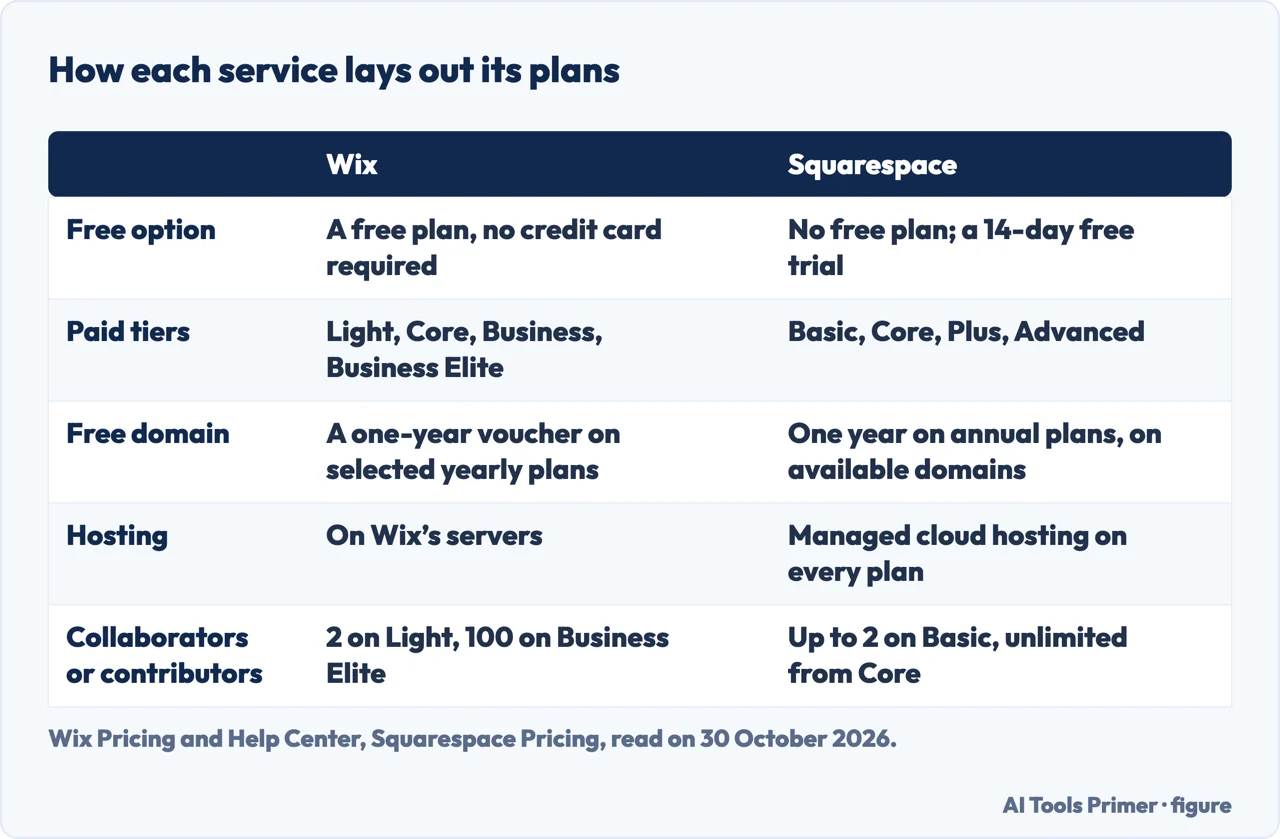
Wix’s plans page lists a free plan marked as needing no credit card, a 14-day money-back guarantee, and four paid plans: Light, Core, Business and Business Elite. Wix’s Help Center says every plan allows a custom domain, 24/7 Wix Customer Care and the removal of Wix branding. What differs is the rest. The same page says a site on the Light plan cannot accept payments, and that Business Elite supports multiple sites in various languages and currencies. The plans page lists site collaborators as 2 on Light, 5 on Core, 10 on Business and 100 on Business Elite, with a one-year free domain on each paid plan.
The free domain has conditions. The Help Center says selected yearly or multi-year plans come with a one-year voucher, that it applies only to the first purchase of a yearly upgrade plan and not to renewals or upgrades, that it has to be redeemed within 60 days, and that it can only buy a new domain from Wix. The plans page words this a little differently, saying most Premium plans include the voucher.
Squarespace’s pricing page says there is no free plan, and that every site starts with a 14-day free trial with no credit card required. It lists four plans: Basic, Core, Plus and Advanced. Annual plans include one year of free domain registration on available domains, with one free domain per website, and the page says a domain registered through that offer renews at the standard rate after the first year. Basic allows up to 2 contributors; Core, Plus and Advanced list unlimited contributors, and complete customization with CSS and JavaScript is listed under those three.
Selling carries fees on Squarespace, and the help page on them was updated on 29 October 2026. Transaction fees depend on the plan and on what is sold. For physical products, downloads, services and donations the fee is 2% on Basic and 0% on Core, Plus and Advanced. For digital products such as courses, video pages and member sites it is 7% on Basic, 5% on Core, 1% on Plus and 0% on Advanced. Payment processing is charged separately on every transaction and depends on the country and the processor. For standard cards in the United States the table lists 2.9% plus $0.30 on Basic and Core, 2.7% plus $0.30 on Plus and 2.5% plus $0.30 on Advanced. We did not open a Wix page on payment fees, so selling costs are compared here for one side only.
This page quotes no plan prices. Wix’s plans page says prices and currency vary by location, and the copy we fetched showed prices that include GST. The Squarespace pricing copy we fetched showed euros. The two comparison articles quote dollars, and they differ from each other.
Where the comparisons disagree
Zapier’s comparison, last updated in July 2025, and PCMag’s, updated on 4 August 2026, both rate the two services, and both say they may earn a commission on links. PCMag scores Wix 4.5 and Squarespace 4.0 and recommends Wix; Zapier rates categories with stars. Their figures differ from each other and from the help pages.
Templates. Zapier gives 2,000+ for Wix and 180+ for Squarespace. PCMag gives nearly 1,000 for Wix and slightly more than 100 for Squarespace. Wix’s own plans page carries two figures: 2000+ templates in one place and “1000’s of templates” beside the free plan. The Squarespace pages we read give template families for version 7.0 but not a count for the service as a whole.
Collaborators. For Business Elite, Wix’s plans page lists 100 site collaborators and PCMag writes 15. Zapier says Wix restricts the number of collaborators while Squarespace sets no limits; Squarespace’s pricing page says Basic allows up to 2 contributors.
Plan names. Zapier lists a Squarespace Personal plan and a Commerce Basic plan. Squarespace’s pricing page lists Basic, Core, Plus and Advanced, and its fees page places Personal, Business, Commerce Basic and Commerce Advanced under legacy plans. PCMag lists the four current names and also says Squarespace includes e-commerce features in its Business package, a name the fees page puts among the legacy plans.
Integrations. Zapier counts hundreds of apps in the Wix App Market and 45+ in Squarespace Extensions. That is an editorial count from July 2025, and we did not check it.
The star ratings and winners also weigh things the help pages we read do not address, such as how attractive the templates are, the AI tools and customer service. PCMag, for example, calls Squarespace’s templates more attractive and Wix the winner on its free tier. Those are the writers’ judgments, dated and attached to links that may pay a commission.
Questions the pages can answer, and what we left out
The help pages let a reader check a few things before choosing, each against the page itself:
- Will the template need to change later? Wix says a template cannot be switched on an existing site. Squarespace says the same for version 7.1 and describes switching for version 7.0.
- Does the site need to be able to leave? Wix says a site must run on its servers. Squarespace describes an .xml export with the content that does and does not come along.
- Will the site sell? Wix says the Light plan cannot accept payments. Squarespace lists transaction fees by plan.
We tested nothing: we did not build a site on either service or open an account. We read two comparison articles, from Zapier and PCMag, and did not read other comparison articles. The pages we read do not measure site speed or search performance. For the neighbouring decisions, see our pages on free hosting, transferring a domain and making a site mobile friendly.
Where to start
Four ways in.
- “Can I change the template later?”
- The template you pick — templates
- “Can I take my site with me?”
- What you can take with you — leaving
- “What do the plans unlock?”
- The plan tiers and what they unlock — plans
- “Why do the comparisons differ?”
- Where the comparisons disagree — disagree
Before you commit
Free hosting, the domain and the phone version.
Questions people also ask
Why is Wix better than Squarespace?
The pages we read do not say which is better. PCMag scores Wix 4.5 and Squarespace 4.0 and recommends Wix, while calling Squarespace’s templates more attractive. Zapier rates categories with stars. Both are dated comparisons that say they may earn a commission on links.
Is Squarespace still good in 2026?
The pages we read do not judge that. Squarespace’s help pages on export, versions and fees were updated in October 2026, and PCMag, updated on 4 August 2026, scores it 4.0 against 4.5 for Wix.
What is the downside of Wix?
The pages describe limits rather than verdicts. A Wix site has to run on Wix’s servers, a template cannot be switched on an existing site, and several features do not transfer to a new site. PCMag adds that free Wix comes with ads and limited tools.
Does Coca-Cola use Wix?
The pages we read do not mention Coca-Cola or any other named customer of either service; they cover the rules of each service on hosting, templates, export and plans.
Not covered here. We built nothing on either service. The statements come from Wix Help Center pages and the Wix plans page, from Squarespace Help Center and pricing pages, and from the Zapier and PCMag comparisons, all read on 30 October 2026.
The search volume and difficulty behind this page come from a Semrush Keyword Overview reading of 30 October 2026; an earlier reading, of 29 August 2026, had passed the 60 days the site normally allows.
Sources
- Wix Help Center — Switching Your Site Template — support.wix.com, read 30 October 2026.
- Wix Help Center — Exporting or Embedding Your Wix Site Elsewhere — support.wix.com, read 30 October 2026.
- Wix Help Center — Choosing a Premium Plan — support.wix.com, read 30 October 2026.
- Wix — Plans and pricing — www.wix.com, read 30 October 2026.
- Squarespace Help Center — Export your site content — support.squarespace.com, read 30 October 2026.
- Squarespace Help Center — Switching templates in version 7.0 — support.squarespace.com, read 30 October 2026.
- Squarespace Help Center — Find your site’s version and template — support.squarespace.com, read 30 October 2026.
- Squarespace Help Center — Transaction fees and payment processing rates — support.squarespace.com, read 30 October 2026.
- Squarespace — Pricing — www.squarespace.com, read 30 October 2026.
- Zapier — Wix vs. Squarespace: Which website builder is best? — zapier.com, read 30 October 2026.
- PCMag — Wix vs. Squarespace: Which Is the Best Website Builder? — www.pcmag.com, read 30 October 2026.
Written by Alberto Gulotta
Founder and editor of AI Tools Primer, writing from Palermo, Italy. Thirty-five years of taking computers apart, starting with a Commodore 64 — the long version is on the about page.
Something wrong on this page? Write to aitoolsprimer@gmail.com and it gets fixed.
Written on 30 October 2026.
Independence and limits
No affiliate links and no paid placements anywhere on this site. Nobody pays to appear here, and no company has seen this page before you did.
This is general information, not professional advice. Where a page touches money, health, safety or the law, it names its source and the date it was read — and your situation may still differ. See the privacy page and the cookie policy.